
GCP-211 · Lesson 12 of 12 · 19 min
Lab walkthrough: configuring services for a department
▶ Video coming soon A video version of this lesson is on the way.
The last session is a rehearsal for February. Jules Baptiste's e-commerce team, 18 people who run the online shop at birchline.example, will move to Workspace with the rest of head office, and Jules has asked to go first within the wave, because the team works closely with outside agencies and wants a week to settle in before the busy spring season. Sofia asks Owen to plan the whole configuration for the team and rehearse it with test accounts in the /Pilot OU, using everything from the course. "Pretend it's February," she says, "but do it now, while mistakes are cheap." This lesson follows his walkthrough from fact sheet to change log.
Step 1: Gather the facts
As in the first course's onboarding lab, Owen starts with a fact sheet, because every later decision depends on it.
| Question | Answer for the E-commerce team |
|---|---|
| How many people, and in which OU? | 18 in /Head office/E-commerce: Jules, 4 product owners, 9 content and merchandising staff, 4 analysts |
| Which mail addresses must keep working? | Personal addresses, plus shop@ and orders-help@, which are groups |
| Which systems send mail as birchline.example? | The e-commerce platform sends order confirmations; the newsletter service uses news.birchline.example |
| Which outsiders do they work with? | Two agencies (allowlisted for head office), a platform developer firm with two developers, about 15 suppliers for product data |
| Which rooms do they book? | Two meeting rooms on floor 3 and the boardroom for quarterly reviews |
| What files? | 96,000 items on the file share, plus a release notes folder the developers need |
| Which outside apps do they use? | DiagramDesk and a test-management tool, NoteForge, that nobody has reviewed |
| What about Gemini? | Stage 2 of the rollout (lesson 9) includes E-commerce |
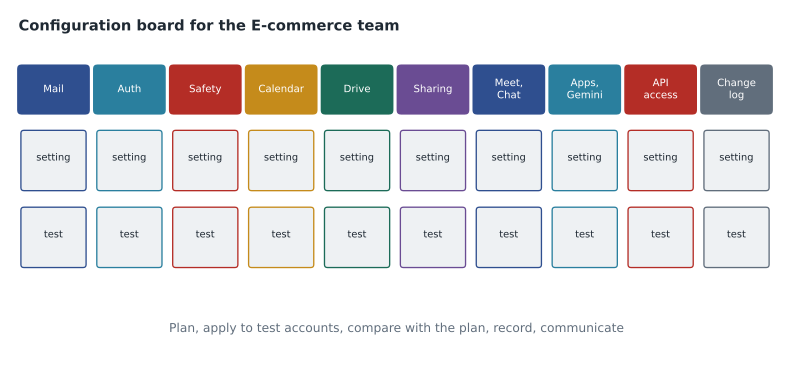
Step 2: Mail
The team's mail flow follows lesson 1. Until the head office wave, Exchange stays primary; the 18 users get forwarding to the routing subdomain g.birchline.example when their wave moves, and Gmail's outbound route to Exchange carries mail to colleagues who have not moved. The two shared addresses are already Google groups from the first course, with Collaborative Inbox turned on for orders-help@, so customer service can assign messages.
The rules the team needs are mostly inherited: the card number quarantine for /Head office and the executable attachment rejection at the top level. Owen adds one rule for /Head office/E-commerce: inbound messages to orders-help@ from the platform's notification address get a header, so the team's filters can separate automatic platform alerts from customer messages. He tests it with the platform's sandbox, which sends real-looking alerts to a test address.
Step 3: Authentication for the platform
Order confirmations are the most important mail the company sends, because customers need them and phishers imitate them. The platform sends them from its own servers with From: orders@birchline.example. Following lesson 2, Owen checks the DMARC aggregate reports: the confirmations pass SPF through the platform's include but have no birchline.example DKIM signature. He asks the platform vendor for a DKIM key with the selector shop1, publishes the vendor's public key at shop1._domainkey.birchline.example and confirms in the reports two days later that the confirmations now pass DMARC with aligned DKIM. That removes the biggest obstacle to moving the DMARC policy to quarantine later.
Step 4: Safety
E-commerce receives many messages from strangers: customers, marketplaces, people offering partnerships. The safety settings stay at the head office defaults from lesson 3, warning banners for spoofed employee names and spam for lookalike domains, with one addition: Jules asks for enhanced pre-delivery scanning on orders-help@, which receives attachments from customers. The short delay does not matter for customer service, so Owen turns it on for the configuration group that holds the customer service group's members.
Step 5: Calendar
The team books two rooms on floor 3, which will exist as Google resources after the February room cutover (lesson 4). Owen checks their names, capacities and video features in the resource upload file, and confirms that the boardroom remains bookable only by assistants, so Jules's quarterly reviews go through an assistant. The platform developers need to see the team's release calendar; Owen creates it as a secondary calendar owned by the role account ecommerce-ops@birchline.example and shares free/busy with the developers and full details internally.
Step 6: Drive and sharing
The E-commerce shared drive and its roles come from lesson 5: Jules and an IT administrator as managers, the product owners as content managers, the team as contributors. With 96,000 items, one shared drive is enough. The release notes folder is the sharing question. The developer firm uses Google Workspace on devworks.example, which is not on the allowlist, so Owen has two options from lesson 6: add devworks.example to the allowlist for head office, or keep the release notes in a separate small shared drive with the two developers as external members. He chooses the separate shared drive, E-commerce releases, because only two people at one firm need access and the allowlist would open sharing with that firm to all of head office.
Before the move, Jules runs the search for files on the old share that were shared outside or with everyone, as lesson 6 recommended. It finds 14 files with old public links to product images, all intended for an agency that has since been replaced. They are not migrated with public links.
Step 7: Meet, Chat and the agencies
Meet needs nothing new: head office defaults allow outside participants to request to join, and the team's sprint reviews with the developers are recorded to the E-commerce releases shared drive. For Chat, Owen creates an external space, E-commerce and DevWorks, with the two developers, which needs external chat for the team. Head office allows external chat only with allowlisted domains, and devworks.example is not one, so he allows external chat for a configuration group cfg-ecommerce-external that holds the team, rather than changing the whole OU. The space is labeled External, and the team agrees not to post customer data in it.
Step 8: Other apps and Gemini
The team needs Forms for a release request form, already on for head office, and AppSheet for one product owner who builds a stock-check app, which means adding her to cfg-appsheet-builders after training (lesson 8). Gemini comes with stage 2 of the rollout: the team's group joins cfg-gemini-early, which turns on Gemini feature access and the Gemini app for them, while the OU setting stays off (lesson 9). Owen adds a line to the team's welcome message linking to the usage guidelines.
Step 9: Apps and API access
DiagramDesk is already trusted for head office from lesson 10's review. NoteForge, the test-management tool, has never been reviewed and requests full Drive access. Under the unconfigured apps rule, the team cannot connect it until it is reviewed, so Owen asks the vendor about narrower scopes; the vendor offers a mode that needs only access to files created with the app. Teresa approves NoteForge with specific Google data access for that scope, for the E-commerce configuration group only, and it goes into the integration register.
Step 10: Check the configuration against the plan
With the settings applied to the test accounts in /Pilot, Owen checks that what the console shows matches what he planned, using the values he recorded from each settings page during testing. A comparison catches the setting that was saved in the wrong OU or the toggle that never saved.
planned = {
    "Gmail: orders-help header rule": "on",
    "DKIM selector shop1": "passing",
    "Enhanced pre-delivery scanning (customer service)": "on",
    "Shared drive E-commerce releases: external members": "allowed",
    "External chat for cfg-ecommerce-external": "allowlisted plus devworks.example space",
    "Gemini feature access for cfg-gemini-early": "on",
    "NoteForge access": "specific Google data",
}
observed = {
    "Gmail: orders-help header rule": "on",
    "DKIM selector shop1": "passing",
    "Enhanced pre-delivery scanning (customer service)": "off",
    "Shared drive E-commerce releases: external members": "allowed",
    "External chat for cfg-ecommerce-external": "allowlisted plus devworks.example space",
    "Gemini feature access for cfg-gemini-early": "on",
    "NoteForge access": "blocked",
}
mismatches = [k for k in planned if observed.get(k) != planned[k]]
for k in mismatches:
    print(f"MISMATCH  {k}: planned {planned[k]!r}, found {observed.get(k)!r}")
print(f"{len(planned) - len(mismatches)} of {len(planned)} settings match the plan")MISMATCH Enhanced pre-delivery scanning (customer service): planned 'on', found 'off' MISMATCH NoteForge access: planned 'specific Google data', found 'blocked' 5 of 7 settings match the plan
What this code does
The comparison lists each setting in Owen's plan with the value he intended, and the value he actually found in the console after applying the changes to the test accounts. It prints every setting where the two differ and then counts how many match. The output points him straight to the two settings that need attention instead of making him re-read the whole plan.
Two settings do not match. Enhanced pre-delivery scanning is off because Owen selected the configuration group, switched the setting on and moved to another page without saving, so the change never took effect. NoteForge shows as blocked because Teresa's approval was recorded in the register but nobody changed its access level in API controls. Both are fixed in minutes, and both are exactly the kind of error that would otherwise surface as a help desk ticket on the team's first morning.
Step 11: Change log and rollback
Each change goes into the change log from lesson 11, classified and with its rollback. Most are normal changes tested in /Pilot. The external chat configuration group and the new shared drive with external members are reviewed by Teresa because they open new routes outside the organization. The DKIM key for shop1 has a rollback of removing the record and asking the vendor to stop signing, which would only be needed if the vendor's signing broke.
| Change | Type | Tested | Rollback |
|---|---|---|---|
| Header rule for orders-help@ | Normal | Platform sandbox alerts | Delete the rule |
| DKIM selector shop1 | Normal | DMARC reports show aligned DKIM | Remove the record; vendor stops signing |
| Enhanced scanning for customer service group | Normal | Test attachment from outside account | Turn off for the group |
| Shared drive E-commerce releases with external members | Normal, security review | Developer test account added and removed | Remove external members; delete drive |
| External chat for cfg-ecommerce-external | Normal, security review | Test space with a test outside account | Remove the group setting |
| NoteForge with specific Google data | Normal | Connected with a test account; scope checked in OAuth log | Block the app; revoke tokens |
Step 12: What the team sees
The last step is communication. Jules's team gets a one-page welcome: their mail and the shared addresses, how to find the rooms, where the shared drives are and which one the developers can see, the external Chat space and what not to post there, the Gemini usage guidelines, and how to ask for a new app. Owen schedules a 30-minute walkthrough on their first morning and a check-in at the end of the first week, when he will look at the help desk tickets, the admin log for unexpected changes and the reports for sharing activity.
Sofia reviews the plan and changes one thing: the external chat configuration group should expire. She asks Owen to add a review date in three months, when the developer firm's contract is due for renewal, because temporary access that nobody reviews becomes permanent access.
Common mistakes
MistakeConfiguring a department from memory of the defaults.
InsteadWrite a fact sheet and a plan, and check the console against the plan after applying.
MistakeAllowlisting a partner domain for a whole OU because one team needs it.
InsteadUse a separate shared drive or a configuration group for the team that needs it.
MistakeRecording an approval without changing the setting.
InsteadCheck observed settings against the plan; approvals and configuration are separate steps.
MistakeGiving temporary outside access with no end date.
InsteadAdd a review or expiry date to every external access change.
Worked problem
Choosing between allowlisting and a separate shared drive
Two developers at devworks.example need the release notes folder. Head office allows external sharing only with allowlisted domains. Why did Owen choose a separate shared drive with external members instead of allowlisting devworks.example?
Show solution
- Allowlisting is account-wide and applied per OU: adding devworks.example would let anyone in /Head office share with that firm.
- Only two people at one firm need access, to one folder's worth of files.
- A separate shared drive in an OU that allows external members gives those two people access to exactly the files they need.
- When the contract ends, removing the two members from one shared drive ends their access cleanly, with no leftover shares in personal drives.
- The decision and the shared drive's owner go into the change log and the access review.
Answer: A separate shared drive limits access to two people and one set of files; allowlisting would have opened sharing with the firm to all of head office.
Summary and key terms
- Configuring services for a department starts with a fact sheet: people and OUs, mail addresses and senders, outsiders, rooms, files, apps and AI plans.
- Then work through each service: mail flow and rules, authentication for systems that send as the domain, safety settings, Calendar resources and shared calendars, shared drives and sharing, Meet and Chat with outsiders, other apps and Gemini stages, and app access.
- Prefer narrow mechanisms, such as a configuration group or a separate shared drive, over changing a whole OU.
- Check the console against the plan after applying changes, record each change with a rollback, add review dates to outside access and tell the team what changed.
- Fact sheet
- A short record of a department's needs that drives the configuration plan.
- Configuration board
- A plan of settings and tests organized by service area.
- Plan comparison
- Checking observed settings against intended ones after applying changes.
- External space
- A Chat space with members from outside the organization, labeled External.
- Role account
- A non-personal account that owns shared resources such as calendars and spaces.
- Review date
- A planned date to re-examine access, especially for outsiders.
- Welcome page
- A short guide for a team that has just moved, covering what changed for them.
- Change window
- An agreed time for making changes users will notice.
Practice problems
Work each problem on paper first, then reveal the answer to check.
Why does Owen rehearse the E-commerce configuration in /Pilot now?
Show answer
Mistakes are cheap before the February wave, and the rehearsal tests the plan, the tests and the rollbacks.
What did the plan comparison find?
Show answer
One setting saved on the wrong page and one approval that never reached API controls.
Why does Sofia add a review date to the external chat group?
Show answer
Temporary outside access that nobody reviews becomes permanent.
Lesson quiz · 5 questions
Score 60% or more to complete this lesson.
Create a free account to save your progress, take quizzes and earn a certificate.