
GCP-211 · Lesson 1 of 12 · 20 min
Gmail setup: MX records, routing and compliance rules
▶ Video coming soon A video version of this lesson is on the way.
Two weeks before the IT pilot starts on Monday, November 30, Sofia Marchetti books a room at Birchline's Columbus head office for the first of twelve sessions on configuring Workspace services. In the first course, Owen Mitchell built the directory: domains, users, organizational units, groups and licenses. Now the accounts exist but the services behind them are still on their defaults. "An account with default settings works," Sofia says, "but it doesn't work the way Birchline needs. This course is about making each service behave the way we decide, starting with the one everyone notices first when it breaks: mail."
Birchline's mail runs on Microsoft Exchange today, and it will keep running there for most staff until the summer of 2027. That means Gmail has to coexist with Exchange for months, and mail has to reach each person wherever their mailbox currently lives. This lesson covers how mail finds Gmail (MX records), how Gmail decides where a message goes next (routing), and how administrators inspect and act on messages in transit (compliance rules).
How mail finds a domain
When a sender's mail server has a message for someone@birchline.example, it looks up the domain's MX records (mail exchanger records) in DNS. Each MX record names a server that accepts mail for the domain and gives it a priority, where a lower number is preferred. The sending server tries the preferred server first and falls back to the others if it cannot connect. Whoever the MX records point to receives the domain's mail from the internet.
For Google Workspace, Google now publishes a single MX record: the host smtp.google.com with priority 1. Accounts set up before 2023 often have the older set of five records (aspmx.l.google.com and four alternates with higher numbers). Google's documentation says those older values are still supported, so an account whose mail already works does not have to change them. New setups, including Birchline's, use the single record.
birchline.example.       3600  IN  MX  10  mail1.birchline.example.   ; Exchange today
birchline.example.       3600  IN  MX  20  mail2.birchline.example.   ; Exchange backup

; After the final cutover (planned for summer 2027)
birchline.example.       3600  IN  MX  1   smtp.google.com.
Two practical details matter at cutover. The first is the time to live (TTL) on the records, which tells other servers how long they may cache the answer. Birchline's records use 3,600 seconds, one hour. A week before changing MX records, Sofia will lower the TTL to 300 seconds so that the change spreads within minutes rather than hours, then raise it again afterwards. The second is that Gmail must be ready before the MX records change: users created, licenses assigned and routing configured, because mail starts arriving the moment other servers see the new records.
Why Birchline will not change its MX records yet
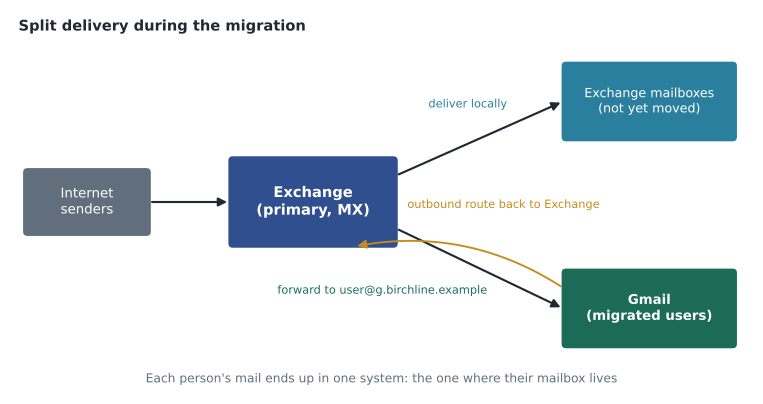
During the pilot only fourteen people use Gmail, and the other thousand-odd still read mail in Outlook connected to Exchange. If the MX records pointed to Google now, Gmail would receive everyone's mail and would need to pass most of it back to Exchange. That is possible, but Birchline's plan is the opposite and more common arrangement for a long migration: Exchange stays the primary mail system that receives all internet mail, and it forwards the pilot users' mail to Gmail. This is called split delivery: each recipient's mail ends up in exactly one system, the one where their mailbox currently lives.
In Exchange, the pilot users get a forwarding address on a routing subdomain that only Google accepts, such as owen.mitchell@g.birchline.example. Google adds that subdomain to the Workspace account as a domain alias (lesson 2 of the first course), so mail sent to the subdomain address lands in Owen's Gmail. Mail from Gmail to people still on Exchange is sent through Gmail's routing to Exchange, so it does not leave over the internet and come back. As each wave moves, Sofia moves its forwarding, and only after the last wave do the MX records change.
| Arrangement | Who receives internet mail | When it fits |
|---|---|---|
| Split delivery, existing system primary | Exchange; it forwards migrated users to Gmail | Long, phased migrations such as Birchline's |
| Split delivery, Gmail primary | Gmail; it routes unmigrated users back to Exchange | Most users already moved, or the old system is unreliable |
| Dual delivery | One system, which delivers a copy to both | Short pilots where testers want to keep both mailboxes |
| Full cutover | Gmail only | Small organizations or the final step of a migration |
Routing settings in Gmail
Gmail's routing settings sit in the Admin console under Apps, Google Workspace, Gmail, and they apply to an organizational unit, like most settings. Sofia walks Owen through the ones that matter for coexistence, because the exam and real migrations both depend on them.
A route (also called a host) names a destination mail server, such as Birchline's Exchange servers at mail1.birchline.example, with the port and whether connections must use TLS. Routes are defined once in the hosts section and reused by routing settings.
Default routing applies to every message addressed to the account's domains. A default routing rule can, for example, also deliver a copy to another route, change the envelope recipient or reject messages to certain addresses. It is how Gmail can act as the primary system and still pass mail to Exchange for users who have not moved.
Routing (in the per-OU routing settings) lets administrators act on inbound, outbound and internal messages for users in a particular OU: add a header, change the route, bypass spam filtering for a trusted internal relay, add more recipients or require secure transport.
Recipient address map rewrites one address into another, for example to redirect a departed manager's address to a team inbox without forwarding rules in a mailbox.
An outbound gateway sends all mail leaving Gmail through another server first, such as an existing mail filtering appliance. An inbound gateway tells Gmail which servers sit in front of it and pass mail on, so that spam and authentication checks look at the original sender rather than the gateway. Birchline does not plan either, but Owen notes the inbound gateway setting for later, because a misconfigured gateway is one of the most common reasons Gmail marks legitimate mail as spam.
Content compliance and other compliance rules
Compliance rules let administrators find messages that match conditions and act on them: reject, quarantine for review, modify (add a header, add a footer, change the route, add recipients) or deliver normally while logging. They also live under the Gmail settings and apply per OU. The ones Owen will use most are:
- Content compliance: matches words, phrases, regular expressions or predefined content detectors in the subject, headers or body, for inbound, outbound or internal mail.
- Objectionable content: matches a word list the administrator maintains.
- Attachment compliance: matches file types, file names, sizes or encrypted attachments.
- Restrict delivery: limits which domains or addresses users in an OU can send to or receive from.
- Append footer: adds standard text, such as a legal notice, to outgoing messages.
Birchline's legal team has asked for two rules before head office moves. Outgoing messages that appear to contain a full card number should be quarantined for review, because card data must never leave by email under Birchline's PCI DSS obligations. And every external message from the Finance OU should carry a short footer with the company's registered address. Before building the card rule in the console, Owen wants to see how a pattern behaves on real-looking text, so Sofia has him write a quick test with invented sample messages.
import re
# A pattern for 16-digit card numbers written with optional spaces or dashes.
card = re.compile(r"\b(?:\d{4}[ -]?){3}\d{4}\b")

def luhn_ok(number):
    digits = [int(d) for d in number if d.isdigit()]
    total = 0
    for i, d in enumerate(reversed(digits)):
        if i % 2 == 1:
            d = d * 2
            if d > 9:
                d = d - 9
        total += d
    return total % 10 == 0

samples = {
    "order-note": "Customer paid with 4539 1488 0343 6467, please refund.",
    "tracking":   "Your parcel number is 1234-5678-9012-3456.",
    "invoice":    "Invoice 2026-11-0042 for 18 tents.",
    "phone":      "Call the store at 416 555 0199 before noon.",
}
for name, text in samples.items():
    hits = [m.group(0) for m in card.finditer(text)]
    real = [h for h in hits if luhn_ok(h)]
    action = "quarantine" if real else "deliver"
print(f"{name:11} pattern hits: {len(hits)} valid card numbers: {len(real)} -> {action}")order-note pattern hits: 1 valid card numbers: 1 -> quarantine tracking pattern hits: 1 valid card numbers: 0 -> deliver invoice pattern hits: 0 valid card numbers: 0 -> deliver phone pattern hits: 0 valid card numbers: 0 -> deliver
What this code does
The check looks for sixteen-digit numbers written in groups of four, which is how card numbers usually appear in messages, and then applies the same checksum test that real card numbers pass. It runs both tests over four invented messages and prints, for each one, how many numbers matched the pattern, how many also passed the checksum and whether the message would be quarantined. The result shows why a pattern alone is not enough: a parcel tracking number has the same shape as a card number but fails the checksum.
The output makes Sofia's point. A simple pattern catches the parcel tracking number as well as the real card number, and a rule built on the pattern alone would quarantine harmless messages and train staff to ignore the review queue. Gmail's predefined content detectors for credit card numbers already combine the pattern with checks like this one, so Owen will use the predefined detector in the console rather than his own regular expression, and keep his test as an explanation for the legal team. The phone number and the invoice do not match at all.
Quarantine and review
When a rule quarantines a message, the message waits in an admin quarantine until a reviewer releases or rejects it. Administrators create quarantines with a name, a description and settings for what happens when a message is rejected (for example, whether the sender gets a notice). Reviewers need the Access Admin Quarantine privilege, which Owen will give to a small group in Finance and Legal through a custom admin role, following the least-privilege approach from the first course. Messages left in quarantine are deleted automatically after a set period, so someone must review the queue daily.
| Rule | Applies to | Condition | Action |
|---|---|---|---|
| Card numbers out | /Head office and below, outbound | Predefined credit card number detector | Quarantine in "Card data review" |
| Finance footer | /Head office/Finance, outbound external | All external messages | Append footer with registered address |
| Executable attachments | Top-level organization, inbound | Attachment file types such as executables and scripts | Reject with a notice to the sender |
| Pilot routing header | /Pilot, inbound | All messages | Add header X-Birchline-Pilot so help desk can trace mail flow |
The executable attachment rule is a belt-and-braces addition, because Gmail already blocks many dangerous file types by default (lesson 3). The pilot routing header costs nothing and helps the help desk later: when a pilot user says a message never arrived, the header shows that it reached Gmail through the routing subdomain.
Order and testing
Several rules can match the same message, and the order matters. Within a setting, rules are applied in the order shown, and settings at a child OU are added to those inherited from parent OUs rather than replacing them. Before switching on any rule, Owen applies it first to the /Pilot OU, sends test messages from an external test account, checks the email log search in the Admin console to see which rules matched and what happened, and only then applies it more widely. Email log search is the tool for questions like "did this message arrive, and if not, why not?" Lesson 11 returns to it as part of change management.
Common mistakes
MistakeChanging MX records to Google on the first day of a long migration.
InsteadKeep the existing system primary and use split delivery until most users have moved; change MX records last.
MistakeWriting a home-made regular expression for card numbers.
InsteadUse the predefined detector, which adds checks that reduce false matches.
MistakeForgetting to lower the TTL before an MX change.
InsteadLower it to a few minutes a week before, change the records, then raise it again.
MistakePlacing a filtering appliance in front of Gmail without setting an inbound gateway.
InsteadDeclare the gateway so Gmail checks the original sender, not the appliance.
Worked problem
Routing a pilot user's mail
Amara Diallo on the help desk joins the pilot. Her Exchange mailbox stays in use for history, but new mail should arrive in Gmail. Exchange is primary and the routing subdomain g.birchline.example is a verified domain alias in Workspace. What must be set up, and where does a message from a supplier go?
Show solution
- In Workspace, Amara's account amara.diallo@birchline.example exists, has a license and sits in /Pilot; because g.birchline.example is a domain alias, she can receive mail at amara.diallo@g.birchline.example.
- In Exchange, her mailbox is set to forward to amara.diallo@g.birchline.example without keeping a copy, so her mail lands in one place.
- The supplier sends to amara.diallo@birchline.example. DNS points to Exchange, which accepts the message and forwards it to the routing address.
- Google receives the forwarded message for the routing subdomain and delivers it to Amara's Gmail, where the pilot routing rule adds its header.
- When Amara replies to a colleague still on Exchange, Gmail sends the message through the route to mail1.birchline.example rather than out over the internet.
Answer: Forwarding in Exchange to a routing subdomain that Google accepts, plus an outbound route back to Exchange, gives split delivery without touching the MX records.
Summary and key terms
- MX records tell other servers where to deliver a domain's mail; lower numbers are preferred.
- Google Workspace now uses one MX record, smtp.google.com with priority 1, and older records still work.
- Lower the TTL before changing MX records and make sure Gmail is ready first.
- During long migrations, split delivery sends each person's mail to the system where their mailbox lives, often with the old system primary and a routing subdomain for migrated users.
- Gmail routing uses hosts, default routing, per-OU routing and recipient address maps.
- Compliance rules find messages by content or attachment and reject, quarantine, modify or log them; prefer predefined detectors.
- Test rules on a pilot OU and check email log search.
- MX record
- A DNS record naming a server that accepts mail for a domain, with a priority.
- Time to live (TTL)
- How long other servers may cache a DNS answer.
- Split delivery
- Delivering each recipient's mail to the system where their mailbox currently lives.
- Routing subdomain
- A subdomain accepted by only one system, used to forward mail to it during coexistence.
- Default routing
- Gmail settings that apply to every message addressed to the account's domains.
- Inbound gateway
- A server in front of Gmail that relays mail; declaring it lets Gmail check the original sender.
- Content compliance
- A Gmail rule that matches message content and takes an action.
- Admin quarantine
- A holding area where matched messages wait for an administrator to release or reject them.
Practice problems
Work each problem on paper first, then reveal the answer to check.
Why does Birchline keep Exchange as the primary mail system during the pilot?
Show answer
Most users are still on Exchange; split delivery forwards only migrated users to Gmail, so the MX records can stay until the last wave.
Why did Owen's test show the regular expression alone is not enough?
Show answer
A parcel tracking number had the same shape as a card number; only the checksum separated them, which is why the predefined detector is better.
What does email log search help with?
Show answer
Tracing whether a message arrived, which rules matched it and what happened to it.
Lesson quiz · 5 questions
Score 60% or more to complete this lesson.
Create a free account to save your progress, take quizzes and earn a certificate.