
BAS-220 · Lesson 7 of 12 · 23 min
Schedules, holidays and occupancy
▶ Video coming soon A video version of this lesson is on the way.
The workshop on Saturday, October 3, began with a calendar. Sophie had printed Harcastle College's academic year: term start, fall break, Thanksgiving on Thursday, November 26, the exam period, the winter closure, and a dozen smaller dates such as commencement and the open house. "The college runs on this," she said. "The building automation system has to know it too, or it heats empty lecture halls on Thanksgiving and leaves the exam halls cold on a Saturday." Schedules decide when a building is occupied, and occupancy decides almost everything else in a sequence of operations. This lesson covers schedules, holidays, exceptions, occupancy sensing and optimal start.
What a schedule does
A schedule is a list of times at which a value changes. The simplest is an occupancy schedule with two states, occupied and unoccupied, but schedules can drive any point: a setpoint that is lower at night, a lighting zone, a domestic hot water circulation pump, or a mode such as warm-up. The program reads the scheduled value and acts on it. In the AHU-1 program, the scheduled occupancy decided whether the supply fan ran continuously, whether the outdoor air damper opened to its ventilation minimum, and which setpoints the zones used.
In BACnet, a Schedule object holds a weekly schedule, with a list of times and values for each day of the week, and an exception schedule, with special days that override the weekly pattern. A Calendar object holds a list of dates, such as holidays, which exception schedules can refer to. The Schedule object writes its present value to a list of target points, usually at a set priority so that operators and programs can still override it, as lesson 11 explains. BAS-310 covers BACnet objects in detail; here, what matters is the idea of a weekly pattern with exceptions.
| Part | Holds | Tilden Hall example |
|---|---|---|
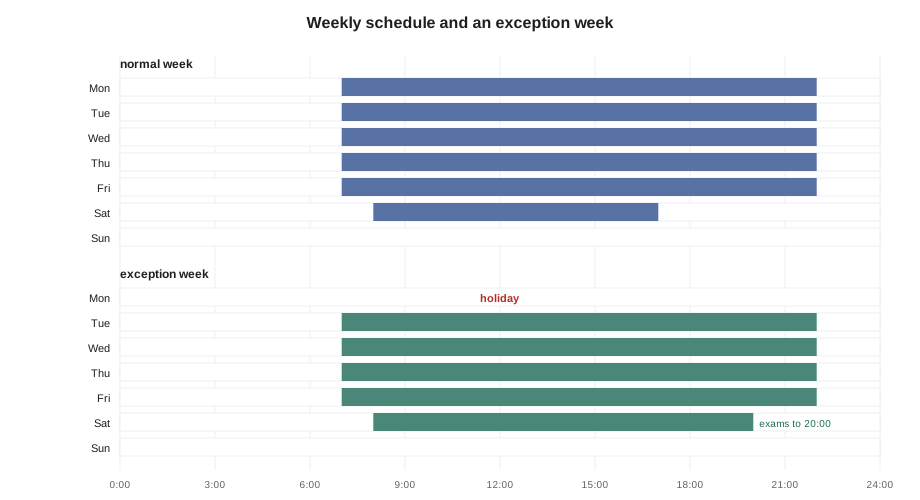
| Weekly schedule | Times and values for each day of the week | Monday to Friday 7:00 to 22:00, Saturday 8:00 to 17:00, Sunday unoccupied |
| Exception schedule | Special days or periods that override the week | Thanksgiving Thursday unoccupied; exam Saturdays 8:00 to 20:00 |
| Calendar | A shared list of dates | Harcastle federal and college holidays |
| Default value | The value when no entry applies | Unoccupied |
| Targets | The points the schedule writes to | Occupancy for AHU-1, AHU-2 and the zones |
Counting occupied hours
Occupied hours drive energy use, because the fans run continuously, outdoor air is brought in for ventilation, and space temperatures are held at comfort setpoints. Gus Thibodeaux had asked Sophie whether Tilden's schedule was longer than it needed to be. The first step was simply to count.
Worked problem
Occupied hours in a week
Tilden Hall's weekly schedule is occupied Monday to Friday 7:00 to 22:00 and Saturday 8:00 to 17:00, and unoccupied on Sunday. How many occupied hours is that per week, and what share of the 168 hours in a week?
Show solution
- Weekdays: 22 − 7 = 15 hours a day; 15 × 5 = 75 hours.
- Saturday: 17 − 8 = 9 hours.
- Total: 75 + 9 = 84 hours.
- Share: 84 ÷ 168 = 0.50, or half the week.
Answer: 84 hours, half the week. Gus's question was whether the 22:00 end on weekdays was needed in every zone, since most evening classes were in one wing. That led to separate schedules for the lecture wing and the offices, a change Gus approved for the winter term.
Schedules tend to grow. Someone works late once, complains, and an hour is added to the whole building; a tenant moves out and its floor stays on the schedule. Sophie recommends reviewing schedules with the owner at least once a year, and every time a tenant or use changes, with a trend of actual occupancy where one is available.
Holidays and exceptions
Holidays are the commonest exception. In the United States, federal holidays are set by law, and colleges and employers choose which to observe and add their own closures. Thanksgiving, for example, is the fourth Thursday in November, so it falls on a different date each year. A calendar that lists only fixed dates will miss it. Most tools let a calendar entry be a fixed date, a range of dates, or a rule such as the fourth Thursday of November. Harcastle's calendar used rules where it could and was updated each summer for the coming academic year.
Exceptions can also lengthen occupancy, as for exam Saturdays, or create a special pattern, such as a half day before a holiday. Exceptions have priorities: if two apply to the same day, the one with the higher priority wins. A typical arrangement gives one-off events the highest priority, then holidays, then term patterns. A fault Sophie often finds is an old one-off exception left in a schedule with a date range that repeats every year, so that an event from three years ago keeps the building occupied every year on the same weekend.
Occupancy sensing and standby
A schedule says when people are expected. An occupancy sensor says whether they are actually there. Combining the two gives three useful states. Occupied: the schedule says occupied and the room sensor confirms people. Standby: the schedule says occupied but the room is empty, so the room's setpoints are relaxed slightly and its ventilation reduced, ready to return quickly. Unoccupied: outside the schedule, with full setback. Standby saves energy in classrooms and meeting rooms that are booked for the day but used only part of it. Energy codes and ASHRAE Guideline 36's terminal unit sequences use this kind of logic.
(* Tilden room occupancy : schedule, sensor and push-button override *)
OverrideTimer(IN := OverridePB, PT := T#2h);     (* pulse: 2 hours *)

IF ScheduleOccupied AND RoomSensorOccupied THEN
    OccMode := OCCUPIED;
ELSIF ScheduleOccupied THEN
    OccMode := STANDBY;          (* scheduled, but nobody in the room *)
ELSIF OverrideTimer.Q THEN
    OccMode := OCCUPIED;         (* after-hours override *)
ELSE
    OccMode := UNOCCUPIED;
END_IF;
The override in the listing deserves attention. Many room sensors have a button that a person can press after hours to bring the room back to occupied for a set time, commonly one to three hours. The program uses a pulse timer started by the button. Sophie's rules for overrides were that the time should be limited, that a second press should restart the time rather than add to it, and that overrides should be logged, because a room overridden every evening is telling the building manager that its schedule is wrong.
| State | Typical heating setpoint | Typical cooling setpoint | Ventilation |
|---|---|---|---|
| Occupied | 70 °F | 75 °F | Full design minimum |
| Standby | 66 °F | 79 °F | Reduced or zero, depending on the space |
| Unoccupied | 61 °F | 84 °F | Off |
Optimal start and optimal stop
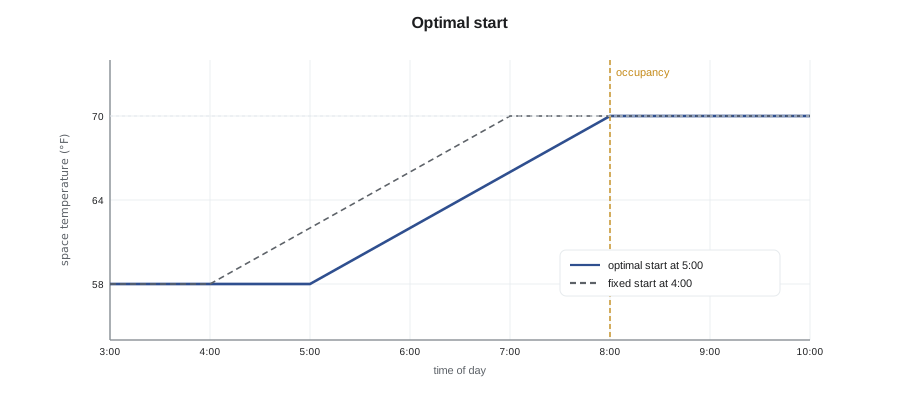
If the air handlers start at the moment occupancy begins, the building is still cold, or hot, when the first people arrive. A fixed early start, say two hours before occupancy, is simple but wastes energy on mild days, when the building would recover in twenty minutes. Optimal start calculates how long recovery will take from the current space temperature, the outdoor temperature and the rate at which the building has warmed in the past, and starts the equipment just in time. Optimal stop does the reverse at the end of the day, letting the space drift for the last part of occupancy because it will not drift far before people leave.
Worked problem
Estimating an optimal start time
On a cold morning, Tilden's average space temperature at 4:00 is 58 °F. The occupied heating setpoint is 70 °F and occupancy starts at 8:00. The program has learned that the building warms at about 4 °F per hour in these conditions. When should warm-up begin?
Show solution
- Rise needed: 70 − 58 = 12 °F.
- Time needed: 12 ÷ 4 = 3 hours.
- Start: 8:00 − 3 h = 5:00.
Answer: Warm-up should begin at about 5:00. Real optimal start blocks adjust the learned rate each day from how early or late the building actually reached setpoint, and limit the earliest start time.
During warm-up, many sequences run the air handler on full return air, with the outdoor air damper closed, because there is nobody in the building to ventilate yet. That is one reason the warm-up mode in lesson 5's setpoint example used a higher discharge air setpoint. Codes and standards set limits on how warm-up and cool-down may use outdoor air; the sequence of operations says how a particular building handles it.
Where schedules live
Schedules can live in the controller that uses them or in a supervisory controller or server that sends values to many controllers. A central schedule is easy to manage but depends on the network: if communication fails, each controller must know what to do. Good practice is for each controller to have a fallback, either its own copy of the schedule or a safe default such as staying occupied during the normal day, so that a network fault on a Monday morning does not leave a building cold. Sophie set every RTU-1 program value that came from the network, including the occupancy command, with a timeout and a local fallback.
Time itself matters. A controller's real-time clock, which BAS-210 described, must be right, and must change correctly for daylight saving time. Most systems synchronize clocks from the supervisory controller or a network time server. A controller whose clock drifts by twenty minutes over a few months starts and stops its equipment twenty minutes off, and the first sign is usually a complaint.
Schedules for shared and special spaces
Not every space follows the building's main schedule. Tilden Hall's lecture hall T-120, with its CO2 demand-controlled ventilation, was booked through the college's room booking system, and Gus wanted the booking system's calendar to drive the hall's occupancy instead of a fixed weekly pattern. Sophie explained the options. The booking system could export a daily file that a server converts into schedule exceptions; it could write occupancy directly to a point through an integration; or the hall could rely on its occupancy and CO2 sensors with a broad weekly schedule as a backstop. Each needs a fallback for the day the integration fails. For the winter term, she recommended the third, which needed no new software, with the first as a project for the following year.
| Space | Schedule approach | Fallback |
|---|---|---|
| Offices and classrooms | Weekly schedule with calendar exceptions | Local copy of the schedule |
| Lecture hall T-120 | Broad weekly schedule plus occupancy and CO2 sensing | Occupied during the broad schedule |
| Server and lab rooms | Continuous operation, no schedule | Always occupied |
| Residence rooms | Always available, with occupancy sensing and setback when empty | Occupied |
Spaces that must never be unoccupied deserve a word of their own. Server rooms, labs with fume hoods and rooms with sensitive equipment are usually set to run continuously, with no schedule at all, so that a holiday exception added for the rest of the building cannot shut them down. Sophie checked that every such space in Tilden had its occupancy fixed in the program, not taken from the shared schedule, after once finding a chemistry storage room exhaust that followed the office schedule and stopped every weekend.
Daylight saving time changes need checking twice a year. A schedule that starts the air handlers at 6:00 should still start them at 6:00 local time after the change. Most systems handle this automatically, but optimal start logic that learned its rates in one season may need a few days to settle after the clocks change, and trends around the change show a missing or repeated hour. Sophie added both dates to Quillon's service calendar as reminders to look at one trend from each site on the following Monday.
Schedules also need an owner. At Harcastle, Sophie recommended that one named person in Gus's team approve every schedule change and that the front end keep a log of who changed what and when. Without that, schedules drift as several people make small changes for good reasons, until nobody knows which hours the building is really supposed to run. A short monthly report of schedule changes and timed overrides, sent to Gus, would show the drift early, and would give the energy plan he was preparing a clear record of how Tilden's hours had changed over the year.
Common mistakes
MistakeListing holidays as fixed dates when they move each year.
InsteadUse rule-based calendar entries such as the second Monday of a month, and review the calendar each year.
MistakeLeaving old one-off exceptions in a schedule with repeating dates.
InsteadRemove expired exceptions and give one-off events dates that do not repeat.
MistakeAdding hours to a whole building for one late worker.
InsteadUse separate schedules for different areas and timed overrides for occasional use.
MistakeAllowing unlimited after-hours overrides.
InsteadLimit override time, restart rather than add on a second press, and log every override.
MistakeDepending on a network schedule with no local fallback.
InsteadGive each controller a timeout and a safe local default for scheduled values.
Summary and key terms
- Schedules change values at set times; occupancy schedules drive most of a sequence of operations.
- A weekly schedule sets the normal pattern; exceptions and calendars handle holidays and events.
- Counting occupied hours shows where schedules have grown longer than needed.
- Occupancy sensors add a standby state between occupied and unoccupied.
- After-hours overrides should be limited, logged and reviewed.
- Optimal start and stop begin and end conditioning just in time, from learned recovery rates.
- Schedules held centrally need local fallbacks, and every controller needs a correct, synchronized clock.
- Schedule
- A list of times at which a point's value changes.
- Weekly schedule
- The normal pattern of times and values for each day of the week.
- Exception schedule
- Special days or periods that override the weekly schedule.
- Calendar
- A list of dates, such as holidays, used by exception schedules.
- Standby
- An occupancy state for a scheduled space that is currently empty, with relaxed setpoints.
- Timed override
- A limited period of occupied mode started by a button or an operator after hours.
- Optimal start
- Logic that starts equipment just early enough to reach setpoint when occupancy begins.
- Setback
- A relaxed setpoint used when a space is unoccupied.
Practice problems
Work each problem on paper first, then reveal the answer to check.
A building is occupied 6:30 to 18:00 on weekdays only. How many hours a week?
Show answer
11.5 × 5 = 57.5 hours.
Why should a Thanksgiving calendar entry be a rule rather than a date?
Show answer
Thanksgiving is the fourth Thursday in November, so its date changes every year.
A room is scheduled occupied but its sensor shows nobody. Which state?
Show answer
Standby.
Space 60 °F, setpoint 70 °F, learned rate 5 °F per hour. How early should warm-up start?
Show answer
10 ÷ 5 = 2 hours before occupancy.
What should a controller do if it stops receiving the network occupancy command?
Show answer
Fall back to a safe local default after a timeout.
Lesson quiz · 5 questions
Score 60% or more to complete this lesson.
Create a free account to save your progress, take quizzes and earn a certificate.