
BAS-220 · Lesson 3 of 12 · 23 min
Line programming and structured text
▶ Video coming soon A video version of this lesson is on the way.
At the second Saturday workshop, on September 19, Sophie put two programs side by side on the screen. On the left was a page of blocks like the one Callie had followed on Thursday. On the right was a page of text that looked a little like a recipe: IF this, THEN that, ELSE something else. "Same job, different language," Sophie said. The text program came from one of the fan coil controllers in Harcastle College's Morrow House residence, the building where, as BAS-210 described, a replacement controller had arrived in 2023 with newer firmware and the old program would not load. Quillon had rebuilt that program by hand, in the controller's text language, and Sophie wanted Callie to be able to read it. This lesson covers line programming and structured text.
Why text languages exist
Some control jobs are mostly continuous: values flow through calculations and loops all the time. Others are mostly decisions: in this mode do one thing, in that mode another, unless this alarm is active or that schedule says otherwise. Blocks suit the first kind well. A long chain of decisions drawn as blocks becomes a tangle of comparisons and selectors, while the same chain written as text reads almost like the sequence of operations. That is why most building automation tools offer a text language as well as blocks, and why many programmers mix them: blocks for loops and calculations, text for modes, sequences and special cases.
Text languages in building automation come in two broad styles. Older controllers often use a line language, with numbered lines run from top to bottom and jumps from one line to another, in the style of early BASIC. Newer controllers usually use a structured language, closer to modern programming, with named variables, blocks of statements and no line numbers. The structured text language defined in IEC 61131-3, whose fourth edition was published in 2025, is followed closely by several building automation tools; others use their own structured languages with similar ideas. This lesson's examples use a generic structured text style, not any one manufacturer's syntax.
Statements, variables and assignment
A structured text program is a list of statements, each ending with a semicolon, run in order from top to bottom on every scan. The basic statement is the assignment, written with := in IEC style, which means "becomes": Mode := HEAT means the variable Mode takes the value HEAT. A variable is a named value in the controller's memory. Some variables are tied to points, such as ZoneTemp tied to the zone sensor input; others are internal, used only inside the program. Variables have types: BOOL for true or false, INT or REAL for whole and decimal numbers, and enumerated types for named states such as OFF, HEAT and COOL.
Comments are written between (* and *) and ignored by the controller. They are for the next person to read the program, who may be the author six months later. Sophie's text programs began with a comment block giving the equipment, the sequence document it implements, the author, the date and a change history, and had a comment above every section.
| Type | Holds | Examples |
|---|---|---|
| BOOL | True or false | Occupied, FanStatus, FreezeAlarm |
| INT | Whole numbers | Stage count, number of starts |
| REAL | Decimal numbers | ZoneTemp, valve command, setpoints |
| Enumerated | One of a list of named states | Mode: OFF, HEAT, COOL, DEADBAND |
| TIME | A duration | T#5m for five minutes in IEC style |
IF, ELSIF and ELSE
The IF statement is the heart of control logic. IF a condition is true THEN run some statements; ELSIF another condition is true, run others; ELSE, if none of the conditions were true, run a default set; END_IF closes the statement. The conditions are tested in order, and only the first true one is acted on. That order matters just as execution order matters in blocks: if a general condition comes before a specific one, the specific one is never reached.
(* Morrow House fan coil FC-1 : heating and cooling mode *)
IF NOT Occupied THEN
    Mode := OFF;
ELSIF ZoneTemp < (HeatSP - 0.9) THEN
    Mode := HEAT;
ELSIF ZoneTemp > (CoolSP + 0.9) THEN
    Mode := COOL;
ELSIF (ZoneTemp > HeatSP) AND (ZoneTemp < CoolSP) THEN
    Mode := DEADBAND;
END_IF;
(* otherwise keep the mode from the last scan *)
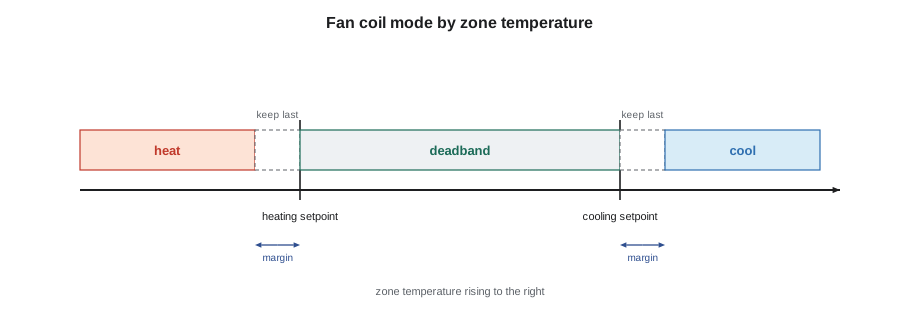
Sophie read the listing aloud with Callie. If the room is not occupied, the mode is off, and nothing else is tested. Otherwise, if the room is colder than the heating setpoint by more than the margin, the mode is heat; if it is warmer than the cooling setpoint by more than the margin, the mode is cool; if it is comfortably between the two setpoints, the mode is deadband, with the fan running for air movement but neither valve open. If the temperature is within the margin of either setpoint, no branch is true, and the comment explains that the mode simply stays as it was on the last scan. That is a deliberate deadband against chattering, and it depends on Mode being a stored variable.
Worked problem
Tracing an IF statement
FC-1 is occupied, the heating setpoint is 69.8 °F and the cooling setpoint is 75.2 °F, and the listing's margin is 0.9 °F. Last scan, the mode was HEAT. Trace the mode for zone temperatures of 68.4 °F, 69.4 °F, 72.5 °F and 75.7 °F, taken in that order.
Show solution
- 68.4 is below 69.8 − 0.9 = 68.9: HEAT.
- 69.4 is not below 68.9, not above 76.1, and not above 69.8: no branch is true, so HEAT continues.
- 72.5 is between 69.8 and 75.2: DEADBAND.
- 75.7 is not above 75.2 + 0.9 = 76.1 and not below 75.2: no branch is true, so DEADBAND continues.
Answer: HEAT, HEAT, DEADBAND, DEADBAND. The margins give the mode a memory near each setpoint, so a room hovering at the edge does not switch modes every scan.
CASE statements
When a variable can take several named values and each needs its own actions, a CASE statement is clearer than a long chain of ELSIFs. The second part of the Morrow House program used one to set the outputs for each mode. Each line names a mode and lists the outputs for it, so a reader can check the whole table at a glance against the sequence of operations.
CASE Mode OF
    OFF:      FanCmd := FALSE;  ValveHeat := 0;      ValveCool := 0;
    HEAT:     FanCmd := TRUE;   ValveHeat := HeatPI; ValveCool := 0;
    COOL:     FanCmd := TRUE;   ValveHeat := 0;      ValveCool := CoolPI;
    DEADBAND: FanCmd := TRUE;   ValveHeat := 0;      ValveCool := 0;
END_CASE;
Sophie liked this structure because it made one kind of mistake hard to make: forgetting to close the cooling valve when changing to heat. Every branch sets every output. In a program where each branch sets only the outputs it cares about, an output can be left in its old state when the mode changes, which is how fan coils end up heating and cooling at the same time.
Comparisons and Boolean expressions
Conditions are built from comparisons, such as ZoneTemp > CoolSP, and joined with the Boolean operators AND, OR and NOT, which lesson 4 covers in detail. Brackets make the intended grouping clear: (ZoneTemp > HeatSP) AND (ZoneTemp < CoolSP) leaves no doubt about what is compared with what. Sophie's rule was to use brackets whenever AND and OR appear in the same condition, because different languages give them different priorities and a reader should never need to remember which.
Comparing decimal numbers for exact equality is a classic trap. A temperature that should be 72.0 °F may be stored as 71.99998 after scaling and filtering, so a condition such as ZoneTemp = 72.0 may never be true. Control logic compares with greater-than and less-than, and uses a band where equality is meant: ABS(ZoneTemp − Setpoint) < 0.1 instead of ZoneTemp = Setpoint.
Persistent variables and the first scan
Lesson 1 described values that must survive a restart. In structured text, a variable declared in a RETAIN section keeps its value through a power failure on controllers that support it. A runtime counter is the classic example, adding the scan time to a total while the fan runs. Without RETAIN, the count would return to zero at every restart, and the maintenance schedule built on it would be wrong.
(* runtime counter, kept through restarts *)
VAR RETAIN
    FanHours : REAL;
END_VAR
IF FanStatus THEN
    FanHours := FanHours + ScanSeconds / 3600.0;
END_IF;
Worked problem
Checking a runtime counter
The counter in the listing adds ScanSeconds ÷ 3600 each scan while the fan runs. With a 1 second scan, how much does it add per scan, and how many hours will it show after the fan has run for 8 hours? If the controller restarted at the four-hour mark and the variable were not retained, what would it show at the end?
Show solution
- Per scan: 1 ÷ 3600 = 0.000278 h.
- After 8 h: 8 × 3600 scans × 0.000278 h = 8.0 h.
- Without RETAIN, the total returns to 0 at the restart and then counts the remaining 4 hours: 4.0 h.
Answer: 8.0 hours with the variable retained, but only 4.0 hours without it. Half the runtime would be lost from the maintenance record.
Line languages and jumps
Older controllers, and some current ones, use line languages. Each line has a number, the program runs from the lowest number to the highest, and GOTO jumps to another line. The logic can be the same as structured text, but it is harder to read, because the reader must follow the jumps to see which lines run in which case. Lines skipped by a jump do nothing that scan.
10 IF OCC = 0 THEN 60
20 IF ZT < HSP THEN 80
30 IF ZT > CSP THEN 100
40 HV = 0 : CV = 0
50 GOTO 120
60 FAN = 0 : HV = 0 : CV = 0
70 GOTO 120
80 FAN = 1 : HV = HPI : CV = 0
90 GOTO 120
100 FAN = 1 : CV = CPI : HV = 0
110 GOTO 120
120 END
Callie traced the line program for an occupied room that was too cold. Line 10 was false, so the program went on to line 20, which was true, so it jumped to line 80, set the fan on and the heating valve to the loop output, and jumped to the end. It worked, but the reader had to hold the jumps in their head. Sophie pointed out a small difference from the structured version: line 40 set both valves to zero in the deadband case but never set the fan, so the fan kept whatever state it last had. In the occupied deadband case that was probably on, after a heat or cool spell, but after an unoccupied period it would stay off. Whether that was a fault depended on the sequence of operations, which nobody had kept.
Loops inside the program
Structured text also has FOR and WHILE loops, which repeat statements several times within one scan: for example, adding up ten zone temperatures in an array to find an average. These are different from control loops and must be used with care. A loop that repeats many times, or a WHILE loop whose ending condition never comes true, can stretch the scan or stop the controller altogether. Most building programs need them rarely, and Sophie's rule was simple: a loop that runs a fixed number of times is fine; a WHILE loop in a controller needs a very good reason and a guaranteed way out.
Blocks or text?
| Job | Usually clearer in | Why |
|---|---|---|
| PID loop and its limits | Blocks | Values flow continuously through calculations |
| Mode selection with many conditions | Text | Reads like the sequence of operations |
| Output table for each mode | Text (CASE) | Every output set in every mode, easy to check |
| Reset schedule | Blocks | A scaling block shows the line at a glance |
| Start-up sequence with steps and delays | Either, or a sequence chart | Steps and timers in order |
| Averaging an array of values | Text (FOR loop) | One short statement instead of many blocks |
Common mistakes
MistakePutting a general condition before a specific one in an IF chain.
InsteadOrder the branches so that the most important or most specific conditions are tested first.
MistakeSetting only some outputs in each branch.
InsteadSet every output in every branch, or use a CASE table, so nothing is left in an old state.
MistakeTesting decimal numbers for exact equality.
InsteadUse greater-than, less-than or a small band instead of = with temperatures and other measured values.
MistakeMixing AND and OR without brackets.
InsteadBracket every group so the reader never relies on operator priority.
MistakeWriting a WHILE loop with no guaranteed exit.
InsteadPrefer fixed-count loops, and make sure any loop ends within one scan.
Summary and key terms
- Text languages suit chains of decisions; blocks suit continuous calculations; many programs mix both.
- Structured text uses named variables, typed values and statements ending in semicolons, with := for assignment.
- IF, ELSIF and ELSE test conditions in order and act only on the first that is true.
- CASE statements set actions for each named state and make complete output tables easy to check.
- Margins in conditions give modes memory and stop chattering near setpoints.
- RETAIN variables survive restarts; runtime counters and totals need them.
- Line languages run numbered lines with jumps; they work but are harder to read and to check.
- Structured text
- A text programming language with named variables and structured statements, defined in IEC 61131-3.
- Line language
- An older style of text program with numbered lines and jumps.
- Assignment
- A statement that gives a variable a new value, written := in structured text.
- Variable
- A named value in the controller's memory, tied to a point or used internally.
- IF statement
- A statement that runs different actions depending on which condition is true.
- CASE statement
- A statement that runs actions chosen by the value of one variable.
- RETAIN
- A declaration that keeps a variable's value through a restart.
- Comment
- Text in a program for people to read, ignored by the controller.
Practice problems
Work each problem on paper first, then reveal the answer to check.
What does Mode := COOL mean?
Show answer
The variable Mode takes the value COOL.
In an IF chain, two conditions are both true. Which branch runs?
Show answer
Only the first true branch in the order written.
Why is ZoneTemp = 22.0 a poor condition?
Show answer
Measured decimal values are rarely exactly equal to a constant; use a comparison or a small band.
Why must a runtime counter be retained?
Show answer
Otherwise it returns to zero at every restart and the runtime record is wrong.
In the line program, what did line 40 forget to set?
Show answer
The fan command, so the fan kept its last state in the deadband case.
Lesson quiz · 5 questions
Score 60% or more to complete this lesson.
Create a free account to save your progress, take quizzes and earn a certificate.