
BAS-220 · Lesson 11 of 12 · 25 min
Testing and simulating logic
▶ Video coming soon A video version of this lesson is on the way.
On Saturday, November 7, RTU-1's new controller was programmed, backed up and waiting in the shop, and its installation at Ninefield was three days away. RTU-2 to RTU-4 would follow in the first two weeks of December with the same shared program. Sophie used the workshop to show Callie how Quillon tests logic before it goes anywhere near a roof, and together they wrote the test plan the RTU program would be held to. "Every fault you find in the office costs a few minutes," she said. "Every fault you find on site costs an hour and a crane. Every fault the owner finds costs our reputation." As BAS-210 described, RTU-1's checkout on November 11 still found three faults that no office test could have caught, and the November 12 review asked for a bench simulator of the unit's own terminal strip. This lesson covers testing and simulating control logic: test plans, simulation in the tool, bench testing with real signals, overrides and the BACnet priority array, and the most common fault left behind after testing.
What testing must prove
Testing a control program has to prove three things. First, that the program does what the sequence of operations says, in every mode and every transition between modes. Second, that it does something safe when things go wrong: a sensor fails, communication is lost, power returns, a safety trips. Third, that it is the right program in the right controller with the right settings, which is what BAS-210's checkout covered. The first two can largely be done before the controller leaves the office; the third can only be done on site.
Testing also has to be repeatable. A test that depends on one person remembering what they tried yesterday cannot be repeated for the next unit or after the next change. That is why Quillon writes test plans: numbered test cases, each with the conditions to set, the time to wait and the results expected, and a space for the result and the tester's initials.
TEST  RTU-ECON-07   economizer high limit
  SET   OAT := 66.2 ; RAT := 71.6 ; Mode := COOL ; FanProven := TRUE
  RUN   60 s
  EXPECT EconEnable = TRUE ; OADamper > MinPos
  SET   OAT := 76.1
  RUN   60 s
  EXPECT EconEnable = FALSE ; OADamper = MinPos
  RESULT ____  (pass / fail, initials, date)
Designing test cases
A good set of test cases covers normal operation, boundaries and failures. Normal cases walk through each mode as the sequence describes it: unoccupied, warm-up, occupied heating, occupied cooling with and without the economizer, and back again. Boundary cases sit right at the edges, where the logic changes its mind: the outdoor temperature exactly at the economizer high limit, the zone exactly at setpoint, a timer exactly at its preset. Failure cases break things on purpose: an input reading open circuit, the fan proof failing to arrive, the network occupancy command timing out, the controller losing power and restarting.
| Type of case | Purpose | RTU program examples |
|---|---|---|
| Normal | Each mode and each transition behaves as the sequence says | Occupied cooling stages 1 and 2 up and down; economizer on and off |
| Boundary | Logic changes state at the right values and times | Economizer high limit; minimum on and off timers; stage-up delay |
| Failure | The program does something safe when things go wrong | DAT sensor open; fan fails to prove; occupancy command lost; restart |
| Safety | Safeties override everything | Smoke alarm stops fan and compressors immediately, timers or not |
| Regression | Earlier behavior still works after a change | Repeat the RTU-1 checkout faults: stage 2 terminal, sensor swap, economizer direction |
Worked problem
How many cases a plan needs
The RTU sequence has 6 modes. Sophie's plan, as revised after RTU-1's checkout, tests each mode once, each of the 8 mode transitions the sequence allows, 7 boundaries, 9 failures, 3 safeties, and the 3 faults found at RTU-1's checkout as regression cases. How many test cases is that? If each takes about 4 minutes in simulation, how long does a full run take?
Show solution
- Cases: 6 + 8 + 7 + 9 + 3 + 3 = 36.
- Time: 36 × 4 = 144 minutes, 2 hours 24 minutes.
Answer: 36 cases, about two and a half hours in simulation. The same faults found on a roof would take far longer, and some, such as a restart failure, might not be found until a real power failure in January.
Simulation in the tool
Most programming tools can simulate a program on the laptop, without a controller. In simulation mode, the programmer sets input values by hand, or with simple models, and watches the program's outputs and internal values change. Some tools can run the program faster than real time, so that a 5 minute timer passes in seconds. Some can connect a simple model of the equipment, so that opening the cooling valve lowers the simulated discharge temperature, which lets loops be exercised before the real equipment exists.
Simulation is excellent for logic and sequences and weaker for anything that depends on real hardware: input scaling, wiring, actuator direction, real loop dynamics. The RTU-1 checkout faults showed the gap. A stage 2 relay wired to a heating terminal, two sensor cables swapped and an actuator running the wrong way are all invisible in simulation, because in simulation every point is whatever the programmer says it is. That is why Quillon also bench-tests panels with real signals, as BAS-210 described, and why the November 12 review asked for a bench simulator of the rooftop unit's own terminal strip.
Bench testing with real signals
A bench test runs the real program in the real controller, on a bench, with signals applied to the real terminals: resistors or decade boxes for thermistor inputs, a signal generator for 4 to 20 milliamp or 0 to 10 volt inputs, switches for binary inputs, and lamps, meters or a small test actuator on the outputs. It proves the program, the configuration and the panel wiring together. For the RTU units, Sophie planned a test board with the same terminal layout as the rooftop unit's own low-voltage strip, so that a relay wired to the wrong unit terminal would light the wrong lamp on the bench, as the RTU-1 stage 2 fault would have done.
Worked problem
Simulating a thermistor with a resistor
A manufacturer's table gives a 10K Type II thermistor about 10,000 Ω at 77 °F and about 15,700 Ω at 59 °F. To test the economizer high limit near 66 °F, Callie uses a decade box. If the curve between the two points were straight, what resistance would represent 66 °F? Why is the real value different?
Show solution
- Fraction of the way from 77 °F to 59 °F: (77 − 66) ÷ (77 − 59) = 0.61.
- Straight-line estimate: 10,000 + 0.61 × (15,700 − 10,000) = 13,480 Ω.
Answer: About 13,400 Ω by straight line, but a thermistor's curve is not straight, so the true value is a little lower. For boundary tests, Callie uses the manufacturer's resistance table or the controller's own displayed temperature, not a straight-line estimate.
Overrides, out of service and the priority array
During testing, technicians force values. There are two common ways. An input can be put out of service, which disconnects its value from the terminal so that a test value can be written, as BAS-210 described. An output or value can be commanded at a priority, which overrides the program's command without touching the program. To understand overrides, a technician must understand the BACnet priority array.
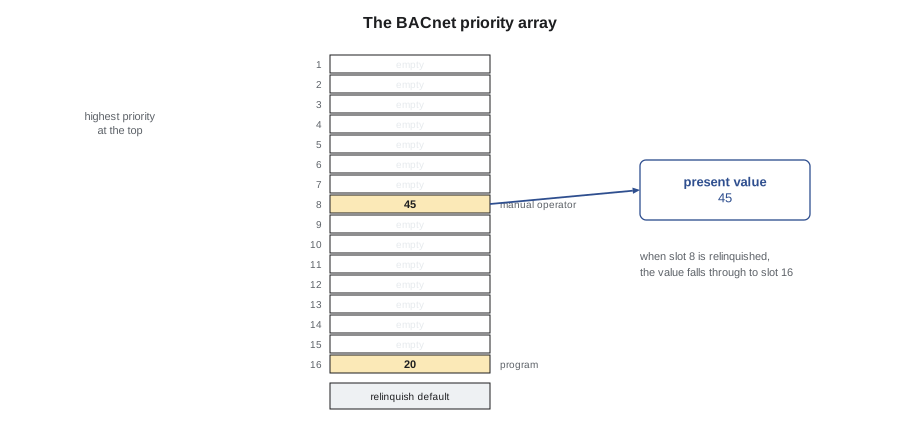
A commandable BACnet object, such as a binary output for a fan or an analog output for a valve, has an array of 16 priority slots. Each slot is either empty or holds a commanded value. The object's present value is the value in the highest-priority non-empty slot, where priority 1 is the highest. If every slot is empty, the present value is the relinquish default. Writing to a slot is called commanding; clearing it is called relinquishing. A program normally writes at a low priority, often 16; an operator override from the front end is usually at priority 8, labeled manual operator in the standard; life-safety commands use the top slots.
| Priority | Standard use |
|---|---|
| 1 | Manual life safety |
| 2 | Automatic life safety |
| 5 | Critical equipment control |
| 6 | Minimum on and off |
| 8 | Manual operator |
| 9 to 16 | Available, commonly used by programs and schedules; 16 is the lowest |
| Relinquish default | Used when every slot is empty |
Worked problem
Reading a priority array
AHU-1's heating valve output has values in three slots: 100 at priority 5, written by freeze protection logic, 45 at priority 8, an operator override, and 20 at priority 16, the program's command. What is the present value? What is it when the freeze protection clears priority 5? And when the operator then relinquishes priority 8?
Show solution
- All three slots full: the highest priority is 5, so the present value is 100.
- Priority 5 cleared: the highest remaining is 8, so 45.
- Priority 8 relinquished: only 16 remains, so 20, the program's value.
Answer: 100, then 45, then 20. While the operator's override sits at priority 8, the program's command at 16 has no effect at all, which is exactly why forgotten overrides cause trouble.
Schedules can also write at a priority, which is how lesson 7's schedules reach their target points. If a schedule and an operator both write to the same point, the higher priority wins, and the other waits underneath until the slot above is relinquished.
The fault left behind
The most common fault Sophie finds on service visits is not a program error. It is an override that someone set during testing or troubleshooting and never released: a valve left at priority 8, a fan forced on, an input left out of service with a test value. The equipment then does what the forgotten value says, the program's correct command is ignored, and the trends look strange to everyone who does not think to check the priority array. A week after the workshop, on November 14, Callie ran the front end's override report for Tilden Hall and found 14 points still commanded at priority 8, some of them since the summer, including two VAV boxes held at maximum airflow during a summer heat wave.
| Habit | Why |
|---|---|
| Record every override in the job log as it is made | So that it can be found and released |
| Use timed overrides where the tool supports them | They release themselves |
| Run the override and out-of-service report before leaving site | Finds anything forgotten |
| Release at the same priority that was used | Relinquishing a different slot leaves the override in place |
| Show overrides on the graphics | Operators can see that a point is not under program control |
Regression testing and change control
Every change to a program, however small, can break something that used to work. Regression testing means running the earlier test cases again after a change, at least the ones that touch the changed logic, to prove that old behavior still works. Sophie's changes to the shared RTU program after RTU-1's checkout were small: renaming two points, adding a check that the economizer actuator's feedback followed its command, and changing a stage-up delay. She still planned to rerun all 36 cases in simulation and the hardware cases on the new test board, because the program would be downloaded into three units in two weeks and any fault would be copied three times.
Change control ties it together: a backup before the change, a description of the change and its reason in the change log, the test results, and a new backup afterwards, as BAS-210 described for downloads. The record is what lets the next person, reading the program as in lesson 10, understand why it is the way it is.
Recording results
A test result is only useful if someone can find it later. Quillon records each test run with the program version, the date, the tester, the controller or simulation used and the result of every case, including failures and how they were fixed. Failed cases stay in the record with their fix, because they show the next person what went wrong before. For the RTU program, the test record would go into the handover package with the backups and point lists, so that Ilona's next contractor, or Quillon's own technicians in five years, could see what had been proved and when.
Common mistakes
MistakeTesting from memory instead of a written plan.
InsteadWrite numbered test cases with conditions, waits and expected results, and record each result.
MistakeTesting only normal operation.
InsteadInclude boundaries, failures, safeties and regression cases from earlier faults.
MistakeTrusting simulation to prove wiring and hardware.
InsteadBench-test with real signals on real terminals, and check on site.
MistakeLeaving overrides and out-of-service flags behind.
InsteadLog every override, run the override report before leaving and release at the same priority.
MistakeSkipping regression tests for small changes.
InsteadRerun the cases that touch the change, and all of them before copying a program to several units.
Summary and key terms
- Testing must prove the sequence, safe behavior on failure, and the right program in the right controller.
- Written test plans make tests repeatable across units and changes.
- Good plans cover normal, boundary, failure, safety and regression cases.
- Simulation proves logic quickly; bench tests with real signals prove configuration and wiring too.
- A BACnet commandable object's present value comes from its highest-priority non-empty slot, or the relinquish default.
- Operator overrides at priority 8 hide the program's commands until they are relinquished.
- Forgotten overrides are the commonest fault left behind; reports, logs and timed overrides prevent them.
- Test plan
- A written set of numbered test cases with conditions, waits and expected results.
- Boundary case
- A test at the exact value or time where logic changes state.
- Simulation mode
- Running a program in the programming tool with input values set by hand or by models.
- Bench test
- Testing the real program in the real controller with signals applied to its terminals.
- Priority array
- The 16 command slots of a commandable BACnet object.
- Relinquish
- To clear a command from a priority slot.
- Manual operator priority
- Priority 8, the standard slot for operator overrides.
- Regression test
- Repeating earlier tests after a change to prove old behavior still works.
Practice problems
Work each problem on paper first, then reveal the answer to check.
A plan has 5 modes, 6 transitions, 4 boundaries, 6 failures and 2 safeties. How many cases?
Show answer
23.
Slots 8 and 16 hold 60 and 30. What is the present value?
Show answer
60, from priority 8.
All slots are empty. What is the present value?
Show answer
The relinquish default.
Why can simulation not find a sensor cable swap?
Show answer
In simulation every point takes the value the programmer sets, so wiring is never involved.
An operator overrides at priority 8 and later relinquishes priority 9. What happens?
Show answer
Nothing; the override at 8 remains in place.
Lesson quiz · 5 questions
Score 60% or more to complete this lesson.
Create a free account to save your progress, take quizzes and earn a certificate.