
AWS-104 · Lesson 9 of 12 · 19 min
AWS Support plans compared
▶ Video coming soon A video version of this lesson is on the way.
Dr. Simone Kaur, the medical director, joins the session on November 11 with one question. "At three in the morning, a dog is on the table, and the records system stops. Who do we call, and how fast will they answer?" On premises, the answer was Mateo's mobile phone. In AWS, part of the answer is an AWS Support plan. This lesson compares the plans, explains what each adds, and records the plan Cascade Ridge will choose for production.
What AWS Support covers
AWS Support helps customers with problems and questions about their use of AWS: a service behaving unexpectedly, an error the documentation does not explain, guidance on architecture, help during an incident, and questions about accounts and bills. It does not run your applications for you, and under the shared responsibility model it does not take over the customer's job of designing, securing and operating their own workloads. What changes from plan to plan is how you can reach AWS, how fast it responds, what proactive guidance you get and whether you have named people who know your environment.
The plans in 2026
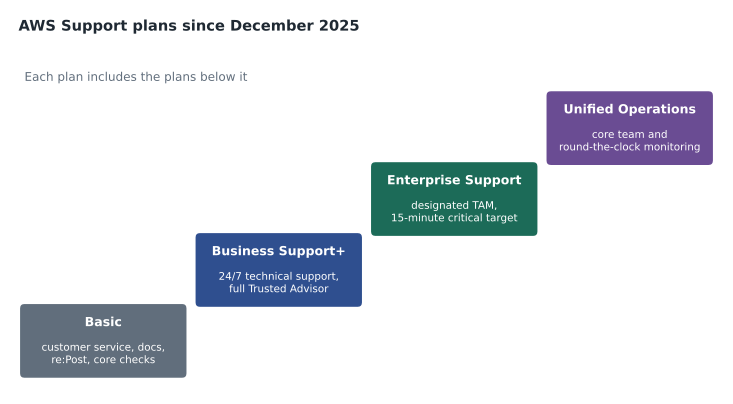
AWS restructured its support plans on December 2, 2025. The current Cloud Practitioner exam guide uses the new names: Basic Support, AWS Business Support+, AWS Enterprise Support and AWS Unified Operations. Each higher plan includes the capabilities of the plans below it.
| Plan | Who it suits | Highlights | Fastest stated response |
|---|---|---|---|
| Basic Support | Every AWS customer, included at no cost | 24/7 customer service for account and billing questions; documentation, whitepapers and AWS re:Post; core Trusted Advisor checks; AWS Health personalized view | No technical support cases |
| Business Support+ | Businesses running production workloads | 24/7 technical support by phone, web and chat; unlimited cases and contacts; AI-powered recommendations with access to AWS experts; full Trusted Advisor checks; AWS Health API; help with common third-party software; Support API | Under 30 minutes for a business-critical system down |
| Enterprise Support | Organizations with mission-critical workloads | A designated Technical Account Manager (TAM); Trusted Advisor Priority; AWS Security Incident Response included; proactive reviews and guidance | Under 15 minutes for a production-critical system down |
| Unified Operations | The largest and most critical environments | A core team including a TAM, a domain specialist engineer and a senior billing and account specialist; on-demand incident management, migration and security experts; around-the-clock monitoring | About 5 minutes for critical incidents |
Pricing
Basic Support is free. The paid plans are priced as the greater of a monthly minimum or a share of the account's monthly AWS charges, with the share falling as spending grows. When AWS announced the new plans, it gave starting prices of 29 US dollars a month for Business Support+, 5,000 US dollars a month for Enterprise Support and 50,000 US dollars a month for Unified Operations. The share-of-spend rates are on the AWS Support pricing page and change over time, so an estimate should use the current page.
Support charges appear on the bill like any other service. In an organization, support is bought per account, and for Enterprise-level plans it can be arranged to cover all accounts in the organization. A support plan's cost is calculated from the charges of the accounts it covers.
Legacy plans
Before December 2025, the plans were called Basic, Developer, Business, Enterprise On-Ramp and Enterprise. Customers on Developer, Business (now called Business classic) or Enterprise On-Ramp can stay on them through January 1, 2027, and can move to a new plan at any time before then. Many study materials still describe the old plans, so it helps to recognize the names: Developer offered business-hours email support for testing, and Enterprise On-Ramp offered a pool of TAMs rather than a designated one.
Severity and response times
When you open a technical case, you choose a severity. AWS's response-time targets depend on the plan and the severity. Gwen shows Dr. Kaur the targets AWS lists for the paid plans:
| Severity | Business Support+ | Enterprise Support |
|---|---|---|
| General guidance | Under 24 hours | Under 24 hours |
| System impaired | Under 12 hours | Under 12 hours |
| Production system impaired | Under 4 hours | Under 4 hours |
| Production system down | Under 1 hour | Under 1 hour |
| Business-critical or mission-critical system down | Under 30 minutes | Under 15 minutes |
Dr. Kaur notices the last words in the caption. A response target is how quickly an engineer engages, not how quickly the problem is solved. Most of the speed in a 3 a.m. emergency still comes from Cascade Ridge's own design (two Availability Zones, automatic failover for the database, backups) and its own on-call plan. Support is a partner in an incident, not a replacement for one.
What the Technical Account Manager does
A Technical Account Manager (TAM) is a named AWS engineer who learns the customer's environment and acts as its advocate inside AWS. A TAM runs regular reviews, helps plan launches and migrations, coordinates during major incidents and brings in specialists. A designated TAM comes with Enterprise Support and Unified Operations. For a group the size of Cascade Ridge, a TAM would be valuable but expensive; the team decides it does not yet need one.
Choosing for Cascade Ridge
Gwen walks through the decision with Lorraine and Dr. Kaur.
- Sandbox and development: Basic Support. Questions can go to documentation and AWS re:Post; billing questions still get answers.
- Production: Business Support+, because the practice system is business-critical and Dr. Kaur needs 24/7 phone access to engineers with a response target under 30 minutes for a critical system down. It also unlocks the full set of Trusted Advisor checks and the AWS Health API (lesson 10).
- Enterprise Support: not yet. The 5,000-dollar monthly minimum is out of proportion to an estimated bill of about 10,000 dollars a month. The team will revisit it if the group grows.
The plan is to switch the production account to Business Support+ before the spring 2027 cutover, so that it is in place for the first night the clinics depend on AWS.
# Illustrative: support charge as the greater of a minimum or a share of spend.
def support_charge(monthly_spend, minimum, share):
    return max(minimum, monthly_spend * share)
for spend in [500, 4000, 10000]:
    c = support_charge(spend, minimum=29, share=0.09)   # illustrative share
print(f"AWS spend {spend:6,d} USD -> support about {c:7.2f} USD")AWS spend 500 USD -> support about 45.00 USD AWS spend 4,000 USD -> support about 360.00 USD AWS spend 10,000 USD -> support about 900.00 USD
What this code does
It calculates an illustrative support charge as the larger of a minimum monthly fee or a share of the month's AWS spend. For three spending levels it prints the resulting charge. Small accounts pay the minimum, while larger accounts pay a charge that grows in step with their spend.
The share used here is illustrative only; the real rates are tiered and are published on the AWS Support pricing page. The pattern is what matters: small accounts pay the minimum, larger ones pay a share of spend.
Opening a case
Cases are opened in the AWS Support Center in the console, through the AWS Support API (on paid plans), or through integrations such as the AWS Support App in Slack. A good case states the account, Region, resource identifiers, what was expected, what happened, when it started and what has been tried. Account and billing cases are available to every customer on every plan; technical cases need a paid plan.
What changes for Cascade Ridge with Business Support+
Mateo asks what will actually be different on the first night after the switch. Gwen lists it plainly. He will be able to open technical cases at any hour, by phone, web or chat, choosing the severity himself; a case marked as a business-critical system down has a target first response under 30 minutes. He can add colleagues as case contacts, so Kwame can work a BookVet problem directly. He gets AI-assisted recommendations in the console that can answer many questions straight away, with the option to reach a human engineer. The full set of Trusted Advisor checks and the AWS Health API become available. And AWS Support can help with common third-party software running on AWS, such as operating systems and popular databases, not only with AWS services themselves.
A support case during an incident
Gwen walks through a realistic scenario so that everyone knows their part.
- 2:52 a.m. The practice system stops responding at the emergency hospital. The on-call technician phones Mateo.
- 2:58 a.m. Mateo checks the AWS Health Dashboard's account view and CloudWatch. Health shows an event affecting the database's Availability Zone. The Multi-AZ database has already started to fail over.
- 3:01 a.m. He opens a case with severity "business-critical system down", including the account, Region, database identifier and what he has seen.
- 3:20 a.m. An AWS engineer responds within the target, confirms the event and the failover, and stays on the case while the application reconnects.
- 3:35 a.m. The system is back. Next morning, Mateo records what happened and what to improve.
Most of the recovery came from the design: a database in two Availability Zones that fails over automatically. Support added information and confidence at the moment they were needed. That balance, design first and support second, is the right one.
Moving from a legacy plan
Some AWS customers in 2026 still run on Developer, Business classic or Enterprise On-Ramp. They can change plans in the console or through their account team at any time, and must move before the legacy plans end after January 1, 2027. Cascade Ridge has no legacy plan, so its decision is simply between Basic and the new paid plans. On the exam, expect the current names; if a study guide mentions Developer or Enterprise On-Ramp, it was written for the older lineup.
Which plan for which account
Support plans are chosen per account, which lets an organization spend only where it matters. A common pattern, and the one Cascade Ridge will follow, is a paid plan on production accounts and Basic on accounts for learning and testing. Larger organizations that need Enterprise-level support often arrange it across all their accounts through their account team, so every account can use the same technical account manager and the costs are calculated together.
Lorraine asks one last question: can the plan be changed later? Yes. Support plans can be changed in the console, and the charge for a month reflects the plan held during it. That flexibility is why the team is comfortable starting with Business Support+ and reviewing the choice after the first year of production.
Worked problem
Matching needs to plans
Three AWS customers describe their needs: (1) a student learning AWS who needs help with a billing question; (2) a small company with an online store that needs 24/7 technical help by phone; (3) a bank that wants a named AWS engineer reviewing its architecture and a response in under 15 minutes when a critical system is down. Which plan fits each?
Show solution
- Student: Basic Support, which includes account and billing help.
- Online store: Business Support+, which adds 24/7 technical support by phone, web and chat.
- Bank: Enterprise Support, which adds a designated TAM and a 15-minute target for critical system down.
Answer: Basic, Business Support+ and Enterprise Support respectively.
Common mistakes
MistakeBasic Support includes technical support cases.
InsteadBasic includes customer service for account and billing, documentation, re:Post and core Trusted Advisor checks, but not technical cases.
MistakeA response time is the time to fix the problem.
InsteadIt is the target for the first response from an engineer.
MistakeEvery paid plan includes a Technical Account Manager.
InsteadA designated TAM comes with Enterprise Support and Unified Operations, not Business Support+.
MistakeAWS Support replaces the customer's own operations.
InsteadUnder shared responsibility, customers still design, secure and operate their workloads; Support helps them.
Summary and key terms
- AWS Support plans set how customers reach AWS for help, how fast AWS responds and what proactive guidance they receive.
- Since December 2, 2025 the plans are Basic Support (free), Business Support+, Enterprise Support and Unified Operations; Developer, Business classic and Enterprise On-Ramp remain available only through January 1, 2027.
- Basic covers account and billing help, documentation, re:Post, core Trusted Advisor checks and the AWS Health personalized view.
- Business Support+ adds 24/7 technical support, full Trusted Advisor checks and the AWS Health API.
- Enterprise Support adds a designated Technical Account Manager, Trusted Advisor Priority and a 15-minute critical response target.
- Unified Operations adds a core team and around-the-clock monitoring.
- Paid plans cost the greater of a monthly minimum or a share of spend.
- Basic Support
- The free plan for every customer, with account and billing support and self-service resources
- Business Support+
- A paid plan with 24/7 technical support and full Trusted Advisor checks
- Enterprise Support
- A paid plan with a designated Technical Account Manager and faster critical response
- AWS Unified Operations
- The highest plan, with a core team of AWS specialists and continuous monitoring
- Technical Account Manager
- A named AWS engineer who guides and advocates for a customer
- Case severity
- The level chosen for a support case, which sets the response-time target
- AWS Support Center
- The console area for opening and tracking support cases
Practice problems
Work each problem on paper first, then reveal the answer to check.
Which plan is the lowest that offers 24/7 technical support by phone?
Show answer
Business Support+.
Which plans include a designated Technical Account Manager?
Show answer
Enterprise Support and Unified Operations.
Until when can customers stay on the legacy Developer, Business classic and Enterprise On-Ramp plans?
Show answer
Through January 1, 2027.
Can a Basic Support customer open a billing case?
Show answer
Yes; account and billing support is included in every plan.
Lesson quiz · 5 questions
Score 60% or more to complete this lesson.
Create a free account to save your progress, take quizzes and earn a certificate.