
AWS-104 · Lesson 8 of 12 · 19 min
AWS Free Tier and its limits
▶ Video coming soon A video version of this lesson is on the way.
Mateo had opened the sandbox account in October partly because he expected it to be free. "Everyone online says AWS has a free tier," he tells Gwen on November 11, a little sheepishly. "I thought small tests would not cost anything." They do have a free tier, Gwen agrees, but it has rules, it changed in 2025, and the October bill shows exactly where its limits are. This lesson explains what the AWS Free Tier offers today, how it differs for older accounts, and how to use it without surprises.
Three kinds of free
For many years, AWS described its free offers in three groups, and the exam still uses these ideas.
| Kind of offer | How it works | Example pattern |
|---|---|---|
| Always free | Usage up to a set amount each month, with no end date, for any account | A number of AWS Lambda requests and compute time each month; a modest amount of Amazon DynamoDB storage |
| Time-limited free (legacy 12-month offers) | For accounts created before mid-July 2025: usage up to set amounts for 12 months after sign-up | A small EC2 instance for a number of hours each month; some S3 storage |
| Short-term trials | A free trial of a specific service for a set period after you first use it | A trial period for some analytics or AI services |
The key word in every row is up to. Usage beyond a free amount is billed at normal rates, and anything not covered by an offer is billed from the first hour. The large instance Mateo launched on October 7 was never eligible for a free offer: free compute offers apply to small instance types only.
The Free Tier since July 2025
On July 15, 2025, AWS changed the Free Tier for new customers. Accounts created since then work with credits.
- Credits. A new customer receives up to 200 US dollars in AWS credits: 100 dollars at sign-up and up to another 100 dollars earned by completing activities with services such as Amazon EC2 and Amazon Bedrock.
- A choice of plan. At sign-up the customer chooses a free plan or a paid plan. The free plan limits which services can be used and prevents charges beyond the credits. The paid plan gives access to all services and uses the credits first, then charges normally.
- A time limit on the free plan. The free plan ends six months after sign-up or when the credits run out, whichever comes first. The customer can then upgrade to a paid plan to keep using the account.
- Always-free services continue. More than 30 services keep their always-free monthly allowances.
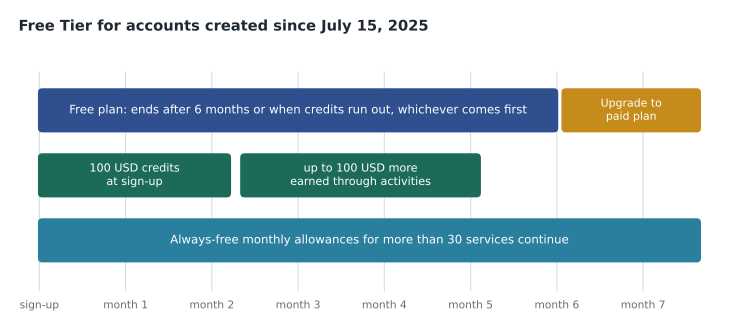
Accounts created before July 15, 2025 kept the older model: 12-month free offers counted from their own sign-up date, plus always-free offers and trials. By November 2026, any 12-month offers for those older accounts have long since ended, so they pay normal rates except for always-free allowances.
Why the sandbox was billed
Mateo checks the date: Cascade Ridge's sandbox was opened on October 5, 2026, so it falls under the credit model. When he signed up he chose the paid plan, because a tutorial needed a service the free plan did not offer. That meant his credits were used first and then normal charges began. The credits covered part of October; the 612.40 US dollars on the invoice is what remained after they were applied.
# Illustrative: credits applied to a month's charges on a paid plan.
charges = 712.40          # usage before credits
credits_available = 100.00
applied = min(charges, credits_available)
print(f"Charges          {charges:8.2f}")
print(f"Credits applied  {-applied:8.2f}")
print(f"Amount due {charges - applied:8.2f} USD, before tax")Charges 712.40 Credits applied -100.00 Amount due 612.40 USD, before tax
What this code does
It applies 100 dollars of available credits to a month's charges, never using more credit than the charges. It prints the charges, the credit applied and the amount due before tax. This reflects how credits reduce a bill on a paid plan.
If he had stayed on the free plan, the large server could not have run beyond the credits, and the account would have stopped him rather than billing him. That is the point of the free plan: it is a safe place to learn. The paid plan is a real account that happens to start with credits.
Limits that catch people out
Whichever model an account uses, the same traps appear again and again in support forums and on the exam.
- Wrong size or type. Free compute offers cover specific small instance types. A larger type is billed in full.
- More than one resource. A monthly free allowance of instance hours is shared by all eligible instances, so two small instances use it up twice as fast.
- Resources outside the offer. Elastic IP addresses not attached to a running instance, NAT gateways, load balancers beyond the allowance, and many managed services charge from the start.
- Storage that stays. Snapshots, volumes and S3 objects keep charging after the server that used them is gone.
- Data transfer out beyond the free monthly allowance.
- Regions and organizations. Free offers apply per customer, and an organization counts as one customer, so free usage is not multiplied across accounts (lesson 7).
Watching free usage
The Billing and Cost Management console shows Free Tier usage for each offer, with how much has been used this month and how much is forecast. AWS sends Free Tier usage alerts by email when usage approaches or exceeds an offer's limit, to the account's email address or the alternate billing contact. In October, those alerts went to an unmonitored mailbox. Gwen's fixes from lesson 5, a monitored billing contact and a budget, would have caught the problem in the first week.
For new accounts, Gwen's advice is simple. Use the free plan to learn. Set a small cost budget on day one, even at a few dollars, with alerts to an address someone reads. Delete resources when an exercise is finished, including volumes, snapshots and Elastic IP addresses. And remember that the Free Tier is a way to learn AWS, not a way to run a business: Cascade Ridge's production workloads will be paid for at normal rates, with commitments where they make sense.
Free Tier and the exam
Exam questions about the Free Tier usually test three ideas: that free offers have limits and charges begin above them; that there are different kinds of offers (always free, time-limited and trials, or credits and plans for newer accounts); and that you can monitor free usage in the billing console and with alerts and budgets. Specific amounts change often and are rarely the point of a question.
A safe routine for learning accounts
Gwen gives Mateo a routine to use in any account meant for learning, and he copies it into the team wiki.
- Before you start: check which plan the account is on and how many credits remain; check that a small budget with alerts exists.
- While you work: use the smallest instance types the exercise allows; tag everything with environment = sandbox and your name.
- When you finish: delete instances, volumes, snapshots, load balancers, NAT gateways and Elastic IP addresses; empty and delete test buckets.
- The next day: look at the billing home page and Cost Explorer for yesterday's charges, before they become a month's.
Watching allowances
Always-free and other monthly allowances are counted across the month and, in an organization, across accounts. The Free Tier page in the billing console shows each offer's month-to-date use and a forecast. A simple calculation shows why the forecast matters: usage that looks small on day ten can pass the allowance well before the month ends.
# Illustrative: forecasting use of a monthly free allowance.
allowance = 750            # free hours in the month for an eligible small instance
used_so_far = 310          # hours used by day 10
day, days_in_month = 10, 30
forecast = used_so_far / day * days_in_month
print("forecast hours this month:", round(forecast))
print("over the allowance by :", max(0, round(forecast - allowance)), "hours")forecast hours this month: 930 over the allowance by : 180 hours
What this code does
It forecasts a month's use of a free allowance by taking the hours used in the first 10 days, working out the daily rate and multiplying by 30 days. It compares the forecast with the 750-hour allowance. The forecast exceeds it by about 180 hours, which is the warning that a free-tier usage alert gives before charges begin.
Two small instances running all month use about 1,460 hours, roughly twice a 750-hour allowance, which is why a second test instance is often the first thing to appear on a beginner's bill.
Other credits
Free Tier credits are not the only credits AWS offers. Startups, non-profits, researchers, students and teachers may qualify for credits through AWS programs, and events or promotions sometimes give credits too. Each credit has its own terms and expiry date and appears on the bill as a negative line. None of them changes how pricing works: once credits are used up or expire, normal charges apply.
Free Tier in exam questions
Exam questions about free offers are usually short scenarios. A student wants to learn without risk of charges: the free plan fits, along with a budget and alerts. A company is surprised by a bill after the first month: the likely causes are an ineligible size, usage above an allowance or resources left running. A team wants to know how much of an allowance it has used: the Free Tier page in the billing console and Free Tier usage alerts answer that. Memorizing exact allowances helps less than understanding these patterns, because AWS changes the amounts and the offers from time to time.
Mateo adds a last line to his notes: the Free Tier is a feature of the account's plan, not of a Region or a service, and the organization counts as one customer.
The Free Tier and production
Could Cascade Ridge run any production workload on free offers? Technically some small pieces fit inside always-free allowances, such as a few Lambda functions or a small DynamoDB table. But production decisions should be made on reliability, security and support, not on staying inside an allowance. Gwen's advice is to treat any free usage in production as a pleasant discount, never as a design goal, and to make sure production accounts are on the paid plan from the start so that nothing is limited at a bad moment. The free plan's protections are for learning; production needs predictable behavior and the full range of services.
Worked problem
Is it free?
On a new account in the paid plan with credits remaining, Kwame runs a small eligible instance for a test, attaches a 30 GB volume, and leaves an Elastic IP address allocated after stopping the instance. Which of these could create charges once credits are used up?
Show solution
- The small instance is covered while credits or an applicable allowance last; beyond that it is billed.
- The volume is billed for its provisioned size if it exceeds any storage allowance.
- An Elastic IP address, and public IPv4 addresses in general, are charged hourly, so the address left allocated costs money.
- All usage draws on the credits first on the paid plan.
Answer: All three can create charges once credits are gone; the idle Elastic IP address is the easiest to forget.
Common mistakes
MistakeThe Free Tier makes any small test free.
InsteadOnly eligible services and sizes are covered, and only up to set amounts.
MistakeCredits on the paid plan prevent any charges.
InsteadOn the paid plan, credits are used first and normal charges begin when they run out.
MistakeEach account in an organization has its own Free Tier.
InsteadThe organization is treated as one customer for free offers.
MistakeDeleting a server stops all of its costs.
InsteadIts volumes, snapshots and Elastic IP addresses can keep charging until they are deleted too.
Summary and key terms
- AWS free offers include always-free monthly allowances, legacy 12-month offers for accounts created before July 15, 2025, and short-term trials.
- Since July 15, 2025, new customers receive up to 200 US dollars in credits, 100 at sign-up and up to 100 more for activities, and choose a free plan or a paid plan.
- The free plan limits services and ends after six months or when credits run out, whichever comes first; the paid plan uses credits first and then charges normally.
- More than 30 services keep always-free allowances.
- Charges begin above any free amount, for ineligible sizes and services, and for resources left behind.
- Free usage is monitored in the billing console, through Free Tier alerts and with budgets.
- AWS Free Tier
- AWS offers that let customers use some services at no charge up to set limits
- Always free
- A monthly allowance with no end date
- Free plan
- For new accounts, a plan that limits services and prevents charges beyond credits, for up to six months
- Paid plan
- An account plan with access to all services that uses credits first, then charges normally
- AWS credits
- Amounts applied to a bill to reduce charges, subject to terms
- Free Tier usage alert
- An email warning when usage nears or exceeds a free offer's limit
Practice problems
Work each problem on paper first, then reveal the answer to check.
When does the free plan for a new account end?
Show answer
Six months after sign-up or when credits run out, whichever comes first.
Why was the sandbox's large test server billed?
Show answer
It was not an eligible size for free compute offers, and the account was on the paid plan, so normal charges applied once credits were used.
Name two resources that can keep charging after you delete a server.
Show answer
EBS volumes and snapshots; also Elastic IP addresses.
Where can you see how much of each free offer has been used?
Show answer
On the Free Tier page of the Billing and Cost Management console.
Lesson quiz · 5 questions
Score 60% or more to complete this lesson.
Create a free account to save your progress, take quizzes and earn a certificate.