
AWS-104 · Lesson 12 of 12 · 19 min
Case study: cutting a monthly cloud bill
▶ Video coming soon A video version of this lesson is on the way.
On the afternoon of November 12, Gwen hands Mateo a final exercise. "Two bills," she says. "The sandbox bill that started all this, which we fix today, and the production estimate from lesson 4, which we plan to cut before the first invoice ever arrives. Write it up as a one-page plan for Lorraine." This lesson follows that exercise. It uses everything in the course: pricing drivers, purchase options, storage classes, data transfer, the estimating and tracking tools, the organization, the Free Tier, support plans and Trusted Advisor.
Part 1: the sandbox bill
The October sandbox invoice was 612.40 US dollars after credits. Mateo lists every line, its cause and its fix, using Cost Explorer grouped by usage type and the Trusted Advisor core checks from lesson 10.
| Line | Cause | Fix (done on November 12) |
|---|---|---|
| Large EC2 instance, running all month | A trial server launched October 7 and forgotten | Terminated; future trials use small instances on a schedule |
| Unattached 1 TB EBS volume | Left behind when another test server was terminated | Snapshot kept for one week, then the volume deleted |
| NAT gateway hours and processing | Created by a tutorial, then used for S3 downloads | Deleted; a gateway endpoint for S3 added to the sandbox VPC |
| 4 TB of test images in S3 Standard | Copied for testing, never cleaned up | 3.5 TB deleted; 0.5 TB kept with a lifecycle rule that expires it after 30 days |
| Elastic IP address | Allocated and never released | Released |
Then he adds controls, so that the next mistake is caught in days instead of a month: the sandbox joins the organization (lesson 7); a monthly budget of 150 US dollars with forecast and actual alerts, and a budget action at 150 (lesson 6); a Cost Anomaly Detection monitor; a service control policy that blocks very large instance types in the sandbox; a scheduled job that stops any sandbox instance tagged environment = sandbox at 7 p.m.; and a monitored billing contact. With these in place, the November sandbox forecast falls to about 40 US dollars.
Part 2: the production estimate
The production estimate from lesson 4 was about 9,800 US dollars a month at On-Demand rates. Gwen and Mateo go through it group by group, asking the same questions each time: Is it the right size? Does it need to run all the time? Is it in the right pricing model? Is the data in the right storage class? Is data moving in a way that costs money for no reason?
Rightsizing
The estimate sized the two VetLedger application servers from the vendor's general recommendation. A load test planned for December will measure real use, but the current on-premises servers already give a clue: they run at about a quarter of their CPU most of the day. Gwen proposes starting one size smaller than the vendor's suggestion, watching CloudWatch and Compute Optimizer during the pilot, and stepping up only if needed. On AWS, changing an instance size is a short maintenance task, not a hardware purchase.
Scheduling and environments
The development account will mirror production in miniature. Its servers and test database need to run only in working hours on weekdays, so a schedule stops them at night and on weekends. Lesson 1's calculation showed that running 50 hours a week instead of 168 removes about 70 cents of every compute dollar. Development is smaller than production, but the saving is real and costs nothing.
Storage
Imaging is the largest data cost. The estimate already included a lifecycle rule, but Gwen checks its timing against Dr. Kaur's real practice: most studies are reopened within three months, so the move to Glacier Instant Retrieval shifts to 180 days. Volumes move from gp2-style sizing to gp3 with performance set to measured need. Backups are reviewed with Hannah: daily backups kept 35 days, monthly backups kept for the records retention period, all managed by AWS Backup rather than ad hoc snapshots, so old copies expire automatically.
Data transfer
Three changes reduce transfer charges: gateway endpoints so private servers reach S3 without passing through NAT gateways; CloudFront in front of the public website and its images; and keeping each application's busy, chatty components in the same Availability Zone where the design allows, while still running copies in two zones for resilience. The estimate keeps one NAT gateway per Availability Zone for the traffic that really needs the internet.
Commitments, later
Commitments come last. Production will run On-Demand for its first three months, so the team can see the steady baseline. Then, using the Savings Plans recommendations in Cost Explorer, Lorraine will approve a Compute Savings Plan sized a little below the steady baseline, and the team will evaluate Reserved Instances for Amazon RDS for the SQL Server database, which runs continuously. These are plans for summer 2027, not purchases.
# Illustrative monthly production estimate (USD) and the planned changes.
start = 9800
changes = [
    ("Rightsize app servers one size down", -900),
    ("Schedule development off nights and weekends", -420),
    ("Lifecycle and gp3 changes", -380),
    ("Gateway endpoints and CloudFront", -260),
    ("Business Support+ for production", +700),
    ("Savings Plan and RDS reservation (planned, after 3 months)", -1640),
]
total = start
print(f"{'Starting estimate':55} {start:7,d}")
for name, delta in changes:
    total += delta
    print(f"{name:55} {delta:+7,d}")
print(f"{'Planned steady-state monthly cost':55} {total:7,d}")Starting estimate 9,800 Rightsize app servers one size down -900 Schedule development off nights and weekends -420 Lifecycle and gp3 changes -380 Gateway endpoints and CloudFront -260 Business Support+ for production +700 Savings Plan and RDS reservation (planned, after 3 months) -1,640 Planned steady-state monthly cost 6,900
What this code does
It starts from an illustrative monthly production estimate and applies a list of planned changes, rightsizing, scheduling, storage changes, network changes, added support and a Savings Plan, keeping a running total. Each change is printed with its effect, plus for added costs and minus for savings. The final line shows the planned steady-state monthly cost, about 2,900 dollars below the starting estimate.
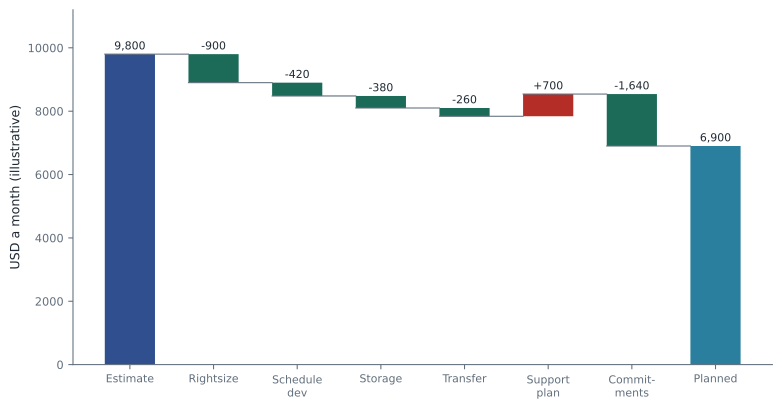
The result is about 6,900 US dollars a month once commitments are in place, illustrative and dependent on the pilot's measurements. Two lines deserve comment. Business Support+ makes the bill higher, and that is deliberate: Dr. Kaur's 3 a.m. requirement is worth paying for (lesson 9). And the largest single saving, the commitment, is also the one with the most risk if bought too early or too large, which is why it waits.
Part 3: keeping it cut
A bill cut once grows back unless someone watches it. Mateo's plan ends with a monthly routine that takes about an hour.
- Week one of each month: compare the finalized bill with the estimate by group in Cost Explorer; explain any line that moved by more than an agreed amount.
- Review recommendations: Cost Optimization Hub, Trusted Advisor cost checks and Compute Optimizer; act on the top three.
- Check commitments: Savings Plans and RI utilization and coverage reports; flag anything below the agreed utilization.
- Check tags: the untagged resources report; tag or delete what it finds.
- Budgets and anomalies: confirm alerts still go to the right people; review any anomalies from the month.
- Report: a one-page summary for Lorraine with cost by clinic, using the tags and Cost Categories from lesson 6.
This routine is a small version of what larger organizations call cloud financial management or FinOps: finance, technology and the business working together to make spending decisions with good, timely data. Gwen points out that the idea is the same at any size: everyone who can create cost should be able to see it, and someone should look regularly.
Mateo's one-page plan
| Area | Action | Tool or feature | When |
|---|---|---|---|
| Sandbox | Clean up, join the organization, budget with action, anomaly monitor, SCP, schedule | Organizations, Budgets, Cost Anomaly Detection, SCPs | Done November 12, 2026 |
| Production design | Rightsize, gp3, lifecycle at 180 days, gateway endpoints, CloudFront | Compute Optimizer, S3 Lifecycle, VPC endpoints | Before the December pilot |
| Development | Stop nights and weekends | Scheduled automation, tags | From the start of the pilot |
| Support | Business Support+ on production | AWS Support | Before the spring 2027 cutover |
| Visibility | Required tags, CUR 2.0 export, budgets and alerts, monthly review | Tag policies, Data Exports, Budgets, Cost Explorer | From the first day of production |
| Commitments | Compute Savings Plan below the steady baseline; evaluate RDS reservations | Savings Plans recommendations, Cost Explorer | After three months of production (summer 2027) |
Lorraine's reply comes back within the hour: "This I can take to the board. Please add a column for who owns each line." Mateo adds it. It is the last change of the course, and possibly the most important one: costs are controlled by people who know they own them.
Cost per appointment
Lorraine thinks in clinics and appointments, not instance hours. Gwen suggests one unit cost for the board: cloud cost per appointment. If the planned steady-state cost is about 6,900 US dollars a month and the group handles about 9,150 appointments a month across all sites, each appointment carries well under a dollar of cloud cost. As the group grows, the total bill should rise, but the cost per appointment should stay flat or fall. A rising unit cost is an early warning that something is being wasted.
# Illustrative unit cost: monthly cloud cost per appointment.
months = ["Apr", "May", "Jun"]
cost = [7400, 7050, 6900]            # USD a month (planned, illustrative)
appointments = [8900, 9050, 9150]
for m, c, a in zip(months, cost, appointments):
print(f"{m}: {c / a:5.3f} USD per appointment")Apr: 0.831 USD per appointment May: 0.779 USD per appointment Jun: 0.754 USD per appointment
What this code does
It divides each month's planned cloud cost by the number of appointments that month to get the cost per appointment. Comparing April, May and June shows the unit cost falling. A unit cost like this is more meaningful than the total bill when the business is growing.
Unit costs also make conversations easier. "The cloud bill went up 300 dollars" invites alarm; "the cloud bill went up 300 dollars because we opened a new clinic, and cost per appointment fell" invites agreement.
Cost and the Well-Architected Framework
The AWS Well-Architected Framework includes a cost optimization pillar whose practices match this lesson: practice cloud financial management, measure and attribute spending, use cost-effective resources, manage demand and supply, and keep optimizing over time. The Well-Architected Tool lets a team review a workload against these questions. Gwen schedules a review of the production design against the cost and reliability pillars before cutover, so that the cost plan and the 3 a.m. plan are checked together.
Where to go next
The billing domain is a small share of the Cloud Practitioner exam, but in daily work it is where most conversations with leadership happen. Mateo leaves the course able to read a bill line by line, estimate a system before it exists, choose purchase options and storage classes, set up tags, budgets and alerts, explain the support plans and find help. The remaining preparation for his February exam is the readiness course, which reviews all four domains.
Worked problem
Prioritizing savings
The team has time for only two changes before the pilot. The options, with illustrative monthly savings, are: buy a three-year Savings Plan now (1,640 USD, but the baseline is unknown); rightsize the app servers (900 USD, easily reversed); schedule development (420 USD, no risk); add gateway endpoints and CloudFront (260 USD). Which two should they choose?
Show solution
- A commitment bought before usage is known risks paying for unused hours for three years; it should wait.
- Rightsizing gives the largest safe saving and can be undone in minutes if the load test needs more.
- Scheduling development is risk-free and quick.
- Endpoints and CloudFront are valuable but smaller; they can follow soon after.
Answer: Rightsize the app servers and schedule development; leave the commitment until usage is measured.
Common mistakes
MistakeThe biggest saving should always be done first.
InsteadWeigh savings against risk; a long commitment made before usage is known can cost more than it saves.
MistakeA higher bill after a change means the change was a mistake.
InsteadSome costs, such as a support plan or a second Availability Zone, buy reliability that the business needs.
MistakeCutting a bill is a one-time project.
InsteadCosts drift upward without a regular review routine and owners for each line.
MistakeCost optimization means using the cheapest option everywhere.
InsteadIt means paying for what delivers value: the right size, the right pricing model and the right reliability.
Summary and key terms
- Cutting a cloud bill starts with reading it: sort each line by driver and cause.
- Quick wins come from deleting forgotten resources, rightsizing, scheduling non-production environments, choosing storage classes and gp3 volumes, and avoiding unnecessary data transfer with gateway endpoints and CloudFront.
- Controls such as budgets, budget actions, anomaly detection, service control policies, tags and a monitored billing contact catch future mistakes.
- Commitments give the largest savings but should wait until the steady baseline is measured.
- Some changes, such as a support plan, raise the bill on purpose to buy reliability.
- A monthly review routine with named owners keeps costs under control, which is the heart of cloud financial management.
- Rightsizing
- Adjusting resource sizes to measured need
- Scheduling
- Stopping resources automatically when they are not needed
- Cloud financial management
- Managing cloud spending through shared responsibility between finance, technology and the business
- FinOps
- A widely used name for cloud financial management practices
- Steady baseline
- The level of usage that runs continuously and suits a commitment
- Cost owner
- The person responsible for explaining and controlling a cost line
Practice problems
Work each problem on paper first, then reveal the answer to check.
Why does the plan wait three months before buying a Savings Plan?
Show answer
To measure the steady baseline, so the commitment is not too large.
Why does the plan accept a higher cost for Business Support+?
Show answer
Because 24/7 technical support with a fast response for critical outages is worth the cost for the emergency hospital.
Name two controls added to the sandbox to catch future mistakes.
Show answer
A budget with alerts and an action, and a Cost Anomaly Detection monitor; also an SCP, schedules and a monitored billing contact.
Which tools support the monthly review?
Show answer
Cost Explorer, Cost Optimization Hub, Trusted Advisor, Compute Optimizer, Budgets and the untagged resources report.
Lesson quiz · 5 questions
Score 60% or more to complete this lesson.
Create a free account to save your progress, take quizzes and earn a certificate.