
AWS-104 · Lesson 3 of 12 · 20 min
Storage and data transfer pricing
▶ Video coming soon A video version of this lesson is on the way.
Cascade Ridge's largest dataset is its imaging archive: about 38 TB of digital radiographs and ultrasound studies, growing by roughly 6 TB a year. In the sandbox, Mateo copied 4 TB of test images into Amazon S3 and paid for every gigabyte of it in the most expensive storage class, then paid again for a NAT gateway that the images never needed. On November 5, Gwen spends the session on the two kinds of charges that are easiest to underestimate: storage and data transfer.
"Compute bills are loud," she says. "A big server shows up as one big line. Storage and transfer are quiet. They grow a little every month until someone notices." This lesson explains how AWS prices storage, how S3 storage classes trade storage price against access price, and when moving data costs money.
How storage is priced
Most AWS storage is billed by the gigabyte-month: one gigabyte stored for one month. Storing 1,000 GB for half a month costs the same as storing 500 GB for a whole month. On top of the storage itself, many services charge for what you do with the data.
- Requests. Amazon S3 charges per thousand requests, with writes and listings (PUT, COPY, POST, LIST) priced higher than reads (GET).
- Retrieval. Infrequent-access and archive classes charge per gigabyte read back, and archive classes can take minutes to hours to return data.
- Provisioned capacity and performance. Amazon EBS volumes are billed for the size you provision, not the data you write, and some volume types also charge for provisioned input/output operations per second (IOPS) and throughput.
- Snapshots and backups. EBS snapshots and AWS Backup copies are billed for the data they keep, which grows as you keep more versions.
The unattached 1 TB volume on the sandbox bill is a classic example of provisioned pricing. It held almost nothing, but it was billed for a full terabyte every hour it existed.
Amazon S3 storage classes
Amazon S3 offers several storage classes. All keep data with the same very high durability, and most store it across at least three Availability Zones. They differ in storage price, access price, how quickly data comes back, and how long you must keep it to avoid a minimum charge.
| Storage class | Designed for | Pricing pattern |
|---|---|---|
| S3 Standard | Frequently accessed data | Highest storage price; no retrieval charge; no minimum storage duration |
| S3 Intelligent-Tiering | Data with unknown or changing access patterns | Small monitoring charge per object; moves objects between access tiers automatically; no retrieval charge |
| S3 Standard-Infrequent Access | Data read rarely but needed quickly | Lower storage price; per-gigabyte retrieval charge; 30-day minimum; minimum billable object size |
| S3 One Zone-Infrequent Access | Re-creatable, infrequently used data | Lower still; stored in one Availability Zone only; 30-day minimum |
| S3 Glacier Instant Retrieval | Archive data that needs millisecond access | Very low storage price; higher retrieval charge; 90-day minimum |
| S3 Glacier Flexible Retrieval | Archives read once or twice a year | Lower storage price; retrieval in minutes to hours; 90-day minimum |
| S3 Glacier Deep Archive | Long-term retention, rarely if ever read | Lowest storage price; retrieval within hours; 180-day minimum |
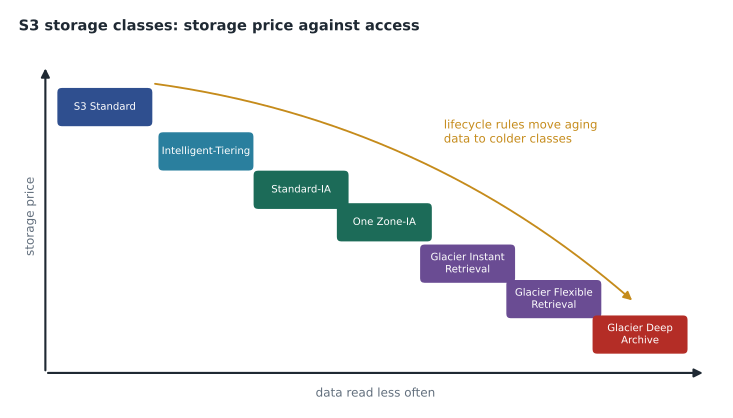
The minimum storage duration matters. If you put an object in Glacier Deep Archive and delete it after 30 days, you are still charged as though it had stayed 180 days. Cold classes are cheap only for data that really stays cold.
Lifecycle rules and Intelligent-Tiering
An S3 Lifecycle rule moves objects to a cheaper class, or deletes them, based on their age. Veterinary images follow a familiar pattern: a study is viewed often in the first weeks while a pet is treated, occasionally over the next year, and very rarely after that, but clinical records must be kept for years. Gwen sketches a rule: keep new images in S3 Standard for 30 days, move them to Standard-Infrequent Access, then to Glacier Instant Retrieval after one year, so that a vet can still open an old radiograph immediately when a patient returns.
Where nobody knows the pattern, S3 Intelligent-Tiering watches each object's access and moves it between tiers automatically for a small monitoring charge per object. It suits large datasets with unpredictable access. It is less attractive for millions of tiny objects, where the per-object monitoring charge can outweigh the saving.
# Illustrative monthly storage prices, USD per GB-month.
price = {"Standard": 0.023, "Standard-IA": 0.0125, "Glacier Instant": 0.004}
archive_gb = 38000
# Assumed split after a lifecycle rule has run for a few years:
split = {"Standard": 0.04, "Standard-IA": 0.12, "Glacier Instant": 0.84}
all_standard = archive_gb * price["Standard"]
tiered = sum(archive_gb * share * price[c] for c, share in split.items())
print(f"All in Standard : {all_standard:8.2f} USD a month")
print(f"With lifecycle : {tiered:8.2f} USD a month (before retrieval charges)")All in Standard : 874.00 USD a month With lifecycle : 219.64 USD a month (before retrieval charges)
What this code does
It prices a 38,000-gigabyte image archive kept entirely in S3 Standard, and again after a lifecycle rule has moved most older images to cheaper classes, using illustrative prices per gigabyte-month and an assumed split. The tiered total is the sum of each class's share of the archive multiplied by its price. Lifecycle tiering cuts the monthly storage bill to about a quarter, before any retrieval charges.
The lifecycle version stores the same 38 TB for a fraction of the cost, but Gwen reminds Mateo of the last line of output: retrieval charges come on top. If vets opened old images far more often than expected, Glacier Instant Retrieval's higher read price would eat into the saving. Cost decisions about storage are really decisions about access patterns.
Block and file storage
Servers use block storage. An Amazon EBS volume is billed per gigabyte of provisioned size per month. General-purpose SSD volumes (gp3) include a baseline of performance and let you pay separately for extra IOPS and throughput; older gp2 volumes tie performance to size, so they sometimes force you to buy space you do not need just to get speed. Moving suitable volumes from gp2 to gp3 is a common, low-risk saving. EBS snapshots are stored incrementally, so each new snapshot stores only the blocks that changed, but keeping many snapshots for years still adds up.
File storage such as Amazon EFS is billed for the data actually stored rather than provisioned, with cheaper infrequent-access tiers for files not read recently. Instance store disks are included in the price of the instances that have them, but their data disappears when the instance stops, so they suit only temporary data.
Data transfer: the general rules
Data transfer pricing confuses many people, so Gwen reduces it to a picture and a handful of rules. They describe the general pattern; specific services have exceptions, and the price list is the final word.
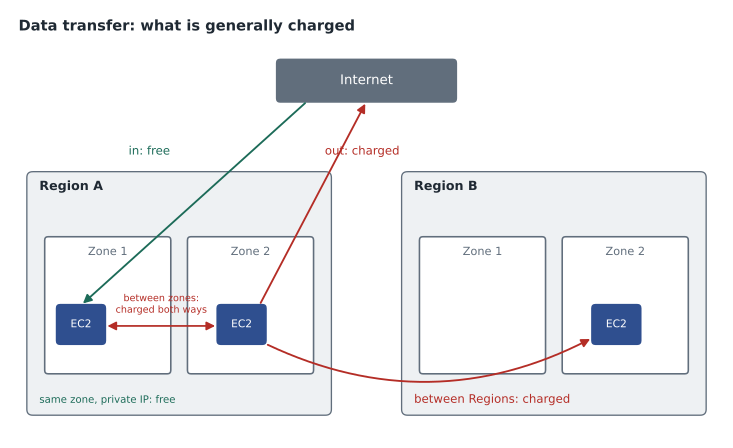
- Into AWS from the internet: generally free.
- Out of AWS to the internet: charged per gigabyte, with volume tiers that lower the rate as you send more. AWS includes a free allowance each month: 100 GB out to the internet, added up across Regions, plus 1 TB out from Amazon CloudFront.
- Between Regions: charged per gigabyte, usually by the sending Region. Copying backups from US West (Oregon) to US East (Ohio) will appear as inter-Region transfer.
- Between Availability Zones in the same Region: charged per gigabyte, in each direction. A chatty application split across zones pays for its conversation.
- Within one Availability Zone over private IP addresses: generally free between EC2 instances.
- To many AWS services in the same Region: often free, for example from EC2 to S3 in the same Region, but the path matters, as the next section shows.
The NAT gateway trap
The sandbox NAT gateway cost money in two ways: an hourly charge for existing and a per-gigabyte processing charge for every byte that passed through it. Private servers in a subnet without direct internet access send their internet-bound traffic through a NAT gateway. If those servers download large files from S3 through the NAT gateway, the company pays the processing charge on traffic that could have gone to S3 for free.
The fix is a gateway VPC endpoint for S3 (and DynamoDB), which lets private servers reach those services directly over the AWS network. Gateway endpoints have no hourly or per-gigabyte charge. Mateo adds an endpoint to the design for the imaging servers before the pilot.
# Illustrative: 3 TB a month pulled from S3 by private servers.
gb = 3000
nat_processing = 0.045      # USD per GB processed (illustrative)
nat_hourly = 0.045 * 730    # USD for one NAT gateway for a month (illustrative)
via_nat = gb * nat_processing + nat_hourly
via_endpoint = 0.0          # gateway endpoint: no hourly or data charge
print(f"Through a NAT gateway  : {via_nat:7.2f} USD")
print(f"Through a gateway endpoint: {via_endpoint:7.2f} USD")Through a NAT gateway : 167.85 USD Through a gateway endpoint: 0.00 USD
What this code does
It compares two ways for private servers to download 3 terabytes a month from S3: through a NAT gateway, which charges for every gigabyte processed plus an hourly fee, or through a gateway endpoint, which has neither charge. It prints both illustrative monthly costs. The endpoint makes this traffic free, which is a common and easy saving.
Content delivery and transfer out
When many people download the same files, a content delivery network can lower both latency and cost. Amazon CloudFront caches content at edge locations around the world; its data transfer to viewers is priced by geographic area and has its own free monthly allowance. Data sent from an AWS origin such as S3 to CloudFront is not charged as internet transfer. Cascade Ridge's public website, with its photos of clinics and staff, is a natural fit. Owners viewing their own pets' images through the client portal, which must be private and authenticated, are a different case that the team will design carefully in phase 2.
Reading transfer on the bill
Data transfer lines on a bill are grouped by the service that sent the data and labeled with the direction and Regions involved. Cost Explorer can group by usage type to separate them (lesson 6). Mateo finds the sandbox's small transfer line: about 20 GB sent to the internet when he viewed test images from home. It fell inside the monthly free allowance and cost nothing, but in production, owners and referring vets downloading studies could send far more.
Requests, small objects and retrieval
Storage price per gigabyte is only part of the story for S3. Every upload, listing and download is a request, and requests are priced per thousand. For a few large files, requests hardly matter. For millions of tiny files, they can cost more than the storage. The infrequent-access classes also have a minimum billable object size, so a very small object is charged as though it were larger. Packing many small files into fewer larger objects, or keeping small, busy files in S3 Standard, avoids both traps.
Retrieval charges work the other way round from storage charges. In S3 Standard there is no charge to read data back. In the infrequent-access and archive classes, each gigabyte read back has a price, and in Glacier Flexible Retrieval and Deep Archive you also choose how fast you want it, with faster retrieval costing more. A good rule is to choose a class by asking how often the data will be read, not only how long it will be kept.
Worked problem
Estimating a backup copy
The team plans to copy the 38 TB imaging archive once to the recovery Region, then about 500 GB a month of new images. With an illustrative inter-Region rate of 0.02 USD per GB, what does the first copy cost, and what does each monthly copy cost after that?
Show solution
- First copy: 38,000 GB × 0.02 = 760 USD (one time).
- Monthly: 500 GB × 0.02 = 10 USD.
- Storage in the recovery Region is charged separately, by storage class.
Answer: About 760 USD once, then about 10 USD a month for transfer, illustrative, plus the storage in the second Region.
Common mistakes
MistakeGlacier Deep Archive is cheapest for any data I might not need.
InsteadIt is cheapest to store, but retrieval takes hours, costs more per gigabyte and objects are charged for at least 180 days.
MistakeEBS charges for the data written to a volume.
InsteadEBS charges for the provisioned size of the volume, whether it is full or empty.
MistakeAll traffic inside AWS is free.
InsteadTraffic between Availability Zones and between Regions is charged; traffic within one zone over private addresses is generally free.
MistakeA NAT gateway is the only way for private servers to reach S3.
InsteadA gateway VPC endpoint reaches S3 directly with no hourly or data processing charge.
Summary and key terms
- Storage is usually billed per gigabyte-month, plus requests, retrievals, provisioned performance and snapshots.
- S3 storage classes trade lower storage prices for higher access prices, slower retrieval and minimum storage durations; lifecycle rules move aging data to colder classes, and Intelligent-Tiering does it automatically.
- EBS is billed for provisioned size, and gp3 lets you pay for performance separately.
- Data into AWS is generally free; data out to the internet, between Regions and between Availability Zones is charged, with a free monthly allowance for internet transfer.
- NAT gateways charge per hour and per gigabyte processed, so gateway endpoints for S3 save money.
- CloudFront can reduce transfer cost and latency for widely downloaded content.
- Gigabyte-month
- One gigabyte stored for one month; the usual unit of storage pricing
- Storage class
- An S3 option with its own storage price, access price and retrieval speed
- Minimum storage duration
- The shortest period an object is charged for in a storage class
- Lifecycle rule
- An S3 rule that moves or deletes objects as they age
- S3 Intelligent-Tiering
- A storage class that moves objects between access tiers automatically
- Data transfer out
- Data sent from AWS to the internet, which is charged per gigabyte
- NAT gateway
- A managed service that gives private subnets outbound internet access, charged per hour and per gigabyte
- Gateway VPC endpoint
- A free private route from a VPC to S3 or DynamoDB
Practice problems
Work each problem on paper first, then reveal the answer to check.
Why did the empty 1 TB EBS volume still cost money?
Show answer
EBS is billed for provisioned size, not for the data stored on it.
Which storage class suits images that are rarely opened but must open instantly when needed?
Show answer
S3 Glacier Instant Retrieval, or Standard-Infrequent Access for data that is a little more active.
Is data transfer between two Availability Zones in the same Region free?
Show answer
No; it is charged per gigabyte in each direction.
How can private servers reach S3 without paying NAT gateway processing charges?
Show answer
Through a gateway VPC endpoint for S3.
Lesson quiz · 5 questions
Score 60% or more to complete this lesson.
Create a free account to save your progress, take quizzes and earn a certificate.