
WEB-201 · Lesson 9 of 12 · 30 min
Indexes and query performance
▶ Video coming soon A video version of this lesson is on the way.
Eight volunteers and sixteen signups make every query instant. Theo wanted Mira to see what happens when they don't. On Wednesday he generated a test database with the Food Hub's real scale for five years ahead: 1,500 volunteers, 20,000 shifts and 300,000 signups. The query behind the sign-up page's "my shifts" list, which had taken under a millisecond, now took a noticeable fraction of a second, and the page ran it on every visit. "The data's fine and the query's correct," Theo said. "The database just has to read every row to answer it. Let's give it an index."
An index is a separate, sorted structure that lets the database find rows by a column's value without reading the whole table. This lesson explains how indexes work, how to create them, how to read a query plan to see whether one is used, why some queries cannot use an index, and what indexes cost. It finishes with the query patterns, such as N+1 queries and deep OFFSET pages, that slow applications down whatever the indexes.
Scans and searches
Without an index on the column in a WHERE clause, the database performs a full table scan: it reads every row and tests the condition on each. That takes time in proportion to the size of the table, which is fine for 300 rows and slow for 300,000. With a suitable index, it performs an index search: it looks up the value in the index, which takes a handful of steps even for millions of rows, and goes straight to the matching rows.
The comparison Theo used is the index at the back of a textbook. To find every page that mentions "normalization", you could read the whole book, or look the word up in the index, which is sorted alphabetically and lists page numbers. A database index lists each value of the column in sorted order, with a pointer to each row that has it.
How a B-tree index works
Almost every database index is a B-tree (strictly, a B+ tree): a balanced tree of pages, each holding many sorted keys. The top page, the root, divides the range of values into sections; each section points to a page below that divides its range further; the bottom pages, the leaves, hold every value in order with pointers to the table rows. Because each page holds hundreds of keys, a tree only three or four levels deep covers millions of rows, so a lookup reads three or four pages instead of the whole table.
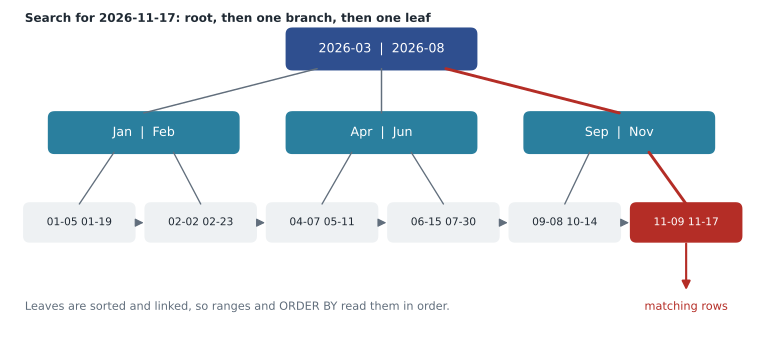
Because the leaves are in sorted order and linked to each other, a B-tree is good for more than exact matches. It handles ranges (shift_date BETWEEN two dates), prefixes (name LIKE 'Kow' followed by a wildcard), sorting (ORDER BY shift_date can read the index in order instead of sorting) and MIN and MAX (the first and last leaf). Other index types exist for special jobs, such as hash indexes for exact matches only and PostgreSQL's GIN indexes for full-text search and JSON, but B-trees are the default and the subject of this lesson.
Creating an index
You create an index with CREATE INDEX, giving it a name, the table and the column or columns. A naming convention such as idx_table_columns keeps them easy to recognize. Primary keys and UNIQUE constraints create an index automatically, because the database needs one to check uniqueness quickly; that is why looking up a volunteer by email was already fast.
-- Speeds up "who is on this shift?" and joins from shifts to signups
CREATE INDEX idx_signups_shift ON signups (shift_id);

-- A unique index both speeds up lookups and enforces uniqueness
CREATE UNIQUE INDEX idx_shifts_slot ON shifts (area_id, shift_date, start_time);

-- Remove an index that is no longer needed
DROP INDEX idx_signups_shift;
One gap catches many developers: PostgreSQL and SQLite do not create indexes for foreign key columns automatically (MySQL's InnoDB does). Joins and lookups along a foreign key, such as finding the signups for a shift, usually need one, as do the checks the database makes when a referenced row is deleted. Theo's rule is to add an index for every foreign key column unless it is the first column of an existing index.
Reading a query plan
You do not have to guess whether a query uses an index. Ask the database for its query plan, the steps it intends to take. In SQLite, put EXPLAIN QUERY PLAN in front of the query; the detail column says SCAN (read every row) or SEARCH (use an index to find rows), and names the index.
import sqlite3

conn = sqlite3.connect(':memory:')
conn.executescript("""
    CREATE TABLE signups (volunteer_id INTEGER, shift_id INTEGER, status TEXT,
                          PRIMARY KEY (volunteer_id, shift_id));
""")
def plan(sql, params=()):
    for row in conn.execute("EXPLAIN QUERY PLAN " + sql, params):
        print("  ", row[3])

sql = "SELECT volunteer_id, status FROM signups WHERE shift_id = ?"
print("Before the index:")
plan(sql, (5,))

conn.execute("CREATE INDEX idx_signups_shift ON signups (shift_id)")
print("After the index:")
plan(sql, (5,))

print("Looking up one volunteer:")
plan("SELECT shift_id FROM signups WHERE volunteer_id = ?", (1,))Before the index: SCAN signups After the index: SEARCH signups USING INDEX idx_signups_shift (shift_id=?) Looking up one volunteer: SEARCH signups USING COVERING INDEX sqlite_autoindex_signups_1 (volunteer_id=?)
What this code does
Makes a signups table and a small helper that asks SQLite how it plans to run a query. Finding the signups for one shift starts as a scan of every row; after an index on the shift column is added, the plan becomes a search using that index. Finding one volunteer's signups already uses the index that comes with the table's primary key.
The last plan says COVERING INDEX. The primary key index on (volunteer_id, shift_id) contains both columns the query needs, so SQLite answers from the index alone without visiting the table at all. A covering index is one that holds every column a query uses, and it is the fastest case of all.
Other systems have their own forms. In PostgreSQL, EXPLAIN shows the plan with estimated costs, and EXPLAIN ANALYZE actually runs the query and adds real times and row counts; look for Seq Scan (a full scan) versus Index Scan or Index Only Scan. In MySQL, EXPLAIN shows a row per table, where type ALL means a full scan and ref, range or const mean an index is used, and the key column names it.
EXPLAIN ANALYZE
SELECT volunteer_id, status FROM signups WHERE shift_id = 18240;

-- Index Scan using idx_signups_shift on signups  (cost=0.42..8.61 rows=15 width=12)
--   (actual time=0.031..0.036 rows=14 loops=1)
--   Index Cond: (shift_id = 18240)
-- Planning Time: 0.104 ms
-- Execution Time: 0.058 ms
Measuring the difference
Plans tell you what the database will do; timing tells you what it costs. The next example builds 60,000 signups and times the same lookup with and without an index. The exact times depend on the computer, so your numbers will differ, but the ratio is what matters.
import sqlite3, time, random

random.seed(7)
conn = sqlite3.connect(':memory:')
conn.execute("CREATE TABLE signups (signup_id INTEGER PRIMARY KEY, volunteer_id INTEGER, shift_id INTEGER)")
rows = [(random.randint(1, 1500), random.randint(1, 4000)) for _ in range(60000)]
conn.executemany("INSERT INTO signups (volunteer_id, shift_id) VALUES (?, ?)", rows)

def timed(label):
    start = time.perf_counter()
    for shift in range(1, 201):
        conn.execute("SELECT COUNT(*) FROM signups WHERE shift_id = ?", (shift,)).fetchone()
    ms = (time.perf_counter() - start) * 1000
    print(f"{label}: {ms:.1f} ms for 200 lookups")
    return ms

slow = timed("Without index")
conn.execute("CREATE INDEX idx_signups_shift ON signups (shift_id)")
fast = timed("With index")
print(f"About {slow / fast:.0f} times faster")Without index: 458.2 ms for 200 lookups With index: 0.6 ms for 200 lookups About 711 times faster
What this code does
Fills a table with sixty thousand random signups, then times two hundred lookups of how many people are on a shift, first with no index and then with an index on the shift column. It prints both times and how many times faster the indexed version was. The times change from computer to computer and run to run.
Composite indexes and the leftmost prefix
An index can cover several columns. A composite index on (last_name, first_name) is sorted by last name, and by first name within each last name, like a phone book. It helps any query that filters on the leading column or columns: last_name alone, or last_name and first_name together. It does not help a query on first_name alone, just as a phone book sorted by surname does not help you find everyone called Grace. This is the leftmost prefix rule.
import sqlite3

conn = sqlite3.connect(':memory:')
conn.execute("CREATE TABLE volunteers (volunteer_id INTEGER PRIMARY KEY, first_name TEXT, last_name TEXT, email TEXT)")
conn.execute("CREATE INDEX idx_volunteers_name ON volunteers (last_name, first_name)")
def plan(sql, params=()):
    for row in conn.execute("EXPLAIN QUERY PLAN " + sql, params):
        print("  ", row[3])

print("Last name only:")
plan("SELECT * FROM volunteers WHERE last_name = ?", ('Liu',))
print("Last name and first name:")
plan("SELECT * FROM volunteers WHERE last_name = ? AND first_name = ?", ('Liu', 'Grace'))
print("First name only:")
plan("SELECT * FROM volunteers WHERE first_name = ?", ('Grace',))Last name only: SEARCH volunteers USING INDEX idx_volunteers_name (last_name=?) Last name and first name: SEARCH volunteers USING INDEX idx_volunteers_name (last_name=? AND first_name=?) First name only: SCAN volunteers
What this code does
Makes a volunteers table with an index sorted by last name and then first name, and shows the plan for three searches. Searching by last name, or by last name and first name, uses the index. Searching by first name alone cannot, because the index is sorted by last name first, so SQLite reads the whole table.
So the order of columns in a composite index matters. Put first the columns that queries test for equality, then a column used for a range or for sorting. The "my shifts" query filters signups by volunteer_id and sorts by date, and the primary key (volunteer_id, shift_id) already starts with volunteer_id. For the sign-up page's "open shifts in an area" query, an index on shifts (area_id, shift_date) serves both WHERE area_id = ? and the ORDER BY shift_date.
When an index cannot be used
A query is called sargable (from "search argument able") when its conditions can use an index. Several common habits make conditions non-sargable, and the database falls back to a full scan even though an index exists.
| Pattern | Why the index is not used | Sargable alternative |
|---|---|---|
| WHERE lower(email) = ? | The index stores email, not lower(email) | Store emails in lower case, or create an index on the expression lower(email) |
| WHERE last_name LIKE a pattern that starts with a wildcard | The start of the value is unknown, so there is nowhere in the sorted index to begin | A prefix pattern, or full-text search |
| WHERE substr(shift_date, 1, 4) = '2026' | A function of the column hides its sorted order | WHERE shift_date >= '2026-01-01' AND shift_date < '2027-01-01' |
| WHERE spots + 1 > 3 | Arithmetic on the column | WHERE spots > 2 |
| WHERE phone = 5550141 on a text column | A type conversion on every row (in some databases) | Compare with a value of the column's type: '5550141' |
PostgreSQL, SQLite and MySQL 8 can index an expression, such as CREATE INDEX idx_volunteers_email_lower ON volunteers (lower(email)), so the first pattern can be fixed in the schema. Even so, keeping values in a consistent form when they are written, such as saving emails in lower case, is usually simpler.
What indexes cost
Indexes are not free. Every INSERT, UPDATE of an indexed column and DELETE must also update every index on the table, so each extra index makes writes slower. Indexes take disk space and memory. And the planner only uses an index when it expects it to help: on a column with few distinct values, such as status with four values spread evenly, a search would visit a large share of the table anyway, and a scan is often faster. How well an index narrows the search is called its selectivity; an email index is highly selective, a status index is not, though it can still help if the rare value you search for, such as 'no-show', really is rare.
The practical approach is to start with the indexes that primary keys and UNIQUE constraints give you, add one for each foreign key, and then add others for the specific queries the application runs often, confirmed with a query plan. Remove indexes that no query uses; PostgreSQL's statistics view pg_stat_user_indexes shows how often each one is scanned.
Query patterns that slow applications
Indexes fix slow lookups. Some slowness comes from how the application talks to the database, and no index fixes it.
- N+1 queries. One query for a list and one more for each item, as lesson 5 showed. Fifty shifts make 51 round trips. Use one join, or one query with WHERE shift_id IN (...) for all the IDs, and group in code. ORMs (lesson 11) produce N+1 queries easily when related data is loaded lazily.
- Fetching too much. SELECT * for a list that shows three columns, or fetching 10,000 rows to display 20. Name the columns and use LIMIT.
- Deep OFFSET pages. OFFSET 50000 still makes the database find and skip 50,000 rows. Keyset pagination remembers the last value on the previous page and asks for the rows after it.
- Repeating work. Running the same expensive report on every page view. Cache the result for a few minutes, or store a summary that is updated on a schedule.
-- Page 1: the first three upcoming shifts
-- Page 2 asks for shifts after the last (shift_date, shift_id) seen on page 1
SELECT shift_id, shift_date, start_time
FROM shifts
WHERE (shift_date, shift_id) > ('2026-11-17', 5)
ORDER BY shift_date, shift_id
LIMIT 3;

-- Result: 3 rows
-- shift_id | shift_date | start_time
-- ---------+------------+-----------
-- 6        | 2026-11-18 | 08:00
-- 7        | 2026-11-19 | 15:00
-- 8        | 2026-11-20 | 11:00
With an index on (shift_date, shift_id), the keyset query goes straight to the right place in the index whatever page it is on. Including the shift_id as a tie-breaker matters when several rows share a date: without it, rows with the same date could be skipped or repeated across pages.
Worked problem
Index the "open shifts" page
The sign-up page runs SELECT shift_id, shift_date, start_time, spots FROM shifts WHERE area_id = ? AND shift_date >= ? ORDER BY shift_date LIMIT 20. Which index helps most, and why?
Show solution
- The equality condition is on area_id, so it should be the first column.
- The range condition and the sort are both on shift_date, so it should be second; then the index returns rows already in date order and no sort step is needed.
- An index on shift_date alone would help the range but mix all areas together; an index on area_id alone would find the area's shifts but still need a sort.
- Check with EXPLAIN QUERY PLAN that the plan says SEARCH shifts USING INDEX and has no TEMP B-TREE FOR ORDER BY step.
Answer: CREATE INDEX idx_shifts_area_date ON shifts (area_id, shift_date);
Worked problem
Why is this query still slow?
Lucy's search box runs SELECT * FROM volunteers WHERE lower(last_name) LIKE ? with a pattern that starts with a wildcard, and there is an index on last_name. Explain the plan and suggest fixes.
Show solution
- lower(last_name) is an expression, so the index on last_name cannot be used.
- A pattern starting with a wildcard cannot use a B-tree index at all, because the start of the value is unknown.
- With 1,500 volunteers, a full scan is still fast, so this may not need fixing; measure first.
- If it does: search by prefix (the pattern without the leading wildcard), use case-insensitive collation or ILIKE in PostgreSQL with a suitable index, or use the database's full-text search.
Answer: The index cannot help either the function or the leading wildcard. Measure; if needed, switch to prefix search or full-text search.
Common mistakes
MistakeAdd an index on every column to be safe.
InsteadEach index slows every write and uses space. Index primary keys, foreign keys and the columns your frequent queries filter, join and sort on, confirmed by plans.
MistakeForeign keys are indexed automatically.
InsteadOnly in MySQL InnoDB. In PostgreSQL and SQLite, create indexes on foreign key columns yourself.
MistakeAn index on (last_name, first_name) speeds up searches by first name.
InsteadComposite indexes help only queries on their leading columns. Searching by first name alone needs its own index.
MistakeWHERE substr(shift_date, 1, 4) = '2026' uses the index on shift_date.
InsteadA function of the column hides its order. Use a range: shift_date >= '2026-01-01' AND shift_date < '2027-01-01'.
MistakeThe query plan is an implementation detail you can ignore.
InsteadThe plan is how you find out whether an index is used. Check it for every important query, and measure with EXPLAIN ANALYZE or timings.
Try it yourself
Make the lookup a search
The setup builds the Food Hub sample database in conn and defines plan(sql, params), which prints each step of SQLite's query plan. The query below finds who is on a shift, and its plan is currently a full scan of signups.
Create an index named idx_signups_shift on signups (shift_id) before the plan is printed, so the plan becomes a search using that index.
sql = "SELECT volunteer_id, status FROM signups WHERE shift_id = ?"

# Create the index here

plan(sql, (5,))
Practice problems
Work each problem on paper first, then reveal the answer to check.
Why does a B-tree lookup stay fast as a table grows from thousands to millions of rows?
Show answer
Each page holds hundreds of keys, so the tree is only a few levels deep. A lookup reads one page per level, three or four pages, however many rows there are.
Which of these conditions can use an index on shift_date: (a) shift_date = '2026-11-17'; (b) shift_date >= '2026-11-16'; (c) date(shift_date, '+1 day') = '2026-11-18'?
Show answer
(a) and (b) can. (c) applies a function to the column, so the index cannot be used; rewrite it as shift_date = '2026-11-17'.
What does COVERING INDEX mean in an SQLite plan?
Show answer
The index contains every column the query needs, so the answer comes from the index alone without reading the table rows.
Why does keyset pagination include shift_id as well as shift_date?
Show answer
Several shifts can share a date. Adding the unique shift_id makes the order total, so no row is skipped or repeated between pages.
Summary and key terms
- Without a usable index the database scans every row; with one it searches a sorted structure and goes straight to matching rows.
- B-tree indexes are balanced trees of sorted pages, only a few levels deep, that serve equality, ranges, prefixes, sorting, MIN and MAX.
- Primary keys and UNIQUE constraints are indexed automatically; foreign keys are not, except in MySQL InnoDB.
- Read the plan with EXPLAIN QUERY PLAN in SQLite, EXPLAIN ANALYZE in PostgreSQL or EXPLAIN in MySQL, and measure.
- A composite index helps queries on its leftmost columns; put equality columns first, then the range or sort column, and a covering index answers from the index alone.
- Functions on columns, leading wildcards, arithmetic and type conversions make conditions non-sargable.
- Indexes slow writes and take space, so add them for real queries.
- N+1 queries, fetching too much, deep OFFSET pages and repeated reports are fixed in the application, with joins, LIMIT, keyset pagination and caching.
- Index
- A separate sorted structure that lets the database find rows by column values quickly.
- Full table scan
- Reading every row of a table to find those that match.
- B-tree
- A balanced tree of sorted pages, the standard structure for database indexes.
- Query plan
- The steps the database chooses to run a query, shown by EXPLAIN.
- Composite index
- An index on two or more columns, sorted by the first, then the second, and so on.
- Leftmost prefix
- The rule that a composite index helps only queries on its leading columns.
- Covering index
- An index that contains every column a query needs.
- Sargable
- Describes a condition that can use an index.
- Selectivity
- How well a condition narrows the rows; high selectivity means few matching rows.
- Keyset pagination
- Paging by asking for rows after the last key seen, instead of using OFFSET.
Lesson quiz · 5 questions
Score 60% or more to complete this lesson.
Create a free account to save your progress, take quizzes and earn a certificate.