
WEB-201 · Lesson 5 of 12 · 30 min
Joins across tables
▶ Video coming soon A video version of this lesson is on the way.
Normalization had split Mira's spreadsheet into four tidy tables, and on Friday she noticed the cost. "Lucy's simplest question, who's on the lunch counter on Tuesday, now needs three tables," she said. "The names are in volunteers, the dates are in shifts and the bookings are in signups." Theo nodded. "Normalization takes facts apart so each is stored once. Joins put them back together for whoever's asking. You'll write a join in almost every query from now on."
A join combines rows from two or more tables by matching values, usually a foreign key in one table with the primary key it refers to. This lesson covers inner joins, outer joins, joining many tables, joining a table to itself, and subqueries with IN and EXISTS that answer "which rows have, or don't have, a match". It also covers the two join mistakes that cause most wrong answers: rows multiplying unexpectedly, and outer joins quietly turning back into inner joins.
How a join works
Conceptually, a join starts from every possible pairing of a row from the first table with a row from the second, then keeps only the pairs that satisfy the join condition in the ON clause. With 8 shifts and 4 areas there are 32 pairings, and the condition shifts.area_id = areas.area_id keeps the 8 that are true. Databases do not literally build all 32 pairs; the query planner uses indexes and smarter algorithms, but the result is the same as if they had.
SELECT sh.shift_id, sh.shift_date, a.name AS area
FROM shifts AS sh
JOIN areas AS a ON a.area_id = sh.area_id
WHERE sh.shift_date >= '2026-11-16'
ORDER BY sh.shift_date;

-- Result: 5 rows
-- shift_id | shift_date | area
-- ---------+------------+--------------
-- 4        | 2026-11-16 | Grocery
-- 5        | 2026-11-17 | Lunch counter
-- 6        | 2026-11-18 | Kitchen
-- 7        | 2026-11-19 | Youth garden
-- 8        | 2026-11-20 | Lunch counter
The short names sh and a are table aliases. They save typing and, more importantly, say which table each column comes from. Whenever a query has more than one table, prefix every column with its table alias, even when the name is unique today: a column added later could make an unprefixed name ambiguous and break the query. JOIN on its own means INNER JOIN; both spellings are the same.
When the two columns have the same name in both tables, standard SQL also allows JOIN areas USING (area_id), and NATURAL JOIN matches on every column with a shared name. Avoid NATURAL JOIN: it silently changes meaning if anyone adds a column with a common name such as name or created_at to both tables.
Joining several tables
Each additional JOIN adds one more table, matched to a table already in the query. To list who is booked on each shift, start from the junction table signups and join out to the tables it references. Reading a join from the junction table outward is often the clearest way to write it.
SELECT sh.shift_date, a.name AS area, v.first_name, v.last_name
FROM signups AS s
JOIN shifts     AS sh ON sh.shift_id = s.shift_id
JOIN areas      AS a  ON a.area_id = sh.area_id
JOIN volunteers AS v  ON v.volunteer_id = s.volunteer_id
WHERE s.status = 'booked'
  AND a.name = 'Lunch counter'
ORDER BY sh.shift_date, v.last_name;

-- Result: 3 rows
-- shift_date | area          | first_name | last_name
-- -----------+---------------+------------+----------
-- 2026-11-17 | Lunch counter | Grace      | Liu
-- 2026-11-17 | Lunch counter | Chloe      | Martin
-- 2026-11-20 | Lunch counter | Amara      | Okafor
That answers Mira's question, and the same shape answers dozens of others: change the WHERE clause to choose different areas or dates, or the SELECT list to show different columns. The query filters on the area's name rather than its number, which is easier to read but depends on the name being unique, which the UNIQUE constraint on areas.name guarantees.
Outer joins: keeping rows without a match
An inner join keeps only rows that have a match on both sides. Hamza Ali registered in October but has not booked anything, so he never appears in a join between volunteers and signups. When you want every row from one table whether or not it has a match, use a LEFT JOIN (in full, LEFT OUTER JOIN). It keeps every row from the table on the left and fills the columns from the right-hand table with NULL where there is no match.
SELECT v.first_name, v.last_name, s.shift_id
FROM volunteers AS v
LEFT JOIN signups AS s ON s.volunteer_id = v.volunteer_id
WHERE v.volunteer_id >= 6
ORDER BY v.volunteer_id, s.shift_id;

-- Result: 4 rows
-- first_name | last_name | shift_id
-- -----------+-----------+---------
-- Farid      | Haddad    | 4
-- Grace      | Liu       | 5
-- Grace      | Liu       | 7
-- Hamza      | Ali       | NULL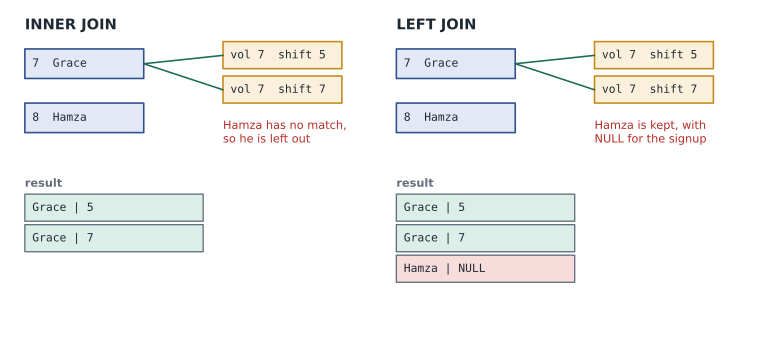
A RIGHT JOIN is the mirror image, keeping every row from the right-hand table. Any right join can be written as a left join by swapping the tables, and most teams use LEFT JOIN only, so every query reads the same way. A FULL OUTER JOIN keeps unmatched rows from both sides. PostgreSQL supports both; SQLite added them in version 3.39; MySQL has RIGHT JOIN but not FULL OUTER JOIN.
Finding rows with no match
A LEFT JOIN followed by WHERE right_table.key IS NULL keeps only the left rows that had no match. This pattern is called an anti-join, and it answers a whole family of questions: volunteers who have never signed up, shifts nobody has booked, areas without a lead.
SELECT v.first_name, v.last_name
FROM volunteers AS v
LEFT JOIN signups AS s ON s.volunteer_id = v.volunteer_id
WHERE s.volunteer_id IS NULL;

-- Result: 1 row
-- first_name | last_name
-- -----------+----------
-- Hamza      | Ali
Test the right table's primary key or join column for NULL, not some other column that might legitimately be NULL in a matched row.
ON or WHERE? The outer join trap
With an inner join it makes no difference whether a condition goes in ON or in WHERE. With an outer join it makes all the difference. A condition in ON decides which right-hand rows count as a match; a condition in WHERE filters the finished result, after the NULLs have been added. Put a condition on the right-hand table in WHERE and the rows filled with NULL fail it, so the outer join quietly becomes an inner join.
-- Wrong: the condition on s.status removes volunteers with no booked signup
SELECT v.first_name, COUNT(s.shift_id) AS booked
FROM volunteers AS v
LEFT JOIN signups AS s ON s.volunteer_id = v.volunteer_id
WHERE s.status = 'booked'
GROUP BY v.volunteer_id
ORDER BY v.volunteer_id;

-- Result: 7 rows
-- first_name | booked
-- -----------+-------
-- Amara      | 2
-- Ben        | 1
-- Chloe      | 1
-- Diego      | 1
-- Esther     | 1
-- Farid      | 1
-- Grace | 2-- Right: the condition is part of the match, so every volunteer stays
SELECT v.first_name, COUNT(s.shift_id) AS booked
FROM volunteers AS v
LEFT JOIN signups AS s ON s.volunteer_id = v.volunteer_id
AND s.status = 'booked'
GROUP BY v.volunteer_id
ORDER BY v.volunteer_id;
-- Result: 8 rows
-- first_name | booked
-- -----------+-------
-- Amara | 2
-- Ben | 1
-- Chloe | 1
-- Diego | 1
-- Esther | 1
-- Farid | 1
-- Grace | 2
-- Hamza | 0These two queries use GROUP BY and COUNT, which lesson 6 explains; the point here is the row for Hamza. With the condition in WHERE he vanishes; with it in ON he appears with a count of 0. COUNT(s.shift_id) counts only non-NULL values, which is why his count is 0 rather than 1.
When joins multiply rows
A join returns one row for every matching pair. If one volunteer has three signups, a join from volunteers to signups returns that volunteer three times. That is correct and expected, but it surprises people when two one-to-many joins are combined. Join a volunteer to their signups and also to their phone numbers (if there were a phones table), and three signups times two phones produce six rows, with every signup repeated. Sums and counts over such a result are wrong.
The symptoms are totals that are too big or names repeated more than expected. The cure is to aggregate each one-to-many side separately, in a subquery or CTE, before joining (lesson 6), or to use EXISTS when you only need to know whether a match exists. Reaching for DISTINCT to hide the duplicates usually hides the bug instead of fixing it.
Joining a table to itself
A self join joins a table to another copy of itself, using two different aliases. It answers questions about pairs of rows in the same table. Lucy likes to know which volunteers will work together, so she can introduce newcomers to experienced people. Two signups on the same shift form a pair.
SELECT s1.shift_id, v1.first_name AS volunteer, v2.first_name AS works_with
FROM signups AS s1
JOIN signups AS s2    ON s2.shift_id = s1.shift_id
                     AND s2.volunteer_id > s1.volunteer_id
JOIN volunteers AS v1 ON v1.volunteer_id = s1.volunteer_id
JOIN volunteers AS v2 ON v2.volunteer_id = s2.volunteer_id
WHERE s1.shift_id IN (4, 5, 6)
ORDER BY s1.shift_id, volunteer, works_with;

-- Result: 5 rows
-- shift_id | volunteer | works_with
-- ---------+-----------+-----------
-- 4        | Amara     | Ben
-- 4        | Amara     | Farid
-- 4        | Ben       | Farid
-- 5        | Chloe     | Grace
-- 6        | Diego     | Esther
The condition s2.volunteer_id > s1.volunteer_id stops a volunteer being paired with themselves and lists each pair once rather than twice (Amara with Ben, but not also Ben with Amara). Self joins are also how you follow a reference inside one table, such as a staff table where each row has a manager_id pointing to another staff row.
CROSS JOIN
A CROSS JOIN has no condition and returns every pairing. It is rarely what you want by accident, which is why forgetting an ON clause in older comma syntax (FROM shifts, areas) is a classic bug that produces huge results. Used deliberately it is useful for building grids, such as every area combined with every day of the coming week, which a report can then fill in with a left join.
Subqueries with IN and EXISTS
A subquery is a SELECT inside another statement. In a WHERE clause it can supply a list of values for IN, or test whether matching rows exist with EXISTS. Many questions can be answered either with a join or with a subquery; choose whichever states the question most clearly.
SELECT first_name, last_name
FROM volunteers
WHERE volunteer_id IN (
    SELECT s.volunteer_id
    FROM signups AS s
    JOIN shifts AS sh ON sh.shift_id = s.shift_id
    WHERE sh.area_id = 2
)
ORDER BY last_name;

-- Result: 2 rows
-- first_name | last_name
-- -----------+----------
-- Esther     | Cohen
-- Diego      | Ramos
EXISTS (subquery) is true if the subquery returns at least one row. The subquery usually refers to a column of the outer query, which makes it a correlated subquery: conceptually it runs once for each outer row. NOT EXISTS is the safest way to write "has no matching row", because unlike NOT IN it is not confused by NULLs.
SELECT sh.shift_id, sh.shift_date, sh.area_id
FROM shifts AS sh
WHERE sh.shift_date >= '2026-11-16'
  AND NOT EXISTS (
      SELECT 1 FROM signups AS s
      WHERE s.shift_id = sh.shift_id
        AND s.volunteer_id = 1
  )
ORDER BY sh.shift_date;

-- Result: 3 rows
-- shift_id | shift_date | area_id
-- ---------+------------+--------
-- 5        | 2026-11-17 | 3
-- 6        | 2026-11-18 | 2
-- 7        | 2026-11-19 | 4
A subquery that returns exactly one value, a scalar subquery, can be used anywhere a value can, including the SELECT list. SELECT name, (SELECT COUNT(*) FROM shifts WHERE shifts.area_id = areas.area_id) AS shift_count FROM areas gives each area its number of shifts. Lesson 6 shows the more common way, with GROUP BY.
Joins from application code
A common performance mistake in applications is to run one query for a list and then another query for each item in it, for example fetching ten shifts and then running ten separate queries for each shift's volunteers. This is called the N+1 query problem: one query plus one per row. Each query is fast, but the round trips add up, and a page with 50 shifts makes 51 queries. A single join returns everything in one round trip, and the code groups the rows.
import sqlite3
from collections import defaultdict

conn = sqlite3.connect(':memory:')
conn.executescript("""
    CREATE TABLE volunteers (volunteer_id INTEGER PRIMARY KEY, first_name TEXT);
    CREATE TABLE shifts (shift_id INTEGER PRIMARY KEY, shift_date TEXT);
    CREATE TABLE signups (volunteer_id INTEGER, shift_id INTEGER, PRIMARY KEY (volunteer_id, shift_id));
    INSERT INTO volunteers VALUES (1, 'Amara'), (2, 'Ben'), (3, 'Chloe'), (7, 'Grace');
    INSERT INTO shifts VALUES (4, '2026-11-16'), (5, '2026-11-17'), (7, '2026-11-19');
    INSERT INTO signups VALUES (1, 4), (2, 4), (3, 5), (7, 5), (7, 7);
""")

rows = conn.execute("""
    SELECT sh.shift_date, v.first_name
    FROM shifts AS sh
    JOIN signups AS s    ON s.shift_id = sh.shift_id
    JOIN volunteers AS v ON v.volunteer_id = s.volunteer_id
    ORDER BY sh.shift_date, v.first_name
""").fetchall()

by_date = defaultdict(list)
for shift_date, name in rows:
    by_date[shift_date].append(name)

for shift_date, names in by_date.items():
print(shift_date, '-', ', '.join(names))2026-11-16 - Amara, Ben 2026-11-17 - Chloe, Grace 2026-11-19 - Grace
What this code does
Builds small volunteers, shifts and signups tables, then asks one question that joins all three and returns every booking with its date and the volunteer's first name. The program then groups the names by date and prints one line per shift listing who is on it, instead of asking the database a separate question for each shift.
Worked problem
Shifts that still have spots
Lucy wants every upcoming shift with its area name and the number of booked signups, including shifts with none booked. Which join types are needed, and where does the status condition go?
Show solution
- Start from shifts, because every upcoming shift must appear.
- Join areas with an inner join: every shift has an area.
- Join signups with a LEFT JOIN, because some shifts may have no signups.
- The condition status = 'booked' is about which signups count, so it goes in the ON clause of the left join. In WHERE it would drop shifts with no booked signups.
- Count s.volunteer_id (not *), group by shift, and filter dates in WHERE because that condition is on shifts, the left table.
Answer: FROM shifts sh JOIN areas a ON a.area_id = sh.area_id LEFT JOIN signups s ON s.shift_id = sh.shift_id AND s.status = 'booked' WHERE sh.shift_date >= '2026-11-16' GROUP BY sh.shift_id, with COUNT(s.volunteer_id).
Worked problem
A total that is too big
Mira joins volunteers to signups and to a phones table (Diego has two phone numbers) and sums hours. Diego's total comes out double. Why, and what is the fix?
Show solution
- Each of Diego's signups pairs with each of his two phone rows, so every signup appears twice.
- The sum adds each shift's hours twice.
- Phone numbers are irrelevant to the total, so remove that join; or, if both are needed, aggregate signups in a subquery first and join the result.
Answer: Two one-to-many joins multiplied the rows. Join only what the question needs, or aggregate before joining.
Common mistakes
MistakeA query without table aliases is clearer.
InsteadWith more than one table, prefix every column with its table alias so it is always clear which table it comes from.
MistakePutting a right-hand condition in WHERE after a LEFT JOIN is the same as putting it in ON.
InsteadIn WHERE it removes the NULL-filled rows, turning the outer join into an inner join. Put conditions on the right-hand table in ON.
MistakeUse NOT IN with a subquery to find rows without a match.
InsteadNOT IN returns nothing if the subquery yields a NULL. Use NOT EXISTS or a LEFT JOIN with IS NULL.
MistakeAdd DISTINCT when a join returns duplicate rows.
InsteadFind out why rows multiplied. Usually a one-to-many join is not needed, or should be aggregated first.
MistakeFetch the list, then query each item's details in a loop.
InsteadThat is the N+1 query problem. Fetch everything with one join and group the rows in code.
Try it yourself
Who has never signed up?
The setup builds the Food Hub sample database in conn. Write a query that returns the first_name and last_name of every volunteer who has no signups at all, using a LEFT JOIN from volunteers to signups and an IS NULL test, ordered by last name.
Print each person as first name, a space and last name.
sql = """SELECT v.first_name, v.last_name
FROM volunteers AS v
ORDER BY v.last_name"""

for first, last in conn.execute(sql):
    print(first, last)
Practice problems
Work each problem on paper first, then reveal the answer to check.
Write a query listing every area with the dates of its shifts, including areas with no shifts.
Show answer
SELECT a.name, sh.shift_date FROM areas a LEFT JOIN shifts sh ON sh.area_id = a.area_id ORDER BY a.name, sh.shift_date; An area with no shifts appears once with a NULL date.
Rewrite volunteer_id NOT IN (SELECT volunteer_id FROM signups) using NOT EXISTS.
Show answer
SELECT ... FROM volunteers v WHERE NOT EXISTS (SELECT 1 FROM signups s WHERE s.volunteer_id = v.volunteer_id);
Why does the self join use s2.volunteer_id > s1.volunteer_id rather than <>?
Show answer
With <> each pair appears twice, once in each order. With > each pair appears once, and a volunteer is never paired with themselves.
A page shows 40 shifts and runs one query per shift to get its volunteers. How many queries is that, and how do you fix it?
Show answer
41: one for the list and one per shift. Use one join that returns all shifts with their volunteers and group the rows in code.
Summary and key terms
- A join combines rows from tables by matching values, usually a foreign key to a primary key, and keeps the pairs that satisfy the ON condition.
- JOIN means INNER JOIN, which keeps only matched rows; use table aliases and prefix every column.
- LEFT JOIN keeps every left-hand row, filling the right with NULL; RIGHT JOIN is its mirror and FULL OUTER JOIN keeps both.
- A LEFT JOIN with WHERE right_key IS NULL is an anti-join that finds rows without a match.
- Conditions on the right-hand table of an outer join belong in ON, not WHERE.
- Joining two one-to-many relationships multiplies rows, so aggregate first rather than hiding duplicates with DISTINCT.
- Self joins compare rows in one table; CROSS JOIN returns every pairing.
- Subqueries with IN and EXISTS test for matches; prefer NOT EXISTS to NOT IN.
- One join is better than N+1 separate queries.
- Join
- Combining rows from two or more tables by matching column values.
- Join condition
- The ON expression that decides which pairs of rows match.
- Inner join
- A join that keeps only rows with a match in both tables.
- Left join
- An outer join that keeps every row of the left table, with NULLs where the right has no match.
- Anti-join
- A query that finds rows with no matching row in another table.
- Self join
- Joining a table to itself under two aliases to compare its rows.
- Cross join
- A join with no condition that returns every pairing of rows.
- Subquery
- A SELECT statement nested inside another statement.
- Correlated subquery
- A subquery that refers to columns of the outer query.
- EXISTS
- A test that is true when a subquery returns at least one row.
- N+1 query problem
- Running one query for a list and another for each item, instead of one join.
Lesson quiz · 5 questions
Score 60% or more to complete this lesson.
Create a free account to save your progress, take quizzes and earn a certificate.