
WEB-201 · Lesson 1 of 12 · 28 min
Why applications need databases
▶ Video coming soon A video version of this lesson is on the way.
On Wednesday, October 7, 2026, Theo Marchetti, Brightwater's back-end developer, opened a file that Mira Castellanos knew better than anyone in the studio: *Volunteers 2026*, the spreadsheet she had kept at the Riverside Community Food Hub front desk for four years. It had a tab for each month, a column for every shift, colour-coded cells for who was booked, and a notes column full of phone numbers, allergies and "call after 5". "This spreadsheet ran a food bank for four years," Theo said. "That's a real achievement. Now Lucy wants volunteers to book their own shifts on the new site, and three hundred people can't all edit one spreadsheet at once. That's the job a database does."
Kingston's Food Hub has about 300 volunteers and 54 staff. When the public site launches on December 7, the next project is a shift sign-up page, and later a back end with accounts. Every one of those features needs somewhere safe to keep data that many people read and change at the same time. This course teaches the tool almost every web application uses for that job: a relational database queried with SQL. Mira will learn it in Wednesday and Friday morning sessions with Theo, and she will finish by designing the Food Hub's volunteer database.
This lesson explains what a database gives an application that files and spreadsheets cannot, how an application talks to a database server, which database systems you are likely to meet, and what responsibilities come with storing other people's personal information.
What goes wrong with spreadsheets
Spreadsheets are wonderful for one person exploring numbers. They become fragile when they turn into the shared record of an organization. Mira could list the problems from memory, because she had lived with every one of them.
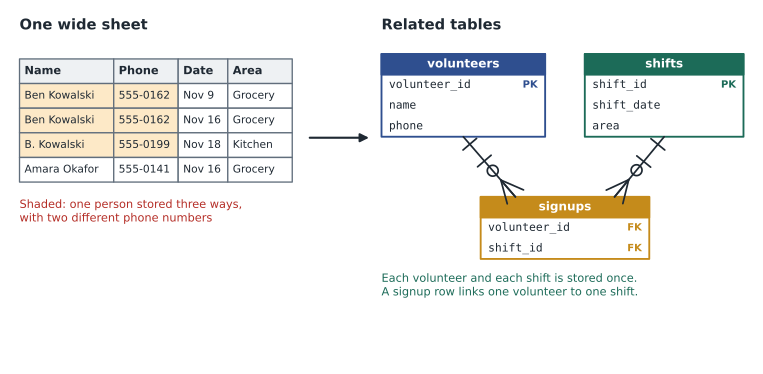
- Duplicates and drift. Ben Kowalski appeared three times: once as "Ben Kowalski", once as "B. Kowalski" and once with an old email address. When he changed his phone number, only one row was updated.
- No rules on values. A cell meant for a date could hold "next Tues", a shift could be booked for twelve people when the kitchen holds four, and a typo in a name silently created a new volunteer.
- One editor at a time. When Lucy and Mira both had the file open, the second person to save either overwrote the first or created a "conflicted copy".
- Everything or nothing. Anyone who could open the file could see every phone number and every note, and could delete a whole month by accident.
- Hard questions. "How many hours did each volunteer give this year?" meant an afternoon of copying and pasting between tabs.
A database is built to solve exactly these problems. It stores data in a defined structure, enforces rules on every change, lets hundreds of users read and write at once without losing anyone's work, controls who may see and change what, and answers questions in milliseconds with a query language designed for the purpose.
What a database system is
A database is an organized collection of data. The software that stores it, enforces its rules and answers questions about it is a database management system (DBMS). People often say "the database" for both. A relational DBMS stores data in tables: each table has named columns, and each row is one record, such as one volunteer or one shift. Tables are linked by shared values called keys, which lesson 2 covers in detail.
You talk to a relational database in SQL (Structured Query Language, pronounced "ess-cue-ell" or "sequel"). SQL is declarative: you describe the result you want and the database works out how to get it. You do not write loops to search through rows; you ask for the rows that match a condition, and the database's query planner chooses whether to read the whole table or use an index.
SELECT first_name, last_name, joined_on
FROM volunteers
WHERE joined_on >= '2026-01-01'
ORDER BY joined_on;

-- Result: 3 rows
-- first_name | last_name | joined_on
-- -----------+-----------+-----------
-- Farid      | Haddad    | 2026-02-20
-- Grace      | Liu       | 2026-08-14
-- Hamza      | Ali       | 2026-10-01
That listing shows the pattern you will see throughout this course: an SQL statement, followed by the exact result the sample database returns, written as comments (lines starting with two hyphens). The sample database holds eight volunteers, four areas (Grocery, Kitchen, Lunch counter and Youth garden), eight shifts in November 2026 and sixteen signups. Lesson 2 builds it table by table.
What a DBMS guarantees
Four properties make a database a safer home for shared data than a file. You will study each in later lessons, but it helps to know from the start what you are getting.
| Guarantee | What it means | Food Hub example |
|---|---|---|
| Structure | Every row in a table has the same columns, each with a type | Every shift has a date, a start time, an end time and a number of spots |
| Integrity | Rules (constraints) reject bad data on every change | An email address can belong to only one volunteer; spots must be more than zero |
| Concurrency | Many users can read and write at once without losing changes | Two volunteers booking the last kitchen spot cannot both succeed |
| Durability | Once a change is confirmed, it survives a crash or power cut | A booking confirmed on screen is still there after the server restarts |
Changes are grouped into transactions: a set of changes that succeed together or fail together. When a volunteer books a shift, the application might insert a signup row and record a confirmation email to send. If anything fails part way, the database undoes the whole transaction, so you never end up with half a booking. Lesson 8 covers transactions and the constraints that protect integrity.
How an application talks to a database
In a web application the browser never talks to the database directly. The browser sends an HTTP request to the application server, where code written in PHP, JavaScript (Node.js), Java or Python handles it. That code opens a connection to the database server, sends SQL, reads the rows that come back, and builds the HTML or JSON response. The database server usually runs on a separate machine or service and listens on a network port that only the application servers can reach.
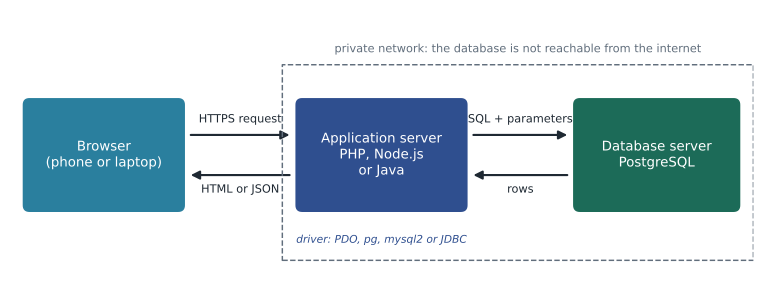
Each programming language has a driver (also called a client library or connector) that speaks the database's network protocol. PHP uses PDO, Node.js commonly uses the pg package for PostgreSQL or mysql2 for MySQL, and Java uses JDBC. Python, which this course uses for runnable examples, includes the sqlite3 module in its standard library. The steps are the same in every language:
- Open a connection, using settings (host, database name, user, password) read from the environment or a configuration file that is never committed to the code repository.
- Send an SQL statement, passing any values from the user as separate parameters, never pasted into the SQL text.
- Read the result rows, or the number of rows changed.
- Commit the transaction if you changed data, and return the connection to a pool or close it.
The second step matters so much that lesson 10 is devoted to it. Pasting user input into SQL text is the cause of SQL injection, one of the most damaging security flaws in web applications, and parameters prevent it completely.
Your first database in Python
SQL cannot run in your browser on its own, but Python can, and Python's built-in sqlite3 module runs a complete SQLite database in memory. Every runnable example in this course builds a small database, runs SQL against it and prints the result, so you can change the SQL and run it again. SQLite is a real, widely used database: it is built into every phone and browser, and many small sites run on it. What you learn with it carries over to PostgreSQL and MySQL, with differences noted along the way.
import sqlite3

conn = sqlite3.connect(':memory:')   # a new, empty database held in memory
conn.execute("""
    CREATE TABLE volunteers (
        volunteer_id INTEGER PRIMARY KEY,
        first_name   TEXT NOT NULL,
        last_name    TEXT NOT NULL,
        email        TEXT NOT NULL UNIQUE
    )
""")
conn.execute("INSERT INTO volunteers (first_name, last_name, email) VALUES (?, ?, ?)",
             ('Amara', 'Okafor', 'amara@example.com'))
conn.execute("INSERT INTO volunteers (first_name, last_name, email) VALUES (?, ?, ?)",
             ('Ben', 'Kowalski', 'ben@example.com'))
conn.commit()

for row in conn.execute("SELECT volunteer_id, first_name, last_name FROM volunteers"):
print(row)(1, 'Amara', 'Okafor') (2, 'Ben', 'Kowalski')
What this code does
Creates an empty database in the computer's memory, makes a table of volunteers with an ID number, first name, last name and email, adds two people, saves the changes and then prints each stored row. The database gives each person an ID number by itself.
Each row comes back as a Python tuple. The question marks in the INSERT statements are parameter placeholders: the values travel separately from the SQL text, which is the safe habit you will use in every language. The volunteer_id values 1 and 2 were assigned automatically because the column is an INTEGER PRIMARY KEY.
Now see the first rule at work. The email column is marked UNIQUE, so the database refuses a second volunteer with the same email address, the very duplicate that crept into Mira's spreadsheet.
import sqlite3

conn = sqlite3.connect(':memory:')
conn.execute("CREATE TABLE volunteers (volunteer_id INTEGER PRIMARY KEY, name TEXT NOT NULL, email TEXT NOT NULL UNIQUE)")
conn.execute("INSERT INTO volunteers (name, email) VALUES (?, ?)", ('Ben Kowalski', 'ben@example.com'))

try:
    conn.execute("INSERT INTO volunteers (name, email) VALUES (?, ?)", ('B. Kowalski', 'ben@example.com'))
except sqlite3.IntegrityError as err:
    print('Rejected:', err)

count = conn.execute("SELECT COUNT(*) FROM volunteers").fetchone()[0]
print('Volunteers stored:', count)Rejected: UNIQUE constraint failed: volunteers.email Volunteers stored: 1
What this code does
Makes a volunteers table where each email address may appear only once, adds Ben, then tries to add him again under a shortened name with the same email. The database refuses the second entry with an error message, and a final count shows only one volunteer stored.
The application catches the error and can show a helpful message, such as "That email is already registered; would you like to sign in?" The important point is that the rule lives in the database, so it holds no matter which page, script or person tries to break it.
Kinds of database you will meet
Relational databases are the default for business applications, and they are the focus of this course. You should still recognize the alternatives, because you will hear about them and occasionally need one.
| Kind | How data is stored | Common examples | Good for |
|---|---|---|---|
| Relational (SQL) | Tables of rows and columns linked by keys | PostgreSQL, MySQL, MariaDB, SQLite, Microsoft SQL Server, Oracle | Most applications: accounts, orders, bookings, inventory |
| Document | JSON-like documents grouped in collections | MongoDB, Couchbase | Records whose shape varies a lot from one to the next |
| Key-value | A value looked up by a single key | Redis, Memcached | Caches, sessions, counters |
| Search engine | Indexes of words in documents | Elasticsearch, OpenSearch | Full-text search with ranking |
| Time series | Measurements stamped with times | InfluxDB, TimescaleDB | Sensor readings and metrics |
Many teams use a relational database as the system of record, the authoritative copy, and add a cache or search engine beside it for speed. Modern relational databases also store JSON in columns when part of a record really is free-form, so you rarely need a second database for that alone.
Among relational systems, the ones you are most likely to work with as a web developer are these:
- PostgreSQL: open source, strict about data types, with excellent support for constraints, JSON and advanced queries. A common choice for new projects and the one Theo uses for most clients.
- MySQL and its community fork MariaDB: open source and very widely hosted, especially alongside PHP. Most shared hosting plans include one.
- SQLite: a database in a single file, with no server to run. Ideal for small sites, prototypes, phone apps, tests and learning.
- Microsoft SQL Server and Oracle Database: commercial systems common in large organizations and government.
The SQL language is standardized, and the core you learn here (SELECT, INSERT, UPDATE, DELETE, joins, grouping, transactions and constraints) works in all of them. They differ in data types, a few function names, and how they create automatically numbered keys. When it matters, this course shows the SQLite form you can run and notes the PostgreSQL and MySQL forms.
Choosing where the Food Hub data lives
Theo and Mira sketched the decision for the sign-up project on the whiteboard. The site would be built in PHP with a PostgreSQL database on the hosting plan Brightwater already manages, because several staff and hundreds of volunteers would use it at once. For learning and testing, Mira would use SQLite, where a whole database is one file she can delete and recreate in a second.
Worked problem
Spreadsheet or database?
Lucy keeps three lists: a list of 40 donors she emails twice a year, the volunteer schedule used by about 300 people, and a one-off table comparing four quotes for a new walk-in fridge. Which should move into the application database?
Show solution
- The fridge quotes are a small, one-time comparison made by one person. A spreadsheet is the right tool.
- The donor list is small and edited by one person, but it holds personal information and email consent records. It can stay in a well-protected spreadsheet for now, or move to a donor system later; it does not need the sign-up database.
- The volunteer schedule is shared, changed by many people at once, needs rules (no overbooking, no duplicate volunteers) and feeds the new sign-up page. It belongs in the database.
Answer: Move the volunteer schedule into the database. Keep the quote comparison in a spreadsheet, and decide about donors separately.
Worked problem
Reading a request through the tiers
A volunteer opens the sign-up page and sees the open lunch counter shifts for next week. List what happens, tier by tier.
Show solution
- The browser sends an HTTPS GET request for the sign-up page to the application server.
- The PHP code opens (or reuses) a connection to PostgreSQL and sends a SELECT statement asking for lunch counter shifts in the date range, with the dates passed as parameters.
- PostgreSQL plans and runs the query and returns rows: date, start time, end time and spots left.
- The PHP code turns the rows into HTML and sends the page back to the browser.
Answer: Browser to application server (HTTP), application server to database (SQL with parameters), rows back, HTML back. The browser never sees the database.
Personal information comes with duties
The moment Mira's spreadsheet became a database, nothing about the data changed: it was still names, emails, phone numbers and sometimes notes about health. What changes is how easily it can be copied, queried and leaked. Designing a database is the right moment to decide what you actually need to collect, who can see it and how long you keep it.
In Canada, the Personal Information Protection and Electronic Documents Act (PIPEDA) governs personal information that private-sector organizations collect in the course of commercial activities. The Food Hub is a non-profit that does not sell its lists, so PIPEDA may not strictly apply to its volunteer records, but Brightwater designs every database to PIPEDA's fair information principles anyway: identify the purpose, limit collection, protect what is kept with safeguards suited to its sensitivity, and keep it only as long as needed. Federal reform is pending: Bill C-36, tabled on June 15, 2026, is still before Parliament as of mid-November 2026, so PIPEDA remains the law. Lesson 12 covers what PIPEDA requires after a breach.
For the volunteer database, Theo and Mira agreed on a short list: name, email, an optional phone number, the date the person joined and the shifts they book. The free-text notes column with allergies and family details would not move into the new system; Lucy would decide separately how to record the few accommodations she really needs, with access limited to the coordinators.
Common mistakes
MistakeA spreadsheet is fine for shared records as long as everyone is careful.
InsteadShared records need rules enforced on every change, safe simultaneous editing and access control. A database provides those; care alone does not.
MistakeThe browser can query the database directly to save a step.
InsteadThe browser talks only to the application server. The database should never be reachable from the internet.
MistakeSQL is a programming language like Python, so you write loops to search rows.
InsteadSQL is declarative: you describe the rows you want and the database decides how to find them.
MistakeDatabase passwords can go in the source code because the repository is private.
InsteadConnection settings come from the environment or a configuration file kept out of the repository. Private repositories get shared, copied and leaked.
MistakeMoving data into a database is a technical change only.
InsteadIt is also a privacy decision. Use the move to drop fields you do not need and limit who can see the rest.
Try it yourself
Make the areas table
The Food Hub has four volunteer areas: Grocery, Kitchen, Lunch counter and Youth garden. Complete the program so it creates a table called areas with an area_id INTEGER PRIMARY KEY column and a name TEXT NOT NULL UNIQUE column, inserts the four areas using a ? placeholder, and prints each area_id and name in the order shown, separated by a colon and a space.
The first line printed should be 1: Grocery.
import sqlite3

conn = sqlite3.connect(':memory:')
names = ['Grocery', 'Kitchen', 'Lunch counter', 'Youth garden']

# Create the areas table here

# Insert each name with a ? placeholder here

print('No areas yet')
Practice problems
Work each problem on paper first, then reveal the answer to check.
Name two problems with a shared spreadsheet that a UNIQUE constraint and a CHECK constraint would each prevent.
Show answer
UNIQUE on email prevents the same volunteer being entered twice under different spellings of the name. CHECK (spots > 0), or a check against capacity, prevents impossible values such as a shift with zero or negative spots.
Why does the browser not connect to the database directly?
Show answer
The database would have to be reachable from the internet with credentials in the page, so anyone could read or change any data. The application server sits between them, checks who the user is and runs only the queries the application allows.
What is a driver, and which one does each of PHP, Node.js and Java commonly use?
Show answer
A library that speaks a database's network protocol. PHP uses PDO, Node.js uses packages such as pg (PostgreSQL) or mysql2 (MySQL), and Java uses JDBC with a driver for the specific database.
Give one reason Theo chose PostgreSQL for the live site and one reason Mira learns with SQLite.
Show answer
PostgreSQL is a server that handles many simultaneous users with strong type and constraint support. SQLite needs no server, keeps a database in one file or in memory and is ideal for learning and tests.
Summary and key terms
- Spreadsheets break down as shared records: duplicates, no rules, one editor at a time, no access control and slow answers.
- A relational database stores data in tables of rows and columns linked by keys, and you query it with declarative SQL.
- A DBMS provides structure, integrity constraints, safe concurrency and durability, and groups changes into transactions.
- Browsers talk to an application server, which connects to the database through a driver and passes user values as parameters.
- PostgreSQL, MySQL or MariaDB, and SQLite are the relational systems web developers meet most; document, key-value and search databases serve narrower jobs.
- Moving personal information into a database is the moment to limit what you collect, restrict who sees it and plan how long to keep it.
- Database
- An organized collection of data, usually managed by a database management system.
- DBMS
- Database management system: software that stores data, enforces rules on it and answers queries.
- Relational database
- A database that stores data in tables of rows and columns linked by key values.
- SQL
- Structured Query Language, the standard declarative language for relational databases.
- Table
- A set of rows that all have the same named, typed columns.
- Row
- One record in a table, such as one volunteer.
- Column
- A named attribute that every row in a table has, with a data type.
- Constraint
- A rule, such as UNIQUE or NOT NULL, that the database enforces on every change.
- Transaction
- A group of changes that succeed together or are undone together.
- Driver
- A library that lets a programming language connect to and query a particular database.
- SQLite
- A serverless relational database that keeps a whole database in one file or in memory.
Lesson quiz · 5 questions
Score 60% or more to complete this lesson.
Create a free account to save your progress, take quizzes and earn a certificate.