
WEB-201 · Lesson 3 of 12 · 26 min
Data modelling and normalization
▶ Video coming soon A video version of this lesson is on the way.
The next Wednesday, Lucy Tran came to the studio with a coffee and a list. Theo had asked her one question: "What do you need the sign-up system to know?" Her answers filled a page: volunteers sign up for shifts; each shift is in one area and has a set number of spots; each area has a lead staff member; some shifts need food-safety training; volunteers can cancel up to a day before; she needs to see who didn't turn up; and at year end she reports total volunteer hours to the board. "That page," Theo told Mira, "is the start of a data model."
Data modelling is deciding what an application needs to store and how to arrange it in tables so that every fact is stored once, the database can enforce the rules, and the questions people ask are easy to answer. This lesson shows how to turn requirements into an entity relationship diagram, how to spot the design flaws that cause data to contradict itself, and how normalization removes them.
From requirements to entities
A practical way to start is to read the requirements and underline the nouns and verbs. Nouns that have several facts of their own and many instances usually become entities (tables): volunteer, shift, area, staff member. Facts about a noun become attributes (columns): a shift's date, start time, end time and spots. Verbs that connect two nouns become relationships: a volunteer *signs up for* a shift; a shift *is in* an area; a staff member *leads* an area.
For each relationship, ask Lucy two questions in each direction. How many? And must there be one? "Can a shift be in more than one area?" No. "Must every shift have an area?" Yes. "Can an area have no shifts?" Yes, the youth garden has none in winter. The answers give each end of the relationship its cardinality (one or many) and its optionality (zero allowed or not).
| Requirement | Becomes | Detail |
|---|---|---|
| Volunteers sign up for shifts | Entities volunteers and shifts; junction table signups | Many-to-many |
| Each shift is in one area | Foreign key shifts.area_id | Each shift exactly one area; an area zero or many shifts |
| Each shift has a set number of spots | Column shifts.spots | Integer, NOT NULL, CHECK (spots > 0) |
| Each area has a lead staff member | Entity staff; foreign key areas.lead_staff_id | One lead per area; a staff member may lead several |
| Some shifts need food-safety training | Column shifts.needs_food_safe; column volunteers.food_safe_on | Boolean on the shift; a nullable date on the volunteer |
| See who didn't turn up | Column signups.status with 'no-show' | Value from a fixed list |
| Report total hours | Calculated from shift start and end times | Not stored; computed by a query |
Look at the last row. Total hours are not stored anywhere; they are derived from facts that are stored. Storing a value you can calculate creates a second copy that can disagree with the first. Calculate it in a query instead, and store it only if the calculation becomes too slow, as a deliberate choice.
Reading crow's foot notation
An ERD can be drawn in several notations. The one most used by developers is crow's foot (also called information engineering notation). Each end of a relationship line carries two symbols: the outer one shows the most rows allowed (a bar for one, a three-pronged crow's foot for many), and the inner one shows the fewest (a bar for one, a circle for zero).
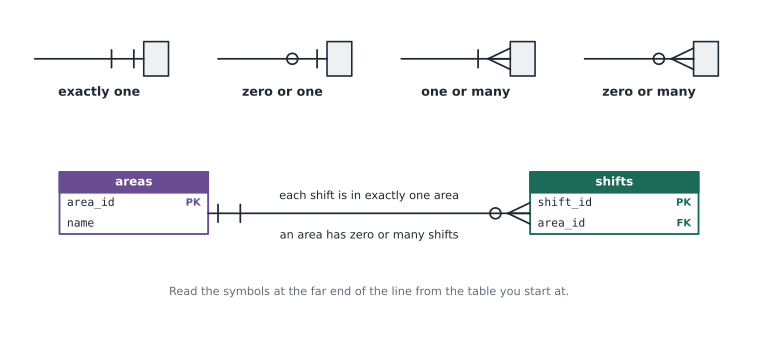
Read a relationship by starting at one table, following the line and reading the symbols at the far end. From areas to shifts: "one area has zero or many shifts". From shifts back to areas: "one shift is in exactly one area". With practice you can check a design against the requirements by reading every line aloud to the person who wrote them, which is exactly what Mira did with Lucy.
Models are often described at three levels. A conceptual model names the entities and relationships only, for talking with people like Lucy. A logical model adds attributes, keys and cardinalities but no database specifics. A physical model is the actual CREATE TABLE statements for PostgreSQL or SQLite, with types, constraints and indexes. Small projects often go straight from a sketch to the physical model, but thinking at the conceptual level first stops you arguing about column types before you know what the tables are.
Anomalies: why one big table goes wrong
Mira's first instinct was to make one table that looked like her spreadsheet: each row a volunteer on a date, with their email, phone, the area and the area's lead. It is easy to read and easy to fill in. It is also a trap, because the same fact is stored in many rows.
import sqlite3

conn = sqlite3.connect(':memory:')
conn.executescript("""
    CREATE TABLE schedule (
        volunteer TEXT, email TEXT, phone TEXT,
        shift_date TEXT, area TEXT, area_lead TEXT
    );
    INSERT INTO schedule VALUES
      ('Ben Kowalski', 'ben@example.com',   '555-0162', '2026-11-09', 'Grocery',       'Nadia'),
      ('Ben Kowalski', 'ben@example.com',   '555-0162', '2026-11-16', 'Grocery',       'Nadia'),
      ('Amara Okafor', 'amara@example.com', '555-0141', '2026-11-10', 'Lunch counter', 'Joel'),
      ('Amara Okafor', 'amara@example.com', '555-0141', '2026-11-16', 'Grocery',       'Nadia'),
      ('Chloe Martin', 'chloe@example.com', NULL,       '2026-11-10', 'Lunch counter', 'Joel');
""")

for row in conn.execute("SELECT volunteer, phone, shift_date, area, area_lead FROM schedule"):
print(row)('Ben Kowalski', '555-0162', '2026-11-09', 'Grocery', 'Nadia')
('Ben Kowalski', '555-0162', '2026-11-16', 'Grocery', 'Nadia')
('Amara Okafor', '555-0141', '2026-11-10', 'Lunch counter', 'Joel')
('Amara Okafor', '555-0141', '2026-11-16', 'Grocery', 'Nadia')
('Chloe Martin', None, '2026-11-10', 'Lunch counter', 'Joel')What this code does
Builds one wide table that mixes volunteer details, shift dates and area details, the way a spreadsheet would, and prints every row. Ben's phone number appears twice, Amara's twice, and the Grocery lead Nadia appears three times.
This design suffers from three anomalies, kinds of contradiction or loss that happen because facts are repeated or tangled together.
- Update anomaly. Ben changes his phone number. If one of his two rows is updated and the other is missed, the database now holds two different numbers for him and nobody knows which is right.
- Insertion anomaly. Hamza Ali has just registered but has not booked a shift. There is no way to store him without inventing a shift date, because every row is a booking.
- Deletion anomaly. Chloe's lunch counter signup is the only row recording her email address. Delete that booking and Chloe disappears from the volunteer list entirely.
import sqlite3

conn = sqlite3.connect(':memory:')
conn.executescript("""
    CREATE TABLE schedule (
        volunteer TEXT, email TEXT, phone TEXT,
        shift_date TEXT, area TEXT, area_lead TEXT
    );
    INSERT INTO schedule VALUES
      ('Ben Kowalski', 'ben@example.com',   '555-0162', '2026-11-09', 'Grocery',       'Nadia'),
      ('Ben Kowalski', 'ben@example.com',   '555-0162', '2026-11-16', 'Grocery',       'Nadia'),
      ('Amara Okafor', 'amara@example.com', '555-0141', '2026-11-10', 'Lunch counter', 'Joel'),
      ('Amara Okafor', 'amara@example.com', '555-0141', '2026-11-16', 'Grocery',       'Nadia'),
      ('Chloe Martin', 'chloe@example.com', NULL,       '2026-11-10', 'Lunch counter', 'Joel');
""")

conn.execute("UPDATE schedule SET phone = ? WHERE volunteer = ? AND shift_date = ?",
             ('555-0199', 'Ben Kowalski', '2026-11-16'))

for row in conn.execute("SELECT DISTINCT volunteer, phone FROM schedule WHERE volunteer = 'Ben Kowalski'"):
print(row)('Ben Kowalski', '555-0162')
('Ben Kowalski', '555-0199')What this code does
Builds the same wide table, then updates Ben's phone number on only one of his two rows, as might happen when someone edits the row in front of them. Asking for Ben's distinct phone numbers now returns two different numbers, so the data contradicts itself.
The cure is to store each fact once, in the table about the thing it describes. Ben's phone number is a fact about Ben, so it belongs in volunteers. The Grocery lead is a fact about the Grocery area, so it belongs in areas. The fact that Ben booked November 16 belongs in signups. That is what normalization does systematically.
Functional dependencies
Normalization rests on one idea. Column B is functionally dependent on column A (written A → B) if knowing A tells you B for certain. In the wide table, email → phone: knowing the email tells you the phone number. area → area_lead: knowing the area tells you the lead. But shift_date does not determine area, because there are several shifts on one day. A good design puts each dependency in a table where the left-hand side is the key.
First, second and third normal form
The normal forms are a series of tests, each stricter than the last. In practice, a design in third normal form is free of the anomalies above, and that is the usual goal.
| Normal form | Rule | Typical violation | Fix |
|---|---|---|---|
| First (1NF) | Every column holds one value; no repeating groups | A cell holding '4, 7, 12', or columns shift1, shift2, shift3 | One row per value in a separate table |
| Second (2NF) | 1NF, and every non-key column depends on the whole key | In signups keyed by (volunteer_id, shift_id), a volunteer_email column depends only on volunteer_id | Move the column to the table for that part of the key |
| Third (3NF) | 2NF, and no non-key column depends on another non-key column | In shifts, area_lead depends on area_id, not on shift_id | Move it to the table where its determinant is the key |
A memorable summary of third normal form is that every non-key column must describe "the key, the whole key, and nothing but the key". A stricter version, Boyce-Codd normal form (BCNF), requires that every determinant is a candidate key; most designs that reach 3NF also satisfy BCNF, and the difference rarely matters in application work.
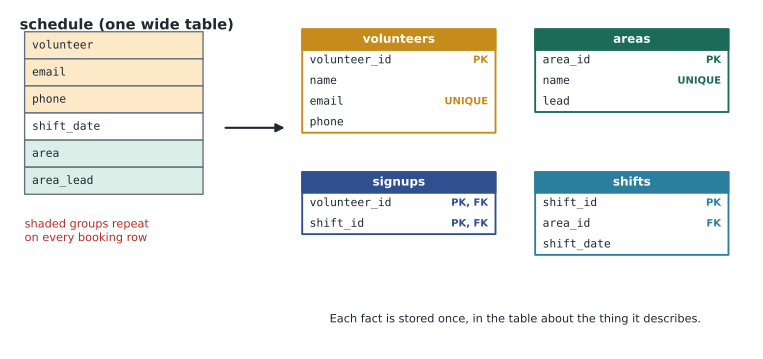
Normalizing the schedule, step by step
Worked problem
From the wide table to third normal form
Normalize the schedule table (volunteer, email, phone, shift_date, area, area_lead).
Show solution
- 1NF: every cell already holds a single value, but there is no key. Add surrogate keys as you split.
- Find the dependencies: email → volunteer, phone; area → area_lead; (area, shift_date) → the shift; (volunteer, shift) → the booking.
- Volunteer facts depend only on the volunteer, so make volunteers (volunteer_id, name, email UNIQUE, phone).
- area_lead depends on area, not on the shift (a transitive dependency through area), so make areas (area_id, name UNIQUE, lead).
- Each shift is an area on a date, so make shifts (shift_id, area_id references areas, shift_date).
- What remains is the pairing, so make signups (volunteer_id, shift_id) with a composite primary key.
Answer: Four tables: volunteers, areas, shifts and signups. Ben's phone is stored once; Hamza can be stored without a booking; deleting Chloe's booking keeps her in volunteers.
You can carry out the split in SQL itself, which is how a real migration from an imported spreadsheet usually works: create the new tables, then fill them with INSERT ... SELECT DISTINCT from the wide table.
import sqlite3

conn = sqlite3.connect(':memory:')
conn.executescript("""
    CREATE TABLE schedule (
        volunteer TEXT, email TEXT, phone TEXT,
        shift_date TEXT, area TEXT, area_lead TEXT
    );
    INSERT INTO schedule VALUES
      ('Ben Kowalski', 'ben@example.com',   '555-0162', '2026-11-09', 'Grocery',       'Nadia'),
      ('Ben Kowalski', 'ben@example.com',   '555-0162', '2026-11-16', 'Grocery',       'Nadia'),
      ('Amara Okafor', 'amara@example.com', '555-0141', '2026-11-10', 'Lunch counter', 'Joel'),
      ('Amara Okafor', 'amara@example.com', '555-0141', '2026-11-16', 'Grocery',       'Nadia'),
      ('Chloe Martin', 'chloe@example.com', NULL,       '2026-11-10', 'Lunch counter', 'Joel');
""")

conn.executescript("""
    CREATE TABLE volunteers (volunteer_id INTEGER PRIMARY KEY, name TEXT NOT NULL,
                             email TEXT NOT NULL UNIQUE, phone TEXT);
    INSERT INTO volunteers (name, email, phone)
        SELECT DISTINCT volunteer, email, phone FROM schedule;

    CREATE TABLE areas (area_id INTEGER PRIMARY KEY, name TEXT NOT NULL UNIQUE, lead TEXT);
    INSERT INTO areas (name, lead)
        SELECT DISTINCT area, area_lead FROM schedule;
""")

print('Volunteers:', conn.execute("SELECT COUNT(*) FROM volunteers").fetchone()[0])
print('Areas:', conn.execute("SELECT COUNT(*) FROM areas").fetchone()[0])
for row in conn.execute("SELECT * FROM areas ORDER BY area_id"):
print(row)Volunteers: 3 Areas: 2 (1, 'Grocery', 'Nadia') (2, 'Lunch counter', 'Joel')
What this code does
Builds the wide table again, then creates proper volunteers and areas tables and fills each one by copying the distinct combinations out of the wide table. Five schedule rows become three volunteers and two areas, and each area's lead is now stored once.
The DISTINCT trick only works if the repeated values are exactly the same. In a real spreadsheet import, "Ben Kowalski" and "B. Kowalski" would become two volunteers, so a data clean-up step comes first: Mira spent a morning matching records by email and phone before the import.
When to denormalize
Normalization is the default, not a religion. Sometimes a design deliberately stores a derived or copied value, which is called denormalization, to make an important query faster or simpler. Examples include keeping a running count of booked spots on each shift so the sign-up page does not count signups on every view, or copying a volunteer's name into an audit log so the log still makes sense if the volunteer record is later anonymized. Each denormalized value needs a plan to keep it correct (often a transaction that updates both places), and you should only add one when measurement shows the normalized version is too slow.
Some copies are not denormalization at all. An order records the price at the moment of purchase even though the product table has a current price, because the historical price is a different fact. When you hear "we're duplicating data", ask whether it is the same fact or a different fact that happens to look similar.
Lookup tables or fixed lists
Signup status takes one of four values. You can enforce that with a CHECK constraint listing the values, as the sample database does, or with a small lookup table of statuses and a foreign key. A CHECK constraint is simpler when the list is short and changes only with the code. A lookup table is better when staff need to add values without a schema change, or when each value has its own attributes, such as a display label or a colour on the sign-up page. The areas table is effectively a lookup table, because the Food Hub may add a new area, such as a mobile market, without asking a developer.
Modelling for privacy
The model is where privacy is won or lost. A column that does not exist cannot leak. Before adding any column about a person, ask what purpose it serves, who needs to see it, and when it can be deleted.
Lucy's old spreadsheet recorded volunteers' dates of birth "for insurance". When Mira checked, the Food Hub's insurer only needed to know that volunteers in the kitchen are 16 or older. The model therefore stores a yes-or-no confirmation instead of a birth date. This follows PIPEDA's principle of limiting collection to what is necessary for the identified purpose, which Brightwater applies to the Food Hub as good practice. Sensitive details, such as the occasional accommodation a volunteer asks for, go in a separate table that only coordinators can read, rather than a free-text notes column that everyone sees.
Common mistakes
MistakeOne table that matches the spreadsheet is simplest, so start there and normalize later.
InsteadThe anomalies start on day one, and fixing a live table later means a risky migration. Model the entities first.
MistakeStore total hours on each volunteer so the report is quick.
InsteadHours are derived from shifts and signups. Calculate them in a query; denormalize only after measuring a real performance problem.
MistakeColumns phone1, phone2 and phone3 are fine because most people have at most three numbers.
InsteadRepeating columns break first normal form. If people can have several phone numbers, use a separate table with one row per number.
MistakeA notes column is a flexible place for anything the coordinator wants to record.
InsteadFree-text notes collect sensitive personal information that nobody planned for. Model the specific facts you need, with access control.
MistakeNormalization means never storing anything twice under any circumstances.
InsteadIt means each fact is stored once. A price at the time of an order is a different fact from today's price and belongs in the order.
Try it yourself
Split out the volunteers
The setup creates the wide schedule table from this lesson, with five rows. Create a volunteers table with columns volunteer_id INTEGER PRIMARY KEY, name TEXT NOT NULL, email TEXT NOT NULL UNIQUE and phone TEXT, and fill it with one row per distinct volunteer using INSERT ... SELECT DISTINCT.
Then print each volunteer's name and phone, ordered by name, as Python tuples. Chloe has no phone, so her row prints None.
# Create and fill the volunteers table here

for row in conn.execute("SELECT volunteer, phone FROM schedule ORDER BY volunteer"):
    print(row)
Practice problems
Work each problem on paper first, then reveal the answer to check.
Name the three anomalies and give a Food Hub example of each in the wide schedule table.
Show answer
Update: Ben's phone changed on one row but not the other. Insertion: a new volunteer with no booking cannot be stored. Deletion: removing Chloe's only booking removes her email address too.
A table shifts(shift_id, area_id, area_name, shift_date) is in 2NF. Why is it not in 3NF, and how do you fix it?
Show answer
area_name depends on area_id, a non-key column, not on shift_id: a transitive dependency. Remove area_name and keep it in the areas table.
Read this relationship aloud: shifts to signups, with a bar at the shifts end and a circle and crow's foot at the signups end.
Show answer
Each shift has zero or many signups, and each signup belongs to exactly one shift.
Should the database store each volunteer's total hours? Explain.
Show answer
Normally no. Total hours are derived from attended signups and shift times, so store those facts and calculate the total in a query. Store a copy only if measurement shows the query is too slow, and keep it in step with a transaction.
Summary and key terms
- Data modelling turns requirements into entities, attributes and relationships, each with a cardinality and an optionality.
- Crow's foot notation shows the most and fewest rows at each end of a relationship line.
- Conceptual, logical and physical models add detail in stages.
- A single wide table causes update, insertion and deletion anomalies because facts are repeated.
- Functional dependencies show which column determines which.
- First normal form removes repeating groups and lists; second removes dependencies on part of a composite key; third removes dependencies on non-key columns.
- Derived values such as total hours are calculated, not stored, unless denormalization is a measured, managed choice.
- Fixed lists can be CHECK constraints or lookup tables.
- The model is the best place to limit what personal information you collect.
- Data modelling
- Deciding what data an application stores and how it is arranged in tables and relationships.
- Attribute
- A fact about an entity, stored as a column.
- Cardinality
- The most rows that can be on one side of a relationship: one or many.
- Optionality
- Whether a relationship end allows zero rows.
- Crow's foot notation
- An ERD notation using bars, circles and three-pronged forks at the ends of lines.
- Anomaly
- A contradiction or loss of data caused by storing the same fact more than once or mixing facts.
- Functional dependency
- A relationship in which the value of one column determines the value of another.
- Normalization
- Reorganizing tables so each fact is stored once, following the normal forms.
- Third normal form
- A design in which every non-key column depends on the key, the whole key and nothing but the key.
- Denormalization
- Deliberately storing a copied or derived value to speed up a query.
- Lookup table
- A small table of allowed values referenced by a foreign key.
Lesson quiz · 5 questions
Score 60% or more to complete this lesson.
Create a free account to save your progress, take quizzes and earn a certificate.