
WEB-201 · Lesson 6 of 12 · 29 min
Grouping and aggregate functions
▶ Video coming soon A video version of this lesson is on the way.
Every January, Paul Desrosiers, the Food Hub's executive director, reports volunteer hours to the board and to the funders who support the community kitchen. For four years, Mira produced the number by filtering each monthly tab, copying the totals into a summary tab and adding them up, and she was never quite sure the result was right. "In SQL that whole afternoon is one query," Theo said, "and you can rerun it any time someone asks."
This lesson covers aggregate functions, which reduce many rows to one value, and GROUP BY, which does that separately for each group of rows, such as each volunteer or each area. You will filter groups with HAVING, count conditionally, build queries in readable steps with common table expressions (CTEs), and meet window functions, which calculate totals and rankings without collapsing the rows.
Aggregate functions
An aggregate function takes the values in a column across many rows and returns one value. The five standard ones are in every database.
| Function | Returns | How NULL is treated |
|---|---|---|
| COUNT(*) | The number of rows | Counts every row, whatever it contains |
| COUNT(column) | The number of non-NULL values in the column | NULLs are not counted |
| COUNT(DISTINCT column) | The number of different non-NULL values | NULLs are not counted |
| SUM(column) | The total | NULLs are ignored; the SUM of no rows is NULL |
| AVG(column) | The mean | NULLs are ignored, so they do not count as zero |
| MIN(column), MAX(column) | The smallest and largest values | NULLs are ignored |
Without GROUP BY, an aggregate treats the whole result as one group and returns a single row.
SELECT COUNT(*)              AS volunteers,
       COUNT(phone)          AS with_phone,
       MIN(joined_on)        AS longest_serving_since,
       MAX(joined_on)        AS newest_since
FROM volunteers;

-- Result: 1 row
-- volunteers | with_phone | longest_serving_since | newest_since
-- -----------+------------+-----------------------+-------------
-- 8          | 6          | 2022-11-05            | 2026-10-01
COUNT(*) is 8 but COUNT(phone) is 6, because two phones are NULL. That difference is useful: COUNT(column) answers "how many have a value". The way AVG ignores NULLs needs more thought. If three volunteers rated a cooking class 5, 4 and NULL (no answer), AVG returns 4.5, the average of the answers given. If NULL really meant zero, you would have to write AVG(COALESCE(rating, 0)) to get 3.0.
GROUP BY
GROUP BY splits the rows into groups that share the same values in the listed columns and computes the aggregates once per group. The result has one row per group. To count signups per status:
SELECT status, COUNT(*) AS signups
FROM signups
GROUP BY status
ORDER BY signups DESC;

-- Result: 3 rows
-- status   | signups
-- ---------+--------
-- booked   | 9
-- attended | 6
-- no-show  | 1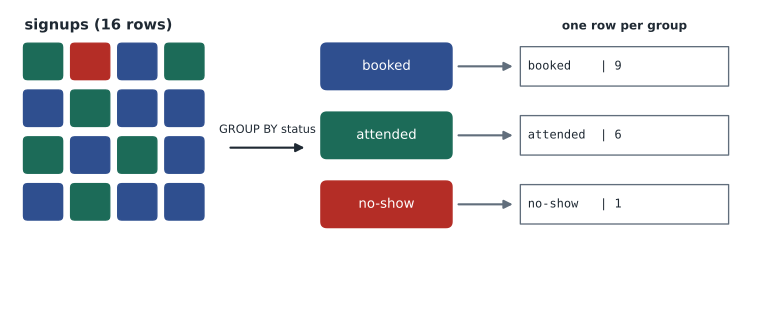
Grouping works together with joins. To count signups by area, join out to areas and group by its name. Group by the key as well as the name when names might repeat; here areas.name is unique, so grouping by it alone is safe.
SELECT a.name AS area,
       COUNT(*) AS signups,
       COUNT(DISTINCT s.volunteer_id) AS different_volunteers
FROM signups AS s
JOIN shifts AS sh ON sh.shift_id = s.shift_id
JOIN areas  AS a  ON a.area_id = sh.area_id
GROUP BY a.name
ORDER BY signups DESC;

-- Result: 4 rows
-- area          | signups | different_volunteers
-- --------------+---------+---------------------
-- Grocery       | 6       | 4
-- Lunch counter | 5       | 3
-- Kitchen       | 4       | 2
-- Youth garden  | 1       | 1
The rule for GROUP BY is that every column in the SELECT list must either be listed in GROUP BY or be inside an aggregate function. Selecting v.email while grouping by v.first_name makes no sense if two volunteers share a first name: which email should the row show? PostgreSQL rejects such a query. MySQL rejects it by default too (its ONLY_FULL_GROUP_BY mode). SQLite allows it and picks a value from some row in the group, which hides mistakes, so follow the rule yourself. One exception is standard: if you group by a table's primary key, you may select the other columns of that table, because they are determined by the key.
The volunteer hours report
Hours for one signup are the shift's end time minus its start time. In SQLite, julianday converts a time to a number of days, so the difference multiplied by 24 gives hours. Only attended signups count.
SELECT v.first_name, v.last_name,
       COUNT(*) AS shifts_attended,
       SUM(ROUND((julianday(sh.end_time) - julianday(sh.start_time)) * 24, 1)) AS hours
FROM signups AS s
JOIN shifts     AS sh ON sh.shift_id = s.shift_id
JOIN volunteers AS v  ON v.volunteer_id = s.volunteer_id
WHERE s.status = 'attended'
GROUP BY v.volunteer_id
ORDER BY hours DESC, v.last_name;

-- Result: 5 rows
-- first_name | last_name | shifts_attended | hours
-- -----------+-----------+-----------------+------
-- Amara      | Okafor    | 2               | 6.0
-- Esther     | Cohen     | 1               | 3.0
-- Ben        | Kowalski  | 1               | 3.0
-- Chloe      | Martin    | 1               | 3.0
-- Diego      | Ramos     | 1               | 3.0
In PostgreSQL, with real time types, the hours are EXTRACT(EPOCH FROM end_time - start_time) / 3600. Mira checked the answer against the shift grid for November 9 to 12 in her old spreadsheet, and it matched, which is a good habit with any new report.
HAVING: filtering groups
WHERE filters rows before they are grouped. HAVING filters groups after the aggregates are calculated, so it can test them. To find volunteers with two or more signups of any status:
SELECT v.first_name, COUNT(*) AS signups
FROM signups AS s
JOIN volunteers AS v ON v.volunteer_id = s.volunteer_id
GROUP BY v.volunteer_id
HAVING COUNT(*) >= 3
ORDER BY signups DESC, v.first_name;

-- Result: 2 rows
-- first_name | signups
-- -----------+--------
-- Amara      | 4
-- Esther     | 3
Put a condition in WHERE whenever it is about individual rows, such as a date range or a status, because removing rows early means less to group. Use HAVING only for conditions on aggregates. A query can have both: WHERE s.status = 'attended' to choose which rows count, and HAVING SUM(hours) >= 6 to choose which volunteers appear.
Counting conditionally
Often you want several counts side by side: booked, attended and no-shows for each area. Conditional aggregation puts a CASE inside the aggregate so that each count only includes the rows you want. PostgreSQL also has a tidier form, COUNT(*) FILTER (WHERE status = 'booked'), which recent SQLite versions accept as well.
SELECT a.name AS area,
       SUM(CASE WHEN s.status = 'booked'   THEN 1 ELSE 0 END) AS booked,
       SUM(CASE WHEN s.status = 'attended' THEN 1 ELSE 0 END) AS attended,
       SUM(CASE WHEN s.status = 'no-show'  THEN 1 ELSE 0 END) AS no_shows
FROM signups AS s
JOIN shifts AS sh ON sh.shift_id = s.shift_id
JOIN areas  AS a  ON a.area_id = sh.area_id
GROUP BY a.name
ORDER BY a.name;

-- Result: 4 rows
-- area          | booked | attended | no_shows
-- --------------+--------+----------+---------
-- Grocery       | 3      | 2        | 1
-- Kitchen       | 2      | 2        | 0
-- Lunch counter | 3      | 2        | 0
-- Youth garden  | 1      | 0        | 0
To combine text from a group into one value, SQLite and MySQL have GROUP_CONCAT and PostgreSQL has string_agg. GROUP_CONCAT(first_name, ', ') could list everyone on each shift in a single row, which is handy for a printable rota.
Building queries in steps with CTEs
Complicated questions are easier to write and to check in steps. A common table expression (CTE) names a subquery at the top of a statement with WITH, and the main query then uses it like a table. Lucy wanted each upcoming shift with the number of spots still open. Step one counts booked signups per shift; step two joins that to shifts.
WITH booked AS (
    SELECT shift_id, COUNT(*) AS taken
    FROM signups
    WHERE status = 'booked'
    GROUP BY shift_id
)
SELECT sh.shift_id, sh.shift_date, a.name AS area,
       sh.spots, COALESCE(b.taken, 0) AS taken,
       sh.spots - COALESCE(b.taken, 0) AS open_spots
FROM shifts AS sh
JOIN areas AS a ON a.area_id = sh.area_id
LEFT JOIN booked AS b ON b.shift_id = sh.shift_id
WHERE sh.shift_date >= '2026-11-16'
ORDER BY sh.shift_date;

-- Result: 5 rows
-- shift_id | shift_date | area          | spots | taken | open_spots
-- ---------+------------+---------------+-------+-------+-----------
-- 4        | 2026-11-16 | Grocery       | 4     | 3     | 1
-- 5        | 2026-11-17 | Lunch counter | 3     | 2     | 1
-- 6        | 2026-11-18 | Kitchen       | 2     | 2     | 0
-- 7        | 2026-11-19 | Youth garden  | 5     | 1     | 4
-- 8        | 2026-11-20 | Lunch counter | 3     | 1     | 2
This also shows the cure for the row-multiplying problem from lesson 5: signups are aggregated first, to one row per shift, and only then joined, so nothing is counted twice. The same query could be written with the subquery in the FROM clause (a derived table), but the CTE reads from top to bottom like a recipe. You can define several CTEs, separated by commas, and later ones can use earlier ones.
A recursive CTE refers to itself, which lets it generate rows. It is how you produce a list of dates, or walk a hierarchy such as staff and their managers. This one makes the five weekdays of the week of November 16, which a report can left join to shifts to show days with nothing scheduled.
WITH RECURSIVE days(day) AS (
    SELECT '2026-11-16'
    UNION ALL
    SELECT date(day, '+1 day') FROM days WHERE day < '2026-11-20'
)
SELECT d.day, COUNT(sh.shift_id) AS shifts
FROM days AS d
LEFT JOIN shifts AS sh ON sh.shift_date = d.day
GROUP BY d.day
ORDER BY d.day;

-- Result: 5 rows
-- day        | shifts
-- -----------+-------
-- 2026-11-16 | 1
-- 2026-11-17 | 1
-- 2026-11-18 | 1
-- 2026-11-19 | 1
-- 2026-11-20 | 1
Window functions
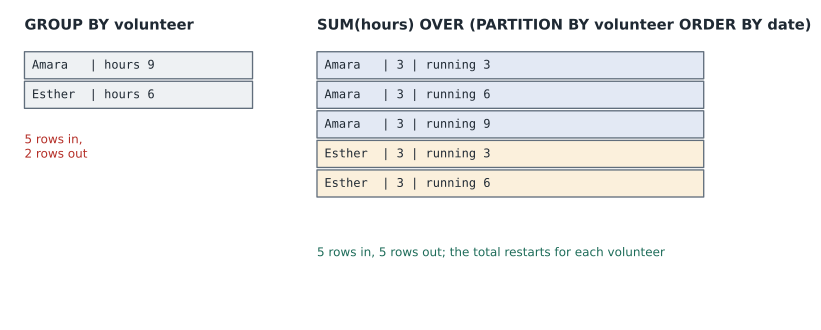
GROUP BY collapses each group into one row. Sometimes you want to keep every row and add a value calculated over a group of related rows: each signup with that volunteer's running total of hours, or each shift with its rank in the week by number of signups. Window functions do this. You write a function followed by OVER (...), where PARTITION BY says which rows form each window and ORDER BY says the order within it.
| Function | What it gives each row |
|---|---|
| ROW_NUMBER() | 1, 2, 3 ... in the window order, with no ties |
| RANK() | The position, with ties sharing a rank and the next rank skipped (1, 1, 3) |
| DENSE_RANK() | The position, with ties sharing a rank and no gaps (1, 1, 2) |
| SUM(x) OVER (... ORDER BY ...) | A running total up to this row |
| COUNT(*) OVER (PARTITION BY ...) | The size of this row's partition |
| LAG(x), LEAD(x) | The value of x in the previous or next row of the window |
SELECT v.first_name, sh.shift_date,
       ROUND((julianday(sh.end_time) - julianday(sh.start_time)) * 24, 1) AS hours,
       SUM(ROUND((julianday(sh.end_time) - julianday(sh.start_time)) * 24, 1)) OVER (PARTITION BY v.volunteer_id
                        ORDER BY sh.shift_date) AS running_hours
FROM signups AS s
JOIN shifts     AS sh ON sh.shift_id = s.shift_id
JOIN volunteers AS v  ON v.volunteer_id = s.volunteer_id
WHERE v.volunteer_id IN (1, 5)
ORDER BY v.first_name, sh.shift_date;

-- Result: 7 rows
-- first_name | shift_date | hours | running_hours
-- -----------+------------+-------+--------------
-- Amara      | 2026-11-09 | 3.0   | 3.0
-- Amara      | 2026-11-10 | 3.0   | 6.0
-- Amara      | 2026-11-16 | 3.0   | 9.0
-- Amara      | 2026-11-20 | 3.0   | 12.0
-- Esther     | 2026-11-09 | 3.0   | 3.0
-- Esther     | 2026-11-12 | 3.0   | 6.0
-- Esther     | 2026-11-18 | 3.0   | 9.0
Window functions are evaluated after WHERE, GROUP BY and HAVING, so you cannot filter on them directly in WHERE. To keep only each volunteer's first signup, for instance, number the rows in a CTE and filter in the outer query.
WITH numbered AS (
    SELECT s.volunteer_id, sh.shift_date,
           ROW_NUMBER() OVER (PARTITION BY s.volunteer_id ORDER BY sh.shift_date) AS n
    FROM signups AS s
    JOIN shifts AS sh ON sh.shift_id = s.shift_id
)
SELECT v.first_name, numbered.shift_date AS first_shift
FROM numbered
JOIN volunteers AS v ON v.volunteer_id = numbered.volunteer_id
WHERE numbered.n = 1
ORDER BY first_shift, v.first_name;

-- Result: 7 rows
-- first_name | first_shift
-- -----------+------------
-- Amara      | 2026-11-09
-- Ben        | 2026-11-09
-- Esther     | 2026-11-09
-- Chloe      | 2026-11-10
-- Diego      | 2026-11-12
-- Farid      | 2026-11-16
-- Grace      | 2026-11-17
Reports from Python
In application code, a report is one query and a loop. Rounding and formatting belong in the code that presents the numbers; the query returns exact values.
import sqlite3

conn = sqlite3.connect(':memory:')
conn.executescript("""
    CREATE TABLE signups (volunteer TEXT, area TEXT, hours REAL, status TEXT);
    INSERT INTO signups VALUES
      ('Amara',  'Grocery',       3, 'attended'), ('Amara',  'Lunch counter', 3, 'attended'),
      ('Ben',    'Grocery',       3, 'attended'), ('Esther', 'Grocery',       3, 'no-show'),
      ('Esther', 'Kitchen',       3, 'attended'), ('Chloe',  'Lunch counter', 3, 'attended'),
      ('Diego',  'Kitchen',       3, 'attended');
""")

report = conn.execute("""
    SELECT area, COUNT(*) AS shifts, SUM(hours) AS hours,
           RANK() OVER (ORDER BY SUM(hours) DESC) AS place
    FROM signups
    WHERE status = 'attended'
    GROUP BY area
    ORDER BY place, area
""").fetchall()

total = sum(row[2] for row in report)
for area, shifts, hours, place in report:
    print(f"{place}. {area:<14} {shifts} shifts  {hours:4.1f} hours")
print(f"Total: {total:.1f} hours")1. Grocery 2 shifts 6.0 hours 1. Kitchen 2 shifts 6.0 hours 1. Lunch counter 2 shifts 6.0 hours Total: 18.0 hours
What this code does
Builds a small table of signups with each person's area, hours and whether they came. It adds up attended hours for each area, ranks the areas from most to fewest hours, and prints a numbered line per area followed by the overall total.
The query combines a GROUP BY with a window function: RANK() runs over the grouped rows, ordered by each group's SUM. Grocery and Lunch counter tie on 6 hours and share first place, so Kitchen is ranked third, which is how RANK treats ties.
Worked problem
Which volunteers missed a shift?
Lucy wants each volunteer who has at least one no-show, with their number of no-shows and number of attended shifts. Write the query.
Show solution
- Start from signups joined to volunteers; group by v.volunteer_id.
- Count each status with conditional aggregation: SUM(CASE WHEN s.status = 'no-show' THEN 1 ELSE 0 END) and the same for 'attended'.
- The condition "at least one no-show" is about the group, so it belongs in HAVING.
- Show first and last name, which are determined by the grouped primary key.
Answer: SELECT v.first_name, v.last_name, SUM(CASE WHEN s.status = 'no-show' THEN 1 ELSE 0 END) AS no_shows, SUM(CASE WHEN s.status = 'attended' THEN 1 ELSE 0 END) AS attended FROM signups s JOIN volunteers v ON v.volunteer_id = s.volunteer_id GROUP BY v.volunteer_id HAVING SUM(CASE WHEN s.status = 'no-show' THEN 1 ELSE 0 END) >= 1; returns Esther Cohen with 1 no-show and 1 attended.
Worked problem
WHERE or HAVING?
Decide where each condition goes in a query that groups signups by volunteer: (a) only shifts in November; (b) only volunteers with more than 6 hours; (c) only the kitchen.
Show solution
- (a) The date is a fact about each row, so WHERE sh.shift_date BETWEEN '2026-11-01' AND '2026-11-30'.
- (b) Total hours exist only after grouping, so HAVING SUM(hours) > 6.
- (c) The area is a fact about each row, so WHERE a.name = 'Kitchen'.
Answer: Row conditions in WHERE, aggregate conditions in HAVING.
Common mistakes
MistakeCOUNT(phone) counts every volunteer.
InsteadCOUNT(column) skips NULLs. Use COUNT(*) to count rows.
MistakeAVG treats missing values as zero.
InsteadAVG ignores NULLs. If missing should mean zero, write AVG(COALESCE(x, 0)).
MistakeWHERE COUNT(*) >= 3 finds groups with three or more rows.
InsteadAggregates are not available in WHERE. Use HAVING COUNT(*) >= 3.
MistakeSelecting a column that is neither grouped nor aggregated is fine because SQLite allows it.
InsteadPostgreSQL and MySQL reject it, and SQLite picks an arbitrary row's value. Group by it, aggregate it, or group by the table's primary key.
MistakeA window function can be filtered in WHERE, such as WHERE ROW_NUMBER() OVER (...) = 1.
InsteadWindow functions run after WHERE. Compute them in a CTE and filter in the outer query.
Try it yourself
Booked signups per area
The setup builds the Food Hub sample database in conn. Write a query that returns each area's name and its number of signups with status 'booked', joining signups to shifts and areas and grouping by area name. Order by the count from highest to lowest, then by name.
Print each area and count separated by a colon and a space, such as Grocery: 3.
sql = "SELECT name, 0 FROM areas ORDER BY name"

for area, n in conn.execute(sql):
    print(f"{area}: {n}")
Practice problems
Work each problem on paper first, then reveal the answer to check.
What is the difference between COUNT(*), COUNT(phone) and COUNT(DISTINCT phone) on the volunteers table?
Show answer
COUNT(*) counts all 8 rows. COUNT(phone) counts the 6 non-NULL phones. COUNT(DISTINCT phone) counts the different non-NULL phone numbers, also 6 here because no two volunteers share one.
Write the query that lists each area with its total scheduled spots for the week of November 16 to 20.
Show answer
SELECT a.name, SUM(sh.spots) FROM shifts sh JOIN areas a ON a.area_id = sh.area_id WHERE sh.shift_date BETWEEN '2026-11-16' AND '2026-11-20' GROUP BY a.name;
Three volunteers have 9, 9 and 6 hours. What do ROW_NUMBER, RANK and DENSE_RANK give each, ordered by hours descending?
Show answer
ROW_NUMBER: 1, 2, 3. RANK: 1, 1, 3. DENSE_RANK: 1, 1, 2.
Why does the open-spots query aggregate signups in a CTE before joining to shifts?
Show answer
So that each shift joins to at most one row of counts. Joining raw signups and then other one-to-many tables could multiply rows and make counts wrong, and a left join to the CTE keeps shifts with no bookings.
Summary and key terms
- Aggregate functions reduce many rows to one value: COUNT, SUM, AVG, MIN and MAX ignore NULLs, except COUNT(*), which counts rows.
- GROUP BY computes aggregates once per group; every selected column must be grouped or aggregated, though grouping by a primary key allows that table's other columns.
- WHERE filters rows before grouping; HAVING filters groups using aggregates.
- Conditional aggregation with CASE, or FILTER in PostgreSQL, gives several counts side by side.
- CTEs written with WITH build a query in named steps, and aggregating before joining avoids double counting; recursive CTEs generate rows such as a list of dates.
- Window functions with OVER, PARTITION BY and ORDER BY add running totals, ranks and neighbouring values to every row without collapsing them, and are filtered in an outer query.
- Aggregate function
- A function such as COUNT or SUM that returns one value from many rows.
- GROUP BY
- The clause that splits rows into groups with equal values and aggregates each group.
- HAVING
- The clause that filters groups after aggregation.
- Conditional aggregation
- Using CASE inside an aggregate so it counts or sums only some rows.
- Derived table
- A subquery in the FROM clause used as a table.
- Common table expression
- A named subquery introduced with WITH at the top of a statement.
- Recursive CTE
- A CTE that refers to itself, used to generate rows or walk hierarchies.
- Window function
- A function computed over a set of related rows, written with OVER, that keeps every row.
- PARTITION BY
- The part of a window definition that splits rows into separate windows.
- Running total
- A sum of a value over all rows up to and including the current one.
Lesson quiz · 5 questions
Score 60% or more to complete this lesson.
Create a free account to save your progress, take quizzes and earn a certificate.