
WEB-201 · Lesson 4 of 12 · 28 min
SELECT, filtering and sorting
▶ Video coming soon A video version of this lesson is on the way.
With the sample database built, Theo handed Mira a sticky note from Lucy with the questions she asks most often: "Who joined this year? Which shifts next week still need people? Who hasn't given us a phone number?" "Every one of those is a SELECT," Theo said. "Get comfortable with SELECT and you can answer most questions anyone at the Food Hub will ever ask."
This lesson covers the statement you will write more than any other. You will choose columns and calculate new ones, filter rows with WHERE, deal correctly with missing values, sort results and return them one page at a time. Every SQL listing shows the exact result from the Food Hub sample database built in lesson 2, and the Python examples let you run and change the queries yourself.
The shape of a SELECT
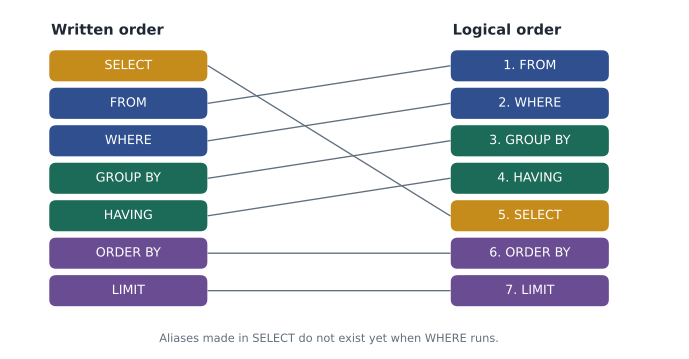
A SELECT statement names the columns you want and the table they come from. Optional clauses then filter, group, sort and limit the rows. The clauses must be written in this order:
SELECT   columns or expressions
FROM     table
WHERE    condition on each row
GROUP BY columns            -- lesson 6
HAVING   condition on each group
ORDER BY columns
LIMIT    number;
The database does not run them in that order, though. Logically, it starts with FROM (which rows exist), applies WHERE (which rows to keep), then GROUP BY and HAVING, then works out the SELECT list, then sorts with ORDER BY and finally applies LIMIT. Knowing this explains several rules that otherwise seem arbitrary, such as why you cannot use a column alias from the SELECT list inside WHERE: when WHERE runs, the alias does not exist yet.
Choosing and calculating columns
The simplest query asks for every column with an asterisk. That is handy for exploring, but application code should name the columns it needs: the query keeps working if someone adds a column, transfers less data, and never accidentally sends a sensitive column to a page that did not need it.
SELECT shift_id, shift_date, start_time, end_time, spots
FROM shifts
WHERE area_id = 3;

-- Result: 3 rows
-- shift_id | shift_date | start_time | end_time | spots
-- ---------+------------+------------+----------+------
-- 2        | 2026-11-10 | 11:00      | 14:00    | 3
-- 5        | 2026-11-17 | 11:00      | 14:00    | 3
-- 8        | 2026-11-20 | 11:00      | 14:00    | 3
The SELECT list can contain expressions as well as columns. You can do arithmetic, join text together with the || operator (CONCAT in MySQL), and call functions. Give a calculated column a readable name with AS; that name is an alias.
SELECT first_name || ' ' || last_name AS volunteer,
       upper(substr(last_name, 1, 1)) AS initial,
       joined_on
FROM volunteers
WHERE volunteer_id <= 3;

-- Result: 3 rows
-- volunteer    | initial | joined_on
-- -------------+---------+-----------
-- Amara Okafor | O       | 2023-04-11
-- Ben Kowalski | K       | 2024-09-02
-- Chloe Martin | M       | 2025-01-15
DISTINCT removes duplicate rows from the result. Use it when you want the set of different values, such as the dates that have any shift at all, but do not use it to hide duplicates caused by a mistaken join; fix the join instead.
SELECT DISTINCT status
FROM signups
ORDER BY status;

-- Result: 3 rows
-- status
-- --------
-- attended
-- booked
-- no-show
Filtering rows with WHERE
WHERE keeps only the rows for which a condition is true. Conditions use the comparison operators = (equal), <> or != (not equal), <, <=, > and >=, and combine with AND, OR and NOT. Text values go in single quotes; double quotes are for identifiers such as column names in standard SQL, so 'Kitchen' is a value and "Kitchen" would be a column.
SELECT shift_id, area_id, shift_date, spots
FROM shifts
WHERE shift_date >= '2026-11-16'
  AND spots >= 3;

-- Result: 4 rows
-- shift_id | area_id | shift_date | spots
-- ---------+---------+------------+------
-- 4        | 1       | 2026-11-16 | 4
-- 5        | 3       | 2026-11-17 | 3
-- 7        | 4       | 2026-11-19 | 5
-- 8        | 3       | 2026-11-20 | 3
AND binds more tightly than OR, just as multiplication binds more tightly than addition. A condition such as area_id = 1 OR area_id = 3 AND spots > 3 means area_id = 1 OR (area_id = 3 AND spots > 3), which is rarely what anyone intends. Use parentheses whenever you mix AND and OR.
SELECT shift_id, area_id, shift_date
FROM shifts
WHERE (area_id = 1 OR area_id = 3)
  AND shift_date BETWEEN '2026-11-16' AND '2026-11-20'
ORDER BY shift_date;

-- Result: 3 rows
-- shift_id | area_id | shift_date
-- ---------+---------+-----------
-- 4        | 1       | 2026-11-16
-- 5        | 3       | 2026-11-17
-- 8        | 3       | 2026-11-20
Three shorthand operators make conditions easier to read.
- IN tests membership of a list: area_id IN (1, 3) means area_id = 1 OR area_id = 3. NOT IN means none of them (with a catch for NULL, explained below).
- BETWEEN low AND high is inclusive at both ends: it means value >= low AND value <= high. With dates stored as ISO text, BETWEEN '2026-11-16' AND '2026-11-20' includes both days. With timestamps it would stop at midnight at the start of the 20th, so for times prefer >= start AND < next day.
- LIKE matches text against a pattern with two wildcards: an underscore stands for exactly one character, and the other wildcard symbol, shown in the listing below, stands for any run of characters, including none. A pattern of K followed by that symbol matches values starting with K. In SQLite and MySQL, LIKE ignores the case of ordinary letters by default; in PostgreSQL it is case sensitive, and ILIKE is the case-insensitive version.
SELECT first_name, last_name, email
FROM volunteers
WHERE last_name LIKE 'K%'
   OR email LIKE '%grace%';

-- Result: 2 rows
-- first_name | last_name | email
-- -----------+-----------+------------------
-- Ben        | Kowalski  | ben@example.com
-- Grace      | Liu       | grace@example.com
A LIKE pattern that starts with a wildcard cannot use an ordinary index, because the database cannot know where in the sorted index to start looking. That is fine on a table of 300 volunteers and slow on a table of millions; lesson 9 returns to this, and to full-text search for searching inside long text.
NULL and three-valued logic
Comparisons with NULL do not give true or false. They give a third value, unknown, because comparing with a missing value cannot be decided. WHERE keeps only rows where the condition is true, so rows where it is unknown are dropped. That is why phone = NULL finds nothing, even for Chloe and Farid, whose phones really are NULL. To test for a missing value, use IS NULL or IS NOT NULL.
SELECT first_name, last_name
FROM volunteers
WHERE phone IS NULL;

-- Result: 2 rows
-- first_name | last_name
-- -----------+----------
-- Chloe      | Martin
-- Farid | Haddad| Expression | Result when phone is NULL | Why |
|---|---|---|
| phone = '555-0141' | unknown | A missing value cannot be compared |
| phone = NULL | unknown | Nothing is equal to NULL, not even NULL |
| phone IS NULL | true | IS NULL is the test for a missing value |
| NOT (phone = '555-0141') | unknown | NOT unknown is still unknown |
| phone = '555-0141' OR 1 = 1 | true | true OR anything is true |
| phone = '555-0141' AND 1 = 0 | false | false AND anything is false |
The rule catches people out with NOT IN. If the list contains a NULL, such as a subquery that returns a NULL, then x NOT IN (1, NULL) is never true, and the query returns no rows at all. Lesson 5 shows the safer NOT EXISTS form. To show a replacement for a missing value, use COALESCE, which returns its first argument that is not NULL.
SELECT first_name, COALESCE(phone, 'not given') AS phone
FROM volunteers
WHERE volunteer_id IN (2, 3, 6);

-- Result: 3 rows
-- first_name | phone
-- -----------+----------
-- Ben        | 555-0162
-- Chloe      | not given
-- Farid      | not given
Sorting with ORDER BY
Without ORDER BY, a database may return rows in any order it likes, and the order can change when data or indexes change. If the order matters to the user, and on a web page it almost always does, say so with ORDER BY. Sort by several columns by listing them: the second column breaks ties in the first. Each column can be ascending (ASC, the default) or descending (DESC).
SELECT area_id, shift_date, start_time
FROM shifts
ORDER BY area_id, shift_date DESC;

-- Result: 8 rows
-- area_id | shift_date | start_time
-- --------+------------+-----------
-- 1       | 2026-11-16 | 09:00
-- 1       | 2026-11-09 | 09:00
-- 2       | 2026-11-18 | 08:00
-- 2       | 2026-11-12 | 08:00
-- 3       | 2026-11-20 | 11:00
-- 3       | 2026-11-17 | 11:00
-- 3       | 2026-11-10 | 11:00
-- 4       | 2026-11-19 | 15:00
Systems disagree about where NULLs go. SQLite and MySQL put NULLs first in an ascending sort; PostgreSQL puts them last. PostgreSQL and recent SQLite versions accept NULLS FIRST or NULLS LAST to make it explicit. Text sorts according to a collation, a set of rules for comparing characters. A plain binary collation puts capital letters before lower-case ones and handles accented letters by their code numbers, so a page that sorts names should use a collation suited to its language or sort by lower(name).
CASE expressions
CASE gives SQL an if-then-else for values. It is evaluated for each row and can appear in the SELECT list, in ORDER BY or in WHERE. Mira used it to label shifts by time of day for the sign-up page.
SELECT shift_id, start_time,
       CASE
         WHEN start_time < '12:00' THEN 'Morning'
         WHEN start_time < '17:00' THEN 'Afternoon'
         ELSE 'Evening'
       END AS part_of_day
FROM shifts
WHERE shift_date >= '2026-11-16'
ORDER BY shift_date;

-- Result: 5 rows
-- shift_id | start_time | part_of_day
-- ---------+------------+------------
-- 4        | 09:00      | Morning
-- 5        | 11:00      | Morning
-- 6        | 08:00      | Morning
-- 7        | 15:00      | Afternoon
-- 8        | 11:00      | Morning
One page at a time: LIMIT and OFFSET
LIMIT n returns at most n rows; OFFSET m skips the first m. Together they give pages: page 1 is LIMIT 3 OFFSET 0, page 2 is LIMIT 3 OFFSET 3, and so on. Always use them with ORDER BY, otherwise "the first three" has no defined meaning. PostgreSQL, MySQL and SQLite all accept LIMIT and OFFSET; the SQL standard and SQL Server use OFFSET m ROWS FETCH NEXT n ROWS ONLY.
SELECT volunteer_id, first_name, joined_on
FROM volunteers
ORDER BY joined_on DESC
LIMIT 3 OFFSET 3;

-- Result: 3 rows
-- volunteer_id | first_name | joined_on
-- -------------+------------+-----------
-- 4            | Diego      | 2025-06-30
-- 3            | Chloe      | 2025-01-15
-- 2            | Ben        | 2024-09-02
OFFSET gets slower as pages go deeper, because the database still has to find and skip all the earlier rows, and rows added while someone is paging can shift the pages. For long lists, lesson 9 shows keyset pagination, which remembers the last value seen and asks for rows after it.
Dates in queries
Because the sample database stores dates as ISO 8601 text, comparisons and sorting work as text. SQLite's date functions accept that text: date('2026-11-16', '+7 days') returns '2026-11-23', and strftime can pull out parts such as the weekday. PostgreSQL has real date types, so you would write shift_date + 7 or shift_date + interval '7 days'. Application code should pass dates in as parameters rather than calling the database's "now" functions inside queries, which makes the queries easy to test with a fixed date, as these examples do.
SELECT shift_id, shift_date,
       strftime('%w', shift_date) AS weekday_number,
       date(shift_date, '+7 days') AS same_day_next_week
FROM shifts
WHERE area_id = 3;

-- Result: 3 rows
-- shift_id | shift_date | weekday_number | same_day_next_week
-- ---------+------------+----------------+-------------------
-- 2        | 2026-11-10 | 2              | 2026-11-17
-- 5        | 2026-11-17 | 2              | 2026-11-24
-- 8        | 2026-11-20 | 5              | 2026-11-27
Running queries from Python
From application code, you send the same SQL with the values supplied as parameters. In Python's sqlite3, conn.execute returns a cursor; you can loop over it, call fetchone() for a single row (or None if there is none) or fetchall() for a list. Setting conn.row_factory = sqlite3.Row makes each row behave like a dictionary, so you can read columns by name, which keeps code readable when the column list changes.
import sqlite3

conn = sqlite3.connect(':memory:')
conn.executescript("""
    CREATE TABLE shifts (shift_id INTEGER PRIMARY KEY, area TEXT, shift_date TEXT, spots INTEGER);
    INSERT INTO shifts (area, shift_date, spots) VALUES
      ('Grocery', '2026-11-16', 4), ('Lunch counter', '2026-11-17', 3),
      ('Kitchen', '2026-11-18', 2), ('Lunch counter', '2026-11-20', 3);
""")
conn.row_factory = sqlite3.Row

start, end = '2026-11-16', '2026-11-20'
rows = conn.execute("""
    SELECT area, shift_date, spots FROM shifts
    WHERE shift_date BETWEEN ? AND ?
    ORDER BY shift_date
""", (start, end)).fetchall()

print(len(rows), 'shifts next week')
for r in rows:
    print(f"{r['shift_date']}  {r['area']:<14} {r['spots']} spots")

first = conn.execute("SELECT area FROM shifts WHERE area = ?", ('Youth garden',)).fetchone()
print('Youth garden shift:', first)4 shifts next week 2026-11-16 Grocery 4 spots 2026-11-17 Lunch counter 3 spots 2026-11-18 Kitchen 2 spots 2026-11-20 Lunch counter 3 spots Youth garden shift: None
What this code does
Builds a small table of four shifts and asks for the ones between two dates, passing the dates separately from the query. It prints how many shifts were found and a neat line for each, reading the columns by name. A last question about youth garden shifts finds none, so it prints None.
Worked problem
Next week's shifts that need people
Lucy wants shifts from November 16 to 20 at the grocery or lunch counter, earliest first, showing the date, the area number and the spots. Write the query.
Show solution
- The rows come from shifts, so FROM shifts.
- Two conditions must both hold: the date range and the area. Use BETWEEN for the dates and IN for the areas, joined with AND.
- Sort by shift_date, then start_time to break ties.
- Name the three columns in the SELECT list.
Answer: SELECT shift_date, area_id, spots FROM shifts WHERE shift_date BETWEEN '2026-11-16' AND '2026-11-20' AND area_id IN (1, 3) ORDER BY shift_date, start_time;
Worked problem
Why does this query return nothing?
Mira writes SELECT first_name FROM volunteers WHERE phone = NULL; to find volunteers without a phone, and gets no rows. Explain and fix it.
Show solution
- phone = NULL compares with a missing value, which gives unknown for every row, never true.
- WHERE keeps only rows where the condition is true, so every row is dropped.
- The test for a missing value is IS NULL.
Answer: SELECT first_name FROM volunteers WHERE phone IS NULL; returns Chloe and Farid.
Common mistakes
MistakeSELECT * is fine in application code.
InsteadName the columns you need. The query transfers less, survives schema changes and never sends a sensitive column by accident.
MistakeWHERE phone = NULL finds missing phone numbers.
InsteadUse WHERE phone IS NULL. Comparisons with NULL are unknown, never true.
MistakeRows come back in the order they were inserted, so ORDER BY is optional.
InsteadWithout ORDER BY the order is undefined and can change. Always sort when order matters.
Mistakearea_id = 1 OR area_id = 3 AND spots > 3 means "area 1 or 3, with more than 3 spots".
InsteadAND binds first, so it means area 1, or area 3 with more than 3 spots. Add parentheses.
MistakeDouble quotes and single quotes are interchangeable in SQL.
InsteadSingle quotes mark text values. Double quotes mark identifiers in standard SQL and PostgreSQL.
Try it yourself
Open lunch counter shifts
The setup builds the Food Hub sample database from lesson 2 in conn. Write a query that returns the shift_id, shift_date and start_time of every lunch counter shift (area_id 3) on or after 2026-11-16, ordered by date, passing 3 and the date as parameters.
Print each row as a tuple.
sql = "SELECT shift_id, shift_date, start_time FROM shifts"

for row in conn.execute(sql):
    print(row)
Practice problems
Work each problem on paper first, then reveal the answer to check.
Write a query for volunteers who joined between January 1, 2025 and December 31, 2025, showing first name and join date, earliest first.
Show answer
SELECT first_name, joined_on FROM volunteers WHERE joined_on BETWEEN '2025-01-01' AND '2025-12-31' ORDER BY joined_on; returns Chloe (2025-01-15) and Diego (2025-06-30).
Why can you not write WHERE part_of_day = 'Morning' when part_of_day is an alias defined in the SELECT list?
Show answer
WHERE is evaluated before the SELECT list, so the alias does not exist yet. Repeat the CASE expression in WHERE, or wrap the query in a subquery or CTE and filter outside it.
Lucy asks for page 3 of the volunteer list at 25 names per page, sorted by last name. Write the LIMIT and OFFSET.
Show answer
ORDER BY last_name, first_name LIMIT 25 OFFSET 50. Page n skips (n minus 1) times 25 rows.
What does area_id NOT IN (1, NULL) return for a shift in area 3, and why?
Show answer
Unknown, so the row is dropped. The test becomes area_id <> 1 AND area_id <> NULL, and the second part is unknown, which makes the whole AND unknown.
Summary and key terms
- A SELECT is written SELECT, FROM, WHERE, GROUP BY, HAVING, ORDER BY, LIMIT but evaluated starting from FROM and WHERE, which is why SELECT aliases are not available in WHERE.
- Name the columns you need, calculate expressions and label them with AS.
- WHERE combines comparisons with AND, OR and NOT; use parentheses when mixing AND and OR.
- IN, BETWEEN (inclusive) and LIKE (an underscore for one character and a second wildcard for any run) shorten common conditions.
- Comparisons with NULL are unknown, so use IS NULL, beware NOT IN with NULLs, and use COALESCE to substitute a value.
- ORDER BY is the only way to guarantee order; NULL placement and collation vary by system.
- CASE adds if-then-else to expressions.
- LIMIT and OFFSET page through results; always pair them with ORDER BY.
- From code, pass values as parameters and read rows with fetchone, fetchall or named rows.
- SELECT
- The SQL statement that reads rows and columns from tables.
- WHERE
- The clause that keeps only rows for which a condition is true.
- Expression
- A calculation in a query, such as arithmetic, a function call or CASE.
- Alias
- A name given to a column or table in a query with AS.
- DISTINCT
- A keyword that removes duplicate rows from a result.
- Three-valued logic
- SQL logic in which conditions can be true, false or unknown, the result of comparing with NULL.
- COALESCE
- A function that returns the first of its arguments that is not NULL.
- ORDER BY
- The clause that sorts the result rows.
- Collation
- Rules that decide how text values compare and sort.
- CASE
- An expression that chooses a value according to conditions.
- LIMIT and OFFSET
- Clauses that return a fixed number of rows after skipping some, used for paging.
Lesson quiz · 5 questions
Score 60% or more to complete this lesson.
Create a free account to save your progress, take quizzes and earn a certificate.