
PYTH-250 · Lesson 7 of 12 · 24 min
Asynchronous programming with asyncio
▶ Video coming soon A video version of this lesson is on the way.
Threads solved Theo's waiting problem, but they are a heavy tool for it. Each thread has its own stack, usually reserved at several hundred kilobytes to a few megabytes of address space, the operating system schedules them, and every shared variable needs thought about locks. For ten waits that is fine. Ridgeline's online shop, though, is heading towards hundreds of simultaneous connections: customers browsing, the stock feed, the payment service, the shipping API. Thousands of threads would be wasteful. Python's asyncio module offers another model of concurrency, designed for exactly this case: a single thread that juggles many waiting tasks, switching between them only at the points where they wait.
This lesson explains the ideas behind asynchronous programming: coroutines defined with async def, the await keyword, and the event loop that runs them. It shows how to run several coroutines concurrently with asyncio.gather and asyncio.create_task, how to add timeouts, and what goes wrong if a coroutine blocks. To make the model concrete you will also build a tiny scheduler of your own that steps coroutines in turn, which is, in miniature, what the real event loop does. The full asyncio examples are listings with their real output; the exercises use coroutines you can step through right in the browser.
Cooperative multitasking
Threads use pre-emptive multitasking: the operating system can pause a thread at almost any moment and run another, which is why races can strike between any two steps. asyncio uses cooperative multitasking: a task runs until it reaches a point where it chooses to wait, marked in the code with await, and only then can another task run. Between two awaits, a task cannot be interrupted by other tasks in the same event loop, so most of the locking worries from lesson 4 disappear. The price is that every task must cooperate. A task that computes for ten seconds without awaiting, or calls a blocking function such as time.sleep, freezes every other task for those ten seconds.
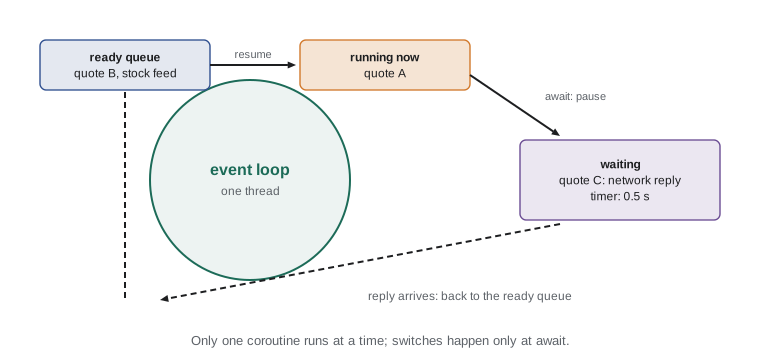
The event loop is the engine that makes this work. It keeps a queue of tasks that are ready to run and a record of tasks waiting for something, such as a network reply or a timer. It runs a ready task until that task awaits, notes what it is waiting for, and moves on to the next ready task. When the operating system reports that a socket has data or a timer has expired, the loop marks the waiting task ready again. All of this happens on one thread.
Coroutines, async def and await
A function defined with async def is a coroutine function. Calling it does not run its body; it returns a coroutine object, much as calling a generator function returns a generator. The body runs when the coroutine is awaited or scheduled on an event loop. Inside a coroutine, await expression pauses the coroutine until the awaited thing, another coroutine, a task or a future, has a result, letting the event loop run something else in the meantime. await can only be used inside async def functions.
import asyncio

async def get_quote(order_id):
    print(f"  asking for {order_id}")
    await asyncio.sleep(0.5)                 # a non-blocking wait, like a network reply
    print(f"  got {order_id}")
    return round(11.75 + int(order_id[-2:]) * 0.35, 2)

coro = get_quote("A-1007")
print("calling get_quote returned:", type(coro).__name__)
coro.close()                                  # tidy up the unused coroutine

print(asyncio.run(get_quote("A-1007"))) # the event loop runs it to completioncalling get_quote returned: coroutine asking for A-1007 got A-1007 14.2
asyncio.run(main()) is the usual entry point of an async program: it creates an event loop, runs the coroutine until it finishes, returns its result and closes the loop. A program normally calls asyncio.run once, at the top, and everything else is reached by awaiting from main. Unlike time.sleep, asyncio.sleep is itself a coroutine: awaiting it tells the event loop to wake this task after the delay and run others in the meantime.
Under the hood: stepping a coroutine
A coroutine object is a close relative of the generators from PYTH-102. Each await that has to wait hands control back to whoever is running the coroutine, and that runner resumes it later by calling its send() method. When the coroutine finishes, send() raises StopIteration with the return value attached. asyncio.sleep(0) is a special case worth knowing: it yields control once without any timer, so the coroutine can be stepped without an event loop at all. That lets us run small coroutines with a few lines of our own code.
def drive(coro):
    """Run a coroutine to completion by stepping it (enough for await asyncio.sleep(0))."""
    try:
        while True:
            coro.send(None)
    except StopIteration as done:
        return done.value

import asyncio

async def price_with_tax(price):
    await asyncio.sleep(0)            # pretend to wait for a tax service
    return round(price * 1.05, 2)

async def basket_total(prices):
    total = 0
    for p in prices:
        total += await price_with_tax(p)
    return round(total, 2)

print(drive(basket_total([18.50, 22.00, 4.95])))47.73
drive() is not a replacement for asyncio. It cannot handle real timers or network waits, and it runs coroutines one at a time. But it shows that nothing magical happens: a coroutine is an object that runs until it waits and can be resumed. In the browser exercises in this lesson and the next, a drive() helper like this one is provided so your coroutines can be checked.
Try it yourself
Your first coroutines
A helper fake_lookup(sku) is provided: it is a coroutine that waits (with await asyncio.sleep(0)) and then returns the price of a coffee. drive(coro) is also provided.
Write a coroutine order_total(lines) that takes a list of (sku, qty) pairs, awaits fake_lookup(sku) for each line and returns the total price rounded to 2 decimal places. It must be defined with async def.
def order_total(lines):
    total = 0
    return total

print(order_total([('RC-101', 2)]))
Running coroutines concurrently with gather
Awaiting coroutines one after another, as basket_total does, is still sequential: each wait finishes before the next begins. To overlap the waits, the coroutines must be scheduled on the event loop at the same time. asyncio.gather(*coroutines) does that: it wraps each coroutine in a task, runs them all concurrently, and returns their results as a list in the order they were passed in. For Theo's quotes, that turns twenty half-second waits into about half a second.
import asyncio, time

async def get_quote(order_id):
    await asyncio.sleep(0.5)
    return order_id, round(11.75 + int(order_id[-2:]) * 0.35, 2)

async def main():
    orders = [f"A-10{n:02d}" for n in range(20)]
    start = time.perf_counter()
    for o in orders[:4]:                              # one at a time
        await get_quote(o)
    print(f"4 quotes in turn: {time.perf_counter() - start:.1f} s")

    start = time.perf_counter()
    quotes = await asyncio.gather(*(get_quote(o) for o in orders))
    print(f"20 quotes with gather: {time.perf_counter() - start:.1f} s")
    print(quotes[:2])

asyncio.run(main())4 quotes in turn: 2.0 s
20 quotes with gather: 0.5 s
[('A-1000', 11.75), ('A-1001', 12.1)]Unlike the thread pool in lesson 6, gather does not need a worker for each task; a coroutine waiting on asyncio.sleep or a network read costs only a small object in memory. That is why asyncio programs can keep thousands of connections open at once. The flip side is that gather starts everything at once. Twenty requests is polite; twenty thousand would overwhelm the shipping server, which is why the next lesson adds a limit.
Tasks
asyncio.create_task(coro) schedules a coroutine to run on the event loop as soon as possible and returns a Task, which is a kind of future. The coroutine starts running at the next await in the current code, without the current code waiting for it. You await the task later to get its result. Tasks let a program start background work, carry on with something else, and collect the result when needed. Since Python 3.11, asyncio.TaskGroup offers a structured alternative: tasks created inside an async with TaskGroup() block are all awaited when the block ends, and if one fails the others are cancelled.
import asyncio

async def refresh_stock_feed():
    await asyncio.sleep(0.3)
    return "stock feed refreshed"

async def price_check(sku):
    await asyncio.sleep(0.1)
    return f"{sku} price checked"

async def main():
    feed = asyncio.create_task(refresh_stock_feed())     # starts in the background
    for sku in ["RC-101", "RC-102"]:
        print(await price_check(sku))
    print(await feed)                                     # collect it when needed

    async with asyncio.TaskGroup() as tg:                 # Python 3.11 and later
        t1 = tg.create_task(price_check("RC-104"))
        t2 = tg.create_task(price_check("RC-106"))
    print(t1.result(), "|", t2.result())

asyncio.run(main())RC-101 price checked RC-102 price checked stock feed refreshed RC-104 price checked | RC-106 price checked
Build a tiny scheduler
The real event loop is complicated because it handles timers, sockets and many edge cases, but its central idea fits in a few lines: keep a queue of coroutines, step each one until it pauses, put it at the back of the queue, and repeat until all have finished. Stepping in turn is what lets the coroutines overlap. The exercise below asks you to write that loop. When you run it, the log shows the coroutines interleaving at their await points, exactly as tasks do on a real event loop.
def drive(coro):
    """Run a coroutine to completion by stepping it (enough for await asyncio.sleep(0))."""
    try:
        while True:
            coro.send(None)
    except StopIteration as done:
        return done.value

import asyncio
from collections import deque

log = []

async def quote(order_id, steps):
    for i in range(steps):
        log.append(f"{order_id} step {i}")
        await asyncio.sleep(0)            # pause: let others run
    return f"{order_id} done"

def run_in_turn(coros):
    queue = deque(coros)
    results = {}
    while queue:
        coro = queue.popleft()
        try:
            coro.send(None)
            queue.append(coro)                     # not finished: back of the queue
        except StopIteration as done:
            results[coro] = done.value
    return results

coros = [quote("A", 2), quote("B", 3)]
results = run_in_turn(coros)
print(log)
print([results[c] for c in coros])['A step 0', 'B step 0', 'A step 1', 'B step 1', 'B step 2'] ['A done', 'B done']
Try it yourself
Round-robin gather
Write gather_in_turn(coros) that runs a list of coroutines concurrently by stepping them in turn: take the first from a queue, send(None) to it, and put it back at the end unless it raised StopIteration. Return the list of results **in the order the coroutines were given**, like asyncio.gather.
A coroutine worker(name, steps, log) is provided that appends to log and pauses steps times before returning name.upper().
from collections import deque

def gather_in_turn(coros):
    results = []
    for c in coros:
        try:
            while True:
                c.send(None)
        except StopIteration as done:
            results.append(done.value)
    return results

log = []
print(gather_in_turn([worker('a', 2, log), worker('b', 2, log)]), log)
Timeouts and cancellation
Network calls sometimes never answer, so async code needs timeouts. asyncio.wait_for(coro, timeout) raises TimeoutError if the coroutine does not finish in time, and since Python 3.11 the async with asyncio.timeout(seconds) block does the same for any code inside it. When a timeout fires, the coroutine is cancelled: a CancelledError is raised inside it at its current await, giving it the chance to clean up in a finally block. Any task can also be cancelled deliberately with task.cancel().
import asyncio

async def slow_supplier():
    try:
        await asyncio.sleep(5)                       # the supplier never answers in time
        return "price list"
    finally:
        print("  supplier request cleaned up")

async def main():
    try:
        await asyncio.wait_for(slow_supplier(), timeout=0.2)
    except TimeoutError:
        print("supplier timed out; using yesterday's prices")

asyncio.run(main())supplier request cleaned up supplier timed out; using yesterday's prices
Never block the event loop
The most common asyncio bug is calling blocking code inside a coroutine: time.sleep instead of asyncio.sleep, a regular requests.get instead of an async HTTP client, a slow file read, or a long computation. Because the event loop runs on one thread, a blocking call stops every task until it returns. The fix depends on the cause. Use async versions of I/O libraries where they exist. For blocking calls that have no async version, asyncio.to_thread(func, *args), available since Python 3.9, runs the function in a worker thread and lets the coroutine await the result. CPU-heavy work belongs in a process pool, which loop.run_in_executor can also wrap.
import asyncio, time

def legacy_label_printer(order_id):        # an old blocking library call
    time.sleep(0.3)
    return f"label for {order_id}"

async def main():
    start = time.perf_counter()
    labels = await asyncio.gather(*(asyncio.to_thread(legacy_label_printer, o) for o in ["A-1", "A-2", "A-3"]))
    print(labels, f"{time.perf_counter() - start:.1f} s")

asyncio.run(main())['label for A-1', 'label for A-2', 'label for A-3'] 0.3 s
Try it yourself
Sequential or concurrent?
Write times(delays) that takes a list of wait times in seconds and returns a tuple (sequential, concurrent): the total time if the waits are awaited one after another, and the time if they all run concurrently with gather (the longest single wait).
Round both to 2 decimal places. An empty list gives (0, 0).
def times(delays):
    return sum(delays), sum(delays)

print(times([0.5, 0.2, 0.4]))
Common mistakes
MistakeCalling a coroutine function and expecting it to run.
InsteadCalling it only creates a coroutine; await it or pass it to asyncio.run or gather.
MistakeUsing time.sleep inside a coroutine.
InsteadUse await asyncio.sleep(...), which lets other tasks run.
MistakeAwaiting coroutines one by one when they could overlap.
InsteadUse asyncio.gather or tasks to run them concurrently.
MistakeCalling asyncio.run inside a coroutine.
InsteadCall asyncio.run once at the top; inside async code, use await.
MistakeRunning a long computation in a coroutine.
InsteadMove it to a process pool or use asyncio.to_thread for blocking calls.
MistakeCreating a task and never awaiting it.
InsteadKeep a reference and await it, or use a TaskGroup so errors are not lost.
Summary and key terms
- asyncio runs many tasks on one thread with cooperative multitasking: tasks switch only at await.
- async def defines a coroutine function; calling it creates a coroutine object that runs when awaited or scheduled.
- The event loop runs ready tasks and resumes waiting tasks when their I/O or timers complete.
- asyncio.run(main()) is the entry point; asyncio.gather runs coroutines concurrently and returns results in order.
- create_task starts background work; TaskGroup awaits a group of tasks and cancels them on failure.
- wait_for and asyncio.timeout add timeouts, cancelling the coroutine with CancelledError.
- Blocking calls freeze the loop; use async libraries, asyncio.to_thread, or a process pool.
- asynchronous programming
- Writing code that can pause while waiting and let other work run.
- coroutine
- A function defined with async def that can pause at await and be resumed.
- await
- A keyword that pauses a coroutine until the awaited result is ready.
- event loop
- The scheduler that runs tasks and resumes them when what they wait for is ready.
- cooperative multitasking
- Multitasking where each task chooses when to give up control.
- task
- A coroutine scheduled to run on the event loop, which can be awaited for its result.
- asyncio.gather
- A function that runs several awaitables concurrently and collects their results.
- TaskGroup
- A context manager that runs a group of tasks and waits for all of them.
- blocking call
- A call that stops the thread until it finishes, freezing an event loop.
Practice problems
Work each problem on paper first, then reveal the answer to check.
What does calling async def f(): ... as f() return?
Show answer
A coroutine object; the body has not run yet.
Three requests take 0.3, 0.5 and 0.2 seconds. How long with gather?
Show answer
About 0.5 seconds, the longest.
Why can 10,000 asyncio tasks be cheap when 10,000 threads are not?
Show answer
A waiting coroutine is a small object, while each thread needs its own stack and operating system scheduling.
What happens if a coroutine calls time.sleep(5)?
Show answer
The whole event loop, and every other task, stops for 5 seconds.
How do you run an old blocking function from async code?
Show answer
await asyncio.to_thread(func, args).
What exception appears inside a coroutine when its timeout expires?
Show answer
asyncio.CancelledError, raised at its current await.
Lesson quiz · 5 questions
Score 60% or more to complete this lesson.
Create a free account to save your progress, take quizzes and earn a certificate.