
PYTH-250 · Lesson 11 of 12 · 22 min
Memory use and large data
▶ Video coming soon A video version of this lesson is on the way.
Speed is not the only resource a program uses up. Anita now wants a report covering every sale since Ridgeline opened, and the online shop's raw order log has grown to several gigabytes of CSV. Kai wants a year of roast readings, about fifteen million rows, analysed in one go. Jordan's first attempt read the whole file into a list of dictionaries and was stopped by the operating system after it had used every byte of the laptop's memory. When data is bigger than memory, or merely big enough to make the computer swap to disk, the fix is not a faster algorithm but one that holds less at a time.
This lesson shows how to measure memory with sys.getsizeof and tracemalloc, why Python objects are larger than the data they hold, how generators and iterators process data one item at a time, how to read big files line by line and in chunks, and how compact representations such as __slots__, the array module and NumPy dtypes shrink the memory needed for each record. The goal is the same as for speed: measure, find the biggest cost, and change the representation or the algorithm that causes it.
How big are Python objects?
Every Python object carries overhead: a reference count, a pointer to its type, and type-specific fields. sys.getsizeof(obj) reports an object's own size in bytes, not counting the objects it refers to. A small integer is not one or two bytes but about 28; an empty dictionary is 64 or more; a dictionary representing one sale with four fields is a few hundred bytes once you count its keys and values. Multiply by fifteen million rows and the overhead dominates the data.
import sys

print("int 42:        ", sys.getsizeof(42), "bytes")
print("float 18.5:    ", sys.getsizeof(18.5), "bytes")
print("str 'RC-101':  ", sys.getsizeof("RC-101"), "bytes")
print("empty list:    ", sys.getsizeof([]), "bytes")
print("empty dict:    ", sys.getsizeof({}), "bytes")

sale = {"sku": "RC-101", "qty": 2, "price": 18.5, "day": "2026-11-02"}
deep = sys.getsizeof(sale) + sum(sys.getsizeof(k) + sys.getsizeof(v) for k, v in sale.items())
print("one sale as a dict, counting its contents: about", deep, "bytes")int 42: 28 bytes float 18.5: 24 bytes str 'RC-101': 47 bytes empty list: 56 bytes empty dict: 64 bytes one sale as a dict, counting its contents: about 512 bytes
The exact numbers vary between Python versions and platforms, which is why this listing is not checked against fixed output, but the proportions do not. Four values that would fit in about 30 bytes as raw data take several hundred bytes as a dictionary of Python objects. Strings and small integers are sometimes shared between objects, so adding up getsizeof values overestimates a little; for real measurements, use tracemalloc.
Measuring with tracemalloc
The standard library's tracemalloc module records memory allocations made by Python code. tracemalloc.start() begins tracing, get_traced_memory() returns the current and peak memory allocated since then, and snapshots can show which lines of code allocated the most. Peak memory is usually the number that matters, because it decides whether a program fits on a machine at all.
import tracemalloc

def as_list(n):
    return sum([i * 2 for i in range(n)])          # builds the whole list first

def as_generator(n):
    return sum(i * 2 for i in range(n))            # one item at a time

for f in (as_list, as_generator):
    tracemalloc.start()
    total = f(1_000_000)
    current, peak = tracemalloc.get_traced_memory()
    tracemalloc.stop()
print(f"{f.__name__:13} total={total} peak memory about {peak / 1_000_000:.1f} MB")as_list total=999999000000 peak memory about 40.4 MB as_generator total=999999000000 peak memory about 0.0 MB
The two functions compute the same total. The list version holds a million integers at once and peaks at tens of megabytes; the generator version holds one at a time and its peak is a tiny fraction of that. Changing square brackets to round brackets is often the whole fix.
Streaming: one item at a time
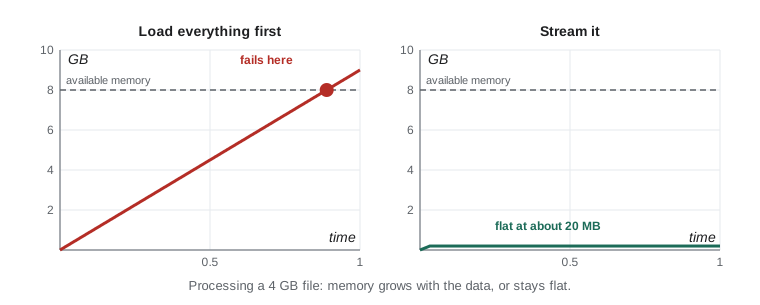
A program streams data when it reads, processes and discards one piece at a time instead of loading everything first. File objects are iterators that yield one line at a time, csv.reader and csv.DictReader wrap them to yield one row at a time, and generator functions and expressions from PYTH-102 build processing pipelines that never hold more than the current item. A streaming program's memory use stays flat however large the input grows. Its limitation is that each item can only be seen once in order, so calculations must be done incrementally: running totals, counts and maximums rather than sorting or indexing the whole dataset.
import csv, io, random

rnd = random.Random(3)
# Pretend this is a multi-gigabyte file: we only ever hold one row.
raw = io.StringIO("day,sku,qty,price\n" + "".join(
    f"2026-{rnd.randint(1, 12):02d}-{rnd.randint(1, 28):02d},RC-10{rnd.randint(1, 6)},{rnd.randint(1, 3)},{18 + rnd.randint(0, 4)}.50\n"
    for _ in range(50_000)))

def rows(f):
    yield from csv.DictReader(f)

def by_month(records):
    totals = {}
    for r in records:
        month = r["day"][:7]
        totals[month] = totals.get(month, 0) + int(r["qty"]) * float(r["price"])
    return totals

monthly = by_month(rows(raw))
for month in sorted(monthly)[:3]:
    print(month, f"{monthly[month]:,.2f}")
print("months:", len(monthly))2026-01 169,130.50 2026-02 172,063.50 2026-03 167,385.50 months: 12
Try it yourself
Streaming statistics
Write temperature_stats(readings) that takes any iterable of numbers, possibly a generator far too large to store, and returns a dictionary with count, mean (rounded to 1 decimal place), min and max.
Go through the readings once, keeping running values. Do not convert the input to a list. For an empty input return {"count": 0, "mean": None, "min": None, "max": None}.
def temperature_stats(readings):
    data = list(readings)
    return {'count': len(data), 'mean': sum(data) / len(data), 'min': min(data), 'max': max(data)}

print(temperature_stats([182, 165, 210]))
Libraries follow the same idea. pandas, the popular table library, can read a CSV in pieces with pd.read_csv(path, chunksize=100_000), handing back one table of a hundred thousand rows at a time, and databases return query results through cursors that fetch rows in batches rather than all at once. Whenever a tool offers a streaming or chunked mode, it is the mode to use for data that might one day outgrow memory, even if it fits today.
Reading big files in chunks
Line-by-line iteration suits text files with reasonable line lengths. Binary files, or files with no line structure, are read in fixed-size chunks with f.read(size) in a loop, which is how tools that copy or hash large files work. Records can also be grouped into batches, for example to insert rows into a database a thousand at a time, so each round trip carries useful work without loading the whole file. itertools.islice takes the next n items from an iterator, and Python 3.12 added itertools.batched, which does the batching for you.
import hashlib, io, itertools

big = io.BytesIO(b"roast-log-bytes " * 500_000)          # about 8 MB of data
digest = hashlib.sha256()
chunks = 0
while chunk := big.read(1 << 20):                         # 1 MiB at a time
    digest.update(chunk)
    chunks += 1
print(chunks, "chunks, sha256 starts", digest.hexdigest()[:16])

def batches(iterable, size):
    it = iter(iterable)
    while batch := list(itertools.islice(it, size)):
        yield batch

for b in batches(range(1, 11), 4):
print("insert", b)8 chunks, sha256 starts 3db39b57c2c257ea insert [1, 2, 3, 4] insert [5, 6, 7, 8] insert [9, 10]
Try it yourself
Batch a stream
Write a generator function batched(iterable, size) that yields lists of up to size items taken in order from any iterable, including a generator. The last batch may be shorter. It must be lazy: it should not read the whole input before yielding the first batch.
Use iter() and itertools.islice.
import itertools

def batched(iterable, size):
    items = list(iterable)
    return [items[i:i + size] for i in range(0, len(items), size)]

print(list(batched(range(7), 3)))
Smaller records: __slots__
Each instance of an ordinary class stores its attributes in its own dictionary, __dict__, which is flexible but large. A class that defines __slots__, a tuple of attribute names, stores those attributes in fixed slots instead and has no per-instance dictionary. Instances become noticeably smaller and attribute access slightly faster, at the cost of not being able to add new attributes on the fly. Dataclasses support this with @dataclass(slots=True) since Python 3.10. For millions of small records, such as Kai's readings, slots can cut memory by half or more.
import sys
from dataclasses import dataclass

class ReadingDict:
    def __init__(self, batch, second, temp):
        self.batch, self.second, self.temp = batch, second, temp

@dataclass(slots=True)
class Reading:
    batch: str
    second: int
    temp: float

a = ReadingDict("B-0412", 30, 165.2)
b = Reading("B-0412", 30, 165.2)
print("with __dict__:", sys.getsizeof(a) + sys.getsizeof(a.__dict__), "bytes")
print("with slots:   ", sys.getsizeof(b), "bytes")
print("has __dict__:", hasattr(a, "__dict__"), hasattr(b, "__dict__"))
try:
    b.roast_level = "dark"
except AttributeError as e:
print("cannot add a new attribute: slots are fixed")with __dict__: 344 bytes with slots: 56 bytes has __dict__: True False cannot add a new attribute: slots are fixed
Try it yourself
A slotted reading class
Define a class Reading with __slots__ = ("batch", "second", "temp") and an __init__(self, batch, second, temp) that sets the three attributes. Add a method fahrenheit() returning the temperature converted with temp * 9 / 5 + 32, rounded to 1 decimal place.
Instances must not have a __dict__, so assigning an unknown attribute raises AttributeError.
class Reading:
    def __init__(self, batch, second, temp):
        self.batch = batch
        self.second = second
        self.temp = temp

    def fahrenheit(self):
        return self.temp

r = Reading('B-0412', 30, 196.0)
print(r.fahrenheit())
Compact arrays
When records are all numbers, storing them as Python objects at all is the waste. The standard array module stores numbers of one type compactly, like a NumPy array without the mathematics: array('d') holds 8-byte floats and array('h') 2-byte integers. NumPy goes further by letting you choose the dtype to match the data. Kai's temperatures need only one decimal place and never exceed a few hundred degrees, so storing them as tenths of a degree in 16-bit integers, or as 32-bit floats, halves or quarters the memory of 64-bit floats with no loss of meaningful precision.
from array import array
import numpy as np

n = 15_000_000                                   # a year of readings
print(f"Python list of floats: about {n * (8 + 24) / 1e6:,.0f} MB (pointer + float object each)")
print(f"array('d'):            {n * array('d').itemsize / 1e6:,.0f} MB")
for dtype in ("float64", "float32", "int16"):
    print(f"NumPy {dtype:8}        {n * np.dtype(dtype).itemsize / 1e6:,.0f} MB")

temps = np.array([182.0, 165.2, 196.4])
tenths = np.round(temps * 10).astype(np.int16)  # 1964 means 196.4 degrees
print(tenths, tenths.dtype, (tenths / 10).tolist())Python list of floats: about 480 MB (pointer + float object each)
array('d'): 120 MB
NumPy float64 120 MB
NumPy float32 60 MB
NumPy int16 30 MB
[1820 1652 1964] int16 [182.0, 165.2, 196.4]Combining the techniques, Jordan's year-long analysis streams the CSV in batches of a hundred thousand rows, converts each batch into a compact NumPy array, updates running statistics, and discards the batch. Peak memory stays under a hundred megabytes for any size of input, and because NumPy does the arithmetic, it is fast as well.
Memory leaks in long-running programs
Python frees objects automatically when nothing refers to them any more, so classic memory leaks are rare. Programs that run for weeks, such as the shop's web server, still grow if something keeps references alive: a module-level list that collects every request for debugging, an unbounded cache, or callbacks registered and never removed. The tools are the same: tracemalloc snapshots taken an hour apart and compared show which lines allocated the growing memory, and bounded caches from lesson 10 stop the most common cause.
Common mistakes
MistakeReading a whole large file with f.read() or readlines().
InsteadIterate over the file object, or read fixed-size chunks.
MistakeBuilding a list just to sum, count or loop over it once.
InsteadUse a generator expression so items are produced one at a time.
MistakeStoring millions of small records as dictionaries.
InsteadUse classes with __slots__, tuples, or NumPy arrays with a suitable dtype.
MistakeIterating over the same generator twice.
InsteadGenerators are used up after one pass; re-create them or store the results if they fit.
MistakeTrusting sys.getsizeof for a container's total size.
Insteadgetsizeof counts only the object itself; use tracemalloc for real usage.
MistakeLetting module-level lists or caches grow without limit.
InsteadBound caches and clear collections that are only needed temporarily.
Summary and key terms
- Python objects carry overhead, so data held as many small objects uses far more memory than the raw values.
- sys.getsizeof reports one object's own size; tracemalloc measures current and peak allocations.
- Streaming with iterators and generators keeps memory flat regardless of input size.
- Files are iterated line by line; binary data is read in fixed-size chunks; records are processed in batches.
- Calculations on streams must be incremental: running counts, totals, minimums and maximums.
- __slots__ and @dataclass(slots=True) remove the per-instance dictionary and shrink objects.
- The array module and NumPy dtypes store numbers compactly; choose the smallest type that fits the data.
- sys.getsizeof
- A function returning an object's own size in bytes.
- tracemalloc
- A standard module that traces memory allocations and peak usage.
- peak memory
- The largest amount of memory a program uses at any one time.
- streaming
- Processing data one piece at a time without holding it all in memory.
- chunk
- A fixed-size block of data read from a file at one time.
- batch
- A group of records processed together.
- __slots__
- A class attribute listing instance attributes, replacing the per-instance dictionary.
- array module
- A standard module for compact arrays of numbers of one type.
- memory leak
- Memory that a long-running program keeps using without need.
Practice problems
Work each problem on paper first, then reveal the answer to check.
Why does sum(x for x in data) use less memory than sum([x for x in data])?
Show answer
The generator produces one item at a time instead of building the whole list first.
How do you compute the average of a stream you can only read once?
Show answer
Keep a running total and count, then divide at the end.
How much memory do 10 million float32 values take?
Show answer
40 million bytes, about 40 MB.
What do you lose by giving a class __slots__?
Show answer
The ability to add new attributes that are not listed in the slots.
Which tracemalloc function gives the peak memory since tracing started?
Show answer
tracemalloc.get_traced_memory(), which returns current and peak.
Name one cause of memory growth in a long-running web server.
Show answer
An unbounded cache, a module-level list that keeps collecting, or callbacks never removed.
Lesson quiz · 5 questions
Score 60% or more to complete this lesson.
Create a free account to save your progress, take quizzes and earn a certificate.