
PYTH-250 · Lesson 5 of 12 · 22 min
Multiprocessing
▶ Video coming soon A video version of this lesson is on the way.
Kai's roast-curve analysis is the opposite of Theo's shipping quotes. It reads a week of temperature readings, about 300,000 of them, splits them into batches, and for each batch computes the rate of rise at every second, finds the turning point and first crack, and scores the roast against the target profile. Profiling shows the processor busy the whole time: it is CPU-bound. Lesson 4 showed that threads will not help, because the global interpreter lock lets only one thread run Python code at a time. The roastery's office computer has eight processor cores, and seven of them sit idle while the analysis runs.
This lesson uses processes to put those cores to work. It explains how a process differs from a thread, runs functions in parallel with multiprocessing.Pool, covers the costs that come with processes, namely start-up time, copying data between them and the need for that data to be picklable, shows how to split work into chunks and combine partial results, and ends with when parallel processing is worth it at all. Browsers cannot start extra processes, so the multiprocessing examples are shown as listings with real output, and the exercises practise the splitting and combining logic that every parallel program needs.
Processes versus threads
A process is a running program with its own memory, managed by the operating system. Threads live inside one process and share its memory; separate processes share nothing by default. Each Python process has its own interpreter and its own global interpreter lock, so several processes can run Python code at the same moment on different cores. That is real parallelism, and it is what CPU-bound work needs.
The isolation that gives processes their power also gives them their costs. Starting a process takes far longer than starting a thread, from milliseconds to a noticeable fraction of a second depending on the operating system. Because memory is not shared, any data a worker needs must be sent to it, and its results sent back, by pickling them, the serialization you met when saving objects to files. Sending a large list to eight workers means copying it eight times. The art of multiprocessing is giving each worker a big enough piece of work that the computing outweighs these overheads.
multiprocessing.Pool
The easiest way to use several processes is a pool of worker processes. multiprocessing.Pool(processes=n) starts n workers, and pool.map(func, items) sends the items out to them, runs func on each in parallel, and returns the results in the original order, just like the built-in map. The function must be defined at the top level of a module, so that the workers can find it by name, and the code that creates the pool must sit under if __name__ == "__main__":, because on some operating systems each worker starts by importing the main module.
import multiprocessing as mp
import time

def analyse_batch(batch_id):
    """Pretend roast analysis: CPU-bound work proportional to the readings."""
    readings = 840                              # 14 minutes at one per second
    score = 0
    for second in range(readings * 400):
        score += (second * batch_id) % 97
    return batch_id, score % 1000

if __name__ == "__main__":
    batches = list(range(1, 17))

    start = time.perf_counter()
    serial = [analyse_batch(b) for b in batches]
    t1 = time.perf_counter() - start

    start = time.perf_counter()
    with mp.Pool(processes=4) as pool:
        parallel = pool.map(analyse_batch, batches)
    t4 = time.perf_counter() - start

    print("same results:", serial == parallel)
print(f"1 process: {t1:.2f} s; 4 processes: {t4:.2f} s; speedup {t1 / t4:.1f}x")same results: True 1 process: 4.12 s; 4 processes: 1.18 s; speedup 3.5x
On a machine with at least four cores, the pool version runs about three to four times faster. It is not quite four, because starting the workers, sending each batch number out and the results back, and the parts of the program that stay sequential all take time. That is Amdahl's law from lesson 1 in action. The results come back in the same order as the input, so the rest of the program does not change.
Pool has several other methods worth knowing. pool.imap returns results lazily, one at a time, which saves memory for long inputs. pool.imap_unordered returns each result as soon as it is ready, in whatever order the workers finish, which is faster when you do not care about order. pool.starmap passes tuples of arguments to functions that take several parameters. And the chunksize argument controls how many items are sent to a worker at once: larger chunks mean less communication overhead, which matters when each item is quick to process.
What can be sent to a worker
Everything passed to a worker process and everything returned from it is pickled. Numbers, strings, lists, tuples, dictionaries and instances of ordinary classes defined at module level all pickle without trouble. Lambdas, functions defined inside other functions, open files, database connections, locks and sockets do not, and passing one raises an error. The usual fix is to pass the data a worker needs to create its own resource, such as a file name instead of an open file, and to define worker functions at the top level of a module.
import pickle

def top_level(x):
    return x * 2

ok = [42, "RC-101", [1, 2], {"sku": "RC-104"}, top_level]
for obj in ok:
    data = pickle.dumps(obj)
    print(f"{type(obj).__name__:9} pickles to {len(data)} bytes")

for bad in [lambda x: x * 2, (n * n for n in range(3))]:
    try:
        pickle.dumps(bad)
        print(type(bad).__name__, "pickled")
    except Exception as e:
print(f"{type(bad).__name__:9} cannot be pickled: {type(e).__name__}")int pickles to 5 bytes str pickles to 21 bytes list pickles to 20 bytes dict pickles to 30 bytes function pickles to 37 bytes function cannot be pickled: PicklingError generator cannot be pickled: TypeError
Splitting work and combining results
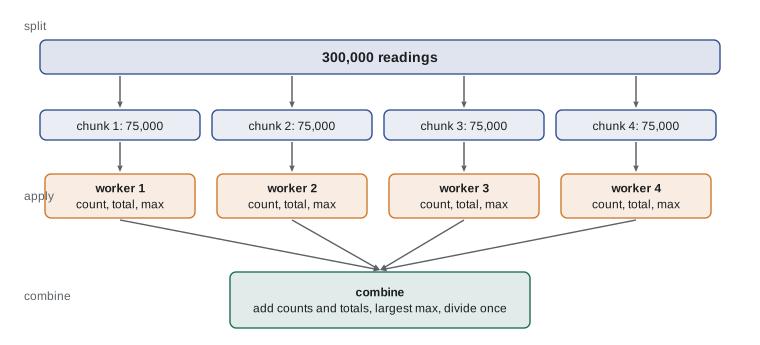
Many parallel jobs follow the same pattern, often called map and reduce, or split-apply-combine. First split the input into chunks, roughly one per worker or a few per worker. Then apply the same function to each chunk in parallel, producing a partial result. Finally combine the partial results into one answer. For Kai's weekly summary, each chunk is a range of batches, each partial result is a dictionary of counts and totals, and combining adds the dictionaries together. Splitting evenly matters: if one worker gets twice as much work as the others, everyone else waits for it at the end.
def chunk_ranges(n_items, workers):
    """Split range(n_items) into `workers` nearly equal (start, stop) ranges."""
    base, extra = divmod(n_items, workers)
    ranges, start = [], 0
    for w in range(workers):
        size = base + (1 if w < extra else 0)
        ranges.append((start, start + size))
        start += size
    return ranges

print(chunk_ranges(10, 3))
print(chunk_ranges(300_000, 8)[:2], "...")
print(sum(stop - start for start, stop in chunk_ranges(300_000, 8)))[(0, 4), (4, 7), (7, 10)] [(0, 37500), (37500, 75000)] ... 300000
Try it yourself
Split the work evenly
Write split_list(items, n) that splits a list into n consecutive chunks whose sizes differ by at most one, with the larger chunks first. Return a list of n lists (some may be empty if there are fewer items than chunks).
For example, split_list([1, 2, 3, 4, 5], 2) is [[1, 2, 3], [4, 5]].
def split_list(items, n):
    size = len(items) // n
    return [items[i * size:(i + 1) * size] for i in range(n)]

print(split_list([1, 2, 3, 4, 5], 2))
Combining is usually the easy part, but it has to be done carefully. Counts and totals add; minimums and maximums take the min or max of the partial values; averages cannot be averaged directly unless the chunks are the same size, so each worker should return a sum and a count, and the combiner divides at the end. collections.Counter makes adding count dictionaries a one-liner, because Counters support +.
from collections import Counter

partials = [
    {"batches": 9, "minutes": 126.4, "first_crack_late": 1},
    {"batches": 8, "minutes": 113.0, "first_crack_late": 0},
    {"batches": 8, "minutes": 118.2, "first_crack_late": 2},
]
total = Counter()
for p in partials:
    total.update(p)                 # adds values key by key
print(dict(total))
print("average roast:", round(total["minutes"] / total["batches"], 2), "minutes")
print("wrong way (average of averages):",
round(sum(p["minutes"] / p["batches"] for p in partials) / len(partials), 2)){'batches': 25, 'minutes': 357.6, 'first_crack_late': 3}
average roast: 14.3 minutes
wrong way (average of averages): 14.31Try it yourself
Combine partial results
Each worker returns a dictionary with keys count, total and max for the temperature readings it processed. Write combine(partials) returning one dictionary with the overall count, total, max and mean (total divided by count, rounded to 1 decimal place).
Return mean as None when the overall count is 0, and ignore partials whose count is 0 when finding the maximum.
def combine(partials):
    means = [p['total'] / p['count'] for p in partials]
    return {'mean': sum(means) / len(means)}

print(combine([{'count': 2, 'total': 400, 'max': 205}, {'count': 3, 'total': 615, 'max': 210}]))
Overheads and when parallel is worth it
Parallel processing pays off only when each task is substantial compared with the cost of sending it to a worker. Squaring a million numbers in a pool, one number per task, is slower than a plain loop, because pickling and sending each number costs far more than squaring it. Analysing a whole roast batch per task is a good size: tens of milliseconds of computing for a few bytes of input. A useful rule is that each task should take at least a few milliseconds, and the data sent per task should be small compared with the work done on it.
def parallel_estimate(work_s, workers, startup_s=0.05, per_task_s=0.0005, tasks=100, serial_s=0.2):
    """Rough model: start-up per worker + communication + serial part + shared work."""
    return startup_s * workers + tasks * per_task_s + serial_s + work_s / workers

for work in [0.5, 5, 60]:
    one = work + 0.2
    best = min(range(1, 9), key=lambda w: parallel_estimate(work, w))
print(f"work {work:>4} s: 1 core {one:5.2f} s; 8 cores {parallel_estimate(work, 8):5.2f} s; best workers = {best}")work 0.5 s: 1 core 0.70 s; 8 cores 0.71 s; best workers = 3 work 5 s: 1 core 5.20 s; 8 cores 1.27 s; best workers = 8 work 60 s: 1 core 60.20 s; 8 cores 8.15 s; best workers = 8
The model is crude but shows the shape of real results: half a second of work gains nothing from eight cores, because start-up and communication eat the savings, and its best choice is only a few workers, while a minute of work speeds up more than sevenfold. Measure real programs, of course, but this kind of estimate tells you whether parallelism is worth trying at all.
Two further cautions apply. Memory multiplies: eight workers each holding a copy of a large dataset use eight times the memory. And not every machine has spare cores: a web server already handling many requests at once may be better off without extra processes per request. Kai's analysis is an ideal case: one person runs it on a machine that is otherwise idle, the work splits naturally by batch, and each batch takes long enough to make the overhead negligible. With a pool of six workers, his weekly analysis drops from about thirty seconds to six, meeting the goal from lesson 1.
Sharing state between processes
Processes do not share variables. A global counter incremented in a worker changes only that worker's copy. When processes must share something, the multiprocessing module offers tools: Queue and Pipe to send messages, Value and Array for small pieces of shared memory protected by locks, and Manager objects that hold shared dictionaries and lists in a server process. Each adds complexity and overhead. The most robust design is the one already shown: give each worker its own input, have it return its own result, and combine the results in the main process. Programs written that way have no race conditions to debug.
import multiprocessing as mp

counter = 0

def bump(_):
    global counter
    counter += 1                  # changes the worker's own copy only
    return counter

if __name__ == "__main__":
    with mp.Pool(2) as pool:
        results = pool.map(bump, range(6), chunksize=3)
    print("values seen in workers:", sorted(results))
print("counter in the main process:", counter)values seen in workers: [1, 1, 2, 2, 3, 3] counter in the main process: 0
Common mistakes
MistakeCreating a Pool without if __name__ == "__main__":.
InsteadGuard the pool code so worker processes that import the module do not start pools of their own.
MistakePassing a lambda or an open file to a worker.
InsteadUse top-level functions and pass plain data such as file names.
MistakeSending tiny tasks to a pool one at a time.
InsteadGive each task substantial work, or raise chunksize, so overhead does not dominate.
MistakeAveraging the averages of unequal chunks.
InsteadReturn sums and counts from workers and divide once when combining.
MistakeExpecting a global variable to be shared between processes.
InsteadReturn results from workers, or use multiprocessing queues or managers deliberately.
MistakeStarting more workers than there are cores for CPU-bound work.
InsteadUse about os.cpu_count() workers; extra processes just compete for the same cores.
Summary and key terms
- Each process has its own memory and its own GIL, so processes give true parallelism for CPU-bound Python code.
- Processes cost more to start than threads, and data passed to and from them is pickled and copied.
- multiprocessing.Pool runs a top-level function over many inputs; map keeps order, imap_unordered returns results as they finish.
- Pool code belongs under if __name__ == "__main__":.
- Lambdas, nested functions, open files and connections cannot be pickled and sent to workers.
- Split the work evenly, apply in parallel, and combine sums and counts rather than averages.
- Parallelism pays only when each task is large compared with start-up and communication costs.
- process
- A running program with its own memory, managed by the operating system.
- worker process
- A process that receives tasks from a main process and returns results.
- process pool
- A fixed set of worker processes that tasks are distributed to.
- pickling
- Converting an object to bytes so it can be stored or sent to another process.
- chunksize
- How many items a pool sends to a worker at once.
- split-apply-combine
- Dividing work into chunks, processing them in parallel and merging the results.
- map-reduce
- Another name for applying a function to many items and then combining the results.
- overhead
- Extra cost, such as start-up and communication, that does no useful work.
Practice problems
Work each problem on paper first, then reveal the answer to check.
Why do processes, but not threads, speed up CPU-bound Python code?
Show answer
Each process has its own interpreter and GIL, so they can run on different cores at once.
A worker needs a database connection. What should you pass to it?
Show answer
The connection details, so the worker opens its own connection.
Split 10 items into 4 nearly equal chunks.
Show answer
Sizes 3, 3, 2, 2.
Two chunks have mean temperatures 200 (2 readings) and 210 (8 readings). What is the overall mean?
Show answer
(400 + 1680) / 10 = 208, not 205.
When would imap_unordered be better than map?
Show answer
When you want each result as soon as it is ready and the order does not matter.
Why might a pool make a quick job slower?
Show answer
Start-up and pickling overhead can exceed the time saved by parallel computing.
Lesson quiz · 5 questions
Score 60% or more to complete this lesson.
Create a free account to save your progress, take quizzes and earn a certificate.