
PYTH-250 · Lesson 10 of 12 · 23 min
Caching and memoization
▶ Video coming soon A video version of this lesson is on the way.
The counting decorator from lesson 2 showed find_price being called a thousand times for three different skus. The same pattern turns up all over Ridgeline's code. The online shop converts supplier prices from US dollars for every page view, although exchange rates change once a day. The shipping estimator asks the same postal zone question for every order going to the same neighbourhood. Mei's loyalty page recalculates a customer's tier from their whole purchase history every time they tap the screen. Each of these repeats work whose answer has not changed. The cure is to remember answers: caching.
This lesson covers memoization with a dictionary, Python's built-in functools.lru_cache and functools.cache, their statistics and limits, functools.cached_property for values computed once per object, and the hard part of caching: knowing when a remembered answer is stale. You will write a time-limited cache with an injectable clock and a least-recently-used cache with a fixed size, the two designs behind most real caches, from web browsers to database servers.
Memoization
A cache is a store of previously computed results, consulted before doing the work again. Memoization is caching applied to a function: the first call with given arguments computes and stores the result; later calls with the same arguments return the stored result immediately. It works for functions that are pure, meaning their result depends only on their arguments and they have no side effects. The classic demonstration is a recursive function that recomputes the same subproblems many times. Here, the number of ways to fill an order of n bags from packs of 1, 2 and 5 bags is computed recursively, with a counter to show the repeated work.
calls = 0

def ways(n, packs=(1, 2, 5)):
    """Ordered ways to make n bags from packs of the given sizes."""
    global calls
    calls += 1
    if n == 0:
        return 1
    return sum(ways(n - p, packs) for p in packs if p <= n)

print("ways(20) =", ways(20), "with", f"{calls:,}", "calls")

memo = {}
calls = 0
def ways_memo(n, packs=(1, 2, 5)):
    global calls
    calls += 1
    if n in memo:
        return memo[n]
    result = 1 if n == 0 else sum(ways_memo(n - p, packs) for p in packs if p <= n)
    memo[n] = result
    return result

print("ways_memo(20) =", ways_memo(20), "with", calls, "calls")ways(20) = 26547 with 64,207 calls ways_memo(20) = 26547 with 56 calls
Without the cache, the function solves the same small subproblems over and over, and the number of calls grows exponentially with n. With a dictionary of known answers, each value of n is computed once. This is the idea behind dynamic programming, a whole family of algorithms that build answers from cached solutions to smaller problems.
functools.lru_cache and functools.cache
Writing the dictionary by hand is rarely necessary. The decorator functools.lru_cache(maxsize=128) memoizes a function, keeping at most maxsize results and discarding the least recently used when full. functools.cache, added in Python 3.9, is the same with no size limit. Both use the function's arguments as dictionary keys, so every argument must be hashable: numbers, strings and tuples work, lists and dictionaries do not. The decorated function gains cache_info(), which reports hits, misses and the current size, and cache_clear(), which empties the cache.
import functools

@functools.lru_cache(maxsize=None)
def ways(n, packs=(1, 2, 5)):
    if n == 0:
        return 1
    return sum(ways(n - p, packs) for p in packs if p <= n)

print(ways(60))
print(ways.cache_info())

@functools.lru_cache(maxsize=2)
def zone_for(postal_prefix):
    print(f"  looking up zone for {postal_prefix}")
    return {"V1Y": 1, "T5J": 2, "M5V": 4}.get(postal_prefix, 5)

for p in ["V1Y", "V1Y", "T5J", "M5V", "V1Y"]:
    zone_for(p)
print(zone_for.cache_info())49203950608909 CacheInfo(hits=115, misses=61, maxsize=None, currsize=61) looking up zone for V1Y looking up zone for T5J looking up zone for M5V looking up zone for V1Y CacheInfo(hits=1, misses=4, maxsize=2, currsize=2)
The second example shows eviction. With room for only two entries, looking up M5V pushes out V1Y, the least recently used, so the final V1Y lookup is a miss and runs the function again. The hit ratio, hits divided by total calls, measures how well a cache is working; a cache that rarely hits only costs memory.
Choosing maxsize is a trade-off between memory and hit ratio. A cache large enough to hold the working set, the values a program uses repeatedly over a short period, gets nearly all the benefit; doubling it beyond that adds memory without adding hits. For Ridgeline's postal zones, a few thousand prefixes cover every customer, so a maxsize of 4096 holds them all. For a function called with an endless variety of arguments, such as one that takes a timestamp, caching rarely helps at all, because the same arguments almost never come back.
Try it yourself
A memoizing decorator
Write a decorator memoize that stores results in a dictionary attribute cache on the wrapper, keyed by the tuple of positional arguments. On a repeated call it must return the stored result without calling the function again.
Also count hits and misses as wrapper attributes. Only positional arguments need to be supported.
import functools

def memoize(func):
    return func

@memoize
def square(x):
    return x * x

print(square(4), square(4))
Values computed once per object
Sometimes the expensive value belongs to an object rather than to a function call: a customer's lifetime spending, computed from their purchase history, or a roast batch's summary statistics, computed from its readings. functools.cached_property turns a method into an attribute that is computed on first access and stored on the instance, so later accesses are plain attribute lookups. Deleting the attribute with del clears it, and the next access recomputes it.
from functools import cached_property

class Customer:
    def __init__(self, phone, purchases):
        self.phone = phone
        self.purchases = purchases
        self.computations = 0

    @cached_property
    def lifetime_spend(self):
        self.computations += 1                      # imagine scanning years of history
        return round(sum(self.purchases), 2)

    @property
    def tier(self):
        points = int(self.lifetime_spend)
        return "Reserve" if points >= 300 else "Roast" if points >= 100 else "Bean"

c = Customer("555-0142", [5.25, 18.50, 22.00, 4.95, 61.50])
print(c.tier, c.lifetime_spend, c.tier, "computed", c.computations, "time(s)")
c.purchases.append(250.00)
print("after a big purchase, still cached:", c.tier)
del c.lifetime_spend                                 # invalidate
print("after clearing the cache:", c.tier, "computed", c.computations, "times")Roast 112.2 Roast computed 1 time(s) after a big purchase, still cached: Roast after clearing the cache: Reserve computed 2 times
The example also shows the central danger of caching: after the customer's big purchase, the cached spending is wrong until someone clears it. A cache is only as good as its rule for throwing away stale answers.
Cache invalidation and expiry
There is a well-known joke that the two hardest problems in computer science are naming things, cache invalidation and off-by-one errors. Invalidation is the act of discarding cached values that are no longer correct, and there are three common strategies. Explicit invalidation clears the cache whenever the underlying data changes, as del did above; it is precise but easy to forget. Time-based expiry gives every entry a time to live, a TTL, after which it is treated as missing, so a value is at most that old. Size-based eviction, as in lru_cache, keeps memory bounded but does nothing about staleness. Ridgeline's exchange rate is a natural fit for expiry: the bank publishes new rates daily, so a TTL of a few hours keeps conversions close to current while avoiding thousands of identical lookups.
class TTLCache:
    """Remembers values for ttl seconds. The clock is injected so it can be tested."""
    def __init__(self, ttl, clock):
        self.ttl, self.clock, self.store = ttl, clock, {}

    def get(self, key):
        item = self.store.get(key)
        if item is None:
            return None
        value, saved_at = item
        if self.clock() - saved_at >= self.ttl:
            del self.store[key]                    # expired
            return None
        return value

    def set(self, key, value):
        self.store[key] = (value, self.clock())

now = [0]                                          # a fake clock we can move by hand
rates = TTLCache(ttl=3600, clock=lambda: now[0])
rates.set("USD->CAD", 1.37)
now[0] = 1800
print("after 30 minutes:", rates.get("USD->CAD"))
now[0] = 3600
print("after 60 minutes:", rates.get("USD->CAD"))after 30 minutes: 1.37 after 60 minutes: None
Passing in the clock instead of calling time.time() inside the class is the same dependency injection used for the Inventory class in PYTH-102. Tests can move the fake clock forward by an hour in a microsecond instead of waiting an hour, and the code behaves identically with a real clock in production.
Try it yourself
A time-limited cache
Write a class TTLCache(ttl, clock) where clock is a function returning the current time in seconds. set(key, value) stores the value with the current time; get(key, default=None) returns the value if it was set less than ttl seconds ago, and otherwise removes it and returns default.
Also give it a __len__ returning how many entries are currently stored (expired entries still count until a get removes them).
class TTLCache:
    def __init__(self, ttl, clock):
        self.store = {}

    def set(self, key, value):
        self.store[key] = value

    def get(self, key, default=None):
        return self.store.get(key, default)

now = [0]
c = TTLCache(60, lambda: now[0])
c.set('rate', 1.37)
now[0] = 61
print(c.get('rate'))
A least-recently-used cache
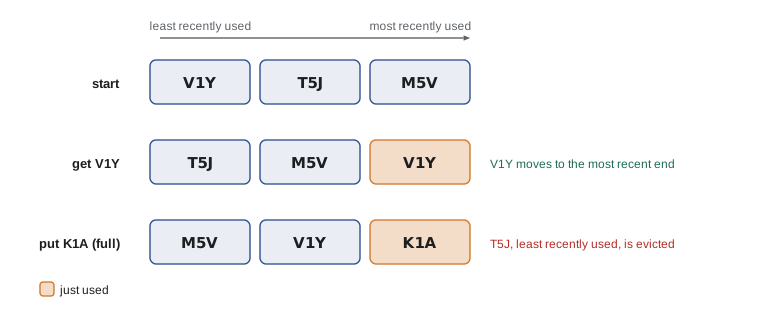
When memory is the constraint, a cache needs a size limit and a rule for what to throw out. Least recently used, LRU, is the most common rule: when the cache is full, discard the entry that has gone longest without being used, on the theory that recently used items are likely to be used again soon. collections.OrderedDict makes an LRU cache short to write: move_to_end marks an entry as recently used, and popitem(last=False) removes the oldest. This is essentially what functools.lru_cache does internally, in C.
Try it yourself
An LRU cache
Write a class LRUCache(capacity) using collections.OrderedDict. get(key) returns the value and marks the key as most recently used, or returns None if missing. put(key, value) adds or updates the key as most recently used, and if the cache then holds more than capacity entries, removes the least recently used one.
Add a method keys() returning a list of keys from least to most recently used.
from collections import OrderedDict

class LRUCache:
    def __init__(self, capacity):
        self.data = {}

    def get(self, key):
        return self.data.get(key)

    def put(self, key, value):
        self.data[key] = value

    def keys(self):
        return list(self.data)

c = LRUCache(2)
c.put('a', 1); c.put('b', 2); c.get('a'); c.put('c', 3)
print(c.keys())
Caching across programs
The caches so far live inside one running program and vanish when it stops. Larger systems cache in other places too. Results can be saved to disk, for example with the shelve module or a small SQLite table, so that the next run of a script starts warm. Web applications put shared caches such as Redis or Memcached in front of slow databases, so that every server process benefits from every other's work. And HTTP has caching built in: servers send Cache-Control and ETag headers telling clients how long a response stays valid and how to check cheaply whether it has changed. A polite client that honours those headers, such as Theo's quote client asking for the shipping company's zone table, avoids downloading the same data repeatedly.
Wherever the cache lives, the same questions apply. Is the function pure, or could the answer change? How stale may an answer be? How much memory can the cache use? And how will you know it is working? Measure the hit ratio, and compare the program's speed and results with the cache switched off. A cache that hides a bug, by serving yesterday's price as today's, is worse than no cache at all.
Common mistakes
MistakeCaching a function whose result depends on the time, a file or a database.
InsteadOnly memoize pure functions, or add expiry or explicit invalidation.
MistakePassing lists or dictionaries to an lru_cache function.
InsteadArguments must be hashable; pass tuples or frozensets instead.
MistakeUsing functools.cache on a function with millions of distinct inputs.
InsteadUnbounded caches grow forever; set a maxsize with lru_cache.
MistakeReturning a mutable object from a cached function and then changing it.
InsteadCallers share the cached object; return immutable values or copies.
MistakeForgetting to invalidate a cached_property when its inputs change.
InsteadDelete the attribute when the data changes, or use a plain property.
MistakeAssuming a cache helps without checking.
InsteadLook at cache_info() hits and misses, and time the program with and without the cache.
Summary and key terms
- Caching stores results so repeated work can be skipped; memoization caches a function's results by its arguments.
- Memoization works for pure functions and turns exponential recursion into linear work.
- functools.lru_cache(maxsize=n) and functools.cache memoize with hashable arguments and report cache_info().
- functools.cached_property computes a value once per object until the attribute is deleted.
- Stale data is the main risk: invalidate explicitly, expire entries with a time to live, or both.
- An LRU cache evicts the least recently used entry when full; OrderedDict makes it easy to build.
- Caches also live on disk, in shared servers such as Redis, and in HTTP headers.
- cache
- A store of previously computed results consulted before redoing the work.
- memoization
- Caching a function's results keyed by its arguments.
- pure function
- A function whose result depends only on its arguments and which has no side effects.
- hit ratio
- The share of cache lookups that find a stored result.
- cache invalidation
- Discarding cached values that are no longer correct.
- time to live (TTL)
- How long a cached entry stays valid.
- eviction
- Removing entries from a full cache to make room.
- least recently used (LRU)
- An eviction rule that removes the entry unused for the longest time.
- dynamic programming
- Solving problems by combining cached solutions to smaller subproblems.
Practice problems
Work each problem on paper first, then reveal the answer to check.
Why can't a function that reads today's exchange rate from a website be memoized forever?
Show answer
Its result changes over time, so cached answers become stale; use a time to live.
After 3 hits and 7 misses, what is the hit ratio?
Show answer
3 in 10, or 0.3.
Which decorator caches a value per object?
Show answer
functools.cached_property.
A cache of capacity 2 receives put a, put b, get a, put c. Which key is evicted?
Show answer
b, the least recently used.
Why inject the clock into a TTL cache?
Show answer
So tests can control time without waiting.
How do you empty an lru_cache?
Show answer
Call the decorated function's cache_clear() method.
Lesson quiz · 5 questions
Score 60% or more to complete this lesson.
Create a free account to save your progress, take quizzes and earn a certificate.