
PYTH-230 · Lesson 9 of 12 · 25 min
Static type checking
▶ Video coming soon A video version of this lesson is on the way.
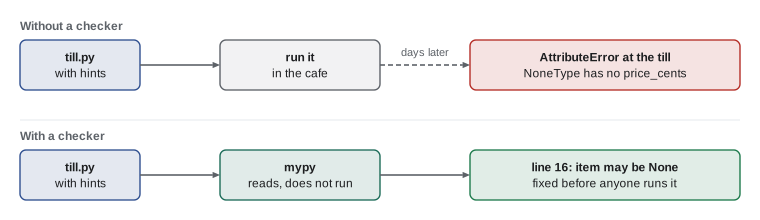
One evening in December the till script crashed in the middle of a sale. A customer had asked for a coffee by a code that had been retired, find_coffee returned None, and the next line tried to read the price of None. The test suite had no test for a retired code, so nothing caught it. Sam pointed out that a different kind of tool would have flagged that line weeks earlier without anyone writing a test at all: a static type checker, which reads the type hints the team had started writing in PYTH-102 and checks that the code uses values consistently with them.
This lesson explains what static type checking is and how it differs from testing, how to run a type checker such as mypy, the kinds of mistakes it catches, the typing tools that make hints precise, why hints are not checked when the program runs and what to do about data from outside, and how to introduce type checking into an existing project gradually.
Dynamic types, static checks
Python is dynamically typed: a variable can hold any kind of value, and types are only checked at the moment an operation happens. That flexibility makes Python quick to write, but it means a mistake such as calling .price on None is only discovered when that exact line runs with that exact value, possibly in front of a customer. Type hints, introduced in Python 3.5, let you write down the types you intend, but Python itself ignores them at run time. They are information for people and for tools.
def bags_from_batch(roasted_kg: float, bag_g: int = 340) -> int:
    return int(roasted_kg * 1000 // bag_g)

print(bags_from_batch(10.2))
print(bags_from_batch.__annotations__)
try:
    bags_from_batch("10.2")          # the hint says float, Python does not care until it fails
except TypeError as err:
print("TypeError at run time:", err)30
{'roasted_kg': <class 'float'>, 'bag_g': <class 'int'>, 'return': <class 'int'>}
TypeError at run time: unsupported operand type(s) for //: 'str' and 'int'A static type checker reads the code, hints included, without running it, works out the type of every expression, and reports places where the types do not fit. The best known checkers for Python are mypy, the original, started by Jukka Lehtosalo, and pyright, which also powers the type checking inside VS Code's Python support. Both understand the same standard type hints.
Running a type checker
mypy is installed with pip into the project's virtual environment and run from a terminal on a file, a folder or a package. It prints one line per problem with the file, line and an explanation, and ends with a summary. Here is what it said about the till script's crash, weeks before the crash happened, had anyone run it.
# ridgeline/till.py
from dataclasses import dataclass

@dataclass
class Coffee:
    sku: str
    name: str
    price_cents: int

CATALOGUE = {"RC-101": Coffee("RC-101", "Sunrise Blend", 1850)}

def find_coffee(sku: str) -> Coffee | None:
    return CATALOGUE.get(sku)

def line_total(sku: str, qty: int) -> int:
    coffee = find_coffee(sku)
return coffee.price_cents * qty> mypy src/ridgeline/till.py
src/ridgeline/till.py:16: error: Item "None" of "Coffee | None" has no attribute "price_cents" [union-attr]
Found 1 error in 1 file (checked 1 source file)The checker knows find_coffee can return None, because the return annotation says so, and it knows None has no price_cents. It cannot know which codes customers will type, so it insists that every path handles the None case. The fix is to decide what should happen, raise a clear error or return 0 or ask the user again, and write it down; once the code checks for None, the checker narrows the type to Coffee inside the check and the error disappears.
from dataclasses import dataclass

@dataclass
class Coffee:
    sku: str
    name: str
    price_cents: int

CATALOGUE = {"RC-101": Coffee("RC-101", "Sunrise Blend", 1850)}

class UnknownCoffee(KeyError):
    pass

def find_coffee(sku: str) -> Coffee | None:
    return CATALOGUE.get(sku)

def line_total(sku: str, qty: int) -> int:
    coffee = find_coffee(sku)
    if coffee is None:                      # the checker narrows coffee to Coffee below
        raise UnknownCoffee(f"{sku} is not on the menu")
    return coffee.price_cents * qty

print(line_total("RC-101", 2))
try:
    line_total("RC-120", 1)
except UnknownCoffee as err:
print("refused:", err)3700 refused: 'RC-120 is not on the menu'
What a type checker catches
The kinds of mistake a checker reports are exactly the ones that tests often miss because nobody thought to try them. Calling a method on something that might be None. Passing a string where a number is expected, such as a quantity read from a form and never converted. Misspelling an attribute, such as coffee.prices_cents. Returning the wrong type from one branch of a function. Forgetting to handle one case of a fixed set of options. Calling a function with too many or too few arguments after its signature changed.
> mypy src
src/ridgeline/orders.py:22: error: Argument 2 to "line_total" has incompatible type "str"; expected "int"  [arg-type]
src/ridgeline/report.py:41: error: "Coffee" has no attribute "prices_cents"; maybe "price_cents"?  [attr-defined]
src/ridgeline/loyalty.py:18: error: Incompatible return value type (got "None", expected "str")  [return-value]
src/ridgeline/cli.py:57: error: Missing positional argument "qty" in call to "line_total"  [call-arg]
Found 4 errors in 4 files (checked 9 source files)
A type checker does not replace tests. It checks that types fit together, not that the values are right: it will happily accept a loyalty function that returns "Roast" for every customer. Tests check behaviour; types check consistency. The two catch different mistakes and work best together, along with the linter from lesson 8.
When you are unsure what type the checker has inferred, write reveal_type(expression) in the code and run mypy; it reports the type it sees, which is a quick way to understand a confusing error. Remove the call afterwards.
Making hints precise
The more precisely the hints describe the data, the more the checker can catch. PYTH-102 introduced the basics: built-in types, list[str] and dict[str, int], unions written with a vertical bar, Callable, generics and Protocol. A few more tools from the typing module are especially useful with a checker.
Literal restricts a value to a fixed set, so Literal["Bean", "Roast", "Reserve"] lets the checker reject a misspelled tier name. TypedDict describes the keys and value types of a dictionary, which suits JSON-like data such as an online order. Final marks a constant that must not be reassigned. And Protocol, met in PYTH-102, describes what an object must be able to do without requiring a particular class, which is how a function can accept either the real mailer or a test fake while still being checked.
from typing import Literal, TypedDict, Final, Protocol, get_type_hints

Tier = Literal["Bean", "Roast", "Reserve"]
REORDER_POINT: Final = 10

class Order(TypedDict):
    id: int
    sku: str
    qty: int

class Mailer(Protocol):
    def send(self, to: str, subject: str, body: str) -> None: ...

def tier(points: int) -> Tier:
    if points >= 300:
        return "Reserve"
    return "Roast" if points >= 100 else "Bean"

def order_bags(order: Order) -> int:
    return order["qty"]

print(tier(150), order_bags({"id": 3106, "sku": "RC-102", "qty": 2}))
print(get_type_hints(order_bags))
print(Order.__annotations__)Roast 2
{'order': <class '__main__.Order'>, 'return': <class 'int'>}
{'id': <class 'int'>, 'sku': <class 'str'>, 'qty': <class 'int'>}With these hints, a checker would reject tier returning "Rost", an order dictionary missing its qty key, an assignment to REORDER_POINT, and a mailer object without a send method, all before any code runs.
Sometimes you know more than the checker. typing.cast(Type, value) tells the checker to treat a value as a given type without any check at run time, and the special type Any switches checking off for a value entirely. Both are escape hatches; every use is a place where the checker cannot help, so keep them rare and comment why.
Hints are not checked at run time
Because Python ignores hints when the program runs, they cannot protect you from bad data arriving from outside: a JSON order from the shop, a row in a CSV file, a form filled in by a person. The checker trusts the hint Order on a dictionary built from JSON, but the dictionary may in fact have qty as the string "2" or no qty at all. Data that crosses the program's boundary must be validated at run time, once, as it enters; after that, the hints and the checker can be trusted inside the program.
import json

def parse_order(text: str) -> dict:
    """Validate an order from the shop before the rest of the code trusts its types."""
    data = json.loads(text)
    problems = []
    for key, kind in (("id", int), ("sku", str), ("qty", int)):
        if key not in data:
            problems.append(f"missing {key}")
        elif not isinstance(data[key], kind) or isinstance(data[key], bool):
            problems.append(f"{key} should be {kind.__name__}, got {type(data[key]).__name__}")
    if problems:
        raise ValueError("; ".join(problems))
    return data

print(parse_order('{"id": 3106, "sku": "RC-102", "qty": 2}'))
try:
    parse_order('{"id": 3107, "sku": "RC-103", "qty": "2"}')
except ValueError as err:
print("rejected:", err){'id': 3106, 'sku': 'RC-102', 'qty': 2}
rejected: qty should be int, got strLibraries such as pydantic generate this kind of validation automatically from a class with type hints, and are widely used for web APIs. The principle is the same: validate at the edges, then let the types flow through the trusted core.
Adopting type checking gradually
Python's typing is gradual. Code without hints is treated as Any and not checked, so a project can add hints one module at a time, starting wherever bugs hurt most. A sensible path for an existing project is: add hints to new code and to the core modules first; run mypy in its default, lenient mode and fix what it finds; then turn on stricter options for the modules that are fully typed, such as requiring every function to have annotations; and finally run the checker in continuous integration so new code stays typed.
# pyproject.toml
[tool.mypy]
python_version = "3.12"
warn_unused_ignores = true
warn_return_any = true

[[tool.mypy.overrides]]
module = ["ridgeline.inventory", "ridgeline.money", "ridgeline.giftcard"]
disallow_untyped_defs = true      # fully typed modules: every function must have hints
strict_optional = true

[[tool.mypy.overrides]]
module = ["ridgeline.legacy.*"]
ignore_errors = true              # old code, to be typed later
Third-party packages either ship their own hints or have hint files published separately, collected in a project called typeshed; installing a package such as types-requests adds them. When a library has no hints at all, the checker treats it as Any, and a small wrapper function with hints around the calls you use keeps the rest of your code checked.
Worked problem
Typing the gift card module
Sam wants the new giftcard module checked strictly. What hints does it need, and what will the checker catch?
Show solution
- Annotate __init__(self, amount_cents: int) -> None and the attribute balance: int.
- Annotate redeem(self, cents: int) -> int and top_up(self, cents: int) -> int.
- Run mypy with disallow_untyped_defs for ridgeline.giftcard; fix any missing annotations it lists.
- Call sites that pass a float, such as redeem(12.5), are now reported by the checker.
- Keep the run-time check in _positive too: amounts typed in at the till still arrive as outside data.
Answer: Full hints let the checker reject float amounts and misspelled methods at every call site; run-time validation still guards input from outside.
Try it yourself
Add the hints
Add type hints to points_for(total_cents, refunded) so that total_cents is an int, refunded is a bool with default False, and the function returns an int. Do not change what it does. The checker inspects the hints with typing.get_type_hints.
def points_for(total_cents, refunded=False):
    if refunded or total_cents <= 0:
        return 0
    return total_cents // 100
Try it yourself
Handle the None
find_price(sku) returns the price in cents, or None for an unknown code. order_total(lines) crashes when a line has an unknown code. Change order_total so it raises KeyError naming the code instead, which a type checker would also accept because the None case is handled.
def order_total(lines):
    total = 0
    for sku, qty in lines:
        total += find_price(sku) * qty
    return total
Try it yourself
Validate at the boundary
Orders arrive from the shop as dictionaries decoded from JSON, and their types cannot be trusted. Write problems(order) that returns a list of problem strings, empty if the order is valid. It must report, in this order: a missing or non-int id as "id", a missing or non-str sku as "sku", and a missing, non-int or non-positive qty as "qty". Note that True is not a valid int here.
def problems(order):
    return [key for key in ('id', 'sku', 'qty') if key not in order]
Common mistakes
MistakeBelieving type hints are enforced when the program runs.
InsteadHints are for tools and people; validate outside data at run time.
MistakeAnnotating a function as returning Coffee when it can return None.
InsteadWrite Coffee | None, and let the checker make callers handle None.
MistakeSprinkling Any and cast to silence errors.
InsteadFix the code or the hints; keep escape hatches rare and commented.
MistakeTreating a clean type check as proof the logic is right.
InsteadTypes check consistency; tests check behaviour. Use both.
MistakeTurning on strict mode for an entire old project at once.
InsteadType gradually: core modules first, stricter settings per module.
MistakeLeaving reveal_type calls in the code.
InsteadUse them while investigating, then remove them.
Summary and key terms
- Python checks types only as operations run; type hints record intended types but are ignored at run time.
- Static type checkers such as mypy and pyright read hints and report inconsistencies without running the code.
- They catch unhandled None, wrong argument types, misspelled attributes, wrong return types and changed signatures.
- Checking for None narrows a union type; reveal_type shows what the checker infers.
- Literal, TypedDict, Final and Protocol make hints precise; cast and Any are escape hatches.
- Validate data from outside at run time, at the boundary, then trust the types inside.
- Typing is gradual: add hints module by module, tighten settings per module and run the checker in CI.
- dynamic typing
- Checking types only when operations run, with variables able to hold any type.
- static type checker
- A tool that reads code and type hints and reports type errors without running the code.
- mypy
- The original static type checker for Python.
- type narrowing
- A checker treating a value as a more specific type after a test such as is None.
- Literal
- A type that allows only specific values, such as certain strings.
- TypedDict
- A type describing a dictionary's keys and the types of their values.
- gradual typing
- A type system in which typed and untyped code can be mixed and typed step by step.
- typeshed
- The collection of type hint files for the standard library and many third-party packages.
Practice problems
Work each problem on paper first, then reveal the answer to check.
What does Python do with the hint qty: int when the function is called with "2"?
Show answer
Nothing; hints are not enforced at run time. Only an operation that fails with a string raises an error.
Why does mypy complain about coffee.price_cents when find_coffee returns Coffee | None?
Show answer
coffee might be None, which has no price_cents; the code must handle the None case first.
Name two kinds of mistake a type checker catches that tests often miss.
Show answer
For example an unhandled None and a misspelled attribute.
Which typing tool restricts a value to "Bean", "Roast" or "Reserve"?
Show answer
Literal["Bean", "Roast", "Reserve"].
Why must JSON from the shop be validated even in a fully typed program?
Show answer
The checker cannot see outside data; it might not match the hints at run time.
Describe a gradual way to introduce mypy into an old project.
Show answer
Hint the core modules first, run mypy leniently, tighten settings per module, then add it to CI.
Lesson quiz · 5 questions
Score 60% or more to complete this lesson.
Create a free account to save your progress, take quizzes and earn a certificate.