
PYTH-230 · Lesson 8 of 12 · 26 min
Linting and code style
▶ Video coming soon A video version of this lesson is on the way.
When Sam reviewed Jordan's first pull request of the term, half the comments were not about what the code did. A line was too long. An import was no longer used. One function was called getLowStock and the one beside it low_stock_report. A comparison was written == None instead of is None. None of these were bugs, exactly, but together they made the code slower to read, and reviewing them by hand wasted the reviewer's attention on things a program could check.
Tools that check code for suspicious patterns and style problems without running it are called linters, after an early Unix program, lint, that picked fluff out of C code. Tools that rewrite code into a consistent layout are called formatters. This lesson covers Python's style conventions, what linters and formatters do, the most common rules and what they catch, how to configure the tools for a project, and how to run them automatically so nobody has to think about them. It also shows, in small runnable listings, how such tools work underneath.
Why style matters
Code is read far more often than it is written. A consistent style means a reader's eyes know where to look: names follow one pattern, indentation and spacing never surprise, and lines fit on the screen. Python's official style guide is PEP 8, written in 2001 by Guido van Rossum, Barry Warsaw and Nick Coghlan. Its central idea is that consistency within a project matters more than any individual rule, and that readability counts.
The PEP 8 rules developers meet most often are these: indent with four spaces; keep lines reasonably short, traditionally 79 characters, though many teams now use 88 or 100; use snake_case for functions and variables, CapWords for classes and UPPER_CASE for constants; put imports at the top of the file, one per line, grouped as standard library, third-party, then your own; surround operators with single spaces; and compare with None using is or is not, never == or !=.
import os, sys, json          # several imports on one line; os and sys unused
MAXBAGS=40                   # constant without spaces around =
def getLowStock(Stock):      # camelCase function, capitalized parameter
    result=[]
    for c in Stock:
        if Stock[c]<10 and Stock[c]!=None: result.append(c)
    return result
print(getLowStock({"RC-104": 9, "RC-101": 42}))['RC-104']
import json

MAX_BAGS = 40
REORDER_POINT = 10


def low_stock(stock):
    """Return the codes whose stock is below the reorder point."""
    return [code for code, bags in stock.items()
            if bags is not None and bags < REORDER_POINT]


print(low_stock({"RC-104": 9, "RC-101": 42}))['RC-104']
Both versions print the same result. The second is easier to read and change, and a reader can tell at a glance that MAX_BAGS and REORDER_POINT are constants and low_stock is a function. The unused imports are gone; the json import is still unused, which is the kind of thing a linter will point out next.
Formatters: stop arguing about layout
A formatter rewrites code into one standard layout automatically: spacing, line breaks, quotes and trailing commas. The best known Python formatter is Black, introduced in 2018, whose slogan is that you can have any style you like as long as it is Black's. Ruff, a fast tool written in Rust, includes a formatter that produces nearly identical output. The point of a formatter is not that its choices are perfect, but that nobody on the team has to spend time or attention on layout ever again, and every diff in a code review shows only real changes.
> ruff format src tests
2 files reformatted, 11 files left unchanged

> ruff format --check src tests       # in CI: fail if anything is not formatted
Would reformat: src/ridgeline/promo.py
1 file would be reformatted, 12 files already formatted
Jordan and Sam configured their editors in PYTH-110 to format on save, so code is formatted as it is written. The --check option, used in automated checks, fails without changing anything if a file is not already formatted.
Linters: finding likely mistakes
A linter goes further than layout. It reads the code, usually by parsing it into a syntax tree, and looks for patterns that are often mistakes: names that are used but never defined, imports and variables that are never used, a bare except that swallows every error including keyboard interrupts, a mutable default argument, comparisons that are always true, functions so tangled they are hard to test. Popular Python linters include Ruff, flake8 and pylint. Ruff reimplements the rules of many older tools and runs them very quickly, which is why Ridgeline uses it.
> ruff check src
src/ridgeline/promo.py:1:8: F401 [*] `os` imported but unused
src/ridgeline/promo.py:14:5: F841 Local variable `total` is assigned to but never used
src/ridgeline/promo.py:22:9: E722 Do not use bare `except`
src/ridgeline/stock.py:31:23: E711 Comparison to `None` should be `cond is None`
src/ridgeline/stock.py:48:1: E501 Line too long (104 > 88)
src/ridgeline/orders.py:9:22: B006 Do not use mutable data structures for argument defaults
Found 6 errors.
[*] 1 fixable with the `--fix` option.
Each finding names a rule by a code. Letters group rules by origin: F codes come from Pyflakes and find likely errors such as F401, unused import, and F821, undefined name. E and W codes come from pycodestyle and cover PEP 8, such as E501, line too long. B codes come from flake8-bugbear and catch subtle bugs such as B006, mutable defaults. C901 measures complexity. Some findings, marked [*], can be fixed automatically with ruff check --fix.
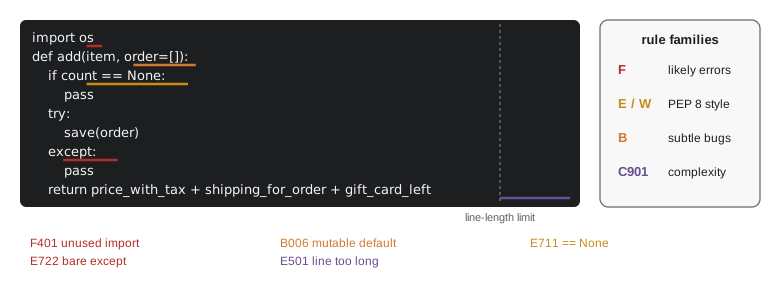
How linters work
Most linters do not run your code. They parse it into an abstract syntax tree, a tree of objects representing the program's structure, and walk the tree looking for patterns. Python's own ast module provides the parser, so a simple check takes only a few lines. The listing below finds bare except clauses and comparisons to None with == or !=, the two rules E722 and E711.
import ast

SOURCE = """
def load(path):
    try:
        return open(path).read()
    except:
        return None

def is_missing(value):
    return value == None
"""

tree = ast.parse(SOURCE)
for node in ast.walk(tree):
    if isinstance(node, ast.ExceptHandler) and node.type is None:
        print(f"line {node.lineno}: E722 bare except")
    if isinstance(node, ast.Compare):
        for op, right in zip(node.ops, node.comparators):
            if isinstance(op, (ast.Eq, ast.NotEq)) and isinstance(right, ast.Constant) and right.value is None:
print(f"line {node.lineno}: E711 comparison to None")line 5: E722 bare except line 9: E711 comparison to None
Finding unused imports takes a little more work: collect the names that imports create, collect the names that are used anywhere, and report the difference. Real tools handle many extra cases, such as names used only in strings, __all__ lists and conditional imports, but the core idea is exactly this.
import ast

SOURCE = """
import os
import json
from datetime import date, timedelta

def sell_by(roasted):
    return roasted + timedelta(days=30)

print(json.dumps({"ok": True}))
"""

tree = ast.parse(SOURCE)
imported = {}
for node in ast.walk(tree):
    if isinstance(node, (ast.Import, ast.ImportFrom)):
        for alias in node.names:
            imported[(alias.asname or alias.name).split(".")[0]] = node.lineno
used = {node.id for node in ast.walk(tree) if isinstance(node, ast.Name)}
for name, line in sorted(imported.items(), key=lambda item: item[1]):
    if name not in used:
print(f"line {line}: F401 {name} imported but unused")line 2: F401 os imported but unused line 4: F401 date imported but unused
Measuring complexity
One of the most useful lint rules is not about style at all. Cyclomatic complexity, a measure Thomas McCabe described in 1976, counts the independent paths through a function: start at one and add one for every if, elif, loop, except clause and boolean and or or. A function with complexity 3 needs at least three tests to try every path; one with complexity 25 is almost impossible to test thoroughly and very hard to change safely. Ruff's C901 rule reports functions above a chosen limit, often 10. A high score is a signal to split the function into smaller pieces, which lesson 10 shows how to do safely.
import ast

SOURCE = """
def shipping(subtotal, country, express):
    if subtotal >= 5000 and not express:
        return 0
    if country == "CA":
        cost = 1295
    elif country == "US":
        cost = 1495
    else:
        raise ValueError(country)
    if express:
        cost += 1000
    return cost
"""

BRANCHES = (ast.If, ast.For, ast.While, ast.ExceptHandler, ast.IfExp)
for func in ast.walk(ast.parse(SOURCE)):
    if isinstance(func, ast.FunctionDef):
        score = 1
        for node in ast.walk(func):
            if isinstance(node, BRANCHES):
                score += 1
            elif isinstance(node, ast.BoolOp):
                score += len(node.values) - 1
print(f"{func.name}: complexity {score}")shipping: complexity 6
The shipping function scores 6: one to start, four if or elif branches, and one for the and. That is fine, but it tells you that six tests are the minimum needed to exercise every path, which is useful information when planning tests in lesson 11.
Configuring the tools
Linters and formatters are configured per project, usually in pyproject.toml, so every developer and every automated check uses the same settings. The configuration chooses the line length, the target Python version and which rule families to enable. Starting with a modest set of rules and adding more as the code is cleaned up works better than switching everything on at once and drowning in hundreds of findings.
# pyproject.toml
[tool.ruff]
line-length = 88
target-version = "py312"

[tool.ruff.lint]
select = ["E", "F", "W", "B", "I", "UP", "C901"]   # pycodestyle, Pyflakes, bugbear, isort, pyupgrade, complexity
ignore = ["E203"]

[tool.ruff.lint.mccabe]
max-complexity = 10

[tool.ruff.lint.per-file-ignores]
"tests/*" = ["B011"]
Occasionally a finding is wrong for a particular line, such as a deliberately broad except at the very top of a long-running service that must log any error and keep going. A comment such as # noqa: E722 on that line tells the linter to skip that one rule there. Use these sparingly and say why in the comment; a file full of noqa comments defeats the purpose.
Running checks automatically
Checks that depend on someone remembering to run them are not run. Three layers make them automatic. First, the editor: Ruff's extension underlines problems as you type and formats on save. Second, pre-commit hooks: the pre-commit tool runs the linter and formatter on the changed files every time you commit, and refuses the commit if they fail. Third, continuous integration: the shared repository runs the same checks, plus the test suite, on every pull request, so nothing unchecked can be merged into main. Ridgeline's branch protection, set up in PYTH-110, now requires these checks to pass.
# .pre-commit-config.yaml
repos:
  - repo: https://github.com/astral-sh/ruff-pre-commit
    rev: v0.8.0
    hooks:
      - id: ruff          # lint, fixing what it safely can
        args: [--fix]
      - id: ruff-format   # format

# then, once per clone:
# > pre-commit install
Worked problem
Bringing an old module up to standard
promo.py was written before the team adopted Ruff and reports 63 findings. Plan the clean-up without breaking anything.
Show solution
- Make sure the module's tests pass first; if there are none, write a few that pin its current behaviour.
- Run the formatter alone and commit: a large layout-only diff that reviewers can skim.
- Run ruff check --fix for the automatically fixable rules, rerun the tests, commit.
- Fix the remaining findings by hand in small commits, starting with F codes, which are the most likely real bugs.
- Add promo.py to the files checked in CI so it stays clean.
Answer: Separate formatting, automatic fixes and manual fixes into their own commits, with tests run after each, so every step is easy to review and safe to revert.
Style beyond the tools
Linters catch the mechanical things. Some style questions remain human judgement, and code review is where they are discussed. Names should say what something is or does: bags_in_stock, not x or data2. Functions should do one thing and be short enough to read in one screen. Comments should explain why, not repeat what the code says. Docstrings, as PEP 257 describes, should give every public module, class and function a one-line summary. And when the code and the style guide disagree with the existing project, follow the project: a consistent codebase that bends one rule is easier to work with than an inconsistent one.
Try it yourself
Find the long lines
Write long_lines(source, limit=88) that returns a list of the line numbers (starting at 1) of lines in the string source that are longer than limit characters, the E501 rule.
def long_lines(source, limit=88):
    return [n for n, line in enumerate(source.splitlines()) if len(line) >= limit]
Try it yourself
A bare except detector
Using the ast module, write bare_excepts(source) that returns a sorted list of the line numbers of every except: clause that names no exception type (rule E722). except ValueError: and except Exception: are fine.
import ast

def bare_excepts(source):
    return [n for n, line in enumerate(source.splitlines(), 1) if 'except' in line]
Try it yourself
Clean up the style
This function works, but a linter would flag it. Rewrite it so that: it is named low_stock (snake_case), the unused import os is gone, it compares with is not None instead of != None, and the magic number 10 is a constant REORDER_POINT. It must still return the same results.
import os

def getLowStock(stock):
    result = []
    for code in stock:
        if stock[code] != None and stock[code] < 10:
            result.append(code)
    return result
Common mistakes
MistakeArguing about layout in code reviews.
InsteadAdopt a formatter and let it decide; reviews then show only real changes.
MistakeSwitching on every lint rule at once in an old project.
InsteadStart with a core set, clean up, then enable more rule families.
MistakeSilencing findings with # noqa without a reason.
InsteadFix the code, or add a targeted noqa with the rule code and a comment saying why.
MistakeRelying on people to remember to run the linter.
InsteadRun it in the editor, in pre-commit hooks and in CI.
MistakeComparing with == None or != None.
InsteadUse is None and is not None.
MistakeIgnoring F codes because they look like style.
InsteadTreat F findings such as undefined names and unused variables as likely bugs.
Summary and key terms
- PEP 8 is Python's style guide; consistency within a project matters most.
- Formatters such as Black and ruff format rewrite layout automatically, ending debates about style.
- Linters such as Ruff, flake8 and pylint find likely mistakes and style problems without running the code.
- Rule codes group findings: F for likely errors, E and W for PEP 8, B for subtle bugs, C901 for complexity.
- Linters parse code into a syntax tree and look for patterns; Python's ast module makes simple checks easy.
- Configure tools in pyproject.toml; use noqa sparingly and with a reason.
- Run checks automatically in the editor, with pre-commit hooks and in CI.
- PEP 8
- The official style guide for Python code.
- linter
- A tool that analyses code without running it to find likely mistakes and style problems.
- formatter
- A tool that rewrites code into a consistent layout automatically.
- rule code
- A short identifier such as F401 naming one lint rule.
- abstract syntax tree (AST)
- A tree of objects representing the structure of a program, produced by parsing.
- noqa comment
- A comment telling a linter to skip a rule on one line.
- pre-commit hook
- A check that runs automatically before each commit and can block it.
- cyclomatic complexity
- A measure of the number of independent paths through a function.
Practice problems
Work each problem on paper first, then reveal the answer to check.
Name the PEP 8 conventions for a function, a class and a constant.
Show answer
snake_case for functions, CapWords for classes, UPPER_CASE for constants.
What is the difference between a linter and a formatter?
Show answer
A formatter rewrites layout; a linter reports likely mistakes and style problems.
Which rule family is most likely to point to a real bug: F, E or W?
Show answer
F, which includes undefined names and unused variables.
Why is except: without a type discouraged?
Show answer
It catches every exception, hiding real errors and even keyboard interrupts.
Where should a project keep its Ruff settings so everyone uses the same ones?
Show answer
In pyproject.toml, committed to the repository.
Give the three layers that make style checks automatic.
Show answer
The editor, pre-commit hooks and continuous integration.
Lesson quiz · 5 questions
Score 60% or more to complete this lesson.
Create a free account to save your progress, take quizzes and earn a certificate.