
PYTH-230 · Lesson 3 of 12 · 29 min
Fixtures and parametrized tests
▶ Video coming soon A video version of this lesson is on the way.
By the end of the first week, Jordan and Sam had written twenty tests for the inventory code, and they had started to notice a pattern. Almost every test began with the same five lines: build a stock dictionary with the six Ridgeline coffees, set the reorder point, perhaps create a sales list. When Kai added a seventh coffee to the real coffee list, those five lines had to be changed in twenty places. Worse, two tests had started failing only when run in a particular order, because one of them changed a shared dictionary that another relied on.
Both problems have the same cure: put the shared setup in one place, and give every test a fresh copy of it. The thing a test needs before it can run, such as an object, some data or a temporary file, is called a fixture. This lesson shows how unittest provides fixtures with setUp and tearDown, how pytest provides them as functions, and how to run the same test over a whole table of inputs with subTest and pytest's parametrize.
Shared state makes tests depend on each other
Here is the problem in miniature. The stock dictionary is created once, at class level, and both tests use it. The first test sells two bags, which changes the shared dictionary. The second test assumes the original count. Whether the second test passes depends on whether the first ran before it.
import unittest

def report(*cases):
    """Run TestCase classes and print one line per test (a small test runner)."""
    loader = unittest.TestLoader()
    tests = [t for case in cases for t in loader.loadTestsFromTestCase(case)]
    result = unittest.TestResult()
    unittest.TestSuite(tests).run(result)
    problems = {}
    for kind, items in (("FAIL", result.failures), ("ERROR", result.errors)):
        for test, tb in items:
            problems.setdefault(test.id().split(" ")[0], []).append((kind, tb.strip().splitlines()[-1]))
    for t in tests:
        found = problems.get(t.id(), [])
        print(f"{t.id().rsplit('.', 1)[-1]:<34} {found[0][0] if found else 'ok'}")
        for kind, line in found:
            print("    " + line)
    print(f"{len(tests)} tests: {len(tests) - len(problems)} passed, {len(problems)} failed")

STOCK = {"RC-101": 42, "RC-104": 9}

class TestStockShared(unittest.TestCase):
    stock = STOCK                      # one dictionary shared by every test

    def test_a_sell_two_bags(self):
        self.stock["RC-104"] -= 2
        self.assertEqual(self.stock["RC-104"], 7)

    def test_b_count_is_nine(self):
        self.assertEqual(self.stock["RC-104"], 9)

report(TestStockShared)test_a_sell_two_bags ok
test_b_count_is_nine FAIL
AssertionError: 7 != 9
2 tests: 1 passed, 1 failedThe second test fails, yet neither test is wrong on its own. Run test_b alone and it passes. This is the worst kind of failure, because it depends on things outside the test, and it is the most common cause of flaky test suites. The rule is simple: every test must start from a known state that no other test can disturb.
setUp and tearDown
A TestCase can define a method called setUp, which unittest calls before every test method, and tearDown, which it calls after every test method, even if the test failed. Anything stored on self in setUp is available to the test. Because unittest creates a new instance of the class for every test and calls setUp each time, every test gets its own fresh objects.
import unittest

def report(*cases):
    """Run TestCase classes and print one line per test (a small test runner)."""
    loader = unittest.TestLoader()
    tests = [t for case in cases for t in loader.loadTestsFromTestCase(case)]
    result = unittest.TestResult()
    unittest.TestSuite(tests).run(result)
    problems = {}
    for kind, items in (("FAIL", result.failures), ("ERROR", result.errors)):
        for test, tb in items:
            problems.setdefault(test.id().split(" ")[0], []).append((kind, tb.strip().splitlines()[-1]))
    for t in tests:
        found = problems.get(t.id(), [])
        print(f"{t.id().rsplit('.', 1)[-1]:<34} {found[0][0] if found else 'ok'}")
        for kind, line in found:
            print("    " + line)
    print(f"{len(tests)} tests: {len(tests) - len(problems)} passed, {len(problems)} failed")

class TestStock(unittest.TestCase):
    def setUp(self):
        # runs before EVERY test: each test gets a brand-new dictionary
        self.stock = {"RC-101": 42, "RC-102": 15, "RC-104": 9}
        self.reorder_point = 10

    def tearDown(self):
        # runs after every test, pass or fail: release anything setUp acquired
        self.stock.clear()

    def test_a_sell_two_bags(self):
        self.stock["RC-104"] -= 2
        self.assertEqual(self.stock["RC-104"], 7)

    def test_b_count_is_nine(self):
        self.assertEqual(self.stock["RC-104"], 9)

    def test_low_stock_list(self):
        low = sorted(c for c, n in self.stock.items() if n < self.reorder_point)
        self.assertEqual(low, ["RC-104"])

report(TestStock)test_a_sell_two_bags ok test_b_count_is_nine ok test_low_stock_list ok 3 tests: 3 passed, 0 failed
Now the order does not matter: test_b sees nine bags because it got its own dictionary. Adding the seventh coffee means changing one line in setUp. tearDown is not needed here, since a dictionary simply disappears when the test finishes, but it matters whenever setUp acquires something that must be released, such as an open file, a temporary folder or a database connection.
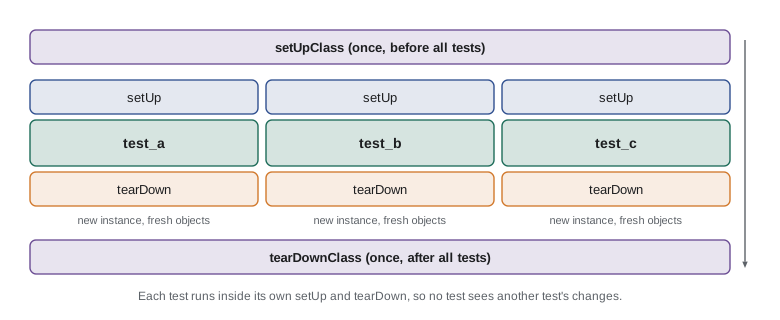
Some setup is expensive, such as loading a large sample file. For that, unittest offers class methods setUpClass and tearDownClass, which run once for the whole class, before the first test and after the last. Use them only for things the tests read and never change, or you are back to shared state. A third tool, self.addCleanup(function), registers a function to run after the test; it is often clearer than tearDown because the cleanup is written right next to the setup it undoes.
Fixtures that use files
Ridgeline's storage code saves the inventory to ridgeline.json. A test of saving and loading must write a real file, but it must not touch the real data file, must not leave junk behind, and must not collide with another test writing the same name. The standard library's tempfile module solves all three: tempfile.TemporaryDirectory() creates a new, empty folder with a unique name and deletes it, with everything inside, when it is cleaned up.
import unittest

def report(*cases):
    """Run TestCase classes and print one line per test (a small test runner)."""
    loader = unittest.TestLoader()
    tests = [t for case in cases for t in loader.loadTestsFromTestCase(case)]
    result = unittest.TestResult()
    unittest.TestSuite(tests).run(result)
    problems = {}
    for kind, items in (("FAIL", result.failures), ("ERROR", result.errors)):
        for test, tb in items:
            problems.setdefault(test.id().split(" ")[0], []).append((kind, tb.strip().splitlines()[-1]))
    for t in tests:
        found = problems.get(t.id(), [])
        print(f"{t.id().rsplit('.', 1)[-1]:<34} {found[0][0] if found else 'ok'}")
        for kind, line in found:
            print("    " + line)
    print(f"{len(tests)} tests: {len(tests) - len(problems)} passed, {len(problems)} failed")
import json, os, tempfile

def save(stock, path):
    with open(path, "w") as f:
        json.dump(stock, f)

def load(path):
    if not os.path.exists(path):
        return {}
    with open(path) as f:
        return json.load(f)

class TestStorage(unittest.TestCase):
    def setUp(self):
        tmp = tempfile.TemporaryDirectory()
        self.addCleanup(tmp.cleanup)            # removed after the test, pass or fail
        self.path = os.path.join(tmp.name, "ridgeline.json")

    def test_round_trip(self):
        stock = {"RC-101": 42, "RC-104": 9}
        save(stock, self.path)
        self.assertEqual(load(self.path), stock)

    def test_missing_file_gives_empty_stock(self):
        self.assertEqual(load(self.path), {})

report(TestStorage)test_missing_file_gives_empty_stock ok test_round_trip ok 2 tests: 2 passed, 0 failed
The test for a missing file needs no special effort: the temporary folder is empty, so the path does not exist. Every test gets its own folder, so the round-trip test cannot leave a file that makes the missing-file test fail.
Fixtures in pytest
pytest takes a different approach to fixtures. A fixture is a function decorated with @pytest.fixture that builds and returns the object. A test asks for a fixture simply by naming it as a parameter, and pytest calls the fixture function and passes in the result. Code after a yield statement in the fixture runs as teardown. This style keeps each test's needs visible in its signature and lets tests use any combination of fixtures.
# tests/test_inventory.py
import pytest
from ridgeline.inventory import Inventory

@pytest.fixture
def inventory():
    """A fresh inventory with three coffees for each test."""
    return Inventory.from_counts({"RC-101": 42, "RC-102": 15, "RC-104": 9})

def test_sell_two_bags(inventory):
    inventory.sell("RC-104", 2)
    assert inventory.count("RC-104") == 7

def test_count_is_nine(inventory):
    assert inventory.count("RC-104") == 9

def test_round_trip(inventory, tmp_path):
    path = tmp_path / "ridgeline.json"        # tmp_path: built-in, unique per test
    inventory.save(path)
    assert Inventory.load(path) == inventory
pytest ships with useful built-in fixtures. tmp_path gives each test its own temporary folder as a pathlib.Path. capsys captures what the code prints, so a test can check output. monkeypatch temporarily replaces an attribute, an environment variable or a dictionary entry and restores it afterwards. Fixtures that several test files need go in a file called conftest.py in the tests folder, where pytest finds them automatically without any import.
# tests/conftest.py
import pytest

@pytest.fixture
def sample_sales():
    return [("RC-101", 2), ("RC-104", 1), ("RC-101", 1)]

@pytest.fixture
def data_file(tmp_path):
    path = tmp_path / "ridgeline.json"
    path.write_text('{"RC-101": 42}')
    yield path                     # the test runs here
    # code after yield is teardown; tmp_path is cleaned up by pytest itself

@pytest.fixture(scope="module")
def coffee_names():
    """Built once per test file: read-only reference data."""
    return {"RC-101": "Sunrise Blend", "RC-104": "Sumatra Dark"}
The scope argument controls how often a fixture is built: once per test by default, or once per class, module or whole test session. As with setUpClass, wider scopes are only safe for objects the tests never change.
Running one test over many inputs
The tier tests from lesson 2 repeated the same line with different numbers: tier(0) is Bean, tier(99) is Bean, tier(100) is Roast, and so on. When a test differs only in its data, it is clearer to write the data as a table and run one test body over every row. This is called a parametrized or table-driven test.
In unittest, the tool is self.subTest. Inside a loop over the table, each row runs in its own with self.subTest(...) block. A failing row is reported with the values that were passed in, and, unlike a plain loop with assertions, the loop carries on to check the remaining rows instead of stopping at the first failure.
import unittest

def report(*cases):
    """Run TestCase classes and print one line per test (a small test runner)."""
    loader = unittest.TestLoader()
    tests = [t for case in cases for t in loader.loadTestsFromTestCase(case)]
    result = unittest.TestResult()
    unittest.TestSuite(tests).run(result)
    problems = {}
    for kind, items in (("FAIL", result.failures), ("ERROR", result.errors)):
        for test, tb in items:
            problems.setdefault(test.id().split(" ")[0], []).append((kind, tb.strip().splitlines()[-1]))
    for t in tests:
        found = problems.get(t.id(), [])
        print(f"{t.id().rsplit('.', 1)[-1]:<34} {found[0][0] if found else 'ok'}")
        for kind, line in found:
            print("    " + line)
    print(f"{len(tests)} tests: {len(tests) - len(problems)} passed, {len(problems)} failed")

def tier(points):
    if points >= 300:
        return "Reserve"
    if points >= 100:
        return "Roast"
    return "Bean"

CASES = [
    (0, "Bean"), (99, "Bean"),
    (100, "Roast"), (299, "Roast"),
    (300, "Reserve"), (5000, "Reserve"),
]

class TestTierTable(unittest.TestCase):
    def test_tiers(self):
        for points, expected in CASES:
            with self.subTest(points=points):
                self.assertEqual(tier(points), expected)

report(TestTierTable)
print(len(CASES), "rows checked")test_tiers ok 1 tests: 1 passed, 0 failed 6 rows checked
The table makes the boundaries obvious at a glance, and adding a case is one more line of data rather than one more method. If two rows failed, the report would list both, each with its points value, which is far more useful than learning only about the first.
import pytest
from ridgeline.loyalty import tier

@pytest.mark.parametrize("points, expected", [
    (0, "Bean"), (99, "Bean"),
    (100, "Roast"), (299, "Roast"),
    (300, "Reserve"), (5000, "Reserve"),
])
def test_tier(points, expected):
    assert tier(points) == expected
pytest's parametrize decorator goes one step further: each row becomes a separate test with its own node id, such as test_tier[99-Bean], so it can be rerun on its own and is counted separately in the summary. The ids argument lets you give rows readable names when the values alone are not clear.
Worked problem
A table for receipt rounding
Anita wants proof that receipts round tax once on the subtotal for a range of carts, including an empty cart and one where the tax ends in exactly half a cent. Design the table.
Show solution
- Columns: the cart as a list of (quantity, cents) pairs, and the expected total in cents.
- Rows: an empty cart; one item; three single drinks; a large order; and a cart whose tax ends in .5 of a cent.
- Work out each expected total by hand with Anita, using the rule: subtotal, then tax, then one rounding.
- Write one test method that loops over the rows with self.subTest(cart=cart).
- Add a row each time a new kind of cart causes a question or a bug.
Answer: One table-driven test with five hand-checked rows covers the rule better than five copies of the same method, and grows one line at a time.
Keeping fixtures healthy
Fixtures can be overdone. A setUp that builds twenty objects when most tests need two makes every test slower and harder to understand, because a reader cannot tell which parts of the setup matter. Prefer small fixtures that build only what is needed, and let a test add its own specific data in its arrange step. When different tests need differently shaped data, a small factory function, such as make_stock(**counts), is often clearer than one large shared fixture.
Test data should also look like the real thing. Using Ridgeline's actual coffee codes, realistic prices and real bag sizes makes tests easier to read and sometimes catches problems that made-up values like 1, 2 and 3 never would, such as a code that assumes every price has two decimal places.
Try it yourself
Give every test a fresh stock
These tests share one class-level dictionary, so test_count_is_nine fails whenever test_sell_two runs first. Add a setUp method that gives each test its own fresh dictionary {"RC-101": 42, "RC-104": 9} in self.stock, and remove the shared one.
The checker runs your tests in normal and in reversed order; both must pass.
import unittest

class TestStock(unittest.TestCase):
    stock = {'RC-101': 42, 'RC-104': 9}

    def test_sell_two(self):
        self.stock['RC-104'] -= 2
        self.assertEqual(self.stock['RC-104'], 7)

    def test_count_is_nine(self):
        self.assertEqual(self.stock['RC-104'], 9)

r = unittest.TestResult()
unittest.defaultTestLoader.loadTestsFromTestCase(TestStock).run(r)
print(r.testsRun, 'tests,', len(r.failures), 'failures')
Try it yourself
A table of tiers
The setup defines a correct tier(points). Complete the CASES table and the test_tiers method so it checks every row with self.subTest. Include at least six rows, with values on both sides of the 100 and 300 boundaries.
The checker runs your test against the correct function and against two broken ones with shifted boundaries.
import unittest

CASES = [(0, 'Bean'), (5000, 'Reserve')]

class TestTierTable(unittest.TestCase):
    def test_tiers(self):
        for points, expected in CASES:
            self.assertEqual(tier(points), expected)

r = unittest.TestResult()
unittest.defaultTestLoader.loadTestsFromTestCase(TestTierTable).run(r)
print(len(CASES), 'cases,', len(r.failures), 'failures')
Try it yourself
Test saving with a temporary folder
The setup defines save(stock, path) and load(path). Write a TestStorage class whose setUp creates a tempfile.TemporaryDirectory(), registers its cleanup with self.addCleanup, and stores a path inside it in self.path. Add a test that saves a stock dictionary and checks that loading gives the same dictionary back.
The checker also runs your test against a broken load that drops the last coffee, and checks that no ridgeline.json is left in the current folder.
import unittest, os

class TestStorage(unittest.TestCase):
    def test_round_trip(self):
        stock = {'RC-101': 42, 'RC-104': 9}
        save(stock, 'ridgeline.json')
        self.assertEqual(load('ridgeline.json'), stock)

r = unittest.TestResult()
unittest.defaultTestLoader.loadTestsFromTestCase(TestStorage).run(r)
print(r.testsRun, 'tests,', len(r.failures) + len(r.errors), 'problems')
Common mistakes
MistakeStoring a fixture as a class attribute, so every test shares and changes the same object.
InsteadBuild it in setUp (or a pytest fixture) so each test gets a fresh one.
MistakeUsing setUpClass for objects that tests modify.
InsteadKeep class-level and module-level fixtures read-only; build changeable objects per test.
MistakeWriting test files to the current folder or the real data file.
InsteadUse tempfile.TemporaryDirectory or pytest's tmp_path and clean up afterwards.
MistakeLooping over cases with plain asserts, so the first failure hides the rest.
InsteadUse self.subTest or pytest.mark.parametrize so every row is checked and reported.
MistakePutting everything any test might need into one huge setUp.
InsteadKeep fixtures small and let each test add its own specific data.
MistakeForgetting that tearDown or addCleanup must undo whatever setUp acquired.
InsteadPair every resource opened in setUp with a cleanup that releases it.
Summary and key terms
- A fixture is whatever a test needs before it runs: objects, data, files or connections.
- Shared, changeable state makes tests depend on their order; give every test a fresh fixture.
- unittest calls setUp before and tearDown after every test; setUpClass and tearDownClass run once per class; addCleanup registers cleanups.
- tempfile.TemporaryDirectory gives file tests a private folder that is deleted afterwards.
- pytest fixtures are functions requested by parameter name; code after yield is teardown; conftest.py shares them; scope controls reuse.
- Table-driven tests run one body over many inputs: self.subTest in unittest, pytest.mark.parametrize in pytest.
- Keep fixtures small and realistic.
- fixture
- Something a test needs set up before it runs, such as objects, data or a temporary file.
- setUp
- A TestCase method that unittest calls before every test method.
- tearDown
- A TestCase method that unittest calls after every test method, even if it failed.
- setUpClass
- A class method that runs once before all the tests in a TestCase class.
- addCleanup
- A TestCase method that registers a function to run after the current test.
- temporary directory
- A uniquely named folder created for a test and deleted afterwards.
- conftest.py
- A file in which pytest looks for fixtures shared by the tests in its folder.
- parametrized test
- A test that runs once for each row of a table of inputs and expected results.
- subTest
- A unittest context manager that reports each case of a loop separately.
Practice problems
Work each problem on paper first, then reveal the answer to check.
Why does a test that passes alone sometimes fail when the whole suite runs?
Show answer
It depends on shared state that another test changes; give each test its own fixture.
How many times is setUp called for a TestCase with four test methods?
Show answer
Four times, once before each test.
When is it safe to build a fixture in setUpClass?
Show answer
When it is expensive to build and the tests only read it, never change it.
Which pytest built-in fixture gives each test its own temporary folder?
Show answer
tmp_path.
What advantage does self.subTest have over a plain loop of assertions?
Show answer
Every row is checked and each failure is reported with its values; the loop does not stop at the first failure.
A colleague wants one fixture function available in five pytest test files. Where should it go?
Show answer
In tests/conftest.py, where pytest finds it automatically.
Lesson quiz · 5 questions
Score 60% or more to complete this lesson.
Create a free account to save your progress, take quizzes and earn a certificate.