
PYTH-230 · Lesson 1 of 12 · 27 min
Why testing matters
▶ Video coming soon A video version of this lesson is on the way.
On the Monday after a busy November weekend, Anita Shah, the bookkeeper at Ridgeline Coffee Roasters, found that Saturday's sales report did not match the till. The report and the card terminal disagreed by a cent here and a cent there. The gap was tiny on any one receipt, but over a day of several hundred receipts it added up, and it meant every report since the previous Wednesday was wrong. Jordan Reyes traced the problem to a small change made that Wednesday: to prepare the new tax summary, Jordan had tidied up the receipt code and, without noticing, moved the rounding so that tax was rounded on every line instead of once for the whole receipt.
Nothing crashed. Every receipt looked reasonable. The program simply produced slightly wrong numbers, and nobody noticed for four days. Rosa Delgado, the owner, asked the question every business eventually asks its developers: how do we make sure this does not happen again? This course is the answer. It covers automated testing with unittest and pytest, test doubles, test-driven development, debugging, logging, linting, type checking, refactoring and coverage, and it ends by rescuing a real, untested Ridgeline script. Sam Okoye, back for a second co-op term, joins Jordan for the work.
This first lesson explains what a test is, why automated tests pay for themselves, what kinds of tests there are, and how to write your first tests with nothing but the assert statement.
How the bug got through
Here is a simplified version of the code before and after Wednesday's change. Prices are kept in cents, as whole numbers, which avoids most floating-point surprises. The tax rate is applied to the subtotal. The original version adds up the lines and then rounds the tax once; the tidied version rounds the tax on each line and adds the rounded amounts. Run it and compare the two totals for the same receipt.
RATE = 0.05   # GST on cafe drinks, for these examples

def total_before(lines):
    """Add up the lines, then round the tax once."""
    subtotal = sum(qty * cents for qty, cents in lines)
    return subtotal + round(subtotal * RATE)

def total_after(lines):
    """Wednesday's version: tax rounded on every line."""
    return sum(qty * cents + round(qty * cents * RATE) for qty, cents in lines)

receipt = [(1, 325), (1, 525), (1, 300)]   # drip coffee, latte, tea
print(total_before(receipt), total_after(receipt))
print("difference in cents:", total_after(receipt) - total_before(receipt))1208 1207 difference in cents: -1
A difference of a cent or two on one receipt is easy to dismiss, which is exactly why the bug survived. Both versions look correct when you read them, both run without errors, and both give sensible-looking totals. The only way to tell them apart is to know what the right answer is for a particular receipt and check it. That is all a test is: a known input, the output you expect, and a check that the program produces it.
If Ridgeline had owned even one test that said this receipt must total so many cents, Wednesday's change would have failed it within seconds, on Jordan's own laptop, before the code ever reached the till. Instead, the bug cost four days of wrong reports, an afternoon of Anita's time reconciling them, and an evening of Jordan's time finding the cause.
What a test is
A software test is code that runs part of a program with chosen inputs and checks that the result is what it should be. Tests are written once and run as often as you like: after every change, before every release, automatically on every push to the shared repository. When they all pass, you have evidence that the behaviour they cover still works. When one fails, it tells you exactly which behaviour broke, usually within moments of breaking it.
Manual testing, where a person runs the program and looks at the output, still has its place, especially for judging whether something is pleasant to use. But manual checks are slow, boring and easy to skip, and people do not notice a total that is off by three cents. A computer comparing numbers never gets tired and never assumes that something which worked last week still works today.
The simplest tool for writing a check in Python is the assert statement. assert takes an expression and does nothing if it is true. If it is false, it raises AssertionError, stopping the program. You can add a message after a comma, which appears in the error and should explain what was expected.
def points(total_cents):
    """Loyalty points: one per whole dollar spent, none for refunds."""
    if total_cents <= 0:
        return 0
    return total_cents // 100

assert points(1850) == 18
assert points(99) == 0
assert points(-1850) == 0, "refunds must not earn points"
print("all three checks passed")

try:
    assert points(2000) == 21, "a 20.00 purchase should earn 20 points"
except AssertionError as err:
print("AssertionError:", err)all three checks passed AssertionError: a 20.00 purchase should earn 20 points
Look at what each assert records: not just that points runs, but a specific fact about its behaviour that someone decided was correct. The last check is deliberately wrong to show what a failure looks like; the function is right and the expectation is not. When a test fails, the first question is always which one is mistaken, the code or the test.
One caution about assert: Python removes assert statements entirely when it runs with the -O optimization flag. That is fine in tests, which are never run that way, but it means you must never use assert to check user input or anything else that must always be enforced in a running program. For those, raise a proper exception such as ValueError.
Tests as functions
Loose assert statements at the bottom of a file are a start, but they quickly become hard to manage: the first failure stops everything after it, and there is no record of which behaviour each check was about. The next step is to group related checks into small functions whose names start with test_ and describe one behaviour each. Every Python test tool, from unittest to pytest, is built on this idea.
def points(total_cents):
    if total_cents <= 0:
        return 0
    return total_cents // 100

def test_one_point_per_whole_dollar():
    assert points(1850) == 18

def test_less_than_a_dollar_earns_nothing():
    assert points(99) == 0

def test_refunds_earn_nothing():
    assert points(-1850) == 0

def test_exactly_one_dollar():
    assert points(100) == 1

tests = [f for name, f in sorted(globals().items()) if name.startswith("test_")]
failed = 0
for test in tests:
    try:
        test()
        print("ok  ", test.__name__)
    except AssertionError:
        failed += 1
        print("FAIL", test.__name__)
print(len(tests), "tests,", failed, "failed")ok test_exactly_one_dollar ok test_less_than_a_dollar_earns_nothing ok test_one_point_per_whole_dollar ok test_refunds_earn_nothing 4 tests, 0 failed
The loop at the bottom is a tiny test runner. It finds every function whose name starts with test_, calls each one, and records which ones raise AssertionError. A failure in one test no longer hides the others, and the names in the report say exactly which behaviour broke. Real test runners do the same job with many more features: they find tests in every file of a project, report the values involved in a failed comparison, time each test, and let you choose which tests to run. You will meet unittest and pytest in the next lesson.
Arrange, act, assert
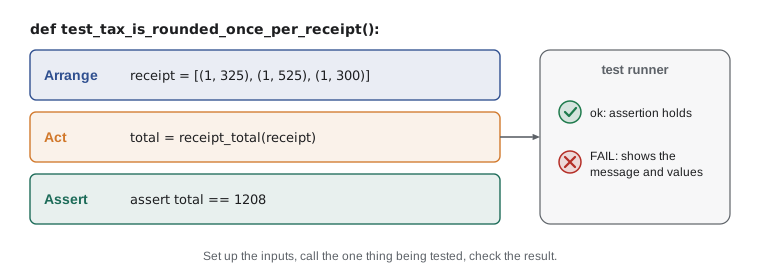
Good tests share a shape. First they arrange: build the inputs and any objects the code needs. Then they act: call the one function or method being tested. Then they assert: check the result. Keeping these three steps visible, often separated by blank lines, makes a test easy to read months later, and it keeps each test focused on one behaviour.
RATE = 0.05

def receipt_total(lines):
    subtotal = sum(qty * cents for qty, cents in lines)
    return subtotal + round(subtotal * RATE)

def test_tax_is_rounded_once_per_receipt():
    # arrange
    receipt = [(1, 325), (1, 525), (1, 300)]
    # act
    total = receipt_total(receipt)
    # assert
    assert total == 1208, f"expected 1208 cents, got {total}"

test_tax_is_rounded_once_per_receipt()
print("passed:", receipt_total([(1, 325), (1, 525), (1, 300)]))passed: 1208
Where did the expected number come from? Not from running the code, which would only confirm whatever the code does. Jordan worked it out by hand with Anita, from the rule the business actually follows: add the lines, apply the tax to the subtotal, round once. A test's expected value must come from the requirement, a calculation done independently, or an agreed example. A test that merely records the program's current output protects against change, which can be useful, but it cannot tell you the output was ever right.
Worked problem
Choosing what to check for the loyalty tiers
Mei's loyalty program puts members in tiers by points: Bean for 0 to 99 points, Roast for 100 to 299 and Reserve for 300 or more. A function tier(points) returns the tier's name. Which inputs should the tests use, and why?
Show solution
- Pick one ordinary value from inside each tier: 50, 200 and 500.
- Pick the values on each side of every boundary, where off-by-one mistakes live: 99 and 100, 299 and 300.
- Include the smallest valid value, 0, and decide with Mei what a negative number should do.
- Write one test per behaviour, named for it, such as test_100_points_is_roast.
- Get the expected names from the program rules, not from running tier.
Answer: Test 0, 50, 99, 100, 200, 299, 300 and 500, plus a decision for negatives: boundaries are where most tier bugs hide.
Kinds of tests
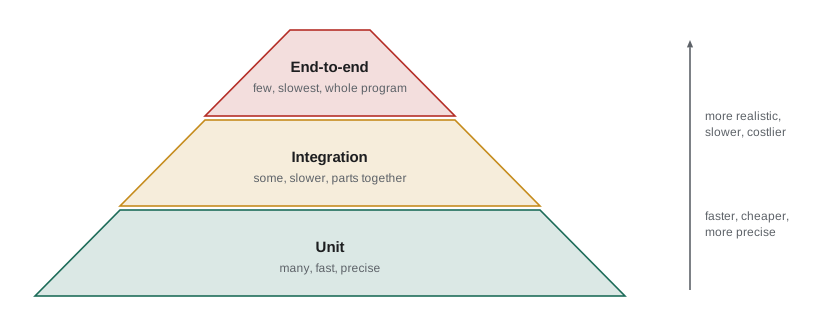
Tests come in sizes. A unit test checks one small piece, such as a function or a class, in isolation, and runs in a fraction of a millisecond. An integration test checks that several pieces work together, for example that the inventory code and the storage code really can save and reload a day's sales through a file. An end-to-end test drives the whole program the way a user would, such as typing commands into the Ridgeline tool and checking the printed report.
Each kind catches different problems. Unit tests pin down the rules precisely and point straight at the broken function, but they cannot tell you whether the parts fit together. End-to-end tests prove the parts fit, but when one fails you still have to dig for the cause, and they are slow and more fragile. A healthy project therefore has many unit tests, fewer integration tests and a handful of end-to-end tests, a balance usually drawn as a pyramid.
Why automated tests pay for themselves
Writing tests takes time, and at first it can feel like writing the program twice. The time comes back in several ways. Bugs are found minutes after they are made, when the change is fresh in your mind, instead of days later by a customer or a bookkeeper. Developers can change code with confidence, because the tests will complain if an existing behaviour breaks; without tests, every change to working code is a gamble, so people stop improving it. Tests also document behaviour: a test named test_refunds_earn_nothing tells the next developer a rule that might not be written down anywhere else.
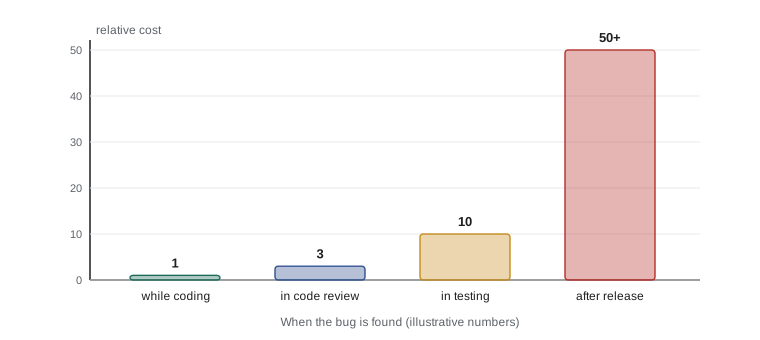
The cost of a bug rises sharply the later it is found. Caught by a test while coding, Wednesday's rounding change would have taken two minutes to fix. Caught in a code review, perhaps fifteen. Caught by Anita four days later, it took hours across three people, plus corrected reports. At a larger business, a bug that reaches customers can mean refunds, lost trust or legal trouble. Tests move the discovery of bugs as early as possible.
Tests are not proof that a program is correct. They check the cases someone thought to write, and a program can pass every test and still be wrong for an input nobody considered. As the computer scientist Edsger Dijkstra put it, testing can show the presence of bugs but never their absence. The goal is not perfection but confidence: enough well-chosen tests that the important behaviour is protected and most mistakes are caught early.
What makes a good test
A good test is fast, so people run it constantly. It is independent: it does not depend on other tests running first, on the time of day or on a particular file being present, so it gives the same answer every time. It checks one behaviour and is named for it. It fails for the right reason, meaning that if the behaviour breaks the test turns red, and if the behaviour is fine the test stays green no matter how the code is rearranged inside. And it is readable, because a test someone cannot understand will be deleted the first time it gets in the way.
A test that sometimes passes and sometimes fails without any change to the code is called flaky. Flaky tests are worse than useless, because people learn to ignore red results. The usual causes are dependence on the clock, on random numbers, on the order tests run in, or on a network service. Later lessons show how to remove each of these.
Try it yourself
Round the tax once
This is Wednesday's version of receipt_total, which rounds the tax on every line. Fix it so the tax is calculated on the subtotal and rounded once, as Ridgeline's rule requires. Prices are in cents and the tax rate in this exercise is 0.05.
Run the code to see the totals, then use Check my code.
RATE = 0.05

def receipt_total(lines):
    return sum(qty * cents + round(qty * cents * RATE) for qty, cents in lines)

print(receipt_total([(1, 325), (1, 525), (1, 300)]))
Run the starter first and you will see a total one cent away from the sample check. That cent is the whole story of the November reports: a single test with a hand-checked total turns a bug that took four days to notice into one that is impossible to miss. Ridgeline's accountant confirmed the rule, round the tax once on the subtotal, so the expected values in these checks come from the business rule and not from the code.
Try it yourself
A test that catches the bug
The setup has defined a correct points(total_cents) function: one point per whole dollar, and 0 for refunds and zero totals. Write a function test_points() that uses assert statements to check its behaviour.
Your test must pass for the correct function, and fail for two broken versions the checker will swap in: one that gives points for refunds, and one that rounds to the nearest dollar instead of rounding down.
def test_points():
    assert points(1850) == 18

test_points()
print('test_points passed')
This exercise shows the real measure of a test: not whether it passes, but whether it would fail if the code were wrong. A test that passes for every version of the code protects nothing. Choosing inputs where wrong versions behave differently from the right one, such as refunds and values just below a whole dollar, is the core skill of testing.
Common mistakes
MistakeTaking the expected value from the program's own output.
InsteadWork it out from the requirement, by hand or with the person who owns the rule.
MistakeTesting only ordinary values such as 1850.
InsteadAdd boundaries, zero, negative and empty inputs, where most bugs live.
MistakeUsing assert to validate user input in the program itself.
InsteadRaise ValueError or another exception; asserts can be switched off with -O.
MistakePutting many unrelated checks in one test called test_everything.
InsteadWrite one small test per behaviour, named for that behaviour.
MistakeWriting tests that depend on the clock, random numbers or the order they run in.
InsteadMake every test independent and repeatable; later lessons show how.
MistakeTreating a passing test suite as proof the program is correct.
InsteadTests check only the cases written; keep adding tests for new risks and every bug found.
Summary and key terms
- A test runs code with a chosen input and checks the result against an expected value worked out independently.
- Automated tests catch bugs minutes after they are made, document rules and make it safe to change code.
- The assert statement raises AssertionError when its condition is false; use it in tests, not to validate input.
- Test functions named test_ that each check one behaviour are the building block of every Python test tool.
- Arrange, act, assert gives tests a clear shape.
- Unit, integration and end-to-end tests catch different problems; most projects want many unit tests and few end-to-end tests.
- Good tests are fast, independent, focused, readable and fail when the behaviour breaks; flaky tests must be fixed.
- test
- Code that runs part of a program with known inputs and checks the result.
- assert statement
- A statement that raises AssertionError if its condition is false.
- test runner
- A tool that finds tests, runs them and reports which passed and failed.
- unit test
- A test of one small piece of code, such as a function or class, in isolation.
- integration test
- A test that checks several parts of a program working together.
- end-to-end test
- A test that drives the whole program the way a user would.
- regression
- A behaviour that used to work and has been broken by a later change.
- arrange, act, assert
- The three steps of a typical test: set up, call the code, check the result.
- flaky test
- A test that passes or fails unpredictably without any change to the code.
- test pyramid
- The guideline of many unit tests, fewer integration tests and very few end-to-end tests.
Practice problems
Work each problem on paper first, then reveal the answer to check.
Why did Wednesday's rounding change survive four days?
Show answer
The program ran without errors and gave plausible totals; nothing compared a total with a known correct value.
What happens when assert points(99) == 0 runs and points(99) returns 0?
Show answer
Nothing: the condition is true, so the program carries on.
Why should a test's expected value not come from running the code under test?
Show answer
The test would then only confirm what the code does, right or wrong, instead of checking it against the requirement.
Name three inputs worth testing for tier(points) with a boundary at 100.
Show answer
For example 99, 100 and 0, plus an ordinary value such as 200.
Is a test that checks that save then load gives back the same stock a unit test?
Show answer
No, it involves the inventory and storage code and a file, so it is an integration test.
A test passes in the morning and fails in the evening with no code change. What kind of test is it, and what is a likely cause?
Show answer
A flaky test, probably one that depends on the current time.
Lesson quiz · 5 questions
Score 60% or more to complete this lesson.
Create a free account to save your progress, take quizzes and earn a certificate.