
PYTH-230 · Lesson 7 of 12 · 29 min
Logging
▶ Video coming soon A video version of this lesson is on the way.
The Ridgeline tools now run in three places Jordan cannot watch: the till script in the cafe, the order import on the small Linux server every fifteen minutes, and the low-stock alert each weekday morning. When the order import skipped two online orders one Saturday, there was nothing to look at afterwards. The script had printed its progress to a terminal window that nobody was watching and that disappeared when the job finished. Rosa wanted to know what had happened, and the honest answer was that nobody could tell.
Programs that run unattended need to keep a record of what they did: a log. Python's standard library includes the logging module, which handles this far better than print. This lesson explains why logging beats print for anything beyond quick debugging, how log levels, loggers, handlers and formatters fit together, how to log exceptions properly, what to log and what never to log, and how to test that code logs what it should.
Why not print?
print sends text to the screen and that is all. It has no notion of importance, so a routine progress message and a serious failure look the same. It cannot easily send messages to a file and to the screen at once, cannot add the time and the module name automatically, and cannot be turned down without editing code. Logging gives every message a level of importance, attaches useful details such as the time, the module and the line, and lets the person running the program decide, through configuration, which messages to keep and where they go.
The rule of thumb many teams follow: print is for output the user asked for, such as a report or a receipt; logging is for messages about what the program is doing, intended for whoever maintains it.
Levels
Every log message has one of five standard levels, each with a matching function. DEBUG is for detailed information useful only when diagnosing a problem. INFO confirms that things are working as expected, such as an import finishing. WARNING signals something unexpected that the program handled, or a problem that may come soon, such as stock running low. ERROR means a function failed to do its job, such as an order that could not be imported. CRITICAL means the program itself may be unable to continue.
A logger has a threshold level and ignores anything below it. By default the threshold is WARNING, which is why logging.info messages seem to vanish until logging is configured. During development you might set the threshold to DEBUG to see everything; in production, INFO or WARNING keeps the log readable.
A note about the listings on this page: the in-browser Python keeps running between your clicks, so a logging setup from an earlier run would stay in place and print to an old destination. The listings therefore pass force=True to basicConfig, which replaces any earlier setup, and send messages to standard output so they appear with the rest of the output. In a normal script you would usually write just logging.basicConfig(level=logging.INFO).
import logging, sys
logging.basicConfig(level=logging.INFO, stream=sys.stdout, force=True,
                    format="%(levelname)s %(name)s: %(message)s")

log = logging.getLogger("ridgeline.stock")

log.debug("checking 6 coffees")              # below INFO: ignored
log.info("stock check started")
log.warning("RC-104 is down to %d bags", 9)
log.error("RC-199 is not a known SKU")
print("the program carries on")INFO ridgeline.stock: stock check started WARNING ridgeline.stock: RC-104 is down to 9 bags ERROR ridgeline.stock: RC-199 is not a known SKU the program carries on
The %d in the warning is not an f-string. Logging functions accept a format string followed by arguments, and they only build the final message if it will actually be shown. That makes debug messages nearly free when debugging is switched off, and it keeps the original arguments available to tools that collect logs. Use this style, log.warning("RC-104 is down to %d bags", 9), in logging calls rather than an f-string.
Loggers, handlers and formatters
The logging module has four kinds of object that work together. A logger is what your code calls. Loggers are named, and the convention is one per module, created with logging.getLogger(__name__), so a message logged in ridgeline/stock.py comes from the logger named ridgeline.stock. A handler decides where messages go: the screen, a file, an email, a remote log service. A formatter decides what each line looks like. Filters, the fourth kind, allow fine control and are rarely needed.
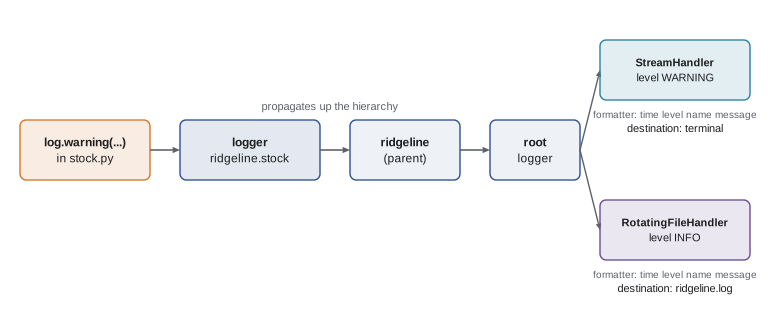
Logger names form a hierarchy separated by dots: ridgeline.stock and ridgeline.orders are children of ridgeline, which is a child of the root logger. A message logged on a child is passed up to its parents' handlers, a behaviour called propagation. This is why a library or module should only create loggers and call them, never add handlers: the application configures handlers once, usually on the root logger in main, and every module's messages flow there.
import logging, sys

root = logging.getLogger()
root.handlers.clear()                       # start clean (page re-runs keep old handlers)
root.setLevel(logging.DEBUG)

screen = logging.StreamHandler(sys.stdout)
screen.setLevel(logging.WARNING)            # the screen only shows problems
screen.setFormatter(logging.Formatter("SCREEN %(levelname)-8s %(message)s"))
root.addHandler(screen)

detail = logging.StreamHandler(sys.stdout)  # stands in for a log file here
detail.setLevel(logging.INFO)
detail.setFormatter(logging.Formatter("FILE   %(name)s:%(lineno)d %(levelname)s %(message)s"))
root.addHandler(detail)

stock = logging.getLogger("ridgeline.stock")
orders = logging.getLogger("ridgeline.orders")
stock.info("stock check started")
orders.warning("order %d has no shipping address", 3104)
stock.debug("not shown by either handler")FILE ridgeline.stock:19 INFO stock check started SCREEN WARNING order 3104 has no shipping address FILE ridgeline.orders:20 WARNING order 3104 has no shipping address
The INFO message reaches only the file-style handler, the WARNING reaches both, and the DEBUG message reaches neither, because both handlers set their own thresholds above it. Real programs use this pattern constantly: a terse screen showing only problems, and a detailed file kept for later investigation.
For files, the logging.handlers module offers RotatingFileHandler, which starts a new file when the current one reaches a set size and keeps a fixed number of old ones, and TimedRotatingFileHandler, which starts a new file every day or week. Rotation stops a log from slowly filling the server's disk, which is a surprisingly common cause of outages.
# ridgeline/main.py: configure logging once, at program start
import logging
from logging.handlers import RotatingFileHandler

def setup_logging(path="/var/log/ridgeline/ridgeline.log"):
    handler = RotatingFileHandler(path, maxBytes=1_000_000, backupCount=5)
    handler.setFormatter(logging.Formatter(
        "%(asctime)s %(levelname)-8s %(name)s: %(message)s"))
    root = logging.getLogger()
    root.setLevel(logging.INFO)
    root.addHandler(handler)

# 2026-12-05 07:15:02,418 INFO     ridgeline.orders: imported 3 new orders
# 2026-12-05 07:15:02,431 ERROR    ridgeline.orders: order 3107 rejected: unknown SKU RC-199
Larger programs often describe the whole setup in a dictionary passed to logging.config.dictConfig, frequently loaded from a configuration file, so operators can change levels and destinations without touching code.
Logging exceptions
When code catches an exception it cannot fix, it should log it with the traceback, so whoever reads the log can see where it came from. Inside an except block, log.exception(message) logs at ERROR level and appends the full traceback automatically. Logging only str(err) throws away the most useful part.
import logging, sys

class OneLineTracebacks(logging.Formatter):
    """For this page only: show the last line of each traceback."""
    def formatException(self, exc_info):
        return f"    ... {exc_info[0].__name__}: {exc_info[1]}"

handler = logging.StreamHandler(sys.stdout)
handler.setFormatter(OneLineTracebacks("%(levelname)s %(name)s: %(message)s"))
logging.basicConfig(level=logging.INFO, handlers=[handler], force=True)
log = logging.getLogger("ridgeline.orders")

def import_order(order):
    return order["sku"], int(order["qty"])

imported = []
for order in [{"id": 3106, "sku": "RC-102", "qty": "2"},
              {"id": 3107, "sku": "RC-103", "qty": "two"}]:
    try:
        imported.append(import_order(order))
    except (KeyError, ValueError):
        log.exception("order %d could not be imported", order["id"])

log.info("imported %d of 2 orders", len(imported))ERROR ridgeline.orders: order 3107 could not be imported
... ValueError: invalid literal for int() with base 10: 'two'
INFO ridgeline.orders: imported 1 of 2 ordersIn a real log the full traceback follows the message, line by line; the small formatter class at the top of the listing shortens it to its last line so the page stays readable. Look at the design: one bad order is logged and skipped, and the import carries on with the rest. Had the script crashed instead, every later order would have been lost too, which is close to what happened on that Saturday. The log line names the order id, so Theo can fix that one order by hand.
What to log, and what never to log
A useful log answers the questions someone will ask during an investigation: what started, what finished, how many items were processed, which ones were skipped and why, and how long it took. Include identifiers, such as order numbers and coffee codes, so a log line can be matched to a real record. Log at the boundaries of the program, when work arrives and when results leave, rather than inside every loop. A log that records every line of a million-row file is as useless as one that records nothing.
Never log secrets: passwords, API keys, card numbers, the shop's access token. Logs are copied, emailed and kept for months, and are read by people who should not see those values. Be careful with personal information too. Canadian privacy law, such as PIPEDA, and US state privacy laws expect businesses to protect customers' personal details, and a log full of customers' names, emails and addresses is a liability. Log an order number or a customer id instead of the person's details.
import logging, sys
logging.basicConfig(level=logging.INFO, stream=sys.stdout, force=True, format="%(levelname)s %(message)s")
log = logging.getLogger("ridgeline.shop")

order = {"id": 3108, "email": "pat@example.com", "card": "4111111111111111", "total": 4400}

# bad: personal details and a card number end up in the log
# log.info("order %s", order)

# good: identifiers and facts only
log.info("order %d paid, total %d cents, card ending %s", order["id"], order["total"], order["card"][-4:])INFO order 3108 paid, total 4400 cents, card ending 1111
Many teams also log in a structured way, writing each event as key=value pairs or as a line of JSON, such as {"event": "order_imported", "order": 3106, "items": 2}. Structured logs are easy for tools to search and count, for example to chart how many orders failed each day.
Worked problem
Adding logging to the order import
The fifteen-minute order import must leave a trail Theo can follow after a problem. Decide what to log at each level.
Show solution
- INFO at start: import started, and how many orders the shop returned.
- DEBUG per order: the order id and items, visible only when diagnosing.
- WARNING for handled oddities: an order with no shipping address, put aside for a person to check.
- ERROR with log.exception for an order that cannot be imported; carry on with the rest.
- INFO at the end: imported n of m orders, with the time taken; never the customer's address or card.
Answer: Start and end at INFO, details at DEBUG, handled problems at WARNING, failures at ERROR with tracebacks, and no personal data.
Testing log output
If a log message matters, such as the warning that tells Theo an order needs attention, it deserves a test. unittest's assertLogs context manager captures messages from a logger during a block and fails if none at the given level appear. The captured output is available afterwards for checking the content.
import logging, unittest, io, sys

def check_stock(stock, log=logging.getLogger("ridgeline.stock")):
    for code, bags in sorted(stock.items()):
        if bags < 10:
            log.warning("%s is down to %d bags", code, bags)

class TestStockLogging(unittest.TestCase):
    def test_low_stock_is_warned(self):
        with self.assertLogs("ridgeline.stock", level="WARNING") as cm:
            check_stock({"RC-101": 42, "RC-104": 9})
        self.assertEqual(cm.output, ["WARNING:ridgeline.stock:RC-104 is down to 9 bags"])

    def test_nothing_logged_when_stock_is_fine(self):
        with self.assertNoLogs("ridgeline.stock", level="WARNING"):
            check_stock({"RC-101": 42})

result = unittest.TestResult()
unittest.defaultTestLoader.loadTestsFromTestCase(TestStockLogging).run(result)
print(result.testsRun, "tests,", len(result.failures) + len(result.errors), "problems")2 tests, 0 problems
pytest's equivalent is the caplog fixture, which collects records during a test so you can assert on caplog.records or caplog.text.
Try it yourself
Log at the right levels
Complete restock(stock, code, bags, log). If code is not in stock, log an ERROR mentioning the code and return without changing anything. Otherwise add the bags and log an INFO message that includes the code and the new count. If the new count is still below 10, also log a WARNING.
Use the log object passed in, with the %s / %d argument style.
def restock(stock, code, bags, log):
    stock[code] = stock.get(code, 0) + bags
    print('restocked', code)
Try it yourself
Skip bad lines, log them
parse_stock(lines, log) reads lines like "RC-101,42" into a dictionary of code to int. A line that cannot be parsed should be skipped with a WARNING that includes its line number (starting at 1), instead of crashing the whole import. Blank lines are ignored silently.
def parse_stock(lines, log):
    stock = {}
    for line in lines:
        code, bags = line.split(',')
        stock[code] = int(bags)
    return stock
Try it yourself
Count the log levels
Theo wants a quick summary of a day's log. Each line looks like 2026-12-05 07:15:02 WARNING ridgeline.stock: RC-104 is down to 9 bags: date, time, level, logger name, message. Write count_levels(lines) that returns a dictionary of level to count, ignoring lines that do not have a known level in the third position.
def count_levels(lines):
    counts = {}
    for line in lines:
        level = line.split()[0]
        counts[level] = counts.get(level, 0) + 1
    return counts
Common mistakes
MistakeUsing print for messages about what an unattended program is doing.
InsteadUse logging so messages have levels, timestamps and a lasting destination.
MistakeWondering why logging.info shows nothing.
InsteadThe default threshold is WARNING; configure the level with basicConfig or setLevel.
MistakeAdding handlers inside library modules.
InsteadModules only call getLogger(__name__); the application configures handlers once.
MistakeLogging str(err) in an except block and losing the traceback.
InsteadUse log.exception(...) inside the except block.
MistakeLogging passwords, tokens, card numbers or customers' personal details.
InsteadLog identifiers and facts only; mask anything sensitive.
MistakeBuilding log messages with f-strings.
InsteadPass a format string and arguments: log.info("imported %d", n).
Summary and key terms
- print is for output the user asked for; logging is for messages about what the program is doing.
- The five levels are DEBUG, INFO, WARNING, ERROR and CRITICAL; messages below a logger's or handler's level are dropped.
- Create one logger per module with getLogger(__name__); names form a hierarchy and messages propagate to parent handlers.
- Handlers choose destinations, formatters choose layout; configure them once in main, with rotation for files.
- log.exception inside an except block records the traceback.
- Log starts, ends, counts, skips and failures with identifiers; never secrets or unnecessary personal data.
- assertLogs, assertNoLogs and pytest's caplog test what code logs.
- log
- A lasting record of what a program did, written as it runs.
- log level
- The importance of a message: DEBUG, INFO, WARNING, ERROR or CRITICAL.
- logger
- A named object that code calls to emit log messages.
- handler
- An object that sends log records to a destination such as the screen or a file.
- formatter
- An object that turns a log record into a line of text.
- propagation
- Passing a log record from a logger up to its parent loggers' handlers.
- log rotation
- Starting a new log file at a set size or time and keeping a limited number of old ones.
- structured logging
- Writing log events as key-value pairs or JSON so tools can process them.
- assertLogs
- A unittest context manager that checks that a block logs at least one message at a level.
Practice problems
Work each problem on paper first, then reveal the answer to check.
Which level suits "imported 3 new online orders"?
Show answer
INFO: normal progress worth recording.
Why does a fresh script's logging.info("hello") print nothing?
Show answer
The default threshold is WARNING, so INFO messages are dropped until the level is configured.
What name does logging.getLogger(__name__) give inside ridgeline/orders.py?
Show answer
ridgeline.orders
What does log.exception add that log.error(str(err)) does not?
Show answer
The full traceback of the exception being handled.
Rewrite log.info(f"imported {n} orders") in the recommended style.
Show answer
log.info("imported %d orders", n)
Give two things that must never appear in Ridgeline's logs.
Show answer
For example the shop API key and full card numbers; also customers' addresses.
Lesson quiz · 5 questions
Score 60% or more to complete this lesson.
Create a free account to save your progress, take quizzes and earn a certificate.