
PYTH-230 · Lesson 2 of 12 · 28 min
Unit tests with pytest
▶ Video coming soon A video version of this lesson is on the way.
The little runner at the end of lesson 1 worked, but it was missing most of what a team needs. It could not find tests in other files, it said nothing about why a test failed beyond the name, and it had no way to run only some of the tests. Python has two standard answers to these problems. unittest is part of the standard library and has been since Python 2.1. pytest is a separate package, installed with pip, that has become the most widely used test tool in the Python world. Ridgeline's project already lists pytest as a development dependency, a decision Jordan and Sam made in PYTH-110.
This lesson shows both. You will write tests as unittest TestCase classes, which run anywhere Python runs, including this page, and as plain pytest functions, which are shorter and give more helpful failure messages. You will see how test discovery works, how to test that code raises an exception, how to compare floating-point numbers safely, and how to organize tests in a project.
unittest: tests as classes
In unittest, tests are methods of a class that inherits from unittest.TestCase. Each method whose name starts with test is one test. Instead of the bare assert statement, a TestCase provides assertion methods such as assertEqual, assertTrue and assertIn, which produce clear messages when they fail. The test runner creates a fresh instance of the class for every test method, so tests cannot leak state into each other through attributes.
On this page a short helper called report() stands in for the test runner. It runs the TestCase classes it is given and prints one line per test, ok or FAIL with the assertion message, and a total. In your own project you would type python -m unittest or pytest in a terminal instead, which do the same job and add timings.
import unittest

def report(*cases):
    """Run TestCase classes and print one line per test (a small test runner)."""
    loader = unittest.TestLoader()
    tests = [t for case in cases for t in loader.loadTestsFromTestCase(case)]
    result = unittest.TestResult()
    unittest.TestSuite(tests).run(result)
    problems = {}
    for kind, items in (("FAIL", result.failures), ("ERROR", result.errors)):
        for test, tb in items:
            problems.setdefault(test.id().split(" ")[0], []).append((kind, tb.strip().splitlines()[-1]))
    for t in tests:
        found = problems.get(t.id(), [])
        print(f"{t.id().rsplit('.', 1)[-1]:<34} {found[0][0] if found else 'ok'}")
        for kind, line in found:
            print("    " + line)
    print(f"{len(tests)} tests: {len(tests) - len(problems)} passed, {len(problems)} failed")

def tier(points):
    """Loyalty tier for a number of points."""
    if points >= 300:
        return "Reserve"
    if points >= 100:
        return "Roast"
    return "Bean"

class TestTier(unittest.TestCase):
    def test_new_member_is_bean(self):
        self.assertEqual(tier(0), "Bean")

    def test_100_points_is_roast(self):
        self.assertEqual(tier(100), "Roast")

    def test_299_points_is_still_roast(self):
        self.assertEqual(tier(299), "Roast")

    def test_300_points_is_reserve(self):
        self.assertEqual(tier(300), "Reserve")

    def test_tier_names_are_known(self):
        self.assertIn(tier(1000), {"Bean", "Roast", "Reserve"})

report(TestTier)test_100_points_is_roast ok test_299_points_is_still_roast ok test_300_points_is_reserve ok test_new_member_is_bean ok test_tier_names_are_known ok 5 tests: 5 passed, 0 failed
Five tests, one behaviour each, all passing. The order in the report is alphabetical by method name, because that is the order unittest uses; tests must never depend on running in a particular order. To see what a failure looks like, imagine Mei asked for the Roast tier to start at 150 and someone changed only one of the two numbers in the code. The next listing makes that mistake on purpose.
import unittest

def report(*cases):
    """Run TestCase classes and print one line per test (a small test runner)."""
    loader = unittest.TestLoader()
    tests = [t for case in cases for t in loader.loadTestsFromTestCase(case)]
    result = unittest.TestResult()
    unittest.TestSuite(tests).run(result)
    problems = {}
    for kind, items in (("FAIL", result.failures), ("ERROR", result.errors)):
        for test, tb in items:
            problems.setdefault(test.id().split(" ")[0], []).append((kind, tb.strip().splitlines()[-1]))
    for t in tests:
        found = problems.get(t.id(), [])
        print(f"{t.id().rsplit('.', 1)[-1]:<34} {found[0][0] if found else 'ok'}")
        for kind, line in found:
            print("    " + line)
    print(f"{len(tests)} tests: {len(tests) - len(problems)} passed, {len(problems)} failed")

def tier(points):
    if points >= 300:
        return "Reserve"
    if points > 100:          # a slip: > instead of >=
        return "Roast"
    return "Bean"

class TestTier(unittest.TestCase):
    def test_100_points_is_roast(self):
        self.assertEqual(tier(100), "Roast")

    def test_299_points_is_still_roast(self):
        self.assertEqual(tier(299), "Roast")

report(TestTier)test_100_points_is_roast FAIL
+ Roast
test_299_points_is_still_roast ok
2 tests: 1 passed, 1 failedThe failure message shows both values: the function returned 'Bean' where 'Roast' was expected. That is the key advantage of assertEqual over a bare assert in unittest. The most useful assertion methods are assertEqual and assertNotEqual, assertTrue and assertFalse, assertIs and assertIsNone for identity, assertIn and assertNotIn for membership, assertAlmostEqual for floating-point numbers, assertRaises for exceptions, and assertCountEqual for comparing two collections while ignoring their order.
pytest: tests as functions
pytest takes a lighter approach. A test is just a function whose name starts with test_, in a file whose name starts with test_, and it checks results with the ordinary assert statement. There is no class to inherit from and no assertion methods to remember. When an assert fails, pytest rewrites the statement behind the scenes so the report shows the values on both sides and, for strings, lists and dictionaries, exactly where they differ.
# tests/test_loyalty.py
from ridgeline.loyalty import tier

def test_new_member_is_bean():
    assert tier(0) == "Bean"

def test_100_points_is_roast():
    assert tier(100) == "Roast"

def test_300_points_is_reserve():
    assert tier(300) == "Reserve"
To run them, open a terminal in the project folder, with the virtual environment active, and type pytest. pytest searches the folder for test files, collects the tests inside, runs them and prints a summary. A dot means a passed test and an F a failed one. Here is what Jordan saw after making the boundary slip from the previous section:
> pytest
=================== test session starts ===================
collected 3 items

tests/test_loyalty.py .F.                            [100%]

======================== FAILURES =========================
_________________ test_100_points_is_roast ________________

    def test_100_points_is_roast():
>       assert tier(100) == "Roast"
E       AssertionError: assert 'Bean' == 'Roast'
E         - Roast
E         + Bean

tests/test_loyalty.py:7: AssertionError
================= short test summary info =================
FAILED tests/test_loyalty.py::test_100_points_is_roast
=============== 1 failed, 2 passed in 0.03s ===============
The report points to the exact line, shows the failing expression and the values it compared, and ends with a one-line summary per failure. Each test is identified by a node id, the file path and test name joined by two colons, which you can paste back into the command to rerun just that test: pytest tests/test_loyalty.py::test_100_points_is_roast.
A few command-line options cover most daily use. pytest -q prints less, pytest -v prints one line per test, pytest -x stops at the first failure, pytest -k roast runs only tests whose names contain roast, and pytest --lf reruns only the tests that failed last time. pytest also runs unittest TestCase classes without any changes, so a project can move from one style to the other gradually.
How test discovery works
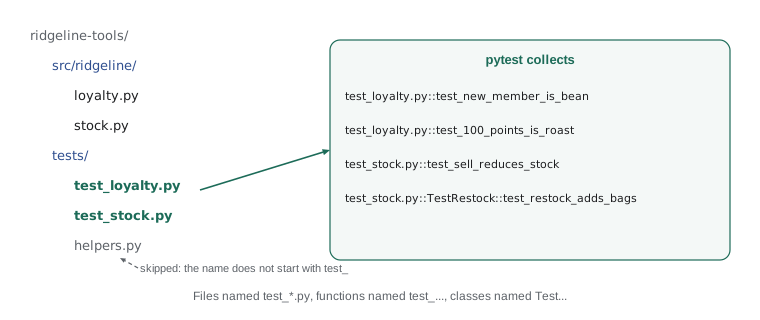
Both tools find tests by naming convention, so names matter. By default pytest looks for files named test_*.py or *_test.py, and inside them for functions named test_something and for classes named TestSomething that contain test_ methods and have no __init__ method. unittest's discovery, run with python -m unittest, looks for files named test*.py and for TestCase subclasses inside them. A test that does not follow the convention is silently skipped, which is a classic way to believe code is tested when it is not. If a test you just wrote does not appear in the count, check its name first.
Most projects keep tests in a folder called tests at the top of the project, beside src, with one test file per module: tests/test_loyalty.py for src/ridgeline/loyalty.py, tests/test_stock.py for stock.py, and so on. Test code is real code. It lives in version control, is reviewed like any other change, and should be as readable as the program it checks.
# pyproject.toml (the pytest section)
[tool.pytest.ini_options]
testpaths = ["tests"]
addopts = "-ra"           # summarize skipped and failed tests at the end
pythonpath = ["src"]      # let tests import ridgeline from the src folder
Testing that code raises an exception
Many rules are about what a program must refuse to do. Selling more bags than are in stock must raise OutOfStock; a negative price must raise ValueError. A test for such a rule passes only if the exception is raised. In unittest you write the call inside a with self.assertRaises(...) block; in pytest the equivalent is with pytest.raises(...). Both fail the test if the block finishes without raising the expected exception, and both let you inspect the exception afterwards.
import unittest

def report(*cases):
    """Run TestCase classes and print one line per test (a small test runner)."""
    loader = unittest.TestLoader()
    tests = [t for case in cases for t in loader.loadTestsFromTestCase(case)]
    result = unittest.TestResult()
    unittest.TestSuite(tests).run(result)
    problems = {}
    for kind, items in (("FAIL", result.failures), ("ERROR", result.errors)):
        for test, tb in items:
            problems.setdefault(test.id().split(" ")[0], []).append((kind, tb.strip().splitlines()[-1]))
    for t in tests:
        found = problems.get(t.id(), [])
        print(f"{t.id().rsplit('.', 1)[-1]:<34} {found[0][0] if found else 'ok'}")
        for kind, line in found:
            print("    " + line)
    print(f"{len(tests)} tests: {len(tests) - len(problems)} passed, {len(problems)} failed")

class OutOfStock(Exception):
    pass

def sell(stock, code, bags):
    if bags <= 0:
        raise ValueError("bags must be positive")
    if stock.get(code, 0) < bags:
        raise OutOfStock(f"only {stock.get(code, 0)} bags of {code}")
    stock[code] -= bags

class TestSell(unittest.TestCase):
    def test_sell_reduces_stock(self):
        stock = {"RC-104": 9}
        sell(stock, "RC-104", 2)
        self.assertEqual(stock["RC-104"], 7)

    def test_cannot_sell_more_than_stock(self):
        stock = {"RC-104": 9}
        with self.assertRaises(OutOfStock) as ctx:
            sell(stock, "RC-104", 10)
        self.assertIn("only 9 bags", str(ctx.exception))
        self.assertEqual(stock["RC-104"], 9)     # nothing was sold

    def test_zero_bags_is_rejected(self):
        with self.assertRaises(ValueError):
            sell({"RC-101": 42}, "RC-101", 0)

report(TestSell)test_cannot_sell_more_than_stock ok test_sell_reduces_stock ok test_zero_bags_is_rejected ok 3 tests: 3 passed, 0 failed
The second test checks three things: that the right exception is raised, that its message is useful, and that the stock was not changed by the failed sale. That last check matters. A function that raises an error halfway through after already changing data leaves a mess, and only a test that looks at the data afterwards will notice.
import pytest
from ridgeline.inventory import Inventory, OutOfStock

def test_cannot_sell_more_than_stock():
    inv = Inventory.from_counts({"RC-104": 9})
    with pytest.raises(OutOfStock, match="only 9 bags"):
        inv.sell("RC-104", 10)
    assert inv.count("RC-104") == 9
Comparing floating-point numbers
Floating-point arithmetic is approximate, so a test that checks 0.1 + 0.2 == 0.3 fails even though the code is correct. Money at Ridgeline is kept in whole cents or Decimal for exactly this reason, but some quantities, such as roast weights and the share of weight lost in roasting, are naturally floats. For those, compare within a tolerance. unittest has assertAlmostEqual, which by default rounds the difference to seven decimal places; pytest has pytest.approx, which compares with a relative tolerance of one part in a million.
import unittest

def report(*cases):
    """Run TestCase classes and print one line per test (a small test runner)."""
    loader = unittest.TestLoader()
    tests = [t for case in cases for t in loader.loadTestsFromTestCase(case)]
    result = unittest.TestResult()
    unittest.TestSuite(tests).run(result)
    problems = {}
    for kind, items in (("FAIL", result.failures), ("ERROR", result.errors)):
        for test, tb in items:
            problems.setdefault(test.id().split(" ")[0], []).append((kind, tb.strip().splitlines()[-1]))
    for t in tests:
        found = problems.get(t.id(), [])
        print(f"{t.id().rsplit('.', 1)[-1]:<34} {found[0][0] if found else 'ok'}")
        for kind, line in found:
            print("    " + line)
    print(f"{len(tests)} tests: {len(tests) - len(problems)} passed, {len(problems)} failed")

def weight_loss(green_kg, roasted_kg):
    """Fraction of weight lost in roasting."""
    return (green_kg - roasted_kg) / green_kg

class TestWeightLoss(unittest.TestCase):
    def test_exact_equality_is_fragile(self):
        self.assertNotEqual(0.1 + 0.2, 0.3)       # true, and surprising

    def test_typical_batch_loses_fifteen_hundredths(self):
        self.assertAlmostEqual(weight_loss(12.0, 10.2), 0.15)

    def test_within_a_chosen_tolerance(self):
        self.assertAlmostEqual(weight_loss(12.0, 10.18), 0.1517, delta=0.0001)

report(TestWeightLoss)
print(weight_loss(12.0, 10.2))test_exact_equality_is_fragile ok test_typical_batch_loses_fifteen_hundredths ok test_within_a_chosen_tolerance ok 3 tests: 3 passed, 0 failed 0.15000000000000005
The printed value shows why: 12.0 minus 10.2, divided by 12, is not exactly 0.15 in binary floating point. assertAlmostEqual accepts it because the difference is tiny. The delta argument lets you choose the tolerance explicitly, which is better when you know how precise the answer needs to be, such as a scale that reads to the nearest ten grams.
Worked problem
Turning a bug report into a test
Theo reports issue #42: when a customer buys exactly the remaining stock of a coffee, the tool refuses with 'only 9 bags of RC-104' even though 9 bags were requested. Write the test before fixing anything.
Show solution
- Reproduce the report as a test: stock {"RC-104": 9}, sell 9 bags.
- Expected behaviour from the business rule: the sale succeeds and stock becomes 0.
- Name the test for the behaviour: test_can_sell_the_last_bags.
- Run it and watch it fail, which proves it captures the bug.
- Look at the code: the check reads stock <= bags instead of stock < bags. Fix it and run all the tests.
Answer: A failing test that reproduces the report comes first; it proves the bug, then proves the fix, and stays in the suite so the bug cannot return.
Writing a test for every bug before fixing it is one of the most valuable habits in software. The test fails first, which proves it really reproduces the problem. It passes after the fix, which proves the fix works. And it stays in the test suite forever, so the same bug can never quietly return. A bug that comes back after being fixed is called a regression, and a suite built up this way is called a regression suite.
Try it yourself
Tests for the tiers
The setup defines a correct tier(points): Bean below 100, Roast from 100 to 299, Reserve from 300. Write a unittest.TestCase class named TestTier with test methods that check it.
Your class must pass for the correct function and fail for two broken versions the checker swaps in: one with the Roast boundary at 101, and one with the Reserve boundary at 301.
import unittest

class TestTier(unittest.TestCase):
    def test_new_member_is_bean(self):
        self.assertEqual(tier(0), 'Bean')

    def test_big_spender_is_reserve(self):
        self.assertEqual(tier(1000), 'Reserve')

result = unittest.TestResult()
unittest.defaultTestLoader.loadTestsFromTestCase(TestTier).run(result)
print(result.testsRun, 'tests,', len(result.failures), 'failures')
Try it yourself
Test the refusal
The setup defines OutOfStock and a correct sell(stock, code, bags) like the one in this lesson. Complete TestSell.test_cannot_oversell so it uses self.assertRaises(OutOfStock) to check that selling 10 bags from a stock of 9 is refused, and then checks the stock is still 9.
The checker also runs your test against a broken sell that never refuses, and against one that changes the stock before raising.
import unittest

class TestSell(unittest.TestCase):
    def test_cannot_oversell(self):
        stock = {'RC-104': 9}
        sell(stock, 'RC-104', 2)
        self.assertEqual(stock['RC-104'], 7)

result = unittest.TestResult()
unittest.defaultTestLoader.loadTestsFromTestCase(TestSell).run(result)
print(result.testsRun, 'tests,', len(result.failures) + len(result.errors), 'problems')
Try it yourself
Make the tests pass
This time the tests are written and the code is wrong. bags_from_batch(roasted_kg) should return how many full 340 g bags a roasted batch fills, and loss(green_kg, roasted_kg) the fraction of weight lost. Fix both functions so the checks pass.
def bags_from_batch(roasted_kg):
    return round(roasted_kg * 1000 / 340)

def loss(green_kg, roasted_kg):
    return (green_kg - roasted_kg) / roasted_kg

print(bags_from_batch(10.2), loss(12.0, 10.2))
Common mistakes
MistakeNaming a test file stock_tests.py or a function check_sell, so the runner never finds it.
InsteadFollow the conventions: test_*.py files and test_ functions or methods.
MistakeComparing floats with == in a test.
InsteadUse assertAlmostEqual or pytest.approx with a sensible tolerance.
MistakeCalling the function outside the with assertRaises block, so the exception escapes the test.
InsteadPut the call that should raise inside the with block.
MistakeForgetting to check that data is unchanged after an operation is refused.
InsteadAssert on the data after the with block as well as on the exception.
MistakeFixing a reported bug without first writing a test that reproduces it.
InsteadWrite the failing test, watch it fail, then fix the code.
MistakeWriting tests that rely on running in a particular order.
InsteadMake each test set up everything it needs; runners may reorder or run tests in parallel.
Summary and key terms
- unittest, in the standard library, groups tests as methods of TestCase classes and checks results with assertion methods.
- pytest uses plain test functions and the assert statement, and rewrites failed asserts to show the values compared.
- Both find tests by naming convention: test_ files, test_ functions and methods, Test classes.
- pytest options such as -q, -v, -x, -k and --lf control what runs and how much is printed; node ids rerun single tests.
- assertRaises and pytest.raises test that code refuses bad requests; also check that data is left unchanged.
- Compare floats with assertAlmostEqual or pytest.approx, never with ==.
- Every bug report should become a failing test before the fix, building a regression suite.
- unittest
- The test framework in Python's standard library, based on TestCase classes.
- pytest
- A popular third-party test framework that uses plain functions and assert.
- TestCase
- The unittest base class whose test methods each make one test.
- assertion method
- A TestCase method such as assertEqual that checks a result and explains failures.
- test discovery
- Finding test files, classes and functions automatically by naming convention.
- node id
- pytest's name for one test: the file path and test name joined by ::.
- assertRaises
- A unittest context manager that passes only if the code inside raises the given exception.
- pytest.approx
- A pytest helper for comparing floating-point numbers within a tolerance.
- regression suite
- A set of tests, many written for past bugs, that guards against old bugs returning.
Practice problems
Work each problem on paper first, then reveal the answer to check.
A colleague adds def check_refund(): to tests/test_loyalty.py and pytest reports the same number of tests as before. Why?
Show answer
The function name does not start with test_, so pytest does not collect it.
Which pytest option reruns only the tests that failed last time?
Show answer
pytest --lf (last failed).
Write the unittest assertion that checks tier(150) returns "Roast".
Show answer
self.assertEqual(tier(150), "Roast")
Why does a test of a refused sale also check the stock afterwards?
Show answer
A function might change the data before raising; only checking the data afterwards catches that.
Which assertion would you use for weight_loss(12.0, 10.2) == 0.15?
Show answer
assertAlmostEqual(weight_loss(12.0, 10.2), 0.15), or pytest.approx(0.15) with assert.
What three things does writing a failing test for a bug report give you?
Show answer
Proof the bug is reproduced, proof the fix works, and protection against the bug returning.
Lesson quiz · 5 questions
Score 60% or more to complete this lesson.
Create a free account to save your progress, take quizzes and earn a certificate.