
PYTH-215 · Lesson 8 of 12 · 33 min
Changing data safely and transactions
▶ Video coming soon A video version of this lesson is on the way.
Reading data cannot damage it; changing data can. A single UPDATE without a WHERE clause can set every price in the shop to the same value, and a sale recorded without reducing the stock leaves the shelf count wrong until someone counts by hand. This lesson covers the statements that change data, INSERT, UPDATE and DELETE, the upsert that inserts or updates in one step, and above all transactions, which group changes so they succeed or fail together.
Ridgeline's checkout is the running example. When a customer buys two bags of Sumatra Dark, two things must happen: a sale is recorded and the stock goes down by two. If the program crashes, the power fails or the stock turns out to be too low between those two steps, neither change may survive on its own. By the end of this lesson Jordan's record_sale function guarantees exactly that.
INSERT in more detail
An INSERT names the table, the columns being filled and the values. Columns left out receive their DEFAULT, or NULL, or for an INTEGER PRIMARY KEY in SQLite the next number. One INSERT can add several rows by listing several groups of values. From Python, executemany runs one parameterized statement once for each item in a sequence, which is the fast and safe way to load many rows.
import sqlite3

con = sqlite3.connect(":memory:")
con.executescript("""
CREATE TABLE coffees (sku TEXT PRIMARY KEY, name TEXT NOT NULL, origin TEXT NOT NULL,
                      roast TEXT NOT NULL, price_cents INTEGER NOT NULL, stock INTEGER NOT NULL);
INSERT INTO coffees VALUES
    ('RC-101', 'Sunrise Blend', 'Blend', 'medium', 1850, 42),
    ('RC-102', 'Ethiopia Guji', 'Ethiopia', 'light', 2200, 15),
    ('RC-103', 'Colombia Huila', 'Colombia', 'medium', 1975, 27),
    ('RC-104', 'Sumatra Dark', 'Indonesia', 'dark', 2025, 9),
    ('RC-105', 'Decaf Swiss Water', 'Mexico', 'medium', 1900, 12),
    ('RC-106', 'Espresso Ridge', 'Blend', 'dark', 2150, 30);
""")

con.execute("INSERT INTO coffees (sku, name, origin, roast, price_cents, stock) "
            "VALUES (?, ?, ?, ?, ?, ?)", ("RC-107", "Kenya Nyeri", "Kenya", "light", 2350, 20))
new_coffees = [
    ("RC-108", "Guatemala Antigua", "Guatemala", "medium", 2100, 18),
    ("RC-109", "Holiday Blend", "Blend", "medium", 1950, 40),
]
con.executemany("INSERT INTO coffees VALUES (?, ?, ?, ?, ?, ?)", new_coffees)
con.commit()
print(con.execute("SELECT COUNT(*) FROM coffees").fetchone()[0], "coffees")

cur = con.execute("CREATE TABLE notes (id INTEGER PRIMARY KEY, text TEXT NOT NULL)")
cur = con.execute("INSERT INTO notes (text) VALUES (?)", ("Order more filters",))
print("new note id:", cur.lastrowid)9 coffees new note id: 1
cursor.lastrowid gives the id the database assigned to the row just inserted, which you need when the next statement must refer to it, for example inserting an order and then its lines. Newer versions of SQLite and PostgreSQL also support INSERT ... RETURNING, which hands back any columns of the inserted rows directly.
UPDATE and DELETE
UPDATE changes columns in existing rows: UPDATE table SET column = expression WHERE condition. DELETE removes rows: DELETE FROM table WHERE condition. The WHERE clause is what makes both safe. Without it, UPDATE changes every row and DELETE empties the table, and both are perfectly valid SQL, so the database will not warn you. A good habit is to write the WHERE clause first, or to run the same condition as a SELECT before turning it into an UPDATE or DELETE, so you see exactly which rows will change.
import sqlite3

con = sqlite3.connect(":memory:")
con.executescript("""
CREATE TABLE coffees (sku TEXT PRIMARY KEY, name TEXT NOT NULL, origin TEXT NOT NULL,
                      roast TEXT NOT NULL, price_cents INTEGER NOT NULL, stock INTEGER NOT NULL);
INSERT INTO coffees VALUES
    ('RC-101', 'Sunrise Blend', 'Blend', 'medium', 1850, 42),
    ('RC-102', 'Ethiopia Guji', 'Ethiopia', 'light', 2200, 15),
    ('RC-103', 'Colombia Huila', 'Colombia', 'medium', 1975, 27),
    ('RC-104', 'Sumatra Dark', 'Indonesia', 'dark', 2025, 9),
    ('RC-105', 'Decaf Swiss Water', 'Mexico', 'medium', 1900, 12),
    ('RC-106', 'Espresso Ridge', 'Blend', 'dark', 2150, 30);
""")

con.execute("UPDATE coffees SET price_cents = price_cents + 50 WHERE roast = 'dark'")
print(con.execute("SELECT sku, price_cents FROM coffees WHERE roast = 'dark'").fetchall())

cur = con.execute("UPDATE coffees SET stock = stock - ? WHERE sku = ? AND stock >= ?", (2, "RC-104", 2))
print("rows changed:", cur.rowcount)
cur = con.execute("UPDATE coffees SET stock = stock - ? WHERE sku = ? AND stock >= ?", (50, "RC-104", 50))
print("rows changed:", cur.rowcount)               # 0: not enough stock, nothing happened

cur = con.execute("DELETE FROM coffees WHERE stock = 0")
print("deleted:", cur.rowcount)[('RC-104', 2075), ('RC-106', 2200)]
rows changed: 1
rows changed: 0
deleted: 0cursor.rowcount reports how many rows a change affected. It is the simplest way to detect that an UPDATE matched nothing, for example because an SKU was mistyped, and the guarded update shows a useful pattern: putting the business rule, enough stock, into the WHERE clause means the stock can never go below zero, even if two tills try to sell the last bag at the same moment. The update either finds a row that satisfies the rule and changes it, or changes nothing.
Try it yourself
A careful price change
Rosa is raising the price of every medium roast by multiplying it by 1.05, rounded to the nearest cent. Write one UPDATE, using round(price_cents * 1.05), that changes only the medium roasts, then commit.
Set changed to the number of rows the UPDATE affected, using rowcount.
cur = con.execute('UPDATE coffees SET price_cents = round(price_cents * 1.05)')
changed = cur.rowcount
con.commit()
Upserts: insert or update
A common need is to add a row if it is new or update it if it already exists, for example recording a restock of a coffee that may or may not be on the list yet, or counting how many times each customer has visited. Checking with a SELECT first and then choosing INSERT or UPDATE takes two statements and can go wrong if another program acts in between. An upsert does it in one statement: INSERT ... ON CONFLICT (key) DO UPDATE SET .... The special name excluded refers to the row that was being inserted. SQLite and PostgreSQL share this syntax; MySQL uses INSERT ... ON DUPLICATE KEY UPDATE.
import sqlite3

con = sqlite3.connect(":memory:")
con.executescript("""
CREATE TABLE coffees (sku TEXT PRIMARY KEY, name TEXT NOT NULL, origin TEXT NOT NULL,
                      roast TEXT NOT NULL, price_cents INTEGER NOT NULL, stock INTEGER NOT NULL);
INSERT INTO coffees VALUES
    ('RC-101', 'Sunrise Blend', 'Blend', 'medium', 1850, 42),
    ('RC-102', 'Ethiopia Guji', 'Ethiopia', 'light', 2200, 15),
    ('RC-103', 'Colombia Huila', 'Colombia', 'medium', 1975, 27),
    ('RC-104', 'Sumatra Dark', 'Indonesia', 'dark', 2025, 9),
    ('RC-105', 'Decaf Swiss Water', 'Mexico', 'medium', 1900, 12),
    ('RC-106', 'Espresso Ridge', 'Blend', 'dark', 2150, 30);
""")

restock = [("RC-104", "Sumatra Dark", "Indonesia", "dark", 2025, 30),
           ("RC-110", "Peru Organic", "Peru", "medium", 2050, 24)]
con.executemany("""
    INSERT INTO coffees (sku, name, origin, roast, price_cents, stock)
    VALUES (?, ?, ?, ?, ?, ?)
    ON CONFLICT (sku) DO UPDATE SET stock = stock + excluded.stock
""", restock)
print(con.execute("SELECT sku, stock FROM coffees WHERE sku IN ('RC-104', 'RC-110')").fetchall())[('RC-104', 39), ('RC-110', 24)]RC-104 already existed, so its stock went from 9 to 39; RC-110 was new, so it was inserted. SQLite also offers the shorthands INSERT OR IGNORE, which skips rows that would break a constraint, and INSERT OR REPLACE, which deletes the conflicting row and inserts the new one. REPLACE looks convenient but deletes and recreates the row, which can trigger cascading deletes and loses columns you did not supply, so ON CONFLICT DO UPDATE is usually the better choice.
Transactions
A transaction is a group of statements that the database treats as one unit: either every change in it becomes permanent, or none does. You start a transaction with BEGIN, make changes, and finish with COMMIT to keep them or ROLLBACK to undo them all. Until the commit, other connections do not see the changes, and if the program or the machine fails before the commit, the database discards them when it next opens.
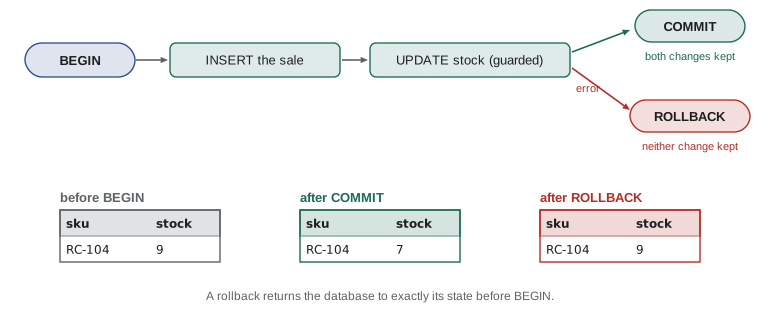
Python's sqlite3 module manages transactions for you in a particular way. By default, it opens a transaction automatically before the first INSERT, UPDATE or DELETE, and the transaction stays open until you call commit or rollback. Using the connection as a context manager is the cleanest pattern: with con: runs the block, commits if it finishes normally, and rolls back if an exception escapes. The with block does not close the connection, only the transaction.
import sqlite3

con = sqlite3.connect(":memory:")
con.executescript("""
CREATE TABLE coffees (sku TEXT PRIMARY KEY, name TEXT NOT NULL, origin TEXT NOT NULL,
                      roast TEXT NOT NULL, price_cents INTEGER NOT NULL, stock INTEGER NOT NULL);
INSERT INTO coffees VALUES
    ('RC-101', 'Sunrise Blend', 'Blend', 'medium', 1850, 42),
    ('RC-102', 'Ethiopia Guji', 'Ethiopia', 'light', 2200, 15),
    ('RC-103', 'Colombia Huila', 'Colombia', 'medium', 1975, 27),
    ('RC-104', 'Sumatra Dark', 'Indonesia', 'dark', 2025, 9),
    ('RC-105', 'Decaf Swiss Water', 'Mexico', 'medium', 1900, 12),
    ('RC-106', 'Espresso Ridge', 'Blend', 'dark', 2150, 30);
""")

import sqlite3

con.execute("CREATE TABLE sales (id INTEGER PRIMARY KEY, sku TEXT NOT NULL, qty INTEGER NOT NULL)")
con.commit()

def record_sale(con, sku, qty):
    with con:                                            # commit on success, roll back on error
        con.execute("INSERT INTO sales (sku, qty) VALUES (?, ?)", (sku, qty))
        cur = con.execute("UPDATE coffees SET stock = stock - ? WHERE sku = ? AND stock >= ?",
                          (qty, sku, qty))
        if cur.rowcount != 1:
            raise ValueError(f"not enough {sku} in stock for {qty} bags")

record_sale(con, "RC-104", 2)
try:
    record_sale(con, "RC-104", 50)
except ValueError as e:
    print("refused:", e)

print(con.execute("SELECT stock FROM coffees WHERE sku = 'RC-104'").fetchone()[0], "bags left")
print(con.execute("SELECT sku, qty FROM sales").fetchall()) # the failed sale is not thererefused: not enough RC-104 in stock for 50 bags
7 bags left
[('RC-104', 2)]The second call inserted a sale row, then discovered that stock was too low and raised an error. Because the error escaped the with block, the whole transaction rolled back, including the INSERT that had already run, so the sales table shows only the successful sale and the stock went down only once. This is atomicity in action, and it is what makes record_sale safe however it fails, including a crash halfway through.
Try it yourself
An all-or-nothing restock
Write restock(con, deliveries) where deliveries is a list of (sku, bags) pairs. Inside one transaction (with con:), add bags to each coffee's stock.
If any SKU does not exist (the UPDATE changes no rows), raise KeyError so that the whole delivery is rolled back and no stock changes at all.
def restock(con, deliveries):
    for sku, bags in deliveries:
        con.execute('UPDATE coffees SET stock = stock + ? WHERE sku = ?', (bags, sku))
        con.commit()
ACID in practice
Lesson 1 named the four ACID properties; here is how each shows up in practice. Atomicity you have just seen: record_sale's two changes happen together or not at all. Consistency means each transaction moves the database from one valid state to another, with every constraint satisfied; a CHECK (stock >= 0) constraint would reject an oversell even if a program forgot its own check. Durability means a committed transaction survives a crash; SQLite writes a journal so it can recover, and client-server databases write ahead logs to disk before confirming a commit.
Isolation is the subtlest. When several connections use the database at once, each transaction should behave as if it ran alone. Full isolation is expensive, so databases offer isolation levels that trade strictness for speed. SQLite takes a simple approach: many connections may read at once, but only one may write at a time, and a writer takes a lock on the whole database for the length of its write transaction. PostgreSQL lets many transactions write different rows at once and offers several isolation levels, from read committed, its default, to serializable. The practical rules are the same everywhere: keep transactions short, never wait for a user's input while a transaction is open, and put rules such as 'enough stock' into the statement itself, as record_sale does, so they are checked at the moment of the change.
Savepoints and explicit transactions
Inside a transaction, a savepoint marks a point you can roll back to without abandoning the whole transaction. SAVEPOINT name sets one, ROLLBACK TO name undoes changes since it, and RELEASE name keeps them. Savepoints suit operations where one part may fail but the rest should continue, such as importing a batch of orders and skipping the bad ones. Python's sqlite3 also lets you take full manual control: since Python 3.12, setting autocommit=False (or the older isolation_level=None for manual mode) changes how transactions start, and some programs issue BEGIN, COMMIT and ROLLBACK themselves.
import sqlite3

con = sqlite3.connect(":memory:")
con.executescript("""
CREATE TABLE coffees (sku TEXT PRIMARY KEY, name TEXT NOT NULL, origin TEXT NOT NULL,
                      roast TEXT NOT NULL, price_cents INTEGER NOT NULL, stock INTEGER NOT NULL);
INSERT INTO coffees VALUES
    ('RC-101', 'Sunrise Blend', 'Blend', 'medium', 1850, 42),
    ('RC-102', 'Ethiopia Guji', 'Ethiopia', 'light', 2200, 15),
    ('RC-103', 'Colombia Huila', 'Colombia', 'medium', 1975, 27),
    ('RC-104', 'Sumatra Dark', 'Indonesia', 'dark', 2025, 9),
    ('RC-105', 'Decaf Swiss Water', 'Mexico', 'medium', 1900, 12),
    ('RC-106', 'Espresso Ridge', 'Blend', 'dark', 2150, 30);
""")

import sqlite3

orders = [("RC-101", 2), ("RC-999", 1), ("RC-103", 1)]       # one bad SKU in the batch
con.execute("PRAGMA foreign_keys = ON")
con.execute("CREATE TABLE lines (sku TEXT NOT NULL REFERENCES coffees (sku), qty INTEGER NOT NULL)")
with con:
    for sku, qty in orders:
        con.execute("SAVEPOINT one_line")
        try:
            con.execute("INSERT INTO lines VALUES (?, ?)", (sku, qty))
            con.execute("RELEASE one_line")
        except sqlite3.IntegrityError:
            con.execute("ROLLBACK TO one_line")
            con.execute("RELEASE one_line")
            print("skipped", sku)
print(con.execute("SELECT * FROM lines").fetchall())skipped RC-999
[('RC-101', 2), ('RC-103', 1)]Bulk changes and soft deletes
Changes can use subqueries and joins to decide which rows to touch. UPDATE ... WHERE sku IN (SELECT ...) changes the rows a query selects, and DELETE works the same way. Before running any bulk change on real data, run the selecting query on its own, check the count, and keep the change inside a transaction so a surprise can be rolled back. Many teams also avoid DELETE for business records altogether, preferring the soft deletion from lesson 6, which marks rows inactive and keeps the history.
import sqlite3

con = sqlite3.connect(":memory:")
con.executescript("""CREATE TABLE coffees (
    sku         TEXT PRIMARY KEY,
    name        TEXT NOT NULL,
    origin      TEXT NOT NULL,
    roast       TEXT NOT NULL CHECK (roast IN ('light', 'medium', 'dark')),
    price_cents INTEGER NOT NULL CHECK (price_cents > 0),
    stock       INTEGER NOT NULL DEFAULT 0 CHECK (stock >= 0)
);
CREATE TABLE customers (
    id     INTEGER PRIMARY KEY,
    name   TEXT NOT NULL,
    email  TEXT NOT NULL UNIQUE,
    points INTEGER NOT NULL DEFAULT 0
);
CREATE TABLE sales (
    id          INTEGER PRIMARY KEY,
    sold_on     TEXT NOT NULL,
    channel     TEXT NOT NULL CHECK (channel IN ('cafe', 'online')),
    sku         TEXT NOT NULL REFERENCES coffees (sku),
    customer_id INTEGER REFERENCES customers (id),
    qty         INTEGER NOT NULL CHECK (qty > 0),
    price_cents INTEGER NOT NULL
);
CREATE TABLE roasts (
    batch      TEXT PRIMARY KEY,
    roasted_on TEXT NOT NULL,
    sku        TEXT NOT NULL REFERENCES coffees (sku),
    green_kg   REAL NOT NULL,
    roasted_kg REAL NOT NULL,
    minutes    REAL NOT NULL
);
INSERT INTO coffees VALUES
    ('RC-101', 'Sunrise Blend', 'Blend', 'medium', 1850, 42),
    ('RC-102', 'Ethiopia Guji', 'Ethiopia', 'light', 2200, 15),
    ('RC-103', 'Colombia Huila', 'Colombia', 'medium', 1975, 27),
    ('RC-104', 'Sumatra Dark', 'Indonesia', 'dark', 2025, 9),
    ('RC-105', 'Decaf Swiss Water', 'Mexico', 'medium', 1900, 12),
    ('RC-106', 'Espresso Ridge', 'Blend', 'dark', 2150, 30);
INSERT INTO customers VALUES
    (1, 'Priya Natarajan', 'priya@example.com', 140),
    (2, 'Marcus Bell', 'marcus@example.com', 35),
    (3, 'Lena Fischer', 'lena@example.com', 320),
    (4, 'Omar Haddad', 'omar@example.com', 0),
    (5, 'Grace Kim', 'grace@example.com', 95);
INSERT INTO sales VALUES
    (1, '2026-11-02', 'cafe', 'RC-101', 1, 2, 1850),
    (2, '2026-11-02', 'online', 'RC-102', 3, 1, 2200),
    (3, '2026-11-02', 'cafe', 'RC-106', NULL, 1, 2150),
    (4, '2026-11-03', 'online', 'RC-103', 2, 3, 1975),
    (5, '2026-11-03', 'cafe', 'RC-101', NULL, 1, 1850),
    (6, '2026-11-03', 'online', 'RC-104', 3, 2, 2025),
    (7, '2026-11-04', 'cafe', 'RC-105', 5, 1, 1900),
    (8, '2026-11-04', 'online', 'RC-101', 1, 1, 1850),
    (9, '2026-11-04', 'cafe', 'RC-106', 2, 2, 2150),
    (10, '2026-11-05', 'online', 'RC-102', 5, 2, 2200),
    (11, '2026-11-05', 'cafe', 'RC-103', NULL, 1, 1975),
    (12, '2026-11-06', 'online', 'RC-106', 3, 1, 2150),
    (13, '2026-11-06', 'cafe', 'RC-101', 1, 3, 1850),
    (14, '2026-11-06', 'online', 'RC-104', NULL, 1, 2025);
INSERT INTO roasts VALUES
    ('B-0412', '2026-10-28', 'RC-101', 12.0, 10.2, 13.5),
    ('B-0413', '2026-10-29', 'RC-106', 12.0, 10.1, 14.0),
    ('B-0414', '2026-10-30', 'RC-102', 9.0, 7.7, 11.75),
    ('B-0415', '2026-10-31', 'RC-103', 12.0, 10.3, 12.5),
    ('B-0416', '2026-11-01', 'RC-104', 6.0, 5.0, 15.0),
    ('B-0417', '2026-11-02', 'RC-101', 12.0, 10.2, 13.25);""")

with con:
    cur = con.execute("""
        UPDATE coffees SET price_cents = price_cents - 100
        WHERE sku IN (SELECT sku FROM sales GROUP BY sku HAVING SUM(qty) < 3)
    """)
    print("discounted:", cur.rowcount)
print(con.execute("SELECT sku, price_cents FROM coffees WHERE sku = 'RC-105'").fetchone())discounted: 1
('RC-105', 1800)Worked problem
Designing a checkout transaction
An online order for customer 3 has two lines: 2 bags of RC-102 and 1 bag of RC-104. List the statements and where the transaction begins and ends, and what happens if RC-104 is out of stock.
Show solution
- BEGIN (in Python: with con:).
- INSERT INTO orders (customer_id, placed_on) VALUES (?, ?); read cursor.lastrowid as the order id.
- For each line: INSERT INTO order_lines ...; then UPDATE coffees SET stock = stock - ? WHERE sku = ? AND stock >= ?, checking rowcount is 1.
- If RC-104's update changes 0 rows, raise an error: the with block rolls back the order, both lines and the RC-102 stock change.
- If every step succeeds, COMMIT at the end of the with block.
Answer: One transaction around the order, its lines and the stock updates; any failure rolls back all of them.
Common mistakes
MistakeRunning UPDATE or DELETE without a WHERE clause.
InsteadWrite the WHERE first, and test it as a SELECT.
MistakeRecording a sale and changing stock in separate transactions.
InsteadPut related changes in one transaction, for example with con:.
MistakeChecking stock with a SELECT, then updating in a separate step.
InsteadPut the rule in the UPDATE's WHERE clause and check rowcount.
MistakeForgetting to commit, so changes vanish when the program ends.
InsteadCommit, or use with con: which commits on success.
MistakeKeeping a transaction open while waiting for user input.
InsteadKeep transactions short; gather input first.
MistakeUsing INSERT OR REPLACE as an upsert.
InsteadUse INSERT ... ON CONFLICT DO UPDATE, which updates in place.
Summary and key terms
- INSERT adds rows; executemany loads many rows safely; lastrowid gives the new id.
- UPDATE and DELETE change rows matching WHERE; without WHERE they affect every row.
- rowcount reports affected rows, and a guarded WHERE enforces rules at the moment of change.
- INSERT ... ON CONFLICT DO UPDATE inserts or updates in one statement.
- A transaction groups changes so they commit together or roll back together.
- In Python, with con: commits on success and rolls back on an exception.
- Isolation levels control how concurrent transactions see each other; SQLite allows one writer at a time.
- Savepoints roll back part of a transaction; bulk changes deserve a SELECT check and a transaction.
- INSERT
- The statement that adds rows.
- UPDATE
- The statement that changes existing rows.
- DELETE
- The statement that removes rows.
- upsert
- Inserting a row or updating it if it already exists.
- transaction
- A group of statements that succeed or fail as a unit.
- rollback
- Undoing all changes made in the current transaction.
- rowcount
- The number of rows affected by the last change.
- lastrowid
- The id assigned to the row most recently inserted through a cursor.
- isolation level
- How much concurrent transactions are shielded from each other.
- savepoint
- A marker inside a transaction that can be rolled back to.
Practice problems
Work each problem on paper first, then reveal the answer to check.
What does UPDATE coffees SET stock = 0 do?
Show answer
Sets every coffee's stock to 0, because there is no WHERE clause.
How can you tell that an UPDATE matched no rows?
Show answer
cursor.rowcount is 0.
In record_sale, why is the stock rule in the UPDATE's WHERE clause?
Show answer
So it is checked at the moment of the change and cannot be undercut by another connection.
What happens to statements already run in a with con: block when an exception escapes it?
Show answer
They are rolled back.
Write an upsert that adds 10 bags to RC-101 or inserts it if missing.
Show answer
INSERT INTO coffees (...) VALUES (...) ON CONFLICT (sku) DO UPDATE SET stock = stock + excluded.stock
Why should a transaction not wait for user input?
Show answer
It holds locks, blocking other writers, for as long as it is open.
Lesson quiz · 5 questions
Score 60% or more to complete this lesson.
Create a free account to save your progress, take quizzes and earn a certificate.