
PYTH-215 · Lesson 3 of 12 · 37 min
Writing SELECT queries
▶ Video coming soon A video version of this lesson is on the way.
Most of the SQL anyone writes is SELECT. Reports, search boxes, dashboards, the stock list on the office screen and the order history on the online shop are all SELECT statements underneath. The statement looks simple, and its basic form is, but it grows into a precise and expressive way to ask questions of data. This lesson covers the first layer: choosing columns, computing new values, renaming results, removing duplicates and limiting the number of rows, and then the single most important habit for SQL in any program, passing values as parameters.
Jordan's first job is to rebuild the stock screen from PYTH-101 as queries: the coffee list with prices formatted from cents, a value-on-hand column, and a lookup that finds one coffee by its SKU. Every example runs against Ridgeline's sample database, so edit them freely and run them again.
The shape of a SELECT
A SELECT statement names the columns you want and the table they come from. Clauses that refine the result, such as WHERE, ORDER BY and LIMIT, follow in a fixed order. Only SELECT and, almost always, FROM are required; this lesson uses SELECT, FROM, DISTINCT and LIMIT, and the next adds WHERE, ORDER BY, GROUP BY and HAVING.
SELECT columns or expressions
FROM table
WHERE condition on rows
GROUP BY columns
HAVING condition on groups
ORDER BY columns
LIMIT number;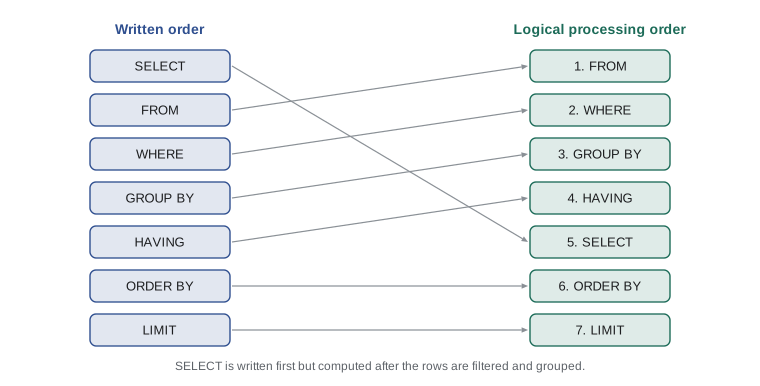
The figure shows a useful mental model: although SELECT is written first, the database logically starts with FROM (which table), then keeps the rows that pass WHERE, groups them, filters the groups, and only then computes the SELECT list, sorts and limits. This explains several rules you will meet, such as why a column alias defined in SELECT can be used in ORDER BY but not in WHERE.
Choosing columns
List the columns you want, separated by commas, in the order you want them back. SELECT * returns every column, which is handy for exploring a table interactively, but avoid it in programs: the result changes shape if someone adds a column, it transfers data you do not use, and code that unpacks rows by position breaks silently. Naming columns documents exactly what the code depends on.
import sqlite3

con = sqlite3.connect(":memory:")
con.executescript("""
CREATE TABLE coffees (sku TEXT PRIMARY KEY, name TEXT NOT NULL, origin TEXT NOT NULL,
                      roast TEXT NOT NULL, price_cents INTEGER NOT NULL, stock INTEGER NOT NULL);
INSERT INTO coffees VALUES
    ('RC-101', 'Sunrise Blend', 'Blend', 'medium', 1850, 42),
    ('RC-102', 'Ethiopia Guji', 'Ethiopia', 'light', 2200, 15),
    ('RC-103', 'Colombia Huila', 'Colombia', 'medium', 1975, 27),
    ('RC-104', 'Sumatra Dark', 'Indonesia', 'dark', 2025, 9),
    ('RC-105', 'Decaf Swiss Water', 'Mexico', 'medium', 1900, 12),
    ('RC-106', 'Espresso Ridge', 'Blend', 'dark', 2150, 30);
""")

for row in con.execute("SELECT * FROM coffees LIMIT 2"):
    print(row)
print()
for sku, name, stock in con.execute("SELECT sku, name, stock FROM coffees"):
print(f"{sku} {name:<18} {stock:>3} bags")('RC-101', 'Sunrise Blend', 'Blend', 'medium', 1850, 42)
('RC-102', 'Ethiopia Guji', 'Ethiopia', 'light', 2200, 15)
RC-101 Sunrise Blend 42 bags
RC-102 Ethiopia Guji 15 bags
RC-103 Colombia Huila 27 bags
RC-104 Sumatra Dark 9 bags
RC-105 Decaf Swiss Water 12 bags
RC-106 Espresso Ridge 30 bagsUnpacking each row into named variables, as in for sku, name, stock in ..., is the clearest way to work with results in Python, and it raises an error immediately if the number of columns does not match, which is exactly the early warning you want.
Expressions and aliases
The SELECT list can contain expressions as well as plain columns. Arithmetic works as you expect, || joins strings (the standard SQL operator for concatenation), and functions transform values. Because Ridgeline stores prices in cents, a query can compute the price in dollars or the value of the stock on hand. Dividing by 100.0 rather than 100 matters: when both sides are integers, SQLite performs integer division and drops the fraction, just as // does in Python.
Name a computed column with AS, giving it an alias. Aliases make results readable, and they become the column names you see when you inspect a cursor's description or read rows as dictionaries, as lesson 9 shows.
import sqlite3

con = sqlite3.connect(":memory:")
con.executescript("""
CREATE TABLE coffees (sku TEXT PRIMARY KEY, name TEXT NOT NULL, origin TEXT NOT NULL,
                      roast TEXT NOT NULL, price_cents INTEGER NOT NULL, stock INTEGER NOT NULL);
INSERT INTO coffees VALUES
    ('RC-101', 'Sunrise Blend', 'Blend', 'medium', 1850, 42),
    ('RC-102', 'Ethiopia Guji', 'Ethiopia', 'light', 2200, 15),
    ('RC-103', 'Colombia Huila', 'Colombia', 'medium', 1975, 27),
    ('RC-104', 'Sumatra Dark', 'Indonesia', 'dark', 2025, 9),
    ('RC-105', 'Decaf Swiss Water', 'Mexico', 'medium', 1900, 12),
    ('RC-106', 'Espresso Ridge', 'Blend', 'dark', 2150, 30);
""")

query = """
    SELECT sku,
           upper(name)                      AS name,
           price_cents / 100.0              AS price,
           price_cents / 100                AS whole_dollars,
           stock * price_cents / 100.0      AS stock_value,
           sku || ' (' || roast || ')'      AS label
    FROM coffees
    LIMIT 3
"""
cur = con.execute(query)
print([d[0] for d in cur.description])      # the column names, including aliases
for row in cur:
print(row)['sku', 'name', 'price', 'whole_dollars', 'stock_value', 'label']
('RC-101', 'SUNRISE BLEND', 18.5, 18, 777.0, 'RC-101 (medium)')
('RC-102', 'ETHIOPIA GUJI', 22.0, 22, 330.0, 'RC-102 (light)')
('RC-103', 'COLOMBIA HUILA', 19.75, 19, 533.25, 'RC-103 (medium)')cursor.description describes the result columns; the first item of each entry is the column's name, which for computed columns is the alias. Without AS, the name would be the expression text itself, such as price_cents / 100.0, which is awkward to use.
SQL has a large library of functions. A few you will use often: upper and lower for case, length for the length of text, round(x, 2) for rounding, abs, coalesce(a, b) which returns the first non-NULL argument (a neat way to show a default instead of NULL), and SQLite's date functions such as date('now') and strftime. Function names vary somewhat between database systems; the SQLite documentation lists its built-in functions.
import sqlite3

con = sqlite3.connect(":memory:")
con.executescript("""CREATE TABLE coffees (
    sku         TEXT PRIMARY KEY,
    name        TEXT NOT NULL,
    origin      TEXT NOT NULL,
    roast       TEXT NOT NULL CHECK (roast IN ('light', 'medium', 'dark')),
    price_cents INTEGER NOT NULL CHECK (price_cents > 0),
    stock       INTEGER NOT NULL DEFAULT 0 CHECK (stock >= 0)
);
CREATE TABLE customers (
    id     INTEGER PRIMARY KEY,
    name   TEXT NOT NULL,
    email  TEXT NOT NULL UNIQUE,
    points INTEGER NOT NULL DEFAULT 0
);
CREATE TABLE sales (
    id          INTEGER PRIMARY KEY,
    sold_on     TEXT NOT NULL,
    channel     TEXT NOT NULL CHECK (channel IN ('cafe', 'online')),
    sku         TEXT NOT NULL REFERENCES coffees (sku),
    customer_id INTEGER REFERENCES customers (id),
    qty         INTEGER NOT NULL CHECK (qty > 0),
    price_cents INTEGER NOT NULL
);
CREATE TABLE roasts (
    batch      TEXT PRIMARY KEY,
    roasted_on TEXT NOT NULL,
    sku        TEXT NOT NULL REFERENCES coffees (sku),
    green_kg   REAL NOT NULL,
    roasted_kg REAL NOT NULL,
    minutes    REAL NOT NULL
);
INSERT INTO coffees VALUES
    ('RC-101', 'Sunrise Blend', 'Blend', 'medium', 1850, 42),
    ('RC-102', 'Ethiopia Guji', 'Ethiopia', 'light', 2200, 15),
    ('RC-103', 'Colombia Huila', 'Colombia', 'medium', 1975, 27),
    ('RC-104', 'Sumatra Dark', 'Indonesia', 'dark', 2025, 9),
    ('RC-105', 'Decaf Swiss Water', 'Mexico', 'medium', 1900, 12),
    ('RC-106', 'Espresso Ridge', 'Blend', 'dark', 2150, 30);
INSERT INTO customers VALUES
    (1, 'Priya Natarajan', 'priya@example.com', 140),
    (2, 'Marcus Bell', 'marcus@example.com', 35),
    (3, 'Lena Fischer', 'lena@example.com', 320),
    (4, 'Omar Haddad', 'omar@example.com', 0),
    (5, 'Grace Kim', 'grace@example.com', 95);
INSERT INTO sales VALUES
    (1, '2026-11-02', 'cafe', 'RC-101', 1, 2, 1850),
    (2, '2026-11-02', 'online', 'RC-102', 3, 1, 2200),
    (3, '2026-11-02', 'cafe', 'RC-106', NULL, 1, 2150),
    (4, '2026-11-03', 'online', 'RC-103', 2, 3, 1975),
    (5, '2026-11-03', 'cafe', 'RC-101', NULL, 1, 1850),
    (6, '2026-11-03', 'online', 'RC-104', 3, 2, 2025),
    (7, '2026-11-04', 'cafe', 'RC-105', 5, 1, 1900),
    (8, '2026-11-04', 'online', 'RC-101', 1, 1, 1850),
    (9, '2026-11-04', 'cafe', 'RC-106', 2, 2, 2150),
    (10, '2026-11-05', 'online', 'RC-102', 5, 2, 2200),
    (11, '2026-11-05', 'cafe', 'RC-103', NULL, 1, 1975),
    (12, '2026-11-06', 'online', 'RC-106', 3, 1, 2150),
    (13, '2026-11-06', 'cafe', 'RC-101', 1, 3, 1850),
    (14, '2026-11-06', 'online', 'RC-104', NULL, 1, 2025);
INSERT INTO roasts VALUES
    ('B-0412', '2026-10-28', 'RC-101', 12.0, 10.2, 13.5),
    ('B-0413', '2026-10-29', 'RC-106', 12.0, 10.1, 14.0),
    ('B-0414', '2026-10-30', 'RC-102', 9.0, 7.7, 11.75),
    ('B-0415', '2026-10-31', 'RC-103', 12.0, 10.3, 12.5),
    ('B-0416', '2026-11-01', 'RC-104', 6.0, 5.0, 15.0),
    ('B-0417', '2026-11-02', 'RC-101', 12.0, 10.2, 13.25);""")

query = """
    SELECT id, coalesce(customer_id, 'walk-in') AS customer,
           qty * price_cents AS cents, round(qty * price_cents / 100.0, 2) AS amount
    FROM sales
    LIMIT 4
"""
for row in con.execute(query):
print(row)(1, 1, 3700, 37.0) (2, 3, 2200, 22.0) (3, 'walk-in', 2150, 21.5) (4, 2, 5925, 59.25)
Try it yourself
A price list from cents
Write a query, stored in sql, that returns for every coffee: its name, its price in dollars as a column named price (cents divided by 100.0), and the value of its stock in dollars as stock_value, sorted by name.
Then set rows to con.execute(sql).fetchall().
sql = "SELECT name, price_cents / 100 FROM coffees"
rows = con.execute(sql).fetchall()
print(rows[:2])
Removing duplicates and limiting rows
SELECT DISTINCT removes duplicate rows from the result. It applies to the whole row, so SELECT DISTINCT origin returns each origin once, while SELECT DISTINCT origin, roast returns each combination once. LIMIT n returns at most n rows, and LIMIT n OFFSET m skips the first m. Limits are used for previews, for 'top five' reports (with ORDER BY, covered next lesson) and for paging through long results.
import sqlite3

con = sqlite3.connect(":memory:")
con.executescript("""CREATE TABLE coffees (
    sku         TEXT PRIMARY KEY,
    name        TEXT NOT NULL,
    origin      TEXT NOT NULL,
    roast       TEXT NOT NULL CHECK (roast IN ('light', 'medium', 'dark')),
    price_cents INTEGER NOT NULL CHECK (price_cents > 0),
    stock       INTEGER NOT NULL DEFAULT 0 CHECK (stock >= 0)
);
CREATE TABLE customers (
    id     INTEGER PRIMARY KEY,
    name   TEXT NOT NULL,
    email  TEXT NOT NULL UNIQUE,
    points INTEGER NOT NULL DEFAULT 0
);
CREATE TABLE sales (
    id          INTEGER PRIMARY KEY,
    sold_on     TEXT NOT NULL,
    channel     TEXT NOT NULL CHECK (channel IN ('cafe', 'online')),
    sku         TEXT NOT NULL REFERENCES coffees (sku),
    customer_id INTEGER REFERENCES customers (id),
    qty         INTEGER NOT NULL CHECK (qty > 0),
    price_cents INTEGER NOT NULL
);
CREATE TABLE roasts (
    batch      TEXT PRIMARY KEY,
    roasted_on TEXT NOT NULL,
    sku        TEXT NOT NULL REFERENCES coffees (sku),
    green_kg   REAL NOT NULL,
    roasted_kg REAL NOT NULL,
    minutes    REAL NOT NULL
);
INSERT INTO coffees VALUES
    ('RC-101', 'Sunrise Blend', 'Blend', 'medium', 1850, 42),
    ('RC-102', 'Ethiopia Guji', 'Ethiopia', 'light', 2200, 15),
    ('RC-103', 'Colombia Huila', 'Colombia', 'medium', 1975, 27),
    ('RC-104', 'Sumatra Dark', 'Indonesia', 'dark', 2025, 9),
    ('RC-105', 'Decaf Swiss Water', 'Mexico', 'medium', 1900, 12),
    ('RC-106', 'Espresso Ridge', 'Blend', 'dark', 2150, 30);
INSERT INTO customers VALUES
    (1, 'Priya Natarajan', 'priya@example.com', 140),
    (2, 'Marcus Bell', 'marcus@example.com', 35),
    (3, 'Lena Fischer', 'lena@example.com', 320),
    (4, 'Omar Haddad', 'omar@example.com', 0),
    (5, 'Grace Kim', 'grace@example.com', 95);
INSERT INTO sales VALUES
    (1, '2026-11-02', 'cafe', 'RC-101', 1, 2, 1850),
    (2, '2026-11-02', 'online', 'RC-102', 3, 1, 2200),
    (3, '2026-11-02', 'cafe', 'RC-106', NULL, 1, 2150),
    (4, '2026-11-03', 'online', 'RC-103', 2, 3, 1975),
    (5, '2026-11-03', 'cafe', 'RC-101', NULL, 1, 1850),
    (6, '2026-11-03', 'online', 'RC-104', 3, 2, 2025),
    (7, '2026-11-04', 'cafe', 'RC-105', 5, 1, 1900),
    (8, '2026-11-04', 'online', 'RC-101', 1, 1, 1850),
    (9, '2026-11-04', 'cafe', 'RC-106', 2, 2, 2150),
    (10, '2026-11-05', 'online', 'RC-102', 5, 2, 2200),
    (11, '2026-11-05', 'cafe', 'RC-103', NULL, 1, 1975),
    (12, '2026-11-06', 'online', 'RC-106', 3, 1, 2150),
    (13, '2026-11-06', 'cafe', 'RC-101', 1, 3, 1850),
    (14, '2026-11-06', 'online', 'RC-104', NULL, 1, 2025);
INSERT INTO roasts VALUES
    ('B-0412', '2026-10-28', 'RC-101', 12.0, 10.2, 13.5),
    ('B-0413', '2026-10-29', 'RC-106', 12.0, 10.1, 14.0),
    ('B-0414', '2026-10-30', 'RC-102', 9.0, 7.7, 11.75),
    ('B-0415', '2026-10-31', 'RC-103', 12.0, 10.3, 12.5),
    ('B-0416', '2026-11-01', 'RC-104', 6.0, 5.0, 15.0),
    ('B-0417', '2026-11-02', 'RC-101', 12.0, 10.2, 13.25);""")

print(con.execute("SELECT DISTINCT roast FROM coffees ORDER BY roast").fetchall())
print(con.execute("SELECT COUNT(DISTINCT sku) FROM sales").fetchone()[0], "different coffees have sold")
print(con.execute("SELECT DISTINCT channel, sold_on FROM sales ORDER BY sold_on LIMIT 4").fetchall())

page_size = 2
for page in range(2):
    rows = con.execute("SELECT sku FROM coffees ORDER BY sku LIMIT ? OFFSET ?",
                       (page_size, page * page_size)).fetchall()
print("page", page + 1, rows)[('dark',), ('light',), ('medium',)]
6 different coffees have sold
[('cafe', '2026-11-02'), ('online', '2026-11-02'), ('online', '2026-11-03'), ('cafe', '2026-11-03')]
page 1 [('RC-101',), ('RC-102',)]
page 2 [('RC-103',), ('RC-104',)]The paging loop used question marks in the SQL and passed the numbers separately. That is a parameterized query, and it deserves a section of its own.
Parameters: never build SQL from user input
Programs constantly need to put values into queries: the SKU a user typed, a date range, a customer's email. The tempting way is to build the SQL text with an f-string or string concatenation. Do not do it. It breaks on ordinary input, such as a name containing an apostrophe, and it opens the door to SQL injection, one of the most common and most damaging security flaws in software. If input is pasted into SQL text, input crafted to look like SQL becomes part of the statement, changing what it does, for example making a lookup return every customer instead of one.
The fix is simple and complete: write placeholders in the SQL and pass the values separately. The database driver sends the statement and the values to the database separately, so a value is always treated as data, never as SQL, whatever characters it contains. Python's sqlite3 supports two placeholder styles: question marks, filled in order from a tuple, and named placeholders such as :sku, filled from a dictionary.
import sqlite3

con = sqlite3.connect(":memory:")
con.executescript("""
CREATE TABLE coffees (sku TEXT PRIMARY KEY, name TEXT NOT NULL, origin TEXT NOT NULL,
                      roast TEXT NOT NULL, price_cents INTEGER NOT NULL, stock INTEGER NOT NULL);
INSERT INTO coffees VALUES
    ('RC-101', 'Sunrise Blend', 'Blend', 'medium', 1850, 42),
    ('RC-102', 'Ethiopia Guji', 'Ethiopia', 'light', 2200, 15),
    ('RC-103', 'Colombia Huila', 'Colombia', 'medium', 1975, 27),
    ('RC-104', 'Sumatra Dark', 'Indonesia', 'dark', 2025, 9),
    ('RC-105', 'Decaf Swiss Water', 'Mexico', 'medium', 1900, 12),
    ('RC-106', 'Espresso Ridge', 'Blend', 'dark', 2150, 30);
""")

def find_coffee(con, sku):
    row = con.execute("SELECT sku, name, stock FROM coffees WHERE sku = ?", (sku,)).fetchone()
    return row                                    # None if no coffee has that SKU

print(find_coffee(con, "RC-104"))
print(find_coffee(con, "RC-999"))
print(find_coffee(con, "x' OR '1'='1"))          # hostile input is just an odd SKU: no match

query = "SELECT name FROM coffees WHERE roast = :roast AND stock < :limit"
print(con.execute(query, {"roast": "dark", "limit": 20}).fetchall())('RC-104', 'Sumatra Dark', 9)
None
None
[('Sumatra Dark',)]Two details trip people up. The values must be a sequence even for one parameter, so write (sku,) with the trailing comma; (sku) is just sku in parentheses, and a string would be treated as a sequence of characters. And placeholders stand for values only: you cannot use one for a table name, a column name or a keyword such as ASC. When a program must choose a column, for example to sort by whatever the user clicked, check the choice against a fixed set of allowed names in Python before putting it into the SQL text.
import sqlite3

con = sqlite3.connect(":memory:")
con.executescript("""
CREATE TABLE coffees (sku TEXT PRIMARY KEY, name TEXT NOT NULL, origin TEXT NOT NULL,
                      roast TEXT NOT NULL, price_cents INTEGER NOT NULL, stock INTEGER NOT NULL);
INSERT INTO coffees VALUES
    ('RC-101', 'Sunrise Blend', 'Blend', 'medium', 1850, 42),
    ('RC-102', 'Ethiopia Guji', 'Ethiopia', 'light', 2200, 15),
    ('RC-103', 'Colombia Huila', 'Colombia', 'medium', 1975, 27),
    ('RC-104', 'Sumatra Dark', 'Indonesia', 'dark', 2025, 9),
    ('RC-105', 'Decaf Swiss Water', 'Mexico', 'medium', 1900, 12),
    ('RC-106', 'Espresso Ridge', 'Blend', 'dark', 2150, 30);
""")

ALLOWED_SORTS = {"name", "price_cents", "stock"}

def coffee_list(con, sort_by="name"):
    if sort_by not in ALLOWED_SORTS:              # names can't be parameters, so allow-list them
        raise ValueError(f"cannot sort by {sort_by!r}")
    return [r[0] for r in con.execute(f"SELECT sku FROM coffees ORDER BY {sort_by}, sku")]

print(coffee_list(con, "stock"))
try:
    coffee_list(con, "stock; DROP TABLE coffees")
except ValueError as e:
print(e)['RC-104', 'RC-105', 'RC-102', 'RC-103', 'RC-106', 'RC-101'] cannot sort by 'stock; DROP TABLE coffees'
Every database library for Python works the same way, though the placeholder style differs: PostgreSQL's psycopg uses %s and %(name)s, for example. Lesson 9 returns to this. The rule never changes: values go in parameters; identifiers come from a fixed list in your code.
Try it yourself
A safe lookup by email
Write a function find_customer(con, email) that returns the (id, name, points) row of the customer with that email, or None if there is none.
Use a ? placeholder for the email. Building the SQL with an f-string or + will fail the checks, because it breaks on emails such as o'brien@example.com and is unsafe.
def find_customer(con, email):
    sql = f"SELECT id, name, points FROM customers WHERE email = '{email}'"
    return con.execute(sql).fetchone()

print(find_customer(con, 'lena@example.com'))
Reading a query result safely in Python
A few Python habits round off the basics. When a query should return exactly one row, fetchone either returns it or returns None, so check for None before using it. When you expect many rows but only need to process them one at a time, loop over the cursor directly instead of calling fetchall, so the rows are not all held in memory at once. And keep SQL text readable: triple-quoted strings let a long query span several indented lines, exactly as you would format it in a SQL editor.
import sqlite3

con = sqlite3.connect(":memory:")
con.executescript("""
CREATE TABLE coffees (sku TEXT PRIMARY KEY, name TEXT NOT NULL, origin TEXT NOT NULL,
                      roast TEXT NOT NULL, price_cents INTEGER NOT NULL, stock INTEGER NOT NULL);
INSERT INTO coffees VALUES
    ('RC-101', 'Sunrise Blend', 'Blend', 'medium', 1850, 42),
    ('RC-102', 'Ethiopia Guji', 'Ethiopia', 'light', 2200, 15),
    ('RC-103', 'Colombia Huila', 'Colombia', 'medium', 1975, 27),
    ('RC-104', 'Sumatra Dark', 'Indonesia', 'dark', 2025, 9),
    ('RC-105', 'Decaf Swiss Water', 'Mexico', 'medium', 1900, 12),
    ('RC-106', 'Espresso Ridge', 'Blend', 'dark', 2150, 30);
""")

def stock_line(con, sku):
    row = con.execute("SELECT name, stock FROM coffees WHERE sku = ?", (sku,)).fetchone()
    if row is None:
        return f"{sku}: no such coffee"
    name, stock = row
    return f"{sku}: {name}, {stock} bags" + ("  (reorder)" if stock < 10 else "")

for sku in ["RC-103", "RC-104", "RC-777"]:
print(stock_line(con, sku))RC-103: Colombia Huila, 27 bags RC-104: Sumatra Dark, 9 bags (reorder) RC-777: no such coffee
Try it yourself
Distinct origins
Set origins to a sorted list of the distinct coffee origins (plain strings), using SELECT DISTINCT and ORDER BY in SQL.
Then set top2 to the names of the two most expensive coffees, using ORDER BY ... DESC and LIMIT.
origins = [r[0] for r in con.execute('SELECT origin FROM coffees')]
top2 = []
print(origins, top2)
Worked problem
The stock screen as one query
Theo wants a screen listing each coffee as SKU, name, price in dollars, bags in stock and stock value in dollars, most valuable stock first, showing only the top three. Write the query.
Show solution
- Columns: sku, name, price_cents / 100.0 AS price, stock, stock * price_cents / 100.0 AS stock_value.
- Sort by the alias: ORDER BY stock_value DESC (aliases may be used in ORDER BY).
- Limit: LIMIT 3.
- Result: Sunrise Blend (777.00), Espresso Ridge (645.00), Colombia Huila (533.25).
Answer: SELECT sku, name, price_cents / 100.0 AS price, stock, stock * price_cents / 100.0 AS stock_value FROM coffees ORDER BY stock_value DESC LIMIT 3
Common mistakes
MistakeBuilding SQL with f-strings or + from user input.
InsteadUse ? or :name placeholders and pass values separately.
MistakeWriting (sku) for a single parameter.
InsteadWrite (sku,) so it is a one-item tuple.
MistakeTrying to pass a table or column name as a parameter.
InsteadChoose identifiers from an allow-list in Python.
MistakeUsing SELECT * in program code.
InsteadName the columns the code depends on.
MistakeDividing integer cents by 100 and losing the cents.
InsteadDivide by 100.0, or format the cents in Python.
MistakeUnpacking fetchone() without checking for None.
InsteadTest for None when a row might not exist.
Summary and key terms
- SELECT names columns or expressions, FROM names the table, and further clauses follow in a fixed order.
- The database logically processes FROM and WHERE before SELECT, then ORDER BY and LIMIT.
- Name columns explicitly in programs, and give computed columns aliases with AS.
- Expressions and functions such as round, upper, length and coalesce compute values in the query.
- DISTINCT removes duplicate rows; LIMIT and OFFSET restrict and page through results.
- Pass values with ? or :name placeholders; never paste input into SQL text.
- Identifiers cannot be parameters, so choose them from an allow-list.
- SELECT
- The SQL statement that retrieves data.
- expression
- A combination of columns, values, operators and functions that computes a value.
- alias
- A name given to a column or expression with AS.
- DISTINCT
- A keyword that removes duplicate rows from a result.
- LIMIT
- A clause that caps the number of rows returned.
- parameter
- A value passed separately from the SQL text, marked by a placeholder.
- placeholder
- A marker such as ? or :name in SQL where a parameter is bound.
- SQL injection
- A flaw where input pasted into SQL text changes the meaning of the statement.
- allow-list
- A fixed set of permitted values that input is checked against.
- cursor.description
- The cursor attribute describing the result columns, starting with their names.
Practice problems
Work each problem on paper first, then reveal the answer to check.
Why does price_cents / 100 give 18 for 1850 in SQLite?
Show answer
Both are integers, so SQLite does integer division; use 100.0.
Write a query for the distinct roasts, sorted.
Show answer
SELECT DISTINCT roast FROM coffees ORDER BY roast
How do you pass the SKU RC-102 into SELECT name FROM coffees WHERE sku = ?
Show answer
con.execute(sql, ('RC-102',))
Why can't you write ORDER BY ? to let users choose the sort column?
Show answer
Placeholders stand for values, not identifiers; use an allow-list instead.
What does coalesce(customer_id, 0) return for a walk-in sale?
Show answer
0, because customer_id is NULL.
Can an alias from SELECT be used in WHERE?
Show answer
Not in standard SQL; WHERE is processed before SELECT. It can be used in ORDER BY.
Lesson quiz · 5 questions
Score 60% or more to complete this lesson.
Create a free account to save your progress, take quizzes and earn a certificate.