
PYTH-215 · Lesson 10 of 12 · 30 min
Object-relational mapping
▶ Video coming soon A video version of this lesson is on the way.
Ridgeline's Python package thinks in objects: a Coffee with a name and a price, an Inventory that holds coffees, an Order composed of order lines. The database thinks in tables, rows and foreign keys. Every program that uses a relational database has to translate between the two, turning rows into objects when reading and objects back into rows when saving. Writing that translation by hand for every class is repetitive, and the repetition invites mistakes.
An object-relational mapper (ORM) is a library that automates the translation. You describe how classes correspond to tables, and the ORM writes the SQL to load, save, update and delete objects, follows relationships between them, and manages transactions. This lesson first builds a tiny mapper by hand, so you can see exactly what an ORM does, then introduces SQLAlchemy, the most widely used ORM for Python, and finishes with the trade-offs: what ORMs make easy, what they make dangerous, and when plain SQL is the better tool.
The object-relational mismatch
Objects and tables differ in ways that make translation non-trivial, a problem often called the object-relational impedance mismatch. Objects refer to each other directly (an order holds a list of its lines), while tables refer to each other through key values. Objects have identity (two variables can point to the same object), while rows are identified only by their keys. Classes can inherit from each other; tables cannot. Objects live in memory and change freely, while rows change only when an UPDATE is sent and committed. A mapper has to bridge all of these, and its design choices about how show up in the SQL it generates.
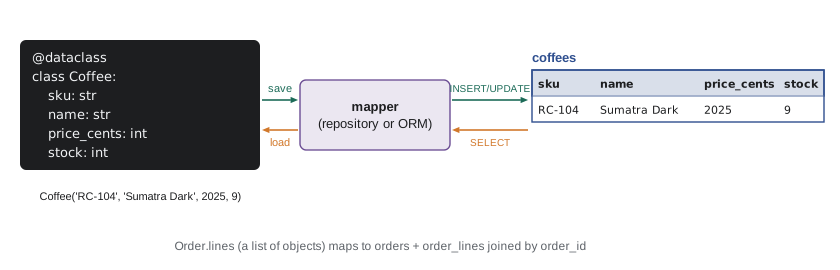
A mapper by hand
The simplest useful mapping turns each row into a dataclass instance and back. A class method from_row builds an object from a row, a small repository class holds the SQL for loading and saving, and the rest of the program works only with Coffee objects. This is the pattern lesson 9 called a data access layer, organized around a class.
import sqlite3

con = sqlite3.connect(":memory:")
con.executescript("""
CREATE TABLE coffees (sku TEXT PRIMARY KEY, name TEXT NOT NULL, origin TEXT NOT NULL,
                      roast TEXT NOT NULL, price_cents INTEGER NOT NULL, stock INTEGER NOT NULL);
INSERT INTO coffees VALUES
    ('RC-101', 'Sunrise Blend', 'Blend', 'medium', 1850, 42),
    ('RC-102', 'Ethiopia Guji', 'Ethiopia', 'light', 2200, 15),
    ('RC-103', 'Colombia Huila', 'Colombia', 'medium', 1975, 27),
    ('RC-104', 'Sumatra Dark', 'Indonesia', 'dark', 2025, 9),
    ('RC-105', 'Decaf Swiss Water', 'Mexico', 'medium', 1900, 12),
    ('RC-106', 'Espresso Ridge', 'Blend', 'dark', 2150, 30);
""")

from dataclasses import dataclass

@dataclass
class Coffee:
    sku: str
    name: str
    origin: str
    roast: str
    price_cents: int
    stock: int

class CoffeeRepository:
    COLUMNS = "sku, name, origin, roast, price_cents, stock"

    def __init__(self, con):
        self.con = con

    def _from_row(self, row):
        return Coffee(*row) if row else None

    def get(self, sku):
        row = self.con.execute(f"SELECT {self.COLUMNS} FROM coffees WHERE sku = ?", (sku,)).fetchone()
        return self._from_row(row)

    def all(self):
        return [self._from_row(r) for r in self.con.execute(f"SELECT {self.COLUMNS} FROM coffees ORDER BY sku")]

    def save(self, c):
        with self.con:
            self.con.execute(f"""
                INSERT INTO coffees ({self.COLUMNS}) VALUES (?, ?, ?, ?, ?, ?)
                ON CONFLICT (sku) DO UPDATE SET name = excluded.name, origin = excluded.origin,
                    roast = excluded.roast, price_cents = excluded.price_cents, stock = excluded.stock
            """, (c.sku, c.name, c.origin, c.roast, c.price_cents, c.stock))

repo = CoffeeRepository(con)
sumatra = repo.get("RC-104")
print(sumatra)
sumatra.stock += 30                       # change the object...
repo.save(sumatra)                        # ...then save it explicitly
repo.save(Coffee("RC-107", "Kenya Nyeri", "Kenya", "light", 2350, 20))
print(repo.get("RC-104").stock, len(repo.all()))Coffee(sku='RC-104', name='Sumatra Dark', origin='Indonesia', roast='dark', price_cents=2025, stock=9) 39 7
The repository hides SQL from the rest of the program, and saving uses the upsert from lesson 8, so the same save method inserts new coffees and updates existing ones. The column list appears in an f-string, which is safe because it is a constant written by the developer, never user input. Even this small mapper raises the questions every ORM must answer. When is a change written to the database: immediately, or when save is called? If two parts of the program load RC-104, do they get the same object or two copies that can disagree? Real ORMs answer with a unit of work, which tracks changed objects and writes them all in one transaction, and an identity map, which ensures one object per row within a session.
Try it yourself
Rows to objects
A Coffee dataclass is defined in the setup with fields sku, name, origin, roast, price_cents, stock. Write low_stock(con, limit) that returns a list of Coffee objects for every coffee with stock below limit, ordered by stock.
Select the columns in the dataclass's field order so that Coffee(*row) works.
def low_stock(con, limit):
    return con.execute('SELECT * FROM coffees WHERE stock < ?', (limit,)).fetchall()
Relationships and the N+1 problem
Objects that refer to other objects are where mappers earn their keep and where they cause the most trouble. Suppose each Sale object should carry its Coffee. The easy way to load that is lazily: load the sales with one query, then, whenever code touches sale.coffee, run another query for that coffee. It reads naturally, and with 14 sales it runs 15 queries: one for the sales and one more for each sale. This is the N+1 query problem, the most common performance mistake in ORM code, invisible in small tests and painful with real data. The fix is to load the related rows together, with a join or a second query that fetches all the needed coffees at once, which ORMs call eager loading.
sqlite3 can report every statement it runs through set_trace_callback, which makes the problem visible.
import sqlite3

con = sqlite3.connect(":memory:")
con.executescript("""CREATE TABLE coffees (
    sku         TEXT PRIMARY KEY,
    name        TEXT NOT NULL,
    origin      TEXT NOT NULL,
    roast       TEXT NOT NULL CHECK (roast IN ('light', 'medium', 'dark')),
    price_cents INTEGER NOT NULL CHECK (price_cents > 0),
    stock       INTEGER NOT NULL DEFAULT 0 CHECK (stock >= 0)
);
CREATE TABLE customers (
    id     INTEGER PRIMARY KEY,
    name   TEXT NOT NULL,
    email  TEXT NOT NULL UNIQUE,
    points INTEGER NOT NULL DEFAULT 0
);
CREATE TABLE sales (
    id          INTEGER PRIMARY KEY,
    sold_on     TEXT NOT NULL,
    channel     TEXT NOT NULL CHECK (channel IN ('cafe', 'online')),
    sku         TEXT NOT NULL REFERENCES coffees (sku),
    customer_id INTEGER REFERENCES customers (id),
    qty         INTEGER NOT NULL CHECK (qty > 0),
    price_cents INTEGER NOT NULL
);
CREATE TABLE roasts (
    batch      TEXT PRIMARY KEY,
    roasted_on TEXT NOT NULL,
    sku        TEXT NOT NULL REFERENCES coffees (sku),
    green_kg   REAL NOT NULL,
    roasted_kg REAL NOT NULL,
    minutes    REAL NOT NULL
);
INSERT INTO coffees VALUES
    ('RC-101', 'Sunrise Blend', 'Blend', 'medium', 1850, 42),
    ('RC-102', 'Ethiopia Guji', 'Ethiopia', 'light', 2200, 15),
    ('RC-103', 'Colombia Huila', 'Colombia', 'medium', 1975, 27),
    ('RC-104', 'Sumatra Dark', 'Indonesia', 'dark', 2025, 9),
    ('RC-105', 'Decaf Swiss Water', 'Mexico', 'medium', 1900, 12),
    ('RC-106', 'Espresso Ridge', 'Blend', 'dark', 2150, 30);
INSERT INTO customers VALUES
    (1, 'Priya Natarajan', 'priya@example.com', 140),
    (2, 'Marcus Bell', 'marcus@example.com', 35),
    (3, 'Lena Fischer', 'lena@example.com', 320),
    (4, 'Omar Haddad', 'omar@example.com', 0),
    (5, 'Grace Kim', 'grace@example.com', 95);
INSERT INTO sales VALUES
    (1, '2026-11-02', 'cafe', 'RC-101', 1, 2, 1850),
    (2, '2026-11-02', 'online', 'RC-102', 3, 1, 2200),
    (3, '2026-11-02', 'cafe', 'RC-106', NULL, 1, 2150),
    (4, '2026-11-03', 'online', 'RC-103', 2, 3, 1975),
    (5, '2026-11-03', 'cafe', 'RC-101', NULL, 1, 1850),
    (6, '2026-11-03', 'online', 'RC-104', 3, 2, 2025),
    (7, '2026-11-04', 'cafe', 'RC-105', 5, 1, 1900),
    (8, '2026-11-04', 'online', 'RC-101', 1, 1, 1850),
    (9, '2026-11-04', 'cafe', 'RC-106', 2, 2, 2150),
    (10, '2026-11-05', 'online', 'RC-102', 5, 2, 2200),
    (11, '2026-11-05', 'cafe', 'RC-103', NULL, 1, 1975),
    (12, '2026-11-06', 'online', 'RC-106', 3, 1, 2150),
    (13, '2026-11-06', 'cafe', 'RC-101', 1, 3, 1850),
    (14, '2026-11-06', 'online', 'RC-104', NULL, 1, 2025);
INSERT INTO roasts VALUES
    ('B-0412', '2026-10-28', 'RC-101', 12.0, 10.2, 13.5),
    ('B-0413', '2026-10-29', 'RC-106', 12.0, 10.1, 14.0),
    ('B-0414', '2026-10-30', 'RC-102', 9.0, 7.7, 11.75),
    ('B-0415', '2026-10-31', 'RC-103', 12.0, 10.3, 12.5),
    ('B-0416', '2026-11-01', 'RC-104', 6.0, 5.0, 15.0),
    ('B-0417', '2026-11-02', 'RC-101', 12.0, 10.2, 13.25);""")

queries = []
con.set_trace_callback(queries.append)            # record every SQL statement sqlite3 runs

# Lazy: one query for the sales, then one per sale for its coffee (N + 1).
sales = con.execute("SELECT id, sku, qty FROM sales").fetchall()
names = [con.execute("SELECT name FROM coffees WHERE sku = ?", (sku,)).fetchone()[0] for _, sku, _ in sales]
print("lazy:", len(queries), "queries")

# Eager: one join brings each sale and its coffee's name together.
queries.clear()
rows = con.execute("SELECT s.id, c.name, s.qty FROM sales AS s JOIN coffees AS c ON c.sku = s.sku").fetchall()
print("eager:", len(queries), "query")
print(names[:3] == [r[1] for r in rows[:3]])
con.set_trace_callback(None)lazy: 15 queries eager: 1 query True
Watching the SQL an ORM generates, through its logging or a tool like this callback, is the single best habit for using one well. If a page that shows twenty orders runs forty queries, an eager loading option or a join will fix it.
Try it yourself
Fix an N+1 loop
The starter builds a report of (customer name, number of sales) by running one query per customer. Rewrite sales_per_customer(con) to use a single query with a LEFT JOIN and GROUP BY, returning the same list of tuples sorted by name, including customers with no sales (count 0).
The test counts the queries your function runs: it must be exactly one.
def sales_per_customer(con):
    result = []
    for cid, name in con.execute('SELECT id, name FROM customers ORDER BY name').fetchall():
        n = con.execute('SELECT COUNT(*) FROM sales WHERE customer_id = ?', (cid,)).fetchone()[0]
        result.append((name, n))
    return result
SQLAlchemy
SQLAlchemy is the standard ORM and database toolkit for Python outside Django. Version 2.0 describes tables with ordinary annotated classes: each class inherits from a declarative base, names its table, and declares columns with Mapped type hints and mapped_column. Relationships between classes are declared with relationship, and SQLAlchemy works out the joins from the foreign keys. You work with objects inside a Session, which is SQLAlchemy's unit of work: it tracks new and changed objects and writes them all when you commit. Queries are built with select(), which generates SQL for whichever database you connect to, SQLite, PostgreSQL, MySQL or others, from the same Python code.
from sqlalchemy import ForeignKey, String, create_engine, func, select
from sqlalchemy.orm import DeclarativeBase, Mapped, Session, mapped_column, relationship

class Base(DeclarativeBase):
    pass

class Coffee(Base):
    __tablename__ = "coffees"
    sku: Mapped[str] = mapped_column(String(10), primary_key=True)
    name: Mapped[str]
    price_cents: Mapped[int]
    stock: Mapped[int] = mapped_column(default=0)
    sales: Mapped[list["Sale"]] = relationship(back_populates="coffee")

class Sale(Base):
    __tablename__ = "sales"
    id: Mapped[int] = mapped_column(primary_key=True)
    sku: Mapped[str] = mapped_column(ForeignKey("coffees.sku"))
    qty: Mapped[int]
    coffee: Mapped[Coffee] = relationship(back_populates="sales")

engine = create_engine("sqlite:///ridgeline.db", echo=True)   # echo=True logs every SQL statement
Base.metadata.create_all(engine)                               # CREATE TABLE for each class

with Session(engine) as session:
    sumatra = Coffee(sku="RC-104", name="Sumatra Dark", price_cents=2025, stock=9)
    session.add(sumatra)
    sumatra.sales.append(Sale(qty=2))          # relationships are plain Python lists
    sumatra.stock -= 2
    session.commit()                           # INSERTs and UPDATE sent in one transaction

    low = session.scalars(select(Coffee).where(Coffee.stock < 10).order_by(Coffee.stock)).all()
    totals = session.execute(select(Coffee.name, func.sum(Sale.qty)).join(Coffee.sales).group_by(Coffee.sku)).all()
Every line of that listing corresponds to SQL you can now write yourself. create_all issues CREATE TABLE statements; session.commit sends INSERTs and an UPDATE inside one transaction; select(Coffee).where(...) becomes SELECT ... WHERE stock < ? ORDER BY stock with a parameter; and the totals query is the join-and-group from lesson 5. With echo=True, SQLAlchemy prints each statement, which is how you spot N+1 patterns. Eager loading is requested with options such as selectinload(Coffee.sales), which loads all the related sales in one extra query instead of one per coffee.
Django, the web framework covered in PYTH-220, has its own ORM built in, with the same ideas in a different style: models are classes with fields, Coffee.objects.filter(stock__lt=10) builds a query, and select_related and prefetch_related are its eager loading tools.
Migrations
An ORM's classes describe the schema, but a live database does not change when you edit a class. As lesson 6 mentioned, schema changes are applied with migrations: numbered scripts, each describing one change and how to undo it, applied in order and recorded in a table inside the database so each copy knows which have run. Alembic, from the SQLAlchemy project, can compare your classes with the database and draft a migration automatically; Django does the same with makemigrations and migrate. Always read a generated migration before applying it, because an automatic tool can mistake a renamed column for a dropped one and a new one, which would delete the data.
# alembic revision --autogenerate -m "add discontinued flag to coffees"
def upgrade():
    op.add_column("coffees", sa.Column("discontinued", sa.Boolean(), nullable=False, server_default=sa.false()))

def downgrade():
    op.drop_column("coffees", "discontinued")
ORM or SQL?
ORMs and raw SQL are not rivals; most mature projects use both. An ORM shines for the everyday create, read, update and delete operations on individual objects, which make up most of an application's database code; it removes boilerplate, keeps queries consistent with the classes, makes switching databases easier and guards against SQL injection by always using parameters. Raw SQL, or the ORM's lower-level query layer, shines for reports, bulk updates, complex joins and anything where you need precise control over performance. Every ORM provides a way to run plain SQL for those cases.
The one thing an ORM cannot do is spare you from understanding SQL. The generated queries are only as good as your knowledge of what they should be, and when something is slow or wrong, the fix is found by reading the SQL. That is why this course taught SQL first.
Worked problem
Spotting N+1 in an order page
An order history page loads a customer's 20 orders, and for each order shows its lines and each line's coffee name. With lazy loading, how many queries run, and how could it be reduced?
Show solution
- 1 query for the orders.
- For each of the 20 orders, 1 query for its lines: 20 queries.
- For each line (say 2 per order, 40 lines), 1 query for its coffee: 40 queries.
- Total: 1 + 20 + 40 = 61 queries.
- Eager loading: one query for the orders, then one query for all their lines joined to coffees (WHERE order_id IN (...)): 2 queries.
Answer: 61 queries lazily; 2 with eager loading (or 1 with a single three-table join).
Common mistakes
MistakeUsing an ORM without ever looking at the SQL it generates.
InsteadTurn on SQL logging (echo=True) and read the queries.
MistakeAccessing a relationship inside a loop, causing N+1 queries.
InsteadUse eager loading or a join to fetch related rows together.
MistakeExpecting changes to objects to reach the database automatically.
InsteadCommit the session (or call save) to write changes.
MistakeApplying auto-generated migrations without reading them.
InsteadReview each migration; renames can be mistaken for drop-and-add.
MistakeForcing every report through ORM objects.
InsteadUse SQL or the ORM's query layer for reports and bulk changes.
MistakeBuilding SQL strings by hand inside ORM code.
InsteadUse the ORM's parameterized query API or bound parameters.
Summary and key terms
- An ORM maps classes to tables and objects to rows, generating the SQL to load and save them.
- The object-relational mismatch covers references versus keys, identity, inheritance and change tracking.
- A hand-written repository with dataclasses shows what an ORM automates.
- Lazy loading of relationships can cause the N+1 query problem; eager loading or joins fix it.
- SQLAlchemy 2.0 declares mapped classes with Mapped and mapped_column, and works through a Session.
- Django's ORM follows the same ideas with models, querysets and select_related.
- Migrations, written by hand or drafted by Alembic, change the schema in versioned steps.
- Use the ORM for everyday object operations and SQL for reports, bulk work and fine control.
- ORM
- Object-relational mapper: a library that maps classes to tables and objects to rows.
- impedance mismatch
- The differences between object and relational models that a mapper must bridge.
- repository
- A class that holds the data access code for one kind of object.
- unit of work
- A pattern that tracks changed objects and writes them together in one transaction.
- identity map
- A record ensuring each row is loaded as only one object within a session.
- lazy loading
- Loading related objects only when they are first accessed.
- eager loading
- Loading related objects together with the main query.
- N+1 problem
- Running one query for a list and one more for each item in it.
- Session
- SQLAlchemy's unit of work and identity map for a set of operations.
- Alembic
- The migration tool for SQLAlchemy.
Practice problems
Work each problem on paper first, then reveal the answer to check.
What does an ORM generate when you change an object's attribute and commit?
Show answer
An UPDATE statement for that row, inside a transaction.
A list page shows 50 products and each product's category, loaded lazily. How many queries?
Show answer
51: one for the products and one per product.
Name two ways to avoid N+1 queries.
Show answer
Eager loading (for example selectinload) or a join in a single query.
What does echo=True do in create_engine?
Show answer
Logs every SQL statement SQLAlchemy sends.
Why read an auto-generated migration before applying it?
Show answer
It may misinterpret a rename as a drop and an add, losing data.
Give one task better done in SQL than through ORM objects.
Show answer
A bulk update, or a complex report with joins and grouping.
Lesson quiz · 5 questions
Score 60% or more to complete this lesson.
Create a free account to save your progress, take quizzes and earn a certificate.