
PYTH-215 · Lesson 5 of 12 · 47 min
Joins
▶ Video coming soon A video version of this lesson is on the way.
Ridgeline's data is split across tables on purpose. Coffees live in one table, customers in another, and each sale stores only a coffee's SKU and a customer's id. That design avoids repeating a coffee's name and origin in every sale, so a name changes in one place, and lesson 7 explains why it matters. But a report that says 'RC-104: 3 bags' is less useful to Anita than one that says 'Sumatra Dark: 3 bags, Lena Fischer'. To answer questions that span tables, SQL joins them back together.
A join combines rows from two or more tables by matching values, usually a foreign key in one table with the primary key it refers to. This lesson covers the inner join, which keeps only matched rows; the left join, which keeps every row of one table whether or not it matches; joins across three or more tables; aggregates over joined rows; and joining a table to itself. Joins are the feature that makes relational databases relational, and fluency with them separates beginners from confident SQL users.
The inner join
An inner join pairs each row of one table with the rows of another that satisfy a join condition, and keeps only the pairs that match. To show each sale with its coffee's name, join sales to coffees on the condition that the sale's sku equals the coffee's sku. The keyword INNER is optional: JOIN on its own means an inner join.
import sqlite3

con = sqlite3.connect(":memory:")
con.executescript("""CREATE TABLE coffees (
    sku         TEXT PRIMARY KEY,
    name        TEXT NOT NULL,
    origin      TEXT NOT NULL,
    roast       TEXT NOT NULL CHECK (roast IN ('light', 'medium', 'dark')),
    price_cents INTEGER NOT NULL CHECK (price_cents > 0),
    stock       INTEGER NOT NULL DEFAULT 0 CHECK (stock >= 0)
);
CREATE TABLE customers (
    id     INTEGER PRIMARY KEY,
    name   TEXT NOT NULL,
    email  TEXT NOT NULL UNIQUE,
    points INTEGER NOT NULL DEFAULT 0
);
CREATE TABLE sales (
    id          INTEGER PRIMARY KEY,
    sold_on     TEXT NOT NULL,
    channel     TEXT NOT NULL CHECK (channel IN ('cafe', 'online')),
    sku         TEXT NOT NULL REFERENCES coffees (sku),
    customer_id INTEGER REFERENCES customers (id),
    qty         INTEGER NOT NULL CHECK (qty > 0),
    price_cents INTEGER NOT NULL
);
CREATE TABLE roasts (
    batch      TEXT PRIMARY KEY,
    roasted_on TEXT NOT NULL,
    sku        TEXT NOT NULL REFERENCES coffees (sku),
    green_kg   REAL NOT NULL,
    roasted_kg REAL NOT NULL,
    minutes    REAL NOT NULL
);
INSERT INTO coffees VALUES
    ('RC-101', 'Sunrise Blend', 'Blend', 'medium', 1850, 42),
    ('RC-102', 'Ethiopia Guji', 'Ethiopia', 'light', 2200, 15),
    ('RC-103', 'Colombia Huila', 'Colombia', 'medium', 1975, 27),
    ('RC-104', 'Sumatra Dark', 'Indonesia', 'dark', 2025, 9),
    ('RC-105', 'Decaf Swiss Water', 'Mexico', 'medium', 1900, 12),
    ('RC-106', 'Espresso Ridge', 'Blend', 'dark', 2150, 30);
INSERT INTO customers VALUES
    (1, 'Priya Natarajan', 'priya@example.com', 140),
    (2, 'Marcus Bell', 'marcus@example.com', 35),
    (3, 'Lena Fischer', 'lena@example.com', 320),
    (4, 'Omar Haddad', 'omar@example.com', 0),
    (5, 'Grace Kim', 'grace@example.com', 95);
INSERT INTO sales VALUES
    (1, '2026-11-02', 'cafe', 'RC-101', 1, 2, 1850),
    (2, '2026-11-02', 'online', 'RC-102', 3, 1, 2200),
    (3, '2026-11-02', 'cafe', 'RC-106', NULL, 1, 2150),
    (4, '2026-11-03', 'online', 'RC-103', 2, 3, 1975),
    (5, '2026-11-03', 'cafe', 'RC-101', NULL, 1, 1850),
    (6, '2026-11-03', 'online', 'RC-104', 3, 2, 2025),
    (7, '2026-11-04', 'cafe', 'RC-105', 5, 1, 1900),
    (8, '2026-11-04', 'online', 'RC-101', 1, 1, 1850),
    (9, '2026-11-04', 'cafe', 'RC-106', 2, 2, 2150),
    (10, '2026-11-05', 'online', 'RC-102', 5, 2, 2200),
    (11, '2026-11-05', 'cafe', 'RC-103', NULL, 1, 1975),
    (12, '2026-11-06', 'online', 'RC-106', 3, 1, 2150),
    (13, '2026-11-06', 'cafe', 'RC-101', 1, 3, 1850),
    (14, '2026-11-06', 'online', 'RC-104', NULL, 1, 2025);
INSERT INTO roasts VALUES
    ('B-0412', '2026-10-28', 'RC-101', 12.0, 10.2, 13.5),
    ('B-0413', '2026-10-29', 'RC-106', 12.0, 10.1, 14.0),
    ('B-0414', '2026-10-30', 'RC-102', 9.0, 7.7, 11.75),
    ('B-0415', '2026-10-31', 'RC-103', 12.0, 10.3, 12.5),
    ('B-0416', '2026-11-01', 'RC-104', 6.0, 5.0, 15.0),
    ('B-0417', '2026-11-02', 'RC-101', 12.0, 10.2, 13.25);""")

query = """
    SELECT sales.id, sales.sold_on, coffees.name, sales.qty
    FROM sales
    JOIN coffees ON coffees.sku = sales.sku
    ORDER BY sales.id
    LIMIT 4
"""
for row in con.execute(query):
print(row)(1, '2026-11-02', 'Sunrise Blend', 2) (2, '2026-11-02', 'Ethiopia Guji', 1) (3, '2026-11-02', 'Espresso Ridge', 1) (4, '2026-11-03', 'Colombia Huila', 3)
When the same column name appears in both tables, as sku does here, qualify it with the table name, as in sales.sku and coffees.sku; an unqualified sku would be ambiguous and the database would refuse the query. Even when a name is unique, qualifying columns in a join makes the query easier to read, because the reader can see where each value comes from.
Conceptually, a join considers every pairing of a sale with a coffee and keeps the pairs where the condition holds. With 14 sales and 6 coffees, there are 84 pairings, and the condition keeps the 14 where the SKUs match, one coffee for each sale. In practice the database uses keys and indexes to find matching rows directly rather than checking every pair, which is what makes joins fast even on large tables.
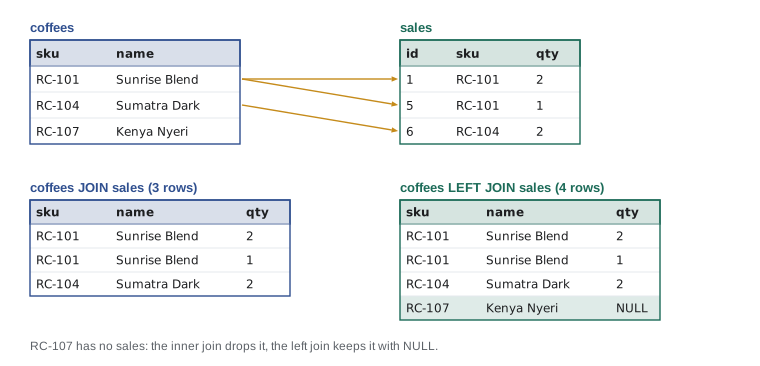
Table aliases
Writing sales. and coffees. in front of every column gets long. A table alias is a short name given to a table in FROM or JOIN, usually one or two letters, and then used to qualify columns. Aliases are almost universal in real SQL, and they become essential when a query uses the same table twice. AS is optional before a table alias.
import sqlite3

con = sqlite3.connect(":memory:")
con.executescript("""CREATE TABLE coffees (
    sku         TEXT PRIMARY KEY,
    name        TEXT NOT NULL,
    origin      TEXT NOT NULL,
    roast       TEXT NOT NULL CHECK (roast IN ('light', 'medium', 'dark')),
    price_cents INTEGER NOT NULL CHECK (price_cents > 0),
    stock       INTEGER NOT NULL DEFAULT 0 CHECK (stock >= 0)
);
CREATE TABLE customers (
    id     INTEGER PRIMARY KEY,
    name   TEXT NOT NULL,
    email  TEXT NOT NULL UNIQUE,
    points INTEGER NOT NULL DEFAULT 0
);
CREATE TABLE sales (
    id          INTEGER PRIMARY KEY,
    sold_on     TEXT NOT NULL,
    channel     TEXT NOT NULL CHECK (channel IN ('cafe', 'online')),
    sku         TEXT NOT NULL REFERENCES coffees (sku),
    customer_id INTEGER REFERENCES customers (id),
    qty         INTEGER NOT NULL CHECK (qty > 0),
    price_cents INTEGER NOT NULL
);
CREATE TABLE roasts (
    batch      TEXT PRIMARY KEY,
    roasted_on TEXT NOT NULL,
    sku        TEXT NOT NULL REFERENCES coffees (sku),
    green_kg   REAL NOT NULL,
    roasted_kg REAL NOT NULL,
    minutes    REAL NOT NULL
);
INSERT INTO coffees VALUES
    ('RC-101', 'Sunrise Blend', 'Blend', 'medium', 1850, 42),
    ('RC-102', 'Ethiopia Guji', 'Ethiopia', 'light', 2200, 15),
    ('RC-103', 'Colombia Huila', 'Colombia', 'medium', 1975, 27),
    ('RC-104', 'Sumatra Dark', 'Indonesia', 'dark', 2025, 9),
    ('RC-105', 'Decaf Swiss Water', 'Mexico', 'medium', 1900, 12),
    ('RC-106', 'Espresso Ridge', 'Blend', 'dark', 2150, 30);
INSERT INTO customers VALUES
    (1, 'Priya Natarajan', 'priya@example.com', 140),
    (2, 'Marcus Bell', 'marcus@example.com', 35),
    (3, 'Lena Fischer', 'lena@example.com', 320),
    (4, 'Omar Haddad', 'omar@example.com', 0),
    (5, 'Grace Kim', 'grace@example.com', 95);
INSERT INTO sales VALUES
    (1, '2026-11-02', 'cafe', 'RC-101', 1, 2, 1850),
    (2, '2026-11-02', 'online', 'RC-102', 3, 1, 2200),
    (3, '2026-11-02', 'cafe', 'RC-106', NULL, 1, 2150),
    (4, '2026-11-03', 'online', 'RC-103', 2, 3, 1975),
    (5, '2026-11-03', 'cafe', 'RC-101', NULL, 1, 1850),
    (6, '2026-11-03', 'online', 'RC-104', 3, 2, 2025),
    (7, '2026-11-04', 'cafe', 'RC-105', 5, 1, 1900),
    (8, '2026-11-04', 'online', 'RC-101', 1, 1, 1850),
    (9, '2026-11-04', 'cafe', 'RC-106', 2, 2, 2150),
    (10, '2026-11-05', 'online', 'RC-102', 5, 2, 2200),
    (11, '2026-11-05', 'cafe', 'RC-103', NULL, 1, 1975),
    (12, '2026-11-06', 'online', 'RC-106', 3, 1, 2150),
    (13, '2026-11-06', 'cafe', 'RC-101', 1, 3, 1850),
    (14, '2026-11-06', 'online', 'RC-104', NULL, 1, 2025);
INSERT INTO roasts VALUES
    ('B-0412', '2026-10-28', 'RC-101', 12.0, 10.2, 13.5),
    ('B-0413', '2026-10-29', 'RC-106', 12.0, 10.1, 14.0),
    ('B-0414', '2026-10-30', 'RC-102', 9.0, 7.7, 11.75),
    ('B-0415', '2026-10-31', 'RC-103', 12.0, 10.3, 12.5),
    ('B-0416', '2026-11-01', 'RC-104', 6.0, 5.0, 15.0),
    ('B-0417', '2026-11-02', 'RC-101', 12.0, 10.2, 13.25);""")

query = """
    SELECT s.id, c.name, cu.name AS customer, s.qty * s.price_cents / 100.0 AS amount
    FROM sales AS s
    JOIN coffees   AS c  ON c.sku = s.sku
    JOIN customers AS cu ON cu.id = s.customer_id
    WHERE s.channel = 'online'
    ORDER BY s.id
"""
for row in con.execute(query):
print(row)(2, 'Ethiopia Guji', 'Lena Fischer', 22.0) (4, 'Colombia Huila', 'Marcus Bell', 59.25) (6, 'Sumatra Dark', 'Lena Fischer', 40.5) (8, 'Sunrise Blend', 'Priya Natarajan', 18.5) (10, 'Ethiopia Guji', 'Grace Kim', 44.0) (12, 'Espresso Ridge', 'Lena Fischer', 21.5)
This query joins three tables: each sale to its coffee and to its customer. Joins chain naturally, each JOIN adding one more table and its condition. Look closely at the result, though: the online sale with id 14 is missing, because it has no customer, and an inner join drops a sale whose customer_id matches no customer. Whether that is right depends on the question, and when it is not, the answer is an outer join.
Try it yourself
Name the coffee in each sale
Set rows to a list of (id, name, qty) tuples for every cafe sale, where name is the coffee's name from the coffees table, ordered by sale id.
Join sales to coffees on the SKU, using table aliases.
rows = con.execute("SELECT id, sku, qty FROM sales WHERE channel = 'cafe' ORDER BY id").fetchall()
print(rows[:2])
The left join
A left outer join, written LEFT JOIN, keeps every row of the left table, the one named before the join, and pairs it with matching rows of the right table where they exist. Where there is no match, the right table's columns are filled with NULL. It answers questions about things that may have no related rows: all sales whether or not they have a customer, or all customers including those who have never bought anything.
import sqlite3

con = sqlite3.connect(":memory:")
con.executescript("""CREATE TABLE coffees (
    sku         TEXT PRIMARY KEY,
    name        TEXT NOT NULL,
    origin      TEXT NOT NULL,
    roast       TEXT NOT NULL CHECK (roast IN ('light', 'medium', 'dark')),
    price_cents INTEGER NOT NULL CHECK (price_cents > 0),
    stock       INTEGER NOT NULL DEFAULT 0 CHECK (stock >= 0)
);
CREATE TABLE customers (
    id     INTEGER PRIMARY KEY,
    name   TEXT NOT NULL,
    email  TEXT NOT NULL UNIQUE,
    points INTEGER NOT NULL DEFAULT 0
);
CREATE TABLE sales (
    id          INTEGER PRIMARY KEY,
    sold_on     TEXT NOT NULL,
    channel     TEXT NOT NULL CHECK (channel IN ('cafe', 'online')),
    sku         TEXT NOT NULL REFERENCES coffees (sku),
    customer_id INTEGER REFERENCES customers (id),
    qty         INTEGER NOT NULL CHECK (qty > 0),
    price_cents INTEGER NOT NULL
);
CREATE TABLE roasts (
    batch      TEXT PRIMARY KEY,
    roasted_on TEXT NOT NULL,
    sku        TEXT NOT NULL REFERENCES coffees (sku),
    green_kg   REAL NOT NULL,
    roasted_kg REAL NOT NULL,
    minutes    REAL NOT NULL
);
INSERT INTO coffees VALUES
    ('RC-101', 'Sunrise Blend', 'Blend', 'medium', 1850, 42),
    ('RC-102', 'Ethiopia Guji', 'Ethiopia', 'light', 2200, 15),
    ('RC-103', 'Colombia Huila', 'Colombia', 'medium', 1975, 27),
    ('RC-104', 'Sumatra Dark', 'Indonesia', 'dark', 2025, 9),
    ('RC-105', 'Decaf Swiss Water', 'Mexico', 'medium', 1900, 12),
    ('RC-106', 'Espresso Ridge', 'Blend', 'dark', 2150, 30);
INSERT INTO customers VALUES
    (1, 'Priya Natarajan', 'priya@example.com', 140),
    (2, 'Marcus Bell', 'marcus@example.com', 35),
    (3, 'Lena Fischer', 'lena@example.com', 320),
    (4, 'Omar Haddad', 'omar@example.com', 0),
    (5, 'Grace Kim', 'grace@example.com', 95);
INSERT INTO sales VALUES
    (1, '2026-11-02', 'cafe', 'RC-101', 1, 2, 1850),
    (2, '2026-11-02', 'online', 'RC-102', 3, 1, 2200),
    (3, '2026-11-02', 'cafe', 'RC-106', NULL, 1, 2150),
    (4, '2026-11-03', 'online', 'RC-103', 2, 3, 1975),
    (5, '2026-11-03', 'cafe', 'RC-101', NULL, 1, 1850),
    (6, '2026-11-03', 'online', 'RC-104', 3, 2, 2025),
    (7, '2026-11-04', 'cafe', 'RC-105', 5, 1, 1900),
    (8, '2026-11-04', 'online', 'RC-101', 1, 1, 1850),
    (9, '2026-11-04', 'cafe', 'RC-106', 2, 2, 2150),
    (10, '2026-11-05', 'online', 'RC-102', 5, 2, 2200),
    (11, '2026-11-05', 'cafe', 'RC-103', NULL, 1, 1975),
    (12, '2026-11-06', 'online', 'RC-106', 3, 1, 2150),
    (13, '2026-11-06', 'cafe', 'RC-101', 1, 3, 1850),
    (14, '2026-11-06', 'online', 'RC-104', NULL, 1, 2025);
INSERT INTO roasts VALUES
    ('B-0412', '2026-10-28', 'RC-101', 12.0, 10.2, 13.5),
    ('B-0413', '2026-10-29', 'RC-106', 12.0, 10.1, 14.0),
    ('B-0414', '2026-10-30', 'RC-102', 9.0, 7.7, 11.75),
    ('B-0415', '2026-10-31', 'RC-103', 12.0, 10.3, 12.5),
    ('B-0416', '2026-11-01', 'RC-104', 6.0, 5.0, 15.0),
    ('B-0417', '2026-11-02', 'RC-101', 12.0, 10.2, 13.25);""")

query = """
    SELECT s.id, s.channel, coalesce(cu.name, 'walk-in') AS customer
    FROM sales AS s
    LEFT JOIN customers AS cu ON cu.id = s.customer_id
    WHERE s.channel = 'online'
    ORDER BY s.id
"""
for row in con.execute(query):
print(row)(2, 'online', 'Lena Fischer') (4, 'online', 'Marcus Bell') (6, 'online', 'Lena Fischer') (8, 'online', 'Priya Natarajan') (10, 'online', 'Grace Kim') (12, 'online', 'Lena Fischer') (14, 'online', 'walk-in')
The most famous use of a left join is finding rows with no match at all: keep every row on the left, then keep only those where the right side came back NULL. To find coffees that have never sold, left-join coffees to sales and keep the rows where the sales key is NULL. The listing first adds a new coffee, Kenya Nyeri, which has no sales yet.
import sqlite3

con = sqlite3.connect(":memory:")
con.executescript("""CREATE TABLE coffees (
    sku         TEXT PRIMARY KEY,
    name        TEXT NOT NULL,
    origin      TEXT NOT NULL,
    roast       TEXT NOT NULL CHECK (roast IN ('light', 'medium', 'dark')),
    price_cents INTEGER NOT NULL CHECK (price_cents > 0),
    stock       INTEGER NOT NULL DEFAULT 0 CHECK (stock >= 0)
);
CREATE TABLE customers (
    id     INTEGER PRIMARY KEY,
    name   TEXT NOT NULL,
    email  TEXT NOT NULL UNIQUE,
    points INTEGER NOT NULL DEFAULT 0
);
CREATE TABLE sales (
    id          INTEGER PRIMARY KEY,
    sold_on     TEXT NOT NULL,
    channel     TEXT NOT NULL CHECK (channel IN ('cafe', 'online')),
    sku         TEXT NOT NULL REFERENCES coffees (sku),
    customer_id INTEGER REFERENCES customers (id),
    qty         INTEGER NOT NULL CHECK (qty > 0),
    price_cents INTEGER NOT NULL
);
CREATE TABLE roasts (
    batch      TEXT PRIMARY KEY,
    roasted_on TEXT NOT NULL,
    sku        TEXT NOT NULL REFERENCES coffees (sku),
    green_kg   REAL NOT NULL,
    roasted_kg REAL NOT NULL,
    minutes    REAL NOT NULL
);
INSERT INTO coffees VALUES
    ('RC-101', 'Sunrise Blend', 'Blend', 'medium', 1850, 42),
    ('RC-102', 'Ethiopia Guji', 'Ethiopia', 'light', 2200, 15),
    ('RC-103', 'Colombia Huila', 'Colombia', 'medium', 1975, 27),
    ('RC-104', 'Sumatra Dark', 'Indonesia', 'dark', 2025, 9),
    ('RC-105', 'Decaf Swiss Water', 'Mexico', 'medium', 1900, 12),
    ('RC-106', 'Espresso Ridge', 'Blend', 'dark', 2150, 30);
INSERT INTO customers VALUES
    (1, 'Priya Natarajan', 'priya@example.com', 140),
    (2, 'Marcus Bell', 'marcus@example.com', 35),
    (3, 'Lena Fischer', 'lena@example.com', 320),
    (4, 'Omar Haddad', 'omar@example.com', 0),
    (5, 'Grace Kim', 'grace@example.com', 95);
INSERT INTO sales VALUES
    (1, '2026-11-02', 'cafe', 'RC-101', 1, 2, 1850),
    (2, '2026-11-02', 'online', 'RC-102', 3, 1, 2200),
    (3, '2026-11-02', 'cafe', 'RC-106', NULL, 1, 2150),
    (4, '2026-11-03', 'online', 'RC-103', 2, 3, 1975),
    (5, '2026-11-03', 'cafe', 'RC-101', NULL, 1, 1850),
    (6, '2026-11-03', 'online', 'RC-104', 3, 2, 2025),
    (7, '2026-11-04', 'cafe', 'RC-105', 5, 1, 1900),
    (8, '2026-11-04', 'online', 'RC-101', 1, 1, 1850),
    (9, '2026-11-04', 'cafe', 'RC-106', 2, 2, 2150),
    (10, '2026-11-05', 'online', 'RC-102', 5, 2, 2200),
    (11, '2026-11-05', 'cafe', 'RC-103', NULL, 1, 1975),
    (12, '2026-11-06', 'online', 'RC-106', 3, 1, 2150),
    (13, '2026-11-06', 'cafe', 'RC-101', 1, 3, 1850),
    (14, '2026-11-06', 'online', 'RC-104', NULL, 1, 2025);
INSERT INTO roasts VALUES
    ('B-0412', '2026-10-28', 'RC-101', 12.0, 10.2, 13.5),
    ('B-0413', '2026-10-29', 'RC-106', 12.0, 10.1, 14.0),
    ('B-0414', '2026-10-30', 'RC-102', 9.0, 7.7, 11.75),
    ('B-0415', '2026-10-31', 'RC-103', 12.0, 10.3, 12.5),
    ('B-0416', '2026-11-01', 'RC-104', 6.0, 5.0, 15.0),
    ('B-0417', '2026-11-02', 'RC-101', 12.0, 10.2, 13.25);""")

con.execute("INSERT INTO coffees VALUES ('RC-107', 'Kenya Nyeri', 'Kenya', 'light', 2350, 20)")
never_sold = con.execute("""
    SELECT c.sku, c.name
    FROM coffees AS c
    LEFT JOIN sales AS s ON s.sku = c.sku
    WHERE s.id IS NULL
""").fetchall()
print("never sold:", never_sold)

counts = con.execute("""
    SELECT c.sku, COUNT(s.id) AS sales
    FROM coffees AS c
    LEFT JOIN sales AS s ON s.sku = c.sku
    GROUP BY c.sku
    ORDER BY c.sku
""").fetchall()
print(counts)never sold: [('RC-107', 'Kenya Nyeri')]
[('RC-101', 4), ('RC-102', 2), ('RC-103', 2), ('RC-104', 2), ('RC-105', 1), ('RC-106', 3), ('RC-107', 0)]The second query shows a subtle point about counting with outer joins. COUNT(s.id) counts only non-NULL sale ids, so the unsold coffee correctly shows 0. COUNT(*) would count the row the left join kept for it and report 1, a classic bug in reports that show 'items with their number of orders'.
Where you put a condition in an outer join also matters. A condition in the ON clause decides which right-hand rows count as matches, while a condition in WHERE filters the final rows. Writing LEFT JOIN sales AS s ON s.sku = c.sku WHERE s.channel = 'online' removes the coffees with no sales, because their s.channel is NULL, silently turning the left join back into an inner join. Writing the condition as part of the join, ON s.sku = c.sku AND s.channel = 'online', keeps every coffee and matches only online sales.
Standard SQL also defines RIGHT JOIN, which keeps every row of the right table, and FULL OUTER JOIN, which keeps unmatched rows from both. A right join is just a left join with the tables swapped, so most people always write left joins. SQLite supports RIGHT and FULL joins since version 3.39.
Try it yourself
Customers who never bought
Set idle to a list of the names of customers who have no sales at all, sorted by name, using a LEFT JOIN from customers to sales.
Then set per_customer to a list of (name, sales) tuples for every customer, with the number of sales (0 where there are none), sorted by name.
idle = []
per_customer = con.execute("SELECT cu.name, COUNT(*) FROM customers AS cu JOIN sales AS s ON s.customer_id = cu.id GROUP BY cu.name ORDER BY cu.name").fetchall()
print(idle, per_customer)
Aggregating joined rows
Joins and grouping combine naturally: join to bring in the descriptive columns, then group and aggregate. The query below produces the report Anita wanted at the start of the lesson, revenue by coffee name and channel. Grouping by c.sku rather than only c.name is a good habit, since two different coffees could one day share a name, and the key is guaranteed unique.
import sqlite3

con = sqlite3.connect(":memory:")
con.executescript("""CREATE TABLE coffees (
    sku         TEXT PRIMARY KEY,
    name        TEXT NOT NULL,
    origin      TEXT NOT NULL,
    roast       TEXT NOT NULL CHECK (roast IN ('light', 'medium', 'dark')),
    price_cents INTEGER NOT NULL CHECK (price_cents > 0),
    stock       INTEGER NOT NULL DEFAULT 0 CHECK (stock >= 0)
);
CREATE TABLE customers (
    id     INTEGER PRIMARY KEY,
    name   TEXT NOT NULL,
    email  TEXT NOT NULL UNIQUE,
    points INTEGER NOT NULL DEFAULT 0
);
CREATE TABLE sales (
    id          INTEGER PRIMARY KEY,
    sold_on     TEXT NOT NULL,
    channel     TEXT NOT NULL CHECK (channel IN ('cafe', 'online')),
    sku         TEXT NOT NULL REFERENCES coffees (sku),
    customer_id INTEGER REFERENCES customers (id),
    qty         INTEGER NOT NULL CHECK (qty > 0),
    price_cents INTEGER NOT NULL
);
CREATE TABLE roasts (
    batch      TEXT PRIMARY KEY,
    roasted_on TEXT NOT NULL,
    sku        TEXT NOT NULL REFERENCES coffees (sku),
    green_kg   REAL NOT NULL,
    roasted_kg REAL NOT NULL,
    minutes    REAL NOT NULL
);
INSERT INTO coffees VALUES
    ('RC-101', 'Sunrise Blend', 'Blend', 'medium', 1850, 42),
    ('RC-102', 'Ethiopia Guji', 'Ethiopia', 'light', 2200, 15),
    ('RC-103', 'Colombia Huila', 'Colombia', 'medium', 1975, 27),
    ('RC-104', 'Sumatra Dark', 'Indonesia', 'dark', 2025, 9),
    ('RC-105', 'Decaf Swiss Water', 'Mexico', 'medium', 1900, 12),
    ('RC-106', 'Espresso Ridge', 'Blend', 'dark', 2150, 30);
INSERT INTO customers VALUES
    (1, 'Priya Natarajan', 'priya@example.com', 140),
    (2, 'Marcus Bell', 'marcus@example.com', 35),
    (3, 'Lena Fischer', 'lena@example.com', 320),
    (4, 'Omar Haddad', 'omar@example.com', 0),
    (5, 'Grace Kim', 'grace@example.com', 95);
INSERT INTO sales VALUES
    (1, '2026-11-02', 'cafe', 'RC-101', 1, 2, 1850),
    (2, '2026-11-02', 'online', 'RC-102', 3, 1, 2200),
    (3, '2026-11-02', 'cafe', 'RC-106', NULL, 1, 2150),
    (4, '2026-11-03', 'online', 'RC-103', 2, 3, 1975),
    (5, '2026-11-03', 'cafe', 'RC-101', NULL, 1, 1850),
    (6, '2026-11-03', 'online', 'RC-104', 3, 2, 2025),
    (7, '2026-11-04', 'cafe', 'RC-105', 5, 1, 1900),
    (8, '2026-11-04', 'online', 'RC-101', 1, 1, 1850),
    (9, '2026-11-04', 'cafe', 'RC-106', 2, 2, 2150),
    (10, '2026-11-05', 'online', 'RC-102', 5, 2, 2200),
    (11, '2026-11-05', 'cafe', 'RC-103', NULL, 1, 1975),
    (12, '2026-11-06', 'online', 'RC-106', 3, 1, 2150),
    (13, '2026-11-06', 'cafe', 'RC-101', 1, 3, 1850),
    (14, '2026-11-06', 'online', 'RC-104', NULL, 1, 2025);
INSERT INTO roasts VALUES
    ('B-0412', '2026-10-28', 'RC-101', 12.0, 10.2, 13.5),
    ('B-0413', '2026-10-29', 'RC-106', 12.0, 10.1, 14.0),
    ('B-0414', '2026-10-30', 'RC-102', 9.0, 7.7, 11.75),
    ('B-0415', '2026-10-31', 'RC-103', 12.0, 10.3, 12.5),
    ('B-0416', '2026-11-01', 'RC-104', 6.0, 5.0, 15.0),
    ('B-0417', '2026-11-02', 'RC-101', 12.0, 10.2, 13.25);""")

query = """
    SELECT c.name, s.channel, SUM(s.qty) AS bags, SUM(s.qty * s.price_cents) / 100.0 AS revenue
    FROM sales AS s
    JOIN coffees AS c ON c.sku = s.sku
    GROUP BY c.sku, s.channel
    ORDER BY c.name, s.channel
"""
for name, channel, bags, revenue in con.execute(query):
print(f"{name:<18} {channel:<7} {bags:>2} bags {revenue:>8.2f}")Colombia Huila cafe 1 bags 19.75 Colombia Huila online 3 bags 59.25 Decaf Swiss Water cafe 1 bags 19.00 Espresso Ridge cafe 3 bags 64.50 Espresso Ridge online 1 bags 21.50 Ethiopia Guji online 3 bags 66.00 Sumatra Dark online 3 bags 60.75 Sunrise Blend cafe 6 bags 111.00 Sunrise Blend online 1 bags 18.50
Joins can also multiply rows unexpectedly. If you join coffees to both sales and roasts at once, each coffee's sales are paired with each of its roast batches, so a coffee with four sales and two batches produces eight rows, and a SUM over sales doubles. When a query needs totals from two different one-to-many relationships, aggregate each separately first, for example in subqueries, and then join the results.
import sqlite3

con = sqlite3.connect(":memory:")
con.executescript("""CREATE TABLE coffees (
    sku         TEXT PRIMARY KEY,
    name        TEXT NOT NULL,
    origin      TEXT NOT NULL,
    roast       TEXT NOT NULL CHECK (roast IN ('light', 'medium', 'dark')),
    price_cents INTEGER NOT NULL CHECK (price_cents > 0),
    stock       INTEGER NOT NULL DEFAULT 0 CHECK (stock >= 0)
);
CREATE TABLE customers (
    id     INTEGER PRIMARY KEY,
    name   TEXT NOT NULL,
    email  TEXT NOT NULL UNIQUE,
    points INTEGER NOT NULL DEFAULT 0
);
CREATE TABLE sales (
    id          INTEGER PRIMARY KEY,
    sold_on     TEXT NOT NULL,
    channel     TEXT NOT NULL CHECK (channel IN ('cafe', 'online')),
    sku         TEXT NOT NULL REFERENCES coffees (sku),
    customer_id INTEGER REFERENCES customers (id),
    qty         INTEGER NOT NULL CHECK (qty > 0),
    price_cents INTEGER NOT NULL
);
CREATE TABLE roasts (
    batch      TEXT PRIMARY KEY,
    roasted_on TEXT NOT NULL,
    sku        TEXT NOT NULL REFERENCES coffees (sku),
    green_kg   REAL NOT NULL,
    roasted_kg REAL NOT NULL,
    minutes    REAL NOT NULL
);
INSERT INTO coffees VALUES
    ('RC-101', 'Sunrise Blend', 'Blend', 'medium', 1850, 42),
    ('RC-102', 'Ethiopia Guji', 'Ethiopia', 'light', 2200, 15),
    ('RC-103', 'Colombia Huila', 'Colombia', 'medium', 1975, 27),
    ('RC-104', 'Sumatra Dark', 'Indonesia', 'dark', 2025, 9),
    ('RC-105', 'Decaf Swiss Water', 'Mexico', 'medium', 1900, 12),
    ('RC-106', 'Espresso Ridge', 'Blend', 'dark', 2150, 30);
INSERT INTO customers VALUES
    (1, 'Priya Natarajan', 'priya@example.com', 140),
    (2, 'Marcus Bell', 'marcus@example.com', 35),
    (3, 'Lena Fischer', 'lena@example.com', 320),
    (4, 'Omar Haddad', 'omar@example.com', 0),
    (5, 'Grace Kim', 'grace@example.com', 95);
INSERT INTO sales VALUES
    (1, '2026-11-02', 'cafe', 'RC-101', 1, 2, 1850),
    (2, '2026-11-02', 'online', 'RC-102', 3, 1, 2200),
    (3, '2026-11-02', 'cafe', 'RC-106', NULL, 1, 2150),
    (4, '2026-11-03', 'online', 'RC-103', 2, 3, 1975),
    (5, '2026-11-03', 'cafe', 'RC-101', NULL, 1, 1850),
    (6, '2026-11-03', 'online', 'RC-104', 3, 2, 2025),
    (7, '2026-11-04', 'cafe', 'RC-105', 5, 1, 1900),
    (8, '2026-11-04', 'online', 'RC-101', 1, 1, 1850),
    (9, '2026-11-04', 'cafe', 'RC-106', 2, 2, 2150),
    (10, '2026-11-05', 'online', 'RC-102', 5, 2, 2200),
    (11, '2026-11-05', 'cafe', 'RC-103', NULL, 1, 1975),
    (12, '2026-11-06', 'online', 'RC-106', 3, 1, 2150),
    (13, '2026-11-06', 'cafe', 'RC-101', 1, 3, 1850),
    (14, '2026-11-06', 'online', 'RC-104', NULL, 1, 2025);
INSERT INTO roasts VALUES
    ('B-0412', '2026-10-28', 'RC-101', 12.0, 10.2, 13.5),
    ('B-0413', '2026-10-29', 'RC-106', 12.0, 10.1, 14.0),
    ('B-0414', '2026-10-30', 'RC-102', 9.0, 7.7, 11.75),
    ('B-0415', '2026-10-31', 'RC-103', 12.0, 10.3, 12.5),
    ('B-0416', '2026-11-01', 'RC-104', 6.0, 5.0, 15.0),
    ('B-0417', '2026-11-02', 'RC-101', 12.0, 10.2, 13.25);""")

wrong = con.execute("""
    SELECT c.sku, SUM(s.qty) FROM coffees AS c
    JOIN sales AS s ON s.sku = c.sku
    JOIN roasts AS r ON r.sku = c.sku
    WHERE c.sku = 'RC-101' GROUP BY c.sku
""").fetchone()
right = con.execute("""
    SELECT c.sku, sold.bags, roasted.batches
    FROM coffees AS c
    JOIN (SELECT sku, SUM(qty) AS bags FROM sales GROUP BY sku) AS sold ON sold.sku = c.sku
    JOIN (SELECT sku, COUNT(*) AS batches FROM roasts GROUP BY sku) AS roasted ON roasted.sku = c.sku
    WHERE c.sku = 'RC-101'
""").fetchone()
print("double-counted:", wrong, " correct:", right)double-counted: ('RC-101', 14) correct: ('RC-101', 7, 2)The correct version uses subqueries: a SELECT in parentheses used as a table in FROM or JOIN, each with an alias. Subqueries, and their tidier cousin, the WITH clause (common table expressions), let you build a complex query from simple named steps. You will use them again in lesson 11.
Joining a table to itself
A self-join joins a table to another copy of itself, which needs two different aliases. It answers questions that compare rows of the same table, such as pairs of coffees from the same origin, or roast batches of the same coffee on different days. The condition a.sku < b.sku keeps each pair once and stops a coffee being paired with itself.
import sqlite3

con = sqlite3.connect(":memory:")
con.executescript("""CREATE TABLE coffees (
    sku         TEXT PRIMARY KEY,
    name        TEXT NOT NULL,
    origin      TEXT NOT NULL,
    roast       TEXT NOT NULL CHECK (roast IN ('light', 'medium', 'dark')),
    price_cents INTEGER NOT NULL CHECK (price_cents > 0),
    stock       INTEGER NOT NULL DEFAULT 0 CHECK (stock >= 0)
);
CREATE TABLE customers (
    id     INTEGER PRIMARY KEY,
    name   TEXT NOT NULL,
    email  TEXT NOT NULL UNIQUE,
    points INTEGER NOT NULL DEFAULT 0
);
CREATE TABLE sales (
    id          INTEGER PRIMARY KEY,
    sold_on     TEXT NOT NULL,
    channel     TEXT NOT NULL CHECK (channel IN ('cafe', 'online')),
    sku         TEXT NOT NULL REFERENCES coffees (sku),
    customer_id INTEGER REFERENCES customers (id),
    qty         INTEGER NOT NULL CHECK (qty > 0),
    price_cents INTEGER NOT NULL
);
CREATE TABLE roasts (
    batch      TEXT PRIMARY KEY,
    roasted_on TEXT NOT NULL,
    sku        TEXT NOT NULL REFERENCES coffees (sku),
    green_kg   REAL NOT NULL,
    roasted_kg REAL NOT NULL,
    minutes    REAL NOT NULL
);
INSERT INTO coffees VALUES
    ('RC-101', 'Sunrise Blend', 'Blend', 'medium', 1850, 42),
    ('RC-102', 'Ethiopia Guji', 'Ethiopia', 'light', 2200, 15),
    ('RC-103', 'Colombia Huila', 'Colombia', 'medium', 1975, 27),
    ('RC-104', 'Sumatra Dark', 'Indonesia', 'dark', 2025, 9),
    ('RC-105', 'Decaf Swiss Water', 'Mexico', 'medium', 1900, 12),
    ('RC-106', 'Espresso Ridge', 'Blend', 'dark', 2150, 30);
INSERT INTO customers VALUES
    (1, 'Priya Natarajan', 'priya@example.com', 140),
    (2, 'Marcus Bell', 'marcus@example.com', 35),
    (3, 'Lena Fischer', 'lena@example.com', 320),
    (4, 'Omar Haddad', 'omar@example.com', 0),
    (5, 'Grace Kim', 'grace@example.com', 95);
INSERT INTO sales VALUES
    (1, '2026-11-02', 'cafe', 'RC-101', 1, 2, 1850),
    (2, '2026-11-02', 'online', 'RC-102', 3, 1, 2200),
    (3, '2026-11-02', 'cafe', 'RC-106', NULL, 1, 2150),
    (4, '2026-11-03', 'online', 'RC-103', 2, 3, 1975),
    (5, '2026-11-03', 'cafe', 'RC-101', NULL, 1, 1850),
    (6, '2026-11-03', 'online', 'RC-104', 3, 2, 2025),
    (7, '2026-11-04', 'cafe', 'RC-105', 5, 1, 1900),
    (8, '2026-11-04', 'online', 'RC-101', 1, 1, 1850),
    (9, '2026-11-04', 'cafe', 'RC-106', 2, 2, 2150),
    (10, '2026-11-05', 'online', 'RC-102', 5, 2, 2200),
    (11, '2026-11-05', 'cafe', 'RC-103', NULL, 1, 1975),
    (12, '2026-11-06', 'online', 'RC-106', 3, 1, 2150),
    (13, '2026-11-06', 'cafe', 'RC-101', 1, 3, 1850),
    (14, '2026-11-06', 'online', 'RC-104', NULL, 1, 2025);
INSERT INTO roasts VALUES
    ('B-0412', '2026-10-28', 'RC-101', 12.0, 10.2, 13.5),
    ('B-0413', '2026-10-29', 'RC-106', 12.0, 10.1, 14.0),
    ('B-0414', '2026-10-30', 'RC-102', 9.0, 7.7, 11.75),
    ('B-0415', '2026-10-31', 'RC-103', 12.0, 10.3, 12.5),
    ('B-0416', '2026-11-01', 'RC-104', 6.0, 5.0, 15.0),
    ('B-0417', '2026-11-02', 'RC-101', 12.0, 10.2, 13.25);""")

pairs = con.execute("""
    SELECT a.name, b.name, a.origin
    FROM coffees AS a
    JOIN coffees AS b ON a.origin = b.origin AND a.sku < b.sku
""").fetchall()
print(pairs)

repeat = con.execute("""
    SELECT first.sku, first.batch, later.batch, later.roasted_on
    FROM roasts AS first
    JOIN roasts AS later ON later.sku = first.sku AND later.roasted_on > first.roasted_on
""").fetchall()
print(repeat)[('Sunrise Blend', 'Espresso Ridge', 'Blend')]
[('RC-101', 'B-0412', 'B-0417', '2026-11-02')]You may also meet the older join syntax, which lists tables separated by commas in FROM and puts the join condition in WHERE: FROM sales s, coffees c WHERE c.sku = s.sku. It gives the same result as an inner join, but mixing join conditions with filters makes queries harder to read, and forgetting the condition produces a cross join, every row paired with every row. Prefer explicit JOIN ... ON.
Try it yourself
A three-table report
Set report to a list of (customer, coffee, bags) tuples giving, for each customer and each coffee they bought, the total bags, where customer and coffee are names.
Use inner joins from sales to customers and coffees, group by customer and coffee, and order by customer name and then coffee name.
report = con.execute("SELECT customer_id, sku, qty FROM sales").fetchall()
print(report[:3])
Worked problem
Choosing the right join
For each question, choose an inner or a left join: (a) the names of coffees each customer bought; (b) every coffee with its total bags sold, showing 0 for coffees that never sold; (c) customers who have never bought anything.
Show solution
- (a) Only actual purchases matter: inner join sales to customers and coffees.
- (b) Every coffee must appear: coffees LEFT JOIN sales, with coalesce(SUM(s.qty), 0) or COUNT for zeros.
- (c) Customers with no matching sales: customers LEFT JOIN sales WHERE s.id IS NULL.
Answer: (a) inner join, (b) left join from coffees, (c) left join from customers keeping rows where the sale is NULL.
Common mistakes
MistakeLeaving shared column names unqualified, such as sku in a join of sales and coffees.
InsteadQualify every column with its table or alias.
MistakeUsing an inner join when unmatched rows must appear.
InsteadUse LEFT JOIN from the table whose rows must all be kept.
MistakeCounting with COUNT(*) after a left join.
InsteadCount a column from the right table, such as COUNT(s.id), so unmatched rows count as 0.
MistakeFiltering the right table of a left join in WHERE.
InsteadPut conditions on the right table in the ON clause to keep unmatched rows.
MistakeJoining two one-to-many tables at once and summing.
InsteadAggregate each relationship in a subquery first, then join.
MistakeForgetting the join condition in comma-style joins.
InsteadWrite explicit JOIN ... ON so the condition cannot be forgotten.
Summary and key terms
- A join combines rows from tables by matching values, usually a foreign key with a primary key.
- An inner join (JOIN) keeps only rows that match in both tables.
- Qualify columns with table names or short aliases, which are required for self-joins.
- A left join keeps every row of the left table, filling the right side with NULL where there is no match.
- LEFT JOIN ... WHERE right.key IS NULL finds rows with no match; count right-hand columns to get zeros.
- Conditions on the right table of a left join belong in ON, not WHERE.
- Join then group for reports; aggregate one-to-many tables separately to avoid multiplied rows.
- A self-join compares rows of the same table using two aliases.
- join
- Combining rows from two or more tables by matching values.
- inner join
- A join that keeps only rows with a match in both tables.
- join condition
- The ON expression that decides which rows match.
- table alias
- A short name for a table within a query.
- left outer join
- A join that keeps every row of the left table, with NULLs where there is no match.
- outer join
- A join that keeps unmatched rows from one or both tables.
- self-join
- A join of a table to itself, using two aliases.
- cross join
- Every row of one table paired with every row of another.
- subquery
- A SELECT nested inside another statement, often used as a table.
- qualified name
- A column name prefixed by its table or alias, such as s.sku.
Practice problems
Work each problem on paper first, then reveal the answer to check.
A query joins sales to customers with an inner join. Why are walk-in sales missing?
Show answer
Their customer_id is NULL, so no customer row matches and the inner join drops them.
Write the FROM clause to list every coffee with its sales, keeping unsold coffees.
Show answer
FROM coffees AS c LEFT JOIN sales AS s ON s.sku = c.sku
A left join report shows 1 sale for a coffee that never sold. What is the likely bug?
Show answer
It used COUNT(*) instead of COUNT(s.id).
Why does a self-join on origin use a.sku < b.sku?
Show answer
To avoid pairing a coffee with itself and listing each pair twice.
What is a cross join of 6 coffees and 14 sales, and how many rows does it have?
Show answer
Every coffee paired with every sale: 84 rows.
Where should the condition channel = 'online' go to keep all coffees in a left join to sales?
Show answer
In the ON clause: ON s.sku = c.sku AND s.channel = 'online'.
Lesson quiz · 5 questions
Score 60% or more to complete this lesson.
Create a free account to save your progress, take quizzes and earn a certificate.