
PYTH-215 · Lesson 12 of 12 · 40 min
Capstone: a database-backed application
▶ Video coming soon A video version of this lesson is on the way.
Ridgeline's tools have come a long way. PYTH-101 built a single script that kept stock in a dictionary and saved it as JSON. PYTH-102 turned that script into a package with classes, money handled exactly, and safe saving. This capstone completes the move to a database: Jordan replaces the JSON storage with SQLite, keeping the operations the rest of the package relies on (look up a coffee, sell, restock, list low stock, value the stock, report sales by day) while gaining everything this course has covered: constraints that protect the data, transactions that keep sales and stock in step, queries that answer reports directly, indexes for speed, and a schema that can evolve through migrations.
The lesson builds a small package, ridgeline_db, in three modules: schema.py holds the table definitions as numbered migrations; store.py holds a Store class that is the only code touching SQL; and __init__.py exposes the public names. It then migrates the old JSON data, runs a scripted day of trading against a database file, reopens it to prove the data persisted, and tests the rules that matter. Each listing writes its module files next to itself before importing them, so you can edit the code and run it again in the browser.
The design
Three decisions shape the package. First, all SQL lives in one class, Store, whose methods take and return plain Python values: SKUs, integers of cents, dictionaries. The rest of Ridgeline's code, the command-line tool from PYTH-102 and the web shop to come in PYTH-220, calls Store methods and never sees a cursor. Second, every change that must be atomic happens inside one with block, so a sale and its stock change commit together or not at all. Third, the schema is versioned: migrations are numbered SQL scripts, and SQLite's built-in user_version setting records how many have been applied, so opening any copy of the database, a fresh one or last year's, brings it to the current version automatically.
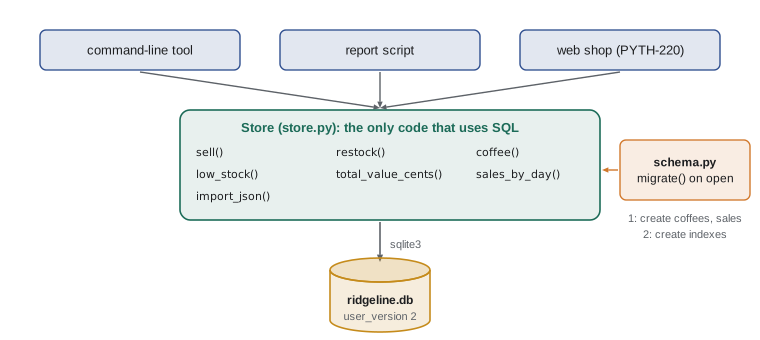
Migrations with user_version
Every SQLite database file has a spare integer in its header, read and written with PRAGMA user_version, that starts at 0 and is free for the application's own use. Using it as a schema version gives a complete, dependency-free migration system. migrate reads the version, then applies each later migration inside its own transaction, setting user_version in the same transaction. SQLite can roll back table creation like any other change, so a migration that fails halfway leaves the database exactly at its previous version. The statements are run one at a time inside an explicit BEGIN, because sqlite3's executescript commits on its own and would break that guarantee.
import importlib, os, sys
sys.dont_write_bytecode = True
sys.path.insert(0, os.getcwd())
os.makedirs("ridgeline_db", exist_ok=True)
with open("ridgeline_db/schema.py", "w") as f:
    f.write('''"""Ridgeline's database schema, applied in numbered steps (migrations)."""

MIGRATIONS = [
    # 1: the first version of the schema
    """
    CREATE TABLE coffees (
        sku          TEXT PRIMARY KEY,
        name         TEXT NOT NULL,
        price_cents  INTEGER NOT NULL CHECK (price_cents > 0),
        stock        INTEGER NOT NULL DEFAULT 0 CHECK (stock >= 0),
        discontinued INTEGER NOT NULL DEFAULT 0
    );
    CREATE TABLE sales (
        id          INTEGER PRIMARY KEY,
        sold_on     TEXT NOT NULL,
        sku         TEXT NOT NULL REFERENCES coffees (sku),
        qty         INTEGER NOT NULL CHECK (qty > 0),
        price_cents INTEGER NOT NULL
    );
    """,
    # 2: indexes for the daily report and each coffee's history
    """
    CREATE INDEX idx_sales_day ON sales (sold_on);
    CREATE INDEX idx_sales_sku_day ON sales (sku, sold_on);
    """,
]


def migrate(con):
    """Apply any migrations this database has not had yet; return its version."""
    version = con.execute("PRAGMA user_version").fetchone()[0]
    for number in range(version + 1, len(MIGRATIONS) + 1):
        con.execute("BEGIN")
        try:
            for statement in MIGRATIONS[number - 1].split(";"):
                if statement.strip():
                    con.execute(statement)
            con.execute(f"PRAGMA user_version = {number}")
            con.execute("COMMIT")
        except Exception:
            con.execute("ROLLBACK")
            raise
    return len(MIGRATIONS)
''')
for name in [m for m in sys.modules if m == "ridgeline_db" or m.startswith("ridgeline_db.")]:
    sys.modules.pop(name)
importlib.invalidate_caches()
import sqlite3
from ridgeline_db.schema import migrate

con = sqlite3.connect(":memory:")
print("version before:", con.execute("PRAGMA user_version").fetchone()[0])
print("version after:", migrate(con))
print([r[0] for r in con.execute("SELECT name FROM sqlite_master ORDER BY type DESC, name")])
print("again:", migrate(con)) # already current: nothing to doversion before: 0 version after: 2 ['coffees', 'sales', 'idx_sales_day', 'idx_sales_sku_day', 'sqlite_autoindex_coffees_1'] again: 2
Running migrate a second time does nothing, because the database already reports version 2. When Ridgeline later needs a new column, the change is appended to the list as migration 3, and every database picks it up the next time a Store opens it. Migrations are never edited after they have been applied anywhere; mistakes are fixed by a new migration. Tools such as Alembic follow the same principle with more features.
The Store class
Store opens the connection with the settings recommended in lesson 9: sqlite3.Row for named columns, foreign keys on, and a timeout so a second program waits briefly for a lock instead of failing. It takes a today function, defaulting to date.today, which tests and examples replace with a fixed date, the same clock-injection idea PYTH-102 used for the Inventory class. Prices are integers of cents throughout; to_cents converts text such as '18.50' exactly with Decimal, never through a float.
The sell method deserves a close look, since it carries the most important rule. Inside one transaction it looks up the coffee (raising KeyError for an unknown SKU), reduces the stock with the guarded UPDATE from lesson 8, raises StockError if no row qualified, and only then records the sale with the price at the moment of sale. Any exception leaves the with block and rolls everything back.
import importlib, os, sys
sys.dont_write_bytecode = True
sys.path.insert(0, os.getcwd())
os.makedirs("ridgeline_db", exist_ok=True)
with open("ridgeline_db/schema.py", "w") as f:
    f.write('''"""Ridgeline's database schema, applied in numbered steps (migrations)."""

MIGRATIONS = [
    # 1: the first version of the schema
    """
    CREATE TABLE coffees (
        sku          TEXT PRIMARY KEY,
        name         TEXT NOT NULL,
        price_cents  INTEGER NOT NULL CHECK (price_cents > 0),
        stock        INTEGER NOT NULL DEFAULT 0 CHECK (stock >= 0),
        discontinued INTEGER NOT NULL DEFAULT 0
    );
    CREATE TABLE sales (
        id          INTEGER PRIMARY KEY,
        sold_on     TEXT NOT NULL,
        sku         TEXT NOT NULL REFERENCES coffees (sku),
        qty         INTEGER NOT NULL CHECK (qty > 0),
        price_cents INTEGER NOT NULL
    );
    """,
    # 2: indexes for the daily report and each coffee's history
    """
    CREATE INDEX idx_sales_day ON sales (sold_on);
    CREATE INDEX idx_sales_sku_day ON sales (sku, sold_on);
    """,
]


def migrate(con):
    """Apply any migrations this database has not had yet; return its version."""
    version = con.execute("PRAGMA user_version").fetchone()[0]
    for number in range(version + 1, len(MIGRATIONS) + 1):
        con.execute("BEGIN")
        try:
            for statement in MIGRATIONS[number - 1].split(";"):
                if statement.strip():
                    con.execute(statement)
            con.execute(f"PRAGMA user_version = {number}")
            con.execute("COMMIT")
        except Exception:
            con.execute("ROLLBACK")
            raise
    return len(MIGRATIONS)
''')
with open("ridgeline_db/store.py", "w") as f:
    f.write('''"""Ridgeline's data in SQLite. The rest of the program never sees SQL."""
import sqlite3
from datetime import date
from decimal import Decimal

from .schema import migrate


class StockError(Exception):
    """A sale asked for more bags than are in stock."""


def to_cents(text):
    """Exact conversion of a price such as '18.50' to 1850 cents."""
    return int((Decimal(text) * 100).quantize(Decimal(1)))


class Store:
    def __init__(self, path=":memory:", today=date.today):
        self.con = sqlite3.connect(path, timeout=5)
        self.con.row_factory = sqlite3.Row
        self.con.execute("PRAGMA foreign_keys = ON")
        self.today = today
        self.version = migrate(self.con)

    def close(self):
        self.con.close()

    # ---------------------------------------------------------------- coffees
    def add_coffee(self, sku, name, price_cents, stock=0):
        with self.con:
            self.con.execute("INSERT INTO coffees (sku, name, price_cents, stock) VALUES (?, ?, ?, ?)",
                             (sku, name, price_cents, stock))

    def coffee(self, sku):
        row = self.con.execute("SELECT * FROM coffees WHERE sku = ?", (sku,)).fetchone()
        if row is None:
            raise KeyError(sku)
        return dict(row)

    def coffees(self):
        return [dict(r) for r in self.con.execute(
            "SELECT * FROM coffees WHERE discontinued = 0 ORDER BY sku")]

    def low_stock(self, limit=10):
        return [r["sku"] for r in self.con.execute(
            "SELECT sku FROM coffees WHERE discontinued = 0 AND stock < ? ORDER BY stock, sku", (limit,))]

    def total_value_cents(self):
        return self.con.execute("SELECT coalesce(SUM(stock * price_cents), 0) FROM coffees").fetchone()[0]

    # ---------------------------------------------------------------- changes
    def restock(self, sku, bags):
        with self.con:
            cur = self.con.execute("UPDATE coffees SET stock = stock + ? WHERE sku = ?", (bags, sku))
            if cur.rowcount != 1:
                raise KeyError(sku)

    def sell(self, sku, qty):
        """Record a sale and reduce the stock together; return the sale id."""
        with self.con:
            price = self.coffee(sku)["price_cents"]           # KeyError for an unknown coffee
            cur = self.con.execute(
                "UPDATE coffees SET stock = stock - ? WHERE sku = ? AND stock >= ?", (qty, sku, qty))
            if cur.rowcount != 1:
                raise StockError(f"not enough {sku} in stock for {qty} bags")
            cur = self.con.execute(
                "INSERT INTO sales (sold_on, sku, qty, price_cents) VALUES (?, ?, ?, ?)",
                (self.today().isoformat(), sku, qty, price))
            return cur.lastrowid

    def import_json(self, data):
        """Load a PYTH-102 save file: prices as text, sales with ISO date-times."""
        with self.con:
            for c in data["coffees"]:
                self.con.execute(
                    "INSERT INTO coffees (sku, name, price_cents, stock) VALUES (?, ?, ?, ?) "
                    "ON CONFLICT (sku) DO UPDATE SET name = excluded.name, "
                    "price_cents = excluded.price_cents, stock = excluded.stock",
                    (c["sku"], c["name"], to_cents(c["price"]), int(c["stock"])))
            for s in data.get("sales", []):
                self.con.execute(
                    "INSERT INTO sales (sold_on, sku, qty, price_cents) VALUES (?, ?, ?, ?)",
                    (s["when"][:10], s["sku"], int(s["qty"]), to_cents(s["price"])))

    # ---------------------------------------------------------------- reports
    def sales_by_day(self):
        return [tuple(r) for r in self.con.execute(
            "SELECT sold_on, SUM(qty) AS bags, SUM(qty * price_cents) AS cents "
            "FROM sales GROUP BY sold_on ORDER BY sold_on")]
''')
with open("ridgeline_db/__init__.py", "w") as f:
    f.write('''"""Ridgeline Coffee Roasters: inventory and sales, stored in SQLite."""
from .store import StockError, Store, to_cents
''')
for name in [m for m in sys.modules if m == "ridgeline_db" or m.startswith("ridgeline_db.")]:
    sys.modules.pop(name)
importlib.invalidate_caches()
import json
from datetime import date
import ridgeline_db

store = ridgeline_db.Store(today=lambda: date(2026, 11, 9))     # in memory, fixed date
store.import_json(json.loads("""{"coffees": [
  {"sku": "RC-101", "name": "Sunrise Blend", "price": "18.50", "stock": 42},
  {"sku": "RC-102", "name": "Ethiopia Guji", "price": "22.00", "stock": 15},
  {"sku": "RC-103", "name": "Colombia Huila", "price": "19.75", "stock": 27},
  {"sku": "RC-104", "name": "Sumatra Dark", "price": "20.25", "stock": 9},
  {"sku": "RC-105", "name": "Decaf Swiss Water", "price": "19.00", "stock": 12},
  {"sku": "RC-106", "name": "Espresso Ridge", "price": "21.50", "stock": 30}],
 "sales": [
  {"sku": "RC-101", "qty": 2, "price": "18.50", "when": "2026-11-06T09:14:00"},
  {"sku": "RC-104", "qty": 1, "price": "20.25", "when": "2026-11-06T15:02:00"}]}"""))
print("schema version", store.version, "-", len(store.coffees()), "coffees")
print(store.coffee("RC-104"))

sale_id = store.sell("RC-104", 2)
print("sale", sale_id, "->", store.coffee("RC-104")["stock"], "bags left")
for sku, qty in [("RC-104", 50), ("RC-999", 1)]:
    try:
        store.sell(sku, qty)
    except ridgeline_db.StockError as e:
        print("StockError:", e)
    except KeyError as e:
        print("KeyError:", e)
print("low stock:", store.low_stock())
print("stock value:", store.total_value_cents() / 100)
print(store.sales_by_day())schema version 2 - 6 coffees
{'sku': 'RC-104', 'name': 'Sumatra Dark', 'price_cents': 2025, 'stock': 9, 'discontinued': 0}
sale 3 -> 7 bags left
StockError: not enough RC-104 in stock for 50 bags
KeyError: 'RC-999'
low stock: ['RC-104']
stock value: 2655.0
[('2026-11-06', 3, 5725), ('2026-11-09', 2, 4050)]The listing writes all three modules (scroll up inside it to read store.py in full), then imports the PYTH-102 save file. Its two old sales keep their original dates, because import_json takes the date part of each ISO date-time, and today's sale is dated 2026-11-09 by the injected clock. The refused sales changed nothing: RC-104's stock is still 7 after the failed attempt to sell 50, and no sale row exists for either failure.
Try it yourself
Best sellers
The setup has written the package and created store with the starter data imported (two old sales). Write best_sellers(store, n) that returns a list of (sku, bags) tuples for the n coffees with the most bags sold, most first, breaking ties by SKU.
Use one query through store.con, with GROUP BY, ORDER BY and LIMIT, passing n as a parameter.
def best_sellers(store, n):
    return [(r['sku'], r['qty']) for r in store.con.execute('SELECT sku, qty FROM sales')]
A day of trading, saved to a file
An in-memory database is ideal for examples and tests, but the point of a database is that data outlives the program. The next listing opens a Store on a file, ridgeline.db, runs a scripted day at the cafe, closes it, and then opens it again as a fresh Store to show that everything persisted and that migrate recognized the existing database. In the browser the file lives in the page's temporary storage, so run the package listing above first if you have not already; on a computer it would be a normal file next to your program.
import importlib, os, sys
sys.dont_write_bytecode = True
sys.path.insert(0, os.getcwd())
if not os.path.exists("ridgeline_db/store.py"):
    raise SystemExit("Run the listing that writes the ridgeline_db package first.")
for name in [m for m in sys.modules if m == "ridgeline_db" or m.startswith("ridgeline_db.")]:
    sys.modules.pop(name)
importlib.invalidate_caches()
from datetime import date
import ridgeline_db

if os.path.exists("ridgeline.db"):
    os.remove("ridgeline.db")                                     # start the demonstration fresh

day = lambda: date(2026, 11, 10)
store = ridgeline_db.Store("ridgeline.db", today=day)
for sku, name, cents, stock in [("RC-101", "Sunrise Blend", 1850, 42), ("RC-104", "Sumatra Dark", 2025, 9)]:
    store.add_coffee(sku, name, cents, stock)
for sku, qty in [("RC-101", 2), ("RC-104", 3), ("RC-101", 1), ("RC-104", 1)]:
    store.sell(sku, qty)
store.restock("RC-104", 24)
store.close()

reopened = ridgeline_db.Store("ridgeline.db", today=day)        # a new connection to the same file
print("version", reopened.version)
print([(c["sku"], c["stock"]) for c in reopened.coffees()])
print(reopened.sales_by_day())
reopened.close()version 2
[('RC-101', 39), ('RC-104', 29)]
[('2026-11-10', 7, 13650)]Everything the first Store committed is there when the second opens the file: the two coffees with their updated stock and the day's four sales summed into one report row. Because every method commits its own transaction, there is no separate save step to forget, which removes a whole class of bugs that the JSON version had to guard against, such as a crash after selling but before saving.
Testing the rules
The rules that protect Ridgeline's money and stock deserve tests: a sale reduces stock and records the price; overselling raises StockError and changes nothing; an unknown SKU raises KeyError; the database itself rejects negative stock even if a future method forgets to check. Each test builds a fresh in-memory Store, which takes milliseconds and shares nothing with the other tests. In PYTH-230 these become pytest tests; written as plain functions with assert, they already run anywhere.
import importlib, os, sys
sys.dont_write_bytecode = True
sys.path.insert(0, os.getcwd())
if not os.path.exists("ridgeline_db/store.py"):
    raise SystemExit("Run the listing that writes the ridgeline_db package first.")
for name in [m for m in sys.modules if m == "ridgeline_db" or m.startswith("ridgeline_db.")]:
    sys.modules.pop(name)
importlib.invalidate_caches()
import sqlite3
from datetime import date
import ridgeline_db

def fresh():
    store = ridgeline_db.Store(today=lambda: date(2026, 11, 9))
    store.add_coffee("RC-104", "Sumatra Dark", 2025, 9)
    return store

def test_sale_reduces_stock_and_records_price():
    s = fresh()
    s.sell("RC-104", 2)
    assert s.coffee("RC-104")["stock"] == 7
    assert s.sales_by_day() == [("2026-11-09", 2, 4050)]

def test_overselling_changes_nothing():
    s = fresh()
    try:
        s.sell("RC-104", 10)
        assert False, "expected StockError"
    except ridgeline_db.StockError:
        pass
    assert s.coffee("RC-104")["stock"] == 9 and s.sales_by_day() == []

def test_unknown_coffee():
    s = fresh()
    try:
        s.sell("RC-999", 1)
        assert False, "expected KeyError"
    except KeyError:
        pass

def test_database_refuses_negative_stock():
    s = fresh()
    try:
        with s.con:
            s.con.execute("UPDATE coffees SET stock = -1 WHERE sku = 'RC-104'")
        assert False, "expected IntegrityError"
    except sqlite3.IntegrityError:
        pass

for test in [test_sale_reduces_stock_and_records_price, test_overselling_changes_nothing,
             test_unknown_coffee, test_database_refuses_negative_stock]:
    test()
print("passed:", test.__name__)passed: test_sale_reduces_stock_and_records_price passed: test_overselling_changes_nothing passed: test_unknown_coffee passed: test_database_refuses_negative_stock
The last test shows the value of constraints: it bypasses Store entirely, as a careless maintenance script might, and the CHECK (stock >= 0) constraint still refuses the change. Python validates, the database guarantees.
Try it yourself
Undo the last sale
Mei sometimes rings up a sale by mistake. Write undo_last_sale(store) that, in one transaction (with store.con:), finds the sale with the highest id, deletes it, and adds its qty back to that coffee's stock. Return the (sku, qty) that was undone, or None if there are no sales.
Both changes must commit together.
def undo_last_sale(store):
    row = store.con.execute('SELECT id, sku, qty FROM sales ORDER BY id DESC LIMIT 1').fetchone()
    store.con.execute('DELETE FROM sales WHERE id = ?', (row['id'],))
    return (row['sku'], row['qty'])
Where the design goes next
The package is small, but it is a real foundation. The command-line tool from PYTH-102 can call Store methods instead of the JSON storage module, with the same commands. The schema can grow by migrations: customers and loyalty points, orders with order lines as designed in lesson 6, soft-deleted coffees through the discontinued column that is already there. Moving to PostgreSQL for the web shop means replacing the connection and placeholder details inside Store, or adopting SQLAlchemy behind the same methods; because no other code sees SQL, nothing else changes. In PYTH-220, a Flask application will call this same Store from its routes.
Look back at what made the difference. Not any single feature, but the habits this course practised: describe the data with types, keys and constraints; ask for exactly what you need in SQL; pass values as parameters; group related changes in transactions; index for the real queries; and keep the SQL in one place behind a clear interface.
Worked problem
Adding customers by migration
Rosa wants sales to record a loyalty customer when there is one. Plan the change to ridgeline_db without breaking existing databases.
Show solution
- Append migration 3 to MIGRATIONS: CREATE TABLE customers (id INTEGER PRIMARY KEY, name TEXT NOT NULL, email TEXT NOT NULL UNIQUE, points INTEGER NOT NULL DEFAULT 0); ALTER TABLE sales ADD COLUMN customer_id INTEGER REFERENCES customers (id); CREATE INDEX idx_sales_customer ON sales (customer_id).
- Existing databases at version 2 get migration 3 the next time a Store opens them; their old sales have customer_id NULL, which means walk-in.
- Add Store.add_customer and an optional customer_id parameter to sell, defaulting to None so existing callers keep working.
- Award points inside the same transaction as the sale: UPDATE customers SET points = points + ? WHERE id = ?.
- Add tests: a sale with a customer awards points; a sale without one still works.
Answer: A new migration (never an edited old one), a backward-compatible sell signature, points updated in the sale's transaction, and tests.
Common mistakes
MistakeEditing a migration that has already been applied somewhere.
InsteadAdd a new migration; old ones are history.
MistakeLetting SQL leak into the rest of the program.
InsteadKeep all SQL inside Store and return plain values.
MistakeRecording a sale and changing stock in separate transactions.
InsteadDo both inside one with block.
MistakeConverting prices to cents through float.
InsteadUse Decimal, as to_cents does, or keep cents as integers throughout.
MistakeTesting against a shared database file.
InsteadGive each test a fresh in-memory Store.
MistakeRelying only on Python checks for critical rules.
InsteadBack them with constraints such as CHECK (stock >= 0).
Summary and key terms
- ridgeline_db replaces JSON storage with SQLite behind a Store class that alone uses SQL.
- Migrations are numbered SQL scripts; PRAGMA user_version records which have run, and each runs in its own transaction.
- Store opens connections with sqlite3.Row, foreign keys on and a timeout, and takes an injectable clock.
- sell looks up the coffee, applies a guarded stock update and records the sale in one transaction.
- import_json migrates the PYTH-102 save file, converting prices exactly with Decimal.
- Data in a database file persists across connections with no separate save step.
- Tests use fresh in-memory stores; constraints protect the data even from code that bypasses Store.
- A clear interface lets the storage move to PostgreSQL or an ORM without changing the rest of the program.
- database-backed application
- A program whose persistent data lives in a database.
- migration
- A numbered, never-edited script that changes the schema.
- user_version
- An integer in each SQLite file's header, free for an application's use.
- store
- Here, the class that owns all of the application's database access.
- clock injection
- Passing a function that supplies the date or time, so code can be tested with fixed values.
- backward compatible
- A change that keeps existing callers and data working.
- fixture
- A known starting state for a test, such as a fresh store with sample data.
- persistence
- Data surviving after the program that created it ends.
- data migration
- Moving existing data from one format or schema to another.
- interface
- The set of methods other code uses, independent of how they are implemented.
Practice problems
Work each problem on paper first, then reveal the answer to check.
A database file reports user_version 1. What happens when a Store opens it?
Show answer
migrate applies migration 2 (the indexes) and sets user_version to 2.
Why does migrate run statements one at a time inside BEGIN instead of using executescript?
Show answer
executescript commits on its own, so a failed migration could leave a half-applied schema.
Why does sell look up the coffee before updating stock?
Show answer
To raise KeyError for an unknown SKU and to record the current price on the sale.
What protects stock from going negative if a script bypasses Store?
Show answer
The CHECK (stock >= 0) constraint in the schema.
Why does Store take a today function?
Show answer
So tests and examples can fix the date and get repeatable results.
What changes in the rest of Ridgeline's code if Store moves to PostgreSQL?
Show answer
Nothing, as long as Store's methods keep the same interface.
Lesson quiz · 5 questions
Score 60% or more to complete this lesson.
Create a free account to save your progress, take quizzes and earn a certificate.