
PYTH-215 · Lesson 11 of 12 · 28 min
Indexes and query performance
▶ Video coming soon A video version of this lesson is on the way.
Every query so far has run in an instant, because Ridgeline's sample database holds a handful of rows. Real databases grow. A year of cafe and online sales is tens of thousands of rows; a busy online shop reaches millions. A query that reads every row of a table, harmless at fourteen rows, becomes the reason a page takes seconds to load. The good news is that most performance problems in database code have a few well-understood causes and a few well-understood fixes, and the most important fix by far is the index.
This lesson explains how a database finds rows, what an index is and how it changes that, how to ask SQLite how it plans to run a query, how to choose indexes well, what they cost, and the query-writing habits that let the database use them. The listings use a generated table of 50,000 sales, built with a fixed random seed so the results are the same every time you run them.
Scans and searches
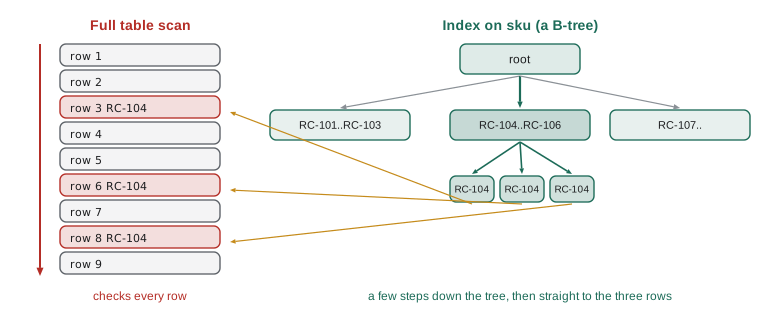
Without help, the only way for a database to find the sales of RC-104 is a full table scan: read every row and test the condition. The work grows in direct proportion to the size of the table, so ten times the data means ten times the time. Looking up a row by its primary key is different. The table is stored ordered by its key in a structure called a B-tree, a balanced tree of pages that the database can descend from the root to the right leaf in a few steps, much as you find a word in a dictionary by opening it near the right letter rather than reading from page one. A B-tree search over a million rows takes about twenty comparisons.
An index is a separate B-tree that stores the values of one or more columns, in sorted order, each with a pointer to its row. With an index on sales(sku), finding RC-104's sales becomes a search in the index followed by reading just the matching rows. The database keeps every index up to date automatically on each INSERT, UPDATE and DELETE.
Asking how a query will run
Every database can show its query plan, the steps it intends to take. In SQLite, putting EXPLAIN QUERY PLAN in front of a SELECT returns the plan instead of the results. The two words to look for are SCAN, which means reading a whole table or index, and SEARCH, which means using an index or the primary key to jump to particular rows. PostgreSQL's equivalent is EXPLAIN, and EXPLAIN ANALYZE runs the query and reports the actual times.
import random
import sqlite3

con = sqlite3.connect(":memory:")
con.execute("""CREATE TABLE sales (id INTEGER PRIMARY KEY, sold_on TEXT NOT NULL, channel TEXT NOT NULL,
                                   sku TEXT NOT NULL, customer_id INTEGER, qty INTEGER NOT NULL)""")
rnd = random.Random(215)
skus = ["RC-101", "RC-102", "RC-103", "RC-104", "RC-105", "RC-106"]
rows = [(f"2026-{rnd.randint(1, 11):02d}-{rnd.randint(1, 28):02d}", rnd.choice(["cafe", "online"]),
         rnd.choice(skus), rnd.randint(1, 5000), rnd.randint(1, 3)) for _ in range(50_000)]
con.executemany("INSERT INTO sales (sold_on, channel, sku, customer_id, qty) VALUES (?, ?, ?, ?, ?)", rows)
con.commit()

def plan(sql, params=()):
    return [row[-1] for row in con.execute("EXPLAIN QUERY PLAN " + sql, params)]
print(con.execute("SELECT COUNT(*) FROM sales").fetchone()[0], "sales")
print(plan("SELECT * FROM sales WHERE id = 1234"))              # primary key: a search
print(plan("SELECT * FROM sales WHERE sku = 'RC-104'"))          # no index yet: a scan

con.execute("CREATE INDEX idx_sales_sku ON sales (sku)")
print(plan("SELECT * FROM sales WHERE sku = 'RC-104'")) # now a search using the index50000 sales ['SEARCH sales USING INTEGER PRIMARY KEY (rowid=?)'] ['SCAN sales'] ['SEARCH sales USING INDEX idx_sales_sku (sku=?)']
The plan changed from SCAN to SEARCH as soon as the index existed, and the query itself did not change at all. That is the declarative idea from lesson 1 paying off: you state what you want, and the database chooses how, including whether to use an index. Index names are free to choose; a convention such as idx_table_columns makes them easy to recognize later.
Try it yourself
Index a lookup
The setup builds a 50,000-row sales table and a helper plan(sql, params) that returns the plan lines. The office often runs SELECT * FROM sales WHERE customer_id = ?.
Create an index named idx_sales_customer so that this query's plan becomes a SEARCH using that index.
con.execute('CREATE INDEX idx_sales_customer ON sales (sold_on)')
print(plan('SELECT * FROM sales WHERE customer_id = ?', (42,)))
Composite indexes and column order
An index can cover several columns, sorted by the first, then by the second within equal values of the first, and so on, like a phone book sorted by surname and then first name. A composite index on (sku, sold_on) serves queries that filter on sku, and queries that filter on sku and a range of dates. It does not help a query that filters only on sold_on, any more than a phone book sorted by surname helps you find everyone named Lena. The rule of thumb: put columns tested with equality first and the column used for a range or for sorting last.
An index that contains every column a query needs is a covering index: the database answers from the index alone, without visiting the table, and SQLite's plan says USING COVERING INDEX. Composite indexes can also satisfy ORDER BY, letting the database read rows already in order instead of sorting them.
import random
import sqlite3

con = sqlite3.connect(":memory:")
con.execute("""CREATE TABLE sales (id INTEGER PRIMARY KEY, sold_on TEXT NOT NULL, channel TEXT NOT NULL,
                                   sku TEXT NOT NULL, customer_id INTEGER, qty INTEGER NOT NULL)""")
rnd = random.Random(215)
skus = ["RC-101", "RC-102", "RC-103", "RC-104", "RC-105", "RC-106"]
rows = [(f"2026-{rnd.randint(1, 11):02d}-{rnd.randint(1, 28):02d}", rnd.choice(["cafe", "online"]),
         rnd.choice(skus), rnd.randint(1, 5000), rnd.randint(1, 3)) for _ in range(50_000)]
con.executemany("INSERT INTO sales (sold_on, channel, sku, customer_id, qty) VALUES (?, ?, ?, ?, ?)", rows)
con.commit()

def plan(sql, params=()):
    return [row[-1] for row in con.execute("EXPLAIN QUERY PLAN " + sql, params)]
con.execute("CREATE INDEX idx_sales_sku_day ON sales (sku, sold_on)")
q1 = "SELECT COUNT(*) FROM sales WHERE sku = 'RC-104' AND sold_on BETWEEN '2026-06-01' AND '2026-06-30'"
q2 = "SELECT COUNT(*) FROM sales WHERE sold_on BETWEEN '2026-06-01' AND '2026-06-30'"
q3 = "SELECT sold_on FROM sales WHERE sku = 'RC-104' ORDER BY sold_on LIMIT 3"
for q in (q1, q2, q3):
    print(plan(q))
print(con.execute(q1).fetchone()[0], "RC-104 sales in June")['SEARCH sales USING COVERING INDEX idx_sales_sku_day (sku=? AND sold_on>? AND sold_on<?)'] ['SCAN sales USING COVERING INDEX idx_sales_sku_day'] ['SEARCH sales USING COVERING INDEX idx_sales_sku_day (sku=?)'] 677 RC-104 sales in June
The first query searched on both columns, the second could only scan, reading every entry of the index (cheaper than the table, but still every entry), because its filter is on the second column alone, and the third used the index both to find RC-104 and to return the dates already sorted, with no separate sorting step. Indexes for the second query would need sold_on first, which is a reason some tables carry two indexes over the same columns in different orders.
What indexes cost
Indexes are not free. Each one takes disk space, often a sizeable fraction of the table's size. Each one must be updated on every INSERT, on every DELETE, and on every UPDATE that changes an indexed column, so a table with many indexes is slower to write. And the database must choose among them, which occasionally goes wrong. The practical approach is to index for the queries you actually run: primary keys are indexed automatically; UNIQUE constraints create an index; foreign key columns are almost always worth indexing, because joins and lookups use them constantly (SQLite and PostgreSQL do not index them automatically); and beyond that, add an index when a real, frequent query shows a SCAN on a large table. Indexes on columns with few distinct values, such as channel with only cafe and online, rarely help on their own.
Write-heavy work has its own habits. Load many rows with executemany inside a single transaction rather than committing after each row, because each commit must wait for the data to reach the disk. For very large loads, it can be faster to create indexes after loading the data than to maintain them row by row during the load.
Writing queries the index can use
An index on a column helps only when the query compares the column itself. Wrapping the column in a function or an expression hides it: WHERE substr(sold_on, 1, 7) = '2026-06' or WHERE upper(email) = ? cannot use an ordinary index on sold_on or email, because the index stores the plain values. Rewrite the condition so the bare column is compared with a value, for example a date range, or create an index on the expression itself, which SQLite and PostgreSQL both support. Similarly, LIKE 'RC-1%' can use an index in some configurations, but LIKE '%Dark' with a leading wildcard never can.
import random
import sqlite3

con = sqlite3.connect(":memory:")
con.execute("""CREATE TABLE sales (id INTEGER PRIMARY KEY, sold_on TEXT NOT NULL, channel TEXT NOT NULL,
                                   sku TEXT NOT NULL, customer_id INTEGER, qty INTEGER NOT NULL)""")
rnd = random.Random(215)
skus = ["RC-101", "RC-102", "RC-103", "RC-104", "RC-105", "RC-106"]
rows = [(f"2026-{rnd.randint(1, 11):02d}-{rnd.randint(1, 28):02d}", rnd.choice(["cafe", "online"]),
         rnd.choice(skus), rnd.randint(1, 5000), rnd.randint(1, 3)) for _ in range(50_000)]
con.executemany("INSERT INTO sales (sold_on, channel, sku, customer_id, qty) VALUES (?, ?, ?, ?, ?)", rows)
con.commit()

def plan(sql, params=()):
    return [row[-1] for row in con.execute("EXPLAIN QUERY PLAN " + sql, params)]
con.execute("CREATE INDEX idx_sales_day ON sales (sold_on)")
hidden = "SELECT COUNT(*) FROM sales WHERE substr(sold_on, 1, 7) = '2026-06'"
bare = "SELECT COUNT(*) FROM sales WHERE sold_on >= '2026-06-01' AND sold_on < '2026-07-01'"
print(plan(hidden))
print(plan(bare))
print(con.execute(hidden).fetchone()[0] == con.execute(bare).fetchone()[0])['SCAN sales USING COVERING INDEX idx_sales_day'] ['SEARCH sales USING COVERING INDEX idx_sales_day (sold_on>? AND sold_on<?)'] True
The two queries return the same count, but only the second can use the index. Conditions the database can answer with an index are called sargable, from search argument; turning non-sargable conditions into sargable ones is one of the most effective performance fixes there is, and it costs nothing but a moment's thought.
Try it yourself
Make a monthly query use the index
An index on sales(sold_on) exists. The function month_count(con, year, month) uses strftime on the column, so it scans the whole table. Rewrite it to compare the bare sold_on column with a range (first day of the month, inclusive, to the first day of the next month, exclusive), passing the two dates as parameters.
Keep it correct for December, where the next month is January of the following year.
def month_count(con, year, month):
    key = f'{year:04d}-{month:02d}'
    return con.execute("SELECT COUNT(*) FROM sales WHERE strftime('%Y-%m', sold_on) = ?", (key,)).fetchone()[0]
Other habits that keep queries fast
A handful of habits avoid most of the remaining problems. Fetch only what you need: select the columns you use, filter in SQL rather than in Python, and use LIMIT when you only show the first rows. Avoid the N+1 pattern from lesson 10 by joining or batching. Page through long results by key rather than by OFFSET: OFFSET 100000 makes the database count past a hundred thousand rows on every page, while keyset pagination remembers the last id seen and asks for WHERE id > ? ORDER BY id LIMIT 50, which an index answers directly at any depth. Let the database aggregate: SUM in SQL is far cheaper than transferring every row to Python to add up.
import random
import sqlite3

con = sqlite3.connect(":memory:")
con.execute("""CREATE TABLE sales (id INTEGER PRIMARY KEY, sold_on TEXT NOT NULL, channel TEXT NOT NULL,
                                   sku TEXT NOT NULL, customer_id INTEGER, qty INTEGER NOT NULL)""")
rnd = random.Random(215)
skus = ["RC-101", "RC-102", "RC-103", "RC-104", "RC-105", "RC-106"]
rows = [(f"2026-{rnd.randint(1, 11):02d}-{rnd.randint(1, 28):02d}", rnd.choice(["cafe", "online"]),
         rnd.choice(skus), rnd.randint(1, 5000), rnd.randint(1, 3)) for _ in range(50_000)]
con.executemany("INSERT INTO sales (sold_on, channel, sku, customer_id, qty) VALUES (?, ?, ?, ?, ?)", rows)
con.commit()

def plan(sql, params=()):
    return [row[-1] for row in con.execute("EXPLAIN QUERY PLAN " + sql, params)]
def page_after(last_id, size=3):                      # keyset pagination
    return con.execute("SELECT id, sku FROM sales WHERE id > ? ORDER BY id LIMIT ?", (last_id, size)).fetchall()

first = page_after(0)
second = page_after(first[-1][0])
print(first, second, sep="\n")
print(plan("SELECT id, sku FROM sales WHERE id > 40000 ORDER BY id LIMIT 3"))
print(plan("SELECT id, sku FROM sales ORDER BY id LIMIT 3 OFFSET 40000"))[(1, 'RC-101'), (2, 'RC-105'), (3, 'RC-105')] [(4, 'RC-104'), (5, 'RC-102'), (6, 'RC-103')] ['SEARCH sales USING INTEGER PRIMARY KEY (rowid>?)'] ['SCAN sales']
The keyset query searches straight to id 40,001 using the primary key, while the OFFSET query scans from the beginning and steps over 40,000 rows before returning three. The difference grows with every page.
Finally, measure before and after. Intuition about performance is often wrong; the query plan, the database's own timing tools, and a simple time.perf_counter around a call tell you where time actually goes. SQLite's ANALYZE command gathers statistics about the data that help the planner choose between indexes, and PostgreSQL gathers them automatically. Optimize the queries that are slow and frequent, and leave the rest simple.
Worked problem
Choosing indexes for Ridgeline
The busiest queries are: (a) a customer's order history, WHERE customer_id = ? ORDER BY sold_on DESC; (b) daily totals, WHERE sold_on = ?; (c) lookups by email on customers. Which indexes would you create?
Show solution
- (a) Equality on customer_id, then sorting by sold_on: a composite index on sales (customer_id, sold_on), which also serves lookups on customer_id alone.
- (b) Equality on sold_on: an index on sales (sold_on).
- (c) customers.email is declared UNIQUE, which already creates an index; nothing more is needed.
- Skip an index on channel: only two values, so it would rarely help.
Answer: CREATE INDEX idx_sales_customer_day ON sales (customer_id, sold_on); CREATE INDEX idx_sales_day ON sales (sold_on); email is already indexed by UNIQUE.
Common mistakes
MistakeAdding indexes to every column just in case.
InsteadIndex for real, frequent queries; each index slows writes and uses space.
MistakeForgetting to index foreign key columns used in joins.
InsteadIndex foreign keys such as sales.customer_id.
MistakeWrapping indexed columns in functions in WHERE.
InsteadCompare the bare column with a range, or index the expression.
MistakePutting the range column first in a composite index.
InsteadPut equality columns first and the range or sort column last.
MistakePaging deep into results with large OFFSETs.
InsteadUse keyset pagination: WHERE id > ? ORDER BY id LIMIT n.
MistakeGuessing at performance problems.
InsteadRead EXPLAIN QUERY PLAN and measure before changing anything.
Summary and key terms
- Without an index, filtering means a full table scan whose cost grows with the table.
- Tables and indexes are stored as B-trees, which find a key in a few steps.
- EXPLAIN QUERY PLAN shows whether SQLite will SCAN or SEARCH; PostgreSQL uses EXPLAIN.
- Composite indexes serve queries on their leading columns; put equality columns before range columns.
- A covering index answers a query without reading the table.
- Indexes cost space and slow writes; index primary keys, unique columns, foreign keys and slow frequent queries.
- Keep conditions sargable by comparing bare columns; functions on columns prevent index use.
- Fetch only what you need, avoid N+1, use keyset pagination, batch writes in transactions and measure.
- full table scan
- Reading every row of a table to find matches.
- index
- A sorted structure of column values with pointers to rows, used to find rows quickly.
- B-tree
- The balanced tree structure databases use for tables and indexes.
- query plan
- The steps the database chooses to execute a query.
- EXPLAIN QUERY PLAN
- SQLite's command for showing a query plan.
- composite index
- An index over several columns, sorted by each in turn.
- covering index
- An index containing every column a query needs.
- sargable
- Describes a condition the database can answer using an index.
- keyset pagination
- Paging by remembering the last key seen instead of using OFFSET.
- selectivity
- How few rows a condition matches; selective conditions benefit most from indexes.
Practice problems
Work each problem on paper first, then reveal the answer to check.
What does SCAN mean in an SQLite query plan?
Show answer
Reading a whole table or index rather than jumping to particular rows.
An index on (sku, sold_on) exists. Does it help WHERE sold_on = ?
Show answer
No, sold_on is not the leading column.
Rewrite WHERE substr(sold_on, 1, 4) = '2026' to be sargable.
Show answer
WHERE sold_on >= '2026-01-01' AND sold_on < '2027-01-01'
Why are indexes on a column with two values usually unhelpful?
Show answer
Each value matches about half the rows, so a scan is about as fast.
Why is OFFSET 100000 slow?
Show answer
The database must step over 100,000 rows before returning any.
Name two costs of an index.
Show answer
Disk space, and slower INSERT, UPDATE and DELETE.
Lesson quiz · 5 questions
Score 60% or more to complete this lesson.
Create a free account to save your progress, take quizzes and earn a certificate.