
PYTH-120 · Lesson 9 of 12 · 26 min
Calling web APIs and handling JSON
▶ Video coming soon A video version of this lesson is on the way.
More and more of the systems an administrator manages are run by someone else and reached over the internet: the online shop platform, the payment processor, the email service, the domain registrar and the cloud storage that holds the backups. Each offers a web API, an application programming interface that a script can call to read information or make changes, instead of clicking through a website. Ridgeline's shop platform, for example, has an API that returns the day's orders, so the weekly report can include online sales without anyone downloading a spreadsheet. This lesson explains how web APIs work, how to call them from Python, and how to handle the JSON data they return, safely and politely.
Your browser's Python cannot reach arbitrary websites from this page, so listings that make real network requests are for reading. Everything else, building requests, parsing responses, handling pages of results and retrying after errors, runs here using sample responses in the exact shape a real API returns.
How a web API works
A web API speaks HTTP, the same protocol a browser uses for web pages. The script sends a request and the server sends back a response. A request has a method, which says what kind of action it is; a URL, which says what it is about; headers, which carry extra information such as the format wanted and the credentials; and sometimes a body, usually JSON, with data to send. The response has a status code, the same codes as in the web logs of lesson 6, headers, and a body, again usually JSON.
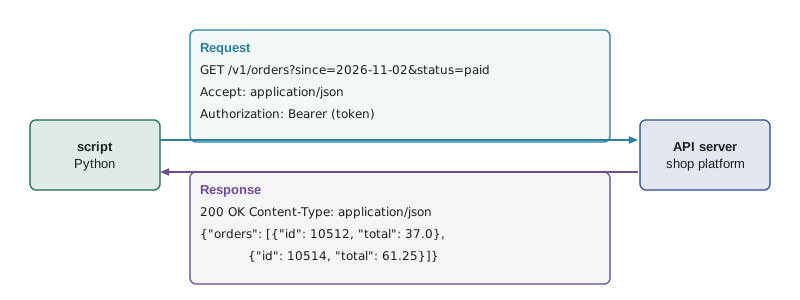
The method follows conventions that most APIs share. GET reads information and never changes anything, so it is safe to repeat. POST creates something new, such as an order or a user. PUT and PATCH update something that exists, replacing it entirely or changing parts of it. DELETE removes it. The URL usually names a resource, such as /v1/orders or /v1/orders/10512, and a query string after a question mark narrows the request, as in ?status=paid&since=2026-11-02. Because a URL can contain only certain characters, values in a query string must be encoded, which Python's urllib.parse module does for you.
from urllib.parse import urlencode, urlsplit, parse_qs

base = "https://api.example.com/v1/orders"
params = {"since": "2026-11-02", "status": "paid", "note": "beans & mugs"}
url = base + "?" + urlencode(params)
print(url)

parts = urlsplit(url)
print("host:", parts.netloc, "| path:", parts.path)
print("query:", parse_qs(parts.query))https://api.example.com/v1/orders?since=2026-11-02&status=paid¬e=beans+%26+mugs
host: api.example.com | path: /v1/orders
query: {'since': ['2026-11-02'], 'status': ['paid'], 'note': ['beans & mugs']}urlencode turned the space into + and the ampersand inside the note into %26, so that it is not mistaken for the separator between parameters. Building query strings by gluing strings together usually works until a value contains a space, an ampersand or an accented letter, and then it fails in confusing ways. Using urlencode from the start avoids the problem entirely.
Try it yourself
Build a request URL
Write build_url(base, path, params) that joins base (such as https://api.example.com/v1) and path (such as orders) with exactly one slash between them, and adds a query string from the dictionary params with its keys in alphabetical order, using urlencode. If params is empty, add no question mark.
For example, build_url("https://api.example.com/v1/", "/orders", {"status": "paid", "since": "2026-11-02"}) returns https://api.example.com/v1/orders?since=2026-11-02&status=paid.
from urllib.parse import urlencode

def build_url(base, path, params):
    return base + path

print(build_url("https://api.example.com/v1/", "/orders", {"status": "paid", "since": "2026-11-02"}))
Making requests from Python
The standard library's urllib.request module can make HTTP requests with nothing to install, which suits small scripts on servers where adding packages is a chore. Most Python developers use the third-party requests package instead, because its interface is shorter and friendlier; both send the same HTTP underneath. Whichever you use, three settings matter on every request: a timeout, so a slow server cannot hang the script; the Accept header, asking for JSON; and the credentials, sent in a header rather than in the URL.
import json, os
import urllib.request

token = os.environ["SHOP_API_TOKEN"]            # never written in the script
req = urllib.request.Request(
    "https://api.example.com/v1/orders?since=2026-11-02&status=paid",
    headers={"Accept": "application/json", "Authorization": f"Bearer {token}"},
)
with urllib.request.urlopen(req, timeout=20) as resp:
    data = json.load(resp)                     # parse the JSON body
print(len(data["orders"]), "paid orders")

# The same with the requests package (pip install requests):
# import requests
# r = requests.get("https://api.example.com/v1/orders",
#                  params={"since": "2026-11-02", "status": "paid"},
#                  headers={"Authorization": f"Bearer {token}"}, timeout=20)
# r.raise_for_status()          # turns 4xx and 5xx responses into exceptions
# data = r.json()
APIs identify callers in a few ways. Many use an API key or token: a long secret string sent in a header, often as Authorization: Bearer followed by the token. Others use OAuth, where the script first exchanges credentials for a short-lived token, and some services issue separate keys with limited permissions for each script, which is least privilege applied to APIs. In every case the secret must stay out of the script and out of version control: read it from an environment variable or a protected file, never print it, and never put it in a URL, because URLs end up in logs.
Working with JSON responses
An API's JSON response becomes ordinary Python data with json.loads, or json.load for a file or response object: objects become dictionaries, arrays become lists, and true, false and null become True, False and None. The structure is often nested, with lists of records that contain further dictionaries, so the main skill is walking the structure carefully. The get method with a default protects against fields that are sometimes missing, which is common in real APIs, where optional fields are simply left out.
import json

body = """{
  "orders": [
    {"id": 10512, "status": "paid", "total": 37.00,
     "customer": {"city": "Kelowna"}, "items": [{"sku": "RC-101", "qty": 2}]},
    {"id": 10513, "status": "refunded", "total": 21.50,
     "customer": {"city": "Penticton"}, "items": [{"sku": "RC-106", "qty": 1}]},
    {"id": 10514, "status": "paid", "total": 61.25,
     "items": [{"sku": "RC-102", "qty": 1}, {"sku": "RC-101", "qty": 2}]}
  ],
  "next": null
}"""
data = json.loads(body)
paid = [o for o in data["orders"] if o["status"] == "paid"]
print("paid orders:", len(paid), "| revenue:", sum(o["total"] for o in paid))
for o in data["orders"]:
    city = o.get("customer", {}).get("city", "(no city)")
    bags = sum(item["qty"] for item in o["items"])
    print(o["id"], o["status"], city, bags, "bags")
print("more pages?", data["next"] is not None)paid orders: 2 | revenue: 98.25 10512 paid Kelowna 2 bags 10513 refunded Penticton 1 bags 10514 paid (no city) 3 bags more pages? False
The third order has no customer object, perhaps because it was placed as a guest, so o['customer'] would raise a KeyError. Chaining get with an empty dictionary as the default handles the missing level gracefully. Money deserves a note too: JSON numbers arrive as Python floats, which can show tiny rounding errors in sums, so a report that must balance to the cent should convert totals to Decimal or work in whole cents, as PYTH-102 explains.
Try it yourself
Summarize an orders response
A variable body holds a JSON response text with a list of orders, each with a status and a total. Write summarize(body) that returns a dictionary mapping each status to a pair (count, total), where total is rounded to 2 decimal places.
For the sample, the result is {"paid": (2, 98.25), "refunded": (1, 21.5)}.
import json

def summarize(body):
    return {}

print(summarize(body))
Pages, limits and retries
APIs rarely return everything at once. A request for a month of orders might return the first 50 with a link or cursor for the next page, and the script must keep asking until there is no next page. Each API documents its own scheme, a page number, an offset or an opaque cursor, but the loop is always the same shape: request, process, follow the pointer to the next page, stop when it is empty.
# A fake API that returns three pages, standing in for real HTTP calls
PAGES = {
    None: {"orders": [{"id": 1}, {"id": 2}], "next": "c2"},
    "c2": {"orders": [{"id": 3}, {"id": 4}], "next": "c3"},
    "c3": {"orders": [{"id": 5}], "next": None},
}
calls = []
def fetch(cursor):
    calls.append(cursor)
    return PAGES[cursor]

def fetch_all(fetch):
    orders, cursor = [], None
    while True:
        page = fetch(cursor)
        orders.extend(page["orders"])
        cursor = page["next"]
        if cursor is None:
            return orders

print([o["id"] for o in fetch_all(fetch)], "in", len(calls), "requests")[1, 2, 3, 4, 5] in 3 requests
Services also limit how fast callers may make requests, to protect themselves from runaway scripts. When a script goes too fast, the API answers 429 Too Many Requests, often with a Retry-After header saying how long to wait. Temporary server problems produce 502, 503 and 504 responses, and networks occasionally drop connections. A polite script retries these transient failures a few times, waiting longer after each attempt, a pattern called exponential backoff, while treating permanent errors such as 400 (bad request), 401 (bad credentials) and 404 (not found) as real failures to report at once, because retrying them cannot help.
import random

RETRYABLE = {429, 500, 502, 503, 504}

def backoff_delays(attempts, base=1.0, cap=30.0, seed=7):
    """Seconds to wait before each retry: doubling, capped, with random jitter."""
    rnd = random.Random(seed)
    delays = []
    for n in range(attempts):
        delay = min(cap, base * 2 ** n)
        delays.append(round(delay * rnd.uniform(0.5, 1.0), 2))   # jitter spreads retries out
    return delays

print("waits:", backoff_delays(6))
for status in (200, 404, 429, 503):
print(status, "retry" if status in RETRYABLE else "do not retry")waits: [0.66, 1.15, 3.3, 4.29, 12.29, 20.49] 200 do not retry 404 do not retry 429 retry 503 retry
The jitter, a random fraction of each delay, matters when many copies of a script, or many customers of a service, fail at the same moment: without it they would all retry together and overload the service again. The fixed seed in the listing makes the output the same every time you run it; a real script leaves the seed out. Limit the number of retries too, five or six is typical, and log each one, so that a persistent problem becomes a clear failure rather than a script that waits forever.
Try it yourself
Collect every page
A function fetch(cursor) is provided. It returns a dictionary with a list items and a next cursor, which is None on the last page; the first call takes None. Write fetch_all(fetch) that calls it repeatedly, following next, and returns all the items in order.
With the provided fake API there are seven items across three pages, and fetch_all(fetch) returns [1, 2, 3, 4, 5, 6, 7].
def fetch_all(fetch):
    page = fetch(None)
    return page["items"]

print(fetch_all(fetch))
Sending data and being a good API citizen
Changing things through an API works the same way, with a POST, PUT or PATCH request carrying a JSON body. json.dumps turns a dictionary into JSON text, and the Content-Type header tells the server the body is JSON. Because these requests change things, they deserve the care of any destructive operation: a dry-run mode that prints the request instead of sending it, a check of the response status, and a log line recording what was changed. Some APIs accept an idempotency key header, a unique value per operation, so that if a retry sends the same creation request twice, the server makes only one order.
import json

new_item = {"sku": "RC-107", "name": "Holiday Blend", "price": 23.00, "stock": 40}
body = json.dumps(new_item)
headers = {"Content-Type": "application/json", "Idempotency-Key": "add-RC-107-2026-11-20"}
dry_run = True
if dry_run:
    print("would POST /v1/products")
    print("headers:", headers)
print("body:", body)would POST /v1/products
headers: {'Content-Type': 'application/json', 'Idempotency-Key': 'add-RC-107-2026-11-20'}
body: {"sku": "RC-107", "name": "Holiday Blend", "price": 23.0, "stock": 40}| Situation | What the script should do |
|---|---|
| 200, 201 or 204 | Success: process the body if there is one |
| 400 Bad Request | Stop and report: the request itself is wrong |
| 401 Unauthorized or 403 Forbidden | Stop and report: credentials missing, expired or lacking permission |
| 404 Not Found | Stop or skip: the resource does not exist |
| 429 Too Many Requests | Wait (Retry-After if given) and retry, a limited number of times |
| 500, 502, 503, 504 | Retry with exponential backoff, then report if it keeps failing |
| Timeout or connection error | Retry with backoff, then report |
Being a good API citizen also means asking only for what you need, using filters such as since and status rather than downloading everything and filtering locally, caching results that do not change, and keeping within published rate limits. Read the API's documentation for its paging scheme, limits and error format before writing the script, and test against a sandbox or test account when the service offers one, especially for anything that creates, changes or deletes.
Worked problem
Adding online sales to the weekly report
Theo's Monday report should include last week's paid online orders from the shop platform's API. Plan the script's API part.
Show solution
- Read the API token from the SHOP_API_TOKEN environment variable; stop with a clear message if it is missing.
- Build the URL with urlencode for status=paid and the since and until dates of last week.
- Fetch every page in a loop, with a 20-second timeout per request and up to five retries with backoff for 429 and 5xx responses.
- Parse the JSON, add up order totals in Decimal and count bags by SKU from the items lists.
- Return the figures to the report code, and log the number of orders, pages and retries.
Answer: A small, careful API client: secret from the environment, encoded query, paging loop, limited retries, and totals computed exactly.
Common mistakes
MistakeGluing query strings together by hand.
InsteadUse urlencode so spaces and special characters are encoded.
MistakeWriting API tokens into scripts or URLs.
InsteadRead them from the environment and send them in a header.
MistakeMaking requests without a timeout.
InsteadAlways set one; a slow server should not hang the script.
MistakeAssuming every response has every field.
InsteadUse get with defaults for optional fields.
MistakeRetrying every error immediately and forever.
InsteadRetry only transient errors, with backoff, jitter and a limit.
MistakeFetching only the first page of results.
InsteadFollow the next-page link or cursor until it runs out.
Summary and key terms
- Web APIs speak HTTP: requests have a method, URL, headers and sometimes a JSON body; responses have a status, headers and a body.
- GET reads, POST creates, PUT and PATCH update, DELETE removes; encode query strings with urlencode.
- urllib.request needs nothing installed and requests is friendlier; always set a timeout and keep secrets in the environment.
- json.loads turns responses into dictionaries and lists; walk nested data with get and defaults.
- Follow pages until there are no more, and retry only transient failures with exponential backoff and jitter.
- Changes through an API deserve dry runs, status checks, logging and idempotency keys.
- API
- An application programming interface: a way for programs to use a service.
- endpoint
- A URL that an API responds to, such as /v1/orders.
- HTTP method
- The kind of request: GET, POST, PUT, PATCH or DELETE.
- query string
- The part of a URL after the question mark, holding parameters.
- header
- A named piece of information sent with a request or response.
- API token
- A secret string that identifies and authorizes a caller.
- JSON
- A text format for structured data used by most web APIs.
- pagination
- Splitting a large result into pages that are requested one after another.
- rate limit
- The maximum number of requests a service allows in a period.
- exponential backoff
- Waiting longer after each failed attempt, often doubling the delay.
Practice problems
Work each problem on paper first, then reveal the answer to check.
Which HTTP method should a script use to read the list of products?
Show answer
GET.
What does urlencode({"q": "dark roast"}) produce?
Show answer
q=dark+roast
Why should an API token not be put in a URL?
Show answer
URLs are recorded in logs and browser histories, exposing the secret.
A response is {"order": {"id": 7}}. How do you read the id?
Show answer
data["order"]["id"]
Which status codes are usually worth retrying?
Show answer
429 and the 5xx server errors, plus timeouts and connection errors.
What problem does jitter solve in retry delays?
Show answer
It stops many clients from retrying at exactly the same moment.
Lesson quiz · 5 questions
Score 60% or more to complete this lesson.
Create a free account to save your progress, take quizzes and earn a certificate.