
PYTH-120 · Lesson 10 of 12 · 27 min
Configuration management concepts
▶ Video coming soon A video version of this lesson is on the way.
Scripts so far have done jobs: copy these files, check that log, create this account. A different kind of automation describes how a system should be, and lets a tool work out what to change. This is configuration management, and it is how organizations keep dozens or thousands of servers set up consistently. Ridgeline has only one Linux server and two Windows computers, but the ideas still pay off: when the shop server needs rebuilding after a failure, or a second server is added for the busy holiday season, a written-down configuration rebuilds it in minutes instead of days of remembering. This lesson explains the concepts, introduces the main tools, and builds small Python versions of the core ideas so you can see how they work.
Configuration tools such as Ansible run against real servers, so their examples here are for reading. The exercises implement the heart of the approach in Python: checking current state, changing only what differs, and rendering configuration files from templates.
Snowflakes and drift
A server set up by hand, one command at a time over months, becomes a snowflake: unique, fragile and impossible to reproduce exactly. Nobody remembers every package installed, every setting changed and every file edited, so rebuilding it means guessing. Worse, servers that started identical slowly diverge as people make small fixes on one machine and not the other, a process called configuration drift. Drift causes the most frustrating kind of problem: the shop works on one server but not the other, and nobody knows why.
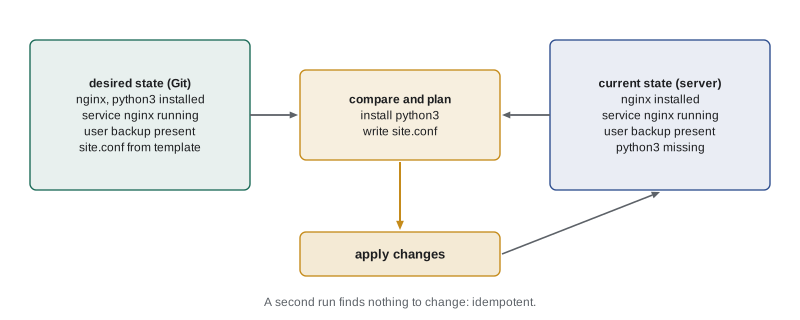
Configuration management solves both by keeping the intended state of every system in text files, under version control, and applying them with a tool. The files say which packages must be installed, which services must be running, which users must exist, and what each configuration file must contain. The tool compares that description with the real system and changes only what differs. Run it on a new server and it builds the whole configuration; run it on an existing server and it fixes any drift; run it again and, if nothing has drifted, it changes nothing.
Declarative and idempotent
Two ideas sit at the centre of configuration management. The first is that configuration is declarative: it states what the end result should be, not the steps to get there. A shell script is imperative: run apt install nginx, then copy this file, then restart the service. A declarative configuration says nginx is installed, this file has this content, the service is running, and the tool decides which steps are needed right now. If nginx is already installed, that step is skipped.
The second idea is idempotence, met first in lesson 1: applying the configuration once or ten times gives the same result. Imperative scripts are often not idempotent. Appending a line to a file each time a script runs adds a duplicate line on every run; running a create-user command for a user who exists fails. Configuration tools build idempotence into every operation by checking before acting. The next listing shows the difference on the simplest possible case, making sure a line is present in a configuration file.
def append_line(text, line):
    """Imperative: always appends, so every run adds another copy."""
    return text + line + "\n"

def ensure_line(text, line):
    """Declarative: makes sure the line is present, changing nothing if it is."""
    lines = text.splitlines()
    if line in lines:
        return text
    return text + line + "\n"

config = "PermitRootLogin no\n"
a = b = config
for run in range(3):
    a = append_line(a, "PasswordAuthentication no")
    b = ensure_line(b, "PasswordAuthentication no")
print("append_line after 3 runs:\n" + a)
print("ensure_line after 3 runs:\n" + b)append_line after 3 runs: PermitRootLogin no PasswordAuthentication no PasswordAuthentication no PasswordAuthentication no ensure_line after 3 runs: PermitRootLogin no PasswordAuthentication no
ensure_line looks at the current state first and acts only when needed, so three runs leave exactly one copy of the setting. Every module in a configuration tool works this way: a package module checks whether the package is installed and at the right version, a file module compares content before writing, a user module checks whether the user exists with the right groups. Because each run reports which items it actually changed, the report doubles as a drift detector: on a well-managed server, a second run should report zero changes.
Try it yourself
Ensure a setting
Configuration files often hold key value settings, one per line. Write ensure_setting(text, key, value) that returns the text with the setting key value present exactly once: if a line starting with key exists, replace that line (the first one) with the new setting; otherwise append the setting as a new line. Always end the result with a new line.
For example, ensure_setting("Port 22\nPermitRootLogin yes\n", "PermitRootLogin", "no") returns "Port 22\nPermitRootLogin no\n".
def ensure_setting(text, key, value):
    return text + f"{key} {value}\n"

print(ensure_setting("Port 22\nPermitRootLogin yes\n", "PermitRootLogin", "no"))
The tools
Several mature tools implement these ideas. Ansible, from Red Hat, is the easiest to start with: it needs nothing installed on the managed servers except SSH and Python, and its configurations, called playbooks, are written in YAML, a readable text format. Puppet and Chef install an agent on each server that regularly fetches its configuration from a central server and applies it, which suits large fleets that must be corrected continuously. Salt combines both styles. On Windows, PowerShell Desired State Configuration, or DSC, applies the same declarative model, and Microsoft's newer tools build on it. Terraform and similar tools apply the same thinking one level down, creating the servers, networks and storage themselves in a cloud, an approach called infrastructure as code.
# shop-server.yml: an Ansible playbook for Ridgeline's shop server
- name: Configure the shop web server
  hosts: shop
  become: true                      # use sudo for these tasks
  vars:
    site_name: shop.ridgeline.example
  tasks:
    - name: Web server and Python are installed
      ansible.builtin.apt:
        name: [nginx, python3]
        state: present

    - name: Backup user exists
      ansible.builtin.user:
        name: backup
        shell: /usr/sbin/nologin

    - name: Site configuration is in place
      ansible.builtin.template:
        src: templates/site.conf.j2
        dest: /etc/nginx/sites-enabled/site.conf
        mode: "0644"
      notify: Reload nginx

    - name: Root logins over SSH are refused
      ansible.builtin.lineinfile:
        path: /etc/ssh/sshd_config
        regexp: '^PermitRootLogin '
        line: PermitRootLogin no

  handlers:
    - name: Reload nginx
      ansible.builtin.service:
        name: nginx
        state: reloaded
Each task names a module and the state wanted: apt with state: present installs packages only if missing; user makes sure the account exists; template renders a configuration file from a template and writes it only if the result differs; lineinfile is Ansible's version of the ensure_setting function you just wrote. The notify line connects the template task to a handler, which reloads nginx only when the file actually changed, so an unchanged run does not disturb the live shop. The hosts line refers to an inventory, a file listing the servers and the groups they belong to.
| Tool | How it runs | Language | Typical use |
|---|---|---|---|
| Ansible | Push over SSH, no agent | YAML playbooks | Small to large Linux fleets, network devices |
| Puppet | Agent pulls from a server | Puppet language | Large fleets corrected continuously |
| Chef | Agent pulls from a server | Ruby-based recipes | Large, developer-heavy teams |
| Salt | Agent or SSH | YAML states | Fast, event-driven management |
| PowerShell DSC | Push or pull on Windows | PowerShell configurations | Windows servers |
| Terraform | Calls cloud provider APIs | HCL | Creating cloud infrastructure itself |
Planning changes
Before applying a configuration, a careful administrator wants to know what will change. Ansible's check mode, run with --check and --diff, reports what each task would do and shows file differences without changing anything, the dry-run principle at the scale of a whole server. Terraform separates a plan step, which prints the planned changes, from an apply step that performs them, so a person can review the plan first. The heart of a plan is a comparison of two descriptions, desired and current, producing a list of additions, changes and removals.
desired = {"nginx": "1.24", "python3": "3.12", "rsync": "3.2"}
current = {"nginx": "1.22", "python3": "3.12", "telnet": "0.17"}

def plan(desired, current):
    steps = []
    for name in sorted(desired.keys() | current.keys()):
        if name not in current:
            steps.append(("install", name, desired[name]))
        elif name not in desired:
            steps.append(("remove", name, current[name]))
        elif desired[name] != current[name]:
            steps.append(("upgrade", name, desired[name]))
    return steps

for step in plan(desired, current):
    print(*step)
print("second run plan:", plan(desired, desired))upgrade nginx 1.24 install rsync 3.2 remove telnet 0.17 second run plan: []
The plan installs rsync, upgrades nginx and removes telnet, an old, insecure remote-login tool that should not be on a modern server, while leaving python3 alone because it already matches. Once the plan is applied, the current state equals the desired state and the next plan is empty. This is the whole cycle in miniature: describe, compare, plan, review, apply, and confirm that a second run finds nothing to do.
Try it yourself
Plan the changes
Write plan(desired, current) that compares two dictionaries of settings and returns a list of (action, key) pairs, sorted by key, where action is "add" for keys only in desired, "remove" for keys only in current, and "change" for keys in both with different values. Keys that match are left out.
For the sample, the result is [("change", "max_upload"), ("add", "timezone"), ("remove", "welcome_banner")], sorted by key.
desired = {"max_upload": "20M", "timezone": "America/Vancouver", "workers": "4"}
current = {"max_upload": "8M", "welcome_banner": "on", "workers": "4"}

def plan(desired, current):
    return []

print(plan(desired, current))
Templates, variables and secrets
Configuration files are rarely identical across servers: the site name, the number of worker processes or the backup destination differ. Configuration tools handle this with templates, configuration files containing placeholders that are filled in from variables for each server. Ansible uses the Jinja2 template language, with placeholders in double curly braces. Python's own str.format_map does the same job for simple cases, filling {name} placeholders from a dictionary, as the next listing shows.
template = """server {{
    listen 443 ssl;
    server_name {site_name};
    root /srv/{site_dir}/public;
    client_max_body_size {max_upload};
}}
"""
servers = {
    "shop1": {"site_name": "shop.ridgeline.example", "site_dir": "shop", "max_upload": "20M"},
    "test1": {"site_name": "test.ridgeline.example", "site_dir": "shop-test", "max_upload": "50M"},
}
for host, values in servers.items():
    print("#", host)
print(template.format_map(values))# shop1
server {
listen 443 ssl;
server_name shop.ridgeline.example;
root /srv/shop/public;
client_max_body_size 20M;
}
# test1
server {
listen 443 ssl;
server_name test.ridgeline.example;
root /srv/shop-test/public;
client_max_body_size 50M;
}Doubled braces, {{ and }}, produce literal braces in the output, which configuration files for web servers need. A missing variable raises a KeyError, which is good: it is far better for rendering to fail than to write a configuration file with a hole in it. Real templates for complex files use Jinja2, which adds loops and conditions, but the principle is identical.
Secrets need special handling in configuration management, because configurations live in version control and are shared. Passwords, API tokens and private keys must never be written into playbooks or templates in plain text. The tools provide encrypted stores for them, such as Ansible Vault, or fetch them at run time from a secrets manager such as HashiCorp Vault or a cloud provider's secret service, so that the repository holds only encrypted values or references.
Try it yourself
Render a configuration template
Write render(template, values) that fills {name} placeholders in template from the dictionary values using format_map. If a placeholder has no value, raise a ValueError whose message names the missing key, instead of a KeyError.
For example, render("listen {port}", {"port": 443}) returns "listen 443".
def render(template, values):
    return template

print(render("listen {port}", {"port": 443}))
Where configuration management fits
Configuration management changes how a team works as much as which tools it uses. Changes are made by editing files in Git and running the tool, not by logging in and typing commands, so every change is reviewed, recorded and reversible. Testing becomes possible: the same playbook can be applied to a test server first, and tools such as Molecule run playbooks against temporary machines to check them automatically. And servers become disposable: when one misbehaves, it is often quicker to build a fresh one from the configuration than to diagnose the old one, an idea summed up in the saying that servers should be treated like cattle, not pets.
For a business Ridgeline's size, a sensible first step is modest: write an Ansible playbook, or even a carefully idempotent script, that sets up the shop server's packages, users, firewall and configuration files, keep it in Git with the other scripts, and test it by building a throwaway server from it. The day the real server fails, that playbook turns a crisis into a routine rebuild.
Worked problem
Bringing the shop server under configuration management
The shop server was set up by hand two years ago. Jordan wants it described in a playbook without breaking the live shop. Plan the steps.
Show solution
- Take an inventory of the current state: installed packages (apt list --installed), enabled services, users and groups, firewall rules, cron jobs, and the configuration files that were changed.
- Write the playbook to describe that state, with templates for the changed files and variables for values that differ between servers.
- Run it in check mode with --diff against the live server; adjust the playbook until it reports no changes, which proves it matches reality.
- Build a fresh test server from the playbook and confirm the shop runs on it.
- From then on, make every change in the playbook first, review it in Git, and apply it, so the server never drifts again.
Answer: Describe, verify with a no-change check run, prove it by building a test server, then manage all future changes through the playbook.
Common mistakes
MistakeFixing servers by hand and forgetting to record the change.
InsteadMake changes in the configuration files and apply them with the tool.
MistakeWriting configuration scripts that append or create blindly.
InsteadCheck the current state first so every step is idempotent.
MistakeApplying a configuration to production without a preview.
InsteadUse check mode or a plan step, and test on a non-production server.
MistakeCopying a nearly identical configuration file for each server.
InsteadUse one template with variables.
MistakeCommitting passwords and keys in playbooks.
InsteadUse an encrypted vault or a secrets manager.
MistakeTreating a non-zero change count on a second run as normal.
InsteadInvestigate it: something is drifting or a task is not idempotent.
Summary and key terms
- Hand-built snowflake servers and configuration drift make systems fragile and hard to rebuild.
- Configuration management keeps desired state in version-controlled files and applies only the differences.
- Declarative descriptions say what the result should be; idempotent operations check before acting.
- Ansible, Puppet, Chef, Salt and PowerShell DSC manage servers; Terraform builds infrastructure as code.
- Check mode and plans preview changes; templates with variables adapt one configuration to many servers.
- Secrets go in encrypted vaults or secrets managers, never in plain text in the repository.
- configuration management
- Keeping systems in a described, intended state using tools and version-controlled files.
- desired state
- The configuration a system should have, as written in the configuration files.
- configuration drift
- Systems slowly diverging from their intended or from each other's configuration.
- declarative
- Describing the end result rather than the steps to reach it.
- imperative
- Describing the steps to perform, in order.
- playbook
- An Ansible file listing tasks to apply to a group of servers.
- inventory
- The list of servers a configuration tool manages, organized in groups.
- template
- A file with placeholders filled from variables for each server.
- check mode
- Running a configuration to report what would change without changing anything.
- infrastructure as code
- Creating and managing servers, networks and storage from text definitions.
Practice problems
Work each problem on paper first, then reveal the answer to check.
Is "run apt install nginx" declarative or imperative? What is the declarative version?
Show answer
Imperative; the declarative version is "nginx is installed".
A playbook run reports 3 changes, and an immediate second run reports 1 change. What does that suggest?
Show answer
One task is not idempotent, or something on the server keeps changing.
What does a handler do in Ansible?
Show answer
Runs an action, such as reloading a service, only when a notifying task changed something.
Why should a template rendering fail on a missing variable rather than leave it blank?
Show answer
A blank value could produce a broken configuration file on a live server.
Where should an API token used by a playbook be stored?
Show answer
In an encrypted vault or a secrets manager, not in plain text.
What is the first step in bringing a hand-built server under configuration management?
Show answer
Inventory its current state: packages, services, users, files and schedules.
Lesson quiz · 5 questions
Score 60% or more to complete this lesson.
Create a free account to save your progress, take quizzes and earn a certificate.