
PYTH-120 · Lesson 6 of 12 · 26 min
Parsing logs and text
▶ Video coming soon A video version of this lesson is on the way.
Every server writes logs: lines of text recording what happened, when and to whom. The web server behind Ridgeline's online shop writes a line for every page request, the operating system records logins and service restarts, and the shop software notes each order. Logs are how an administrator finds out what went wrong at 3 a.m., whether someone is trying to guess passwords, and which pages customers actually use. The trouble is volume: a busy day produces thousands of lines. This lesson shows how to turn log text into structured records with Python, using string methods for simple formats and regular expressions for the rest, and then how to count, filter and summarize the results.
All the log lines in this lesson are invented samples in the real formats. IP addresses come from the ranges reserved for documentation, such as 203.0.113.0 to 203.0.113.255, so none of them belong to a real computer.
What a log line holds
Most web servers write requests in a standard layout called the combined log format. Each line holds the client's IP address, two fields that are usually a dash, the date and time in square brackets, the request line in quotation marks (method, path and protocol), the status code, the size of the response in bytes, and, in quotation marks, the page the visitor came from and the browser's description of itself. Once you know where each piece sits, you can pull out exactly the fields a question needs.
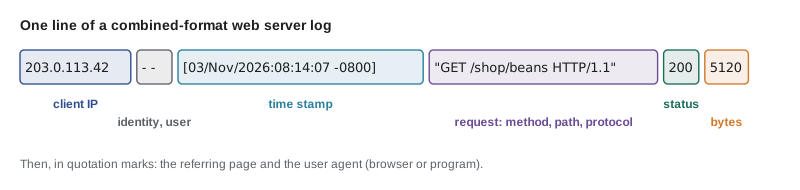
Status codes are the most useful single field. Codes in the 200s mean success; 301 and 302 are redirects; 304 means the browser's cached copy is still good. The 400s are client errors: 401 means login required, 403 forbidden, and 404 not found, often a broken link. The 500s are server errors, the ones that mean the shop itself has a problem. A sudden rise in 500s, or a stream of 401s from one address, is exactly what Jordan's morning check is looking for.
| Status | Meaning | What it usually tells you |
|---|---|---|
| 200 | OK | Normal successful request |
| 301, 302 | Redirect | Page moved; usually harmless |
| 304 | Not modified | Browser cache was still valid |
| 401 | Unauthorized | Login needed or failed; many from one address may be password guessing |
| 403 | Forbidden | Access refused; check permissions or blocked areas |
| 404 | Not found | Broken link or someone probing for files |
| 500 | Server error | The application failed; investigate |
| 503 | Service unavailable | Overloaded or down for maintenance |
Simple formats: split and partition
When fields are separated by a fixed character, string methods are the quickest and clearest tool. Many application logs write a timestamp, a level and a message separated by spaces, and the shop software's order log uses vertical bars. split with a maximum number of splits keeps the message whole even when it contains spaces, and partition splits once at a separator and always returns three parts, which avoids errors on lines that lack the separator.
app_log = """2026-11-03 08:01:12 INFO order 10512 placed, 2 items
2026-11-03 08:04:55 ERROR payment gateway timeout for order 10513
2026-11-03 08:05:30 INFO order 10513 placed, 1 item
2026-11-03 08:09:02 ERROR stock lookup failed: RC-104
"""
for line in app_log.splitlines():
    day, time, level, message = line.split(" ", 3)   # at most 3 splits: message stays whole
    if level == "ERROR":
        print(time, "|", message)

order = "10512|2026-11-03|RC-101|2|37.00"
number, date, sku, qty, total = order.split("|")
print(number, sku, int(qty) * 1, float(total))
key, sep, value = "retries=3".partition("=")
print(key, value, repr(sep))08:04:55 | payment gateway timeout for order 10513 08:09:02 | stock lookup failed: RC-104 10512 RC-101 2 37.0 retries 3 '='
The combined web format is harder for split alone, because the request and the browser description contain spaces and sit inside quotation marks. You can still split carefully, but it gets fragile. That is where regular expressions come in.
Regular expressions with re
A regular expression, or regex, is a small pattern language for describing text. In Python, the re module applies patterns to strings. A few building blocks cover most log work: \d matches a digit and \S any character that is not whitespace; + means one or more of the previous item and * means zero or more; square brackets match any one of a set of characters; and parentheses capture part of the match so that you can extract it. Named groups, written (?P<name>...), let you pull out fields by name, which keeps patterns readable.
import re

LINE = re.compile(
    r'(?P<ip>\S+) \S+ \S+ \[(?P<time>[^\]]+)\] '
    r'"(?P<method>\S+) (?P<path>\S+) [^"]*" (?P<status>\d{3}) (?P<size>\d+|-)'
)
line = '203.0.113.42 - - [03/Nov/2026:08:14:07 -0800] "GET /shop/beans HTTP/1.1" 200 5120 "-" "Mozilla/5.0"'
m = LINE.match(line)
print(m.group("ip"), m.group("method"), m.group("path"), m.group("status"))
record = m.groupdict()
print(record)203.0.113.42 GET /shop/beans 200
{'ip': '203.0.113.42', 'time': '03/Nov/2026:08:14:07 -0800', 'method': 'GET', 'path': '/shop/beans', 'status': '200', 'size': '5120'}Reading the pattern piece by piece: \S+ takes the IP address up to the first space; two more \S+ skip the dash fields; \[ and \] match literal square brackets, with [^\]]+ capturing everything up to the closing bracket; inside the quotation marks, the method and path are captured and [^"]* skips the rest of the request; \d{3} captures exactly three digits for the status; and the size is digits or a dash. Writing the pattern as a raw string, with r before the quotation mark, stops Python from treating the backslashes as escape characters. Compiling the pattern once with re.compile and reusing it is faster and clearer when you apply it to thousands of lines.
match only succeeds if the pattern matches at the start of the line, search finds the pattern anywhere, and findall returns every match as a list. A line that does not fit the pattern makes match return None, so always check before calling group: real logs contain odd lines from probes, truncated writes and software upgrades, and a parser that crashes on the first odd line is no use at 3 a.m.
Try it yourself
Parse one log line
Write a function parse_line(line) that takes one combined-format log line and returns a dictionary with keys ip, method, path and status, where status is an int. If the line does not match, return None.
For the sample line the result is {"ip": "198.51.100.7", "method": "POST", "path": "/cart", "status": 500}.
import re

sample = '198.51.100.7 - - [03/Nov/2026:09:30:00 -0800] "POST /cart HTTP/1.1" 500 0 "-" "curl/8.5"'

def parse_line(line):
    return None

print(parse_line(sample))
Counting and summarizing
Once each line is a dictionary, questions about the log become questions about a list of records, and the tools from PYTH-101 apply. collections.Counter counts how often each value appears; most_common gives the top entries. Filtering with a condition and counting again answers questions such as which pages return 404 most often, or which addresses produce the most failed logins.
import re
from collections import Counter

LINE = re.compile(r'(?P<ip>\S+) \S+ \S+ \[[^\]]+\] "(?P<method>\S+) (?P<path>\S+) [^"]*" (?P<status>\d{3})')
log = """203.0.113.42 - - [03/Nov/2026:08:14:07 -0800] "GET /shop/beans HTTP/1.1" 200 5120 "-" "Mozilla/5.0"
203.0.113.42 - - [03/Nov/2026:08:14:09 -0800] "GET /shop/cart HTTP/1.1" 200 2048 "-" "Mozilla/5.0"
198.51.100.23 - - [03/Nov/2026:08:20:00 -0800] "GET /wp-login.php HTTP/1.1" 404 312 "-" "scanner"
198.51.100.23 - - [03/Nov/2026:08:20:01 -0800] "GET /.env HTTP/1.1" 404 312 "-" "scanner"
203.0.113.77 - - [03/Nov/2026:08:31:15 -0800] "POST /account/login HTTP/1.1" 401 180 "-" "Mozilla/5.0"
203.0.113.77 - - [03/Nov/2026:08:31:19 -0800] "POST /account/login HTTP/1.1" 401 180 "-" "Mozilla/5.0"
203.0.113.77 - - [03/Nov/2026:08:31:24 -0800] "POST /account/login HTTP/1.1" 200 950 "-" "Mozilla/5.0"
192.0.2.10 - - [03/Nov/2026:08:40:02 -0800] "POST /cart/checkout HTTP/1.1" 500 0 "-" "Mozilla/5.0"
this line was cut short by a restart
"""
records, bad = [], 0
for line in log.splitlines():
    m = LINE.match(line)
    if m:
        records.append(m.groupdict())
    else:
        bad += 1
status = Counter(r["status"] for r in records)
print("requests:", len(records), "| unparsed lines:", bad)
print("by status:", dict(sorted(status.items())))
print("404 paths:", Counter(r["path"] for r in records if r["status"] == "404").most_common())
print("failed logins by IP:", Counter(r["ip"] for r in records if r["status"] == "401").most_common())requests: 8 | unparsed lines: 1
by status: {'200': 3, '401': 2, '404': 2, '500': 1}
404 paths: [('/wp-login.php', 1), ('/.env', 1)]
failed logins by IP: [('203.0.113.77', 2)]Even this tiny sample tells a story. One address requested /wp-login.php and /.env, files that do not exist on Ridgeline's shop: that is an automated scanner probing for weaknesses common on other websites, which is normal background noise on the internet but worth watching. Another address failed to log in twice before succeeding, probably a customer who mistyped a password. And one checkout returned a 500 error, which is a real problem for the business and goes to the top of Jordan's list. Counting the lines that did not parse is a good habit too: a sudden jump in unparsed lines usually means the log format changed.
Try it yourself
Count the status codes
A list lines of web log lines has been defined for you, along with a working parse_line function that returns a dictionary with an int status, or None for a bad line. Write status_counts(lines) that returns a dictionary mapping each status code (an int) to how many lines had it, skipping lines that do not parse.
For the sample lines the result is {200: 2, 404: 1, 500: 1}.
def status_counts(lines):
    counts = {}
    return counts

print(status_counts(lines))
Times, windows and large files
Questions about logs are often about time: how many errors in the last hour, or did failed logins come in a burst. The timestamp in square brackets can be turned into a datetime object with datetime.strptime and a format string that describes its layout, here %d/%b/%Y:%H:%M:%S %z for day, abbreviated month name, year, time and time zone offset. Datetimes can then be compared, subtracted and grouped, for example by hour, using the techniques from PYTH-101.
from datetime import datetime
from collections import Counter

stamps = ["03/Nov/2026:08:14:07 -0800", "03/Nov/2026:08:52:40 -0800",
          "03/Nov/2026:09:03:11 -0800", "03/Nov/2026:09:04:59 -0800", "03/Nov/2026:11:30:00 -0800"]
times = [datetime.strptime(s, "%d/%b/%Y:%H:%M:%S %z") for s in stamps]
print(times[0].isoformat())
print("gap between first two:", times[1] - times[0])
by_hour = Counter(t.strftime("%H:00") for t in times)
for hour, n in sorted(by_hour.items()):
print(hour, "#" * n)2026-11-03T08:14:07-08:00 gap between first two: 0:38:33 08:00 ## 09:00 ## 11:00 #
Real logs can be large, hundreds of megabytes on a busy site. The key habit is to read them line by line, looping over the open file, rather than reading the whole file into memory with read. Combined with a compiled pattern and a Counter, a loop like this handles millions of lines comfortably. Logs are also rotated: each day or week the current file is renamed, often compressed to access.log.1.gz, and a fresh one started. The gzip module opens compressed logs with the same interface, gzip.open(path, 'rt', encoding='utf-8'), so the same parsing loop works on old logs too.
import gzip, re
from collections import Counter
from pathlib import Path

STATUS = re.compile(r'" (\d{3}) ')
# make a small compressed log, as log rotation would
with gzip.open("access.log.1.gz", "wt", encoding="utf-8") as f:
    f.write('203.0.113.4 - - [02/Nov/2026:10:00:00 -0800] "GET / HTTP/1.1" 200 900 "-" "x"\n' * 3)
    f.write('203.0.113.5 - - [02/Nov/2026:10:01:00 -0800] "GET /x HTTP/1.1" 404 10 "-" "x"\n')

counts = Counter()
with gzip.open("access.log.1.gz", "rt", encoding="utf-8") as f:
    for line in f:                       # one line at a time, never the whole file
        m = STATUS.search(line)
        if m:
            counts[m.group(1)] += 1
print(dict(counts), "| file exists:", Path("access.log.1.gz").exists()){'200': 3, '404': 1} | file exists: TrueTry it yourself
Most common missing pages
Using the parse_line function and lines list provided (each record has path and an int status), write top_missing(lines, n) that returns the n most requested paths that returned 404, as a list of (path, count) pairs, most common first, with ties in alphabetical order of path.
For the sample, top_missing(lines, 2) returns [("/.env", 2), ("/old-menu", 1)].
def top_missing(lines, n):
    return []

print(top_missing(lines, 2))
Worked problem
Designing the morning log check
Jordan wants a script that reads yesterday's shop log and prints a short report: total requests, server errors with their paths, addresses with five or more failed logins, and the number of unparsed lines. Plan it.
Show solution
- Compile one regex with named groups for ip, time, method, path and status.
- Loop over the file line by line; append parsed records to a list and count lines that do not match.
- Use a Counter on status for the totals, and a list of (time, path) for records whose status starts with 5.
- Use a Counter on ip for records with status 401 and keep addresses whose count is at least 5.
- Print the report in a fixed layout and return exit code 1 if there were any server errors or suspicious addresses, so the scheduler can flag the run.
Answer: Parse once into records, then answer each question with a filter and a Counter; the exit code turns the report into an alert.
Common mistakes
MistakeSplitting combined-format lines on spaces.
InsteadUse a regular expression; the request and browser fields contain spaces.
MistakeWriting regex patterns in normal strings.
InsteadUse raw strings, r"...", so backslashes reach the regex unchanged.
MistakeCalling group on the result of match without checking it.
Insteadmatch returns None for lines that do not fit; check first.
MistakeReading a large log with read() into memory.
InsteadLoop over the open file one line at a time.
MistakeIgnoring lines that fail to parse.
InsteadCount them; a jump means the log format has changed.
MistakeComparing timestamps as strings.
InsteadConvert them with datetime.strptime before comparing or subtracting.
Summary and key terms
- Logs record events as lines of text; the combined web format holds IP, time, request, status, size, referrer and browser.
- split with a limit and partition handle simple delimited formats.
- Regular expressions with named groups extract fields from complex lines; compile them once and check for no match.
- Counter and filters turn parsed records into answers: status totals, missing pages, failed logins.
- datetime.strptime converts timestamps for time-based questions; gzip reads rotated, compressed logs.
- Read logs line by line and count unparsed lines.
- log
- A file of lines recording events as they happen.
- combined log format
- A standard web server log layout with client, time, request, status, size, referrer and user agent.
- status code
- A three-digit number a web server returns to say how a request went.
- regular expression
- A pattern that describes text, used to search and extract parts of strings.
- named group
- A part of a regex, written (?P<name>...), that captures text under a name.
- raw string
- A Python string written r"..." in which backslashes are kept literally.
- Counter
- A dictionary subclass in collections that counts items.
- log rotation
- Renaming and often compressing logs on a schedule so files do not grow forever.
- user agent
- Text a browser or program sends to describe itself.
- strptime
- A datetime method that parses a string into a date and time using a format.
Practice problems
Work each problem on paper first, then reveal the answer to check.
What does the status 401 suggest when it appears many times from one address?
Show answer
Repeated failed logins, possibly password guessing.
Why use line.split(" ", 3) rather than line.split() for an application log?
Show answer
It stops after three splits, keeping the message, which contains spaces, in one piece.
What does \d{3} match?
Show answer
Exactly three digits.
Which regex function finds a pattern anywhere in a line, not just at the start?
Show answer
re.search.
How would you count requests per status code from a list of records?
Show answer
Counter(r["status"] for r in records).
How do you read access.log.2.gz line by line in Python?
Show answer
with gzip.open("access.log.2.gz", "rt", encoding="utf-8") as f: for line in f: ...
Lesson quiz · 5 questions
Score 60% or more to complete this lesson.
Create a free account to save your progress, take quizzes and earn a certificate.