
PYTH-120 · Lesson 1 of 12 · 26 min
Why automate
▶ Video coming soon A video version of this lesson is on the way.
Every IT job has chores: the same report every Monday, the same files copied every night, the same log checked every morning for the same kinds of errors. Done by hand, each chore takes only a few minutes, so it rarely feels worth changing. Added up over a year, and multiplied by the mistakes people make when they are tired or rushed, those minutes become days of work and a steady trickle of problems. This course is about handing that work to the computer: writing scripts that do the chores reliably, the same way every time, whether or not anyone remembers.
The running example is Ridgeline Coffee Roasters, the small roaster with one cafe and an online shop that you met in PYTH-101. Jordan Reyes, the barista who writes the shop's Python tools, has become the person everyone asks when the computers misbehave. In this course Jordan takes over the shop's IT chores one by one and automates them. The first lesson is about deciding what to automate, why, and with which tool.
The chores at Ridgeline
Jordan starts by asking each person what they do with a computer every week that feels repetitive. The answers are typical of any small organization, and of many large ones too:
- Theo Barnes, the operations manager, spends about 45 minutes every Monday building a stock and sales report from the till's daily export files and the stock spreadsheet.
- Kai Nakamura, the head roaster, exports a roast log from the roaster's software after each session. The files arrive with names such as export (3).csv, and Kai renames each one by hand to show the date and batch, about 10 minutes, three times a week.
- Anita Shah, the bookkeeper, copies the till's daily files to a backup drive every evening, about 5 minutes a day, six days a week, and sometimes forgets.
- Jordan checks the online shop's web server log every morning for errors and failed logins, about 15 minutes on a good day.
- Mei Lin, the cafe lead, sets up an account on the office computer for each new barista and removes it when they leave, which happens a few times a season and is often done late.
None of these jobs is difficult. That is exactly what makes them good candidates: they follow clear steps, they repeat, and doing them wrong has a cost. A missed backup is invisible until the day it is needed. A report built from the wrong file looks perfectly convincing. An account left active after someone leaves is a security risk that nobody notices.
What automation means
To automate a task is to describe it precisely enough that a computer can carry it out without a person making the decisions. The description is a script: a program, usually short, that strings together actions the operating system and other programs already know how to do, such as listing files, copying them, reading text, sending a request to a web service or adding a user. Scripting is programming aimed at getting a job done rather than at building an application for others to use, and the skills from PYTH-101 carry straight over.
Automation is not all or nothing. It grows in stages, and each stage is worth having on its own. The first stage is simply writing the procedure down, so that anyone can follow it. The second is a script that a person runs when needed. The third is scheduling that script so that it runs by itself. The fourth is monitoring: making sure that when the scheduled job fails, someone finds out. Many teams stop at the second or third stage, and that is fine. The important thing is to move a chore up the ladder deliberately, checking at each step that the result is still correct.
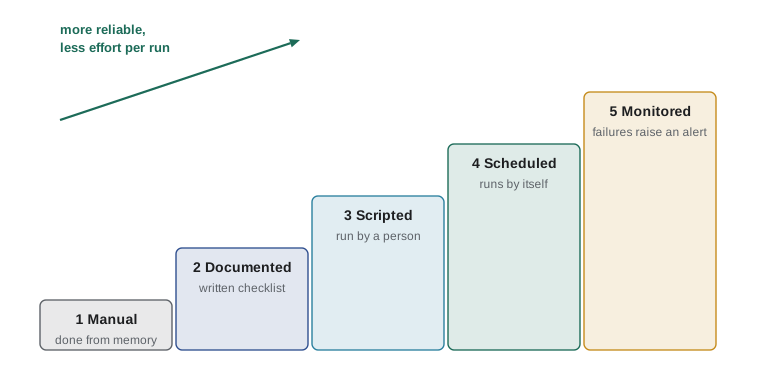
Look at what happens to people's attention as a chore climbs the ladder. A manual chore needs someone to remember it, to do it and to check it. A monitored, scheduled script needs attention only when something unusual happens, and it says so when it does. That shift, from routine attention to exception handling, is the real benefit of automation. The minutes saved are welcome; the reduction in forgotten steps and silent errors matters more.
When automation pays off
Writing and testing a script takes time, so automation is an investment. A simple way to judge it is to compare the hours the script will save in a year with the hours it takes to build. A chore that takes 10 minutes and happens three times a week uses 10 × 3 × 52 = 1,560 minutes, or 26 hours, a year. If the script takes four hours to write and test, it pays for itself in about two months, and every week after that is time returned.
def yearly_hours(minutes, per_week):
    return minutes * per_week * 52 / 60

chores = [
    ("Monday stock report", 45, 1),
    ("Rename roast logs", 10, 3),
    ("Back up till files", 5, 6),
    ("Check web server log", 15, 5),
]
for name, minutes, per_week in chores:
    print(f"{name:<22}{yearly_hours(minutes, per_week):6.1f} hours a year")
total = sum(yearly_hours(m, w) for _, m, w in chores)
print(f"{'Total':<22}{total:6.1f} hours a year")Monday stock report 39.0 hours a year Rename roast logs 26.0 hours a year Back up till files 26.0 hours a year Check web server log 65.0 hours a year Total 156.0 hours a year
About 132 hours a year, more than three working weeks, go into four small chores. Time is only half the story, though. Three other questions matter as much:
- How costly is a mistake? A missed backup or a report built from last week's file can cost far more than the minutes the chore takes. Tasks where errors are expensive deserve automation even if they are rare.
- How stable is the procedure? Automating a process that changes every month means rewriting the script every month. Settle the steps first, then automate.
- Who else could do it? A chore that only one person knows how to do stops when that person is away. A script is documentation that runs.
There is also a caution. Automating a process you do not fully understand just makes the misunderstanding run faster. Before writing a script, do the chore by hand once more while writing down every step and every decision. If you cannot describe a step precisely, the script cannot do it either.
import math

def payback_weeks(build_hours, minutes_per_run, runs_per_week):
    minutes_saved_per_week = minutes_per_run * runs_per_week
    return math.ceil(build_hours * 60 / minutes_saved_per_week)

print("Rename roast logs:", payback_weeks(4, 10, 3), "weeks")
print("Back up till files:", payback_weeks(3, 5, 6), "weeks")
print("Monday stock report:", payback_weeks(12, 45, 1), "weeks")Rename roast logs: 8 weeks Back up till files: 6 weeks Monday stock report: 16 weeks
The renaming script pays for itself in eight weeks and the backup in six. The Monday report takes longest to build, about 12 hours because it combines several files, and needs 16 weeks to pay back, but it is also the chore where a wrong number has the biggest consequences, so Jordan still puts it on the list. Change the numbers in the listing and run it again: the calculation is a quick way to argue for, or against, a piece of automation.
Try it yourself
Hours a year
Write a function yearly_hours(minutes, per_week) that returns how many hours a chore uses in a year of 52 weeks, rounded to 1 decimal place.
For example, a 10-minute chore done 3 times a week uses 26.0 hours a year.
def yearly_hours(minutes, per_week):
    return 0

print(yearly_hours(10, 3))
Choosing a tool
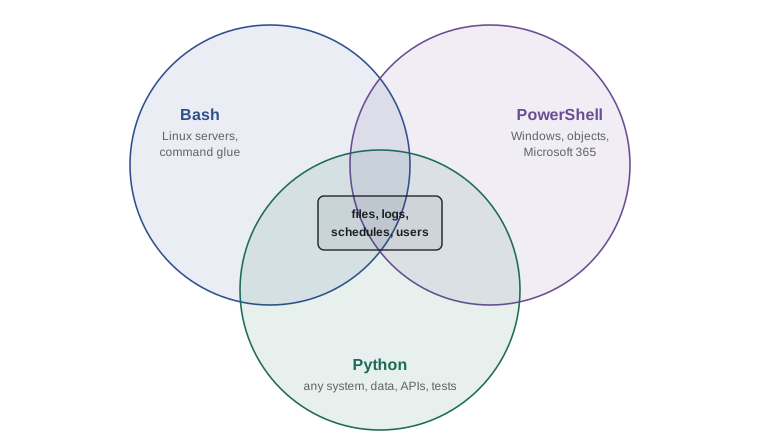
Three tools cover almost all scripting in IT, and this course teaches all three. Each has a natural home, and a capable administrator knows when to reach for which.
Bash is the standard shell on Linux and a common one on macOS. A shell script is a list of the same commands you would type at a terminal, plus variables, loops and tests. Bash is unbeatable for gluing together existing command-line programs, such as copying, compressing, searching and moving files, and it is present on almost every server. It becomes awkward when the logic gets complicated, when data has structure, or when the script must run on Windows.
PowerShell is Microsoft's shell and scripting language. It is built into Windows, and PowerShell 7 also runs on Linux and macOS. Its commands, called cmdlets, pass structured objects to each other rather than plain text, which makes sorting, filtering and reporting easy. It is the natural tool for managing Windows computers, Microsoft 365 and Active Directory.
Python is a general-purpose language with a large standard library for files, text, dates, networking and data formats, and thousands of further packages. It runs the same way on Linux, macOS and Windows, and it scales from a ten-line script to a full application with tests. Python is the right choice when a task involves real logic, structured data such as JSON or CSV, web APIs, or when the same script must work on several operating systems.
| Tool | Natural home | Strengths | Weak spots |
|---|---|---|---|
| Bash | Linux and macOS servers | Gluing commands together; always installed on Linux | Complex logic, structured data, Windows |
| PowerShell | Windows, Microsoft 365, Active Directory | Object pipeline; deep Windows management | Less common on Linux servers |
| Python | Any operating system | Logic, data formats, APIs, testing, libraries | Needs Python installed; more code for simple command chains |
In practice the three work together. A Bash script on the shop's Linux server might call a Python program to analyze the web log. A PowerShell script on Anita's Windows computer might copy files and then hand them to the same Python report. Learning the basics of all three lets you read the scripts you inherit, and choose the right tool for the scripts you write.
Principles of good automation
A script that runs unattended needs more care than one you watch. Experienced administrators follow a handful of principles, and every later lesson in this course comes back to them.
- Idempotent: running the script twice should leave things in the same state as running it once. A backup script that copies today's files again should not create duplicates; a user script should not fail because the user already exists.
- Safe by default: destructive actions such as deleting or overwriting should have a dry-run mode that only reports what would happen. Test with the dry run first.
- Loud on failure: a script that fails should stop, return a non-zero exit code and say clearly what went wrong, rather than carrying on with bad data. Silence should mean success.
- Logged: a scheduled script should record what it did and when, so that you can answer the question did last night's backup run without guessing.
- Least privilege: run with only the permissions the task needs. A report script should not run as an administrator.
- Kept in version control: scripts are code. Store them in Git, as PYTH-110 shows, so that changes are reviewed and can be undone.
- Configurable: folder names, email addresses and limits belong in settings or command-line options, not buried in the code, so that the same script works on another computer.
copied = set()

def back_up(files):
    """Copy each file at most once: running this twice changes nothing new."""
    new = []
    for name in files:
        if name not in copied:
            copied.add(name)
            new.append(name)
    return new

today = ["till-2026-11-02.csv", "till-2026-11-03.csv"]
print("first run copied:", back_up(today))
print("second run copied:", back_up(today))first run copied: ['till-2026-11-02.csv', 'till-2026-11-03.csv'] second run copied: []
The set remembers what has already been copied, so the second run does nothing. A real backup script checks the backup folder instead of a set in memory, but the idea is the same: decide what needs doing by looking at the current state, rather than blindly repeating every step. Idempotence is what makes it safe to rerun a script after a failure, and safe to schedule it more often than strictly necessary.
Worked problem
Choosing the first chore to automate
Jordan has time to automate one chore this month. The candidates are the roast log renaming (10 minutes, 3 times a week, mistakes are annoying but harmless), the till backup (5 minutes, 6 times a week, a missed backup could lose a week of sales records) and the Monday report (45 minutes weekly, takes about 12 hours to build). Which should come first?
Show solution
- Work out the yearly time: renaming 26 hours, backup 26 hours, report 39 hours.
- Estimate the build time: renaming about 4 hours, backup about 3 hours, report about 12 hours.
- Payback: renaming 8 weeks, backup 6 weeks, report 16 weeks.
- Weigh the cost of a mistake: a missed backup is the most dangerous, because the loss is permanent and invisible until it is too late.
- Check stability: the backup steps have not changed in a year; the report format is still being discussed with Theo.
Answer: Automate the till backup first: it pays back fastest, its failures are the most costly, and its steps are settled. The report comes next, once Theo agrees on its format.
Try it yourself
Weeks to pay back
Write a function payback_weeks(build_hours, minutes_per_run, runs_per_week) that returns the number of whole weeks until a script has saved the time it took to build. Round up, because a partial week still has to be lived through.
For example, payback_weeks(4, 10, 3) is 8: the script saves 30 minutes a week and took 240 minutes to build.
import math

def payback_weeks(build_hours, minutes_per_run, runs_per_week):
    return build_hours

print(payback_weeks(4, 10, 3))
Try it yourself
Rank the chores
Each chore is a dictionary with keys name, minutes and per_week. Write a function rank_chores(chores) that returns a list of the chore names, largest yearly time first. Yearly time is minutes × per_week × 52.
For the starter data the order is report, logs, backup.
chores = [
    {"name": "backup", "minutes": 5, "per_week": 4},
    {"name": "report", "minutes": 45, "per_week": 1},
    {"name": "logs", "minutes": 15, "per_week": 2},
]

def rank_chores(chores):
    return [c["name"] for c in chores]

print(rank_chores(chores))
Common mistakes
MistakeAutomating a chore before the steps are settled.
InsteadDo it by hand while writing every step down; automate once the procedure is stable.
MistakeJudging automation only by minutes saved.
InsteadWeigh the cost of mistakes and the risk of the chore depending on one person.
MistakeWriting a script that repeats every step on every run.
InsteadMake it idempotent: check the current state and do only what is needed.
MistakeLetting a scheduled script fail silently.
InsteadReturn a non-zero exit code, log the failure and make sure someone is told.
MistakeBurying folder names and limits in the code.
InsteadPut settings in options or a configuration file so the script works elsewhere.
MistakeUsing one tool for everything.
InsteadUse Bash to glue commands, PowerShell for Windows management and Python for logic and data.
Summary and key terms
- Automation hands routine chores to scripts so they happen reliably, the same way every time.
- Chores climb a ladder: manual, documented, scripted, scheduled and monitored.
- A script pays off when the yearly time saved and the mistakes avoided outweigh the time to build it.
- Bash glues commands on Linux, PowerShell manages Windows with objects, and Python handles logic, data and APIs anywhere.
- Good automation is idempotent, safe by default, loud on failure, logged, least-privileged, version-controlled and configurable.
- automation
- Having a computer carry out a task without a person making each decision.
- script
- A short program that strings together actions to get a job done.
- shell
- A program that reads commands and runs them, such as Bash or PowerShell.
- idempotent
- Giving the same result whether it runs once or many times.
- dry run
- A mode in which a script reports what it would do without changing anything.
- exit code
- A number a program returns when it ends; 0 means success.
- payback period
- The time until a piece of automation has saved the time it took to build.
- least privilege
- Giving a person or script only the permissions a task needs.
- monitoring
- Watching scheduled jobs so that failures are noticed and reported.
- configuration
- Settings kept outside the code so a script can be reused.
Practice problems
Work each problem on paper first, then reveal the answer to check.
A chore takes 20 minutes and happens twice a week. How many hours a year does it use?
Show answer
20 × 2 × 52 = 2,080 minutes, about 34.7 hours.
A script takes 6 hours to build and saves 30 minutes a week. What is the payback period?
Show answer
360 ÷ 30 = 12 weeks.
Why is a missed backup a stronger reason to automate than a slow report?
Show answer
The loss from a missed backup is permanent and unnoticed until the data is needed.
Which tool would you choose to rename files on the Linux web server using standard commands?
Show answer
Bash.
What does it mean for a user-creation script to be idempotent?
Show answer
Running it again for an existing user does not create a duplicate or fail; it leaves the user as it is.
Name two things a monitored script does that a merely scheduled one does not.
Show answer
It records what happened and alerts someone when a run fails.
Lesson quiz · 5 questions
Score 60% or more to complete this lesson.
Create a free account to save your progress, take quizzes and earn a certificate.