
PYTH-120 · Lesson 11 of 12 · 29 min
Error handling, logging and safe scripts
▶ Video coming soon A video version of this lesson is on the way.
A script that runs while you watch can rely on you: you see the error, you notice the odd output, you stop it before it does damage. A script that runs at 2:30 a.m. has nobody watching. It must notice its own problems, stop before making them worse, leave a clear record of what happened, and never destroy data by accident. This lesson pulls together the safety habits mentioned throughout the course into a coherent approach: handling errors deliberately, logging properly, validating inputs, writing files atomically, and building dry runs and confirmations into anything destructive.
Everything on this page runs in your browser, including the file operations, which use the page's own temporary file system. That makes it a safe place to practise exactly the operations that are dangerous on a real server.
Failing well
There are two ways for a script to fail badly. It can stop with an unhandled error and a long traceback that nobody reads, leaving work half done. Or, worse, it can carry on after something went wrong, processing an empty file as if it were complete, or deleting files after the backup that should have protected them failed. Failing well means detecting problems early, stopping cleanly when continuing would be unsafe, saying exactly what went wrong, and returning a non-zero exit code so that schedulers and other scripts know.
Python's exceptions are the tool. Catch specific exceptions, such as FileNotFoundError or json.JSONDecodeError, where you know how to respond, and let everything else propagate to a single handler in main that logs the error and returns a failure code. Avoid a bare except: that catches everything, including programming mistakes and the KeyboardInterrupt raised when someone presses Ctrl+C, and hides them. Use finally, or a with block, for cleanup that must happen however the code exits, such as removing a lock file.
import json, sys
from pathlib import Path

def load_stock(path):
    try:
        text = Path(path).read_text(encoding="utf-8")
    except FileNotFoundError:
        raise SystemExit(f"stock file not found: {path}")      # clear message, exit code 1
    try:
        data = json.loads(text)
    except json.JSONDecodeError as e:
        raise SystemExit(f"stock file is not valid JSON: {path} (line {e.lineno})")
    if not isinstance(data, dict):
        raise SystemExit(f"stock file should hold an object, found {type(data).__name__}")
    return data

Path("stock.json").write_text('{"RC-101": 42, "RC-104": 9}', encoding="utf-8")
Path("broken.json").write_text('{"RC-101": 42, "RC-104"}', encoding="utf-8")
print(load_stock("stock.json"))
for bad in ("missing.json", "broken.json"):
    try:
        load_stock(bad)
    except SystemExit as e:
print("stopped:", e){'RC-101': 42, 'RC-104': 9}
stopped: stock file not found: missing.json
stopped: stock file is not valid JSON: broken.json (line 1)Raising SystemExit with a message, which is what sys.exit does, ends the script with exit code 1 and prints the message to standard error, a tidy way to stop a command-line tool. The listing catches it only so that the page can show both failures; a real script would simply stop. Look at the third check: the file parsed as valid JSON but held the wrong kind of data. Validating structure, not just syntax, is what stops a script from producing a convincing report from the wrong data.
Validating inputs
Every value that comes from outside the script, command-line arguments, environment variables, file contents, API responses, is a possible source of trouble and should be checked before it is used. Is the folder really a folder? Is the number of days a positive whole number? Does the CSV file have the columns the script expects? Checking at the start, and refusing to continue if anything is wrong, is called failing fast, and it means problems are reported in terms the user understands, folder not found: /mnt/backup, instead of an obscure error deep in the code after half the work is done.
def parse_days(text, low=1, high=365):
    """Return a whole number of days, or raise ValueError with a clear message."""
    try:
        days = int(text.strip())
    except ValueError:
        raise ValueError(f"days must be a whole number, got {text!r}") from None
    if not low <= days <= high:
        raise ValueError(f"days must be between {low} and {high}, got {days}")
    return days

for value in ["30", " 7 ", "thirty", "0", "4000"]:
    try:
        print(repr(value), "->", parse_days(value))
    except ValueError as e:
print(repr(value), "-> error:", e)'30' -> 30 ' 7 ' -> 7 'thirty' -> error: days must be a whole number, got 'thirty' '0' -> error: days must be between 1 and 365, got 0 '4000' -> error: days must be between 1 and 365, got 4000
Try it yourself
A safe integer
Write safe_int(text, default, low, high) that converts text to an int, ignoring surrounding spaces. Return default if the text is not a whole number or the number is outside low to high inclusive.
For example, safe_int(" 45 ", 30, 1, 365) returns 45 and safe_int("abc", 30, 1, 365) returns 30.
def safe_int(text, default, low, high):
    return int(text)

print(safe_int(" 45 ", 30, 1, 365))
Logging properly
print is fine for a script you watch, but a scheduled script needs a log: a file with one line per event, each with a timestamp and a level saying how serious it is. Python's logging module provides this. You configure it once at the start of the script, with a format, a level and a destination, and then call logging.info for normal progress, logging.warning for things that are odd but not fatal, logging.error for failures, and logging.debug for detailed information you only want when investigating. The level setting filters messages, so the same script can be quiet in normal use and detailed when run with a --verbose option.
import logging, sys

log = logging.getLogger("backup")
log.setLevel(logging.INFO)
handler = logging.StreamHandler(sys.stdout)           # a real script would also use a FileHandler
handler.setFormatter(logging.Formatter("%(levelname)-7s %(name)s: %(message)s"))
log.addHandler(handler)

log.debug("checking 3 files")                          # hidden: below the INFO level
log.info("copied till-2026-11-03.csv (19968 bytes)")
log.warning("backup drive is 91% full; clean up soon")
log.error("could not copy till-2026-11-04.csv: file is locked")
log.setLevel(logging.DEBUG)
log.debug("now debug messages appear too")INFO backup: copied till-2026-11-03.csv (19968 bytes) WARNING backup: backup drive is 91% full; clean up soon ERROR backup: could not copy till-2026-11-04.csv: file is locked DEBUG backup: now debug messages appear too
A real script would write to a file as well, with a FileHandler, or to the system's own log, and add the time with %(asctime)s in the format; the listing leaves the time out so its output is the same every time it runs. Logs grow, so either let the operating system rotate them, as lesson 6 described, or use logging's RotatingFileHandler, which starts a new file after a size limit and keeps a few old ones. Three rules keep logs useful: log enough to answer what did the script do and why did it stop; never log secrets such as passwords and tokens; and make error messages specific, naming the file, the record or the step that failed.
| Level | Use for | Example |
|---|---|---|
| DEBUG | Detail needed only when investigating | read 1,532 lines from access.log |
| INFO | Normal progress and results | backup complete: 6 files, 112 KB |
| WARNING | Something unusual that does not stop the job | backup drive is 91% full |
| ERROR | A failure of one part of the job | could not copy till-2026-11-04.csv |
| CRITICAL | A failure that stops the whole job | backup drive not mounted |
Writing files atomically
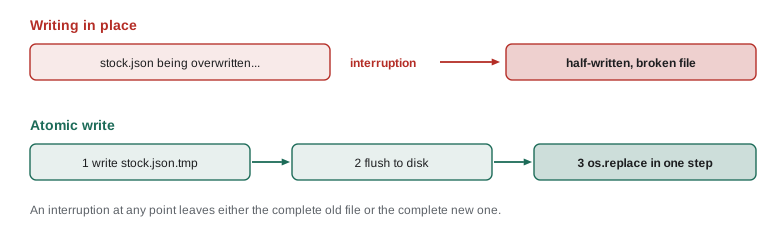
Writing a file is not instantaneous. If a script is interrupted halfway through writing the stock file, by a crash, a power cut or a full disk, the file is left half written, and the next run reads a broken file. The cure is an atomic write: write the new content to a temporary file in the same folder, make sure it is complete, then replace the old file with the new one in a single step using os.replace. On the same file system, os.replace either completes fully or not at all, so other programs always see either the complete old file or the complete new one, never a half-written mixture.
import os, tempfile, json
from pathlib import Path

def atomic_write(path, text):
    path = Path(path)
    fd, tmp = tempfile.mkstemp(dir=path.parent, prefix=path.name + ".", suffix=".tmp")
    try:
        with os.fdopen(fd, "w", encoding="utf-8") as f:
            f.write(text)
            f.flush()
            os.fsync(f.fileno())          # make sure the data reached the disk
        os.replace(tmp, path)             # the single, all-or-nothing step
    except BaseException:
        os.unlink(tmp)                    # never leave temporary files behind
        raise

atomic_write("stock.json", json.dumps({"RC-101": 40, "RC-104": 9}))
print(Path("stock.json").read_text(encoding="utf-8"))
print([p.name for p in Path(".").glob("stock.json.*.tmp")]){"RC-101": 40, "RC-104": 9}
[]Try it yourself
Write a file atomically
Write atomic_write(path, text) that writes text to a temporary file in the same folder as path and then moves it into place with os.replace, so the file is never half written. No temporary file may be left behind afterwards. A folder called data with an old stock.json has been created for you.
After atomic_write("data/stock.json", "new") the file contains new and data holds only stock.json.
import os, tempfile
from pathlib import Path

def atomic_write(path, text):
    pass

atomic_write("data/stock.json", "new")
print(Path("data/stock.json").read_text(encoding="utf-8"))
Dry runs, confirmations and safe deletion
Every destructive action, deleting, overwriting, changing permissions, removing accounts, deserves three protections. First, a dry-run mode that builds the full list of what would be done and reports it without doing it, so the plan can be checked. Second, a narrow scope: act only inside an explicitly named folder, only on files that match an expected pattern, and refuse to run if the inputs look wrong, for example if the folder does not exist, is the root of the disk, or contains far more matching files than expected. Third, a record: log each item changed, so that a mistake can at least be traced and, where a backup exists, reversed.
import os, time
from pathlib import Path

def delete_old(folder, pattern, days, now, dry_run=True, max_files=100):
    folder = Path(folder)
    if not folder.is_dir():
        raise SystemExit(f"not a folder: {folder}")
    cutoff = now - days * 86400
    old = sorted(p for p in folder.glob(pattern) if p.is_file() and p.stat().st_mtime < cutoff)
    if len(old) > max_files:
        raise SystemExit(f"refusing: {len(old)} files match, more than the limit of {max_files}")
    for p in old:
        if dry_run:
            print("would delete", p.name)
        else:
            p.unlink()
            print("deleted", p.name)
    return [p.name for p in old]

now = time.time()
folder = Path("till_exports")
folder.mkdir(exist_ok=True)
for name, age_days in [("till-2026-08-01.csv", 95), ("till-2026-09-15.csv", 50), ("till-2026-11-01.csv", 2)]:
    p = folder / name
    p.write_text("x\n", encoding="utf-8")
    os.utime(p, (now - age_days * 86400, now - age_days * 86400))   # set the file's age

delete_old(folder, "till-*.csv", 30, now)                       # dry run first
print("still there:", sorted(p.name for p in folder.iterdir()))
delete_old(folder, "till-*.csv", 30, now, dry_run=False)
print("left:", sorted(p.name for p in folder.iterdir()))would delete till-2026-08-01.csv would delete till-2026-09-15.csv still there: ['till-2026-08-01.csv', 'till-2026-09-15.csv', 'till-2026-11-01.csv'] deleted till-2026-08-01.csv deleted till-2026-09-15.csv left: ['till-2026-11-01.csv']
The function defaults to a dry run, so forgetting the option is harmless rather than destructive. The max_files limit is a sanity check worth copying: if a bug in the age calculation suddenly makes every file look old, the script refuses instead of emptying the folder. Passing now in as an argument, rather than reading the clock inside, also makes the function testable, because a test can use a fixed time. For interactive scripts, a confirmation prompt, Delete 2 files? [y/N], adds a final check, with no as the default; scheduled scripts cannot ask, which is why their scope and limits must be tight.
Try it yourself
Delete old files safely
Write delete_old(folder, days, now, dry_run=True) that finds the files directly in folder whose modification time (stat().st_mtime) is more than days days before now (a time in seconds), and returns their names sorted. If dry_run is False, also delete them. If dry_run is True, delete nothing. A folder exports with files of different ages has been prepared, and NOW holds the reference time.
With days=30, the two old files are a-old.csv and b-old.csv.
from pathlib import Path

def delete_old(folder, days, now, dry_run=True):
    return []

print(delete_old("exports", 30, NOW))
Putting it together: a script skeleton
The habits in this lesson fit together into a standard shape for an administration script, which the capstone uses. Parse and validate arguments first. Set up logging. Take a lock if the script must not run twice at once. Do the work in small functions that raise specific exceptions. Catch errors once, in main, log them and return an exit code. And keep destructive steps behind a dry-run option that defaults to on for anything new.
import argparse, logging, sys

log = logging.getLogger("ridgeline")

def run(args):
    log.info("starting%s", " (dry run)" if args.dry_run else "")
    # ... validate inputs, do the work in small functions, log each change ...
    log.info("finished: %d items processed", 0)

def main(argv=None):
    p = argparse.ArgumentParser(prog="ridgeline-task")
    p.add_argument("--dry-run", action="store_true")
    p.add_argument("-v", "--verbose", action="store_true")
    args = p.parse_args(argv)
    logging.basicConfig(level=logging.DEBUG if args.verbose else logging.INFO,
                        format="%(levelname)s %(message)s", stream=sys.stdout, force=True)
    try:
        run(args)
    except SystemExit:
        raise
    except Exception:
        log.exception("task failed")          # logs the message and the traceback
        return 1
    return 0

print("exit code:", main(["--dry-run"]))INFO starting (dry run) INFO finished: 0 items processed exit code: 0
log.exception, used inside an except block, logs the error together with its full traceback, which is exactly what you want in a log file the morning after a failure. Catching Exception in main is acceptable here, unlike a bare except, because it happens in one place, logs everything and converts the failure into an exit code. Bash and PowerShell have their own versions of the same safety net: set -euo pipefail with a trap for cleanup in Bash, and the Stop error action with try, catch and finally in PowerShell.
Worked problem
Reviewing a risky cleanup script
A script found on the old server deletes everything in a folder named in an environment variable, BACKUP_DIR, that is older than seven days, with no options and no log. Jordan is asked to make it safe before scheduling it. What changes?
Show solution
- Validate BACKUP_DIR: stop if it is unset, empty, not a folder, or a top-level folder such as / or /home.
- Narrow the scope to the backup naming pattern, such as till-*.tar.gz, instead of everything.
- Add a dry-run option that defaults to on, and a max_files sanity limit that stops the run if too many files match.
- Log every file deleted, the totals and any errors, and return a non-zero exit code on failure.
- Before deleting, check that at least one recent backup exists, so cleanup never removes the last good copy.
Answer: Validate the input, narrow the pattern, default to a dry run, add a sanity limit, log everything and protect the newest backups.
Common mistakes
MistakeUsing a bare except: that hides every error.
InsteadCatch specific exceptions, and handle the rest once in main.
MistakeCarrying on after a step fails.
InsteadStop cleanly and return a non-zero exit code.
MistakeTrusting arguments, environment variables and file contents.
InsteadValidate them at the start and fail fast with clear messages.
MistakeOverwriting important files in place.
InsteadWrite to a temporary file and swap it in with os.replace.
MistakeMaking destructive scripts act by default.
InsteadDefault to a dry run, narrow the scope and add sanity limits.
MistakeLogging passwords, tokens or full customer records.
InsteadLog what happened, never the secrets.
Summary and key terms
- Failing well means detecting problems early, stopping cleanly, explaining clearly and returning a non-zero exit code.
- Catch specific exceptions where you can respond; handle everything else once in main.
- Validate every outside input at the start, so errors are reported clearly before any work is done.
- The logging module records timestamped, levelled messages; never log secrets.
- Atomic writes, through a temporary file and os.replace, never leave half-written files.
- Destructive scripts need dry runs, narrow scopes, sanity limits and a record of every change.
- exception
- An error raised during a program's execution that can be caught and handled.
- traceback
- The report of where in the code an exception happened.
- fail fast
- Checking inputs early and stopping at the first sign of a problem.
- validation
- Checking that a value is of the right type, range and shape before using it.
- log level
- How serious a log message is: DEBUG, INFO, WARNING, ERROR or CRITICAL.
- handler
- The part of the logging system that sends messages to a destination.
- atomic operation
- An operation that either completes fully or has no effect.
- os.replace
- A function that moves a file into place, replacing any existing file in one step.
- sanity check
- A test that stops a script when results look implausible.
- dry run
- A run that reports what would happen without changing anything.
Practice problems
Work each problem on paper first, then reveal the answer to check.
Why is a bare except: dangerous in a scheduled script?
Show answer
It hides every error, including bugs and interrupts, so failures go unnoticed.
What should a script do if a required folder argument does not exist?
Show answer
Stop at once with a clear message and a non-zero exit code.
Which log level suits the message backup drive is 91% full?
Show answer
WARNING.
Why write to a temporary file and then call os.replace?
Show answer
So an interruption never leaves a half-written file.
A cleanup run suddenly finds 4,000 old files instead of the usual 30. What should a well-written script do?
Show answer
Refuse to continue because of its sanity limit, and report the count.
Why pass the current time into a function rather than reading the clock inside it?
Show answer
It makes the function testable with a fixed time.
Lesson quiz · 5 questions
Score 60% or more to complete this lesson.
Create a free account to save your progress, take quizzes and earn a certificate.