
PYTH-110 · Lesson 9 of 12 · 29 min
Virtual environments and dependencies
▶ Video coming soon A video version of this lesson is on the way.
Anita wants the monthly report as a spreadsheet file rather than plain text. Sam finds a well-known third-party package that writes spreadsheet files, installs it and adds an export command. The tests pass on Sam's laptop. On Jordan's laptop the new command crashes at once with ModuleNotFoundError, because Jordan never installed the package. A week later Sam upgrades the package for a different project, and ridgeline-tools breaks on Sam's laptop too, because the new version renamed a function. Both problems have the same cause: the project's dependencies were not recorded or isolated. Virtual environments and dependency files fix that.
This lesson explains why each project needs its own environment, how to create and use virtual environments, how pip installs packages from the Python Package Index, how to record a project's dependencies, how version numbers and version specifiers work, how lock files make installs reproducible and how to keep passwords and keys out of the code with environment variables.
Why each project needs its own environment
A package is a bundle of Python code that someone has published for others to install, such as a library for spreadsheets, web requests or testing. Most are downloaded from the Python Package Index, PyPI, at pypi.org, which holds hundreds of thousands of them. When you install a package without any special arrangement, it goes into a single location shared by every program that uses that Python. That works until two projects need different versions of the same package, or until you need to know exactly which packages one project depends on.
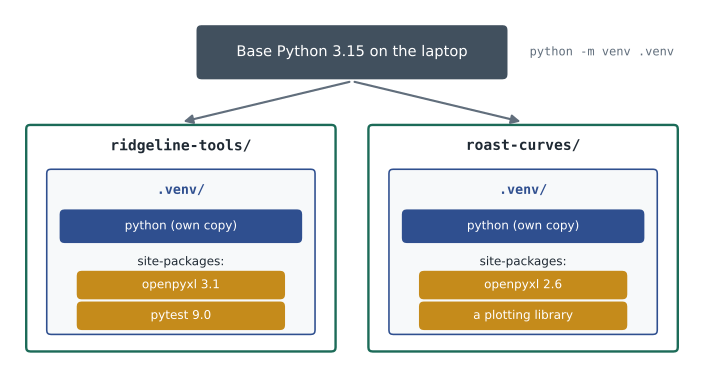
A virtual environment is a self-contained folder with its own Python executable and its own place for installed packages. Each project gets one, usually in a folder named .venv at the top of the project. Packages installed while the environment is active go into that folder only. ridgeline-tools can use version 3 of a package while another project on the same laptop uses version 2, and deleting the .venv folder removes every package installed for the project without touching anything else.
Creating and using a virtual environment
The venv module, part of the standard library, creates environments. Run it once per project, from the project folder, with the Python version the project should use. Then activate the environment in each new terminal session: activation changes the PATH from lesson 1 so that python and pip refer to the environment's copies, and most shells show the environment's name in the prompt as a reminder. Code editors detect a .venv folder and offer to use it as the project's interpreter, which is what makes completion and problem markers see the installed packages.
> cd ~/projects/ridgeline-tools
> python3 -m venv .venv
> source .venv/bin/activate                # macOS and Linux
(.venv) > python -c "import sys; print(sys.prefix)"
/home/sam/projects/ridgeline-tools/.venv
(.venv) > deactivate

On Windows (PowerShell):
> py -3.15 -m venv .venv
> .venv\Scripts\Activate.ps1
(.venv) > python -m pip --version
pip 25.3 from C:\Users\jordan\projects\ridgeline-tools\.venv\Lib\site-packages\pip (python 3.15)
Three rules keep environments trouble-free. Never commit the .venv folder: it is large, it contains paths specific to one computer and it can always be rebuilt, so .venv/ belongs in .gitignore, as lesson 4 showed. Never move or rename an environment folder; delete it and create a new one instead. And when in doubt about which Python is running, ask Python itself: inside an environment, sys.prefix points to the environment folder while sys.base_prefix still points to the base installation.
import sys

def in_virtualenv():
    return sys.prefix != sys.base_prefix

print('Running inside a virtual environment:', in_virtualenv())
print('Packages are installed under:', sys.prefix == sys.base_prefix and 'the base Python' or 'the environment')Running inside a virtual environment: False Packages are installed under: the base Python
Installing packages with pip
pip is Python's package installer. Always run it as python -m pip inside the active environment, so it installs into the right place. pip install with a package name downloads the newest version and everything it depends on; pip install name==1.4.2 installs an exact version; pip install --upgrade upgrades. pip list shows what is installed, pip show describes one package, including what it requires, and pip uninstall removes one. Install only packages you need from publishers you trust, and check the name carefully: attackers publish packages with names one letter away from popular ones, hoping for a typing mistake.
(.venv) > python -m pip install pytest
Collecting pytest
  Downloading pytest-9.0.1-py3-none-any.whl (370 kB)
Collecting iniconfig, packaging, pluggy (dependencies)
Successfully installed iniconfig-2.3.0 packaging-25.0 pluggy-1.6.0 pytest-9.0.1
(.venv) > python -m pip list
Package    Version
---------- -------
iniconfig  2.3.0
packaging  25.0
pip        25.3
pluggy     1.6.0
pytest     9.0.1
Recording dependencies
An environment is only useful to the team if everyone can recreate it, so a project must record what it depends on. The traditional way is a requirements.txt file listing one package per line, often with a version specifier, which pip installs with pip install -r requirements.txt. The modern way is the dependencies list in pyproject.toml, the project's main configuration file, which also holds the project's name, version, required Python and tool settings; pip install -e . installs the project and its dependencies in editable mode, so code changes take effect without reinstalling.
# pyproject.toml (part)
[project]
name = "ridgeline-tools"
version = "0.4.0"
requires-python = ">=3.10"
dependencies = [
    "openpyxl>=3.1,<4",
]

[project.optional-dependencies]
dev = ["pytest>=9", "ruff>=0.8"]

# requirements.txt (the older equivalent)
openpyxl>=3.1,<4   # monthly report export
pytest>=9                    # tests
Development tools such as pytest and ruff are needed by the people working on the project but not by the café computer that only runs it, so they go in a separate optional group, installed with pip install -e .[dev]. Whichever file a project uses, any program that reads it has to understand its format: comments after a hash sign, blank lines, package names with specifiers and sometimes extras in square brackets. The next exercise reads the essentials.
Try it yourself
Read a requirements file
Write parse_requirements(text) that returns a dictionary mapping each package name, in lowercase, to its version specifier as written (an empty string if there is none). Ignore blank lines and comments: everything from a # to the end of a line. The specifier starts at the first character that is one of =, <, >, ! or ~; remove spaces from it.
def parse_requirements(text):
    result = {}
    for line in text.splitlines():
        if line:
            result[line] = ''
    return result

print(parse_requirements(REQS))
Version numbers and semantic versioning
Most packages number their releases with semantic versioning: three numbers, MAJOR.MINOR.PATCH, such as 3.1.4. A patch release, 3.1.5, fixes bugs without changing how the package is used. A minor release, 3.2.0, adds features in a backward-compatible way, so code written for 3.1 still works. A major release, 4.0.0, may change or remove things, so code written for version 3 may need updating. Version numbers starting with 0, such as 0.8.2, signal that anything may still change.
As lesson 1 warned, version numbers must be compared as numbers, part by part, not as text: 3.10.0 is newer than 3.9.7. Pre-releases add a suffix, such as 4.0.0rc1 for a release candidate, and come before the final release. The packaging library, which pip itself uses, implements the complete official rules; the exercise below handles plain numeric versions, which is enough to see how comparison works.
versions = ['3.9.7', '3.10.0', '3.1.4', '3.10.2', '2.11.0']

print(sorted(versions))
print(sorted(versions, key=lambda v: tuple(int(p) for p in v.split('.'))))['2.11.0', '3.1.4', '3.10.0', '3.10.2', '3.9.7'] ['2.11.0', '3.1.4', '3.9.7', '3.10.0', '3.10.2']
Try it yourself
Compare semantic versions
Write parse_version(text) that turns a version such as 3.10.2 into a tuple of three integers, treating missing parts as 0, so 3.2 becomes (3, 2, 0). Then write newest(versions) that returns the newest version string from a list, and is_breaking(old, new) that returns True when the major number of new is greater than that of old.
def parse_version(text):
    return tuple(text.split('.'))

def newest(versions):
    return max(versions)

def is_breaking(old, new):
    return False

print(newest(['3.9.7', '3.10.0', '3.1.4']))
Version specifiers
A dependency rarely names one exact version. Instead it gives a range with version specifiers. == pins an exact version. >= and > set a minimum, <= and < a maximum, and != excludes one version. Several specifiers separated by commas must all hold, so >=3.1,<4 means any 3.x release from 3.1 on. The compatible-release operator ~= is shorthand for that kind of range: ~=3.1 means >=3.1 and <4, while ~=3.1.2 means >=3.1.2 and <3.2.
Choosing ranges is a balance. A range that is too loose, with no upper limit, lets a future major release break the project without warning. One that is too tight, pinning exact versions in pyproject.toml, prevents users from receiving bug fixes and makes it hard to combine the project with others. A common approach for applications is a sensible range in pyproject.toml plus a lock file, described next, that records the exact versions actually tested.
Try it yourself
Does a version satisfy a specifier?
Write satisfies(version, spec) that returns True when the version meets every comma-separated clause of the specifier. Support the operators ==, !=, >=, <=, > and < with plain numeric versions. An empty specifier is satisfied by any version. A helper parse_version that returns three-integer tuples is provided.
def satisfies(version, spec):
    return version in spec

print(satisfies('3.4.1', '>=3.1,<4'))
Lock files and reproducible installs
Ranges say which versions are acceptable; a lock file records exactly which versions were installed, including the dependencies of dependencies, so every installation can be identical. The simplest form is the output of pip freeze, which lists every installed package with an exact == version. Tools such as pip-tools and uv generate lock files from the ranges in pyproject.toml and can record a hash of each package file, so an altered download is rejected. With a lock file in the repository, Jordan's laptop, Sam's laptop and the café computer all run the same versions that passed the tests.
(.venv) > python -m pip freeze > requirements-lock.txt
(.venv) > cat requirements-lock.txt
iniconfig==2.3.0
packaging==25.0
pluggy==1.6.0
pytest==9.0.1
openpyxl==3.1.5

# Recreating the environment on another computer:
> python3 -m venv .venv
> source .venv/bin/activate
(.venv) > python -m pip install -r requirements-lock.txt
Lock files need updating too. Dependencies receive security fixes, and a project that never updates its lock file slowly accumulates known vulnerabilities. Hosting services offer bots that open pull requests when a dependency has a new release or a security advisory; each such pull request is reviewed and tested like any other change.
Keeping secrets out of the code
ridgeline-tools will soon need secrets: the key for the online shop's interface and the password for the email account that sends Anita's report. Lesson 1 said these must never appear in source code. The standard approach is to read them from environment variables, which are set outside the program, in the shell, by the operating system's service settings or by the hosting platform. Python reads them through os.environ.
import os

os.environ['RIDGELINE_SHOP_KEY'] = 'demo-key-123'      # in real use, set outside the program

key = os.environ.get('RIDGELINE_SHOP_KEY')
mail_password = os.environ.get('RIDGELINE_MAIL_PASSWORD')

print('Shop key found:', key is not None, '| ends with', key[-3:])
if mail_password is None:
print('RIDGELINE_MAIL_PASSWORD is not set; email sending is turned off.')Shop key found: True | ends with 123 RIDGELINE_MAIL_PASSWORD is not set; email sending is turned off.
For development, many teams keep these variables in a file named .env in the project folder, loaded at start-up by a small package or the editor, and listed in .gitignore so it is never committed. A committed file named .env.example shows the variable names with dummy values, so a new team member knows what to set. If a real secret is ever committed by mistake, treat it as exposed: change it immediately, because removing it from the latest commit does not remove it from history.
Worked problem
Fixing the spreadsheet export problem
The export command works for Sam and crashes for Jordan. Set up the project so this cannot happen again.
Show solution
- Sam adds openpyxl>=3.1,<4 to the dependencies in pyproject.toml, and pytest and ruff to the dev group.
- Sam runs python -m pip freeze > requirements-lock.txt in a fresh environment after the tests pass, and commits both files.
- The README gains setup steps: create .venv, activate it, python -m pip install -r requirements-lock.txt, then pip install -e .[dev].
- Jordan deletes the old environment, follows the README and runs the tests: they pass, and the export works.
- When Sam later upgrades the package for another project, that project's own .venv changes; ridgeline-tools is untouched.
Answer: Every computer now builds the same environment from files in the repository, and projects no longer affect each other.
Common mistakes
MistakeInstalling packages into the base Python for every project.
InsteadCreate a .venv for each project and install into it.
MistakeCommitting the .venv folder.
InsteadAdd .venv/ to .gitignore and record dependencies in files instead.
MistakeRunning pip and installing into a different Python.
InsteadActivate the environment and use python -m pip.
MistakeLeaving dependencies unrecorded, or with no upper limit at all.
InsteadDeclare sensible ranges in pyproject.toml and commit a lock file.
MistakeComparing versions as strings.
InsteadCompare tuples of integers, or use the packaging library.
MistakePutting an API key in the code or committing a .env file.
InsteadRead secrets from environment variables and ignore .env in Git.
Summary and key terms
- Packages from PyPI extend Python; installing them globally causes version clashes between projects.
- A virtual environment is a folder, usually .venv, with its own Python and installed packages; activate it before working.
- Use python -m pip to install, list and remove packages in the active environment, and check package names carefully.
- Dependencies are recorded in pyproject.toml or requirements.txt, with development tools in a separate group.
- Semantic versions are MAJOR.MINOR.PATCH; a new major number signals breaking changes; compare versions numerically.
- Specifiers such as >=3.1,<4 and ~=3.1 give acceptable ranges; lock files record the exact versions tested.
- Secrets belong in environment variables, read with os.environ, never in code or committed files.
- Package
- Published Python code that can be installed and imported by other programs.
- PyPI
- The Python Package Index, the main public repository of Python packages.
- pip
- Python's package installer.
- Virtual environment
- A project folder with its own Python executable and installed packages.
- Activation
- Adjusting the shell so python and pip refer to an environment's copies.
- Dependency
- A package that a project needs in order to run.
- pyproject.toml
- The standard configuration file for a Python project, including its dependencies.
- Semantic versioning
- Numbering releases MAJOR.MINOR.PATCH to signal the kind of change.
- Version specifier
- An expression such as >=3.1,<4 describing acceptable versions.
- Lock file
- A file recording the exact versions of every installed package.
Practice problems
Work each problem on paper first, then reveal the answer to check.
Why does each project get its own virtual environment?
Show answer
So projects can use different package versions and each project's dependencies are clear.
Which command creates an environment in .venv?
Show answer
python3 -m venv .venv (or py -m venv .venv on Windows).
How can a program tell it is running inside a virtual environment?
Show answer
sys.prefix differs from sys.base_prefix.
Why should .venv never be committed?
Show answer
It is large, specific to one computer and can be rebuilt from the dependency files.
Is 3.10.0 newer than 3.9.7?
Show answer
Yes: compared part by part, 10 is greater than 9.
What does ~=3.1 allow?
Show answer
Versions from 3.1 up to, but not including, 4.0.
Does 4.0.1 satisfy >=3.1,<4?
Show answer
No: it is not below 4.
What kind of change does 2.4.1 to 2.4.2 suggest under semantic versioning?
Show answer
A bug-fix release with no change in usage.
What is the difference between dependencies in pyproject.toml and a lock file?
Show answer
pyproject.toml gives acceptable ranges; the lock file records the exact versions installed.
A real API key was committed yesterday. What is the first thing to do?
Show answer
Change the key, because it stays in the history.
Lesson quiz · 5 questions
Score 60% or more to complete this lesson.
Create a free account to save your progress, take quizzes and earn a certificate.