
PYTH-110 · Lesson 12 of 12 · 32 min
Capstone: contributing to a team project
▶ Video coming soon A video version of this lesson is on the way.
It is the last week of Sam's co-op term, and there is one more feature to deliver before the 0.5.0 release: Kai wants the roast log exported for the bean supplier, who asks for each batch's green weight, roasted weight and weight loss. The feature is small. What makes this lesson a capstone is the way it is delivered. Sam uses every tool from the course, from the workstation and editor to issues, branches, commits, a pull request, review, documentation and finally a tagged release, and the result is a change that the whole team can trust, trace and maintain after Sam leaves.
This lesson walks through a complete contribution from issue to release. Along the way it introduces three practices that tie the course together: conventional commit messages, automatic checks that run before code leaves your computer, and releases with version numbers and changelogs derived from the history. It closes with advice for contributing to projects beyond your own team.
The contribution workflow, end to end
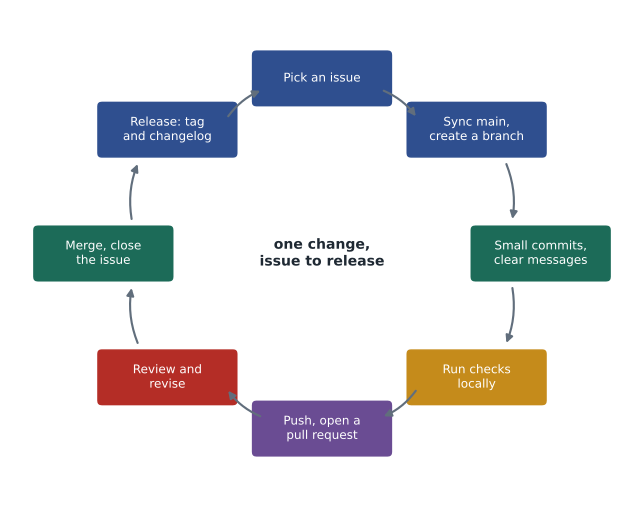
Each step in the figure has appeared in an earlier lesson. Picking and understanding the issue comes from lesson 11. Syncing and branching come from lessons 5 and 6. Commits come from lesson 4, local checks from lessons 2 and 9, the pull request and review from lessons 6 and 8, and the documentation from lesson 10. What is new is doing them together, in order, as one habit. Experienced developers do not think about these steps any more than an experienced barista thinks about each motion of making a latte; the purpose of this capstone is to start building that habit.
Sam begins with issue #36, Export roast log for supplier. Kai wrote it two weeks ago, and during Monday triage it was labelled feature and medium and added to the 0.5 milestone. Sam reads it again and asks one question in the thread before writing any code: should weights be in kilograms with one decimal place, like the roast log, or in grams? Kai answers kilograms. A thirty-second question saves an afternoon of rework.
> git switch main
> git pull
Updating 6a0f2d4..b81c3e9
Fast-forward
> git switch -c feature/36-roast-export
> source .venv/bin/activate
(.venv) > python -m pip install -r requirements-lock.txt
(.venv) > python -m pytest -q
31 passed in 0.42s
Starting from a green test run matters. If the tests already fail before you change anything, you need to know that now, not after an hour of work, when you could no longer tell whether you broke them.
Conventional commit messages
Many teams adopt a structured style for commit summaries called Conventional Commits. The summary begins with a type, an optional scope in parentheses and a colon: feat: for a new feature, fix: for a bug fix, docs: for documentation, test: for tests, refactor: for restructuring without changing behaviour, and chore: for maintenance such as updating dependencies. An exclamation mark after the type or scope, as in feat(api)!:, or a footer starting with BREAKING CHANGE:, marks a change that breaks backward compatibility. The rest of the summary follows the rules from lesson 4.
feat(roast): add supplier export of the roast log

Writes one row per batch with green kg, roasted kg and weight loss,
as Kai's supplier asked. Weights use one decimal place, like the log.

Closes #36
The structure costs little to write and pays off twice. People can scan a history and see at once which commits added features and which fixed bugs. And programs can read it: release tools work out the next version number from the commit types and draft the changelog from the summaries. The listing and exercises below build small versions of those tools.
import re

PATTERN = re.compile(r'^(\w+)(?:\(([\w-]+)\))?(!)?: (.+)')

for summary in ['feat(roast): add supplier export of the roast log',
                'fix: round weight loss to one decimal place',
                'feat(api)!: rename the sell command to sale',
                'Updated readme']:
    m = PATTERN.match(summary)
    if m:
        kind, scope, bang, text = m.groups()
        print(kind.ljust(5), (scope or '-').ljust(6), 'breaking' if bang else '        ', text)
    else:
print('not conventional:', summary)feat roast add supplier export of the roast log fix - round weight loss to one decimal place feat api breaking rename the sell command to sale not conventional: Updated readme
Try it yourself
Parse a conventional commit
Write parse_commit(message) that reads a full commit message and returns a dictionary with the keys type, scope, breaking and summary, or None if the first line is not in the conventional form type(scope)!: summary, where the scope and the ! are optional. scope is None when absent. breaking is True if the ! is present or if any line of the message starts with BREAKING CHANGE:. type is returned in lowercase.
def parse_commit(message):
    first = message.split('\n')[0]
    kind, summary = first.split(': ', 1)
    return {'type': kind, 'scope': None, 'breaking': False, 'summary': summary}

print(parse_commit('feat(roast): add supplier export'))
Checking before you push
Every course lesson has added a check that is better done by a program than by memory: the formatter and linter, the tests, no leftover conflict markers, no secrets, a well-formed commit message. Git can run a script automatically at certain moments, using hooks: a pre-commit hook runs before each commit is recorded, and a commit-msg hook can inspect the message. If the script reports a problem, Git stops, and you fix it before the code goes anywhere. The pre-commit framework, configured with a .pre-commit-config.yaml file in the repository, makes it easy for a whole team to share the same hooks, and CI, from lesson 8, runs the same checks again on the hosting service as a safety net.
import re

def check_files(files):
    problems = []
    for name, text in files.items():
        for n, line in enumerate(text.splitlines(), start=1):
            if line.startswith(('<' * 7, '=' * 7, '>' * 7)):
                problems.append(name + ':' + str(n) + ' conflict marker')
            if line != line.rstrip():
                problems.append(name + ':' + str(n) + ' trailing whitespace')
            if re.search(r'(?i)(api_key|password)\s*=\s*[\'"]\w', line):
                problems.append(name + ':' + str(n) + ' possible secret')
    return problems

staged = {
    'src/ridgeline/roast.py': "def weight_loss(green, roasted):\n    return round((green - roasted) / green * 100, 1)\n",
    'src/ridgeline/shop.py': "API_KEY = 'live-8f2c'\n",
}
for p in check_files(staged) or ['all checks passed']:
print(p)src/ridgeline/shop.py:1 possible secret
The check caught a key written into shop.py, exactly the mistake that lessons 1 and 9 warned about, before it was ever committed. Real secret scanners know the formats of many kinds of keys and tokens, and hosting services scan pushed commits too, but catching the problem on your own computer is far better than catching it after it reaches the shared repository, where it must be treated as exposed.
With the checks passing, Sam commits in two small steps, one for the export function with its tests and one for the README and changelog, pushes the branch and opens a pull request titled feat(roast): add supplier export of the roast log, with Closes #36 in the description. CI passes. Jordan's review asks for one change, a test for a batch with zero green weight, which would otherwise divide by zero. Sam adds the test and a guard in a new commit, Jordan approves, and the pull request is merged. Issue #36 closes itself.
Releasing a version
A release marks a version of the software as ready for use. For ridgeline-tools it means the version the café computer should run. Releasing involves three things: choosing the version number, recording what changed and marking the exact commit. The version number follows semantic versioning from lesson 9: since 0.4.0, the team has added features and fixed bugs without breaking anything, so the next version is 0.5.0. Release tools make this decision from conventional commits: any breaking change raises the major number, any feature raises the minor number, and fixes alone raise the patch number.
Try it yourself
Choose the next version
Write next_version(current, commits) where current is a version such as "0.4.0" and commits is a list of commit summary lines since that release. Return the new version as a string: if any commit is breaking (a ! right before the colon of a conventional summary, or the text BREAKING CHANGE anywhere), raise the major number; otherwise, if any commit has type feat, raise the minor number; otherwise, if any has type fix, raise the patch number; otherwise return current unchanged. Raising a number resets the numbers to its right to 0.
def next_version(current, commits):
    major, minor, patch = (int(p) for p in current.split('.'))
    return current

print(next_version('0.4.0', ['feat(roast): add supplier export', 'fix: guard zero weight']))
The changelog entry for the release comes next. A draft can be generated from the conventional commits, grouping feat commits under Added and fix commits under Fixed, and then edited by a person into wording that makes sense to users. Generating the draft guarantees nothing is forgotten; editing it makes it readable.
Try it yourself
Draft the release notes
Write release_notes(version, date, commits) that returns Markdown text for a changelog entry. The first line is ## [version] - date. Then, if there are any feat commits, a line ### Added followed by one line - summary for each, in the given order; then the same under ### Fixed for fix commits. Use only the part of each summary after the colon and space, and skip commits of other types. End with a newline.
def release_notes(version, date, commits):
    return '## ' + version + '\n'

print(release_notes('0.5.0', '2026-11-20', COMMITS))
Finally, the release commit is marked with a tag: a fixed label, unlike a branch, that permanently names one commit. An annotated tag, created with git tag -a, also stores who made it, when and a message. Tags are not pushed automatically, so they are pushed explicitly. Hosting services show tags as releases, where notes and downloadable files can be attached, and anyone can later check out exactly the code that was released as 0.5.0.
> git switch main
> git pull
> git tag -a v0.5.0 -m "Release 0.5.0: supplier roast export, receipt points"
> git push origin v0.5.0
To github.com:ridgeline-roasters/ridgeline-tools.git
 * [new tag]         v0.5.0 -> v0.5.0
> git tag --list
v0.3.0
v0.4.0
v0.5.0
Contributing beyond your own team
The same workflow carries over to open-source projects, with a few courtesies. Read the project's README and CONTRIBUTING.md first, and follow its process exactly; many projects ask contributors to open an issue and discuss a change before sending a pull request, so nobody spends a week on something the maintainers cannot accept. Respect the code of conduct, the document setting expectations for behaviour in the community. Start small, with a documentation fix or an issue labelled good first issue. Keep pull requests focused, follow the project's style and tests, and be patient: maintainers are often volunteers.
Pay attention to licences. Code you find online is not free to copy just because it is visible; its licence says what you may do with it. Permissive licences such as MIT and Apache 2.0 allow reuse with attribution, while copyleft licences such as the GPL require that software built from the code be shared under the same terms. Your own contributions are usually accepted under the project's licence. When copying code into ridgeline-tools, Sam checks the licence first, and if in doubt, writes the code from scratch.
Looking back
Over twelve lessons, Ridgeline's tooling has changed completely. A single script edited in IDLE and backed up as ridgeline_final_WORKING.py is now a project in a shared repository with a predictable layout, consistent editor settings, a recorded and isolated set of dependencies, a README and changelog, a history of small commits with clear messages, branches for every change, pull requests reviewed by a second person, issues for every request, a board showing the week's work and tagged releases. When Sam leaves at the end of the term, nothing leaves with Sam: the knowledge is in the repository.
These tools are the same ones used by software teams of every size, from two people in a coffee roastery to thousands in a technology company. The rest of the Python Programming program builds on them: PYTH-102 uses them for a larger, modular version of the Ridgeline program, PYTH-230 adds testing in depth, and PYTH-260 turns the checks from this lesson into a full continuous integration and deployment pipeline.
Worked problem
Delivering issue #36 from start to finish
List the steps Sam took to deliver the supplier export, with the lesson each comes from.
Show solution
- Clarify the issue in its thread and confirm it is in the 0.5 milestone (lesson 11).
- Pull main, create feature/36-roast-export, activate the environment and confirm the tests pass (lessons 3, 5, 6 and 9).
- Write the function, its tests, a docstring with a doctest, the README usage line and the changelog entry (lessons 2 and 10).
- Run the formatter, linter, tests and pre-commit checks; commit in two conventional commits (lessons 2, 4 and 12).
- Push, open a pull request with Closes #36, respond to review with a new commit, merge after approval (lessons 6 and 8).
- Choose 0.5.0 from the commit types, finish the release notes, tag v0.5.0 and push the tag (lessons 9 and 12).
Answer: The change is reviewed, tested, documented, linked to its request and released under a version number anyone can check out.
Common mistakes
MistakeStarting work without reading or clarifying the issue.
InsteadAsk questions in the issue thread before writing code.
MistakeBranching from an out-of-date main.
InsteadPull main first, then create the branch.
MistakeRelying on memory for formatting, tests and secret checks.
InsteadRun them automatically with hooks and again in CI.
MistakeWriting commit summaries that tools and people cannot scan.
InsteadUse conventional types such as feat and fix with a clear description.
MistakeRaising the minor version for a breaking change.
InsteadBreaking changes raise the major number; features the minor; fixes the patch.
MistakeCopying code from the internet without checking its licence.
InsteadCheck the licence, and write the code yourself if in doubt.
Summary and key terms
- A contribution moves from issue to branch, commits, local checks, pull request, review, merge and release.
- Start from an up-to-date main with passing tests, on a branch named after the issue.
- Conventional commits begin with a type such as feat or fix, an optional scope and ! for breaking changes.
- Git hooks and the pre-commit framework run checks automatically before code leaves your computer; CI repeats them.
- Release tools choose the next semantic version from commit types and draft changelog entries from summaries.
- Annotated tags permanently mark released commits and must be pushed explicitly.
- Open-source contributions follow the project's contributing guide, code of conduct and licence.
- Conventional Commits
- A convention for commit summaries that start with a type, an optional scope and a colon.
- Breaking change
- A change that makes existing uses of the software stop working.
- Git hook
- A script Git runs automatically at a point such as before a commit.
- pre-commit
- A framework for sharing Git hook checks across a team, configured in the repository.
- Release
- A version of the software marked as ready for use.
- Tag
- A fixed label that permanently names one commit, often a release.
- Annotated tag
- A tag that also stores its author, date and a message.
- Code of conduct
- A document setting expectations for behaviour in a project community.
- Licence
- The terms under which code may be used, changed and shared.
- Good first issue
- A label marking an issue suitable for newcomers to a project.
Practice problems
Work each problem on paper first, then reveal the answer to check.
Why run the tests before making any change on a new branch?
Show answer
So you know whether failures afterwards were caused by your change.
Write a conventional summary for a commit that fixes the low-stock threshold.
Show answer
fix(stock): correct the low-stock threshold comparison
Is refactor!: rename load to read_inventory a breaking change?
Show answer
Yes: the ! marks it as breaking.
What does a pre-commit hook do?
Show answer
Runs checks automatically before Git records each commit, stopping it if they fail.
Current version 2.3.4; commits since: fix, docs, feat. What is the next version?
Show answer
2.4.0
Current version 2.3.4; one commit has a BREAKING CHANGE footer. Next version?
Show answer
3.0.0
Under which changelog heading does a feat commit usually go?
Show answer
Added.
How is a tag different from a branch?
Show answer
A tag stays on one commit permanently; a branch moves forward with new commits.
Which command pushes the tag v0.5.0?
Show answer
git push origin v0.5.0
What should you read before contributing to an open-source project?
Show answer
Its README, contributing guide, code of conduct and licence.
Lesson quiz · 5 questions
Score 60% or more to complete this lesson.
Create a free account to save your progress, take quizzes and earn a certificate.