
PYTH-110 · Lesson 5 of 12 · 30 min
Branches and merging
▶ Video coming soon A video version of this lesson is on the way.
Mei has asked for a loyalty tracker: customers earn a point for every whole dollar they spend, move up through the Bean, Roast and Reserve tiers and get every tenth drink free. Sam takes the job. It will take two weeks, and for most of that time the code will be half-finished and broken. Meanwhile Jordan must keep ridgeline.py working for the staff, fixing bugs as they come in. If both of them commit to the same line of history, Sam's half-finished loyalty code lands in the tool the café uses every morning. Branches let each line of work develop separately and come together only when it is ready.
This lesson explains what a branch is in Git, how to create branches and move between them, the two ways Git merges one branch into another, how Git finds the common starting point of two branches, how to name branches and which branching strategies teams use.
What a branch is
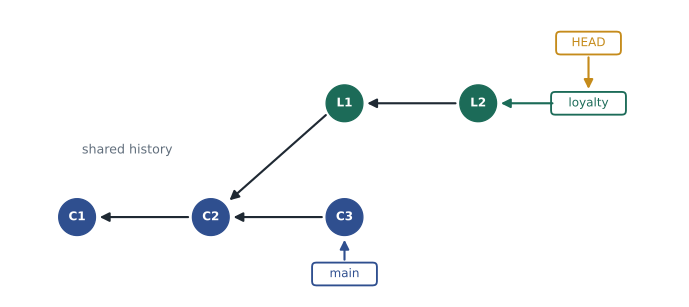
In Git, a branch is nothing more than a movable label that points to a commit. The main branch created by git init is a label named main that points to the newest commit on the main line of work. When you make a new commit on a branch, Git moves that branch's label forward to the new commit. Creating a branch just creates a new label pointing at the current commit, which is why branches in Git are instant and cost almost nothing, however large the project.
Git also keeps a special label named HEAD that records where you are: usually HEAD points to a branch name, which points to a commit. When you switch branches, Git moves HEAD to the other branch and updates the files in your working tree to match that branch's newest commit. The next commit you make then extends whichever branch HEAD points to.
> git branch
* main
> git switch -c loyalty
Switched to a new branch 'loyalty'
> git branch
* loyalty
  main
> # ... write loyalty.py, commit twice ...
> git log --oneline --graph --all
* 3c81f0a (HEAD -> loyalty) Add tier calculation
* 9b44e21 Add points for each whole dollar
| * d27aa90 (main) Fix low-stock threshold
|/
* a41c9e2 Add low-stock report command
git switch -c creates a branch and switches to it in one step; git switch on its own moves to an existing branch. Older tutorials use git checkout for both, which still works but does several unrelated jobs, so the newer git switch and git restore commands are clearer. git log --oneline --graph --all draws the history of every branch as text, with the asterisks showing commits and the lines showing how branches split and join.
Switching branches changes the files on disk. If Jordan switches from main to loyalty, loyalty.py appears in the working tree; switching back makes it disappear again, because main does not have it. Git refuses to switch if you have uncommitted changes that the switch would overwrite, to protect your work. Commit the changes first, or set them aside temporarily with git stash, which saves them and cleans the working tree, and bring them back later with git stash pop.
Two ways to merge
When the loyalty feature is finished, its commits need to join main. git merge does this: while on main, git merge loyalty brings in the work from the loyalty branch. Git does it in one of two ways, depending on the shape of the history.
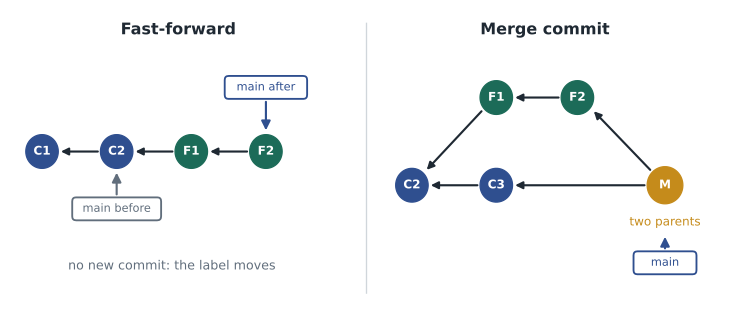
If main has not moved since loyalty was created, every commit on main is already part of loyalty's history. Git can simply slide the main label forward to loyalty's newest commit. This is a fast-forward merge: no new commit is made, and history stays a straight line. If main has moved on, as in the figure where Jordan's fix C3 was committed after the branch split, the two lines have each gained commits the other lacks. Git then makes a merge commit, a new commit with two parents, whose snapshot combines the changes from both branches.
> git switch main
> git merge loyalty
Merge made by the 'ort' strategy.
 src/ridgeline/loyalty.py | 64 ++++++++++++++++++++++++++++++++
 1 file changed, 64 insertions(+)
> git log --oneline --graph
*   e5f1b07 (HEAD -> main) Merge branch 'loyalty'
|\
| * 3c81f0a (loyalty) Add tier calculation
| * 9b44e21 Add points for each whole dollar
* | d27aa90 Fix low-stock threshold
|/
* a41c9e2 Add low-stock report command
> git branch -d loyalty
Deleted branch loyalty (was 3c81f0a).
To make the merge commit, Git performs a three-way merge. It compares three snapshots: the newest commit on each branch and their merge base, the most recent commit they have in common. A change that appears on only one side, compared with the merge base, is taken from that side. Only when both sides changed the same lines differently does Git stop and ask a person to decide, which is a merge conflict and the subject of lesson 7. After a successful merge, the branch label is no longer needed, and git branch -d deletes it; the commits remain in history.
The listings below model Git's history with a dictionary that maps each commit to the list of its parents. That is close to how Git stores it: each commit records its parents' hashes, and everything else is worked out by following those links.
parents = {
    'C1': [], 'C2': ['C1'], 'C3': ['C2'],     # main
    'L1': ['C2'], 'L2': ['L1'],               # loyalty, branched at C2
}

def ancestors(commit):
    seen, stack = set(), [commit]
    while stack:
        c = stack.pop()
        if c not in seen:
            seen.add(c)
            stack.extend(parents[c])
    return seen

print(sorted(ancestors('L2')))
print(sorted(ancestors('C3')))
print('C2 is an ancestor of L2:', 'C2' in ancestors('L2'))
print('C3 is an ancestor of L2:', 'C3' in ancestors('L2'))['C1', 'C2', 'L1', 'L2'] ['C1', 'C2', 'C3'] C2 is an ancestor of L2: True C3 is an ancestor of L2: False
Try it yourself
Can the merge fast-forward?
Using the PARENTS dictionary, write ancestors(commit) returning the set of the commit and all commits reachable through its parents, and can_fast_forward(target_tip, branch_tip) returning True when merging branch_tip into the branch whose newest commit is target_tip could be a fast-forward, that is, when target_tip is an ancestor of branch_tip.
In PARENTS, main is at C3, fix is at X1 (made from C3) and loyalty is at L2 (made from C2). M1 is a merge commit with two parents.
def ancestors(commit):
    return {commit}

def can_fast_forward(target_tip, branch_tip):
    return False

print(can_fast_forward('C3', 'X1'))
Finding the merge base
The merge base is the newest commit that both branches contain. For main at C3 and loyalty at L2, the commits they share are C1 and C2, and the newest of those is C2, where loyalty branched off. Git uses it as the reference point for the three-way merge, and git merge-base main loyalty prints it. Finding it is a matter of working out each branch's ancestors and picking the shared commit that comes latest.
Try it yourself
Find the merge base
PARENTS maps each commit to its parents and ORDER maps each commit to its position in time (larger is newer). Write merge_base(a, b) that returns the newest commit that is an ancestor of both a and b (a commit counts as its own ancestor). Return None if they share no commit.
def merge_base(a, b):
    # ancestors(commit) is already defined for you
    return None

print(merge_base('C3', 'L2'))
Naming branches
Branch names should say what the work is, so that a list of branches reads like a list of tasks in progress. Many teams use a prefix for the kind of work followed by a short description in lowercase with hyphens: feature/loyalty-points, fix/rounding-daily-totals, docs/install-guide. Some add the issue number, as in fix/14-rounding. Keep names short, because you will type them often, and delete branches once they are merged so the list stays meaningful.
Git itself forbids some names. A branch name cannot contain spaces, two consecutive dots, a tilde, a caret, a colon, a question mark, an asterisk, an opening square bracket or a backslash; it cannot begin with a hyphen, end with a slash or a dot, or end with .lock; and no part between slashes can begin with a dot. The command git check-ref-format --branch checks a name against these rules. The rules exist because those characters have special meanings in Git commands, such as the two dots that name a range of commits.
Try it yourself
Validate a branch name
Write valid_branch(name) that returns True only if the name follows these rules (a subset of Git's): it is not empty; it contains no space, .., ~, ^, :, ?, *, [ or backslash; it does not start with -; it does not end with /, . or .lock; and no part between slashes is empty or starts with a dot.
def valid_branch(name):
    return ' ' not in name

for n in ['feature/loyalty-points', 'fix rounding', 'feature/.hidden']:
    print(n, valid_branch(n))
Branching strategies
Teams agree on how they use branches, and three strategies are common. In GitHub flow, main is always ready to release; every piece of work happens on a short-lived branch, which is merged into main through a pull request after review, as lesson 6 describes. In trunk-based development, everyone integrates small changes into main, the trunk, at least daily, with branches lasting hours rather than weeks and unfinished features hidden behind settings called feature flags. In Git flow, long-lived develop and main branches are combined with feature, release and hotfix branches, a heavier process suited to software released in numbered versions on a fixed schedule.
For a small team like Ridgeline's, GitHub flow is the natural choice: main always works, each feature or fix gets its own branch, and branches are merged as soon as the work is reviewed. Whatever the strategy, the same principle holds: the longer a branch lives apart from main, the more main changes underneath it and the harder the eventual merge. Merge often, or bring main's latest changes into your branch often, and keep branches small.
| Strategy | Main idea | Branch lifetime | Suits |
|---|---|---|---|
| GitHub flow | main is always releasable; work on short branches merged by pull request | Days | Small teams, websites and tools released continuously |
| Trunk-based development | Everyone integrates small changes into main at least daily | Hours to a day or two | Teams with strong automated testing |
| Git flow | Separate develop, release and hotfix branches alongside main | Weeks | Software shipped in scheduled numbered versions |
Worked problem
An urgent fix during a feature
Sam is halfway through the loyalty branch when Mei reports that the low-stock report is wrong. The fix must reach the café today, without the unfinished loyalty code. Plan the Git steps.
Show solution
- Sam commits or stashes the loyalty work in progress so the working tree is clean.
- git switch main, then git switch -c fix/low-stock-threshold to start a fix branch from the working code.
- Make the one-line fix, run the tests and commit with a message such as Fix low-stock threshold comparison.
- git switch main and git merge fix/low-stock-threshold; main had not moved, so this is a fast-forward. Delete the fix branch.
- Back on loyalty, git merge main brings the fix into the feature branch so the two do not drift apart, and Sam continues where they stopped.
Answer: The fix reaches main the same day, and the loyalty work is untouched and up to date with it.
Common mistakes
MistakeCommitting unfinished feature work directly to main.
InsteadDo each piece of work on its own branch and merge it when it is ready.
MistakeSwitching branches with uncommitted changes and losing track of them.
InsteadCommit or stash your changes before switching.
MistakeKeeping a feature branch apart from main for weeks.
InsteadKeep branches short and merge main into them often.
MistakeNaming branches test, new or sam2.
InsteadUse descriptive names such as feature/loyalty-points or fix/14-rounding.
MistakeLeaving merged branches lying around.
InsteadDelete branch labels after merging; the commits stay in history.
MistakeUsing git checkout for everything and getting confused.
InsteadUse git switch to change branches and git restore to discard file changes.
Summary and key terms
- A branch is a movable label pointing to a commit; creating one is instant and cheap.
- HEAD records the current branch; switching branches updates the working tree to that branch's newest commit.
- A fast-forward merge moves the label when the target has not moved; otherwise Git makes a merge commit with two parents.
- Three-way merging compares both branch tips with their merge base, the newest commit they share.
- git stash sets uncommitted changes aside; git branch -d removes a merged branch's label.
- Branch names describe the work and must avoid characters that Git reserves.
- GitHub flow, trunk-based development and Git flow are common strategies; short-lived branches merge most easily.
- Branch
- A movable label that points to a commit and moves forward with each new commit.
- HEAD
- Git's pointer to the current branch or commit.
- git switch
- The command that changes branches; with -c it creates a new branch first.
- Merge
- Combining the work of one branch into another.
- Fast-forward merge
- A merge that just moves the branch label forward, creating no new commit.
- Merge commit
- A commit with two parents that combines two lines of history.
- Merge base
- The newest commit that two branches have in common.
- Three-way merge
- A merge that compares both branch tips with their merge base.
- Stash
- A saved set of uncommitted changes, set aside to leave a clean working tree.
- GitHub flow
- A strategy in which main is always releasable and work happens on short branches merged by pull request.
Practice problems
Work each problem on paper first, then reveal the answer to check.
What actually changes in the repository when you create a branch?
Show answer
Only a new label pointing to the current commit is added.
Which single command creates a branch named fix/tax and switches to it?
Show answer
git switch -c fix/tax
Git refuses to switch branches. What is the likely reason and the fix?
Show answer
Uncommitted changes would be overwritten; commit or stash them first.
main is at C3. feature was created from C3 and has F1 and F2. What kind of merge happens?
Show answer
A fast-forward: main's label moves to F2.
How many parents does a merge commit have?
Show answer
Two.
main is at C5 and feature, created from C3, is at F2. What is the merge base?
Show answer
C3.
When does a three-way merge need a person's help?
Show answer
When both branches changed the same lines differently, a merge conflict.
Is fix..totals a valid branch name? Why?
Show answer
No: two consecutive dots are not allowed.
Why are long-lived branches risky?
Show answer
main keeps changing, so the eventual merge becomes larger and more likely to conflict.
Which strategy keeps main always releasable and uses short branches merged by pull request?
Show answer
GitHub flow.
Lesson quiz · 5 questions
Score 60% or more to complete this lesson.
Create a free account to save your progress, take quizzes and earn a certificate.