
PYTH-110 · Lesson 11 of 12 · 29 min
Issue tracking and team workflow
▶ Video coming soon A video version of this lesson is on the way.
Requests for ridgeline-tools arrive from everywhere. Kai mentions a roast log idea over coffee. Anita sends a text about a wrong total. Mei writes a sticky note about the loyalty receipts and puts it on the office monitor, where it falls behind the desk. Theo tells Jordan about a shipping report, and Jordan tells Sam, who remembers it slightly differently. Some requests are done twice, some never, and nobody can say what the team is working on this week. The code is in good shape, thanks to Git and reviews; the work around the code is not.
This lesson explains how teams track work with issues, how to write a bug report someone can act on, how labels, priorities and milestones organize issues, how commits and pull requests link to them, how boards and limits on work in progress keep work flowing, how to decide what to do next, and the team habits that make all of this light rather than bureaucratic.
Issues
An issue, also called a ticket, is a record of one piece of work: a bug to fix, a feature to add, a question to answer or a task to do. Hosting services include an issue tracker alongside each repository, and teams also use dedicated tools such as Jira or Linear. Each issue gets a number, such as #21, a title, a description, a discussion thread, a status of open or closed, and optional labels, an assignee and a milestone. The number is how everyone refers to the work, in conversation, in commits and in pull requests.
Issues replace the sticky notes and text messages with one shared list. Anyone on the team can see what has been asked for, who is working on what and what was decided. The discussion stays attached to the work, so when Sam picks up the shipping report in a month, Theo's original request, Jordan's questions and Theo's answers are all in one place. For Ridgeline, Rosa decides that every request, from anyone, becomes an issue; staff who do not use the tracker can send requests to Jordan, who files them.
Writing an issue someone can act on
A good issue gives the person who picks it up everything they need without a conversation. Its title is short and specific: Daily total wrong when a sale is refunded, not Totals broken. A bug report says what happened, what should have happened, the exact steps to make it happen again, and the version or environment, with any error message pasted as text. A feature request describes the problem from the user's point of view and why it matters, rather than prescribing a solution, and says how to tell when it is done.
Title: Daily total wrong when a sale is refunded

What happened
`ridgeline report --day 2026-10-14` shows a total of 1,286.45.

What should happen
The till's end-of-day slip shows 1,267.95. The difference, 18.50,
is one bag of Sunrise Blend that was refunded at 15:40.

Steps to reproduce
1. Use the attached sales export for 14 October (sales-2026-10-14.csv).
2. Run ridgeline report --day 2026-10-14.
3. Compare with the slip (photo attached).

Version: ridgeline-tools 0.4.0 on the office computer
Reported by: Anita
Steps to reproduce are the most valuable part of a bug report. A bug that can be reproduced can be fixed and then tested; one that cannot is a guessing game. Repositories often provide issue templates, such as a bug report form with these headings, so reporters fill in the right information. When you receive a vague issue, ask the questions in the issue thread, so the answers are recorded for whoever works on it.
Labels, priorities and milestones
Labels classify issues so lists can be filtered. Most teams use a small set: a type, such as bug, feature, documentation or question; a priority, such as high, medium or low; and an area, such as loyalty, stock or reports. Keep the set small, because a label nobody applies consistently is worse than none. A milestone groups the issues planned for a release or a period, such as Version 0.5 or November, and shows progress as the share of its issues that are closed. The assignee field says who is doing the work, and an issue should have exactly one.
Triage is the regular habit of going through new issues to label them, set a priority, ask for missing information, close duplicates and decide which ones to do. On a small team it can be ten minutes on Monday morning. Without it, the issue list becomes a pile that nobody trusts.
Linking issues and code
Issues are most useful when the code that resolves them points back to them. Branch names can carry the number, such as fix/33-refund-totals. Commit messages and pull request descriptions mention it, and hosting services turn #33 into a link and show the reference on the issue's page. Certain keywords do more: a pull request whose description includes Fixes #33, Closes #33 or Resolves #33 closes issue 33 automatically when it is merged into the default branch. The issue then records exactly which change fixed it.
import re

KEYWORDS = r'(?:close|closes|closed|fix|fixes|fixed|resolve|resolves|resolved)'

messages = [
    'Fix refund handling in daily totals\n\nFixes #33',
    'Add roast log command (see #27, closes #28)',
    'Update README; refs #21',
]
for m in messages:
    closed = re.findall(KEYWORDS + r'\s+#(\d+)', m, flags=re.IGNORECASE)
    mentioned = re.findall(r'#(\d+)', m)
print('closes', closed, '| mentions', mentioned)closes ['33'] | mentions ['33'] closes ['28'] | mentions ['27', '28'] closes [] | mentions ['21']
Try it yourself
Which issues will a merge close?
Write closed_issues(text) that returns a sorted list of unique issue numbers (as integers) that the text would close. An issue is closed when its number follows one of the words close, closes, closed, fix, fixes, fixed, resolve, resolves or resolved (in any capitalization), then whitespace, then # and digits. A plain mention such as see #27 does not close anything.
import re

def closed_issues(text):
    return sorted(int(n) for n in re.findall(r'#(\d+)', text))

print(closed_issues('Fix totals. Fixes #33, see #27'))
Boards and work in progress
A board shows issues as cards in columns that represent stages of work, commonly To do, In progress, In review and Done. Cards move from left to right as work advances, so a glance shows what is waiting, what is being worked on and where things are stuck. Hosting services build boards from issues and pull requests automatically, moving a card to Done when its issue closes. This style of visual workflow comes from kanban, a method first developed for manufacturing.
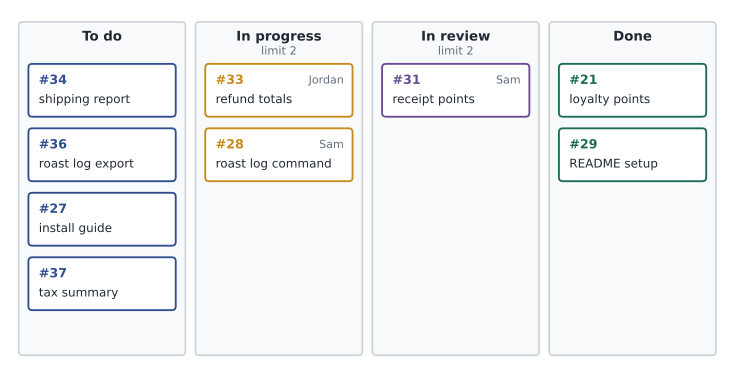
The most useful rule a board can carry is a limit on work in progress, or WIP limit: a maximum number of cards allowed in a column at once. With two people, In progress might be limited to two cards, one each. The limit stops the common pattern of starting many things and finishing few, and it makes bottlenecks visible: if In review is full, the right next step is to review someone's pull request, not to start something new. Finishing work is worth more than starting it.
Try it yourself
Board summary and WIP limits
Cards are given as (number, status) tuples and limits as a dictionary from status to the maximum allowed. Write column_counts(cards) that returns a dictionary counting cards per status, and over_limit(cards, limits) that returns a sorted list of the statuses whose count is greater than their limit. Statuses without a limit are never over the limit.
def column_counts(cards):
    return {}

def over_limit(cards, limits):
    return []

print(column_counts(CARDS))
Deciding what to do next
There is always more work than time. Priority labels answer most of the question: high-priority bugs that affect the café come first. Within the same priority, older issues usually go first, so nothing waits forever. Some teams weigh value against effort, doing small, valuable items early; others agree on a short list for each week or two, often called a sprint or iteration, and leave everything else for the next planning session. On a small team, a ten-minute conversation on Monday, looking at the board and the high-priority issues, is enough.
Try it yourself
Order the backlog
Issues are dictionaries with number, priority ("high", "medium" or "low"), opened (a date string YYYY-MM-DD) and labels (a list). Write next_up(issues, count) that returns the numbers of the first count open issues to work on, ordered by priority (high first), then by opened date (oldest first), then by number. Issues labelled "blocked" are skipped.
def next_up(issues, count):
    return [i['number'] for i in issues][:count]

print(next_up(ISSUES, 3))
Estimates and splitting work
Someone will always ask when a piece of work will be ready, and software estimates are famously unreliable. Two habits make them better. First, split large issues into small ones, each of which can be finished, reviewed and merged in a day or two; the roast log feature becomes separate issues for reading the log, the summary command and the supplier export. Small pieces are easier to estimate, easier to review and deliver value sooner. Second, estimate in rough sizes rather than hours, such as small, medium and large, and compare with similar work the team has finished before, which is a more honest reflection of how uncertain the future is.
Some teams record estimates on issues and compare them with how long the work actually took, which over time shows whether they tend to be optimistic. On a small team, the board itself gives most of this information: if a card has sat in In progress for a week, something is wrong, and the stand-up is the place to ask what is blocking it and whether the issue should be split.
Team rhythm and communication
Teams settle into a rhythm of short, regular meetings. A stand-up is a quick daily check, often fifteen minutes or less, where each person says what they finished, what they are doing next and anything blocking them. A planning session chooses the work for the coming week or two. A retrospective looks back at how the team worked, not what it built, and picks one or two improvements to try. Ridgeline's two developers fold all three into a twenty-minute call on Monday and a short message on Thursday, which is plenty for their size.
Most team communication should be written and attached to the work. Decisions belong in the issue or pull request they concern, not in a private message that the next person cannot see. Questions asked in a shared channel help everyone who has the same question later. Writing well, briefly and with the context a reader needs, is one of the most valuable skills on a software team, and every lesson in this course has practised it: commit messages, pull request descriptions, review comments, READMEs and now issues.
Finally, agree on a definition of done: the checklist that must be true before a card reaches the Done column. For ridgeline-tools it reads: code merged to main through a reviewed pull request, tests added and passing, README and changelog updated where needed, and the person who asked for it told that it is ready. A shared definition prevents the familiar argument about whether something is finished.
Worked problem
Bringing order to Ridgeline's requests
Requests reach the team by text, sticky note and conversation, and some are lost. Design a light process for a team of two developers and five staff.
Show solution
- Every request becomes an issue: developers file their own, and staff send requests to Jordan, who files them the same day with the requester named.
- Add issue templates for bug reports and feature requests, and six labels: bug, feature, docs, high, medium, low.
- Set up a board with To do, In progress (limit 2), In review (limit 2) and Done, with cards moving automatically.
- Triage and plan in the Monday call: label new issues, ask missing questions, choose the week's work.
- Link all work: branches named with the issue number, Fixes #N in pull requests, and the requester notified when the issue closes.
Answer: Requests are no longer lost, everyone can see what is in progress, and each finished piece of work is traceable from the request to the merged code.
Common mistakes
MistakeKeeping requests in private messages and sticky notes.
InsteadRecord every request as an issue in the shared tracker.
MistakeFiling a bug as totals broken with no details.
InsteadGive a specific title, expected and actual results, steps to reproduce and the version.
MistakeCreating dozens of labels that nobody applies consistently.
InsteadKeep a small set for type, priority and area.
MistakeStarting new work while pull requests wait for review.
InsteadRespect WIP limits: finish and review before starting more.
MistakeMerging the fix and forgetting to close the issue.
InsteadPut Fixes #N in the pull request so merging closes it automatically.
MistakeMaking decisions in private chats.
InsteadRecord decisions in the issue or pull request they concern.
Summary and key terms
- An issue records one piece of work with a number, title, description, discussion, status and optional labels, assignee and milestone.
- Good bug reports give expected and actual results, steps to reproduce and the version; feature requests describe the user's problem.
- Labels, priorities and milestones organize issues; regular triage keeps the list trustworthy.
- Commits, branches and pull requests reference issues by number; Fixes #N closes an issue when the pull request is merged.
- Boards show work flowing through columns; WIP limits stop too much work from being started at once.
- Order work by priority and age, skipping blocked items, and plan in short regular sessions.
- Write decisions down where the work lives and agree on a definition of done.
- Issue
- A tracked record of one piece of work, such as a bug or feature.
- Bug report
- An issue describing a defect, with steps to reproduce it.
- Label
- A tag used to classify and filter issues.
- Milestone
- A group of issues planned for a release or period.
- Triage
- Reviewing new issues to label, prioritize and clarify them.
- Closing keyword
- A word such as Fixes or Closes that closes an issue when a pull request merges.
- Board
- A view of issues as cards in columns representing stages of work.
- WIP limit
- The maximum number of cards allowed in a column at once.
- Stand-up
- A short, regular meeting about progress, plans and blockers.
- Definition of done
- The agreed checklist that must be true before work counts as finished.
Practice problems
Work each problem on paper first, then reveal the answer to check.
Improve the issue title report wrong.
Show answer
Something specific, such as Monthly report omits refunds from the total.
What is the most valuable part of a bug report?
Show answer
The steps to reproduce the problem.
Which line in a pull request description closes issue 42 on merge?
Show answer
Fixes #42 (or Closes #42 or Resolves #42).
Does see #42 close the issue?
Show answer
No: it only links to it.
Name the three kinds of label most teams use.
Show answer
Type, priority and area.
In progress has a WIP limit of 2 and holds 2 cards. What should someone who finishes a task do next?
Show answer
Review a waiting pull request or help finish existing work, not start something new.
Two high-priority bugs were opened on 3 October and 9 October. Which goes first?
Show answer
The older one, from 3 October.
What does triage involve?
Show answer
Labelling, prioritizing, asking for missing details and closing duplicates of new issues.
What three questions does a stand-up answer?
Show answer
What I finished, what I will do next and what is blocking me.
Give two items for a definition of done.
Show answer
Reviewed and merged, tests added and passing, documentation updated, requester informed.
Lesson quiz · 5 questions
Score 60% or more to complete this lesson.
Create a free account to save your progress, take quizzes and earn a certificate.