
NET-120 · Lesson 9 of 12 · 24 min
Containers and serverless computing
▶ Video coming soon A video version of this lesson is on the way.
Virtual machines solved the problem of sharing physical servers, but they still carry the weight of a whole operating system each, take a minute or more to start, and need someone to patch them. Over the last decade, two lighter ways of running code have become the normal choice for new cloud applications. Containers package an application with exactly what it needs and start in seconds. Serverless services go further: you hand the provider your code or your container, and it runs it when needed, scales it automatically and charges only for the time it runs. The wholesale site will run as a container on a serverless container platform, and a small serverless function will email Theo when a large order arrives. This lesson explains both.
What a container is
A container is a lightweight, isolated environment for running an application. Unlike a virtual machine, a container does not include its own operating system kernel. All the containers on a host share the host's kernel, while each container sees its own files, processes and network, kept apart by features of the Linux kernel such as namespaces and control groups. Because there is no operating system to boot, a container starts in a second or two, and dozens can run on a host that might hold only a few virtual machines.
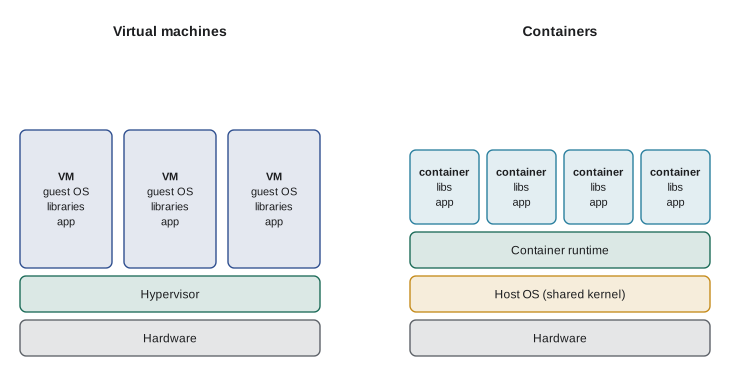
The great practical advantage of containers is consistency. A container image packages the application together with its runtime, libraries and settings, so the image that works on Jordan's laptop behaves the same way on a test server and in production. The old excuse, it works on my machine, mostly disappears. Images are built from a recipe called a Dockerfile, named after Docker, the company and tool that made containers popular in 2013. The format is now an open standard maintained by the Open Container Initiative, so images built with one tool run on any compatible platform.
# Dockerfile for the Ridgeline wholesale application
FROM python:3.13-slim

WORKDIR /app
COPY requirements.txt .
RUN pip install --no-cache-dir -r requirements.txt

COPY . .
RUN useradd --create-home appuser
USER appuser

EXPOSE 8080
CMD ["gunicorn", "--bind", "0.0.0.0:8080", "wholesale.app:app"]
Each line in the Dockerfile adds a layer to the image. FROM chooses a base image, here an official slim Python image. COPY and RUN add the application's files and install its libraries. USER switches to an ordinary account, because running containers as the all-powerful root user is a common security mistake. CMD says what to run when the container starts. Building the Dockerfile produces an image, which is pushed to a container registry: Amazon Elastic Container Registry, Azure Container Registry or Google Artifact Registry. The platforms that run containers pull images from the registry.
Containers are designed to be disposable. Any data that must survive belongs outside the container, in a managed database or object storage, so a container can be stopped, replaced or multiplied at any moment without losing anything. Jordan's application keeps no files on its own disk: orders go to the database and invoices to object storage, exactly as lessons 6 and 8 described.
Running containers in the cloud
There are three broad ways to run containers in the cloud, from most control to least work.
The first is to run them yourself on virtual machines, installing a container runtime on each. That is IaaS with containers on top, and it leaves all the server work with you. The second is Kubernetes, an open-source system originally developed at Google for running containers across a cluster of machines. Kubernetes schedules containers onto machines, restarts them if they fail, scales them, rolls out new versions gradually and connects them to each other. It is extremely capable and correspondingly complex. All three providers offer managed Kubernetes, in which the provider runs the cluster's control plane: Amazon EKS, Azure Kubernetes Service and Google Kubernetes Engine. Kubernetes is the standard for large organizations running many services, and NET-240 and CYB-250 return to it.
The third is a serverless container platform: you give it a container image, tell it how much memory and processor each copy needs and how many copies are allowed, and it runs and scales the containers without any servers or clusters for you to manage. Examples are AWS Fargate, used with Amazon ECS or EKS, AWS App Runner, Azure Container Apps and Google Cloud Run. Most of these can scale a service down to zero copies when there is no traffic, so a quiet test site costs almost nothing, and up to many copies under load. For a small team with one web application, this is usually the best fit, and it is what Jordan chose.
| Option | You manage | Best for | AWS | Azure | Google Cloud |
|---|---|---|---|---|---|
| Containers on VMs | Servers, runtime, scaling | Special requirements, full control | EC2 | Virtual Machines | Compute Engine |
| Managed Kubernetes | Cluster configuration, workloads (provider runs the control plane) | Many services, large teams, portability | EKS | AKS | GKE |
| Serverless containers | The container image and its settings | Web apps and APIs, small teams | Fargate, App Runner | Container Apps | Cloud Run |
| Functions | Function code only | Small event-driven tasks | Lambda | Azure Functions | Cloud Run functions |
| Container registry | Your images | Storing and scanning images | ECR | Container Registry | Artifact Registry |
Sizing a container service is similar to sizing an autoscaling group, with one new idea: concurrency, the number of requests one copy can handle at the same time. If each copy can handle 40 requests at once and the site is handling 300 requests at a given moment, at least eight copies are needed. Platforms such as Cloud Run and Azure Container Apps scale on concurrency directly.
Try it yourself
How many copies?
Complete copies_needed(concurrent_requests, per_copy, min_copies, max_copies). It returns the number of container copies needed: the concurrent requests divided by the requests one copy can handle, rounded up, but never below min_copies and never above max_copies.
Then complete plan(series, per_copy, min_copies, max_copies) that returns a list of copies needed for each value in a list of concurrent request counts.
import math

def copies_needed(concurrent_requests, per_copy, min_copies, max_copies):
    return min_copies

def plan(series, per_copy, min_copies, max_copies):
    return []

print(copies_needed(300, 40, 0, 10), plan([0, 30, 300, 900], 40, 0, 10))
Serverless functions
Functions as a service, usually just called serverless functions, take the idea to its limit. You write a single function in a supported language, such as Python, JavaScript, Java, C# or Go, and connect it to an event: an HTTP request, a new file in a storage bucket, a message on a queue, a database change or a timer. When the event happens, the platform starts an environment, runs the function and, after a while with no events, shuts it down. You never see or manage a server. The services are AWS Lambda, launched in 2014, Azure Functions and Google Cloud Run functions, formerly called Cloud Functions.
Serverless does not mean there are no servers; it means the servers are entirely the provider's concern. Functions suit small, event-driven tasks: resizing an image when it is uploaded, sending an email when an order is placed, processing a file, running a job every night. They are less suited to long-running work, because platforms limit how long one invocation may run; AWS Lambda, for example, allows at most fifteen minutes. They also have cold starts: when a function has not run for a while, the first request waits a moment while a new environment starts, from well under a second to a few seconds depending on the language and size.
# A serverless function: email Theo when a wholesale order over 500 dollars arrives.
# The platform calls handler() with the event; this version just returns what it would send.
import json

def handler(event, context=None):
    order = json.loads(event["body"])
    total = sum(line["qty"] * line["price"] for line in order["lines"])
    if total <= 500:
        return {"statusCode": 200, "body": "no alert needed"}
    message = f"Large order {order['id']} from {order['customer']}: {total:.2f} dollars"
    return {"statusCode": 200, "body": message}

sample = {"body": json.dumps({"id": "W-1031", "customer": "Lakeview Cafe",
                              "lines": [{"sku": "RC-101", "qty": 24, "price": 14.80},
                                        {"sku": "RC-106", "qty": 12, "price": 17.20}]})}
print(handler(sample)){'statusCode': 200, 'body': 'Large order W-1031 from Lakeview Cafe: 561.60 dollars'}Serverless pricing
Functions are billed differently from servers. You pay a small amount per million requests and an amount for compute measured in gigabyte-seconds: the memory you give the function, in gigabytes, multiplied by how long each run takes, in seconds, added up over all runs. A function with 512 megabytes of memory that runs for 200 milliseconds uses 0.5 times 0.2, or 0.1 gigabyte-seconds per run. All three providers include a free allowance every month, large enough that many small functions cost nothing at all. When a function is not running, it costs nothing, which is the great attraction for work that happens occasionally.
The flip side is that serverless can become expensive for work that runs constantly. A function handling a steady stream of requests all day may cost more than a small container or virtual machine that runs all the time. The usual rule is that serverless wins for spiky or occasional work and loses for steady, heavy work, and the only way to know for a particular workload is to calculate it.
Try it yourself
Serverless cost estimator
Write monthly_cost(requests, memory_mb, duration_ms, price_per_million, price_per_gb_second, free_requests, free_gb_seconds).
Compute gigabyte-seconds as requests x (memory_mb / 1024) x (duration_ms / 1000). Subtract the free allowances (never going below zero), then charge price_per_million for each million remaining requests and price_per_gb_second for each remaining gigabyte-second. Return the total rounded to 2 decimal places.
def monthly_cost(requests, memory_mb, duration_ms, price_per_million, price_per_gb_second,
                 free_requests, free_gb_seconds):
    return 0.0

print(monthly_cost(5_000_000, 512, 200, 0.20, 0.0000166667, 1_000_000, 400_000))
Event-driven design
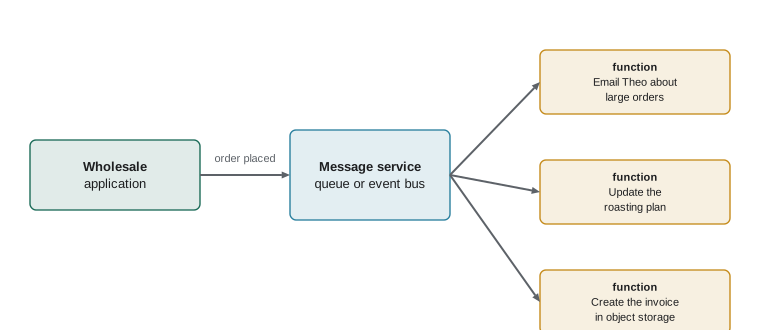
Serverless functions encourage an event-driven style of design, in which parts of a system communicate by publishing and reacting to events rather than calling each other directly. When a wholesale order is placed, the application writes it to the database and publishes an order-placed event to a message service. Separate functions react: one emails Theo if the order is large, one updates Kai's roasting plan, one creates the invoice. If the invoice function fails, the message waits in a queue and is retried, and the customer's order is not affected. The providers' messaging services include Amazon SQS, SNS and EventBridge, Azure Service Bus, Event Grid and Event Hubs, and Google Pub/Sub and Eventarc.
Decoupling parts of a system this way makes it more resilient and easier to change, because each part can be developed, scaled and fixed separately. It also makes it harder to follow what happened when something goes wrong, which is why logging and tracing, covered in NET-230 and CYB-210, matter more in event-driven systems.
Worked problem
Function, container or virtual machine?
Choose a compute option for each: (a) the wholesale web application, busy on Monday mornings and quiet overnight; (b) creating a thumbnail whenever a product photo is uploaded, about fifty times a month; (c) the roast logger receiver, whose vendor software must be installed on a particular Linux distribution with a kernel setting changed; (d) a nightly job that sums the day's orders, taking about two minutes.
Show solution
- (a) A web application with variable traffic and no special operating system needs suits a serverless container platform, which scales with demand and down to almost nothing at night.
- (b) A tiny task triggered by an upload event fifty times a month is ideal for a function; it will cost nothing within the free allowance.
- (c) Vendor software needing a particular distribution and kernel setting needs control of the operating system: a small virtual machine.
- (d) A short scheduled job fits a function on a timer, well inside the time limit; a scheduled container job would also work.
Answer: (a) serverless containers, (b) a function, (c) a virtual machine, (d) a scheduled function.
Common mistakes
MistakeThinking containers include their own operating system kernel.
InsteadContainers share the host's kernel; virtual machines each have their own.
MistakeStoring data inside a container.
InsteadContainers are disposable; keep data in databases and object storage.
MistakeRunning containers as root.
InsteadCreate and switch to an ordinary user in the Dockerfile.
MistakeChoosing Kubernetes for a single small application.
InsteadA serverless container platform is far simpler for one web app; Kubernetes suits many services and larger teams.
MistakeUsing a function for long-running work.
InsteadFunctions have time limits, such as fifteen minutes for AWS Lambda; use containers or virtual machines for long jobs.
MistakeAssuming serverless is always cheapest.
InsteadIt is cheapest for occasional or spiky work; steady heavy loads may cost less on containers or VMs.
Summary and key terms
- Containers package an application with its dependencies and share the host's kernel, so they start quickly and run consistently everywhere.
- Images are built from Dockerfiles, stored in registries, and should run as ordinary users and keep no data inside.
- Containers can run on your own VMs, on managed Kubernetes (EKS, AKS, GKE) or on serverless container platforms (Fargate, App Runner, Container Apps, Cloud Run).
- Serverless functions (Lambda, Azure Functions, Cloud Run functions) run code in response to events and are billed per request and per gigabyte-second.
- Functions have time limits and cold starts; they suit short, event-driven tasks.
- Event-driven designs connect parts through messages, making systems more resilient and easier to change.
- container
- An isolated environment for an application that shares the host operating system's kernel.
- container image
- A packaged application with its dependencies, from which containers are started.
- Dockerfile
- A recipe of instructions for building a container image.
- container registry
- A service that stores container images.
- Kubernetes
- An open-source system for running and managing containers across a cluster.
- serverless
- Running code without managing servers, billed for what is used.
- function
- A small piece of code run by a serverless platform in response to an event.
- cold start
- The delay when a serverless platform starts a new environment for a request.
- concurrency
- The number of requests handled at the same time.
- gigabyte-second
- One gigabyte of memory used for one second, the unit of serverless compute billing.
- event-driven
- A design in which components react to published events.
Practice problems
Work each problem on paper first, then reveal the answer to check.
Why does a container start faster than a virtual machine?
Show answer
It shares the host's running kernel, so there is no operating system to boot.
A function has 256 MB of memory and runs for 400 ms. How many gigabyte-seconds does one run use?
Show answer
0.25 x 0.4 = 0.1 GB-seconds.
Name the managed Kubernetes service at each provider.
Show answer
Amazon EKS, Azure Kubernetes Service (AKS), Google Kubernetes Engine (GKE).
Each container copy handles 25 concurrent requests. How many copies are needed for 210?
Show answer
210 / 25 = 8.4, so 9 copies.
Give one task well suited to a serverless function and one poorly suited.
Show answer
Well suited: resizing an uploaded image. Poorly suited: a video conversion that runs for an hour.
What problem does a container image solve?
Show answer
It packages the application with its exact dependencies so it runs the same everywhere.
Lesson quiz · 5 questions
Score 60% or more to complete this lesson.
Create a free account to save your progress, take quizzes and earn a certificate.