
NET-120 · Lesson 1 of 12 · 29 min
What cloud computing is
▶ Video coming soon A video version of this lesson is on the way.
For most of its life, Ridgeline Coffee Roasters has run on a handful of machines in the back office: Anita's desktop, Theo's shipping PC, the network storage box that holds the nightly backups, and the point-of-sale tablets in the cafe. Its online shop already lives somewhere else, on a hosted e-commerce platform that Ridgeline rents by the month. Nobody at Ridgeline has ever seen the computers that run the shop, and nobody needs to. When the shop is busy in the weeks before the holidays, it keeps working; when it is quiet in January, Ridgeline pays the same modest fee. That arrangement is a small example of cloud computing, and it is the starting point for this course.
This spring Rosa Delgado, Ridgeline's owner, decided to grow the wholesale side of the business. A dozen cafes and two grocery stores now buy Ridgeline coffee in bulk, and they order by phone, by email and sometimes by text message to Theo's personal phone. Rosa wants a proper wholesale ordering site where those customers can sign in, see their prices, place orders and download invoices, and she wants Kai's roast logs to feed a dashboard that shows what is roasting this week. Jordan Reyes, the barista who writes Ridgeline's Python tools, will build the application. Sam Ortiz, the support technician who looks after Ridgeline's computers and taught Jordan the basics of IT support in NET-101, will help decide where it should run.
The obvious question is whether to buy a server for the back office or to run the application in the cloud. Answering it properly needs the ideas in this course: what the cloud is, what the main kinds of cloud service are, how cloud providers build their infrastructure, how compute, storage, networking and identity work in the cloud, what containers and serverless functions are, how cloud costs and responsibilities are divided, and how infrastructure can be described in code. The course ends with Jordan and Sam deploying the wholesale site, so every lesson adds one piece of that final design.
A working definition
The phrase cloud computing is used loosely in advertising, but there is a precise definition that the industry and most governments rely on. It was written by the United States National Institute of Standards and Technology, known as NIST, in its Special Publication 800-145, and the Government of Canada's cloud guidance uses the same ideas. In NIST's words, cloud computing is a model for enabling convenient, on-demand network access to a shared pool of configurable computing resources, such as networks, servers, storage, applications and services, that can be rapidly provisioned and released with minimal management effort or service provider interaction.
That sentence is dense, so it is worth unpacking. On-demand means you get resources when you ask for them, not after a purchase order and a delivery truck. Network access means you reach those resources over a network, usually the internet. A shared pool means the provider's hardware serves many customers at once. Configurable means you choose sizes and settings. Rapidly provisioned and released means you can create resources in minutes and give them back just as quickly. And minimal management effort means the provider handles the physical work of running data centres, so you do not.
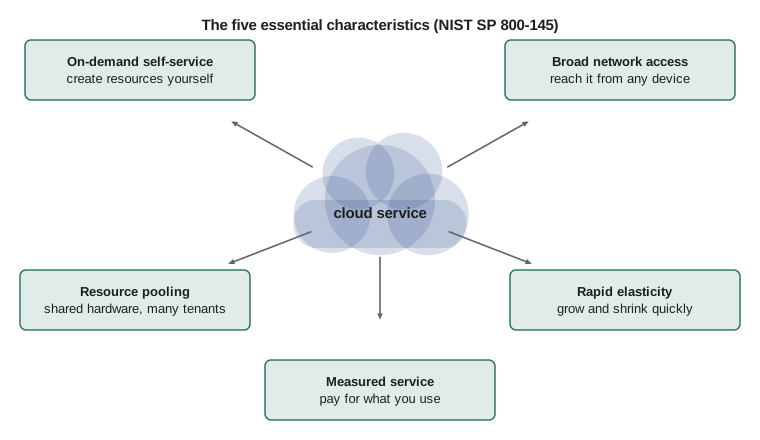
NIST then lists five essential characteristics. A service that lacks one of them may still be useful, but it is not cloud computing in the strict sense. The table below sets them out with an example from Ridgeline's world for each.
| Characteristic | What it means | Ridgeline example |
|---|---|---|
| On-demand self-service | Customers create and change resources themselves, through a web console or an API, without asking a person at the provider | Jordan creates a test database at 10 p.m. without phoning anyone |
| Broad network access | Resources are reached over the network from ordinary devices: laptops, phones, tablets and servers | Wholesale customers order from their own phones and laptops |
| Resource pooling | The provider serves many customers from shared hardware, assigning resources as needed; customers usually do not know exactly which machine they are on | The wholesale site shares physical servers with thousands of other customers |
| Rapid elasticity | Capacity can grow and shrink quickly, often automatically, so it appears almost unlimited | Extra capacity for the holiday rush, released in January |
| Measured service | Use is metered, so customers pay for what they consume and can see their usage | Anita sees a monthly bill broken down by service |
Two of those characteristics deserve extra attention, because they change how technicians and developers work. Self-service means the person who needs a server can usually create it in a few clicks or a single command, which is wonderful for speed and dangerous for budgets and security if nobody sets limits. Measured service means every resource has a meter running, which turns forgotten test servers into a monthly charge. Both points come back in lesson 10, on cost management.
How we got here
Cloud computing did not appear from nowhere. In the 1960s and 1970s, organizations rented time on large shared mainframe computers, paying for the processing they used. Personal computers and then local servers moved computing into every office in the 1980s and 1990s, and by 2000 a typical business owned a room of servers, each running one application. Most of those servers sat idle most of the time, because each had to be sized for its busiest day.
Virtualization changed the economics. A hypervisor is software that lets one physical server run several virtual machines, each behaving like a separate computer with its own operating system. Companies used virtualization to combine many lightly used servers onto a few busy ones. The next step was to offer virtual machines to outside customers on demand. Amazon Web Services launched its Simple Storage Service, S3, in March 2006 and its Elastic Compute Cloud, EC2, later that year, letting anyone rent storage and virtual servers by the hour with a credit card. Google App Engine followed in 2008 and Microsoft Azure became generally available in 2010. Today those three companies, usually called the hyperscalers because of their enormous scale, run the largest public clouds, alongside others such as Oracle Cloud Infrastructure, IBM Cloud and Alibaba Cloud.
This course stays vendor-neutral. When it names a service, it shows the equivalent at Amazon Web Services (AWS), Microsoft Azure and Google Cloud side by side, because the ideas are the same everywhere even when the product names differ. If you go on to a vendor certification, such as AWS Certified Cloud Practitioner, Microsoft Azure Fundamentals or Google Cloud Digital Leader, you will find that most of what those exams test is in this course under a general name.
On premises or in the cloud
The traditional alternative to the cloud is called on premises, often shortened to on-prem: you buy the hardware, install it in a room you control, and run it yourself. On-premises computing is not obsolete. It still makes sense for equipment that must sit next to machines on the shop floor, for very steady workloads that run flat out all year, and for organizations with strict rules about where data lives. But it carries costs that are easy to underestimate.
| Question | On premises | Public cloud |
|---|---|---|
| How do you pay? | Up front for hardware (a capital expense), then power, cooling and repairs | Monthly for what you use (an operating expense) |
| How fast can you get a new server? | Days or weeks: order, deliver, rack, install | Minutes |
| What if demand doubles? | Buy more hardware, if you planned the space and power | Add capacity, often automatically |
| What if demand falls? | The hardware sits idle but is still paid for | Release capacity and stop paying for it |
| Who replaces a failed disk at 3 a.m.? | You | The provider |
| Who controls the physical location? | You, completely | The provider, within the region you choose |
| What skills do you need? | Hardware, networking, power, cooling, operating systems | Cloud design, identity, cost management, automation |
The cost comparison is subtle. A back-office server might cost a few thousand dollars, which sounds cheaper than years of monthly cloud bills. But the server also needs a battery backup, a backup system, power, cooling, a replacement in five years, and, most expensively, someone's time to patch, monitor and repair it. Cloud providers price those things into their services, and they buy hardware at a scale no small business can match. On the other hand, a cloud resource that runs every hour of every month for years can end up costing more than equivalent owned hardware. The honest answer is that it depends on the workload, and the skill is in working it out.
Accountants describe the difference as capital expenditure, or CapEx, against operating expenditure, or OpEx. Buying a server is CapEx: a large payment up front for an asset that loses value over its life. Paying a cloud bill is OpEx: an ongoing cost that rises and falls with use. Many small businesses prefer OpEx because it avoids large up-front payments and matches spending to activity. Larger organizations sometimes prefer CapEx for steady workloads because it can be cheaper over time.
Jordan sketched the comparison for the wholesale site as a short script. The prices are invented for the example and are not quotes from any provider, but the shape of the calculation is the one every cloud decision uses: total the costs over the same period on each side, including the costs that are easy to forget.
# Three-year cost sketch for the wholesale site (example prices, in dollars)
months = 36

onprem = {
    "server hardware": 4200,
    "battery backup and spare drive": 650,
    "backup software and storage": 30 * months,
    "power and cooling": 22 * months,
    "Sam's time for patching and repairs": 90 * months,
}
cloud = {
    "small virtual machine": 38 * months,
    "managed database": 29 * months,
    "storage and backups": 6 * months,
    "data transfer": 4 * months,
}

for name, costs in (("On premises", onprem), ("Cloud", cloud)):
    total = sum(costs.values())
    print(f"{name:<12} {total:>7,} dollars over {months} months, about {total / months:,.0f} a month")

difference = sum(onprem.values()) - sum(cloud.values())
print("Cloud saves" if difference > 0 else "On premises saves", f"{abs(difference):,} dollars")On premises 9,962 dollars over 36 months, about 277 a month Cloud 2,772 dollars over 36 months, about 77 a month Cloud saves 7,190 dollars
Look at how much of the on-premises total is Sam's time rather than hardware. That is typical: labour, not equipment, is usually the largest cost of running servers yourself. Press Edit and run and try changing the hours or the prices to see how sensitive the answer is.
Try it yourself
Total cost of ownership
Write a function total_cost(upfront, monthly, months) that returns the total cost of an option: the up-front amount plus the monthly amount multiplied by the number of months.
Then write cheaper(a, b) that takes two (name, total) tuples and returns the name of the cheaper option, or "tie" if the totals are equal.
def total_cost(upfront, monthly, months):
    # up-front amount plus monthly amount for each month
    return 0

def cheaper(a, b):
    # a and b are (name, total) tuples
    return a[0]

onprem = ("on premises", total_cost(4850, 142, 36))
cloud = ("cloud", total_cost(0, 77, 36))
print(onprem, cloud, cheaper(onprem, cloud))
Elasticity and why it matters
Ridgeline's sales are not steady. The cafe is busiest from seven to ten in the morning, the online shop peaks on weekday evenings, and wholesale orders cluster on Monday mornings when cafes restock after the weekend. December is the busiest month of the year by far, because coffee is a popular gift. An on-premises server has to be big enough for the busiest hour of the busiest day, which means it is far too big for almost every other hour.
Elasticity is the cloud's answer. Instead of owning capacity for the peak, you rent capacity that follows demand: more servers when the orders pour in, fewer when they stop. Two related words are often confused. Scalability is the ability of a system to handle more load when you give it more resources. Elasticity is the ability to add and remove those resources quickly, ideally automatically, as demand changes. A system can be scalable without being elastic, if adding capacity takes a week. The cloud makes elasticity practical.
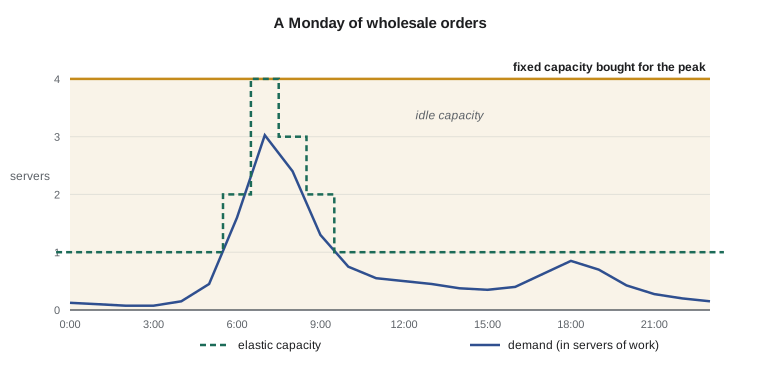
The difference is easy to see with numbers. Suppose one small server can handle forty orders an hour, and Ridgeline's wholesale site sees the demand below over a typical Monday. A fixed setup must run enough servers for the busiest hour all day. An elastic setup runs only as many as each hour needs.
import math

orders_per_hour = [5, 4, 3, 3, 6, 18, 64, 121, 96, 52, 30, 22,
                   20, 18, 15, 14, 16, 25, 34, 28, 17, 11, 8, 6]
per_server = 40

needed = [max(1, math.ceil(n / per_server)) for n in orders_per_hour]
fixed = max(needed) * len(needed)
elastic = sum(needed)

print("Servers needed each hour:", needed)
print("Fixed capacity:", fixed, "server-hours")
print("Elastic capacity:", elastic, "server-hours")
print(f"Elastic uses {elastic / fixed:.0%} of the fixed server-hours")Servers needed each hour: [1, 1, 1, 1, 1, 1, 2, 4, 3, 2, 1, 1, 1, 1, 1, 1, 1, 1, 1, 1, 1, 1, 1, 1] Fixed capacity: 96 server-hours Elastic capacity: 31 server-hours Elastic uses 32% of the fixed server-hours
Over this day, elastic capacity uses less than half the server-hours of fixed capacity. The saving is real money, but elasticity also protects the customer experience: if an unexpected promotion doubles the morning orders, an elastic system adds servers instead of slowing to a crawl.
Try it yourself
Servers needed each hour
Complete servers_needed(demand, per_server). It takes a list of hourly demand figures and the number of requests one server can handle in an hour, and returns a list with the number of servers needed for each hour.
Round up, because a fraction of a server is not possible, and never return fewer than 1 server for any hour, so the site stays online. Then complete savings(demand, per_server), which returns the fixed server-hours minus the elastic server-hours.
import math

def servers_needed(demand, per_server):
    # one entry per hour, rounded up, at least 1
    return []

def savings(demand, per_server):
    needed = servers_needed(demand, per_server)
    # fixed = the busiest hour's servers for every hour; elastic = sum of needed
    return 0

print(servers_needed([10, 50, 120], 40), savings([10, 50, 120], 40))
What changes for IT staff
Moving work to the cloud does not remove the need for IT skills; it changes which skills matter. Nobody at Ridgeline will ever replace a disk in a cloud server, but somebody must decide who is allowed to create resources, set sensible sizes, watch the monthly bill, keep backups, apply updates to the parts the customer still manages, and respond when something goes wrong. Cloud providers publish this division of labour as the shared responsibility model, which lesson 10 covers in detail. The short version is that the provider is responsible for the security of the cloud, meaning the buildings, hardware and core software, while the customer is responsible for security in the cloud, meaning their data, their accounts and how they configure the services.
Most cloud incidents that make the news are not failures of the provider's hardware. They are misconfigurations by customers: a storage bucket left open to the public, an administrator password with no second factor, or a test server forgotten and left running for a year. This course spends as much time on identity, configuration and cost as it does on servers, because that is where cloud work actually happens.
There is a human side too. Cloud work rewards people who write things down, who automate repeated tasks instead of clicking through them, and who think about cost as a design constraint rather than an afterthought. Jordan already writes Python, which turns out to be an advantage: almost every cloud service can be controlled through an API, and the main providers publish Python libraries for their APIs.
Worked problem
Is it really cloud?
Sam is reviewing three services Ridgeline already uses. (1) The hosted online shop, rented monthly, which Ridgeline configures through a web dashboard and which handles busy and quiet months without any action from Ridgeline. (2) A local company that hosts Ridgeline's old website on one physical server in its office; changes require an email to their technician, and the fee is the same every month. (3) Online file storage that staff reach from any device, where Anita can add more space herself and is billed by the gigabyte. Which of these meet the NIST definition of cloud computing?
Show solution
- The online shop: self-service through the dashboard, reached over the internet, shared platform, handles load changes automatically, and billed by plan and usage. It meets all five characteristics.
- The old website host: changes need a person at the provider, so there is no on-demand self-service; one fixed server means no rapid elasticity; a flat fee means no measured service. It is hosting, but not cloud computing in the NIST sense.
- The file storage: self-service, broad network access, shared infrastructure, space grows on request, and billed by use. It meets the definition.
Answer: The online shop and the file storage are cloud services; the single-server web host is traditional hosting, because it lacks self-service, elasticity and metering.
Common mistakes
MistakeCalling any service on the internet "the cloud".
InsteadCheck the five NIST characteristics: on-demand self-service, broad network access, resource pooling, rapid elasticity and measured service.
MistakeComparing a cloud bill with the price of a server alone.
InsteadInclude power, cooling, backup, replacement and, above all, the staff time needed to run a server yourself.
MistakeAssuming the cloud is always cheaper.
InsteadSteady workloads that run flat out all year can cost more in the cloud; the answer depends on the workload.
MistakeTreating scalability and elasticity as the same thing.
InsteadScalability is handling more load with more resources; elasticity is adding and removing resources quickly as demand changes.
MistakeThinking the provider is responsible for everything once you move to the cloud.
InsteadThe customer remains responsible for data, accounts and configuration under the shared responsibility model.
MistakeLetting anyone create resources with no limits because self-service is convenient.
InsteadSet permissions, budgets and alerts from the start, so convenience does not become cost or risk.
Summary and key terms
- Cloud computing is on-demand network access to a shared pool of configurable resources that can be provisioned and released quickly with little effort (NIST SP 800-145).
- Its five essential characteristics are on-demand self-service, broad network access, resource pooling, rapid elasticity and measured service.
- Virtualization made the cloud possible; AWS, Microsoft Azure and Google Cloud are the largest public cloud providers.
- On-premises computing is paid for up front (CapEx); cloud computing is usually paid monthly for use (OpEx).
- A fair cost comparison includes power, cooling, backups, replacement and staff time, not just hardware.
- Elastic capacity follows demand, so it avoids paying for capacity that sits idle outside the peak.
- The provider secures the cloud itself; the customer secures what they put in it and how they configure it.
- cloud computing
- On-demand network access to shared, configurable computing resources that are quickly provisioned and released.
- on premises
- Hardware owned and run by the organization in its own building.
- hypervisor
- Software that runs several virtual machines on one physical server.
- virtual machine
- A software computer with its own operating system, running on shared hardware.
- elasticity
- Adding and removing resources quickly as demand changes.
- scalability
- The ability to handle more load when more resources are added.
- measured service
- Metering of resource use so customers pay for what they consume.
- CapEx
- Capital expenditure: up-front spending on assets such as hardware.
- OpEx
- Operating expenditure: ongoing spending, such as a monthly cloud bill.
- hyperscaler
- One of the very large public cloud providers.
Practice problems
Work each problem on paper first, then reveal the answer to check.
A provider lets you rent a server, but you must email them and wait two days for it to be set up. Which essential characteristic is missing?
Show answer
On-demand self-service (and probably rapid elasticity).
Why is staff time often the largest cost of running servers on premises?
Show answer
Patching, monitoring, backups and repairs need skilled time every month, while hardware is bought only every few years.
Demand over four hours is 30, 90, 150 and 20 requests, and one server handles 50 requests an hour. How many server-hours do fixed and elastic capacity need?
Show answer
Needed each hour: 1, 2, 3, 1. Fixed: 3 x 4 = 12 server-hours. Elastic: 7 server-hours.
Is paying for a cloud database each month a capital or operating expense?
Show answer
An operating expense (OpEx).
Give one workload that might be better on premises.
Show answer
Examples: equipment that must sit next to factory machines, very steady workloads running flat out for years, or data that rules require to stay on site.
Who is responsible for a storage bucket accidentally left open to the public?
Show answer
The customer: configuration is the customer's responsibility under the shared responsibility model.
Lesson quiz · 5 questions
Score 60% or more to complete this lesson.
Create a free account to save your progress, take quizzes and earn a certificate.