
NET-120 · Lesson 5 of 12 · 26 min
Virtual machines and compute services
▶ Video coming soon A video version of this lesson is on the way.
Compute is the work of running programs: processor time and memory. In the cloud, compute comes in several forms, from virtual machines that behave like complete computers, through containers, to small functions that run for a fraction of a second. This lesson covers virtual machines, the oldest and most flexible form and the foundation that the others are built on. Even if Ridgeline's wholesale application ends up in containers, Sam will run one small virtual machine for the roast logger, and every cloud technician needs to know how to choose, launch, connect to, scale and look after a virtual machine.
Virtualization underneath
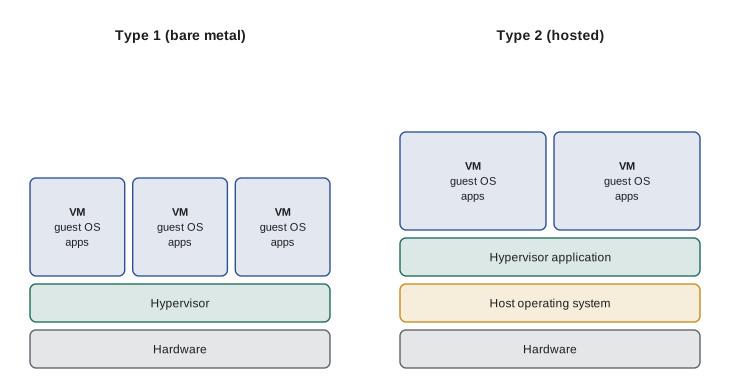
A cloud virtual machine, often called an instance, runs on a physical server under the control of a hypervisor. Lesson 1 introduced hypervisors as software that lets one physical server run many virtual machines. There are two kinds. A type 1 hypervisor, also called bare metal, runs directly on the hardware with no operating system underneath; this is what cloud providers use, with examples such as the AWS Nitro system, Microsoft's Hyper-V and the KVM hypervisor used by Google and many others. A type 2 hypervisor runs as an application on an ordinary operating system, such as VirtualBox or VMware Workstation on a laptop, and is used mostly for testing and learning.
The hypervisor divides the physical server's processor cores, memory, storage and network bandwidth among the virtual machines and keeps them isolated from each other. Each virtual machine sees what looks like its own processors, called virtual CPUs or vCPUs, its own memory and its own network card, and runs its own operating system. Modern processors include features that make virtualization efficient, and providers add custom hardware to offload networking and storage work, so a virtual machine today runs nearly as fast as the bare hardware.
Choosing an instance type
Providers sell virtual machines in fixed sizes called instance types at AWS and Google Cloud and VM sizes at Azure. Each type has a set number of vCPUs, an amount of memory, and limits on network and storage performance. Types are grouped into families for different kinds of work. The names are cryptic at first, but they follow patterns: a letter for the family, a number for the generation, and a size word or number.
| Family | Good for | AWS examples | Azure examples | Google Cloud examples |
|---|---|---|---|---|
| General purpose | Web servers, small databases, most business applications | m7i, t3 (burstable) | D-series, B-series (burstable) | n2-standard, e2 |
| Compute optimized | Busy web servers, batch jobs, video encoding | c7i | F-series | c3 |
| Memory optimized | Large databases, in-memory caches, analytics | r7i | E-series | n2-highmem, m3 |
| Storage optimized | Databases needing very fast local disks | i4i | L-series | z3 |
| Accelerated (GPU) | Machine learning, graphics, scientific computing | p5, g6 | N-series | a3, g2 |
Burstable instances deserve a special mention because they suit so many small workloads. A burstable instance, such as AWS's t-family, Azure's B-series or Google's shared-core e2 types, has a low baseline level of processor performance and earns credits while it is idle. When work arrives, it spends credits to run faster than the baseline. For a server that is quiet most of the time and busy in short bursts, like the roast logger receiver, this is much cheaper than paying for full-time processor capacity. If the credits run out, performance drops back to the baseline, which is the most common reason a burstable server suddenly becomes slow.
The skill in sizing is to choose the smallest type that does the job, and then measure. Beginners often pick a large instance to be safe; the bill then arrives. A better approach is to start small, watch processor, memory and disk use for a week or two, and resize if needed. In the cloud, resizing a virtual machine usually means a short restart, not a new purchase, so a wrong guess is cheap to correct.
# Pick the cheapest size that meets the requirements (illustrative sizes and prices)
sizes = [
    {"name": "small",   "vcpu": 2, "ram_gb": 2,  "hourly": 0.021},
    {"name": "medium",  "vcpu": 2, "ram_gb": 4,  "hourly": 0.042},
    {"name": "large",   "vcpu": 2, "ram_gb": 8,  "hourly": 0.083},
    {"name": "xlarge",  "vcpu": 4, "ram_gb": 16, "hourly": 0.166},
    {"name": "c-large", "vcpu": 4, "ram_gb": 8,  "hourly": 0.150},
]

def cheapest(sizes, vcpu, ram_gb):
    fits = [s for s in sizes if s["vcpu"] >= vcpu and s["ram_gb"] >= ram_gb]
    return min(fits, key=lambda s: s["hourly"]) if fits else None

for need in [(1, 2), (2, 6), (4, 8), (8, 32)]:
    s = cheapest(sizes, *need)
    if s:
        print(f"{need[0]} vCPU, {need[1]} GB -> {s['name']}, about {s['hourly'] * 730:.2f} dollars a month")
    else:
print(f"{need[0]} vCPU, {need[1]} GB -> no size fits")1 vCPU, 2 GB -> small, about 15.33 dollars a month 2 vCPU, 6 GB -> large, about 60.59 dollars a month 4 vCPU, 8 GB -> c-large, about 109.50 dollars a month 8 vCPU, 32 GB -> no size fits
Cloud providers usually quote compute prices per hour or per second and assume 730 hours in an average month, which is 365 days times 24 hours divided by 12. Remember that number; it appears in almost every cloud cost estimate.
Try it yourself
Right-size a server
Complete cheapest(sizes, vcpu, ram_gb) so that it returns the **name** of the cheapest size that has at least the required vCPUs and memory, or None if nothing fits.
Then complete monthly(size_name, sizes) to return that size's monthly cost, using 730 hours a month, rounded to 2 decimal places.
sizes = [
    {"name": "small", "vcpu": 2, "ram_gb": 2, "hourly": 0.021},
    {"name": "medium", "vcpu": 2, "ram_gb": 4, "hourly": 0.042},
    {"name": "large", "vcpu": 2, "ram_gb": 8, "hourly": 0.083},
    {"name": "c-large", "vcpu": 4, "ram_gb": 8, "hourly": 0.150},
    {"name": "xlarge", "vcpu": 4, "ram_gb": 16, "hourly": 0.166},
]

def cheapest(sizes, vcpu, ram_gb):
    return None

def monthly(size_name, sizes):
    return 0

print(cheapest(sizes, 2, 3), monthly("medium", sizes))
Images and launching an instance
Every virtual machine starts from an image: a template containing an operating system and sometimes preinstalled software. AWS calls these Amazon Machine Images, or AMIs; Azure and Google Cloud call them images. Providers publish official images for popular operating systems such as Ubuntu, Debian, Red Hat Enterprise Linux, Amazon Linux and Windows Server, and organizations often build their own images with their software and security settings baked in, so that new servers start ready to work.
Launching an instance means making a handful of decisions: the image, the instance type, the region and zone, the virtual network and subnet, the security rules that control which traffic can reach it, the size and type of its disk, and how administrators will sign in. Many providers also let you pass a startup script, called user data at AWS, custom data at Azure and a startup script at Google Cloud, which runs on first boot to install software or apply settings. Startup scripts are an early step toward the automation covered in lesson 11.
# Launching a small Ubuntu server for the roast logger (listing only; needs a cloud account)

# AWS
aws ec2 run-instances --image-id ami-0abc1234example --instance-type t3.micro \
    --subnet-id subnet-0abc1234 --key-name ridgeline-admin --tag-specifications \
    "ResourceType=instance,Tags=[{Key=Name,Value=roast-logger}]"

# Azure
az vm create --resource-group ridgeline --name roast-logger --image Ubuntu2404 \
    --size Standard_B1s --admin-username sam --generate-ssh-keys

# Google Cloud
gcloud compute instances create roast-logger --machine-type=e2-micro \
    --image-family=ubuntu-2404-lts-amd64 --image-project=ubuntu-os-cloud
Connecting and administering
Linux virtual machines are normally administered over SSH, using a key pair rather than a password: the public key is placed on the server at launch, and the administrator keeps the private key. Windows servers use Remote Desktop. The safest practice, which Sam insists on, is not to expose SSH or Remote Desktop to the whole internet. Instead, administrators connect through a provider's browser-based or agent-based session service, such as AWS Systems Manager Session Manager, Azure Bastion or Google Cloud's Identity-Aware Proxy, or through a VPN, so the administrative ports stay closed to everyone else. Scanning bots try to log in to every open SSH port on the internet within minutes of it appearing.
Once connected, administration is the same as on any server, which is why NET-103 on Linux administration matters for cloud work. Somebody must apply operating system updates, ideally on a schedule using the provider's patch management service, watch disk space and logs, and keep the software current. Under the IaaS model, that somebody is the customer.
Pricing models
The default way to pay for a virtual machine is on demand: pay per second or per hour while it runs, with no commitment. On-demand pricing is the most flexible and the most expensive per hour. The providers offer three main ways to pay less.
| Model | How it works | Typical saving | Best for | Names |
|---|---|---|---|---|
| On demand | Pay per second or hour while running, no commitment | None (the baseline) | Short-term, unpredictable or new workloads | On-Demand, pay as you go |
| Commitment discounts | Commit to a level of use for one or three years | Large, often a third to over half off | Steady workloads that run all the time | Savings Plans and Reserved Instances (AWS), reservations and savings plans (Azure), committed use discounts (Google) |
| Spare capacity | Use the provider's idle capacity, which can be reclaimed at short notice | Very large, up to about nine tenths off | Interruptible work: batch jobs, testing, rendering | Spot Instances (AWS), Spot VMs (Azure), Spot VMs (Google) |
| Sustained use | Automatic discount for running all month | Moderate | Steady workloads without a commitment | Sustained use discounts (Google, on some machine types) |
The art is to mix them: commitments for the base load that never goes away, on demand for normal variation, and spot capacity for work that can be interrupted and restarted. Spot capacity is unsuitable for anything that must stay up, such as a web server holding customer sessions, because the provider can take the machine back with as little as two minutes' notice at AWS and thirty seconds at Azure and Google Cloud.
Stopping a virtual machine stops the compute charge, but not every charge: its disk, and any reserved public IP address, keep costing money until they are deleted. A stopped server that nobody needs should be deleted, after checking that its data is backed up.
Scaling and load balancing
There are two ways to give an application more capacity. Vertical scaling, or scaling up, means moving to a bigger instance type. It is simple, but it has a ceiling, usually needs a restart, and still leaves a single point of failure. Horizontal scaling, or scaling out, means adding more instances of the same size and spreading the work among them. It has almost no ceiling, survives the loss of an instance, and is the way cloud applications are normally designed.
Horizontal scaling needs two services. A load balancer receives all incoming requests and passes each one to a healthy instance, checking health regularly and stopping traffic to any instance that fails. The providers' load balancers include AWS Elastic Load Balancing, Azure Load Balancer and Application Gateway, and Google Cloud Load Balancing. An autoscaling group then adds or removes instances automatically according to rules, such as keeping average processor use near half. AWS calls these Auto Scaling groups, Azure calls them Virtual Machine Scale Sets, and Google Cloud calls them managed instance groups. Each group has a minimum, a maximum and a desired number of instances, and launches new ones from a template.
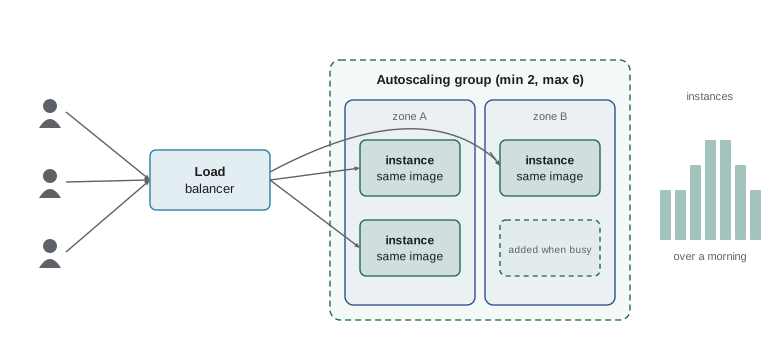
The rules that drive autoscaling need care. Scale out too eagerly and costs jump with every small spike; scale in too eagerly and instances are removed just before the next spike. Most rules therefore use a threshold to add instances, a lower threshold to remove them, and a cooldown period during which no further change is made. The listing below simulates a simple rule over a busy morning.
def simulate(cpu_readings, start=2, minimum=2, maximum=6, high=70, low=30):
    count, history = start, []
    for cpu in cpu_readings:
        if cpu > high and count < maximum:
            count += 1
        elif cpu < low and count > minimum:
            count -= 1
        history.append(count)
    return history

cpu = [25, 40, 75, 82, 78, 65, 50, 35, 28, 22, 20]
print("CPU readings:", cpu)
print("Instances: ", simulate(cpu))CPU readings: [25, 40, 75, 82, 78, 65, 50, 35, 28, 22, 20] Instances: [2, 2, 3, 4, 5, 5, 5, 5, 4, 3, 2]
Try it yourself
Autoscaling simulator
Extend the simulator. Complete simulate(readings, start, minimum, maximum, high, low, cooldown) so that after any change in instance count, the next cooldown readings cause no change at all. Otherwise apply the rule above: add one instance when the reading is above high (but not above maximum), remove one when below low (but not below minimum).
Return the list of instance counts, one per reading.
def simulate(readings, start, minimum, maximum, high, low, cooldown):
    count, history = start, []
    for r in readings:
        if r > high and count < maximum:
            count += 1
        elif r < low and count > minimum:
            count -= 1
        history.append(count)
    return history

print(simulate([80, 80, 80, 80, 20, 20, 20], 2, 2, 6, 70, 30, 1))
Worked problem
Paying for the roast logger
The roast logger receiver needs 1 vCPU and 1 GB of memory, is busy for a few minutes each time a batch is roasted and idle otherwise, and must run all year. A burstable micro instance costs about 0.011 dollars an hour on demand, and a one-year commitment would cut that by about a third. A spot instance would cost about 0.004 dollars an hour. What should Sam choose?
Show solution
- The workload is mostly idle with short bursts, which is exactly what burstable instances are designed for.
- It must run all year, so spot capacity is unsuitable: if the provider reclaims it during a roast, readings are lost.
- On demand costs about 0.011 x 730 = 8.03 dollars a month. A one-year commitment saves about a third, roughly 2.70 dollars a month, about 32 dollars a year.
- The workload is steady for at least a year, so the commitment is safe.
Answer: A burstable micro instance with a one-year commitment: cheap, steady and suited to bursty load. Spot is ruled out because it can be interrupted.
Common mistakes
MistakePicking a large instance type to be safe.
InsteadStart small, measure processor and memory use, and resize; resizing is quick in the cloud.
MistakeOpening SSH or Remote Desktop to the whole internet.
InsteadUse the provider's session service, a bastion or a VPN, and keep administrative ports closed.
MistakeRunning a web server that must stay up on spot capacity.
InsteadUse spot only for interruptible work; providers can reclaim it at short notice.
MistakeStopping an unused server and assuming the charges stop.
InsteadDisks and reserved IP addresses keep costing money; delete what you do not need.
MistakeScaling vertically for resilience.
InsteadA bigger single server is still a single point of failure; scale horizontally across zones.
MistakeWondering why a burstable instance suddenly slowed down.
InsteadCheck its CPU credit balance; when credits run out, performance drops to the baseline.
Summary and key terms
- Cloud virtual machines run on type 1 hypervisors that divide physical servers into isolated instances.
- Instance types combine vCPUs, memory and performance limits in families: general purpose, compute, memory, storage and accelerated.
- Burstable instances suit mostly idle workloads with short bursts of activity.
- Instances launch from images, with choices of type, network, security rules, disk and sign-in method.
- Administer through session services or VPNs, not open SSH or Remote Desktop ports.
- On demand is flexible; commitments save on steady loads; spot capacity is cheapest but can be reclaimed.
- Horizontal scaling with load balancers and autoscaling groups gives capacity and resilience.
- instance
- A virtual machine running in the cloud.
- vCPU
- A virtual processor presented to a virtual machine.
- instance type
- A fixed combination of vCPUs, memory and performance limits.
- burstable instance
- An instance with a low baseline that can run faster for short periods using credits.
- image
- A template containing an operating system and software from which instances start.
- on demand
- Paying per second or hour with no commitment.
- spot capacity
- Discounted spare capacity that the provider can reclaim at short notice.
- vertical scaling
- Moving to a bigger instance type.
- horizontal scaling
- Adding more instances and spreading work among them.
- load balancer
- A service that distributes requests across healthy instances.
- autoscaling group
- A set of identical instances whose number changes automatically by rules.
Practice problems
Work each problem on paper first, then reveal the answer to check.
How many hours do cloud price calculators usually assume in a month?
Show answer
730 hours (365 x 24 / 12).
An instance costs 0.096 dollars an hour on demand. What does it cost for a month of continuous running?
Show answer
0.096 x 730 = about 70.08 dollars.
Which hypervisor type do cloud providers run, and why?
Show answer
Type 1 (bare metal), because it runs directly on the hardware with less overhead and better isolation.
Name one workload well suited to spot capacity and one poorly suited.
Show answer
Well suited: batch processing, test runs, rendering. Poorly suited: a production web server or database.
What are the minimum, maximum and desired values in an autoscaling group?
Show answer
The fewest instances allowed, the most allowed, and the number the group currently aims to run.
Why should SSH not be open to the internet?
Show answer
Automated bots try to log in within minutes; closing the port and using a session service removes that attack surface.
Lesson quiz · 5 questions
Score 60% or more to complete this lesson.
Create a free account to save your progress, take quizzes and earn a certificate.