
NET-120 · Lesson 10 of 12 · 25 min
Cost management and the shared responsibility model
▶ Video coming soon A video version of this lesson is on the way.
Two questions decide whether a move to the cloud is a success: who is responsible for what, and what does it really cost? Both are easy to get wrong. Organizations that assume the provider handles everything leave data exposed; organizations that treat the cloud like a fixed-price utility get a shock when the bill arrives. Anita, Ridgeline's bookkeeper, will see the cloud bill every month, and Rosa has made it clear that the wholesale site must not cost more than the old phone and email ordering system wastes in Theo's time. This lesson covers the shared responsibility model and the practice of managing cloud costs, which the industry calls FinOps.
The shared responsibility model
Every major provider publishes a shared responsibility model that divides security and operational duties between the provider and the customer. AWS summarizes it neatly: the provider is responsible for security of the cloud, and the customer is responsible for security in the cloud. Microsoft and Google publish the same idea with their own diagrams.
Security of the cloud means the physical data centres, the hardware, the network that connects them, the hypervisors and the software that runs the managed services. Customers cannot inspect or change these, so they must trust the provider and check its independent audit reports. Security in the cloud means everything the customer controls: its data, its identities and permissions, the configuration of its services, the operating systems and applications it runs on IaaS, the network rules it writes, and its encryption and backup choices.
As lesson 2 showed, where the line falls depends on the service model. With IaaS, the customer is responsible for patching the guest operating system and everything above it. With PaaS, the provider patches the operating system and runtime, and the customer secures its code, data and access. With SaaS, the customer mostly manages users, settings and data. Some duties are always the customer's: data classification and protection, identities and access, and the configuration of whatever services it uses. Some are always the provider's: the physical facilities and hardware.
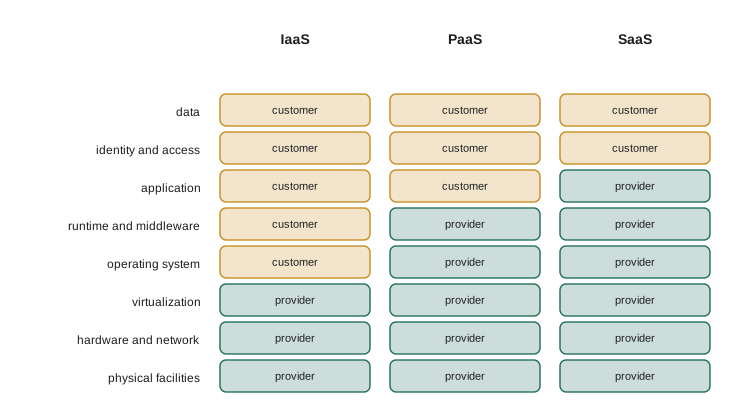
| Duty | IaaS | PaaS | SaaS |
|---|---|---|---|
| Physical security of data centres | Provider | Provider | Provider |
| Hardware and hypervisor | Provider | Provider | Provider |
| Guest operating system patching | Customer | Provider | Provider |
| Runtime and middleware | Customer | Provider | Provider |
| Application code | Customer | Customer | Provider |
| Network rules and configuration | Customer | Shared | Provider (customer configures settings) |
| Identities, permissions and MFA | Customer | Customer | Customer |
| Data classification, protection and backup choices | Customer | Customer | Customer |
Because customers cannot audit the provider's data centres themselves, providers hire independent auditors and publish the results. Common reports and certifications include SOC 1 and SOC 2 reports, ISO/IEC 27001 for information security management, PCI DSS for card payment data, and government programs such as FedRAMP in the United States and the Government of Canada's assessments for Protected B workloads. The reports are available to customers through portals such as AWS Artifact, the Microsoft Service Trust Portal and Google's compliance reports manager. A provider's certification covers its share of the model only: a PCI DSS-compliant provider does not make a customer's payment application compliant.
The practical lesson is that most cloud security failures happen on the customer's side of the line. Industry research consistently finds that misconfiguration and stolen credentials, not provider failures, cause the large majority of cloud breaches. Turning on MFA, keeping buckets private, writing narrow firewall rules and patching what you own are therefore the highest-value security work a small cloud customer can do.
Try it yourself
Whose job is it?
Complete responsible(duty, model), which returns "provider", "customer" or "shared" for a duty under a service model ("IaaS", "PaaS" or "SaaS"), using the table in the RESP dictionary in the starter. Each entry gives the answers for IaaS, PaaS and SaaS in that order.
Return None for a duty that is not in the table. Then complete customer_duties(model) to return a sorted list of the duties that are the customer's alone under that model.
RESP = {
    "physical security": ("provider", "provider", "provider"),
    "hypervisor": ("provider", "provider", "provider"),
    "os patching": ("customer", "provider", "provider"),
    "application code": ("customer", "customer", "provider"),
    "network rules": ("customer", "shared", "provider"),
    "identities": ("customer", "customer", "customer"),
    "data": ("customer", "customer", "customer"),
}
MODELS = ["IaaS", "PaaS", "SaaS"]

def responsible(duty, model):
    return "provider"

def customer_duties(model):
    return []

print(responsible("os patching", "PaaS"), customer_duties("SaaS"))
What drives a cloud bill
Cloud bills are long and detailed, often with hundreds of line items, but most of the money usually goes on a few things. Compute is billed per second or hour for virtual machines and containers, per request and gigabyte-second for functions. Storage is billed per gigabyte per month, by tier, plus charges for operations such as reads and writes. Databases combine compute and storage charges, with extra for standby copies and backups beyond the free amount. Networking has the charges that surprise people most.
Data transfer pricing is asymmetric. Data coming into the cloud from the internet, called ingress, is usually free. Data going out to the internet, called egress, is charged per gigabyte. Data moving between availability zones and between regions is often charged too, and NAT gateways charge per gigabyte processed. A site that serves large files to many users, or a design that copies data back and forth between zones, can rack up network charges that dwarf its compute bill. Serving files through a CDN usually reduces egress cost as well as speeding up delivery.
Finally, there is waste: resources that are running but not needed. The classic examples are test servers left running over weekends and holidays, disks left behind after their virtual machines were deleted, snapshots kept forever, oversized instances that never use more than a fraction of their processor, and idle load balancers and NAT gateways. Industry surveys regularly estimate that a quarter or more of cloud spending is wasted in these ways.
Canadian customers should also check the currency. Some providers bill Canadian accounts in US dollars by default, so exchange rate changes alter the bill even when usage does not; others let customers pay in Canadian dollars. Bills should show GST or HST, and PST where it applies, and Anita needs invoices that show the provider's Canadian tax registration so Ridgeline can claim input tax credits.
# Estimate one month of the wholesale site (illustrative prices, in dollars)
usage = {
    "containers":        {"qty": 2 * 730 * 0.5,  "unit": "vCPU-hours",   "price": 0.045},
    "database":          {"qty": 730,            "unit": "hours",        "price": 0.034},
    "database standby":  {"qty": 730,            "unit": "hours",        "price": 0.034},
    "object storage":    {"qty": 40,             "unit": "GB-months",    "price": 0.023},
    "egress to internet":{"qty": 60,             "unit": "GB",           "price": 0.09},
    "NAT gateway":       {"qty": 730,            "unit": "hours",        "price": 0.045},
}
total = 0
for item, u in usage.items():
    cost = u["qty"] * u["price"]
    total += cost
    print(f"{item:<20} {u['qty']:>8.0f} {u['unit']:<11} {cost:>7.2f}")
print(f"{'Total':<41}{total:>7.2f}")containers 730 vCPU-hours 32.85 database 730 hours 24.82 database standby 730 hours 24.82 object storage 40 GB-months 0.92 egress to internet 60 GB 5.40 NAT gateway 730 hours 32.85 Total 121.66
Look at the NAT gateway. It costs more each month than the object storage and egress together, simply by existing. When Sam saw this estimate, he moved the database and storage connections to private endpoints and removed the NAT gateway from the design, because the containers did not need general internet access. That kind of saving, found on paper before anything is built, is exactly what cost estimation is for. Every provider offers a free pricing calculator: the AWS Pricing Calculator, the Azure pricing calculator and the Google Cloud Pricing Calculator.
Try it yourself
Estimate a monthly bill
Complete monthly_bill(items), where each item is a dictionary with qty, price and an optional free quantity that is not charged. Charge max(0, qty - free) * price for each item and return the total rounded to 2 decimal places.
Then complete biggest(items), which returns the name of the most expensive item. Items have a name key.
items = [
    {"name": "compute", "qty": 730, "price": 0.034},
    {"name": "storage", "qty": 40, "price": 0.023, "free": 5},
    {"name": "egress", "qty": 160, "price": 0.09, "free": 100},
    {"name": "nat", "qty": 730, "price": 0.045},
]

def monthly_bill(items):
    return 0.0

def biggest(items):
    return None

print(monthly_bill(items), biggest(items))
FinOps: managing cloud spending
FinOps, short for cloud financial operations, is the practice of bringing finance, technology and business people together to manage cloud spending. The FinOps Foundation, part of the Linux Foundation, describes it as three repeating phases. Inform: make costs visible, so everyone can see who is spending what and why. Optimize: find and act on savings, such as rightsizing, removing waste and buying commitments. Operate: build cost awareness into everyday decisions, with budgets, policies and regular reviews.
Visibility starts with tags, which lesson 11 returns to. A tag is a label attached to a resource, such as project equals wholesale or environment equals test. Bills and cost reports can then be broken down by tag, so Anita can see exactly what the wholesale site costs, separately from the roast logger. Untagged resources are the usual source of mystery charges, so mature organizations require tags on every resource and use automated checks to find those missing them.
Budgets and alerts are the safety net. All three providers let you set a monthly budget, AWS Budgets, Azure cost management budgets and Google Cloud budgets, and receive an email when actual or forecast spending crosses thresholds, such as half, most and all of the budget. A forecast alert is especially useful, because it warns in the middle of the month that the bill is heading over the limit, while there is still time to act. Budgets normally only alert; they do not stop spending unless you connect them to automated actions. Sam set Ridgeline's budget at 150 dollars a month with alerts to Anita and himself.
Try it yourself
Budget alerts
Complete forecast(spent, day, days_in_month) to return the projected month-end spending if spending continues at the same daily rate: spent / day * days_in_month, rounded to 2 decimal places.
Then complete alerts(spent, day, days_in_month, budget, thresholds) to return a sorted list of the thresholds (fractions such as 0.5 and 0.9) that the **forecast** has reached or passed, as a fraction of the budget.
def forecast(spent, day, days_in_month):
    return spent

def alerts(spent, day, days_in_month, budget, thresholds):
    return []

print(forecast(60, 10, 30), alerts(60, 10, 30, 150, [0.5, 0.9, 1.0]))
Ways to save
The main levers for saving money are well known, and most organizations get the biggest wins from the simplest ones.
| Lever | What to do | Typical effect |
|---|---|---|
| Remove waste | Delete idle servers, unattached disks, old snapshots and unused IP addresses | Often the quickest large saving |
| Rightsize | Move oversized instances and databases to smaller sizes based on measured use | Large savings on over-provisioned resources |
| Schedule | Stop test and development resources outside working hours | Up to about two thirds off those resources |
| Commit | Buy commitment discounts for the steady base load | A third to over half off covered usage |
| Use spot capacity | Run interruptible work on spare capacity | Up to about nine tenths off that work |
| Tier storage | Lifecycle rules to cool and archive tiers; delete what is not needed | Large savings on old data |
| Reduce data transfer | CDNs, private endpoints, keeping traffic within a zone | Lower network charges |
| Go serverless where it fits | Functions and scale-to-zero containers for spiky or occasional work | Pay nothing while idle |
Scheduling deserves a quick calculation, because it surprises people. A test environment needed only from eight in the morning to six in the evening on weekdays runs 50 hours a week instead of 168, under a third of the time, so stopping it outside those hours removes more than two thirds of its compute cost. The providers offer scheduling tools, and a short serverless function on a timer can do the job too.
Worked problem
Anita's first bill
The first full month's bill is 212 dollars against a forecast of 140. The cost report, grouped by tag, shows: wholesale (production) 118, wholesale (test) 61, roast logger 9, and untagged 24. What should Sam and Jordan investigate?
Show solution
- The test environment costs half as much as production, which suggests it runs all the time. Scheduling it for working hours only would cut its compute cost by about two thirds.
- The 24 dollars of untagged spending needs tracing; it is often leftover resources such as a disk or snapshot from an early experiment, or a forgotten load balancer.
- Production at 118 against a forecast of about 100 is worth a look at the details: data transfer, a NAT gateway, or containers scaling more than expected.
- Finally, add tag checks so new resources cannot be created untagged, and a forecast alert at nine tenths of the budget.
Answer: Schedule the test environment, find and remove the untagged resources, check production's network and scaling charges, and enforce tags.
Common mistakes
MistakeAssuming the provider is responsible for securing the customer's data and configuration.
InsteadThe provider secures the cloud; the customer secures what it puts in the cloud and how it configures it.
MistakeBelieving a provider's compliance certificate covers the customer's application.
InsteadCertifications cover the provider's share only; the customer must meet its own obligations.
MistakeForgetting data transfer and NAT gateway charges in estimates.
InsteadEstimate egress, cross-zone traffic and NAT processing, and use CDNs and private endpoints.
MistakeLeaving test environments running at night and on weekends.
InsteadSchedule them to stop outside working hours.
MistakeExpecting a budget to stop spending.
InsteadBudgets alert by default; act on alerts or connect them to automated actions.
MistakeCreating resources without tags.
InsteadTag every resource with project, environment and owner so costs can be traced.
Summary and key terms
- Under the shared responsibility model, the provider secures the cloud and the customer secures what it puts in it.
- The line moves up the stack from IaaS to PaaS to SaaS, but data, identities and configuration are always the customer's.
- Providers publish independent audit reports such as SOC 2 and ISO/IEC 27001; they cover only the provider's share.
- Most cloud bills are driven by compute, storage, databases and data transfer; egress and NAT gateways often surprise.
- Waste from idle, oversized and forgotten resources is a large share of typical cloud spending.
- FinOps cycles through inform, optimize and operate, using tags, cost reports, budgets and alerts.
- Savings come from removing waste, rightsizing, scheduling, commitments, spot capacity, storage tiers and reduced data transfer.
- shared responsibility model
- The division of security and operational duties between provider and customer.
- security of the cloud
- The provider's responsibility for facilities, hardware and core services.
- security in the cloud
- The customer's responsibility for data, identities and configuration.
- SOC 2
- An independent audit report on a service organization's security controls.
- egress
- Data leaving a cloud provider's network, usually charged per gigabyte.
- ingress
- Data entering a cloud provider's network, usually free.
- FinOps
- The practice of managing cloud spending through collaboration between finance, technology and business.
- tag
- A label attached to a cloud resource, used to group costs and resources.
- budget alert
- A notification when actual or forecast spending crosses a threshold.
- rightsizing
- Changing resources to the size their measured use requires.
Practice problems
Work each problem on paper first, then reveal the answer to check.
Under PaaS, who patches the operating system?
Show answer
The provider.
Under SaaS, who manages user accounts and their permissions?
Show answer
The customer.
A test environment is needed 10 hours a day on 5 weekdays. What fraction of a 168-hour week does it need to run?
Show answer
50 / 168, a little under a third.
Spending is 75 dollars after 12 days of a 30-day month. What is the forecast?
Show answer
75 / 12 x 30 = 187.50 dollars.
Why is data transfer into the cloud usually free but transfer out charged?
Show answer
Providers encourage moving data in and charge for the bandwidth used to serve data out.
Name the three FinOps phases.
Show answer
Inform, optimize and operate.
Lesson quiz · 5 questions
Score 60% or more to complete this lesson.
Create a free account to save your progress, take quizzes and earn a certificate.