
NET-120 · Lesson 8 of 12 · 25 min
Identity and access in the cloud
▶ Video coming soon A video version of this lesson is on the way.
In Ridgeline's office, security starts with the front door: only staff have keys, and the back office is locked at night. In the cloud there is no front door. Every service is reachable from anywhere on the internet by anyone with valid credentials, so identity, meaning who someone is and what they are allowed to do, becomes the most important security control. Security professionals often say that in the cloud, identity is the new perimeter. This lesson explains how cloud identity and access management works, how permissions are written, and the habits that keep a small account safe.
Authentication and authorization
Two words describe the two halves of access control, and they are easy to mix up. Authentication answers the question who are you? It is the process of proving identity, with a password, a security key, a code from an app or a certificate. Authorization answers the question what are you allowed to do? Once the cloud knows who you are, it checks your permissions before every action, from listing storage buckets to deleting a database.
Every cloud provider has an identity and access management service, usually called IAM, that handles both halves. AWS has AWS Identity and Access Management and IAM Identity Center; Azure uses Microsoft Entra ID, formerly called Azure Active Directory, together with Azure role-based access control; Google Cloud uses Cloud Identity or Google Workspace accounts together with Google Cloud IAM. Every request to a cloud API, whether it comes from a person clicking in the console or a program calling the API, is authenticated and then authorized against the IAM rules.
Kinds of identity
Cloud IAM deals with several kinds of identity, and using the right kind for each job is half of good practice.
| Identity | What it is | AWS | Azure | Google Cloud |
|---|---|---|---|---|
| Account owner | The all-powerful identity that created the account; used almost never | Root user | Global Administrator (of the Entra tenant) | Organization administrator / owner |
| User | A person who signs in | IAM Identity Center user (or IAM user) | Entra ID user | Google account or Cloud Identity user |
| Group | A collection of users given the same permissions | Group | Group | Google group |
| Role | A set of permissions that people or services take on temporarily | IAM role | Role definition, granted by a role assignment | Role, granted by a policy binding |
| Workload identity | An identity for a program or server, not a person | IAM role for EC2, Lambda and others | Managed identity | Service account |
The account owner identity deserves special care. At AWS it is the root user, created with the email address that opened the account, and it can do anything, including closing the account. The rule is to protect it with a strong password and multi-factor authentication, store those credentials securely, and then not use it for day-to-day work at all. Sam created Ridgeline's cloud account with a shared mailbox address rather than his own, so that the account does not depend on one person's email, turned on a hardware security key for the root user, and locked the recovery details in Ridgeline's safe.
People should sign in as individual users, never by sharing an account, so that every action can be traced to a person. Users should be placed in groups, and permissions given to groups rather than to individuals, so that when Theo joins the operations group he gets what operations needs, and when someone leaves, removing them from groups removes their access. Larger organizations connect the cloud to their existing directory with single sign-on, using standards such as SAML and OpenID Connect, so staff use one company account for everything and leaving the company disables cloud access too.
Programs need identities as well. The worst way to give a program cloud access is to create a user, generate a long-term access key and paste it into the program's configuration, where it may end up in a code repository or a backup. Keys leaked this way are found by automated scanners within minutes. The right way is a workload identity: an IAM role attached to the virtual machine or function at AWS, a managed identity at Azure, or a service account at Google Cloud. The platform then gives the program short-lived credentials automatically and rotates them, so there is no long-term secret to leak.
Multi-factor authentication
Passwords alone are not enough. They are reused, guessed, phished and leaked in breaches of other sites. Multi-factor authentication, or MFA, requires a second factor, something you have or something you are, in addition to something you know. Authenticator apps that generate one-time codes are good; phishing-resistant methods, such as FIDO2 security keys and passkeys, are better, because they will not work on a fake sign-in page. All three providers now require or strongly enforce MFA for administrative and console access, and Sam's rule is simple: every human identity with cloud access uses MFA, and administrators use security keys.
Writing permissions
Permissions are expressed as policies. The details differ by provider, but the idea is the same: a policy says which actions are allowed, or denied, on which resources, sometimes under which conditions. AWS policies are JSON documents with statements. Each statement has an effect, Allow or Deny, a list of actions, such as s3:GetObject to read objects, and a list of resources identified by Amazon Resource Names, or ARNs. Azure uses role definitions, lists of allowed actions, which are assigned to a user, group or identity at a scope: a management group, a subscription, a resource group or a single resource. Google Cloud grants roles to principals with policy bindings on resources in its hierarchy of organization, folders and projects.
{
  "Version": "2012-10-17",
  "Statement": [
    {
      "Sid": "ReadAndWriteInvoices",
      "Effect": "Allow",
      "Action": ["s3:GetObject", "s3:PutObject"],
      "Resource": "arn:aws:s3:::ridgeline-invoices/*"
    },
    {
      "Sid": "NeverDeleteInvoices",
      "Effect": "Deny",
      "Action": "s3:DeleteObject",
      "Resource": "arn:aws:s3:::ridgeline-invoices/*"
    }
  ]
}
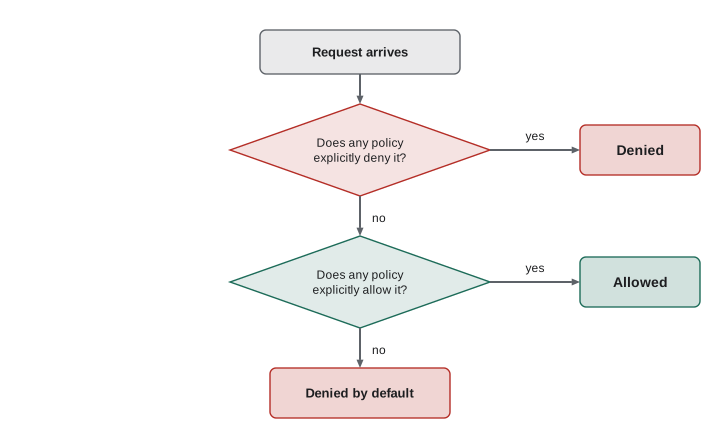
The evaluation logic matters. At AWS, every request starts out denied. An explicit Allow in a policy that applies to the identity permits it, unless some policy contains an explicit Deny that matches, in which case the request is denied regardless of any Allow. In short: deny by default, allow by exception, and an explicit deny always wins. Azure role assignments are additive, so permissions from several roles combine, and Azure deny assignments and Google deny policies can block actions in a similar way to AWS's explicit deny.
from fnmatch import fnmatch

policy = [
    {"effect": "Allow", "actions": ["s3:GetObject", "s3:PutObject"], "resource": "invoices/*"},
    {"effect": "Deny",  "actions": ["s3:DeleteObject"],               "resource": "invoices/*"},
    {"effect": "Allow", "actions": ["s3:*"],                          "resource": "photos/*"},
]

def evaluate(action, resource):
    matching = [s for s in policy
                if fnmatch(resource, s["resource"]) and any(fnmatch(action, a) for a in s["actions"])]
    if any(s["effect"] == "Deny" for s in matching):
        return "denied (explicit deny)"
    if any(s["effect"] == "Allow" for s in matching):
        return "allowed"
    return "denied (no matching allow)"

for action, resource in [("s3:GetObject", "invoices/2026/INV-0412.pdf"),
                         ("s3:DeleteObject", "invoices/2026/INV-0412.pdf"),
                         ("s3:DeleteObject", "photos/sunrise-blend.jpg"),
                         ("s3:GetObject", "backups/nightly.tar")]:
print(f"{action:<16} {resource:<28} {evaluate(action, resource)}")s3:GetObject invoices/2026/INV-0412.pdf allowed s3:DeleteObject invoices/2026/INV-0412.pdf denied (explicit deny) s3:DeleteObject photos/sunrise-blend.jpg allowed s3:GetObject backups/nightly.tar denied (no matching allow)
The evaluator uses Python's fnmatch module, which matches simple wildcards such as `*`, the same way cloud policies use wildcards in action names and resource paths. Real cloud policy engines also handle conditions, such as allowing an action only from Ridgeline's office address or only with MFA, and policies attached at several levels, but the core logic is exactly this.
Try it yourself
Evaluate a policy
Complete evaluate(policy, action, resource). Each statement in policy has effect ("Allow" or "Deny"), actions (a list of patterns) and resources (a list of patterns). Patterns may contain *, matched with fnmatch.
A statement matches when the action matches any of its action patterns **and** the resource matches any of its resource patterns. Return "Deny" if any matching statement denies; otherwise "Allow" if any matching statement allows; otherwise "Deny".
from fnmatch import fnmatch

policy = [
    {"effect": "Allow", "actions": ["db:Read*"], "resources": ["orders/*", "prices/*"]},
    {"effect": "Allow", "actions": ["db:*"], "resources": ["orders/draft-*"]},
    {"effect": "Deny", "actions": ["db:Delete*"], "resources": ["*"]},
]

def evaluate(policy, action, resource):
    return "Allow"

print(evaluate(policy, "db:ReadItem", "prices/rc-101"), evaluate(policy, "db:DeleteItem", "orders/draft-7"))
Least privilege
The principle of least privilege says every identity should have only the permissions it needs to do its job, and no more. It limits the damage if an account is compromised or a program misbehaves. If the wholesale application can only read and write invoices, then even an attacker who takes over the application cannot delete the database or start expensive servers.
Least privilege is easy to state and hard to practise, because it is always tempting to grant broad permissions to make something work and promise to tighten them later. The providers help in several ways. They publish managed roles for common jobs, such as read-only viewer roles, which are a good starting point. Their access analyzers report permissions that have not been used in months, so they can be removed: AWS IAM Access Analyzer, Microsoft Entra Permissions Management and Google's IAM Recommender. And temporary elevation, such as Azure Privileged Identity Management, lets an administrator take powerful permissions for an hour when needed instead of holding them permanently.
Try it yourself
Find unused permissions
An access review compares what each identity is allowed to do with what it actually did. Complete unused(granted, log), where granted maps each identity to a set of permissions and log is a list of (identity, permission) pairs from the last 90 days.
Return a dictionary mapping each identity to a **sorted list** of permissions it was granted but never used. Leave out identities that used everything they were granted.
granted = {
    "wholesale-app": {"invoices:read", "invoices:write", "orders:read", "orders:write", "servers:create"},
    "anita": {"billing:read", "invoices:read"},
}
log = [("wholesale-app", "invoices:read"), ("wholesale-app", "invoices:write"),
       ("wholesale-app", "orders:read"), ("wholesale-app", "orders:write"),
       ("anita", "billing:read"), ("anita", "invoices:read")]

def unused(granted, log):
    return {}

print(unused(granted, log))
Secrets and keys
Applications still need some secrets: the password for a database, an API key for the payment provider, a signing key for sign-in tokens. These belong in a secrets management service, not in code, configuration files or environment variables typed into a console. The services are AWS Secrets Manager and Systems Manager Parameter Store, Azure Key Vault and Google Secret Manager. They store secrets encrypted, control who and what can read them through IAM, log every access, and can rotate some secrets automatically. The wholesale application reads its database password from the secrets service at startup, using its workload identity, so the password never appears in Jordan's code or repository.
Encryption keys are managed by key management services: AWS KMS, Azure Key Vault and Google Cloud KMS. Most storage and database services encrypt data with keys the provider manages automatically. Organizations with stricter requirements can use customer-managed keys, which they control and can disable, making the data unreadable, and some services support keys held in hardware security modules that the customer controls.
Identity for customers
So far this lesson has been about identities for staff and programs. The wholesale site also needs identities for its customers, the cafes and grocers who sign in to order. That is a different job, usually called customer identity and access management, and the providers offer managed services for it: Amazon Cognito, Microsoft Entra External ID and Google's Identity Platform, as well as independent services. They handle sign-up, sign-in, password resets, MFA and social sign-in, so that Jordan does not have to write and secure that code himself. Handing customer sign-in to a well-tested service is one of the best security decisions a small team can make.
Worked problem
Setting up Ridgeline's cloud identities
Sam lists who and what needs access: Sam (full administration), Jordan (deploy and manage the wholesale application, read logs), Anita (view bills and budgets only), the wholesale application (read and write invoices and orders, read its database password), and the roast logger receiver (write readings to one storage location). How should each be set up?
Show solution
- Root or account owner: strong password, security key, credentials locked away, not used day to day.
- Sam: a named user in an administrators group, with a security key, using temporary elevation for the most powerful actions.
- Jordan: a named user in a developers group with permissions limited to the wholesale application's resources and logs, with MFA.
- Anita: a named user in a billing group with read-only access to cost and billing information, with MFA.
- The wholesale application: a workload identity (role, managed identity or service account) allowed to read and write invoices and orders and read one secret, with an explicit deny on deletion.
- The roast logger receiver: a workload identity allowed only to write to its own storage path.
Answer: Named users in groups with MFA for people, workload identities for programs, and least-privilege permissions for each, with the account owner locked away.
Common mistakes
MistakeUsing the root or global administrator account for everyday work.
InsteadLock the account owner away with MFA and use named users with limited permissions.
MistakeSharing one cloud login among several staff.
InsteadGive everyone their own user so every action can be traced and access removed individually.
MistakePasting long-term access keys into application code.
InsteadUse workload identities, which receive short-lived credentials automatically.
MistakeGranting full administrator rights to make something work.
InsteadGrant the narrowest permissions needed, and use access analyzers to remove unused ones.
MistakeRelying on passwords alone.
InsteadRequire MFA for every human identity, and phishing-resistant keys for administrators.
MistakeStoring database passwords in configuration files.
InsteadKeep secrets in a secrets management service and read them at runtime.
Summary and key terms
- Authentication proves who someone is; authorization decides what they may do.
- Cloud IAM covers account owners, users, groups, roles and workload identities.
- Protect the account owner with MFA and do not use it day to day; give every person their own user in groups.
- Programs should use workload identities with short-lived credentials, never long-term keys in code.
- Policies allow or deny actions on resources; requests are denied by default and an explicit deny wins.
- Least privilege limits damage; access analyzers and temporary elevation help achieve it.
- Secrets belong in a secrets manager; keys in a key management service; customer sign-in in a managed customer identity service.
- authentication
- Proving the identity of a user or program.
- authorization
- Deciding whether an authenticated identity may perform an action.
- IAM
- Identity and access management.
- root user
- The AWS account owner identity, with unlimited permissions.
- role
- A set of permissions that people or services take on temporarily.
- workload identity
- An identity for a program, such as an IAM role, managed identity or service account.
- MFA
- Multi-factor authentication: a second factor in addition to a password.
- policy
- A document stating which actions are allowed or denied on which resources.
- least privilege
- Giving each identity only the permissions it needs.
- explicit deny
- A policy statement that denies an action and overrides any allow.
- secrets manager
- A service that stores, controls and logs access to secrets.
- single sign-on
- Using one organizational account to sign in to many services.
Practice problems
Work each problem on paper first, then reveal the answer to check.
A user enters a correct password and an authenticator code. Which half of access control is that?
Show answer
Authentication.
A policy allows s3:* on a bucket and another denies s3:DeleteObject on it. Can the user delete objects?
Show answer
No. An explicit deny always wins.
No policy mentions an action at all. Is it allowed?
Show answer
No. Requests are denied by default.
Why are workload identities safer than access keys for programs?
Show answer
They provide short-lived, automatically rotated credentials, so there is no long-term secret to leak.
Name the secrets management service at each of AWS, Azure and Google Cloud.
Show answer
AWS Secrets Manager, Azure Key Vault, Google Secret Manager.
What is a phishing-resistant MFA method?
Show answer
A FIDO2 security key or passkey, which will not authenticate to a fake site.
Lesson quiz · 5 questions
Score 60% or more to complete this lesson.
Create a free account to save your progress, take quizzes and earn a certificate.