
NET-120 · Lesson 7 of 12 · 24 min
Virtual networks in the cloud
▶ Video coming soon A video version of this lesson is on the way.
In Ridgeline's office, the network is something you can touch: a router from the internet provider, a switch in the back room, a Wi-Fi access point on the ceiling, and cables to every desk. NET-110 explained how that network works, from IP addresses and subnets to routing and firewalls. In the cloud, the same ideas apply, but the network is defined in software. There are no cables to run; instead you draw the network with a few settings or a few lines of code, and the provider's software-defined networking makes it real. This lesson explains virtual networks, subnets, routing, gateways and the firewalls that protect cloud resources, and ends with how to connect a cloud network to an office.
Virtual networks
A virtual network is a private, isolated network inside a cloud account, in which you place virtual machines, databases and other resources. AWS calls it a virtual private cloud, or VPC; Azure calls it a virtual network, or VNet; Google Cloud also calls it a VPC. Resources in the same virtual network can talk to each other using private IP addresses, and nothing outside can reach them unless you deliberately allow it. One important difference between providers: an AWS VPC or an Azure VNet belongs to a single region, while a Google Cloud VPC is global, with subnets in different regions joined automatically.
When you create a virtual network, you give it an address range written in CIDR notation, such as 10.20.0.0/16. CIDR, or classless inter-domain routing, notation writes an IP address followed by a slash and the number of bits that identify the network. A /16 network leaves 16 bits for hosts, which is 65,536 addresses; a /24 leaves 8 bits, 256 addresses. Cloud networks almost always use the private address ranges reserved for internal use: 10.0.0.0/8, 172.16.0.0/12 and 192.168.0.0/16.
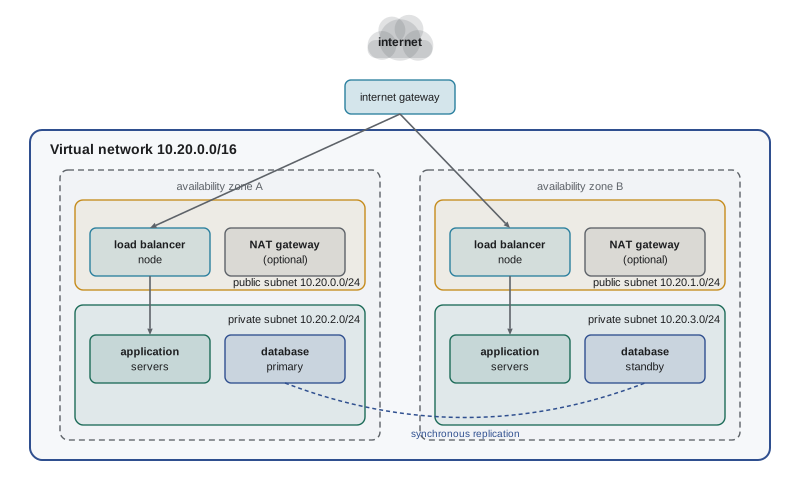
Choosing the range is one of the few cloud decisions that is hard to change later, so it deserves thought. The range must not overlap with the office network or with other virtual networks you might connect, because overlapping networks cannot be routed to each other. Ridgeline's office uses 192.168.10.0/24, as NET-101 recorded, so Sam chose 10.20.0.0/16 for the cloud network: plenty of room, and no clash.
Subnets
A virtual network is divided into subnets, each a smaller range of addresses within the network's range. In AWS and Google Cloud, each subnet lives in a particular location: an availability zone at AWS, a region at Google Cloud. Azure subnets span the zones of their region. Subnets let you group resources and apply different rules to each group.
The most important distinction is between public and private subnets. A public subnet has a route to the internet through an internet gateway, and resources in it can have public IP addresses that the internet can reach. A private subnet has no direct route from the internet; resources in it have only private addresses. The standard design puts only the things that must face the internet, such as load balancers, in public subnets, and everything else, such as application servers and databases, in private subnets. This simple arrangement removes most of the attack surface: the database cannot be attacked from the internet if the internet has no route to it.
Cloud providers reserve a few addresses in every subnet for their own use. AWS reserves five per subnet: the network address, the next three for its router, DNS and future use, and the last address. Azure also reserves five, and Google Cloud reserves four. So a /24 subnet at AWS gives 251 usable addresses, not 254 as on a traditional network.
import ipaddress

vpc = ipaddress.ip_network("10.20.0.0/16")
print("Network:", vpc, "with", vpc.num_addresses, "addresses")

# Split into /24 subnets and take the first four: public and private in two zones
subnets = list(vpc.subnets(new_prefix=24))[:4]
names = ["public-a", "public-b", "private-a", "private-b"]
for name, net in zip(names, subnets):
    usable = net.num_addresses - 5          # AWS reserves five addresses per subnet
    print(f"{name:<10} {str(net):<15} first {net[0]}, last {net[-1]}, usable {usable}")

office = ipaddress.ip_network("192.168.10.0/24")
print("Overlaps the office network?", vpc.overlaps(office))Network: 10.20.0.0/16 with 65536 addresses public-a 10.20.0.0/24 first 10.20.0.0, last 10.20.0.255, usable 251 public-b 10.20.1.0/24 first 10.20.1.0, last 10.20.1.255, usable 251 private-a 10.20.2.0/24 first 10.20.2.0, last 10.20.2.255, usable 251 private-b 10.20.3.0/24 first 10.20.3.0, last 10.20.3.255, usable 251 Overlaps the office network? False
Python's standard ipaddress module does exactly the arithmetic a network planner needs, which makes it a handy tool for checking a design. Press Edit and run, then try changing the network to 192.168.0.0/16 and see what the overlap check says.
Try it yourself
Plan subnets
Complete plan(network, new_prefix, count) so that it returns a list of the first count subnets of size new_prefix inside network, each as a string such as "10.20.0.0/24". Return an empty list if count subnets of that size do not fit.
Then complete usable(subnet, reserved=5) to return the number of usable addresses after the provider's reserved addresses are removed.
import ipaddress

def plan(network, new_prefix, count):
    net = ipaddress.ip_network(network)
    return []

def usable(subnet, reserved=5):
    return 0

print(plan("10.20.0.0/16", 24, 3), usable("10.20.0.0/24"))
Routing and gateways
Each subnet has a route table that decides where traffic goes. Every route table includes a local route that lets resources in the virtual network reach each other. Other routes send traffic for other destinations to a gateway. A route to 0.0.0.0/0, meaning everywhere, through an internet gateway is what makes a subnet public.
Resources in private subnets often still need to reach the internet outward, to download operating system updates or call a payment provider's API, without being reachable from it. A NAT gateway provides that. Like the router in Ridgeline's office, which NET-110 described, it translates the private source addresses of outgoing traffic to its own public address and lets the replies back, but refuses connections that start from the internet. The private subnet's route table sends 0.0.0.0/0 to the NAT gateway instead of the internet gateway. NAT gateways are managed services at all three providers, and they are a common surprise on cloud bills, because they charge both by the hour and for every gigabyte they process.
| Component | Purpose | AWS | Azure | Google Cloud |
|---|---|---|---|---|
| Virtual network | Private, isolated network for your resources | VPC (regional) | VNet (regional) | VPC (global) |
| Subnet | A range of addresses within the network | Subnet (per zone) | Subnet (per region) | Subnet (per region) |
| Internet gateway | Route between public subnets and the internet | Internet gateway | Built in (default outbound and public IPs) | Default internet gateway route |
| NAT gateway | Outbound internet for private resources | NAT gateway | NAT Gateway | Cloud NAT |
| Instance firewall | Allow traffic to and from resources | Security group | Network security group | VPC firewall rules |
| Subnet firewall | Stateless filter on a subnet | Network ACL | Network security group on the subnet | Firewall rules and policies |
| Private service access | Reach managed services without the internet | VPC endpoints, PrivateLink | Private Endpoint | Private Service Connect |
Cloud firewalls
Cloud networks are protected by software firewalls defined as lists of rules. At AWS, the main tool is the security group, attached to each instance, load balancer or database. A security group contains only allow rules, each specifying a protocol, a port range and a source, such as TCP port 443 from anywhere or TCP port 5432 from the application servers' security group. Anything not allowed is denied. Security groups are stateful: if a request is allowed in, the reply is automatically allowed out, so you write rules only for the direction in which connections start.
AWS also offers network access control lists, applied to whole subnets. They are stateless, which means replies must be allowed explicitly, and they can contain deny rules evaluated in numbered order. Azure's network security groups combine both roles: they can be attached to subnets or network cards, contain allow and deny rules with priorities, and are stateful. Google Cloud uses firewall rules and policies on the VPC, applied to instances by network tags or service accounts, also stateful and with priorities.
A powerful feature at AWS, and similar features elsewhere, is that a rule's source can be another security group rather than an address range. Sam's rules for the wholesale site use this: the load balancer allows HTTPS from anywhere; the application servers allow traffic only from the load balancer's security group; the database allows PostgreSQL traffic on port 5432 only from the application servers' group. If the application scales from two servers to six, the rules still work, because they refer to groups, not addresses.
import ipaddress

# Security group rules for the application servers (allow rules only)
rules = [
    {"protocol": "tcp", "port": 8080, "source": "10.20.0.0/23"},   # from the load balancer subnets
    {"protocol": "tcp", "port": 22,   "source": "10.20.250.0/24"}, # from the admin subnet
]

def allowed(protocol, port, source_ip):
    ip = ipaddress.ip_address(source_ip)
    for r in rules:
        if r["protocol"] == protocol and r["port"] == port and ip in ipaddress.ip_network(r["source"]):
            return True
    return False       # anything not allowed is denied

tests = [("tcp", 8080, "10.20.1.15"), ("tcp", 8080, "203.0.113.7"),
         ("tcp", 22, "10.20.250.4"), ("tcp", 5432, "10.20.0.9")]
for t in tests:
print(t, "->", "allow" if allowed(*t) else "deny")('tcp', 8080, '10.20.1.15') -> allow
('tcp', 8080, '203.0.113.7') -> deny
('tcp', 22, '10.20.250.4') -> allow
('tcp', 5432, '10.20.0.9') -> denyTry it yourself
Firewall rule matcher
Some firewalls, such as Azure network security groups, use numbered rules that can allow or deny. Complete decide(rules, protocol, port, source_ip): check the rules in order of their priority number, **lowest first**, and return the action ("allow" or "deny") of the first rule that matches the protocol, the port and the source network. A rule with protocol "any" matches every protocol. If no rule matches, return "deny".
import ipaddress

rules = [
    {"priority": 200, "protocol": "tcp", "port": 443, "source": "0.0.0.0/0", "action": "allow"},
    {"priority": 100, "protocol": "tcp", "port": 443, "source": "198.51.100.0/24", "action": "deny"},
    {"priority": 300, "protocol": "any", "port": 22, "source": "10.20.250.0/24", "action": "allow"},
]

def decide(rules, protocol, port, source_ip):
    return "deny"

print(decide(rules, "tcp", 443, "203.0.113.9"), decide(rules, "tcp", 443, "198.51.100.20"))
Private access to managed services
Managed services such as object storage and databases have public endpoints by default, reached over the internet even from inside your virtual network. For better security and sometimes lower cost, the providers let you reach them privately. Gateway and interface endpoints at AWS, Private Endpoints at Azure and Private Service Connect at Google Cloud give a managed service a private address inside your virtual network, so traffic never crosses the public internet and the service can be configured to refuse public access entirely. Sam uses a private endpoint for the wholesale site's database, so the database has no public address at all.
Connecting networks together
Virtual networks can be joined. Peering connects two virtual networks, in the same account or different ones, so their resources can talk using private addresses as if they were one network. For many networks, hub-and-spoke designs use a central transit service, such as AWS Transit Gateway, Azure Virtual WAN or Google's Network Connectivity Center, rather than a tangle of individual peerings.
Connecting a cloud network to an office or data centre is what makes a hybrid cloud work, as lesson 3 described. A site-to-site VPN creates an encrypted tunnel over the internet between the office router or firewall and a VPN gateway in the cloud. It is quick and cheap to set up, but its speed and reliability depend on the internet connection. A dedicated connection, such as AWS Direct Connect, Azure ExpressRoute or Google Cloud Interconnect, is a private circuit from a telecommunications provider into the cloud provider's network, with predictable speed and latency, at a higher monthly cost. For a small business like Ridgeline, a site-to-site VPN is more than enough: it lets Kai's roast logger in the roastery send readings to the cloud receiver over an encrypted tunnel, without exposing the receiver to the internet.
Worked problem
Why can the database not be reached?
Jordan deploys the application servers in the private subnets and the database in private-a. The application logs show connection timeouts to the database on port 5432. The database's security group allows TCP 5432 from 10.20.0.0/23, the load balancer subnets. What is wrong, and what should the rule be?
Show solution
- Timeouts, rather than refusals, usually mean a firewall silently dropped the traffic.
- The application servers are in the private subnets, 10.20.2.0/24 and 10.20.3.0/24, not in the load balancer subnets that the rule allows.
- So the database security group drops their connections.
- The best fix is to allow TCP 5432 with the application servers' security group as the source, so the rule keeps working as servers are added or replaced.
Answer: The rule allows the wrong source. Change it to allow TCP 5432 from the application servers' security group, not from an address range.
Common mistakes
MistakeChoosing a virtual network range that overlaps the office network.
InsteadPlan non-overlapping ranges before creating networks; overlapping ranges cannot be routed together.
MistakePutting databases and application servers in public subnets.
InsteadKeep only internet-facing components such as load balancers in public subnets.
MistakeOpening a port to 0.0.0.0/0 to make something work quickly.
InsteadAllow the narrowest source possible, ideally another security group.
MistakeForgetting that the provider reserves addresses in every subnet.
InsteadSubtract the reserved addresses when sizing subnets; a /24 at AWS has 251 usable.
MistakeIgnoring NAT gateway charges.
InsteadNAT gateways bill per hour and per gigabyte; use private endpoints for heavy traffic to managed services.
MistakeWriting return-traffic rules in a security group.
InsteadSecurity groups are stateful; replies to allowed traffic are allowed automatically.
Summary and key terms
- A virtual network (VPC or VNet) is a private, isolated network in the cloud, given a CIDR range that should not overlap other networks.
- Subnets divide the network; public subnets route to an internet gateway, private subnets do not.
- NAT gateways let private resources reach the internet outward without being reachable from it.
- Security groups are stateful allow-only firewalls on resources; network ACLs are stateless subnet filters; Azure NSGs and Google firewall rules use priorities.
- Rules should allow the narrowest possible source, such as another security group.
- Private endpoints let resources reach managed services without the public internet.
- Peering joins virtual networks; site-to-site VPNs and dedicated connections join cloud networks to offices.
- VPC
- Virtual private cloud: a private, isolated network in a cloud account.
- CIDR
- Notation for an address range, such as 10.20.0.0/16.
- subnet
- A smaller range of addresses within a network.
- public subnet
- A subnet with a route to the internet through an internet gateway.
- private subnet
- A subnet with no direct route from the internet.
- internet gateway
- The component that connects a virtual network to the internet.
- NAT gateway
- A managed service giving private resources outbound internet access.
- route table
- Rules that decide where traffic from a subnet goes.
- security group
- A stateful, allow-only firewall attached to cloud resources.
- network ACL
- A stateless firewall applied to a subnet.
- peering
- A private connection between two virtual networks.
- site-to-site VPN
- An encrypted tunnel over the internet between an office and a cloud network.
Practice problems
Work each problem on paper first, then reveal the answer to check.
How many addresses does a /20 network contain?
Show answer
2 to the power 12 = 4,096 addresses.
How many usable addresses does a /26 subnet have at AWS?
Show answer
64 - 5 = 59.
Does 10.20.0.0/16 overlap 10.20.128.0/24?
Show answer
Yes, the /24 lies inside the /16.
What makes a subnet public?
Show answer
A route to 0.0.0.0/0 through an internet gateway.
Why are rules that name another security group as the source better than rules with addresses?
Show answer
They keep working as instances are added, removed or replaced, and allow only those resources.
Name one advantage of a dedicated connection over a site-to-site VPN.
Show answer
Predictable bandwidth and latency, independent of the public internet.
Lesson quiz · 5 questions
Score 60% or more to complete this lesson.
Create a free account to save your progress, take quizzes and earn a certificate.