
MSBA-330 · Lesson 7 of 12 · 18 min
Inventory transactions
▶ Video coming soon A video version of this lesson is on the way.
Henrik opened the inventory transactions page for a seal kit in the sandbox and scrolled. There were purchase receipts, production picking lines, a transfer, a counting adjustment and two sales lines, each with a column of statuses that meant little to him yet. Annelise said that reading this page was the single most useful skill for anyone who supports inventory, because every question about stock, from where did it go to why is the cost wrong, is answered here.
What an inventory transaction is
Every document that changes, or will change, inventory creates inventory transactions: purchase order lines, sales order lines, transfer order lines, production orders and their BOM lines, inventory journals, quality and quarantine orders, and more. Each transaction records the item, the quantity, the inventory dimensions, a reference to the originating document, dates and the cost. The sum of transactions with the right statuses gives on-hand inventory. Nothing changes stock without a transaction, which is why the transaction list is the full history of an item.
Transactions are visible from almost anywhere: the Transactions button on a released product, on an order line, or in the inventory management inquiries. Like other pages, the transaction list has a Dimensions button to show or hide dimensions, and filters to narrow it by reference, status or date.
Receipt and issue statuses
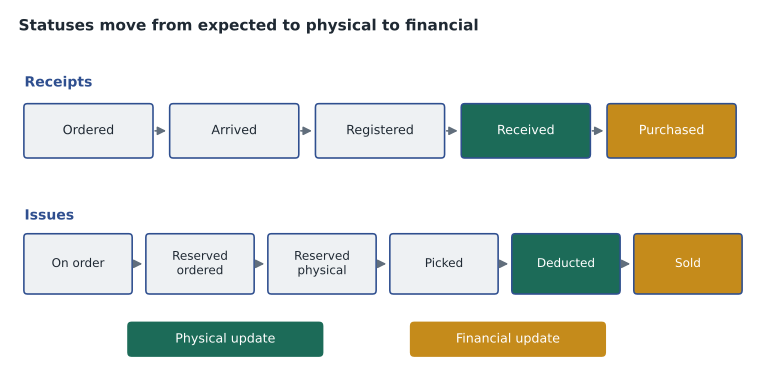
Each transaction has a receipt status or an issue status that shows how far it has progressed. The statuses tell you whether the movement has happened physically, financially or not yet at all.
| Receipt status | Meaning |
|---|---|
| Ordered | Expected, such as an open purchase order line |
| Arrived | Registered as arrived but not yet put away (warehouse processes) |
| Registered | Registered as physically received |
| Received | A product receipt is posted; physically updated |
| Purchased | Invoiced; financially updated |
| Issue status | Meaning |
|---|---|
| On order | Expected, such as an open sales order line |
| Reserved ordered | Reserved against stock that is ordered but not yet received |
| Reserved physical | Reserved against stock on hand |
| Picked | Picked for shipment or production |
| Deducted | A packing slip or picking list is posted; physically updated |
| Sold | Invoiced; financially updated |
Physical and financial updates
The most important distinction in inventory is between a physical update and a financial update. A physical update happens when goods actually move: a product receipt for a purchase, a packing slip for a sale, a report as finished for production. A financial update happens when the movement is invoiced or otherwise posted to inventory value: a vendor invoice, a customer invoice, the end of a production order, or the posting of an inventory journal.
Between the two, stock is on hand but carries a physical cost, an estimate. When physical posting is enabled in the item model group, product receipts and packing slips post to interim ledger accounts, such as received not invoiced, and the financial update reverses them and posts to inventory. Ifeoma recognized this immediately as the accruals her team used to calculate by hand. Inventory journals, by contrast, update physically and financially in one step when they are posted.
Worked problem
Reading a transaction history
Seal kit SK-75 shows these transactions in CRCA: a purchase line of 200 with status Purchased; a purchase line of 100 with status Received; a production BOM line of 60 with status Deducted; a sales line of 40 with status Reserved physical; and a counting journal of minus 2 with status Sold. What is the physical on-hand quantity, and how much is available?
Show solution
- Physical on-hand counts receipts that are at least Received and subtracts issues that are at least Deducted: 200 + 100 - 60 - 2 = 238.
- The counting journal line shows Sold because journals update physically and financially at once.
- The sales line of 40 is reserved physically, so it is still on hand but not available.
- Available physical is 238 - 40 = 198.
Answer: 238 on hand, 40 reserved for the sale, 198 available. Of the 238, the 100 from the second purchase still carry a physical cost until the vendor invoice posts.
Inventory journals
Inventory journals post inventory transactions that are not part of an order. Each journal type is defined by a journal name that sets defaults such as voucher series, posting detail and whether the journal must be approved. The study guide lists the main types by name, so it is worth knowing what each does.
| Journal | What it posts | Example |
|---|---|---|
| Movement | A receipt or issue against an offset ledger account | Issuing gaskets to the maintenance department's expense account |
| Inventory adjustment | A receipt or issue against the inventory profit and loss account | Writing off a dropped motor |
| Transfer | A move between inventory dimensions, such as warehouse, location or batch, in one step | Moving castings from main stores to the yard |
| BOM | Reports a manufactured item as finished and consumes its components at the same time | Assembling spare seal kits without a production order |
| Item arrival | Registers the arrival of goods on order lines | Registering a delivery before the product receipt |
| Counting | Records counted quantities and posts differences | Annual count of the mezzanine (lesson 8) |
| Tag counting | Records counts from pre-numbered count tags | A wall-to-wall count with paper tags |
A journal has a header, with the journal name and description, and lines with the item, dimensions, quantity, cost and, for movement journals, the offset account. Lines can be validated before posting, and posting creates the transactions and the voucher. Journals that need approval go through a workflow first, which Cobalt Ridge required for adjustment journals above a value of 5,000 dollars.
The difference between a movement journal and an inventory adjustment journal confuses many new users. Both add or remove stock. The movement journal lets the user choose the offset account on each line, which suits issues to a department or project. The adjustment journal always posts to the inventory profit and loss account from the posting setup, which suits corrections. Annelise's rule was simple: if the stock went somewhere on purpose, use a movement journal; if it was lost, found or broken, use an adjustment journal.
Transfer orders
A transfer journal moves stock between dimensions in a single step, which is fine when the move is instant, such as from one location to another. When stock is shipped between sites, it is better to use a transfer order, which records the shipment and the receipt separately, with the goods in a transit warehouse in between.
A transfer order has a header with the from-warehouse, to-warehouse, transit warehouse and dates, and lines with items and quantities. Stock is reserved and picked at the shipping warehouse, the transfer order shipment is posted, and stock sits in the transit warehouse until the transfer order receipt is posted at the receiving end. Transfer orders can be created manually or by master planning, which proposes them when a warehouse is replenished from another. With warehouse management, shipping and receiving are done through warehouse work on mobile devices.
Cost moves with the stock. If the sites have different costs, which they can with site-financial dimensions, a transfer carries the issuing site's cost to the receiving site, and, for standard cost items with different standards at each site, a variance posts on receipt. This matters at Cobalt Ridge, where distributor pumps are built at Hamilton and shipped to Calgary. Ifeoma decided that the distribution site would use the same standard as the plant for transferred finished goods.
| Use | Transfer journal | Transfer order |
|---|---|---|
| Move between locations in one warehouse | Yes | Not needed |
| Move between warehouses at one site, instantly | Yes | Possible |
| Ship between sites with travel time | No | Yes, with a transit warehouse |
| Planned replenishment by master planning | No | Yes |
| Warehouse management shipping and receiving work | No | Yes |
Inventory closing and adjustment
For items that use FIFO, LIFO, weighted average or their date variants, the inventory close settles financial issues against financial receipts for the period and adjusts the cost of issues to match the costing method. It posts adjustments to the ledger, including to cost of goods sold, and creates a record of settlements that can be reviewed. Once a close has run, the period is closed to new inventory transactions dated in it unless the close is cancelled.
- Recalculation runs the same settlement as a close without closing the period, so costs can be updated mid-month.
- The close can be cancelled, which reverses its adjustments, as long as no later close depends on it.
- Standard cost and moving average items are not adjusted by the close, though they are included in the period closing.
- Problems such as negative financial inventory should be cleared before the close, because they stop issues from being fully settled.
- Manual adjustments can be made to on-hand value or to specific transactions through the inventory adjustment functions, for corrections the close cannot make.
Microsoft recommends running the close regularly, usually monthly, so that the number of open transactions stays small and each close runs quickly. Cobalt Ridge scheduled it as a batch job on the second business day of each month, after the vendor invoices for the previous month were posted, and gave the job to Ifeoma's team. Her checklist began with clearing negative inventory, because an item with negative financial inventory cannot be fully settled.
Reservation and marking
Two more ideas explain many of the transactions people see. Reservation sets aside stock for a specific issue, such as a sales order line, so that nobody else can take it. Reservation can be manual, from the order line, or automatic, according to the item model group and order settings. A reserved line shows Reserved physical if stock is on hand, or Reserved ordered if it is reserved against an expected receipt. Reservation decides availability, not cost.
Marking is different. It links a specific issue to a specific receipt so that, at inventory close, the issue is settled against that receipt regardless of the costing method. Marking is used when the cost of a particular receipt must follow a particular issue, for example a special-purpose part bought for one customer order or a return that must carry the cost of the original shipment. Ifeoma's team rarely marks, but she wanted to know it existed because it explains why some FIFO issues settle against receipts that are not the oldest.
| Concept | Affects | Typical use |
|---|---|---|
| Reservation | Availability of stock for other demands | Holding seal kits for a confirmed sales order |
| Marking | Which receipt an issue is settled against at close | A part bought specially for one customer order |
| Inventory blocking | Whether stock can be reserved at all | Holding a batch named in a complaint |
| Blocking inventory status | Whether stock in that status is available | Damaged stock at the distribution warehouse |
The transaction origin inquiry shows every transaction created by one source, such as all the lines of one transfer order, and is a quick way to answer what did this document do. The inventory transactions inquiry under inventory management shows transactions for many items at once, with filters by date and reference, and is the usual starting point when investigating a stock difference.
Henrik's team used the transaction origin inquiry heavily in the first weeks of testing. Each time a test produced an unexpected quantity, they opened the source document's transaction origin, read the statuses line by line and found the step that had been skipped, usually a product receipt that had been registered but not posted.
Inventory blocking
Sometimes stock must be kept from use without moving it. Inventory blocking creates a blocking record for an item, quantity and dimensions so that it cannot be reserved. Blocking can be manual, created by a user with a reason and an expected date, or created automatically by quality orders and other processes. Removing a manual block is a matter of deleting the blocking record. Teodora's team uses manual blocks when a customer complaint names a batch number, so that the remaining stock of that batch is held while the complaint is investigated.
Common mistakes
MistakeCounting only financially updated receipts as on hand.
InsteadPhysically updated receipts, with status Received, are on hand too, at a physical cost.
MistakeUsing an adjustment journal to issue stock to a department.
InsteadUse a movement journal with the department's offset account.
MistakeUsing a transfer journal for shipments between sites with travel time.
InsteadUse a transfer order with a transit warehouse.
MistakeLeaving negative inventory before the inventory close.
InsteadClear negative inventory first so issues can be settled.
Summary and key terms
- Every change to stock is an inventory transaction with a reference, dimensions, status and cost.
- Receipt statuses run from Ordered to Purchased and issue statuses from On order to Sold; Received and Deducted are physical updates, Purchased and Sold financial.
- Inventory journals include movement, adjustment, transfer, BOM, item arrival and counting journals, and update physically and financially at once.
- Transfer orders ship and receive between warehouses with a transit warehouse in between.
- Inventory close settles issues for FIFO, LIFO and weighted average items; inventory blocking holds stock without moving it.
- Physical update
- Posting that records the actual movement of goods, such as a product receipt or packing slip.
- Financial update
- Posting that records the movement in inventory value, such as an invoice.
- Movement journal
- An inventory journal that posts against an offset ledger account chosen on each line.
- Transfer order
- An order that ships stock from one warehouse and receives it in another, via a transit warehouse.
- Inventory close
- The periodic process that settles issues against receipts and adjusts issue costs.
Practice problems
Work each problem on paper first, then reveal the answer to check.
What status does a purchase line have after the product receipt but before the invoice?
Show answer
Received.
Which journal posts a dropped and broken motor to the inventory profit and loss account?
Show answer
An inventory adjustment journal.
What is the difference between recalculation and closing?
Show answer
Recalculation settles and adjusts costs without closing the period; closing also closes the period.
Lesson quiz · 5 questions
Score 60% or more to complete this lesson.
Create a free account to save your progress, take quizzes and earn a certificate.