
MSBA-330 · Lesson 4 of 12 · 18 min
Units and conversions
▶ Video coming soon A video version of this lesson is on the way.
Ifeoma arrived at the units session with a printout of the spreadsheet that had kept Cobalt Ridge running for fifteen years. It held the conversion from kilograms to pieces for every steel casting, the number of gaskets in a box for every gasket, and the litres in a drum for every lubricant. Each month, someone copied the numbers into purchase orders and issue slips by hand. Twice in the past year a decimal point had moved and a shipment had been short by a factor of ten. Her request was simple: put the spreadsheet inside the system and delete it.
Units of measure
A unit of measure is a named unit such as piece, box, kilogram, metre or litre. Units are defined once for the whole system on the Units page, where each has a symbol, a description, translations, the number of decimals it allows and a unit class. The class groups units that measure the same kind of quantity.
| Unit class | Examples | Used at Cobalt Ridge for |
|---|---|---|
| Quantity | Piece (ea), box, pallet, set, pair | Most components and all pumps |
| Mass | Kilogram, gram, tonne, pound | Steel castings bought by weight |
| Length | Metre, millimetre, foot | Gasket sheet and hose sold by length |
| Volume | Litre, millilitre, gallon | Lubricants and coatings |
| Time | Hour, minute | Service products and labour |
| Area | Square metre | Not used yet |
One unit in each class can be marked as the system unit, which is used as the base when converting within the class. Units can also be flagged as fixed, which matters for units like a box whose size depends on the product. Decimal precision deserves attention: a piece usually allows no decimals, while a kilogram might allow three. If a unit allows too few decimals, conversions round in ways that surprise people; if it allows too many, users enter impossible quantities such as 2.375 pumps.
Units are maintained centrally, so Cobalt Ridge appointed Ifeoma's team as their owner. The migration from the old system revealed six different spellings of each, ten units that meant piece and two units called box that meant different things. The cleanup replaced them with one unit list of 31 entries.
Standard conversions
A standard conversion converts between two units for every product, such as 1 kilogram = 1,000 grams or 1 metre = 1,000 millimetres. Standard conversions are defined within a unit class or between classes when the relationship is the same for every product. The unit conversions page holds them, and the system ships with many common ones, which can be loaded with a setup wizard and extended.
Product-specific conversions
Many conversions depend on the product. A box of gaskets holds 50 pieces, but a box of bearings holds 10. A casting weighs 18.4 kilograms, while a different casting weighs 62 kilograms. These are product-specific conversions, held on the released product or the shared product, and they come in two kinds.
| Conversion | Converts | Example |
|---|---|---|
| Standard | Between units for all products | 1 tonne = 1,000 kilograms |
| Intraclass (product-specific) | Between units in the same class for one product | Gasket G-110: 1 box = 50 pieces |
| Interclass (product-specific) | Between units in different classes for one product | Casting CS-3300: 1 piece = 18.4 kilograms |
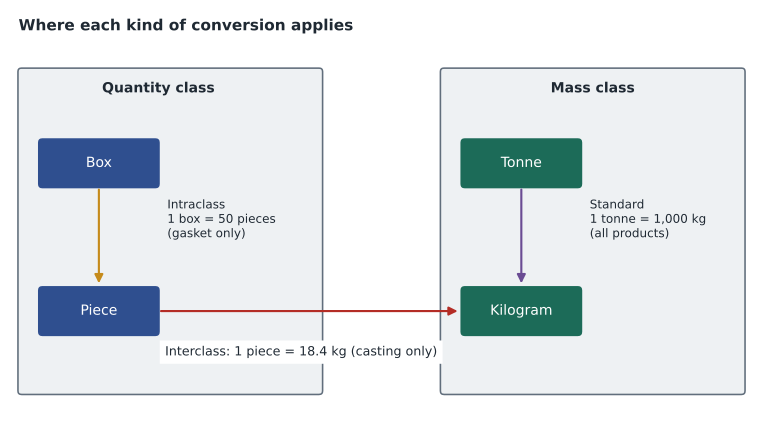
A conversion is defined with a factor, and optionally a numerator, denominator, inner offset, outer offset and rounding rule, so that it can express fractions exactly and handle units like temperature. Most real conversions need only the factor. The rounding rule matters for units like box: if a customer orders 120 pieces of a gasket sold by the box, the system can be set to round up to three boxes.
When a transaction uses a unit that differs from the item's inventory unit, the system looks for a conversion in a fixed order: a product-specific conversion first, then a standard conversion. If none exists, it refuses the transaction. This is why missing conversions show up as errors rather than wrong numbers, which is exactly what Ifeoma wanted.
Inventory, purchase and sales units
Every released product has an inventory unit, the unit in which on-hand quantities are held and inventory transactions are recorded. It also has a default purchase unit and sales unit, used on order lines, and production can use a BOM unit. The units can all be different as long as conversions exist.
| Item | Inventory unit | Purchase unit | Sales unit | Conversions needed |
|---|---|---|---|---|
| Gasket G-110 | Piece | Box | Piece | Box to piece (intraclass) |
| Casting CS-3300 | Piece | Kilogram | Piece | Piece to kilogram (interclass) |
| Lubricant LB-46 | Litre | Drum | Litre | Drum to litre (intraclass, volume) |
| Pump DU-40 | Piece | Piece | Piece | None |
| Gasket sheet GS-2 | Metre | Roll | Metre | Roll to metre (intraclass, length) |
The inventory unit is hard to change once an item has transactions, because historic quantities are stored in it. Microsoft has added ways to change it in some situations, but they come with strict conditions, so the safest course is to choose it correctly at the start. The rule Cobalt Ridge adopted was: the inventory unit is the unit in which the item is counted and consumed. Castings are counted and issued as pieces, even though they are bought by weight, so their inventory unit is piece.
Worked problem
Receiving castings bought by weight
A purchase order line asks for 2,000 kilograms of casting CS-3300, whose inventory unit is piece and whose product-specific conversion is 1 piece = 18.4 kilograms. The vendor delivers 109 castings. How does the receipt work, and what does on-hand show?
Show solution
- The order quantity of 2,000 kilograms converts to about 108.7 pieces, which the warehouse sees as the expected quantity.
- The receiver registers 109 pieces; the system converts back to 2,005.6 kilograms against the order line.
- If the over-delivery tolerance on the purchase allows a small excess, the receipt is accepted; otherwise it is refused or needs approval.
- On-hand increases by 109 pieces in the inventory unit.
- The vendor invoice, priced per kilogram, is matched in kilograms, and the cost per piece is derived from it.
Answer: The receipt is recorded in pieces, matched in kilograms and costed per piece, all from one product-specific conversion.
Bar codes and GTIN codes
Bar codes let warehouse staff and point-of-sale devices identify items by scanning. The study guide lists creating and assigning bar codes and GTIN codes as a skill, so it is worth knowing the setup.
First, bar code setup defines the formats the company uses, such as EAN-13, UPC-A, Code 128 or GTIN-14, with their length and check-digit rules. Then each released product, and each variant where needed, gets one or more bar codes of a chosen format, optionally with a unit and quantity, so that a scan can mean one piece or one box of 50. One bar code per item can be marked as the one used for scanning by default, and one for printing.
GTIN codes, the Global Trade Item Numbers issued through GS1, are held on a separate GTIN codes page for each released product and unit. A distributor that orders by GTIN on an electronic order can therefore be matched to the right item and unit automatically. Cobalt Ridge already held GS1 numbers for its distributor units and spare parts, so these were migrated as GTIN codes, and the same numbers were set up as bar codes for scanning.
| Record | What it holds | Example |
|---|---|---|
| Bar code setup | A symbology and its rules | EAN-13, 13 digits with check digit |
| Item bar code | A bar code value for an item, variant, unit and quantity | DU-40, piece, 1 |
| GTIN code | A GTIN for an item, variant and unit | DU-40 in carton of 1 |
| External item number | A customer's or vendor's own number for the item | Distributor part number DX-4400 |
Unit sequence groups
Warehouse management, taught in MSBA-332, needs one more unit setting. A unit sequence group lists the units an item uses in the warehouse in order from smallest to largest, such as piece, box and pallet, and marks which units are used for receiving, picking and replenishment. Every item handled by warehouse management processes must have a unit sequence group, and every unit in it must convert to the inventory unit. The study guide places configuring unit sequence groups under product prerequisites, alongside dimension groups and reservation hierarchies, because it is assigned on the released product before transactions start.
Henrik made one rule about unit sequence groups that saved trouble later: the warehouse picks in the largest unit that fits the order and breaks down to smaller units only when needed. For that to work, the pallet and box conversions must be accurate, so the team asked each major vendor for its packing specification and stored it as product-specific conversions.
Default order settings
Related to units are default order settings, which the study guide lists under additional product details. They hold, for purchase, sales and inventory, the default site and warehouse, minimum, maximum, standard and multiple order quantities, and the lead time. They can be set for the item as a whole and overridden for a site, and for product masters per variant through site-specific order settings. A multiple quantity of 50 for gaskets, for example, means a buyer cannot accidentally order 120 pieces; the system proposes 150 or warns, depending on the setting.
| Setting | Purchase | Sales | Inventory |
|---|---|---|---|
| Default site and warehouse | Where receipts go | Where shipments come from | Where journals default to |
| Minimum and maximum quantity | Limits on order lines | Limits on order lines | Limits on transfers |
| Multiple | Order in multiples of a box | Sell in multiples | Transfer in multiples |
| Standard quantity | Default line quantity | Default line quantity | Default line quantity |
| Lead time | Purchase lead time in days | Sales lead time | Transfer lead time |
Default order settings are often skipped during implementation and then rediscovered when users complain that every line defaults to the wrong warehouse. Cobalt Ridge added them to the product templates so that each new item started with sensible defaults for its plant.
Units on documents and in integrations
Units travel well beyond the item record. Purchase orders print the purchase unit and its translation for the vendor's language, so the unit text must be translated as carefully as product names; the Monterrey hub will need Spanish unit descriptions such as pieza and caja. Electronic documents exchanged with distributors use unit codes from a standard list, so Cobalt Ridge mapped its units to the codes its distributors expect and kept the mapping in the integration rather than renaming its own units.
Data entities also carry units. When opening balances are loaded through an inventory journal entity, the quantity is in the unit given on each line, and the system converts it to the inventory unit using the same conversions as a user would. A file that gives casting quantities in kilograms therefore loads correctly only if the interclass conversion is already in place. For that reason the migration plan loaded units first, then conversions, then products, then balances, and each rehearsal began by checking that every migrating item had every conversion its open orders and balances needed.
Annelise added a final check to the plan: a simple report listing released products whose purchase or sales unit differed from the inventory unit with no conversion between them. On the first rehearsal it listed 212 items. By the third it listed none.
Cleaning up the spreadsheet
Ifeoma's spreadsheet had 4,100 rows. Annelise and the inventory controllers went through it in three passes. The first removed conversions for items that were not migrating. The second sorted the rest into standard conversions, which were already in the system, and product-specific ones. The third checked the product-specific conversions against vendor packing specifications and recent receipts, and corrected 37 that were wrong. The 2,900 that remained were loaded with the product unit conversion data entity through the data management framework, and the spreadsheet was archived with a note that it must never be updated again.
Common mistakes
MistakeChoosing the purchase unit as the inventory unit because that is how the vendor invoices.
InsteadChoose the unit in which the item is counted and consumed; convert purchases to it.
MistakeCreating a standard conversion for a relationship that depends on the product.
InsteadUse product-specific conversions for box sizes, weights and similar.
MistakeGiving units too few decimals.
InsteadSet decimal precision to match how the unit is really measured.
MistakeLeaving unit sequence groups until warehouse go-live.
InsteadAssign them on released products before warehouse transactions start.
Summary and key terms
- Units belong to unit classes such as quantity, mass, length and volume, with decimal precision and an optional system unit.
- Standard conversions apply to all products; intraclass and interclass conversions are product-specific.
- Each released product has an inventory unit plus default purchase and sales units; the inventory unit is hard to change later.
- Bar codes and GTIN codes identify items and units for scanning and electronic trading.
- Unit sequence groups and default order settings prepare items for warehouse processes and sensible order defaults.
- Unit class
- A group of units that measure the same kind of quantity, such as mass.
- Interclass conversion
- A product-specific conversion between units in different classes.
- Inventory unit
- The unit in which an item's on-hand quantities and transactions are recorded.
- GTIN
- Global Trade Item Number, a GS1 identifier for a product in a given packaging unit.
- Unit sequence group
- An ordered list of units used for an item in warehouse management.
Practice problems
Work each problem on paper first, then reveal the answer to check.
A casting is bought by kilogram and issued by piece. What kind of conversion links the two?
Show answer
A product-specific interclass conversion.
In what order does the system look for a conversion?
Show answer
Product-specific first, then standard.
What does a multiple of 50 in default purchase order settings do?
Show answer
It makes purchase quantities follow multiples of 50, proposing or warning when a line does not.
Lesson quiz · 5 questions
Score 60% or more to complete this lesson.
Create a free account to save your progress, take quizzes and earn a certificate.