
MSBA-300 · Lesson 7 of 12 · 22 min
Caching and artifacts
▶ Video coming soon A video version of this lesson is on the way.
Rosa's budget alert fired for the first time in the week after the matrix arrived. Nothing was broken; the validator matrix and the split check workflow simply ran more jobs, and every one of them downloaded the same few hundred megabytes of packages before doing any real work. At the same time Owen reported that the PDF proof from his manual workflow had vanished from the run page after a few weeks, just when the printer asked for it again. Priya used both complaints to introduce the two storage features of GitHub Actions, which look similar and do opposite jobs: caches make future runs faster, and artifacts keep the results of a run.
Two kinds of storage
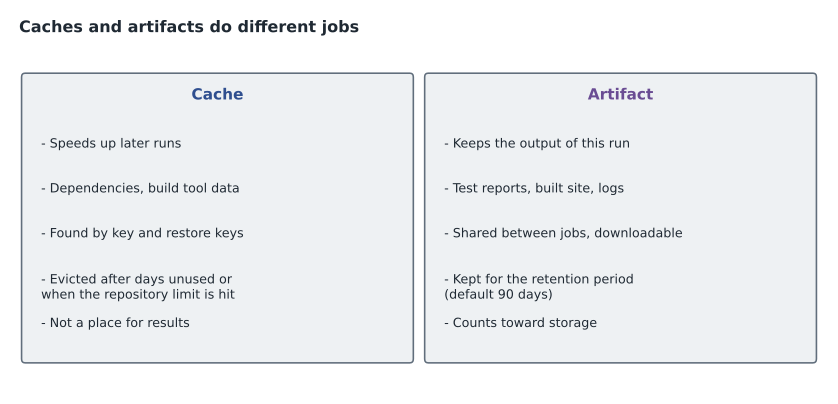
A cache stores files that are expensive to recreate but can always be recreated, such as downloaded packages or a build tool's working data, so that later runs can start from them. A cache is an optimization: if it is missing, the workflow must still work, just more slowly. An artifact stores files produced by a run, such as a built website, a test report or a PDF, so that a later job in the same run, or a person, can use them. An artifact is a result: if it is missing, something is lost. Mixing the two up causes most of the confusion in this area, so the rule of thumb is simple. If the files would be the same for every run with the same inputs, cache them; if they are what this particular run produced, upload them as an artifact.
Caching dependencies
The easiest way to cache is through a setup action. setup-node, setup-python, setup-java, setup-go and others accept a cache input that names the package manager; the action then computes a key from the lock file, restores the cache before installation and saves it after the job, with no extra steps. For anything else, the actions/cache action does the work directly. You give it the paths to cache, a key and optionally a list of restore keys. When the job starts, the action tries to restore a matching cache; when the job ends successfully, it saves the paths under the key if no cache with that exact key existed.
steps:
  - uses: actions/checkout@v5
  # Option 1: let the setup action cache npm's download folder
  - uses: actions/setup-node@v5
    with:
      node-version: "24"
      cache: npm
  - run: npm ci

  # Option 2: cache something else explicitly
  - name: Cache the site generator's image data
    id: img-cache
    uses: actions/cache@v4
    with:
      path: .cache/images
      key: images-${{ runner.os }}-${{ hashFiles('site/images/**') }}
      restore-keys: |
        images-${{ runner.os }}-
  - if: steps.img-cache.outputs.cache-hit != 'true'
    run: npm run optimize-images
Keys, restore keys and hits
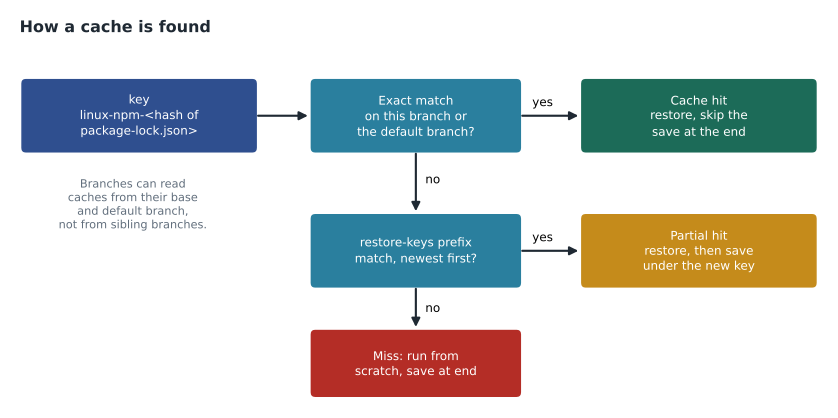
The key identifies a cache exactly. A good key changes whenever the cached content should change and stays the same otherwise, which is why keys usually combine the operating system with a hash of the lock file, computed with the hashFiles function. When the lock file changes, the hash changes, the key changes, and the old cache is no longer an exact match.
Restore keys provide a fallback. If no cache matches the key exactly, the action looks for caches whose keys start with each restore key in turn, choosing the most recently created match. Restoring a slightly older cache and then installing only what changed is usually much faster than starting from nothing. The action's cache-hit output is true only for an exact match, so a step can skip work when the cache is current and run it after a partial or missed restore.
Which caches a run can see
Caches are scoped to branches for safety. A run can restore caches created on its own branch, on the default branch and, for pull requests, on the base branch. It cannot restore caches created on sibling branches, so a feature branch cannot poison the cache that another feature branch will use. This is why the first run on a new branch often restores a cache from main: that is the fallback the scoping allows. Caches created by pull request runs are scoped to the pull request's merge reference, so they help later pushes to the same pull request but not other branches.
Limits and eviction
Each repository gets 10 GB of cache storage at no charge. Since November 2025, administrators of accounts on the Pro, Team and Enterprise plans can raise the per-repository cache size eviction limit and pay for the extra storage by usage, and can set a cache retention limit in days. Two rules remove caches. Entries not accessed for longer than the retention limit, seven days by default, are deleted. And when a repository goes over its size limit, the least recently used caches are evicted until it fits. Caches can also be listed and deleted from the repository's Actions caches page, with the GitHub CLI and through the REST API, which is useful when a cache is known to be bad.
The cache service itself was rebuilt in 2025, and GitHub retired the oldest versions of actions/cache when the new service took over, so v4 is the version to use. If an old workflow reports a cache service error, the first thing to check is the action version.
| Good to cache | Do not cache |
|---|---|
| Package manager download folders, such as npm's cache | Secrets, tokens or anything sensitive |
| Language tool caches and compiled dependencies keyed on a lock file | The final build output you need to keep |
| Large data that is slow to download and rarely changes | node_modules when installs depend on the platform, unless the key includes it |
| Docker layer caches built for the same platform | Files that differ per run, such as timestamps or test results |
Never cache secrets. A cache created on a branch can be restored by later runs, including pull request runs, and anyone who can trigger such a run may be able to read what is restored. Caches are also not a substitute for pinning: a cache keyed on the lock file speeds up installation, but the lock file is what makes the installation repeatable.
Worked problem
Designing a cache key
The validator matrix runs on three operating systems and two Node versions. npm's download folder is cached with the key npm plus a hash of package-lock.json, and Windows jobs keep failing with errors about native modules built for Linux. What is wrong with the key, and what should it be?
Show solution
- The key is identical for every matrix job, so whichever job saves first wins, and other platforms restore its files.
- Downloaded packages are mostly portable, but anything compiled for a platform is not.
- Add the operating system, and the Node version if compiled modules depend on it, to the key and restore keys.
- Or use setup-node's cache input, which builds a platform-aware key automatically.
Answer: Include runner.os (and the Node version if needed) in the key, for example npm, the OS, the Node version and the lock file hash; or let setup-node manage the cache.
Artifacts
Artifacts are uploaded with actions/upload-artifact and downloaded with actions/download-artifact. An upload step names the artifact, lists the paths to include, and can set how long to keep it. GitHub compresses the files, stores them with the run, and lists them on the run summary page, where people with read access to the repository can download them as a zip file. A later job in the same run can download them by name, which is how a build job hands a built site to a deploy job, or how test jobs hand reports to a job that combines them.
jobs:
  build:
    runs-on: ubuntu-latest
    steps:
      - uses: actions/checkout@v5
      - run: npm ci && npm run build
      - uses: actions/upload-artifact@v7
        with:
          name: site
          path: dist/
          retention-days: 14
          if-no-files-found: error
  linkcheck:
    needs: build
    runs-on: ubuntu-latest
    steps:
      - uses: actions/download-artifact@v7
        with:
          name: site
          path: dist/
      - run: npx linkinator dist --recurse
The artifact actions were rewritten in 2024 as version 4, and later major versions build on the same backend. Three behaviours of the current design matter. Artifacts are immutable: once uploaded, an artifact cannot be appended to, and a second upload with the same name in the same run fails unless the step allows overwriting. Each job in a matrix that uploads must therefore use a unique name, usually including the matrix values, and a later job can download several artifacts at once with a name pattern and merge them into one folder. Artifacts are available for download as soon as their upload step finishes, not only when the run ends. And uploads and downloads are much faster than in the old versions, which stopped working when GitHub retired the old service in early 2025.
# In each matrix job
- uses: actions/upload-artifact@v7
  with:
    name: test-report-${{ matrix.os }}-node${{ matrix.node }}
    path: reports/

# In a later job that needs the matrix
- uses: actions/download-artifact@v7
  with:
    pattern: test-report-*
    merge-multiple: true
    path: all-reports/
Artifacts outside the browser
People rarely need the browser to fetch artifacts. The GitHub CLI downloads them with gh run download, given a run number and optionally an artifact name, and lists recent runs with gh run list. The REST API exposes the same operations: list the artifacts of a repository or a run, download one as a zip archive, and delete one. Owen's printer contact eventually got a small script that fetched the latest approved proof with the CLI, but the release approach made even that unnecessary.
# List the last five runs of the proof workflow
gh run list --workflow proof.yml --limit 5

# Download one artifact from a specific run
gh run download 4182 --name proof-chapter-07

# Delete an artifact with the REST API (artifact id from the list endpoint)
gh api -X DELETE repos/tidewater/guidebook/actions/artifacts/987654
Two smaller points round out artifacts. A workflow can upload logs or screenshots only when something fails, by giving the upload step the condition failure(), which keeps storage low while still capturing evidence for debugging (lesson 10). And an artifact can be the subject of an artifact attestation, a signed statement of where and how it was built; attestations belong to the security domain of the exam and are covered in the course on managing and securing Actions.
Retention and storage
Artifacts and logs are kept for 90 days by default. Administrators can change the default for a repository, organization or enterprise; for public repositories the period can be set from 1 to 90 days, and for private repositories up to 400 days. An upload step can set retention-days for its artifact, but not beyond the repository's maximum. Artifact storage counts toward the account's storage allowance, and use beyond the allowance is billed, so large artifacts with long retention cost money for as long as they exist. Artifacts can be deleted from the run page or through the REST API, and the GH-200 outline expects you to know that retention policies for logs, artifacts and runs can be applied through the REST API at organization and repository level.
Owen's missing PDF was a retention problem, but the deeper lesson was that an artifact is not an archive. A proof that the printer might need months later belonged in a release, where an attached file stays until someone deletes it. The guidebook workflow kept the 90-day artifact for quick review and, when a chapter was approved, attached the final PDF to a release.
| Need | Use | Why |
|---|---|---|
| Faster dependency installs in every run | Cache | Recreatable, keyed on the lock file |
| Hand a built site from build to deploy | Artifact | A result of this run, shared between jobs |
| Let a reviewer download a test report | Artifact | Downloadable from the run page |
| Keep a final file indefinitely | Release asset or package | Artifacts expire with retention |
| Pass a version number to the next job | Job output | Small text values do not need storage |
Worked problem
Setting retention for different artifacts
The pipeline produces three kinds of artifact: a built site used by later jobs in the same run, test reports that reviewers look at during a pull request, and failure screenshots from browser tests. The repository default is 90 days. What retention would you set for each?
Show solution
- The built site is used within minutes and redeployed from main if needed, so a few days is plenty, or 14 if rollbacks may need it.
- Test reports matter while the pull request is open; 14 to 30 days covers most reviews.
- Failure screenshots are only uploaded on failure and matter until the failure is fixed; 7 to 14 days is enough.
- Nothing here needs 90 days; shorter retention cuts storage costs without losing anything useful.
Answer: Short retention for all three, roughly 3 to 14 days for the site, 14 to 30 for reports and 7 to 14 for screenshots, set with retention-days on each upload.
Common mistakes
MistakeUsing a cache to pass a built site from one job to the next.
InsteadCaches may be missing or evicted; use an artifact for results a later job needs.
MistakeUploading artifacts with the same name from every matrix job.
InsteadArtifacts are immutable; give each job a unique name and download with a pattern.
MistakeUsing one cache key for every operating system.
InsteadInclude runner.os and relevant versions in the key, or use a setup action's cache input.
MistakeTreating artifacts as permanent storage.
InsteadArtifacts expire; attach long-term files to releases or publish them as packages.
The week after the clinic, Rosa's usage report showed the check workflow's average duration down from two and a half minutes to just over one, and the validator matrix down by half. Owen's next proof was attached to a release, and he stopped worrying about the calendar.
Summary and key terms
- Caches make future runs faster with recreatable files; artifacts keep the results of a run.
- Setup actions cache dependencies with one input; actions/cache uses paths, a key and restore keys.
- cache-hit is true only for an exact key match; restore keys give a partial fallback, newest first.
- Runs can restore caches from their own branch, the base branch and the default branch, not siblings.
- Repositories get 10 GB of cache; entries unused past the retention limit (default seven days) and least recently used entries are evicted.
- Current artifact actions upload immutable artifacts; names must be unique; retention defaults to 90 days.
- Cache
- Stored files that speed up later runs and can always be recreated.
- Cache key
- The exact identifier used to save and restore a cache.
- Restore keys
- Prefixes used to find a fallback cache when there is no exact match.
- hashFiles
- An expression function that returns a hash of matching files, used in keys.
- Artifact
- Files uploaded from a run so later jobs or people can download them.
- Retention period
- How long artifacts and logs are kept before automatic deletion.
- Cache eviction
- Automatic removal of caches that are unused or over the size limit.
Practice problems
Work each problem on paper first, then reveal the answer to check.
A deploy job needs the built site from the build job. Cache or artifact?
Show answer
Artifact, because it is a result of this run that must not go missing.
What does the cache-hit output mean when it is true?
Show answer
That a cache with exactly the requested key was restored.
How long are artifacts kept by default?
Show answer
90 days, unless the repository or the upload step sets another period.
Lesson quiz · 5 questions
Score 60% or more to complete this lesson.
Create a free account to save your progress, take quizzes and earn a certificate.