
MSBA-300 · Lesson 11 of 12 · 19 min
Troubleshooting failed runs
▶ Video coming soon A video version of this lesson is on the way.
Priya kept her promise from the first clinic. The eleventh session opened with the closures-page pull request from Malik that had failed weeks earlier, still red, and Lena was asked to explain it without help. She opened the run, saw that the job had failed at a step calling the trail API, read the error, an authorization failure with an empty token, and then checked the trigger: pull_request from a fork. "Secrets are not passed to fork pull requests," she said, "so the token was empty, and the request was refused. The change itself was fine." It had taken her about two minutes. This session turned that kind of reasoning into a routine that works for most failures.
A triage routine
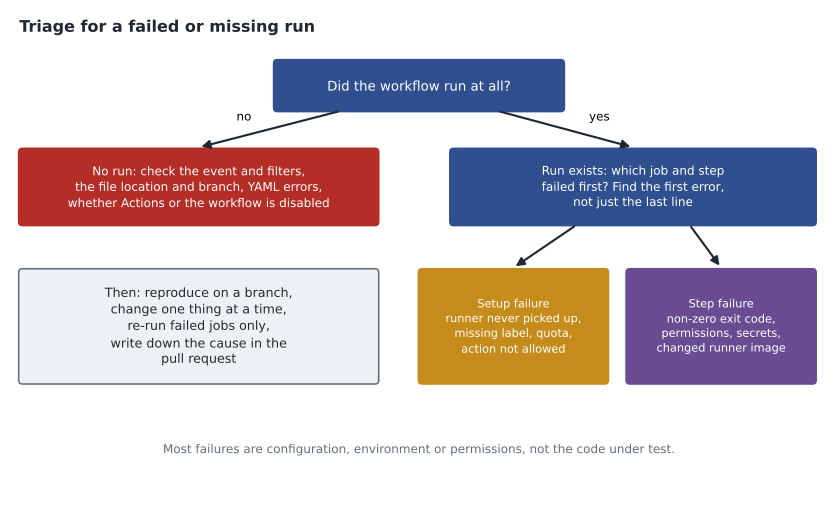
Most problems fall into one of two families. Either the workflow did not run at all, or it ran and something failed. The questions to ask are different for each, so the first step is always to decide which family you are in. A missing run leaves no log to read, so the evidence is in the workflow file, the event and the settings. A failed run leaves a log, and the work is to find the first real error in it and decide whether it comes from the code, the configuration or the environment.
When a workflow does not run
| Check | What to look for |
|---|---|
| Is the file in the right place? | Directly in .github/workflows, with a .yml or .yaml extension, on the branch that matters for the event |
| Is the file valid? | The Actions tab shows an invalid workflow with the line number of the YAML or schema error |
| Does the event match? | The right event and activity types; for pull_request, the base branch in branches |
| Do the filters match? | Branch, tag and path patterns, their order, and negative patterns; both branch and path filters must match |
| Was the event caused by the GITHUB_TOKEN? | Events from the token do not start new runs, except workflow_dispatch and repository_dispatch |
| Does the commit message skip CI? | A skip instruction in the head commit message suppresses push and pull_request runs |
| Is Actions or the workflow disabled? | Repository or organization settings, or the workflow disabled in the Actions tab; scheduled workflows in inactive public repositories are disabled after 60 days |
| Is it waiting for approval? | Runs from first-time contributors on forks may need a maintainer to approve them |
Disabling and deleting a workflow are different, and the outline asks you to contrast them. Disabling a workflow from the Actions tab stops it from being triggered while keeping the file and its run history; it can be enabled again with one click, which is the right move for a noisy scheduled workflow during maintenance. Deleting means removing the file from the repository through a commit; the workflow stops running on branches where the file is gone, and its past runs remain visible until they are deleted or reach the end of their retention.
When a run fails before its steps
Some failures happen before any of your steps run. A job that stays queued for a long time is waiting for a runner: on hosted runners, the account may have reached its concurrency limit or its spending limit; on self-hosted runners, no online runner may have all the labels the job asks for, or the runner group may not be available to the repository. A job that fails in Set up job may be blocked by policy, for example because the organization allows only certain actions and the workflow uses another, or because an action could not be downloaded at the version requested.
| Symptom | Likely cause | Where to confirm |
|---|---|---|
| Job queued indefinitely | No runner with matching labels, runner offline, or concurrency limit reached | Runner settings; other running jobs; the runs-on value |
| Job not started, billing message on the run | Spending limit or budget reached for private repositories | Billing settings and budgets |
| Set up job fails: action not allowed | Organization or repository policy restricts actions | Actions policy settings |
| Set up job fails: unable to resolve action | Wrong owner, repository or ref, or a deleted tag | The uses line and the action's releases |
| Workflow rejected at start | Expression uses a context not available for that key | The error text and the context availability table |
When a step fails
Once steps run, failures usually come from one of five places. Learning to recognize them saves most of the debugging time.
The code or content under test. The test, lint or build genuinely failed: a broken link, a spelling error, a failing unit test. The log shows the tool's normal error output. This is the workflow doing its job, and the fix belongs in the change, not in the workflow.
Permissions. A step that writes to the repository, comments on a pull request or publishes a package fails with a 403 or "resource not accessible by integration" error when the GITHUB_TOKEN lacks the scope. Check the permissions block at workflow and job level, remember that unspecified scopes become none once any permission is set, and check the Set up job section, which lists what the token actually had. Fork pull requests always get a read-only token.
Secrets and variables. An empty or missing secret produces authentication failures, often with confusing messages. Secrets are not passed to fork pull requests, are not passed to reusable workflows unless given or inherited, are only released to environment jobs after approval, and are case sensitive in name. A secret moved from repository to environment level is invisible to jobs that do not reference the environment.
The environment. The runner image changed, a tool version moved, a service container was not ready, or a network service was down. These failures appear suddenly with no change in the repository. Compare Set up job between the last green run and the first red one, read the runner image release notes, and pin tools and images where stability matters.
The workflow logic itself. A condition that is never true, an expression that evaluates to an empty string, a path built for the wrong operating system, a shell quoting problem, or a step that depends on a file from another job. Debug logging and printing the relevant contexts with toJSON usually expose these.
Worked problem
The deploy that suddenly could not write
The publish workflow had worked for months. After Dmitri added a permissions block at the top of the file granting contents read, to follow least privilege, the deploy job started failing with an error that the resource was not accessible by integration. The deploy job uses deploy-pages. What happened?
Show solution
- Before the change there was no permissions block, so the token had the repository's default permissions.
- Once a permissions block exists, every scope not listed is set to none.
- deploy-pages needs pages write and id-token write, which are now none.
- Grant those two scopes on the deploy job only, keeping contents read as the workflow default.
Answer: Setting permissions removed all unlisted scopes; add pages write and id-token write to the deploy job.
Five failures, triaged
Lena applied the routine to the five failed runs Priya had printed for the previous clinic. Working through them as a set shows how quickly the families separate once you ask the right first question.
| Run | First question answered | Evidence | Cause and fix |
|---|---|---|---|
| Weekly link check, no runs for a month | Did it run? No | Actions tab shows the workflow disabled | Someone disabled it during a holiday; enable it |
| Check on a fork pull request | Ran, failed at the API step | Empty token, trigger was pull_request from a fork | No secrets for forks; use the public endpoint in pull request runs |
| Validator on Windows | Ran, failed in tests | File not found on Windows jobs only | Path built with forward slashes; use path joining |
| Publish after adding permissions | Ran, failed at deploy | Resource not accessible by integration | Unlisted scopes became none; grant pages and id-token write |
| Check that slowed to eight minutes | Ran, passed slowly | Debug log shows a new cache key every run | Run number in the key; key on OS and lock file |
Only one of the five was a problem in the code under test, and even that one showed up because the workflow ran on a platform the developer did not use. The rest were configuration and environment issues, which is the usual proportion. That is why the routine starts with the workflow and the evidence around it, not with the application code: most of the time the application is fine and the automation around it has drifted.
Flaky failures
A flaky failure is one that comes and goes without any change: a test that fails one run in ten, a download that times out on busy mornings. Flaky runs erode trust, because people start re-running failures until they turn green and stop reading the logs. Treat flakiness as a bug. Look at the run history for the pattern: the same test, the same platform, the same time of day. Add retries only where the cause is truly external, such as a network call, and with a limit; fix tests that depend on timing or order; and give network steps a timeout so they fail quickly instead of hanging for an hour.
Re-running and testing fixes safely
The run page lets you re-run all jobs, re-run failed jobs only, or re-run a single job, including one matrix combination, with or without debug logging, for up to 30 days after the original run. A re-run uses the same commit and the same workflow file as the original, so it cannot test a fix to the workflow; it answers the question "does this fail again?", which is exactly what you need for a suspected flaky failure or an outside outage. A change to the workflow needs a new commit.
Test workflow changes on a branch before they reach main. Pull request workflows run the version of the file in the pull request, so a fix can be proved in its own pull request. For workflows that only run on main, on a schedule or on releases, add workflow_dispatch temporarily, or use a test repository, so that you can run the changed workflow without merging it first. Change one thing at a time, so that a green run tells you which change fixed it.
# Temporary debugging step: print the contexts the condition uses
- name: Dump contexts
  if: always()
  env:
    GITHUB_CONTEXT: ${{ toJSON(github) }}
    NEEDS_CONTEXT: ${{ toJSON(needs) }}
  run: |
    echo "$GITHUB_CONTEXT" | jq '{event_name, ref, head_ref, base_ref, actor}'
    echo "$NEEDS_CONTEXT"
When the cause is outside your control
Sometimes the evidence points outside the repository altogether: GitHub itself is degraded, a package registry is down, or a cloud provider is having a bad day. The GitHub status page reports incidents affecting Actions, and checking it takes seconds before spending an hour on a failure that is affecting everyone. When an outside service is at fault, the right response is usually to wait and re-run the failed jobs, not to change the workflow. If the same outside dependency fails often, reduce exposure to it: cache what it provides, add a limited retry around the call, or move the dependency behind a mirror that the team controls.
Writing down the cause
The last step of troubleshooting is the one most often skipped: recording what happened. A short note in the pull request that fixes the workflow, saying what failed, why and how it was confirmed, turns a fix into team knowledge. Tidewater added a troubleshooting page to the repository's docs folder with one line per incident, and within a month it answered two questions before anyone had to ask Priya.
Common mistakes
MistakeRe-running a failed run to test a fix to the workflow file.
InsteadA re-run uses the original commit and workflow; push the fix and run the new version.
MistakeAdding a permissions block and forgetting that unlisted scopes become none.
InsteadList every scope the jobs need, at workflow or job level.
MistakeRe-running flaky failures until they pass without investigating.
InsteadLook for the pattern in run history and fix the cause; add limited retries only for external issues.
MistakeDeleting a workflow file when you only want to pause it.
InsteadDisable the workflow from the Actions tab; enable it again later.
Lena wrote a one-page version of the triage routine and pinned it in the team's chat. Malik's closures-page pull request was fixed by changing the workflow so that the API call used a public, unauthenticated endpoint for pull request runs and the authenticated one only on main, where the secret was available.
Summary and key terms
- Decide first whether the workflow did not run or ran and failed; the evidence differs.
- Missing runs: file location and validity, events and filters, token-caused events, skip messages, disabled workflows and approvals.
- Pre-step failures: queued jobs without runners or capacity, billing limits, action policies and unresolved actions.
- Step failures come from the code, permissions, secrets, the environment or the workflow logic.
- Treat flaky failures as bugs; re-runs repeat the original commit and cannot test workflow fixes.
- Test fixes on branches or with workflow_dispatch, change one thing at a time and record the cause.
- Triage
- Deciding quickly what kind of problem a failure is and where to look.
- Queued job
- A job waiting for a runner to become available.
- Disabled workflow
- A workflow that keeps its file and history but is not triggered until enabled again.
- Flaky failure
- A failure that appears intermittently without any change to the code or workflow.
- Re-run
- Running jobs of an existing run again with the same commit and workflow file.
- Resource not accessible by integration
- A common error when the GITHUB_TOKEN lacks the permission a step needs.
Practice problems
Work each problem on paper first, then reveal the answer to check.
A job has been queued for an hour on a self-hosted runner. Name two likely causes.
Show answer
No online runner has all the requested labels, or the runner group is not available to the repository.
Why can't a re-run prove that your workflow fix works?
Show answer
It uses the original commit and workflow file, not your change.
What is the difference between disabling and deleting a workflow?
Show answer
Disabling stops triggers but keeps the file and history; deleting removes the file with a commit.
Lesson quiz · 5 questions
Score 60% or more to complete this lesson.
Create a free account to save your progress, take quizzes and earn a certificate.